Organization members can delete reports in teams they have no access to
A member of an organization could delete analytics reports belonging to a team they had been removed from, even though those reports were no longer shown to them. The delete mutation did not check team-level access, so a restricted member could remove another team's reports by supplying their identifiers.

- Triaged in 11 days
- Fixed in 11 days
- Paid in 11 days
- Disclosed after 41 days
Summary: Hello team, While testing the analytics reports functionality for an organization, I realized that organization members can delete reports created for a team they have no access to.
If an organization has 2 teams and a member has access to both teams, when they view the reports page, they can see the reports created for both teams. But, if the member access is restricted to a single team, then they can only see the reports generated for that team, the reports for the other team are not displayed to the restricted member.
However, the team member can delete these reports by using the DeleteAnalyticsReport and replacing the analytics report id.
I tried to edit the same report from the restricted team but it gives an error.
The same control should also be applied in the delete report query.
Steps To Reproduce
- Using a team member with access to 2 teams in your demo, navigate to https://hackerone.com/organizations/your_demo/analytics/reports
- Create a report for one of your teams by specifying the filters. (I have 2 teams comb26_h1b and comb26_h1r, I created a report for comb26_h1r). copy the id for that report
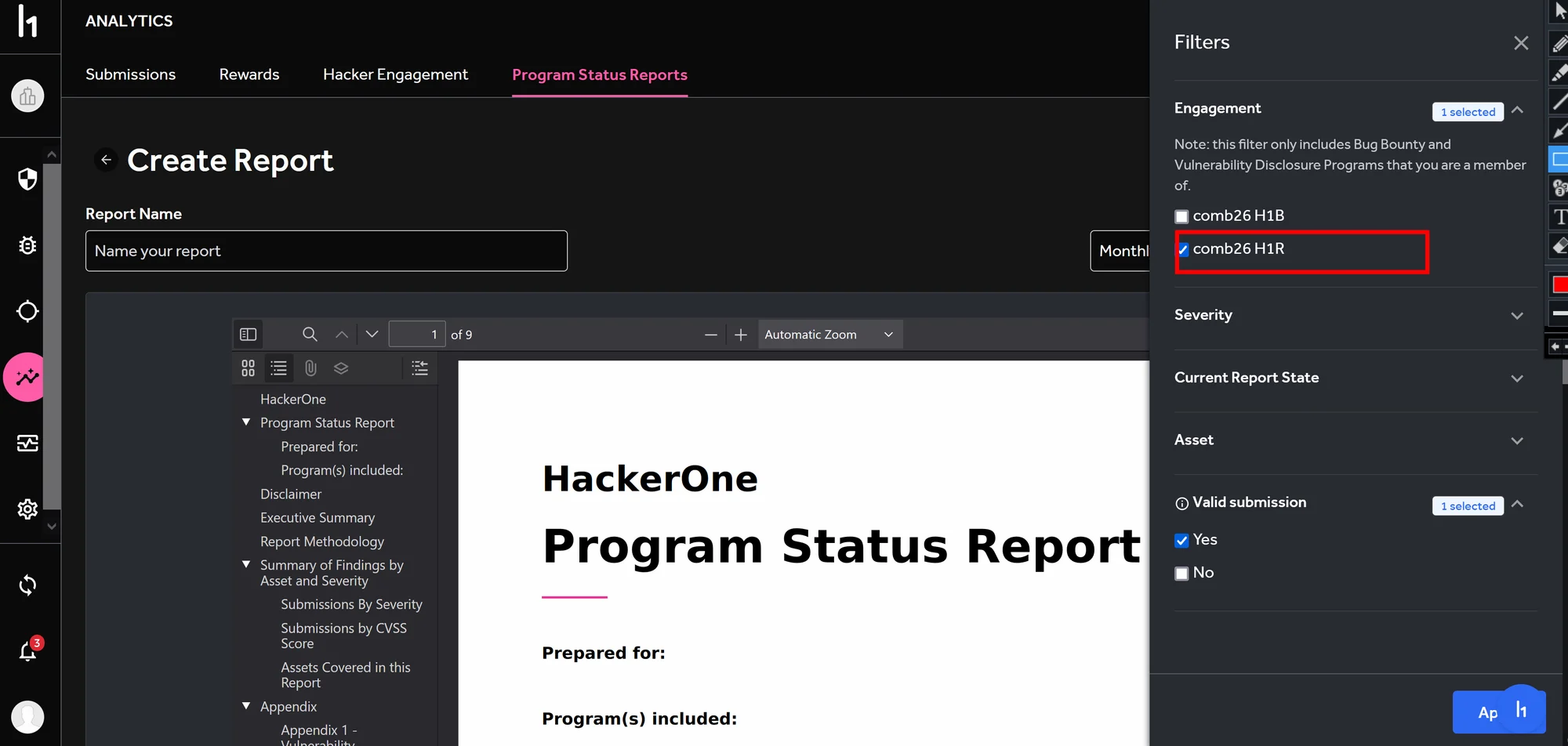
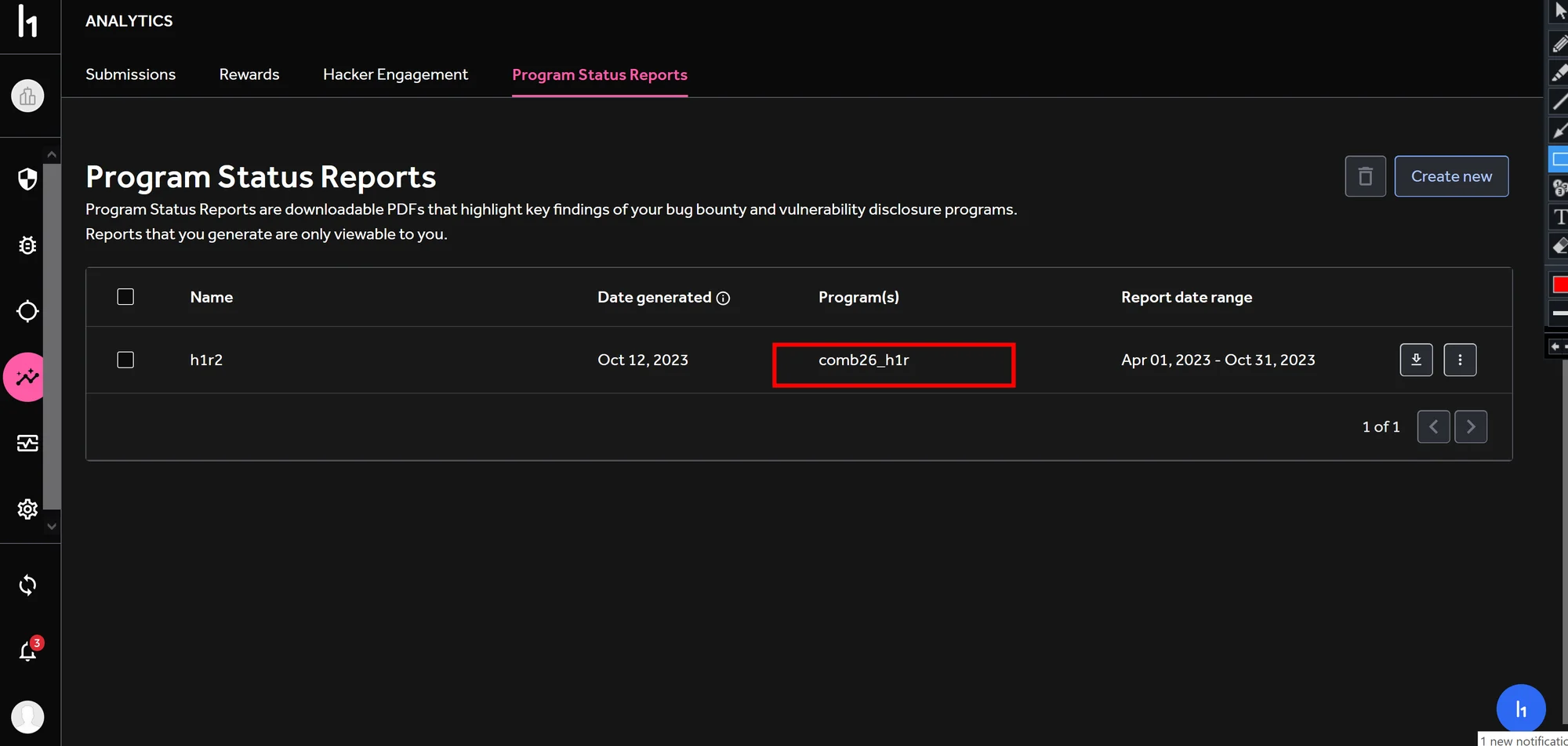
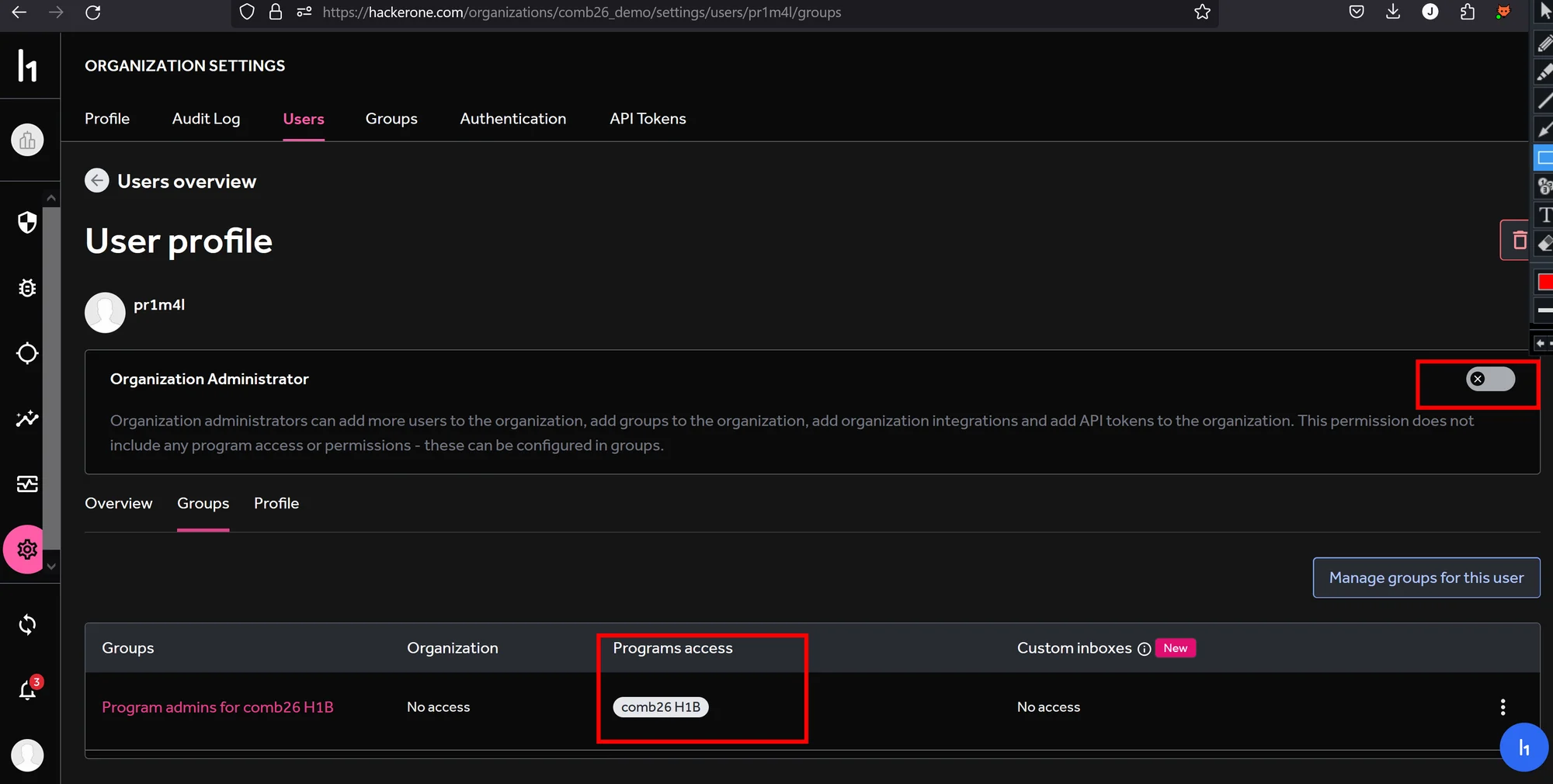
- Remove access for that user from the team they have created the report. (I removed all access to the comb26_h1r team and also removed the admin role)
- Go back to the reports section and notice that the report they created is not shown since they do not have access to that team.
- Replace the id of the report you created in step 2 in the GraphQL request below:
{"operationName":"DeleteAnalyticsReport","variables":{"reportIds":[644],"product_area":"other","product_feature":"other"},"query":"mutation DeleteAnalyticsReport($reportIds: [Int!]!) {\n deleteAnalyticsReport(input: {analytics_report_ids: $reportIds}) {\n errors {\n edges {\n node {\n type\n field\n message\n __typename\n }\n __typename\n }\n __typename\n }\n __typename\n }\n}\n"}
- Notice that the report is successfully deleted.
██████████
Impact
Users without access to a team can delete reports in the restricted team
Context
The target is HackerOne itself, specifically the analytics reports feature inside an organization. Organizations on the platform can contain multiple teams, and members can be granted access to some teams and not others. The analytics reports page, at https://hackerone.com/organizations/your_demo/analytics/reports, lets a member create reports by choosing filters, and those reports belong to a particular team. The page is meant to show a member only the reports for the teams they can access.
The report was filed by researcher 0v3rw4tch, rated medium severity (CVSS 6.7) under Improper Access Control, and disclosed on 22 November 2023. No bounty amount is recorded.
Setup
The researcher used an organization with two teams, named comb26_h1b and comb26_h1r, and a member account with access to both teams. The member also held an admin role at the start. The report shows the GraphQL delete request with a replaced report id. The scenario in the report is an organization with two teams and a member whose access is later narrowed to one.
Finding it
While testing the analytics reports functionality, the researcher noticed an asymmetry. A member with access to both teams sees the reports for both teams on the reports page. Once the member's access is restricted to a single team, the reports for the other team disappear from the page: the listing respects team access. But the delete operation behind the page does not apply the same check. The researcher could still delete a report belonging to the restricted team by sending the delete request with that report's id.
The same attempt to edit the report from the restricted team returned an error, so the edit path enforced access control while the delete path did not. That contrast is what made the missing check on delete stand out.
Exploitation
Step 1: Open the reports page
Using a team member with access to two teams in the demo organization, navigate to:
https://hackerone.com/organizations/your_demo/analytics/reports
Step 2: Create a report for one team and copy its id
Create a report for one of the teams by specifying the filters. In this case the researcher created a report for comb26_h1r, then copied the id of that report.
The two screenshots show the report being created for the chosen team and the resulting report with its id, which is the value needed for the later request.
Step 3: Remove the member's access to that team
Remove the user's access to the team the report was created for. The researcher removed all access to the comb26_h1r team and also removed the admin role.
Step 4: Confirm the report is hidden
Go back to the reports section. The report the member created is no longer shown, because they no longer have access to that team. The listing is correctly filtered.
Step 5: Send the delete request with the hidden report's id
Take the id of the report created in step 2 and put it into the GraphQL request below:
{"operationName":"DeleteAnalyticsReport","variables":{"reportIds":[644],"product_area":"other","product_feature":"other"},"query":"mutation DeleteAnalyticsReport($reportIds: [Int!]!) {\n deleteAnalyticsReport(input: {analytics_report_ids: $reportIds}) {\n errors {\n edges {\n node {\n type\n field\n message\n __typename\n }\n __typename\n }\n __typename\n }\n __typename\n }\n}\n"}
The response selection asks only for the errors edges, with type, field and message per node. The payload carries a report id in reportIds; replace it with the id copied in step 2.
Step 6: Observe the result
The report is successfully deleted. The member who no longer has any access to the team, and whose admin role was removed, has removed a report belonging to that team.
Root cause
The reports listing applies a team access check, and the edit path applies one too, since editing the same report from the restricted team returned an error. The delete mutation does not apply the equivalent check: it accepts any analytics report id and deletes the report without verifying that the caller has access to the team the report belongs to. The researcher's conclusion is that the same control applied elsewhere should also be applied in the delete report query. Why the check was omitted on this path is not stated in the report.
Impact
A user without access to a team can delete reports in the restricted team. The hidden report is not shown in the listing, and editing the same report returned an error. Users without access to a team can delete reports in the restricted team.
Fix
The report does not describe the fix that was applied. The change it calls for is to enforce the same team access control on the delete report query that the listing and the edit path already enforce, so that a report id belonging to a team the caller cannot access is rejected.
Variants to test
- Other mutations on the same object type: try rename, duplicate or export operations against a report id from a team you cannot access. A positive result is the operation succeeding where the listing hides the object.
- Batch ids: the delete input takes a list (
analytics_report_ids). Send a mix of ids you can access and ids you cannot, and check whether the whole batch succeeds or the inaccessible ones are silently dropped. - Other organization-scoped objects: apply the same pattern to any feature where a member's team access can be narrowed after objects are created, such as saved filters, dashboards or exports. A positive result is a hidden object being modified or removed by id.
- Role changes: repeat after removing an admin role as well as team access, to confirm the check is tied to team membership rather than to the admin role.
Hunting notes
This bug lives where a feature has both a listing that is filtered by access and a mutation that acts on an object by id. The signal is a visible asymmetry: the UI hides an object, but the underlying request still names it by id. When you lose access to a resource, capture the requests you made while you still had access, then replay them after access is removed. Compare sibling operations: here the edit path rejected the request while delete accepted it, which is exactly the kind of inconsistency worth reporting. The researcher demonstrated impact by creating a report, removing all access and the admin role, showing the report was hidden from the listing, and then deleting it with the captured mutation, which is a clean, reproducible proof that the check is missing on that one path.
What happened, in plain words
HackerOne is a website where companies run bug bounty programmes: security researchers report flaws to them and get paid for good findings. The site itself is also a product with features for the companies that use it. One of those features is organizations. An organization is a company's account on HackerOne, and inside it there can be several teams, for example one team per product or per department. People can be members of an organization and be given access to some teams but not others.
Each team can have analytics reports: pages that summarise activity, built by choosing filters. A member who can access a team can create reports for it. The reports page is supposed to show a member only the reports belonging to teams they can access.
The researcher, 0v3rw4tch, found that the delete action did not apply the same check. The page correctly hid reports from teams the member could not access, and trying to edit such a report failed with an error. But the delete action did not apply the same team access control: by sending the delete request with the id of a hidden report, a member with no access to that team could still remove the report. The finding was rated medium severity (CVSS 6.7), classified as Improper Access Control, and disclosed on 22 November 2023. No bounty amount is recorded.
To follow the rest you need a few ideas:
- Request: what your browser sends to a website's server when you click something. It is a short message asking the server to do something or give something back.
- API: the set of requests a website's own pages use to talk to its server. Think of a restaurant: the menu and the waiter are the API, the kitchen is the server. You can order only what the menu lists, but you can also order directly if you know how the waiter takes orders.
- GraphQL: a way of writing API requests where the request itself says which operation to run and which fields to return. Instead of many fixed URLs, there is usually one endpoint and the request body names the operation.
- Mutation: in GraphQL, an operation that changes something on the server (create, edit, delete), as opposed to a query that only reads.
- Id: a number or string that uniquely identifies one object, like a report. If you know an object's id, you can often refer to it directly in a request, even if the website's pages never show it to you.
- Access control: the rules deciding who is allowed to do what. Improper access control means some action is missing its check, so someone who should be refused is allowed through.
Context
The target is HackerOne itself, specifically the analytics reports feature inside an organization. Organizations on the platform can contain multiple teams, and members can be granted access to some teams and not others. The analytics reports page, at https://hackerone.com/organizations/your_demo/analytics/reports, lets a member create reports by choosing filters, and those reports belong to a particular team. The page is meant to show a member only the reports for the teams they can access.
The report was filed by researcher 0v3rw4tch, rated medium severity (CVSS 6.7) under Improper Access Control, and disclosed on 22 November 2023. No bounty amount is recorded.
Setup
The researcher used an organization with two teams, named comb26_h1b and comb26_h1r, and a member account with access to both teams. The member also held an admin role at the start. The report shows the GraphQL delete request with a replaced report id. The scenario in the report is an organization with two teams and a member whose access is later narrowed to one.
Browsers have a developer tools panel for exactly this; the report does not name the tool used.
Finding it
While testing the analytics reports functionality, the researcher noticed an asymmetry. A member with access to both teams sees the reports for both teams on the reports page. Once the member's access is restricted to a single team, the reports for the other team disappear from the page: the listing respects team access. But the delete operation behind the page does not apply the same check. The researcher could still delete a report belonging to the restricted team by sending the delete request with that report's id.
The same attempt to edit the report from the restricted team returned an error, so the edit path enforced access control while the delete path did not. That contrast is what made the missing check on delete stand out.
An everyday comparison: a hotel key card that opens the front door but not your old room is fine, as long as the old room's door also refuses the card. Here the front door (the reports list) refused, the side door for editing refused, but the back door for deleting was left unlocked.
Exploitation
Step 1: Open the reports page
Using a team member with access to two teams in the demo organization, navigate to:
https://hackerone.com/organizations/your_demo/analytics/reports
This is the reports page of the demo organization. your_demo is a placeholder for the organization's name in the URL.
Step 2: Create a report for one team and copy its id
Create a report for one of the teams by specifying the filters. In this case the researcher created a report for comb26_h1r, then copied the id of that report.
The two screenshots show the report being created for the chosen team and the resulting report with its id, which is the value needed for the later request.
Step 3: Remove the member's access to that team
Remove the user's access to the team the report was created for. The researcher removed all access to the comb26_h1r team and also removed the admin role.
After this step the user has no access to comb26_h1r.
Step 4: Confirm the report is hidden
Go back to the reports section. The report the member created is no longer shown, because they no longer have access to that team. The listing is correctly filtered.
Step 5: Send the delete request with the hidden report's id
Take the id of the report created in step 2 and put it into the GraphQL request below:
{"operationName":"DeleteAnalyticsReport","variables":{"reportIds":[644],"product_area":"other","product_feature":"other"},"query":"mutation DeleteAnalyticsReport($reportIds: [Int!]!) {\n deleteAnalyticsReport(input: {analytics_report_ids: $reportIds}) {\n errors {\n edges {\n node {\n type\n field\n message\n __typename\n }\n __typename\n }\n __typename\n }\n __typename\n }\n}\n"}
Line by line, in plain words:
operationNameisDeleteAnalyticsReport: this tells the server which named operation in the request to run. The request contains one operation, and this is its name.variablesholds the values the operation will use.reportIdsis set to[644], a list containing one number; replace it with the id copied in step 2. The square brackets mean a list, so more than one id could be sent at once.product_areaandproduct_featureare both"other". They travel with the request but the query text never refers to them, so they play no part in the deletion.queryis the actual GraphQL text. It starts withmutation DeleteAnalyticsReport($reportIds: [Int!]!), which declares the operation and says$reportIdsis a list of integers that cannot be null.deleteAnalyticsReport(input: {analytics_report_ids: $reportIds})is the action: it calls the delete operation and hands it the list of ids under the nameanalytics_report_ids.- The
errors { edges { node { type field message __typename } } }part says what to send back. It asks only for error entries, each with a type, a field, a message and a type name. It does not ask for any confirmation of success. - The response selection asks only for error entries, each with a type, a field, a message and a type name.
Step 6: Observe the result
The report is successfully deleted. The member who no longer has any access to the team, and whose admin role was removed, has removed a report belonging to that team.
Root cause
The reports listing applies a team access check, and the edit path applies one too, since editing the same report from the restricted team returned an error. The delete mutation does not apply the equivalent check: it accepts any analytics report id and deletes the report without verifying that the caller has access to the team the report belongs to. The researcher's conclusion is that the same control applied elsewhere should also be applied in the delete report query. Why the check was omitted on this path is not stated in the report.
A resolver is the piece of server code that runs when a particular GraphQL operation is called. If each operation has to remember to check permissions itself, one forgotten check is enough to open a hole.
Impact
A user without access to a team can delete reports in the restricted team. The hidden report is not shown in the listing, and editing the same report returned an error. Users without access to a team can delete reports in the restricted team.
Integrity here means the data is correct and complete. Deleting a report removes information the team had, and it can be done by someone without access to that team.
Fix
The report does not describe the fix that was applied. The change it calls for is to enforce the same team access control on the delete report query that the listing and the edit path already enforce, so that a report id belonging to a team the caller cannot access is rejected.
Variants to test
- Other mutations on the same object type: try rename, duplicate or export operations against a report id from a team you cannot access. A positive result is the operation succeeding where the listing hides the object.
- Batch ids: the delete input takes a list (
analytics_report_ids). Send a mix of ids you can access and ids you cannot, and check whether the whole batch succeeds or the inaccessible ones are silently dropped. - Other organization-scoped objects: apply the same pattern to any feature where a member's team access can be narrowed after objects are created, such as saved filters, dashboards or exports. A positive result is a hidden object being modified or removed by id.
- Role changes: repeat after removing an admin role as well as team access, to confirm the check is tied to team membership rather than to the admin role.
Hunting notes
This bug lives where a feature has both a listing that is filtered by access and a mutation that acts on an object by id. The signal is a visible asymmetry: the UI hides an object, but the underlying request still names it by id. When you lose access to a resource, capture the requests you made while you still had access, then replay them after access is removed. Compare sibling operations: here the edit path rejected the request while delete accepted it, which is exactly the kind of inconsistency worth reporting. The researcher demonstrated impact by creating a report, removing all access and the admin role, showing the report was hidden from the listing, and then deleting it with the captured mutation, which is a clean, reproducible proof that the check is missing on that one path.
Glossary
- Access control: the rules that decide who may do what; improper access control means a check is missing or wrong.
- Admin role: a permission level that lets a user manage settings and people, beyond ordinary member rights.
- API: the set of requests a website's pages use to talk to its server; a menu of operations the server accepts.
- Analytics report: a saved summary page built from filters, belonging to one team.
- Bug bounty: a programme where researchers report security flaws and may be rewarded.
- CVSS: a standard score for how serious a vulnerability is; 6.7 is in the medium range.
- Delete mutation: the GraphQL operation that removes a report by id.
- Disclosure: the point at which a report is made public.
- Endpoint: the address a request is sent to.
- GraphQL: a request format where the request names the operation and the fields it wants back.
- Id: a unique identifier for one object, such as a report.
- Integrity: the property that data is correct and complete, not altered or removed without authorisation.
- Member: a user account inside an organization.
- Mutation: a GraphQL operation that changes data, as opposed to a query that only reads.
- Organization: a company's account on the platform, which can contain several teams.
- Query: a GraphQL operation that only reads data.
- Request: the message a browser sends to a server asking it to do something or return something.
- Resolver: the server code that runs for one GraphQL operation.
- Replay: sending a captured request again, possibly with changed values.
- Severity: a label for how damaging a vulnerability is.
- Team: a group inside an organization that members can be given access to or kept out of.
- Variable: a named value supplied alongside a GraphQL operation, such as the list of report ids.
- Vulnerability: a flaw that lets someone do something the system should not allow.

