User with privilege to maintain External Programs can update certain churned HackerOne programs
A user who only had permission to maintain external programs found an edit button on a public program and was able to change its about text and other fields. This let someone without the intended rights alter information shown on a public program page.
 Originally disclosed on HackerOne
- Triaged in 6 days
- Fixed in 35 days
- Paid in 8 days
- Disclosed after 35 days
Summary: You wrote that some programs are behind, but you are trying to get them back (sorry maybe bad translation)
Description: Apparently because of a system error, I have access to change information in the public program. This option is given only for external programs.But here is a public program, so I create a report
Steps To Reproduce
- Go to @uzbey -- https://hackerone.com/uzbey
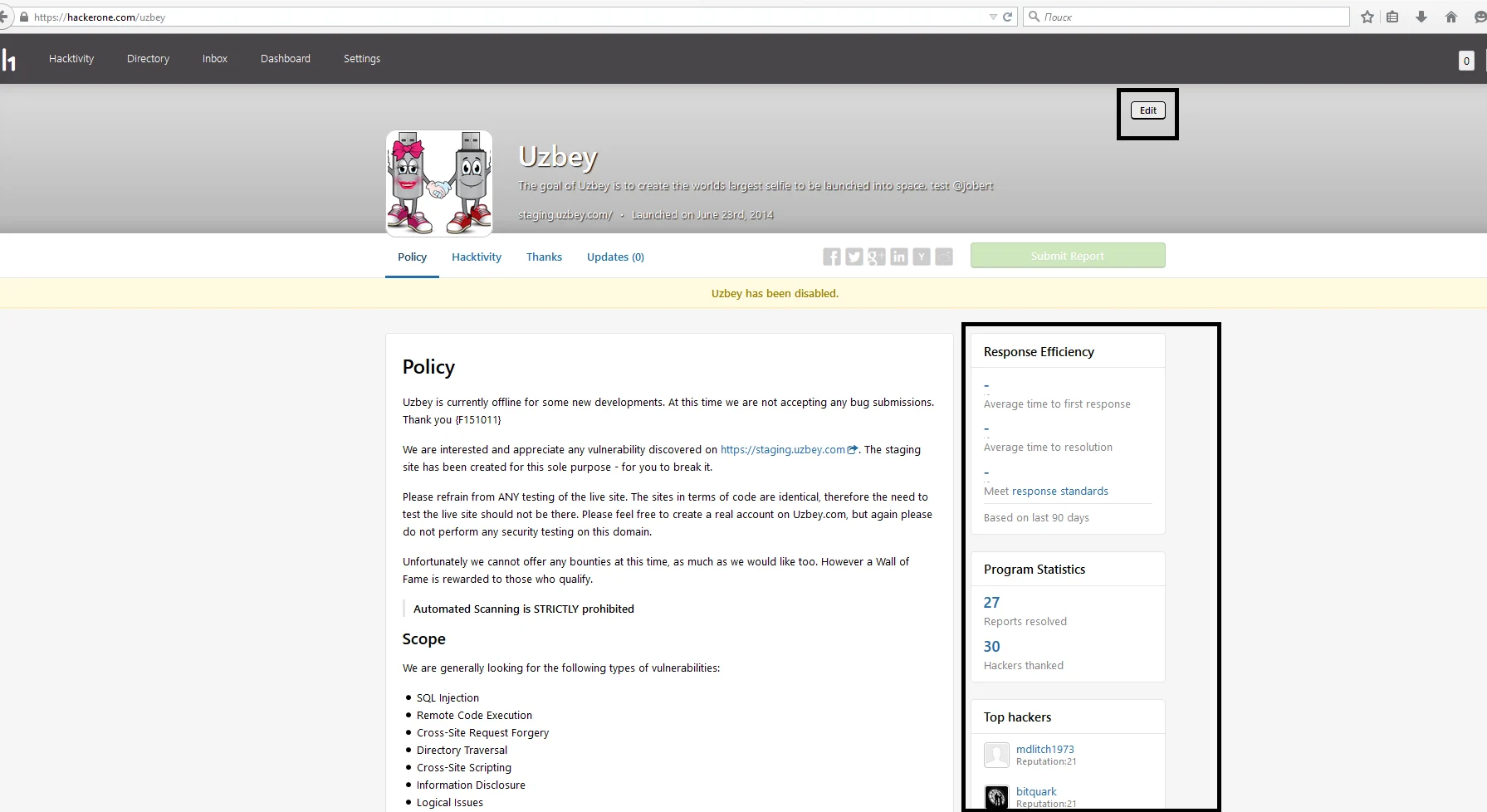
- I can see button
edit
F348953
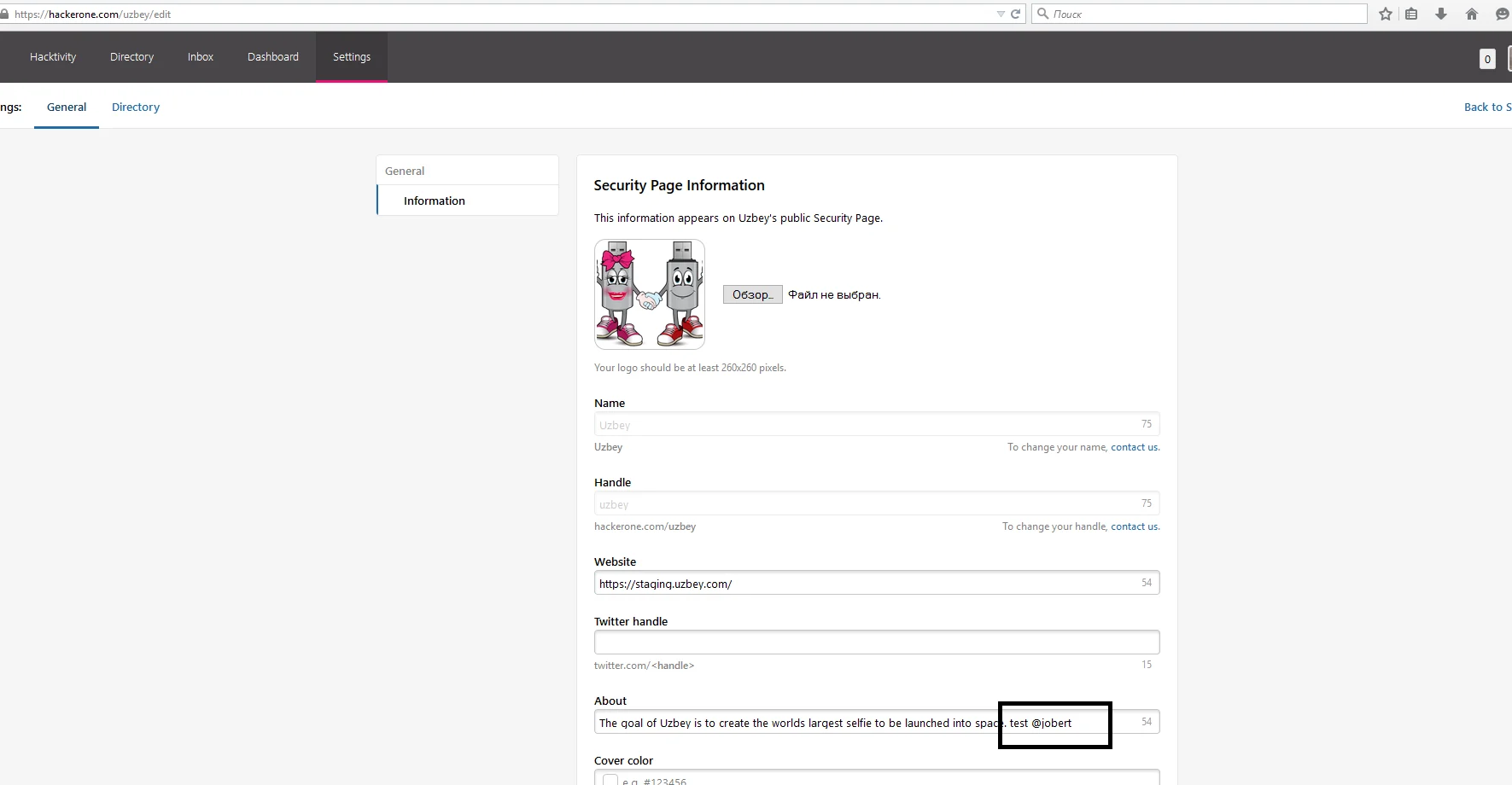
3. Try to change about
4. I write -- test @jobert
F348952
Check about page
The goal of Uzbey is to create the worlds largest selfie to be launched into space. test @jobert
Hi @jobert :)
PS I understand that this is an old program, but it has the ability to return. Perhaps there are still such programs.I'm still searching. If I understood something wrong, then close the report as information, thank you!
fix: to change the program state
Sorry i bad speak english I hope you understand me Thank you,haxta4ok00
Impact
Change fields:
Website
Twitter handle
About
Cover color
and i think , i can change logo ?
in public(public_mode) programs
Attachments
Context
HackerOne hosts bug bounty programs, and each program has a public profile page that describes the organisation: its website, Twitter handle, an "about" text, a cover colour and a logo. The report concerns the program page at https://hackerone.com/uzbey, an old public program. The researcher found that he, as a user with the privilege to maintain External Programs, could edit fields on this public program's page, even though that editing capability is meant only for external programs.
The weakness is classified as Improper Authorization, rated low severity with a CVSS score of 2.6, and a bounty of 500.00 USD was awarded. The report was disclosed on 2018-10-25.
Setup
The researcher's account had the privilege to maintain External Programs. That is the precondition: the editing interface is intended for external programs, and the researcher's account legitimately holds the role that unlocks it. No special tools are mentioned; the work was done through the normal web interface in a browser.
Finding it
The researcher noticed that the public program page for uzbey displayed an edit button to him. Since the editing option is supposed to be given only for external programs, and uzbey is a public program, seeing the button was the signal that something was wrong. In the summary he frames it as a system error that gave him access to change information in the public program.
Exploitation
Step 1: Open the program page
He went to the program page:
https://hackerone.com/uzbey
Step 2: Observe the edit button
On that page he could see the edit button. The report references attachment F348953 at this point.
Step 3: Change the about field
He tried to change the about field and wrote the following text into it:
test @jobert
This step references attachment F348952.
Step 4: Check the about page
After saving, the about page showed the injected text appended to the existing description:
The goal of Uzbey is to create the worlds largest selfie to be launched into space. test @jobert
The about page then showed the new text appended to the existing description. He addresses the mentioned user in the report with a greeting.
He adds that he understands this is an old program but that it has the ability to return, and that there may be other such programs; he was still searching. He offers that if he misunderstood something, the report can be closed as informational.
Root cause
The report attributes the behaviour to a system error: the authorisation check that should restrict editing to external programs was not applied to this public program, so a user holding the External Programs maintenance privilege was shown and could use the edit interface on a public program. The report does not describe the code or the check itself, so the exact mechanism is not stated.
Impact
The researcher states he could change the following fields on public (public_mode) programs:
WebsiteTwitter handleAboutCover color
He also thinks he could change the logo, phrased as a question rather than a confirmed result. The effect is unauthorised modification of a program's public profile content. The report does not describe any further consequence, such as redirecting users through the website field or impersonation through the logo, so the impact stays at tampering with public program information.
Fix
The report's suggested fix is short: "to change the program state". In other words, the condition that decides whether the edit interface is available should account for the program's state, so that public programs are not editable through the External Programs privilege.
Variants to test
- Check other public programs for an
editbutton while logged in with the External Programs privilege. A positive result is the button appearing on a program that is not external. - Attempt to save a change to the
aboutfield on such a program and reload the public page. A positive result is the modified text persisting for anonymous visitors. - Try the other fields listed in the impact section (
Website,Twitter handle,Cover color) and thelogo. A positive result is any of them accepting and persisting a change on a public program. - Look for older or dormant programs, since the researcher suspected the issue could return and was still searching for similar cases.
Hunting notes
This kind of bug hides where a role-based permission is reused across objects of different types: the UI and the save endpoint trust the user's privilege and never re-check the target object's state. During recon, the signal is an editing control appearing on an object you do not own or should not manage, especially on legacy or inactive instances of the feature. The researcher showed impact by changing the about field to a harmless, clearly attributable value and checking the about page.
What happened, in plain words
HackerOne is a website where companies publish "bug bounty programs": pages that invite security researchers to look for mistakes in their software and report them in exchange for a reward. Each program has a public profile page, a bit like a shop window, that describes the organisation: its website address, its Twitter handle, a short "about" text, a cover colour and a logo.
Some programs are "external programs", and HackerOne lets certain trusted users help maintain those. The researcher's account had that privilege. The problem was that the same editing button also appeared on a program that was not external, the old public program uzbey. He could therefore change text on a public page that he should not have been able to touch. This kind of mistake is called Improper Authorization: the site checked who the user was, but not what they were allowed to change.
The report was rated low severity with a CVSS score of 2.6, a bounty of 500.00 USD was paid, and it was disclosed on 2018-10-25.
Background you need first
A few ideas come up again and again below, so here they are from zero.
- A web page and a form. When you click a button on a website and a box appears where you can type, you are using a form. When you press save, your browser sends what you typed to the website's server (the computer that stores the page). The server decides whether to keep it.
- Authorisation. Authentication is proving who you are (logging in). Authorisation is what you are then allowed to do. A helpful comparison: a hotel key card proves you are a guest, but authorisation decides whether that card opens your room only, or every room in the building. This bug is an authorisation bug: the card opened a door it should not have.
- A role or privilege. Websites often group users into roles, for example "normal user" or "maintainer of external programs". The role is stored on the server and is meant to limit what the interface shows and what the server accepts.
- A public program versus an external program. On HackerOne, a public program is one whose page anyone can read. An external program is a different category, and the editing tools are meant for those. The report does not explain the difference further.
- Persistence. A change "persists" when it is saved on the server and stays there, so that other people, including visitors who are not logged in, see it after reloading the page. This matters because a change that only appears in your own browser proves nothing.
No special tools were used. Everything happened through the normal website in a browser.
The starting point
The researcher's account already had the privilege to maintain External Programs. That is the precondition for the whole finding: the editing interface is intended for external programs, and his account legitimately held the role that unlocks it. The question was whether that role was being checked against the right kind of program.
Finding it
While looking at the public program page for uzbey, he noticed that an edit button was shown to him. Since the editing option is supposed to be given only for external programs, and uzbey is a public program, seeing the button was the signal that something was wrong. In his summary he describes it as a system error that gave him access to change information in the public program.
Reproducing it, step by step
Step 1: Open the program page
He went to the program page:
https://hackerone.com/uzbey
This is simply the address of the public profile page of the uzbey program. Opening it as a logged-in user with the External Programs privilege is what sets up the test: if the page behaves differently for him than for an ordinary visitor, that difference is the clue.
Step 2: Observe the edit button
On that page he could see the edit button. The report references attachment F348953 at this point.
The screenshot is the evidence that the button was actually there for this account on this program. Without it, the claim would just be words; with it, anyone reviewing the report can see the interface offering an action that should not be offered.
Step 3: Change the about field
He tried to change the about field and wrote the following text into it:
test @jobert
Line by line, this is not code at all, it is just the text he typed into the box:
testis a harmless word, chosen so the change is obviously a test and not real content.@jobertis a mention of another user, which makes the change clearly attributable to the researcher and easy to spot.
He picked a harmless, clearly marked value on purpose: it proves the edit works without damaging the program's real description. This step references attachment F348952.
The second screenshot shows the editing interface with that text entered, which documents exactly what was submitted.
Step 4: Check the about page
After saving, the about page showed the injected text appended to the existing description:
The goal of Uzbey is to create the worlds largest selfie to be launched into space. test @jobert
Here is what this line tells us:
The goal of Uzbey is to create the worlds largest selfie to be launched into space.is the original description that was already on the page.test @jobertis the text he added, now sitting at the end of it.
The about page then showed the new text appended to the existing description. He greets the mentioned user in the report.
He adds that he understands this is an old program, but that it has the ability to return, and that there may be other such programs; he was still searching. He offers that if he misunderstood something, the report can be closed as informational.
Why it happened
The report attributes the behaviour to a system error: the check that should restrict editing to external programs was not applied to this public program, so a user holding the External Programs maintenance privilege was shown, and could use, the edit interface on a public program. The report does not describe the code or the check itself, so the exact mechanism is not stated.
What could be changed
The researcher states he could change the following fields on public (public_mode) programs:
WebsiteTwitter handleAboutCover color
He also thinks he could change the logo, phrased as a question rather than a confirmed result. The effect is unauthorised modification of a program's public profile content.
The suggested fix
The report's suggested fix is short: "to change the program state". In other words, the condition that decides whether the edit interface is available should take the program's state into account, so that public programs are not editable through the External Programs privilege.
Other places to look
- Check other public programs for an
editbutton while logged in with the External Programs privilege. A positive result is the button appearing on a program that is not external. - Attempt to save a change to the
aboutfield on such a program and reload the public page. A positive result is the modified text persisting for anonymous visitors. - Try the other fields listed in the impact section (
Website,Twitter handle,Cover color) and thelogo. A positive result is any of them accepting and persisting a change on a public program. - Look for older or dormant programs, since the researcher suspected the issue could return and was still searching for similar cases.
What to take away
This kind of bug hides where a permission based on a user's role is reused across objects of different types: the interface and the save action trust the user's privilege and never re-check the state of the thing being edited. During recon, the signal is an editing control appearing on something you do not own or should not manage, especially on legacy or inactive instances of the feature. The researcher showed impact by changing the about field to a harmless, clearly attributable value and checking the about page.
Glossary
- Authorisation: the rules that decide what a logged-in user is allowed to do, as opposed to authentication, which only proves who they are.
- Bug bounty program: a page where an organisation invites researchers to report security mistakes in exchange for a reward.
- Bounty: the money paid for a valid report; here 500.00 USD.
- CVSS: a standard scoring system for the severity of a security issue; here 2.6, which is low.
- Disclosure: making a report public after it has been handled; this one was disclosed on 2018-10-25.
- External program: a category of HackerOne program whose maintenance tools are meant for users with a specific privilege.
- Field: a single box in a form, such as the
abouttext or theWebsiteaddress. - Form: the part of a web page where you type information and submit it to the server.
- Improper Authorization: a weakness where the site fails to check that a user is allowed to perform an action.
- Persistence: a change being saved on the server so that it remains visible after reloading, including to other visitors.
- Privilege (role): a permission attached to an account, such as the ability to maintain External Programs.
- Public program: a program whose profile page anyone can read;
uzbeyis one. public_mode: the report's name for the state of a program that is public.- Recon: the exploratory phase of looking around a target for clues before testing anything specific.
- Server: the computer that stores a website's data and decides whether to accept changes sent from a browser.
- Severity: how serious an issue is judged to be; here low.
- Tampering: changing data you are not supposed to change.

