Usernames still visible on report export pdf despite "I want to redact all usernames" is selected
The PDF export feature failed to redact usernames when the redaction option was selected, due to edge cases such as short names. An attacker could view the exported PDF and see the reporter's username despite the redaction setting.

- Triaged in 13 days
- Fixed in 28 days
- Paid in 28 days
- Disclosed after 32 days
Summary by the program
During a period of roughly week we had deployed a feature that would let you redact usernames in the Export PDF function that did not account for a number of edge cases including nullability, short names, and a few other edge cases. The function did not perform what it was aiming to do, and was reverted thereafter, during that time the hacker identified one of such edge cases and filed the below report.
Summary by the researcher
Write up:
https://medium.com/@robindivino/redacted-usernames-disclosure-in-export-as-pdf-feature-d00ce3f3e2fc
Video PoC: https://youtu.be/Sd18mVai_TM
The report
Summary:
Hi Team,
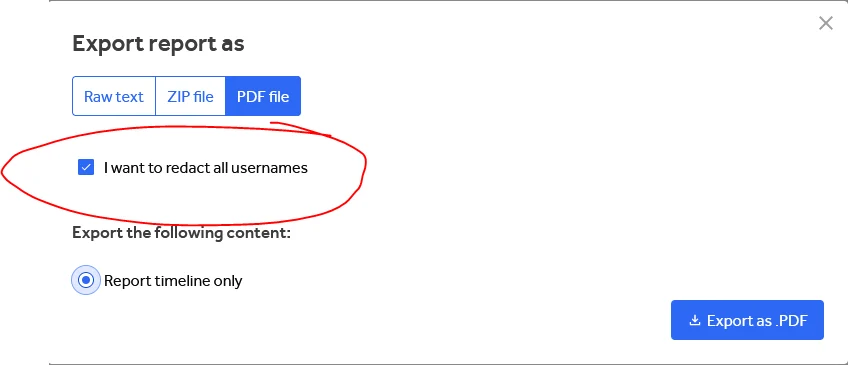
Export report via .pdf still disclosing the reporter username despite I exported it with "I want to redact all usernames" being selected to redact all the usernames.
Steps To Reproduce
- Login and try to export any report using export as .pdf
- Select "I want to redact all usernames"
- Check the exported .pdf report is still disclosing the username of researcher
https://hackerone.com/reports/<REPORT-ID>.pdf?redact_usernames=true&pdf_type=reporter
PoC screenshot below:
█████
The .pdf looks messy (maybe design issue) but if you will take a look at Reported by: section at the report header, you will see: <REDACTED> (<REDACTED>j<REDACTED>a<REDACTED>p<REDACTED>z<REDACTED>) If you removed the <REDACTED> it will show the username japz.
If you removed all <REDACTED>, you will see something like the screenshot below:
█████
Impact
Information Disclosure
Context
HackerOne's report export feature lets a user download a report as a PDF. The export URL shown in the report carries query parameters, including a flag to redact usernames. When that flag is set, the exported document is supposed to hide the identities of the people involved in the report.
According to the program's own summary, a feature had been deployed for roughly a week that was meant to redact usernames in the Export PDF function. It did not account for a number of edge cases, including nullability, short names and a few others. The function did not do what it was aiming to do and was reverted afterwards. During that window the researcher found one of those edge cases and filed this report.
The affected asset is hackerone.com, the weakness is classified as Information Disclosure, and the severity is low (CVSS 3.4).
Setup
No special tooling is described. The researcher was logged in and used the normal report export flow, choosing the PDF format and the option to redact all usernames. The only precondition is access to a report that can be exported as a PDF, with the redaction option available in the export dialog.
Finding it
The researcher exported a report as a PDF with the option "I want to redact all usernames" selected, expecting every username in the document to be hidden. The exported PDF still disclosed the reporter's username.
The screenshot shows the export with the redaction option selected. The PDF itself looked messy, which the researcher put down to a possible design issue, but the relevant part was the Reported by: section in the report header. There the username appeared broken up by redaction markers rather than removed:
Removing the <REDACTED> markers leaves the username japz in plain sight. The markers appear between the characters of the username rather than replacing it, though the report does not describe the implementation.
Exploitation
Step 1: Export a report as PDF
Log in and export any report using export as .pdf.
Step 2: Select the redaction option
In the export dialog, select "I want to redact all usernames".
Step 3: Inspect the exported PDF
The export is served from a URL of this shape:
https://hackerone.com/reports/<REPORT-ID>.pdf?redact_usernames=true&pdf_type=reporter
The export URL includes redact_usernames=true and pdf_type=reporter. The returned document still contained the researcher's username in the Reported by: line of the report header, interleaved with <REDACTED> markers as shown above.
A video PoC accompanies the report:
Root cause
The program's summary is explicit: the redaction feature did not account for a number of edge cases, including nullability, short names and a few others, and it did not perform what it was aiming to do. The observed output, where <REDACTED> markers are interleaved with the individual characters of the username, indicates that redaction was applied at the wrong granularity, likely to parts of the string rather than to the complete username value. The exact implementation is not described in the report.
Impact
The impact is information disclosure: a user who exports a report believing usernames will be redacted still receives a PDF containing the reporter's username. Anyone who relies on the redaction option to share a report without exposing identities would disclose them unintentionally. The program rated this low severity (CVSS 3.4).
Fix
The program states that the feature was reverted after the affected period. The report itself does not describe a code-level fix.
Variants to test
- Export the same report with different
pdf_typevalues and check whether the Reported by: header still contains username characters between redaction markers. - Try reports where the username is short, where a participant has no username set (nullability), and where several users appear, since the program names these as the edge cases the feature missed.
- Search the exported PDF text for fragments of known usernames rather than for the full string, because partial redaction leaves the characters in place.
Hunting notes
Redaction features are a good place to look because the promise is strong and the implementation often works on the wrong unit of text. When a product offers an export with a privacy option, export the same document with and without the option and diff the text: markers appearing inside a value, rather than replacing it, are the signal. The researcher pointed at a specific field in the exported document and showed that stripping the markers recovered the username.
What happened, in plain words
HackerOne is a website where security researchers report bugs to companies. Each bug is written up as a report, and the site lets you download a report as a PDF file, the same kind of document you might get from a printer or a word processor.
When you download a report, you can tick a box that says "I want to redact all usernames". Redact means to hide or black out a piece of text so nobody can read it. The idea is simple: if you want to share a report with someone, but you do not want them to see who wrote it or who took part, you tick that box and the usernames should disappear from the PDF.
For about a week, HackerOne had a version of this feature that did not work properly. It was meant to hide usernames, but it missed several situations, including names that were very short and cases where a name was missing altogether. The researcher in this report found one of those situations: the username was not hidden at all. Instead of being removed, it was chopped into pieces with the word <REDACTED> stuck between the letters. Anyone who deleted those markers could read the name straight away.
The researcher reported it, and the program states the feature was reverted after the affected period. The issue was rated low severity, with a CVSS score of 3.4. CVSS is a standard way of scoring how serious a security problem is, from 0 (harmless) up to 10 (extremely serious). A 3.4 means it is a genuine flaw but not a dangerous one. The researcher received a bounty of 500 USD.
Background you need first
Before walking through the steps, here are the few ideas the report relies on.
A PDF is a file format for documents that look the same on every computer. When you click "download as PDF", the website builds a document on its server and sends it to your browser.
A URL is the address of a page or file, the thing you type into the address bar. Some URLs carry extra instructions after a question mark. Everything after the ? is called the query string, and each instruction in it is a parameter, written as name=value and separated by &. For example, in ?colour=blue&size=large, there are two parameters: colour set to blue, and size set to large. The server reads these and changes what it sends back.
An endpoint is simply a specific address on a server that does one job. The export endpoint is the address that produces the PDF.
Information disclosure is the name for a whole family of bugs where a system reveals something it was supposed to keep hidden. It might be a name, an email address, a file path or a password. Nothing is broken or crashed; the problem is that data leaks out to someone who should not have it.
A proof of concept (PoC) is a small demonstration that proves a bug is real. It can be a screenshot, a video, or a set of steps someone else can repeat.
The setup
There is no special software involved here. The researcher was logged in to HackerOne with a normal account and used the ordinary export flow: open a report, choose to export it as a PDF, and tick the redaction option. The only thing you need to repeat this is access to a report you are allowed to export, with the redaction checkbox available in the export window.
Finding the problem
The researcher exported a report as a PDF with "I want to redact all usernames" selected, expecting every username in the document to be hidden. The PDF that came back still showed the reporter's username.
The screenshot shows the export with the redaction option ticked. The researcher noted that the PDF looked messy overall, and guessed that might be a separate design problem, but the part that mattered was the Reported by: line near the top of the report. That is the field that says who filed the report. Instead of the name being gone, it appeared with redaction markers wedged between its letters:
Read that line character by character. <REDACTED> is the marker the system inserts where it thinks it has hidden something. Between the markers you can see the letters j, a, p and z, in order. Delete every <REDACTED> marker and what is left is the username japz, fully readable.
So the hiding was applied to the wrong thing. The markers appear around and between the individual characters instead of replacing the whole username. The letters themselves were never removed, which means the secret was still sitting in the file the whole time.
Reproducing it step by step
Step 1: Export a report as PDF
Log in and export any report using the PDF export option. This is the normal, intended way to use the feature, which is why the bug matters: nothing unusual is required to trigger it.
Step 2: Select the redaction option
In the export window, tick "I want to redact all usernames". This is the promise the product makes: the resulting document should not contain usernames.
Step 3: Inspect the exported PDF
The export is served from a URL of this shape:
https://hackerone.com/reports/<REPORT-ID>.pdf?redact_usernames=true&pdf_type=reporter
Line by line, in plain words:
https://hackerone.com/reports/is the part of the site where individual reports live.<REPORT-ID>is a placeholder for the number that identifies one particular report..pdftells the server to produce a PDF document rather than a normal web page.?starts the list of extra instructions.redact_usernames=trueis the instruction that asks for usernames to be hidden.truemeans yes, please redact.&separates this instruction from the next one.pdf_type=reporteris the second parameter in the export URL.
Even with redact_usernames=true in the address, the document that came back still contained the researcher's username in the Reported by: line at the top, with <REDACTED> markers scattered through it as shown above.
A video proof of concept accompanies the report:
Why it happened
The program's own summary explains it. The redaction feature had been live for roughly a week, and it did not account for a number of edge cases, including nullability, short names and a few others. Nullability here means the case where a value is empty or missing, for example a participant with no username set. A short name is exactly what it sounds like: a username only a few characters long. The feature simply did not do what it was meant to do, and it was reverted, meaning switched off and rolled back, afterwards.
The output tells you something about the cause even though the report does not describe the code. Markers appearing between the letters of a name, rather than in place of the name, suggest the hiding was applied to the wrong unit of text: pieces of the string instead of the whole value. The exact implementation is not described in the report.
What the impact is
The impact is information disclosure. Someone who exports a report believing usernames will be hidden still gets a PDF containing the reporter's username. Anyone who relies on that checkbox to share a report without exposing identities would leak them by accident.
The program rated this low severity, CVSS 3.4.
The fix
The program states that the feature was reverted after the affected period. The report does not describe a code-level fix.
Other cases worth trying
- Export the same report with different
pdf_typevalues and check whether the Reported by: header still contains username characters between redaction markers. - Try reports where the username is short, where a participant has no username set (the nullability case), and where several users appear, since the program names these as the edge cases the feature missed.
- Search the text of the exported PDF for fragments of known usernames rather than for the full name, because partial redaction leaves the characters in place.
Notes for anyone hunting similar bugs
Redaction features are worth testing because the promise is strong and the implementation often works on the wrong unit of text. When a product offers an export with a privacy option, export the same document with and without the option and compare the text. Markers appearing inside a value, rather than replacing it, are the signal to look for.
Here the researcher made the impact easy to see by pointing at one specific field in the exported document and showing that deleting the markers recovered the username. That turned a vague worry into a concrete, checkable fact.
Glossary
- API: a way for one piece of software to ask another for data or an action, usually over the web, without a human clicking through pages.
- Bounty: a payment a company gives a researcher for reporting a valid security problem.
- CVSS: a standard scoring system for the severity of a security flaw, from 0 to 10.
- Edge case: an unusual or extreme situation that normal handling does not cover, such as an empty value or a very short name.
- Endpoint: a specific address on a server that performs one particular job.
- Export: producing a file, here a PDF, from data stored on a website.
- Information disclosure: a bug where a system reveals data it was supposed to keep hidden.
- Nullability: whether a value is allowed to be empty or missing; the nullability edge case is the situation where a value is absent.
- Parameter: an instruction attached to a URL after the
?, written asname=value. - PDF: a document file format that displays the same way on any computer.
- Proof of concept (PoC): a demonstration, such as a screenshot or video, that proves a bug is real and repeatable.
- Query string: the part of a URL after the
?that carries parameters. - Redact: to hide or remove text so it cannot be read.
- Reverted: switched off and rolled back to the previous version.
- Severity: how serious a security problem is judged to be.
- URL: the address of a page or file on the web.
- Username: the name that identifies a person's account on a website.
- Variant: a slightly different version of the same test, used to check whether a bug appears in other places too.



