Access to Splunk at https://apt.ec2.shopify.com:8089
A Splunk instance was reachable at a public hostname and accepted the default administrator login. An attacker who found it could log in with those well-known credentials and gain administrative access to the Splunk service.

- Fixed in 8 hours
- Paid in 22 days
- Disclosed after 22 days
Summary by the researcher
Issue with old DNS record, as it turned out.
The report
Description:
Default Splunk admin credentials were found at https://apt.ec2.shopify.com:8089 Default credentials
login:admin
password:changeme
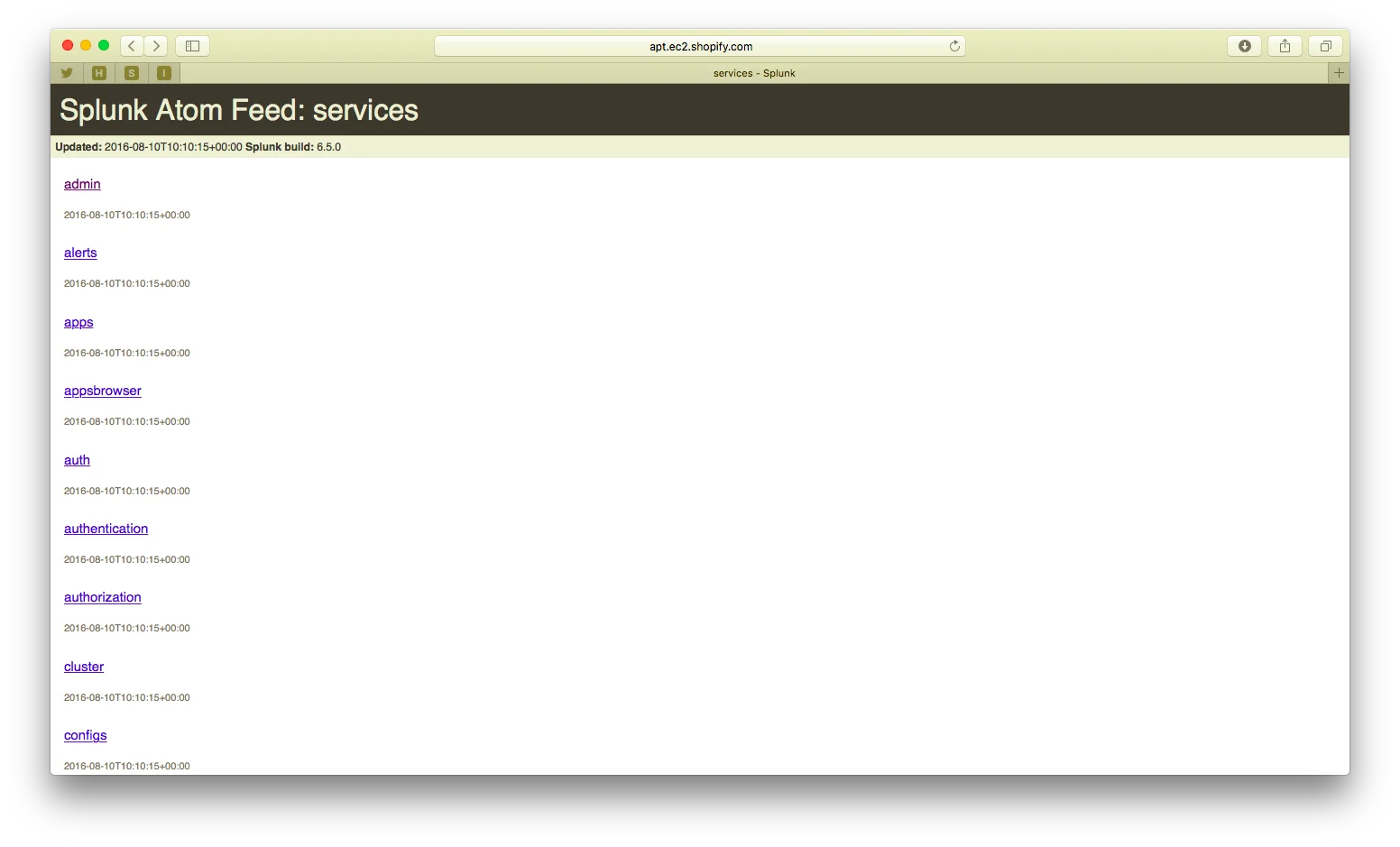
See pic 1 as POC
###Resolution: Change credentials
Please let me know if you need some extra information. Sorry if this report if out of scope, i thought it could be informative for you!
Thanks in advance!
Attachments
What the report shows
The target was a Splunk instance exposed at https://apt.ec2.shopify.com:8089, the port Splunk uses for its management interface. The researcher reported that the instance was reachable with the default administrative credentials:
login:admin
password:changeme
The proof of concept was a screenshot of the login, referenced in the report as pic 1 and attached at the end of the write-up.
The suggested resolution was short: change the credentials. The researcher also acknowledged that the finding might be out of scope and framed it as potentially informative rather than as a confirmed in-scope vulnerability.
In the end the issue was traced to an old DNS record, as the researcher's summary states. The report was disclosed on 1 September 2016 and a bounty of 500.00 USD was paid. No severity rating or weakness classification is given.
Root cause
The researcher's summary attributes the issue to an old DNS record. The report does not describe the infrastructure behind the record beyond calling it old.
Impact
With administrative access to Splunk, an attacker reaches far more than a login page. Splunk's management port serves the web interface and the REST API, and an admin account can search indexed data, manage users and roles, and change app and configuration state. In practice that means read access to whatever logs and events the instance ingests, which frequently include internal hostnames, URLs, request data and other operational detail. The report itself does not enumerate any of this; it stops at demonstrating the login. The researcher's own hedge, that the finding might be out of scope, is worth keeping in mind: the practical impact depends entirely on what that instance indexed and who could reach it.
How this kind of bug works
Default credentials are a configuration failure rather than a software flaw. Many products ship with a well-known initial account so that a fresh install is usable, and the vendor expects the operator to change it during setup. When that step is skipped, or when an appliance is stood up quickly for a test and then forgotten, the account remains valid indefinitely. Internet-wide scanning makes discovery easy: scanners probe management ports continuously and try the documented default pairs, so an exposed instance is often found quickly.
The DNS angle adds a second failure mode. A record that once pointed at a staging or proof-of-concept host can keep resolving after the project ends, and the address it resolves to may be reused by a new instance that inherits the same weak configuration. Old names are easy to overlook because nobody is watching them.
Defences are straightforward: change or disable default accounts at provisioning time, restrict management interfaces to trusted networks or a VPN, and remove DNS records when the services behind them are retired.
How to test for it
- Identify management and administrative interfaces. Look for non-standard ports in scan results, subdomains that suggest internal tooling (
apt,admin,mon,ci,grafana,splunk,kibanaand similar), and services whose banners name a product. - For each candidate, determine the product and version from the login page, response headers or error messages, then consult that product's documentation for its documented default account.
- Attempt a single login with the documented default pair. Do not run credential lists against production systems; one attempt with the vendor's published default is the test.
- A positive result is a successful authentication that lands in the product's interface or returns a valid session from its API. Capture the login screen, the post-login page and a harmless read-only action, such as listing users or running a trivial search, as evidence.
- Common false positives: a login page that accepts any credentials because authentication is disabled upstream, a demo or honeypot instance, a captive portal that returns 200 for every request, and a session that appears valid but grants no data. Confirm that the session actually reaches functionality before reporting.
Also check whether the hostname is stale. If a subdomain resolves to an address that no longer belongs to the target, the finding may be out of scope, and the report should say so rather than overstate it.
How it is fixed
Change the default password immediately, or disable the built-in account and create named accounts with the minimum necessary role. Restrict the management port with firewall rules or a private network so that only administrative hosts can reach it. Audit for other instances created from the same image, since defaults tend to be deployed in batches. Finally, clean up DNS records for hosts that are decommissioned, so old names cannot point at forgotten services.
Hunting notes
Default-credential findings cluster around internal tooling that was exposed for convenience: monitoring dashboards, log aggregators, CI servers, database consoles and appliance management ports. Recon signals include subdomains with infrastructure-flavoured names, hosts on unusual high ports, TLS certificates naming an internal product, and login pages whose HTML or assets identify the vendor. Because these services are often stood up by teams outside the security group, they rarely appear in the main application's threat model.
What happened, in plain words
A security researcher found a web page belonging to Shopify that was protected by a username and password. The problem was that the username and password were the ones the software ships with out of the box, so anyone who knew them could get in. The software in question is Splunk, a tool that companies use to collect and search through their logs (the automatic records that computers and applications write about what they are doing).
The address was https://apt.ec2.shopify.com:8089. The https part means the connection is encrypted, and the :8089 at the end is a port number. Think of a server as a large building and ports as numbered doors: the same building can have many doors, each leading to a different service. Port 8089 is the door Splunk uses for its management interface, the screen where an administrator logs in to run searches and change settings.
The researcher reported that this door opened with the default administrator account:
login:admin
password:changeme
login:admin is the username, and password:changeme is the password. The researcher reported that these were the default administrator credentials. The vendor expects that person to change them straight away. Here, nobody had.
To prove it, the researcher took a screenshot of the login, referred to in the report as pic 1 and attached at the end.
The suggested fix was one line: change the credentials. The researcher also said the finding might be out of scope (outside the rules of the bug bounty programme, the scheme where companies pay people for reporting security problems) and offered it as information rather than as a confirmed vulnerability.
In the end, the researcher's own summary says the issue came down to an old DNS record. DNS is the system that turns a name like apt.ec2.shopify.com into the numeric address of a machine, much like a contacts list turning a name into a phone number. A record that once pointed at a test machine can keep resolving long after that machine was retired, and the address it now points to may belong to something else entirely. The report does not describe the infrastructure behind the record beyond calling it old.
The report was disclosed on 1 September 2016 and a bounty of 500.00 USD was paid. No severity rating or weakness classification is given.
In general, how this kind of bug works
Default credentials are a configuration mistake, not a flaw in the software itself. Many products create a well-known first account so a new installation is usable immediately, and the vendor's instructions say to change it during setup. When that step is skipped, or when a machine is set up quickly for a test and then forgotten, the account stays valid indefinitely. Because scanners probe management ports across the internet all day and try the documented default pairs, an exposed instance is often found quickly.
The DNS angle is a second, separate failure. A name that once pointed at a staging or proof-of-concept host can keep resolving after the project ends, and the address it resolves to may be reused by a new machine that inherits the same weak setup. Old names are easy to overlook because nobody is watching them.
What an attacker gains
With administrative access to Splunk, an attacker reaches far more than a login page. Splunk's management port serves both the web interface and the REST API (a way for programs to talk to the service directly). An admin account can search indexed data, manage users and roles, and change app and configuration state. In practice that means reading whatever logs and events the instance collects, which often include internal hostnames, URLs, request data and other operational detail. The report itself does not list any of this; it stops at showing the login. The researcher's own caution, that the finding might be out of scope, is worth keeping in mind: the real impact depends on what that instance held and who could reach it.
How to test for it
- Find management and administrative interfaces. Look for unusual port numbers, subdomains whose names suggest internal tooling (
apt,admin,mon,ci,grafana,splunk,kibanaand similar), and services whose banners name a product. - For each candidate, work out the product and version from the login page, response headers or error messages, then check that product's documentation for its documented default account.
- Try a single login with the documented default pair. Do not run password lists against production systems; one attempt with the vendor's published default is the test.
- A positive result is a successful login that lands in the product's interface or returns a valid session from its API. Capture the login screen, the page after login and a harmless read-only action, such as listing users or running a trivial search, as evidence.
- Watch for false positives: a login page that accepts anything because authentication is switched off upstream, a demo or honeypot instance (a decoy set up to attract attackers), a captive portal that returns a success page for every request, and a session that looks valid but grants no data. Confirm the session actually reaches functionality before reporting.
Also check whether the hostname is stale. If a subdomain resolves to an address that no longer belongs to the target, the finding may be out of scope, and the report should say so rather than overstate it.
How it is fixed
Change the default password immediately, or disable the built-in account and create named accounts with the minimum role each person needs. Restrict the management port with firewall rules or a private network so only administrative machines can reach it. Audit for other instances built from the same image, since defaults tend to be deployed in batches. Finally, clean up DNS records for machines that are decommissioned, so old names cannot point at forgotten services.
Hunting notes
Default-credential findings cluster around internal tooling that was exposed for convenience: monitoring dashboards, log aggregators, CI servers, database consoles and appliance management ports. Reconnaissance signals include subdomains with infrastructure-flavoured names, hosts on unusual high ports, TLS certificates naming an internal product, and login pages whose HTML or assets identify the vendor. Because these services are often set up by teams outside the security group, they rarely appear in the main application's threat model.
Glossary
- Bug bounty programme: a scheme where a company pays researchers for reporting security problems under agreed rules.
- Out of scope: outside the rules of the programme, so not eligible for a reward or not covered by the agreement.
- Splunk: software that collects and searches logs from many systems.
- Log: an automatic record a computer or application writes about what it did.
- Port: a numbered door on a server, each leading to a different service.
- Management interface: the screen or API an administrator uses to control a service.
- Default credentials: the username and password a product ships with before anyone changes them.
- DNS: the system that turns a name into the numeric address of a machine.
- DNS record: one entry in that system, mapping a name to an address.
- REST API: a way for programs to talk to a service over HTTP, without a browser.
- Session: the state a server keeps after you log in, so it recognises your later requests.
- Response headers: extra information a server sends alongside a web page.
- Banner: text a service sends to identify itself.
- Honeypot: a decoy system set up to attract and observe attackers.
- Captive portal: a login page, often on public Wi-Fi, that intercepts requests until you sign in.
- False positive: a finding that looks like a problem but is not one.
- TLS certificate: the file that proves a site's identity and enables encryption.
- Threat model: the list of threats a team has decided to defend against.
- Reconnaissance: the information-gathering stage before an attack or a test.