Bypass report #416983 - Removed Staff members who had "Apps" permission can still modify flow app connections
A removed staff member with 'Apps' permission could still modify Flow app connections because signed URLs with a timestamp and path_hmac remained valid for one hour and could be refreshed indefinitely. This allowed the removed user to connect their own Google Sheets, Trello, and Asana accounts, potentially accessing shop data.

- Triaged in 3 days
- Fixed in 21 days
- Paid in 3 days
- Disclosed after 21 days
The following report intends to disclose a bypass for #416983.
It's been found that removed staff members who had "Apps" permission can still modify flow app connection settings due to improper authorization.
Description
Signed URLs generated by Shopify Flow (https://apps.shopify.com/flow) use a timestamp so it remains valid only during a period of one hour.
After that period of time, a removed staff member that previously had Apps permissions should not be able to get unauthorized access to store data, or to connect and disconnect Google Sheets, Trello and Asana accounts from Flow.
With that said, it's possible for a removed staff member to keep refreshing the timestamp and path_hmac parameters again and again to get unauthorized access to Flow app connections, forever.
Steps To Reproduce:
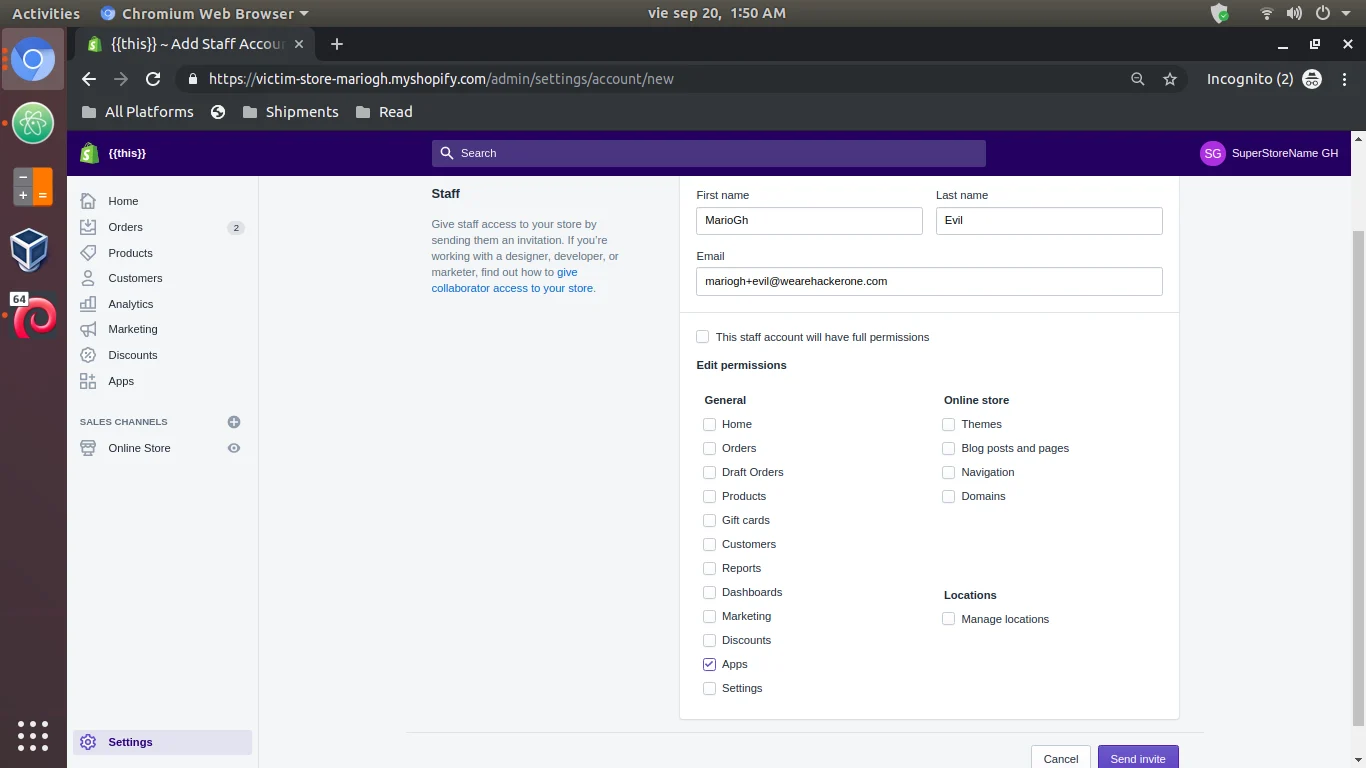
- Login to your shop as the shop owner and add a staff member with only "Apps" permission.
- Install flow app: (https://apps.shopify.com/flow)
- Login with the new user you added and navigate to
https://[Your-Shop].myshopify.com/admin/apps/flow/connectors
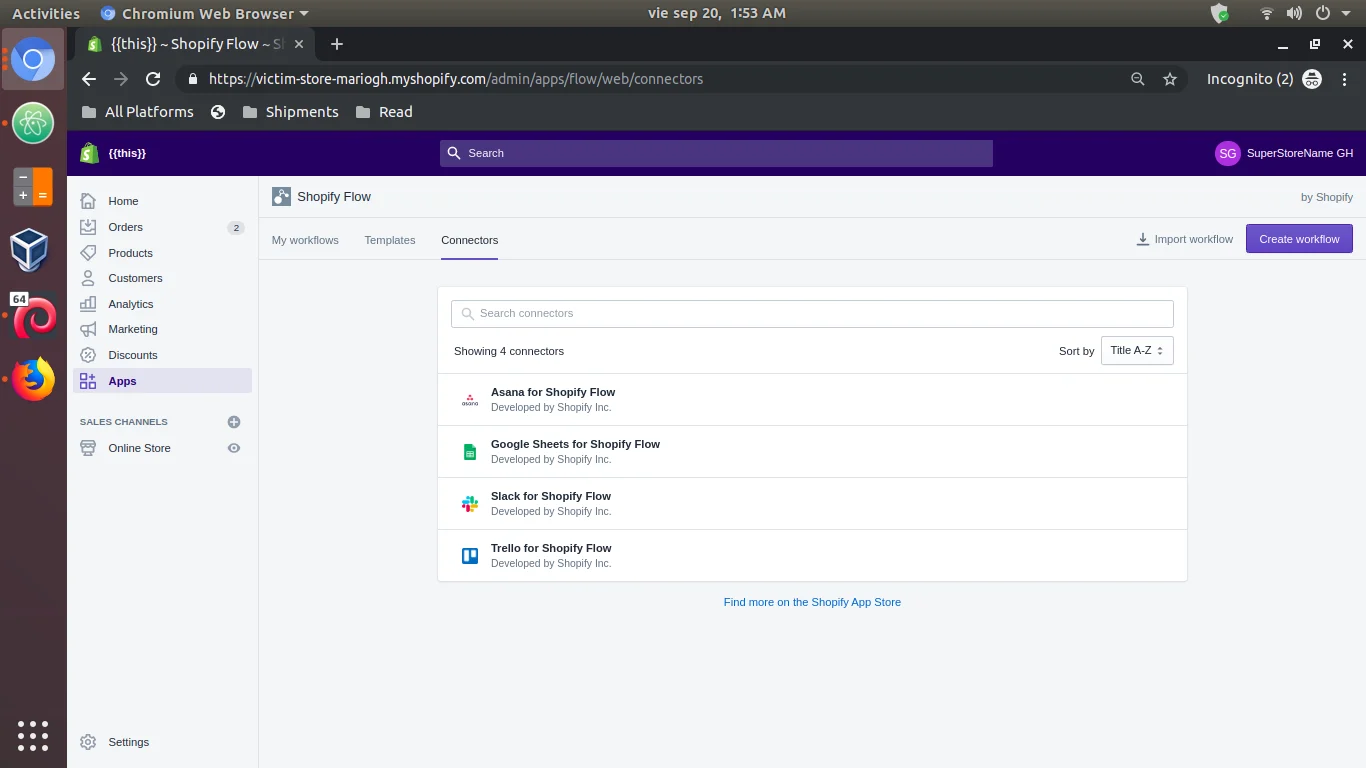
- Click and connect Google Sheets, Trello and Asana.
- With the user you added go to
https://[Your-Shop].myshopify.com/admin/apps/flow/connectors, clickGoogle Sheetsand you will be redirected to:
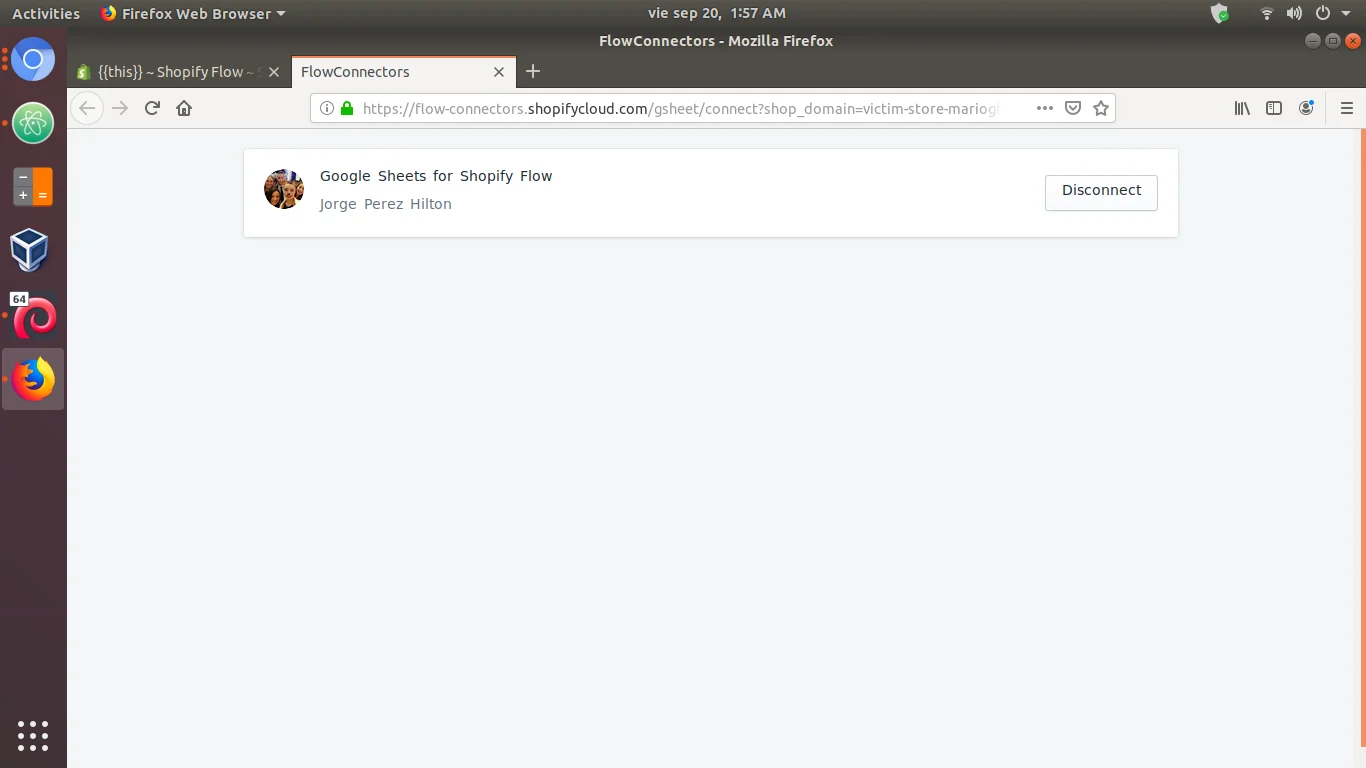
Jorge Perez Hilton is my personal Google Account, I link it to the store to create this report. You can verify this by sending me an email to ███████.
6. Grab the URL you are visiting. It will look like https://flow-connectors.shopifycloud.com/gsheet/connect?shop_domain=victim-store-mariogh.myshopify.com&shop_id=10361503766×tamp=[TIMESTAMP]&path_hmac=[PATH_HMAC].
7. Login with the shop owner and remove the user you added
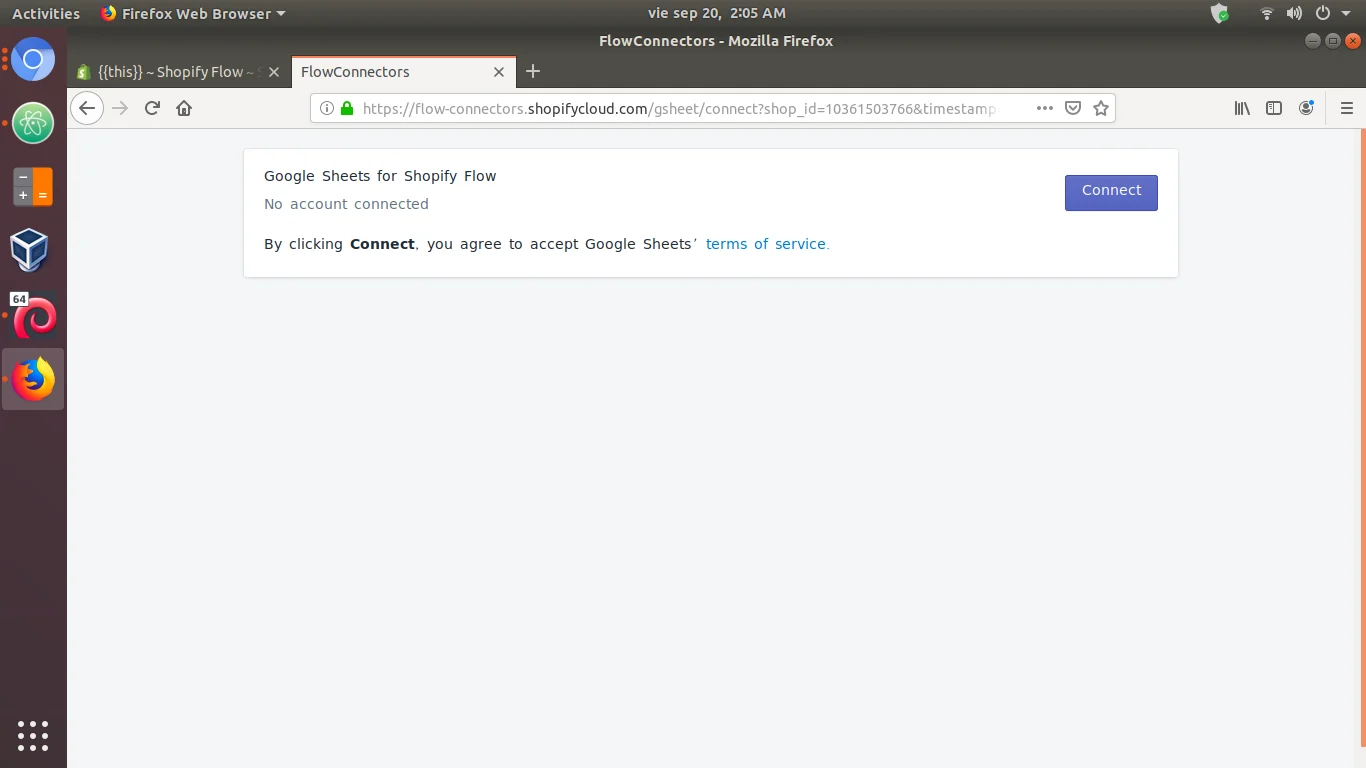
8. You can now use the links you saved to modify connectors settings for 60 minutes even if you are not a Staff member anymore. To reset the timestamp, go to the link you grabbed before the 60 minutes time-frame ends and disconnect the Google Account by clicking Disconnect. You will see now something like:
- Now, click on
Connectand use any Google Account. The account will successfully connect, a newtimestampand a newpath_hmacwill be generated, and they will give you unauthorized access to Flow connectors for an extra 60 mins. - Save the updated URL and repeat the step 8 and step 9 every ~45 min. This can be done manually or by automating the browser actions.
I tried to login with the Admin account, Disconnect and Reconnect a new Google Account, thinking that after a new timestamp and a new path_hmac is generated, the hacker's URL and path_hmac will be "blocked" but it doesn't work this way.
When the Admin generates a new timestamp and a new path_hmac, is like "both URL's are valid to get access". The hacker's (which is a removed staff member) URL still allows him to get unauthorized access to Flow app connections and to refresh the timestamp and path_hmac again and again.
Impact
Through this vulnerability a removed staff member will be able to modify google spread sheet, trello and asana connections to connect his own accounts so that workflow actions regarding the connections go to his accounts and therefore he can still access the shop data.
Context
Shopify Flow is a Shopify app, listed at https://apps.shopify.com/flow, that lets a merchant build workflows and connect external services to the store. Among the supported connectors are Google Sheets, Trello and Asana. The connector management screen lives in the shop admin at:
https://[Your-Shop].myshopify.com/admin/apps/flow/connectors
When a user clicks a connector such as Google Sheets, the admin redirects them to a separate host, flow-connectors.shopifycloud.com, with a signed URL. The signature is made of two query parameters, timestamp and path_hmac, and the URL stays valid for one hour. After that hour the signature should no longer grant access.
This report describes a bypass of an earlier report, #416983, which found that removed staff members who had the "Apps" permission could still modify Flow app connection settings because of improper authorisation. The bypass shows that the one-hour expiry can be renewed indefinitely by the removed user.
Setup
To reproduce, the researcher used:
- A shop owner account.
- A staff member account granted only the "Apps" permission.
- The Flow app installed on the shop.
- Google Sheets, Trello and Asana accounts to connect.
No special tooling is required beyond a browser and the ability to save URLs. The researcher notes that the repeated refresh can be done manually or by automating the browser actions.
Finding it
The signed URLs generated by Flow carry a timestamp so that they remain valid only during a period of one hour. The expectation is that after that period, a removed staff member who previously had Apps permissions should not be able to get unauthorised access to store data, nor to connect and disconnect Google Sheets, Trello and Asana accounts from Flow.
What the researcher found is that a removed staff member can keep refreshing the timestamp and path_hmac parameters again and again, obtaining unauthorised access to Flow app connections indefinitely.
The researcher also tested whether the shop owner regenerating the signature would invalidate the removed user's saved URL. Logging in with the admin account, disconnecting and reconnecting a new Google Account does generate a new timestamp and a new path_hmac, but the old URL keeps working: both URLs remain valid for access. The removed staff member's URL still allows unauthorised access to Flow app connections and can still be used to refresh the timestamp and path_hmac again and again.
Exploitation
Step 1: create the low-privileged staff member
Log in to the shop as the shop owner and add a staff member with only the "Apps" permission.
Step 2: install Flow
Install the Flow app from https://apps.shopify.com/flow.
Step 3: reach the connectors page as the staff member
Log in with the new user and navigate to:
https://[Your-Shop].myshopify.com/admin/apps/flow/connectors
Step 4: connect the external accounts
Click and connect Google Sheets, Trello and Asana.
Step 5: capture the signed connector URL
With the added user, go to https://[Your-Shop].myshopify.com/admin/apps/flow/connectors, click Google Sheets, and you are redirected to the signed connector URL.
The researcher notes that Jorge Perez Hilton is his personal Google Account, linked to the store to create the report.
Step 6: save the URL
Grab the URL being visited. It looks like this:
https://flow-connectors.shopifycloud.com/gsheet/connect?shop_domain=victim-store-mariogh.myshopify.com&shop_id=10361503766×tamp=[TIMESTAMP]&path_hmac=[PATH_HMAC]
The URL points at the gsheet/connect path on flow-connectors.shopifycloud.com. The shop_domain and shop_id parameters identify the store, while timestamp and path_hmac are the signature that authorises the request. The URL carries a timestamp so that it remains valid only during a period of one hour.
Step 7: remove the staff member
Log in with the shop owner and remove the user that was added.
Step 8: use the saved link, then refresh the signature
The saved links can be used to modify connector settings for 60 minutes even though the user is no longer a staff member. To reset the timestamp, go to the saved link before the 60-minute window ends and disconnect the Google Account by clicking Disconnect. The resulting page looks like this:
Step 9: reconnect to mint a fresh signature
Click Connect and use any Google Account. The account connects successfully, and a new timestamp and a new path_hmac are generated. These give unauthorised access to Flow connectors for an extra 60 minutes.
Step 10: repeat
Save the updated URL and repeat step 8 and step 9 every ~45 minutes. This can be done manually or by automating the browser actions.
Root cause
The signature is bound to a timestamp and a path HMAC, and the server accepts any signature that is still within its one-hour window. Nothing in the signed URL ties the request to the current staff membership of the user who originally obtained it, so removing the staff member does not revoke the URL.
Disconnecting and reconnecting through the saved link generates a new timestamp and path_hmac, restarting the 60-minute window. Disconnecting and reconnecting a connector through that URL produces a fresh signature, which restarts the one-hour clock. The researcher expected that the admin generating a new signature would invalidate the old one, but it does not: both URLs remain valid. The researcher expected a new signature to block the old URL, but both remain valid.
Impact
A removed staff member can modify the Google Sheets, Trello and Asana connections of the shop's Flow app. By connecting his own accounts, the attacker can make workflow actions that use those connections go to his accounts, and therefore he can still access shop data. The access persists as long as the attacker keeps refreshing the signature, which the researcher says can be done forever.
Fix
The report does not describe a fix.
Variants to test
- Other signed-URL features in the same product. Look for other admin redirects to a separate host that carry
timestampandpath_hmac-style parameters. A positive result is that a URL saved before a permission change still works after the change. - Signature refresh through the signed endpoint. On any signed connector or OAuth-style link, try performing an action that causes the endpoint to issue a new signature (disconnect and reconnect, as here). A positive result is a new
timestampandpath_hmacreturned to a session that should no longer be authorised. - Supersession check. After an administrator regenerates a signature for the same resource, replay the old URL. A positive result is that the old URL still grants access.
- Role removal timing. Remove the staff member and replay the saved URL at intervals inside and beyond the stated validity window. A positive result is access beyond the window after a refresh, or access inside the window after removal.
- Automation of the refresh loop. Script the disconnect and reconnect actions at roughly 45-minute intervals and confirm the signature keeps renewing. A positive result is uninterrupted access over a period longer than the original validity window.
What happened, in plain words
Shopify is a platform that lets people run an online shop. On top of the shop itself, a merchant can install extra apps, a bit like adding apps to a phone. One of those apps is called Shopify Flow. Flow lets a shop owner build automatic workflows, for example "when an order comes in, add a row to a spreadsheet". To do that, Flow connects to outside services such as Google Sheets, Trello and Asana.
A shop owner can also invite other people to help run the shop. These helpers are called staff members, and the owner decides what each one is allowed to do. One of the possible permissions is called "Apps", which lets that person manage the apps installed on the shop, including the connections Flow makes to Google Sheets, Trello and Asana.
When a staff member clicks a connector such as Google Sheets, the shop admin does not handle the request itself. It sends the browser to a different web address, on a separate server, and it attaches a kind of pass to that address. That pass is a signed URL: a web address that carries a signature proving it was handed out by Shopify. The signature is made of two parts that appear in the address, timestamp and path_hmac. The address is meant to work for one hour only. After that hour, the pass should be worthless.
An earlier report, #416983, had already found that a staff member who was removed from the shop could still change these Flow connection settings, because the permission check was not done properly. This report is about a way around the one-hour limit on top of that. The researcher found that a removed staff member can keep renewing the pass, again and again, and so keep access to the Flow connections forever.
To understand the trick, imagine a one-day ticket to a swimming pool. The ticket is stamped with today's date, and the guard only looks at the stamp. If you can get the pool staff to stamp a fresh ticket for you before the day ends, you can keep swimming indefinitely, even after the pool has been told you are no longer a member. That is essentially what happens here: the connector server will hand out a new timestamp and a new path_hmac to anyone who presents a still-valid one.
Context
Shopify Flow is a Shopify app, listed at https://apps.shopify.com/flow, that lets a merchant build workflows and connect external services to the store. Among the supported connectors are Google Sheets, Trello and Asana. The connector management screen lives in the shop admin at:
https://[Your-Shop].myshopify.com/admin/apps/flow/connectors
This is the page where a staff member sees the list of outside services and can connect or disconnect them. [Your-Shop] is a placeholder for the shop's own name, the part that makes each shop's address unique.
When a user clicks a connector such as Google Sheets, the admin redirects them to a separate host, flow-connectors.shopifycloud.com, with a signed URL. A redirect is simply the admin telling the browser "go to this other address instead". The signature is made of two query parameters, timestamp and path_hmac, and the URL stays valid for one hour. After that hour the signature should no longer grant access.
A query parameter is the part of a web address after a question mark, made of name and value pairs joined by &. You see them all the time in browser address bars. Here, timestamp records when the pass was issued, and path_hmac is a cryptographic stamp that proves the server produced the address and that nobody edited it. HMAC stands for hash-based message authentication code: a value computed from the address plus a secret key that only the server knows. If anyone changes the address, the stamp no longer matches, so the server can tell the address was tampered with.
This report describes a bypass of an earlier report, #416983, which found that removed staff members who had the "Apps" permission could still modify Flow app connection settings because of improper authorisation. A bypass, in security language, means the earlier problem was supposedly fixed or limited, and the researcher found a way around that limit. The bypass here shows that the one-hour expiry can be renewed indefinitely by the removed user.
Setup
To reproduce, the researcher used:
- A shop owner account.
- A staff member account granted only the "Apps" permission.
- The Flow app installed on the shop.
- Google Sheets, Trello and Asana accounts to connect.
No special tooling is required beyond a browser and the ability to save URLs. The researcher notes that the repeated refresh can be done manually or by automating the browser actions.
This matters because it shows the attack is not exotic. You do not need to write programs or use hacking tools. Copying an address into a text file and clicking a few buttons is enough. Automating the browser actions means letting a script click those same buttons on a timer, which turns a manual trick into a permanent back door.
Finding it
The signed URLs generated by Flow carry a timestamp so that they remain valid only during a period of one hour. The expectation is that after that period, a removed staff member who previously had Apps permissions should not be able to get unauthorised access to store data, nor to connect and disconnect Google Sheets, Trello and Asana accounts from Flow.
What the researcher found is that a removed staff member can keep refreshing the timestamp and path_hmac parameters again and again, obtaining unauthorised access to Flow app connections indefinitely.
The researcher also tested whether the shop owner regenerating the signature would invalidate the removed user's saved URL. Logging in with the admin account, disconnecting and reconnecting a new Google Account does generate a new timestamp and a new path_hmac, but the old URL keeps working: both URLs remain valid for access. The removed staff member's URL still allows unauthorised access to Flow app connections and can still be used to refresh the timestamp and path_hmac again and again.
Think of a hotel that issues key cards. You would expect that when the front desk makes a new card for a room, the old card stops opening the door. Here it does not: the old card and the new card both work. That is the second half of the finding, and it is what makes the attack durable rather than a one-hour nuisance.
Exploitation
Step 1: create the low-privileged staff member
Log in to the shop as the shop owner and add a staff member with only the "Apps" permission.
The point of this step is to create an account that has exactly the access a real helper would have, no more. If the account had every permission, the test would not prove anything about the "Apps" permission specifically.
Step 2: install Flow
Install the Flow app from https://apps.shopify.com/flow.
This is the same as installing any app on the shop. Without Flow there are no connectors, and without connectors there is nothing to attack.
Step 3: reach the connectors page as the staff member
Log in with the new user and navigate to:
https://[Your-Shop].myshopify.com/admin/apps/flow/connectors
This address is the connector management page inside the shop admin. The researcher logs in as the limited staff member, not the owner, because the whole question is what a limited user can do. The screenshot shows that page as the staff member sees it.
Step 4: connect the external accounts
Click and connect Google Sheets, Trello and Asana.
Connecting means authorising Flow to act on those outside services on the shop's behalf.
Step 5: capture the signed connector URL
With the added user, go to https://[Your-Shop].myshopify.com/admin/apps/flow/connectors, click Google Sheets, and you are redirected to the signed connector URL.
This is the moment the pass is handed out, so it is the moment to copy it. The researcher notes that Jorge Perez Hilton is his personal Google Account, linked to the store to create the report. In other words, the account being connected belongs to the researcher, which is how he can later show that the connection really works.
Step 6: save the URL
Grab the URL being visited. It looks like this:
https://flow-connectors.shopifycloud.com/gsheet/connect?shop_domain=victim-store-mariogh.myshopify.com&shop_id=10361503766×tamp=[TIMESTAMP]&path_hmac=[PATH_HMAC]
Line by line, in plain words:
https://flow-connectors.shopifycloud.comis the separate server that handles the connections, not the shop admin itself./gsheet/connectis the action being requested: connect a Google Sheet.shop_domain=victim-store-mariogh.myshopify.comsays which shop this is for.shop_id=10361503766is the shop's internal number, a second way of identifying the same shop.timestamp=[TIMESTAMP]is when the pass was issued. The square brackets are placeholders; the real value is a number.path_hmac=[PATH_HMAC]is the signature stamp that proves the server made this address and that it has not been edited.
The URL points at the gsheet/connect path on flow-connectors.shopifycloud.com. The shop_domain and shop_id parameters identify the store, while timestamp and path_hmac are the signature that authorises the request. The signature is what the one-hour validity applies to.
Saving the URL is the heart of the attack. The browser address bar is just text, and text can be copied into a file. Once copied, it can be used later from anywhere, by anyone, as long as the server still accepts the signature.
Step 7: remove the staff member
Log in with the shop owner and remove the user that was added.
This is the moment the shop owner believes access has been taken away. The rest of the report tests whether that belief is correct.
Step 8: use the saved link, then refresh the signature
The saved links can be used to modify connector settings for 60 minutes even though the user is no longer a staff member. To reset the timestamp, go to the saved link before the 60-minute window ends and disconnect the Google Account by clicking Disconnect. The resulting page looks like this:
The researcher clicks it deliberately, not to cause damage, but because disconnecting and reconnecting is what makes the server issue a fresh pass. The old pass is still valid at this point, so the server treats the request as legitimate and performs the action.
Step 9: reconnect to mint a fresh signature
Click Connect and use any Google Account. The account connects successfully, and a new timestamp and a new path_hmac are generated. These give unauthorised access to Flow connectors for an extra 60 minutes.
This is the core of the bypass. Clicking Connect and using any Google Account generates a new timestamp and path_hmac, giving access for an extra 60 minutes. The one-hour clock restarts, and the removed staff member is back where he started, with a fresh hour of access.
Step 10: repeat
Save the updated URL and repeat step 8 and step 9 every ~45 minutes. This can be done manually or by automating the browser actions.
Done on a timer, this turns a one-hour window into permanent access.
Root cause
The signature is bound to a timestamp and a path HMAC, and the server accepts any signature that is still within its one-hour window. Nothing in the signed URL ties the request to the current staff membership of the user who originally obtained it, so removing the staff member does not revoke the URL.
In everyday terms: the guard at the door only looks at the ticket, never at the list of current members. Cancel the membership and the ticket still gets you in.
The refresh loop works because the connector host itself will issue a new timestamp and path_hmac to whoever presents a still-valid signed URL. Disconnecting and reconnecting a connector through that URL produces a fresh signature, which restarts the one-hour clock. The researcher expected that the admin generating a new signature would invalidate the old one, but it does not: both URLs remain valid. The researcher expected a new signature to block the old URL, but both remain valid.
Superseded means replaced, so that the old one stops working. Here nothing is ever replaced. Each pass is checked on its own merits, so an unlimited number of passes can be valid at the same time.
Impact
A removed staff member can modify the Google Sheets, Trello and Asana connections of the shop's Flow app. By connecting his own accounts, the attacker can make workflow actions that use those connections go to his accounts, and therefore he can still access shop data. The access persists for as long as the attacker keeps refreshing the signature, which the researcher demonstrated can be done indefinitely.
Put simply: the shop owner thinks the person is gone, but the person's own spreadsheet and task accounts are still wired into the shop's automations. Workflow actions that use those connections go to the attacker's accounts, so he can still access shop data.
Fix
The report does not describe a fix.
In the ticket comparison: when a membership is cancelled, the tickets issued to that member should be cancelled too, and when a new ticket is printed for a room, the old one should stop opening the door.
Variants to test
- Other signed-URL features in the same product. Look for other admin redirects to a separate host that carry
timestampandpath_hmac-style parameters. A positive result is that a URL saved before a permission change still works after the change. - Signature refresh through the signed endpoint. On any signed connector or OAuth-style link, try performing an action that causes the endpoint to issue a new signature (disconnect and reconnect, as here). A positive result is a new
timestampandpath_hmacreturned to a session that should no longer be authorised. - Supersession check. After an administrator regenerates a signature for the same resource, replay the old URL. A positive result is that the old URL still grants access.
- Role removal timing. Remove the staff member and replay the saved URL at intervals inside and beyond the stated validity window. A positive result is access beyond the window after a refresh, or access inside the window after removal.
- Automation of the refresh loop. Script the disconnect and reconnect actions at roughly 45-minute intervals and confirm the signature keeps renewing. A positive result is uninterrupted access over a period longer than the original validity window.
OAuth-style link means a link used as part of the standard process for letting one service act on another with the user's consent. The idea behind all five variants is the same: find any place where a pass is handed out, then check whether taking away a person's permission actually takes away their pass.
Glossary
- API: a way for one piece of software to talk to another, like a service counter where you ask for something and get a defined answer.
- App: an add-on installed on a shop that adds features, similar to an app on a phone.
- Authorisation: deciding whether a person is allowed to do a particular thing.
- Bypass: a way around a protection that was supposed to stop you.
- Connector: the part of an app that links the shop to an outside service such as Google Sheets, Trello or Asana.
- HMAC: a stamp computed from a message plus a secret key, used to prove the message came from the server and was not edited.
- Host: the server part of a web address, for example
flow-connectors.shopifycloud.com. - OAuth-style link: a link used in the standard process for granting one service access to another on a user's behalf.
- Path: the part of a web address after the host, for example
/gsheet/connect. - Permission: a specific right granted to a user, such as the "Apps" permission.
- Query parameter: a name and value pair after the
?in a web address, separated by&. - Redirect: the server telling the browser to go to a different address.
- Replay: sending a saved request again later, as if it were new.
- Root cause: the underlying reason a problem exists, as opposed to its symptoms.
- Signed URL: a web address carrying a signature that proves the server issued it and that it has not been altered.
- Staff member: a person invited to help run a shop, with permissions chosen by the owner.
- Supersede: to replace something so that the old version no longer applies.
- Timestamp: a recorded moment in time, here the moment a pass was issued.
- Token: a value that stands in for proof of access, like a ticket or a key card.
- Unauthorised access: getting to data or actions you are not permitted to use.
- Workflow: a set of automatic steps in Flow, such as "when this happens, do that".


