H1514 Lack of access control on edit packing slip template
A staff user with only 'Home' permission could access and edit the packing slip template, which should require admin rights. This allowed a low-privileged user to modify the template, potentially redirecting shipments or disrupting service.

- Triaged in 11 days
- Fixed in 7 months
- Paid in 11 days
- Disclosed after 7 months
Summary:
An admin is able to edit the Edit packing slip template at /admin/settings/packing_slip_template. However, a staff user with only "Home" permission (and none other) can view and also make edits to this template.
Description:
The Edit packing slip feature exists so an admin user can customize the packing slip added to an order after fulfilment, without the need of external apps (such as Print Order). As mentioned, the problem here arises that any staff user in that Shop can access this endpoint and actually make edits to the template.
Steps To Reproduce:
- Create and login a user without permissions (Home only):
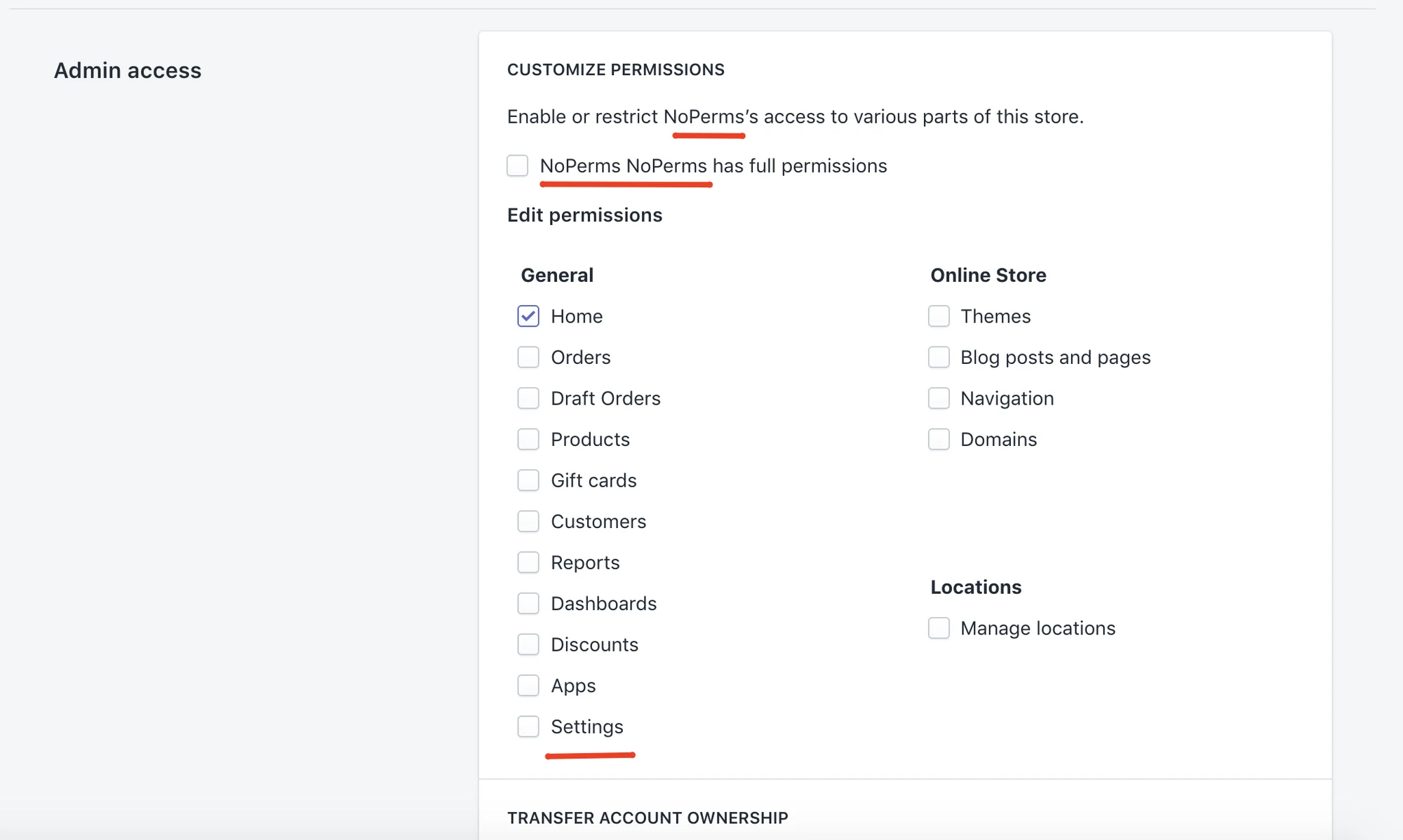
- As the user without permissions access /admin/settings/packing_slip_template and make any edits in the template file:
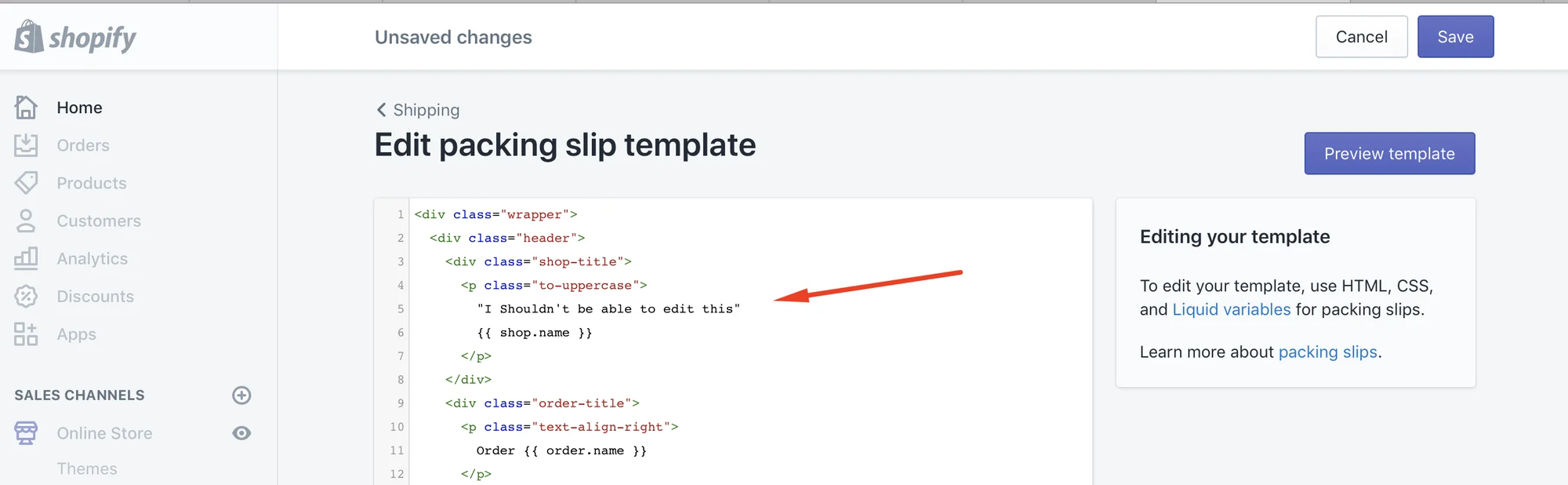
- Login as other user with adequate permissions, e.g. admin and refresh the same endpoint to confirm that the changes were saved:
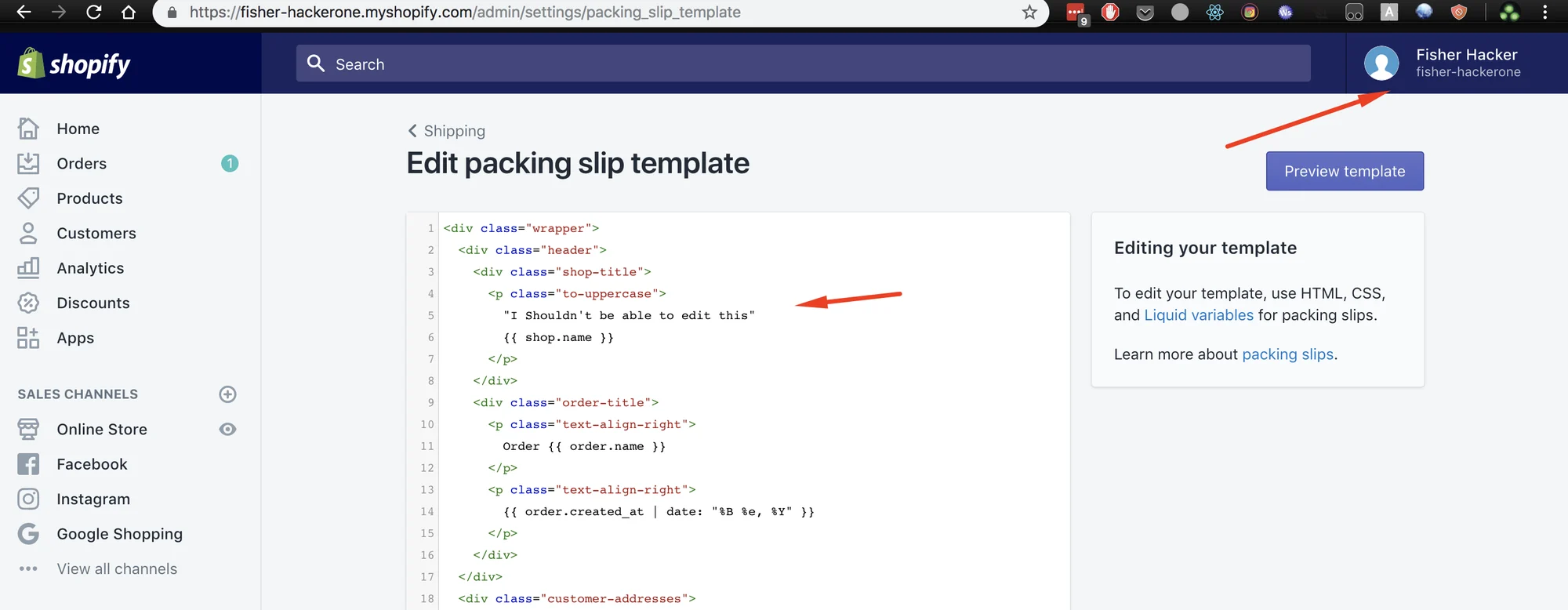
Impact
Having control of the packing slip a malicious staff user can e.g. change the shipping address for his own, potentially receiving orders at some time in the future.
More importantly, besides any disruption of the service (by erasing the template) or manipulation, it can lead to further attacks targeting the exfiltration/disclosure of liquid variables.
Context
Shopify lets a store owner customise the packing slip that is added to an order after fulfilment, without needing an external app such as Print Order. The feature lives in the store admin at /admin/settings/packing_slip_template, and the report describes it as an admin-only capability: the person who runs the store edits the template that will be printed and shipped with orders.
The asset in scope is a store admin host of the form your-store.myshopify.com. The bug is an access control gap: a staff account that holds only the "Home" permission, and nothing else, can both view and edit that template.
Setup
The researcher worked against a Shopify store admin. Two accounts are involved:
- A staff user with no permissions other than "Home".
- A second user with adequate permissions, for example an admin, used only to confirm that the first user's changes were persisted.
No tools, versions or special preconditions are described beyond the ability to create a staff user in the store and log in as each account.
Finding it
The researcher compared what the packing slip template endpoint is meant to be, an admin-only settings page, with what a low-privileged staff user could actually do there. A staff user restricted to "Home" could open /admin/settings/packing_slip_template and make edits to the template. That mismatch between the intended admin-only feature and the observed access for a nearly permissionless staff account is the whole finding.
Exploitation
Step 1: create a staff user with only "Home" permission
A user without permissions (Home only) is created and logged in. The screenshot shows that account's permission state.
Step 2: open the template endpoint and edit it
Still logged in as the user without permissions, the researcher accessed:
/admin/settings/packing_slip_template
and made arbitrary edits in the template file. The screenshot shows the low-privileged session editing the template.
Step 3: confirm the change persisted
The researcher then logged in as another user with adequate permissions, for example an admin, refreshed the same endpoint, and confirmed that the changes made by the restricted user had been saved.
That third step confirms the changes made by the restricted user were saved.
Root cause
The endpoint that serves and saves the packing slip template does not enforce the permission that the feature is supposed to require. A staff user holding only "Home" reaches the same page and the same save path as an admin. The report does not describe the server-side check, so the exact mistake in code is not stated; what is clear is that authorisation on this settings endpoint is missing or too weak.
Impact
Because the packing slip is what accompanies a fulfilled order, control of its template gives a malicious staff user several options. The researcher gives these examples:
- Change the shipping address to their own, potentially receiving orders at some time in the future.
- Disrupt the service by erasing the template.
- Manipulate the template in ways that lead to further attacks targeting the exfiltration or disclosure of Liquid variables.
The report hedges the address scenario with "potentially" and "at some time in the future"; it is a plausible consequence rather than a demonstrated theft. The Liquid variable angle is described as a route to further attacks, not shown end to end. The precondition throughout is a staff account in the store with only the Home permission.
Fix
The report does not state what was changed. The fix that follows from the finding is to enforce the same authorisation on /admin/settings/packing_slip_template for both reading and saving that the feature is meant to require, so that a staff user without the relevant permission is refused rather than served the page and allowed to persist edits.
Variants to test
- Other admin settings pages that render or save templates or content: open each as a Home-only staff user and attempt a save. A positive result is a stored change visible to an admin afterwards.
- Read versus write: check whether a restricted user can only view a settings page or can also submit changes. A view-only leak is weaker; a persisted write is the stronger finding, as in this report.
- Direct endpoint access: request the settings path directly rather than through navigation, in case the UI hides the link but the server does not check. A positive result is a 200 with the editable template, or a successful save.
- Permission combinations: repeat with staff roles that hold a subset of permissions, not just Home only, to map which permission the endpoint actually keys on, if any.
Hunting notes
This kind of bug hides in admin settings surfaces that were built for the store owner and never revisited when the staff permission model was extended: template editors, notification and document customisation, and anything that renders user-controlled content into a document sent to customers. During recon, the signal is a settings endpoint that is reachable by a low-privileged staff session at all; from there, the question is whether a save also succeeds.
The researcher showed a reproducible three-step sequence with two accounts, demonstrating that a Home-only user's edit is stored and visible to an admin. The report also ties the primitive to consequences such as shipping address manipulation and Liquid variable disclosure.
What happened, in plain words
Shopify is a service that lets people run an online shop. Every shop has an admin area, a private set of web pages where the shop owner manages products, orders and settings. The address of that admin area looks like your-store.myshopify.com, where your-store is replaced by the shop's own name.
One of the settings in that admin area is the packing slip template. A packing slip is the piece of paper that goes in the box with a shipped order: it lists what is inside and where it is going. Shopify lets the shop owner change how that slip looks by editing a template, which is a piece of text with placeholders that get filled in with each order's details. The report calls this feature "Edit packing slip" and says it exists so the owner does not need a separate app such as Print Order to customise the slip.
Shop owners can also invite other people to help run the shop. These helpers are called staff users, and each one is given a set of permissions: a list of which parts of the admin area they are allowed to use. One of those permissions is called "Home". A staff user who has only "Home" and nothing else is meant to be very limited.
The problem in this report is simple to state. That packing slip template page is supposed to be for admins only, but a staff user with only the "Home" permission could open it and change the template. This kind of mistake is called a missing access control, or an authorisation gap: the software knows who you are but does not properly check whether you are allowed to do what you are asking. A useful everyday comparison is a hotel: your key card opens your own room, and the fact that the card physically fits the lock on the manager's office does not mean it should open it. Here, the low-privileged staff account's "key card" opened a door it should not have.
The researcher proved it in three steps: create a staff user with only "Home", log in as that user and edit the template, then log in as an admin and check that the edit was really saved. That last check matters, because it shows the change was stored on Shopify's servers, not just displayed in the low-privileged user's own browser.
The setup
The researcher worked against a Shopify store admin. Two accounts are involved:
- A staff user with no permissions other than "Home".
- A second user with adequate permissions, for example an admin, used only to confirm that the first user's changes were saved.
Nothing else is described: no special tools, no software versions, no preconditions beyond being able to create a staff user in the shop and log in as each account. That is worth noticing. The whole test can be done with a normal browser and two logins.
Finding it
The researcher compared two things: what the packing slip template page is meant to be, an admin-only settings page, and what a low-privileged staff user could actually do there. A staff user restricted to "Home" could open /admin/settings/packing_slip_template and make edits to the template. That mismatch between the intended admin-only feature and the observed access for a nearly permissionless staff account is the whole finding.
In other words, the bug was not found by running a scanner or sending strange input. It was found by asking a plain question: this page is for admins, so what happens if a non-admin opens it?
Exploitation
Step 1: create a staff user with only "Home" permission
A user without permissions (Home only) is created and logged in. The screenshot shows that account's permission state.
This first step is about setting up the test fairly. If you want to show that a low-privileged account can do something it should not, you first need such an account, and you need to confirm it really is low-privileged. The screenshot is the evidence of that: it shows the account's permissions, so a reader can see that "Home" is the only thing ticked.
Step 2: open the template endpoint and edit it
Still logged in as the user without permissions, the researcher accessed:
/admin/settings/packing_slip_template
This line is a path, the part of a web address after the shop's name. If the shop's admin address is your-store.myshopify.com, then the full address of this page is that name followed by this path. The word "admin" in the path tells you it is part of the private management area, and "settings" tells you it is a configuration page. Typing this path into the browser's address bar is the same as clicking a link to it; the researcher did it directly to be sure the page itself, not some menu, was being tested.
Once on the page, the researcher made arbitrary edits in the template file. The screenshot shows the low-privileged session editing the template.
Why does this step matter? Because being able to see a page and being able to change something on it are two different levels of access. A page that merely displays information is a read. A page that accepts your changes and stores them is a write. A write by the wrong person is the more serious of the two, and this step is where the researcher tested whether the low-privileged user could write.
Step 3: confirm the change persisted
The researcher then logged in as another user with adequate permissions, for example an admin, refreshed the same endpoint, and confirmed that the changes made by the restricted user had been saved.
This third step confirms the change was saved. If the low-privileged user's edit had only appeared in their own browser, it could have been a display quirk with no effect on anyone else. By logging in as an admin and refreshing the same page, the researcher checked whether the change had actually been stored by Shopify and was visible to a properly privileged user. It was. The edit is not a client-side artefact of the low-privileged session; it is saved.
Why it happened
The page that shows and saves the packing slip template does not enforce the permission that the feature is supposed to require. A staff user holding only "Home" reaches the same page and the same save action as an admin. The report does not describe the server-side check, so the exact mistake in the code is not stated. What is clear is that the permission check on this settings page is missing or too weak.
A comparison: a building can have a working reception desk that checks badges at the front door, and still have a side door nobody thought about. The permission system works in most places; this one page was simply not covered.
Impact
Because the packing slip is what accompanies a fulfilled order, control of its template gives a malicious staff user several options. The researcher gives these examples:
- Change the shipping address to their own, potentially receiving orders at some time in the future.
- Disrupt the service by erasing the template.
- Manipulate the template in ways that lead to further attacks targeting the exfiltration or disclosure of Liquid variables.
A few words here need unpacking. A fulfilled order is one that has been packed and sent, and the packing slip travels with it. Liquid is the template language Shopify uses: the template is not plain text but text with special placeholders that the system fills in with real order data when the slip is produced. Exfiltration means getting data out of a system to somewhere the attacker can read it, and disclosure means the same idea: information being revealed to someone who should not see it. The researcher's point is that if an attacker can control the template, they may be able to make those placeholders reveal information they should not.
The report hedges the address scenario with "potentially" and "at some time in the future"; it is a plausible consequence rather than a demonstrated theft. The Liquid variable angle is described as a route to further attacks, not shown end to end. The precondition throughout is a staff account in the shop with only the Home permission.
Fix
The report does not state what was changed. The fix that follows from the finding is to enforce the same permission on /admin/settings/packing_slip_template for both viewing and saving that the feature is meant to require, so that a staff user without the relevant permission is refused rather than shown the page and allowed to save edits.
Variants to test
Directions for looking for similar bugs:
- Other admin settings pages that show or save templates or content: open each as a Home-only staff user and try to save. A positive result is a saved change that an admin can see afterwards.
- Read versus write: check whether a restricted user can only view a settings page or can also submit changes. A view-only leak is weaker; a saved write is the stronger finding, as in this report.
- Direct page access: request the settings path directly rather than through the menus, in case the interface hides the link but the server does not check. A positive result is a page that loads with the editable template, or a save that succeeds.
- Permission combinations: repeat with staff roles that hold a subset of permissions, not just Home only, to map which permission the page actually depends on, if any.
Hunting notes
This kind of bug hides in admin settings pages that were built for the shop owner and never revisited when the staff permission system was extended: template editors, notification and document customisation, and anything that puts user-controlled content into a document sent to customers. During reconnaissance, the signal is a settings page that a low-privileged staff session can reach at all; from there, the question is whether a save also succeeds.
The researcher showed a reproducible three-step sequence with two accounts, demonstrating that a Home-only user's edit is stored and visible to an admin. The report also ties the primitive to consequences such as shipping address manipulation and Liquid variable disclosure.
Glossary
- Admin area: the private set of web pages where a shop owner manages a shop, reached at an address like
your-store.myshopify.com. - Access control: the rules that decide which users are allowed to see or change which parts of a system.
- Authorisation: the check that a user who is already logged in is allowed to perform a particular action.
- Staff user: a person invited to help run a shop, given a set of permissions.
- Permission: a named allowance, such as "Home", that grants access to part of the admin area.
- Packing slip: the document placed in a shipped order listing its contents and destination.
- Template: text with placeholders that the system fills in with real data when producing a document.
- Endpoint: a specific address or path on a server that a browser can request.
- Path: the part of a web address after the site name, such as
/admin/settings/packing_slip_template. - Read: an action that only displays information.
- Write: an action that changes or saves information.
- Persisted: saved on the server so it remains and is visible to other users, not just shown in one browser.
- Client-side: happening in the user's own browser rather than on the server.
- Server-side: happening on the server that runs the service.
- Fulfilment: the process of packing and sending an order.
- Liquid: the template language Shopify uses to fill placeholders with order data.
- Exfiltration: getting data out of a system to a place the attacker can read it.
- Disclosure: information being revealed to someone who should not see it.
- Reconnaissance: the exploratory phase of looking around a system to find things worth testing.
- Bug bounty programme: a scheme where a company pays researchers for reporting security bugs.
- Primitive: a basic capability an attacker gains, which can then be used for further attacks.



