Improper access check by Kit leads to controlling attributes of store & getting analytics by deleted Store member via dual messenger A/C
A deleted staff member could still access Kit through their connected Facebook Messenger account and change store attributes such as creating discount codes, as well as view business and marketing analytics. The issue arises because Kit does not re-check store permissions after the staff account is removed.

- Fixed in 9 days
- Paid in 9 days
- Disclosed after 32 days
Hi,
Disclaimer :
This report will be detected as a duplicate of a N/A marked report by me(#351154).The reason for self-close was i did not know if the scope in your policy only restricted to XSS,CSRF on kitcrm.com the domain.
Issue :
A deleted store member can still use Kit via Facebook messenger & affect the store attributes such as discount codes & also view business analytics & marketing analytics.
Summary :
Kit acts as a Facebook & Instagram digital marketeer for any store.It can be installed on a store by setting up 3 things :
- Facebook Business/Store page
- Messaging account.(Messenger will be used here)
- Facebook Ad account after agreeing terms from Facebook.
A store owner installs the app,then goes through the process of connecting his/her Facebook account,messenger account & then , the ad account.Basically,here assume that one such account is successfully connected to kit.
After , the setups are complete,you will notice one thing, that when you go to Account preferences under Kit,you will notice that you can only change your messaging platform but not the existing Facebook messenger account.You can check this by going to preferences under kitcrm.com/ and then clicking change messaging platform.After this click on messenger again,you will be redirected back to apps/.
Now,if you were to have a staff account lets say with Apps permission(so that he/she could access Kit). The staff account when opens Kit will see that Kit fixates on the Facebook Page for the store due to lack of store permissions for the staff.Nonetheless,a Facebook account is to be connected :
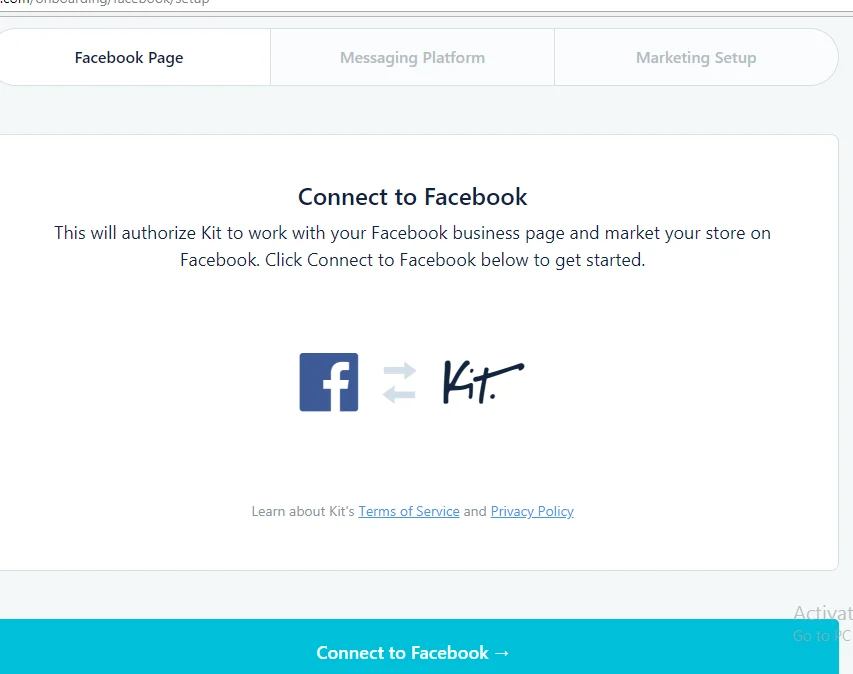
The staff can then easily connect his/her messenger account.After this,even if the staff account is deleted he/she could access kit via Facebook messenger & issue transaction causing changes in the store for example creating a 99% discount etc etc.
Steps to reproduce :
- Have a store & a facebook account ready.
- Now as the store owner setup kit in the store completely.
- Now invite a staff account with Apps permission.
- Now as the staff you can open Kit,but you will redirected to
https://kitcrm.com/onboarding/facebook/setupto connect a messenger account.You will notice that the Facebook page connected cannot be changed. - Now,just open the Facebook account & connect your(staffs) Facebook account by giving permissions on Facebook to accept kit.After this, you will be redirected to
https://kitcrm.com/onboarding/messaging_platform/setup. - Here you will notice that the Facebook page is under a green tab,but when you open it,there isn't any Facebook pages connected.This is because of the lack of store permissions.If the staff were to have full permissions, then the Facebook page would be visible.Nonetheless,continuing as a staff account with apps permission. Now, connect your Facebook messenger to kit,by selecting Facebook messenger & then clicking send to messenger.
- Now , you have your messenger connected & are redirected to
https://kitcrm.com/onboarding/checklist/setupwhere your Ad account is auto-connected.You will notice that you are not able to accept Facebook Custom Audience Terms of Service & Website Audience Terms of Service. This most likely is , because for the store,the terms were already accepted. - Now,if you open your Facebook account you would have received a message from Kit. At this point as the store owner , delete the staff account/deactivate.
- Now,as the staff account you can still ask kit to change the store attributes i.e create valid discount codes,get reports of business & ad performance.You cannot publish ads due to not having permissions to access the pages Ad account.
Impact
- Deleted staff can still change store attributes such as discount codes & still access business/ads/email marketing analytics of the store via kit.
- Discounts created by deleted staff member via Kit :

Not written yet. The AI write-up for this report has not been written yet. The Original tab links to the source.
How it worked
Root cause
Likely, Kit does not verify that the Facebook Messenger account is still associated with an active staff member when processing requests, allowing deleted staff to retain access.
Impact
A deleted staff member could still change store attributes such as discount codes and access business, ads, and email marketing analytics via Kit, though they could not publish ads due to lacking permissions to the store's Ad account.
What the attacker needed
Store owner sets up Kit; Staff account with Apps permission; Staff connects Facebook Messenger; Staff account is deleted
The fix
Kit should re-check the staff member's active status and store permissions on each request.
How it was found
- Set up Kit on a store as the owner.
- Invite a staff account with Apps permission.
- As the staff, open Kit and connect your Facebook Messenger account.
- As the store owner, delete or deactivate the staff account.
- As the deleted staff, use Facebook Messenger to send commands to Kit, such as creating a discount code or viewing analytics.
Explained by bugbounty.wiki with AI from the original and checked against quotes from it; it can still be wrong. Read the original before relying on a detail.
Not written yet. The AI write-up for this report has not been written yet. The Original tab links to the source.
When a staff member is removed from a store, they should lose all access. Here, the staff member had linked their personal Facebook Messenger to the store's Kit app, and that link stayed active even after their staff account was deleted. So they could still send commands through Messenger to change discounts or see sales data.
What is Access control?
A user can do something their role should not allow: reach an admin function, act on a feature they have not paid for, or skip a permission check. IDOR is the special case where the object belongs to someone else.