PII disclosure -- Past team members & their email ID(personal email) can be viewed by Staff member with no permissions on Partner Dashboard
A staff member with no explicit permissions on a Shopify Partner team could view the names, personal email addresses and removal dates of past team members. Changes made by a removed member to their name and email on their Shopify account were also visible to current team members.

- Triaged in 3 days
- Fixed in 21 days
- Paid in 4 days
- Disclosed after 41 days
Hi,
I'm not too sure if this is intentional and a expected feature or was it really an unnecessary information disclosure. If this is intentional, kindly close this as Informative or allow me to self-close so as not affect my signal.
From my perspective, I noticed 2 issues,
PART 1: Using Partners Dashboard a current team member belonging to a partner team with no explicit permissions can view past members of the partner team via Partner, their names, their personal email IDs and when they were removed from the Partner Team.
PART 2:
Assuming if a deleted STAFF member from Partner team changes his email ID & name via https://accounts.shopify.com/account , then that change can be seen by all the current STAFF members of the Partner team.
Vulnerable Endpoint - https://partners.shopify.com/{PartnerTeam_ID}/memberships/removed
STEPS TO REPRODUCE
PART 1:
1.Owner invites a STAFF1 to join Partner Team(Team_ABC) and assign any permissions. 2.STAFF1 receives invite and joins Team_ABC. 3.Owner removes STAFF1 from Team_ABC. 4.Owner invites a STAFF2 to join Partner Team(Team_ABC) and DOES NOT assign any permissions. █████ 5.STAFF2 receives invite and joins Team_ABC.
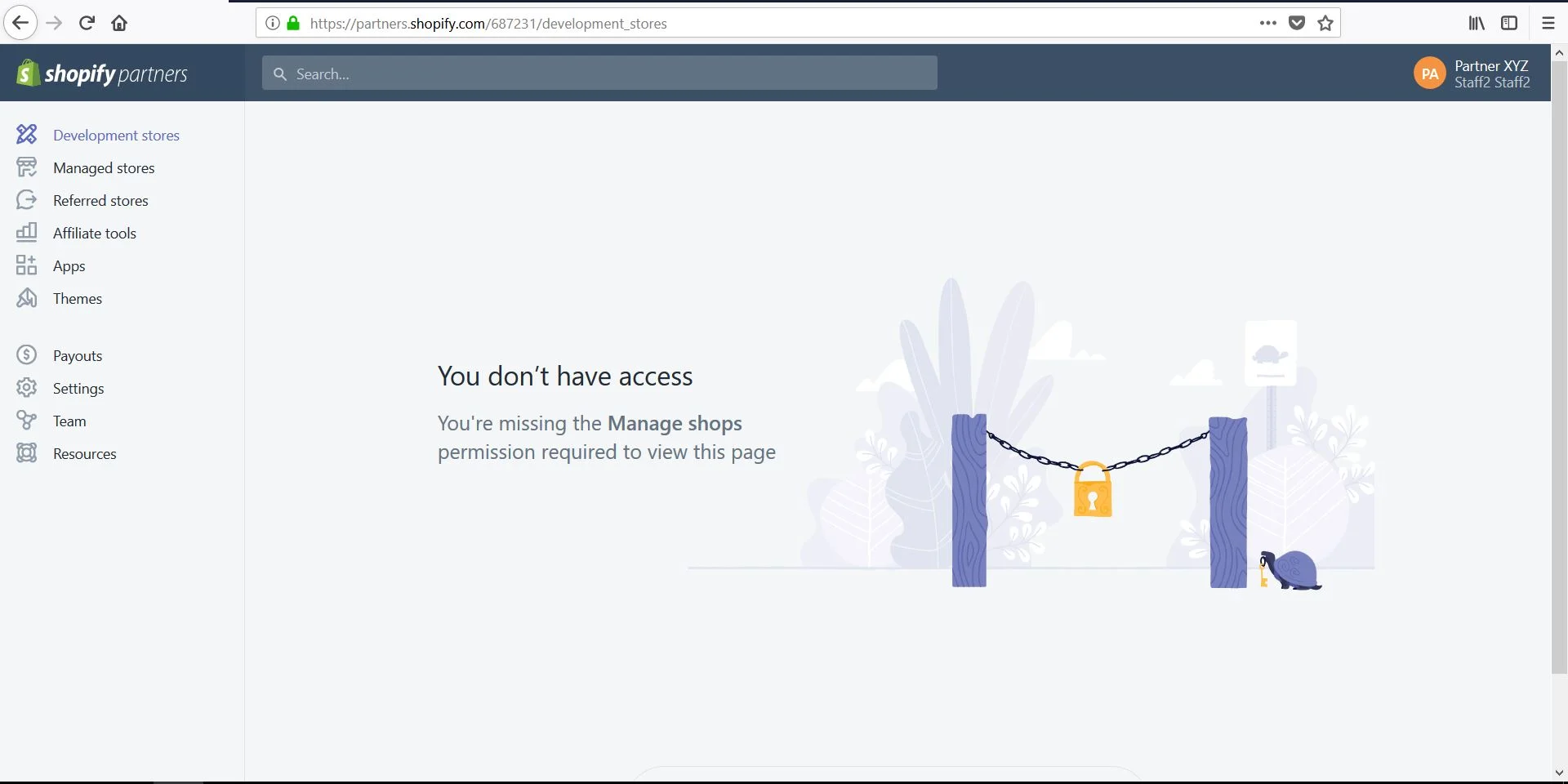
6.STAFF2 then navigates to vulnerable endpoint to see past team members
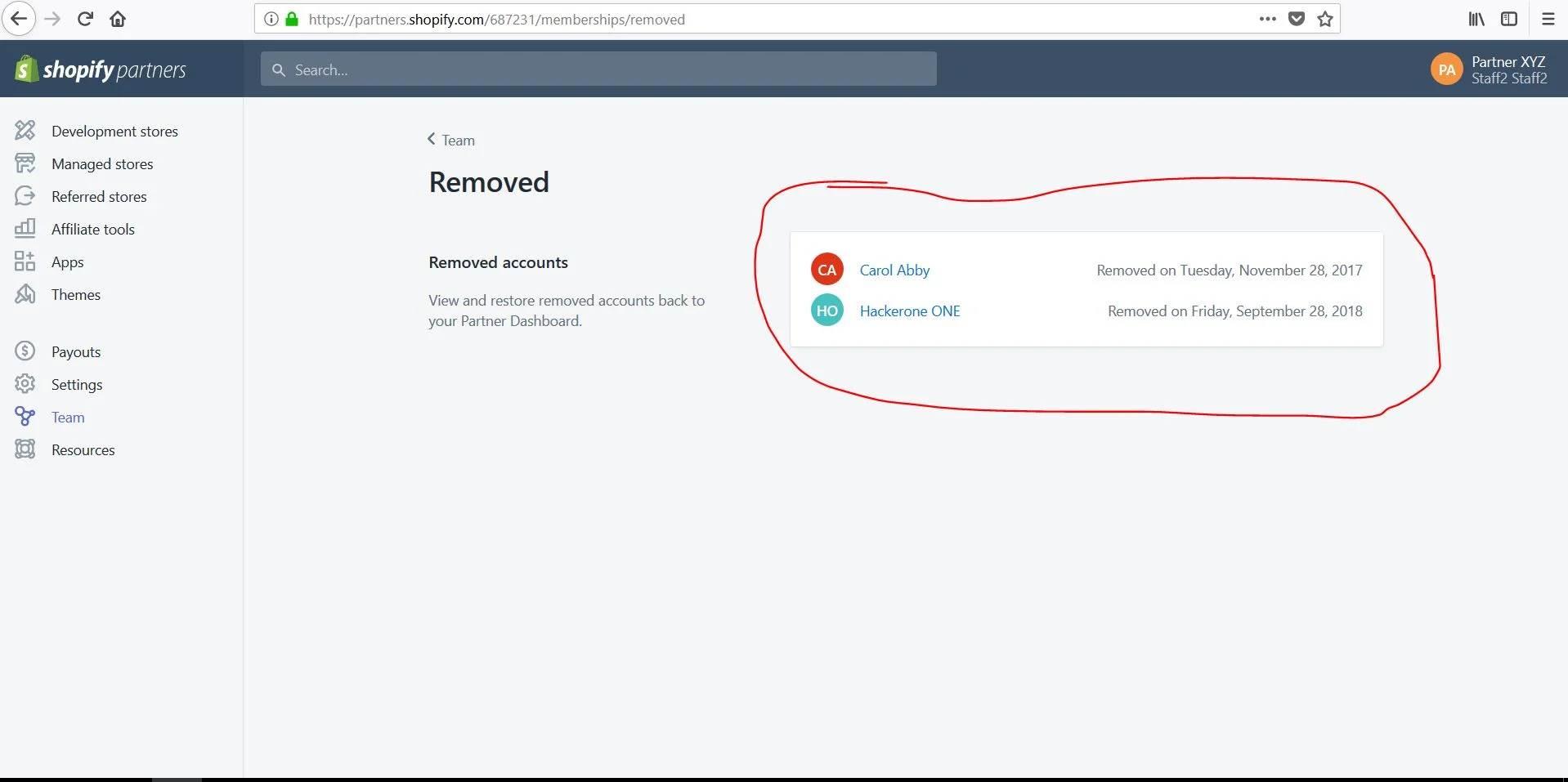
7.STAFF2 can then click on past team member and it reveals their email IDs associated with https://accounts.shopify.com/account
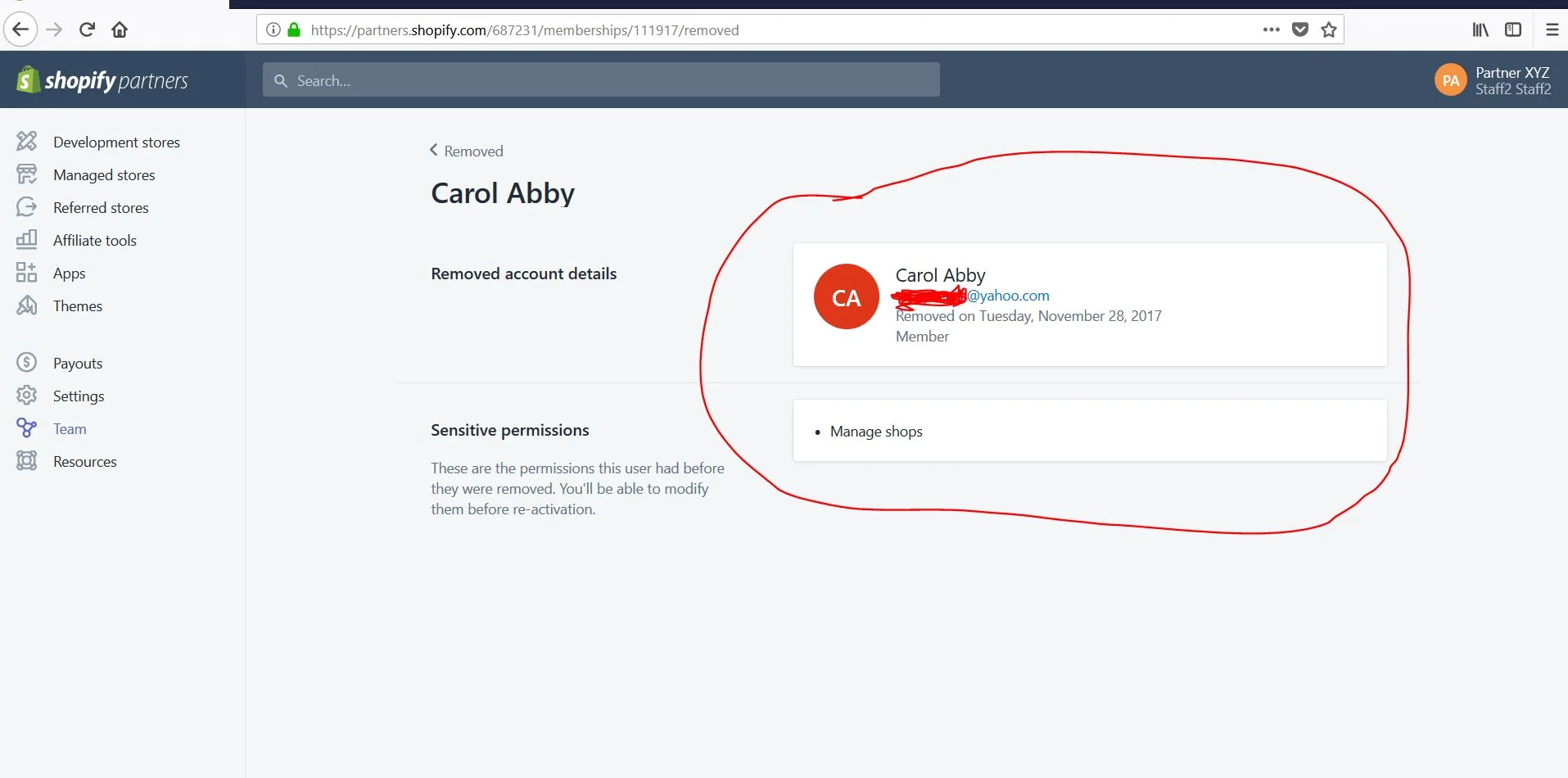
PART 2:
- STAFF1 who was removed from Team_ABC changes his name & email ID via
https://accounts.shopify.com/account. - STAFF2 now refreshes the past members page in his partner team dashboard and is able to view updated name & email ID former team member STAFF1. Please watch the below video PoC
███
Impact
As mentioned earlier in the bug report, I see 2 potential issues
-
Current Staff members of a Partner Account having
no explicit permissionscan view past team members page and can access details like names, personal email IDs and date when the ex-staff was removed. -
The second is a much more significant issue where by current STAFF members and perhaps even owners can see the updated personal email ID(PII) of ex-Staff who was associated with the Partner account. This email is PII since the email is set via
https://accounts.shopify.com/account.
If ex-staff is no longer interested to work for the specific Partner account, then Shopify must honor their privacy by not exposing their updated personal email IDs in the Past Team member pages for the partner account which they were a part of in the past. If this is not done, the there are chances that Owner of Partner account can re-invite the ex-staff or restore their permissions for the Partner Account.
Context
The target is the Shopify Partners Dashboard at partners.shopify.com, the portal where a partner team manages its members and their permissions. A partner team has an owner who invites staff members and assigns permissions, and each member has an account at https://accounts.shopify.com/account where their name and email address live.
The feature under scrutiny is the list of removed (past) team members. The report describes a page reachable at the endpoint below, which shows former members of a partner team together with their names, their personal email addresses and the date they were removed:
https://partners.shopify.com/{PartnerTeam_ID}/memberships/removed
The researcher was unsure whether exposing this was an intended feature and said so up front, offering to have the report closed as Informative if it was deliberate. From their perspective there were two distinct issues: a current staff member with no explicit permissions could read the past members list (Part 1), and a removed staff member's later changes to their name and email at https://accounts.shopify.com/account were reflected to the remaining team (Part 2).
Setup
The report uses three roles within a single partner team, referred to as Team_ABC:
| Role | Description |
|---|---|
| Owner | Invites members, assigns permissions, removes members |
| STAFF1 | Invited with permissions, joins, later removed |
| STAFF2 | Invited with no permissions assigned, joins |
The precondition for the whole finding is that STAFF2 holds no explicit permissions on the partner team. The accounts are ordinary Shopify accounts, and the name and email used for each are managed through https://accounts.shopify.com/account. The report does not name any tools or versions.
Finding it
The researcher noticed that the removed-members view was reachable by a staff member who had been granted nothing. Two observations followed from that: the page itself disclosed former members' names, personal email addresses and removal dates, and those details tracked changes made later by the former member in their own Shopify account settings. The second observation is what made the researcher treat the issue as more than a cosmetic listing, because the email shown is the one set at https://accounts.shopify.com/account, which the researcher classifies as personal data.
Exploitation
Part 1: reading the past members list without permissions
- The owner invites STAFF1 to join Team_ABC and assigns any permissions.
- STAFF1 receives the invite and joins Team_ABC.
- The owner removes STAFF1 from Team_ABC.
- The owner invites STAFF2 to join Team_ABC and does not assign any permissions.
- STAFF2 receives the invite and joins Team_ABC.
- STAFF2 navigates to the vulnerable endpoint to see past team members.
- STAFF2 clicks on a past team member and the page reveals the email address associated with that person's
https://accounts.shopify.com/account.
So a member who was deliberately given no permissions can still enumerate former members of the team, including their personal email addresses and when they were removed.
Part 2: changes made after removal are visible to the team
- STAFF1, who was removed from Team_ABC, changes their name and email address via
https://accounts.shopify.com/account. - STAFF2 refreshes the past members page in the partner team dashboard and can see the updated name and email address of the former member STAFF1.
The report refers to a video proof of concept for this second part, which is not reproduced here.
Root cause
The report does not describe the implementation. It shows that the removed-members endpoint is reachable by a team member with no explicit permissions, and that changes a former member later makes to their name and email appear on the page. Whether this is a missing authorisation check, an inherited permission, or a deliberate design choice is not stated; the researcher explicitly left open that it might be intentional.
Impact
Two issues are described:
- Current staff members of a partner account with no explicit permissions can view the past team members page and access names, personal email addresses and the date each former staff member was removed.
- More significantly, current staff members, and perhaps owners, can see the updated personal email address of a former staff member who was associated with the partner account. The researcher treats this email as personal data because it is set via
https://accounts.shopify.com/account.
The researcher argues that if a former staff member no longer wishes to work for that partner account, Shopify should not expose their updated personal email address on the past team members page of an account they used to belong to. Otherwise, the owner of the partner account could use the address to re-invite the former staff member or restore their permissions. The report does not quantify how many accounts or records are affected.
Fix
Variants to test
- Other team-management views in the same dashboard, such as pending invitations or permission history, requested as a member with no permissions. A positive result is a response containing member names, emails or timestamps.
- The same removed-members path with a different
{PartnerTeam_ID}than the one the account belongs to. A positive result is data from a team the account is not part of. - Changing the name and email on a removed account and re-requesting the list, to confirm whether the view is live or a snapshot. A positive result is the new values appearing.
- Equivalent past-member or audit views in other multi-tenant dashboards. A positive result is a low-privilege member reading former users' personal identifiers.
Hunting notes
The signal is a response that returns personal identifiers, especially email addresses, to an account that was granted nothing.
What happened, in plain words
Shopify runs a portal called the Partners Dashboard at partners.shopify.com. Companies that work with Shopify (called partners) use it to manage their team: one person is the owner, and the owner can invite other people as staff members and decide what each of them is allowed to do. Each of those people also has a normal Shopify account at https://accounts.shopify.com/account, where their name and email address are stored.
The dashboard has a page that lists people who used to be on the team but have since been removed. The researcher found that this page could be opened by a staff member who had been given no permissions at all, and that it showed the former members' names, their personal email addresses and the date they were removed. Separately, if a former member later changed their name or email in their own Shopify account, the change appeared on that page too.
The researcher was honest that this might be a feature the company intended, and offered to have the report closed as Informative (a label meaning "this is not a security bug") if that were the case. They described two separate problems, called Part 1 and Part 2 below.
A few words you will meet throughout:
- Partner team: a group of people inside a partner company, with one owner and several staff members.
- Permissions: the list of things a staff member is allowed to do. "No explicit permissions" means the owner ticked nothing when inviting them.
- PII (personally identifiable information): data that can identify a real person, such as a personal email address.
- Endpoint: a specific web address on a server that a browser can request. Think of it as a particular counter in a large building: the building is the website, the counter is the endpoint.
- Information disclosure: a vulnerability class where a system shows data to someone who should not be allowed to see it. Nothing is broken or changed; the problem is that information leaks.
Context
The target is the Shopify Partners Dashboard at partners.shopify.com, the portal where a partner team manages its members and their permissions. A partner team has an owner who invites staff members and assigns permissions, and each member has an account at https://accounts.shopify.com/account where their name and email address live.
The feature under scrutiny is the list of removed (past) team members. The report describes a page reachable at the endpoint below, which shows former members of a partner team together with their names, their personal email addresses and the date they were removed:
https://partners.shopify.com/{PartnerTeam_ID}/memberships/removed
Line by line:
https://is the prefix that means the page is fetched over an encrypted connection.partners.shopify.comis the server (the building) that hosts the Partners Dashboard.{PartnerTeam_ID}is a placeholder for a number or code that identifies one particular partner team. The curly braces are not typed literally; they stand for whatever value identifies the team./memberships/removedis the path that names the feature: the list of memberships that have been removed.
The researcher was unsure whether exposing this was an intended feature and said so up front, offering to have the report closed as Informative if it was deliberate. From their perspective there were two distinct issues: a current staff member with no explicit permissions could read the past members list (Part 1), and a removed staff member's later changes to their name and email at https://accounts.shopify.com/account were reflected to the remaining team (Part 2).
Setup
The report uses three roles within a single partner team, referred to as Team_ABC:
| Role | Description |
|---|---|
| Owner | Invites members, assigns permissions, removes members |
| STAFF1 | Invited with permissions, joins, later removed |
| STAFF2 | Invited with no permissions assigned, joins |
The precondition for the whole finding is that STAFF2 holds no explicit permissions on the partner team. The accounts are ordinary Shopify accounts, and the name and email used for each are managed through https://accounts.shopify.com/account. The report does not name any tools or versions.
Why three roles? To test a permission problem you need at least two kinds of user: one who is supposed to have access and one who is not. STAFF1 is the person who gets removed, so that there is something to appear in the past members list. STAFF2 is the low-privilege user, the one who should see as little as possible. The owner is the person who controls the team. If STAFF2, who was given nothing, can still read the list, that is the bug.
Finding it
The researcher noticed that the removed-members view was reachable by a staff member who had been granted nothing. Two observations followed from that: the page itself disclosed former members' names, personal email addresses and removal dates, and those details tracked changes made later by the former member in their own Shopify account settings. The second observation is what made the researcher treat the issue as more than a cosmetic listing, because the email shown is the one set at https://accounts.shopify.com/account, which the researcher classifies as personal data.
In everyday terms: imagine a company noticeboard that lists former employees. If anyone walking past can read it, that is one problem. If the noticeboard also updates itself whenever a former employee changes their home address, that is a bigger problem, because the leak keeps happening long after the person left.
Exploitation
Part 1: reading the past members list without permissions
- The owner invites STAFF1 to join Team_ABC and assigns any permissions.
- STAFF1 receives the invite and joins Team_ABC.
- The owner removes STAFF1 from Team_ABC.
- The owner invites STAFF2 to join Team_ABC and does not assign any permissions.
- STAFF2 receives the invite and joins Team_ABC.
- STAFF2 navigates to the vulnerable endpoint to see past team members.
- STAFF2 clicks on a past team member and the page reveals the email address associated with that person's
https://accounts.shopify.com/account.
Why each step is there:
- STAFF1 has to exist and be a real member first, otherwise there is nobody to remove.
- Joining makes the membership active, which is what the owner later removes.
- Removing STAFF1 creates the entry in the past members list that we want to test.
- STAFF2 is deliberately given nothing. This is the control: a user with the least possible access.
- STAFF2 joins so that they have a valid login to the dashboard.
- This is the actual test: a user with no permissions opens the removed-members page. If it loads and shows data, the page is not checking permissions.
- Clicking a former member shows the details behind the list, including the personal email address.
So a member who was deliberately given no permissions can still enumerate former members of the team, including their personal email addresses and when they were removed.
Part 2: changes made after removal are visible to the team
- STAFF1, who was removed from Team_ABC, changes their name and email address via
https://accounts.shopify.com/account. - STAFF2 refreshes the past members page in the partner team dashboard and can see the updated name and email address of the former member STAFF1.
The report refers to a video proof of concept for this second part, which is not reproduced here.
Why this matters: if the page showed a frozen copy of the details from the day STAFF1 was removed, the leak would be limited to old data. Instead, the updated name and email appeared on the page. That means a former employee who has moved on and changed their personal email is still exposing that new address to a team they no longer work with, indefinitely.
Root cause
The report does not describe the implementation. It shows that the removed-members endpoint is reachable by a team member with no explicit permissions, and that changes a former member later makes to their name and email appear on the page. Whether this is a missing authorisation check, an inherited permission, or a deliberate design choice is not stated; the researcher explicitly left open that it might be intentional.
Two ideas are worth separating here:
- Authorisation check: after a server knows who you are (authentication), it decides what you may see (authorisation). A missing check means the server answers a request it should have refused.
- Live lookup versus snapshot: a snapshot is a copy taken at one moment, like a printed receipt. A live lookup fetches the current value each time, like checking a bank balance online. The report's evidence points to a live lookup.
Impact
Two issues are described:
- Current staff members of a partner account with no explicit permissions can view the past team members page and access names, personal email addresses and the date each former staff member was removed.
- More significantly, current staff members, and perhaps owners, can see the updated personal email address of a former staff member who was associated with the partner account. The researcher treats this email as personal data because it is set via
https://accounts.shopify.com/account.
The researcher argues that if a former staff member no longer wishes to work for that partner account, Shopify should not expose their updated personal email address on the past team members page of an account they used to belong to. Otherwise, the owner of the partner account could use the address to re-invite the former staff member or restore their permissions. The report does not quantify how many accounts or records are affected.
Fix
In plain words: the page should ask "is this person allowed to see the removed members?" before answering, and it should show the details as they were at removal time rather than fetching the person's current account information.
Variants to test
- Other team-management views in the same dashboard, such as pending invitations or permission history, requested as a member with no permissions. A positive result is a response containing member names, emails or timestamps.
- The same removed-members path with a different
{PartnerTeam_ID}than the one the account belongs to. A positive result is data from a team the account is not part of. - Changing the name and email on a removed account and re-requesting the list, to confirm whether the view is live or a snapshot. A positive result is the new values appearing.
- Equivalent past-member or audit views in other multi-tenant dashboards. A positive result is a low-privilege member reading former users' personal identifiers.
A multi-tenant dashboard is one website shared by many separate organisations, where each organisation should only ever see its own data. Testing whether one tenant can reach another tenant's data is a standard way to find this class of bug.
Hunting notes
The signal is a response that returns personal identifiers, especially email addresses, to an account that was granted nothing.
Recon means exploring a target to map out what exists before testing it, much like walking around a building to note every door before trying any of them.
Glossary
- API: a way for one piece of software to ask another for data or actions, usually over the web, without a human clicking buttons.
- Audit log: a record of who did what and when inside a system.
- Authentication: proving who you are, for example by logging in.
- Authorisation: deciding what an authenticated person is allowed to do or see.
- Cookie: a small piece of data a website stores in your browser so it can recognise you on later requests.
- Endpoint: a specific web address on a server that accepts requests.
- Enumeration: listing items one by one, here the former members of a team.
- Information disclosure: a vulnerability where data is shown to someone who should not see it.
- Informative: a report status meaning the behaviour is not considered a security bug.
- Multi-tenant: one system shared by many separate organisations, each of which should only see its own data.
- Partner team: a group of people inside a Shopify partner company, managed by an owner.
- Permissions: the specific actions a user is allowed to perform.
- PII (personally identifiable information): data that identifies a real person, such as a personal email address.
- PoC (proof of concept): a demonstration that a bug really works, often a video or a sequence of steps.
- Recon: exploring a target to map what exists before testing it.
- Snapshot: a copy of data taken at one moment in time.
- Token: a value, often stored in a cookie or header, that proves a request comes from a logged-in session.
- Vulnerability class: a family of bugs that share the same underlying mistake, such as information disclosure.




