STAFF member with NO Explicit permissions can view `ActivityFeed` via GraphQL
A staff member with no explicit permissions could query the store's activity feed through a GraphQL endpoint, bypassing the intended permission check. This allowed the staff member to view activity feed data that should only be visible to staff with Home permissions.

- Disclosed after 2 months
Hi,
This is similar to #95589. I noticed that ActivityFeeds are now being fetched by GraphQL call on Shopify. But from my testing, I noticed that STAFF member with NO EXPLICIT permissions can fetch store's activity feed by calling the vulnerable endpoint.
STEPS
1.STAFF member is not assigned any permissions on Store. by Owner
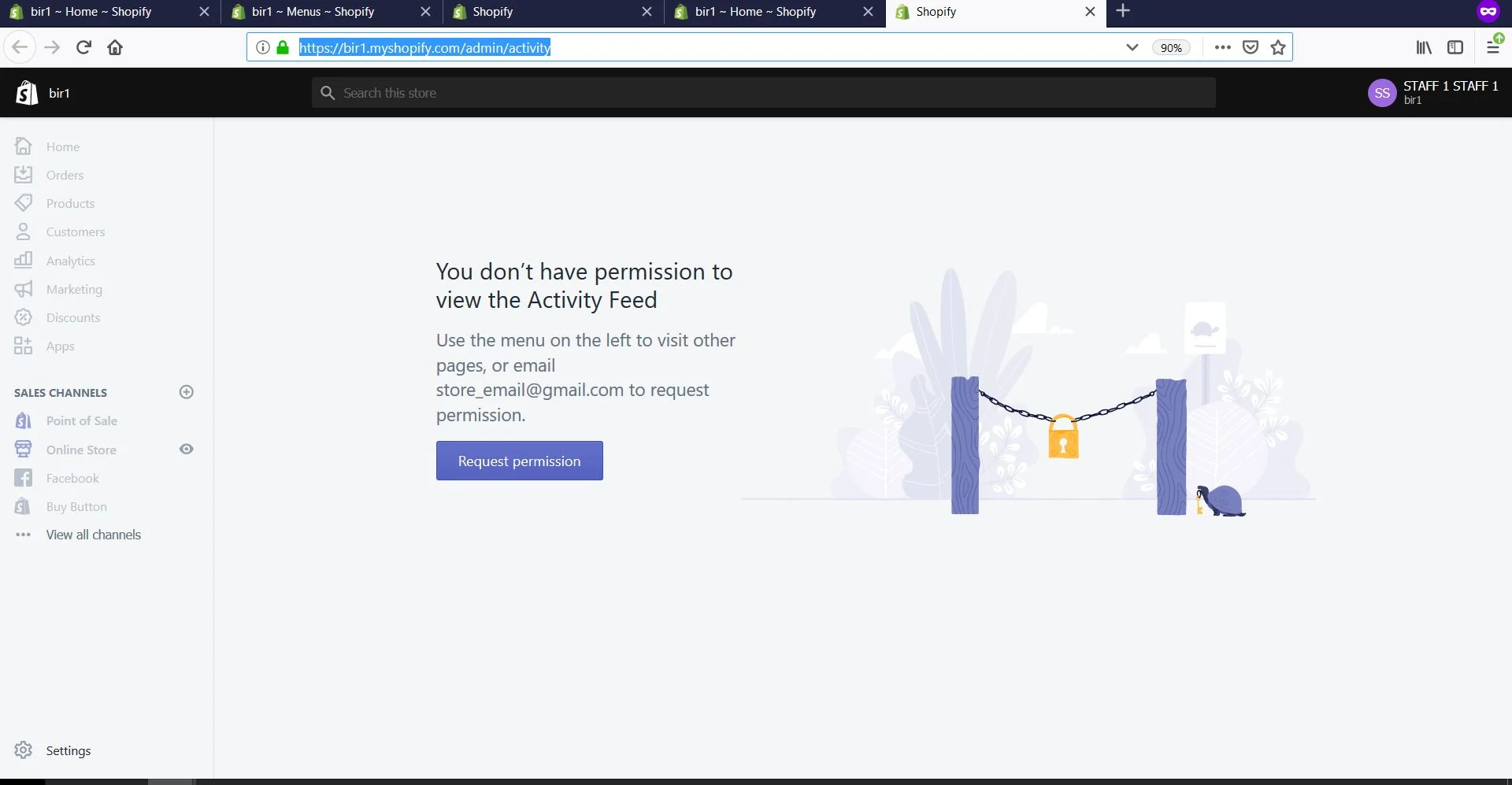
2.STAFF member logs into store and navigates to https://{store-name).myshopify.com/admin/activity . As you can see below, the STAFF has no permissions to view activity feed
2.STAFF member logs into store and triggers the below GraphQL request.
POST /admin/api/graphql HTTP/1.1
Host: bir1.myshopify.com
User-Agent: Mozilla/5.0 (Windows NT 10.0; WOW64; rv:66.0) Gecko/20100101 Firefox/66.0
Accept: application/json
Accept-Language: en-US,en;q=0.5
Accept-Encoding: gzip, deflate
content-type: application/json
X-Shopify-Web-Force-Proxy: 1
Origin: https://bir1.myshopify.com
Content-Length: 577

{"operationName":"ActivityFeed","variables":{"first":20},"query":"query ActivityFeed($first: Int!) {\n  staffMember {\n    id\n    privateData {\n      activityFeed(first: $first) {\n        pageInfo {\n          hasNextPage\n          __typename\n        }\n        edges {\n          ...Activity\n          __typename\n        }\n        __typename\n      }\n      __typename\n    }\n    __typename\n  }\n}\n\nfragment Activity on ActivityEdge {\n  cursor\n  node {\n    author\n    createdAt\n    messages\n    topic\n    attributed\n    __typename\n  }\n  __typename\n}\n"}
The response of the above request is follows,
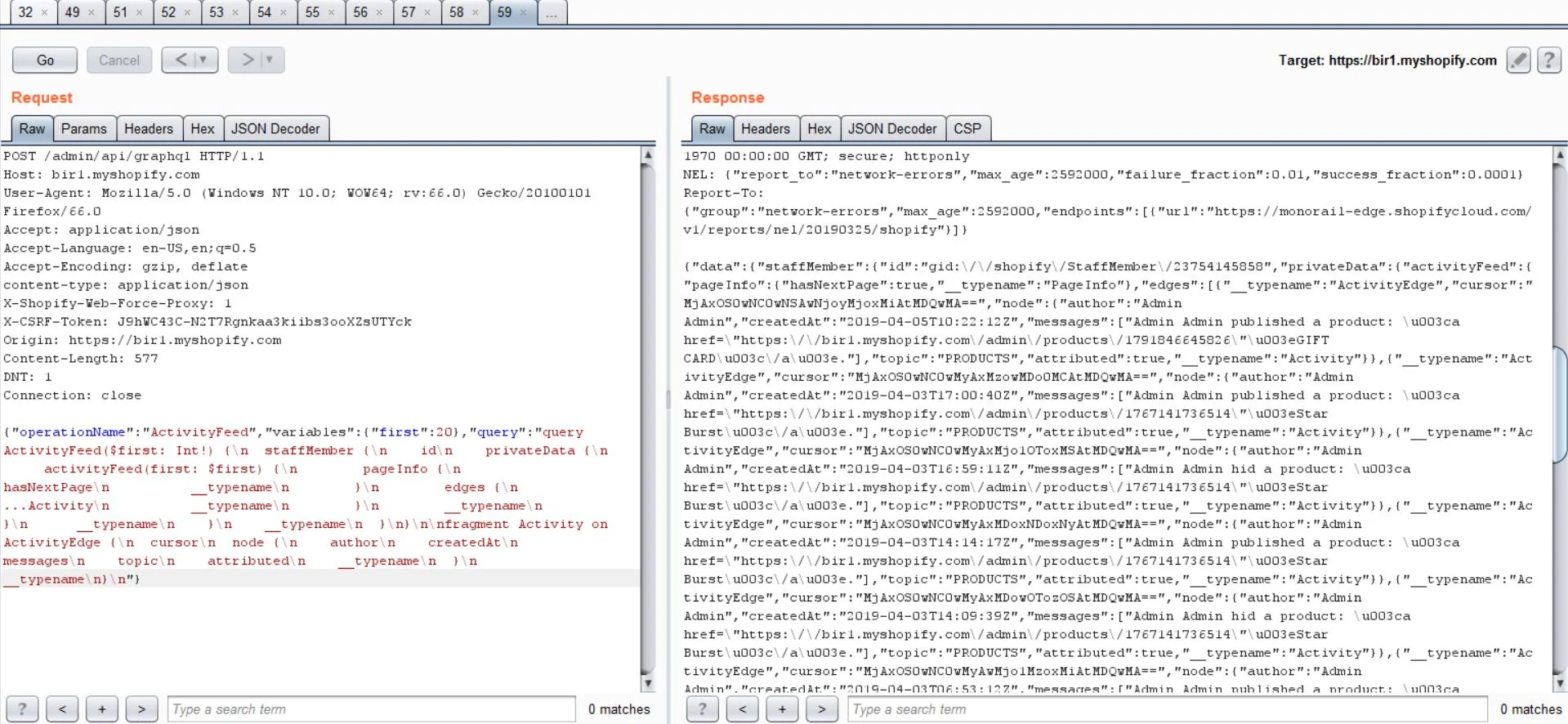
As you can see, the STAFF member was able to view activity feeds of the Store
Impact
By default, the store's Activity Feed must only be displayed to the STAFF having Home permissions. But using the above vulnerable GraphQL call, it was possible for a STAFF member with no permissions for fetch activity feed of a store.
Thanks, @h13-
Context
Shopify's admin interface includes an activity feed for each store, reachable at https://{store-name}.myshopify.com/admin/activity. The feed records store events and is meant to be visible only to staff members who hold the Home permission. At the time of this report, the admin was fetching that feed through a GraphQL call rather than a classic REST endpoint, and the researcher noticed this change and tested whether the new call enforced the same permission check as the page.
This report is a follow-up to an earlier report, #95589, which covered a similar access control problem.
Setup
The test needs two roles on a Shopify store:
- A store owner, who creates a staff member account and assigns it no permissions at all.
- A staff member account with no explicit permissions, used to log into the store admin.
The researcher used a store named bir1 in the request (bir1.myshopify.com) and a Firefox 66 user agent. No other tooling is described.
Finding it
The researcher observed that ActivityFeeds were now being fetched by a GraphQL call on Shopify. Given that the admin page itself is permission-gated, the question was whether the GraphQL operation behind it was gated the same way. Testing showed that a staff member with no explicit permissions could still fetch the store's activity feed by calling the GraphQL endpoint directly.
Exploitation
Step 1: Create a staff member with no permissions
The owner assigns the staff member no permissions on the store.
Step 2: Confirm the UI blocks the feed
The staff member logs into the store and navigates to:
https://{store-name).myshopify.com/admin/activity
The page shows that the staff member has no permission to view the activity feed.
The screenshot shows the admin activity page as seen by the unprivileged staff member, who has no permission to view the activity feed.
Step 3: Call the GraphQL endpoint directly
While logged in, the staff member sends the following request:
POST /admin/api/graphql HTTP/1.1
Host: bir1.myshopify.com
User-Agent: Mozilla/5.0 (Windows NT 10.0; WOW64; rv:66.0) Gecko/20100101 Firefox/66.0
Accept: application/json
Accept-Language: en-US,en;q=0.5
Accept-Encoding: gzip, deflate
content-type: application/json
X-Shopify-Web-Force-Proxy: 1
Origin: https://bir1.myshopify.com
Content-Length: 577

{"operationName":"ActivityFeed","variables":{"first":20},"query":"query ActivityFeed($first: Int!) {\n  staffMember {\n    id\n    privateData {\n      activityFeed(first: $first) {\n        pageInfo {\n          hasNextPage\n          __typename\n        }\n        edges {\n          ...Activity\n          __typename\n        }\n        __typename\n      }\n      __typename\n    }\n    __typename\n  }\n}\n\nfragment Activity on ActivityEdge {\n  cursor\n  node {\n    author\n    createdAt\n    messages\n    topic\n    attributed\n    __typename\n  }\n  __typename\n}"}
The operation is named ActivityFeed and takes a single variable, first, set to 20, which controls how many edges are returned. The query starts at staffMember, descends into privateData, and then into activityFeed(first: $first). It requests pageInfo.hasNextPage and, for each edge, the Activity fragment, which pulls cursor and the node fields author, createdAt, messages, topic and attributed. The X-Shopify-Web-Force-Proxy: 1 header is present on the request.
Step 4: Read the response
The response to the request is shown below.
The screenshot shows the response to the request, after which the researcher notes the staff member was able to view the store's activity feeds.
As the researcher notes, the staff member was able to view the activity feeds of the store.
Root cause
The activity feed data is exposed through the staffMember.privateData.activityFeed field on the GraphQL schema. The admin page at /admin/activity enforces the Home permission, but the GraphQL resolver behind the ActivityFeed operation does not apply the same check, so a staff session with no permissions can reach the data by calling the API directly. The report does not describe the server-side implementation, so the exact location of the missing check is not stated; likely the authorisation was enforced only at the page or route level and not on the GraphQL field itself.
Impact
By default, the store's activity feed must only be displayed to staff holding Home permissions. Using the GraphQL call above, a staff member with no permissions could fetch the activity feed of the store. The data returned includes the fields requested in the query: author, creation time, messages, topic and the attributed flag, for up to the requested number of edges. The staff member held no permissions on the store, yet could fetch its activity feed.
Fix
The report does not describe the fix that was applied.
Variants to test
- Other GraphQL fields under
staffMember.privateData: query each field with an unprivileged staff session and check whether data comes back where the corresponding admin page is blocked. - Other admin pages that were migrated to GraphQL: compare the permission required by the page with the permission enforced by the operation it calls.
- Other staff roles with partial permissions: check whether operations tied to permissions the account does not hold are still reachable.
- Pagination variables: vary
firstto see whether larger pages are accepted, which would widen the amount of data returned per request.
A positive result in each case is a response containing store data that the staff member's assigned permissions should not allow.
Hunting notes
This bug sits at the boundary between a permission-gated UI and the API that feeds it. When a product migrates a feature from server-rendered pages or REST to GraphQL, the new operation is a fresh authorisation surface, and the page-level check does not automatically carry over. The signal during recon is a feature whose page is blocked for a low-privilege account but whose underlying request can be replayed from that same session. The researcher showed both states: the blocked page and the successful GraphQL response from the same unprivileged account.
What happened, in plain words
Shopify is a platform that lets people run an online shop. Each shop has an admin area, a private website where the owner and their helpers manage the shop. The owner can create accounts for helpers, called staff members, and decide exactly what each one is allowed to see and do. This is the shop's permission system.
One part of the admin area is the activity feed. It is a running list of things that happened in the shop: who did what and when. Think of it like a shared diary of the shop's events. By design, only staff members who hold a permission called Home should be able to read it.
A security researcher noticed that the admin was no longer loading this feed the old way. Instead, the page was asking a separate service for the data using a technology called GraphQL. The researcher then asked a simple question: does that separate service check permissions as carefully as the page does? The answer was no. A staff member with no permissions at all could ask the service directly and receive the shop's activity feed.
This kind of mistake is called a broken access control problem: the product has a rule about who may see something, but one of the ways to reach the data does not enforce the rule. The report is a follow-up to an earlier report, #95589, which described a similar problem.
Background ideas you need first
Before walking through the steps, here are the few concepts the report relies on.
The admin page and the API behind it. A web page you see in a browser is only the visible part. Modern web apps often load their data separately, by having the browser send a request to a server and then drawing the answer on screen. The address that answers such requests is called an API (application programming interface). A useful comparison: the page is the counter of a shop, and the API is the back door the staff use to fetch stock from the warehouse. If the counter is locked but the back door is not, the lock does not help much.
GraphQL. GraphQL is a way for a client to ask a server for exactly the data it wants. Instead of many fixed addresses, there is usually one address, and the request describes which fields to return, a bit like filling in a form that says "give me these boxes and nothing else". The server replies with data shaped like the request.
A session. When you log into a website, the server needs a way to recognise you on your next request, because the web itself does not remember anything between requests. It gives your browser a small piece of identification, often stored in a cookie, and your browser sends it back with every request. That is your session: proof that you are the logged-in staff member. The report relies on this: the staff member is logged in, so their requests carry their identity.
Permissions and roles. A permission is a named allowance, such as "may view the activity feed". A role is a bundle of permissions given to an account. The shop owner decides which permissions each staff account gets. The whole point of the report is that one account had none, and still got data.
Severity and bounty. When a report is accepted, the platform gives it a severity rating (how serious the problem is) and sometimes pays a reward, called a bounty.
Setting up the test
The test needs two accounts on a Shopify store:
- A store owner, who creates a staff member account and gives it no permissions at all.
- That staff member account, used to log into the shop's admin area.
The researcher used a store named bir1 in the request, so the address bir1.myshopify.com appears throughout. The browser identified itself as Firefox 66. No other tools are described.
Finding it
The researcher saw that activity feeds were now being fetched by a GraphQL call. Since the admin page itself refuses to show the feed to an account without the right permission, the natural next question is whether the GraphQL operation behind that page refuses too. Testing showed it did not: a staff member with no explicit permissions could still fetch the shop's activity feed by calling the GraphQL endpoint directly.
Exploitation, step by step
Step 1: Create a staff member with no permissions
The owner creates the staff account and assigns it no permissions on the shop. This is the setup that makes the test meaningful: if the account had the Home permission, seeing the feed would be normal and there would be nothing to report.
Step 2: Confirm the normal page blocks the feed
The staff member logs into the shop and opens this address in the browser:
https://{store-name).myshopify.com/admin/activity
This is the admin page for the activity feed. The idea of this step is to establish the intended behaviour first: the product itself says this account may not see the feed. The page shows that the staff member has no permission to view the activity feed.
The screenshot shows the admin activity page as seen by the unprivileged staff member, who has no permission to view the activity feed.
Step 3: Call the GraphQL endpoint directly
While still logged in, the staff member sends the following request:
POST /admin/api/graphql HTTP/1.1
Host: bir1.myshopify.com
User-Agent: Mozilla/5.0 (Windows NT 10.0; WOW64; rv:66.0) Gecko/20100101 Firefox/66.0
Accept: application/json
Accept-Language: en-US,en;q=0.5
Accept-Encoding: gzip, deflate
content-type: application/json
X-Shopify-Web-Force-Proxy: 1
Origin: https://bir1.myshopify.com
Content-Length: 577

{"operationName":"ActivityFeed","variables":{"first":20},"query":"query ActivityFeed($first: Int!) {\n  staffMember {\n    id\n    privateData {\n      activityFeed(first: $first) {\n        pageInfo {\n          hasNextPage\n          __typename\n        }\n        edges {\n          ...Activity\n          __typename\n        }\n        __typename\n      }\n      __typename\n    }\n    __typename\n  }\n}\n\nfragment Activity on ActivityEdge {\n  cursor\n  node {\n    author\n    createdAt\n    messages\n    topic\n    attributed\n    __typename\n  }\n  __typename\n}"}
Line by line, in plain words:
POST /admin/api/graphql HTTP/1.1is the request line.POSTmeans "I am sending data to the server",/admin/api/graphqlis the address of the GraphQL service inside the admin area, andHTTP/1.1is the version of the web protocol being used.Host: bir1.myshopify.comtells the server which site the request is for. One server can host many sites, so this line picks the right one.User-Agent: ...says which browser and operating system sent the request. Here it is Firefox 66 on 64-bit Windows.Accept: application/jsonsays the client expects the answer in JSON, a text format for structured data that both sides can read.Accept-LanguageandAccept-Encodingdescribe preferred language and compression. They are ordinary browser headers.content-type: application/jsonsays the body of the request is JSON.X-Shopify-Web-Force-Proxy: 1is a custom header present on the request. The report does not explain what it does.Origin: https://bir1.myshopify.comsays which site the request came from. Browsers add this automatically, and servers often use it for security checks.Content-Length: 577is the size of the body in bytes, so the server knows how much to read.- The blank line separates the headers from the body.
- The body is one JSON object with three parts.
operationNameisActivityFeed, the name of the operation being run.variablessetsfirstto20, which controls how many entries are returned.queryis the GraphQL query itself.
Inside the query, the structure reads like a path through the data:
- It starts at
staffMember, the logged-in staff account, and asks forid. - It then goes into
privateData, a section of the staff member's data that is meant to be private. - Inside that, it asks for
activityFeed(first: $first), the feed itself, using thefirstvariable. - Under the feed it asks for
pageInfowithhasNextPage, which tells whether there are more entries beyond this page. - It asks for
edges, the list of entries, and spreads in a fragment calledActivity. - The fragment
Activityis defined at the end. For each entry it asks forcursor, a marker used for paging, and anodecontainingauthor,createdAt,messages,topicandattributed. __typenameappears in several places. It is a built-in GraphQL field that returns the name of the type of the object, useful for the client to know what it received.
The point of this step is that the request goes straight to the API, skipping the page that would have refused. If the API checks permissions properly, it should refuse as well. The next step shows what actually came back.
Step 4: Read the response
The response to the request is shown below.
The screenshot shows the response to the request, after which the researcher notes the staff member was able to view the shop's activity feeds. As the researcher notes, the staff member was able to view the activity feeds of the shop.
Why it happened
The activity feed data is reachable through the field staffMember.privateData.activityFeed in the GraphQL schema. The admin page at /admin/activity does enforce the Home permission, but the code that answers the ActivityFeed operation does not apply the same check. So a staff session with no permissions can reach the data by calling the API directly.
The report does not describe the server-side implementation, so the exact place where the check is missing is not stated. The likely explanation is that the authorisation was enforced only at the page or route level and not on the GraphQL field itself. In everyday terms: the shop assistant at the counter checks your badge, but the warehouse door behind them has no lock.
Impact
By default, the shop's activity feed must only be shown to staff holding Home permissions. Using the GraphQL call above, a staff member with no permissions could fetch the feed. The data returned includes the fields requested in the query: author, creation time, messages, topic and the attributed flag, for up to the requested number of entries.
The staff member held no permissions on the shop, yet could fetch its activity feed. The report was rated low severity and paid a 500 USD bounty.
Fix
Variants to test
- Other GraphQL fields under
staffMember.privateData: query each field with an unprivileged staff session and check whether data comes back where the corresponding admin page is blocked. - Other admin pages that were migrated to GraphQL: compare the permission required by the page with the permission enforced by the operation it calls.
- Other staff roles with partial permissions: check whether operations tied to permissions the account does not hold are still reachable.
- Pagination variables: vary
firstto see whether larger pages are accepted, which would widen the amount of data returned per request.
A positive result in each case is a response containing shop data that the staff member's assigned permissions should not allow.
Hunting notes
This bug sits at the boundary between a permission-gated interface and the API that feeds it. When a product migrates a feature from server-rendered pages or REST to GraphQL, the new operation is a fresh place where authorisation must be checked, and the page-level check does not automatically carry over. The signal during recon is a feature whose page is blocked for a low-privilege account but whose underlying request can be replayed from that same session. The researcher showed both states: the blocked page and the successful GraphQL response from the same unprivileged account.
Glossary
- API: a way for one piece of software to ask another for data or actions, usually over the web; the back door behind a page.
- Access control: the rules that decide who may see or do what in a system.
- Broken access control: when those rules exist but one route into the data does not enforce them.
- Admin area: the private part of a shop where the owner and staff manage it.
- Staff member: an account created by the shop owner for a helper, with chosen permissions.
- Permission: a named allowance, such as the right to view the activity feed.
Homepermission: the permission that, by design, is required to see the activity feed.- Activity feed: the list of events that happened in the shop, with author, time, messages and topic.
- GraphQL: a query language and service style where the client describes exactly which fields it wants in one request.
- Operation: a named GraphQL request, here
ActivityFeed. - Query: the part of a GraphQL request that describes the data to return.
- Variable: a named value passed alongside a GraphQL query, here
firstset to20. - Field: one named piece of data in a GraphQL query, such as
authororcreatedAt. - Fragment: a reusable block of fields in GraphQL, here
Activity. - Edge and node: GraphQL's way of describing a list; each edge is a position in the list and its node is the item itself.
- Cursor: a marker that identifies a position in a list, used for paging.
- Pagination: splitting a long list into pages;
firstcontrols the page size. pageInfo.hasNextPage: a field that says whether more entries exist after this page.__typename: a built-in GraphQL field returning the name of the object's type.- Resolver: the server-side code that produces the data for a GraphQL field.
- Schema: the map of all types and fields a GraphQL service offers.
- Session: the server's memory of who you are, kept alive by an identifier your browser sends with each request.
- Cookie: a small piece of data a site stores in your browser, often used to carry that session identifier.
- Header: a line of extra information sent with a web request or response, such as
HostorOrigin. Host: the header naming which site the request is for.User-Agent: the header describing the browser and system that sent the request.Origin: the header naming the site a request came from.Content-Type: the header saying what format the request body is in.Content-Length: the header giving the size of the request body in bytes.- JSON: a text format for structured data, made of keys and values.
- HTTP: the protocol browsers and servers use to exchange requests and responses.
- POST: an HTTP method used to send data to the server.
- Endpoint: a specific address on a server that accepts requests, here
/admin/api/graphql. - REST: an older, common style of web API with many fixed addresses, contrasted here with GraphQL.
- Replay: sending a captured request again from the same session to see whether it is accepted.
- Severity: a rating of how serious a security problem is.
- Bounty: a reward paid to a researcher for a valid report.
- Recon: the exploratory phase of security testing, looking for interesting behaviour.


