Unpublished Product Images can be disclosed
An endpoint on a Shopify store returned product images for unpublished products when given a product ID. An unauthenticated attacker could view images of products that were not meant to be public.

- Triaged in 27 hours
- Fixed in 2 months
- Paid in 28 hours
- Disclosed after 2 months
Hi,
This looks like a minor issue but felt like it was something worth reporting. Ideally, a product can be published or remain unpublished on any sales channel. If a product remains unpublished, then no information regarding it must be visible to public including product pictures.
But I found an endpoint which when queried with the Product_ID value of the unpublished product will returns its product image.
STEPS
1.Create product in Shopify Admin and upload a product image to it. 2.Make sure the product is not published in any sales channels/Apps.
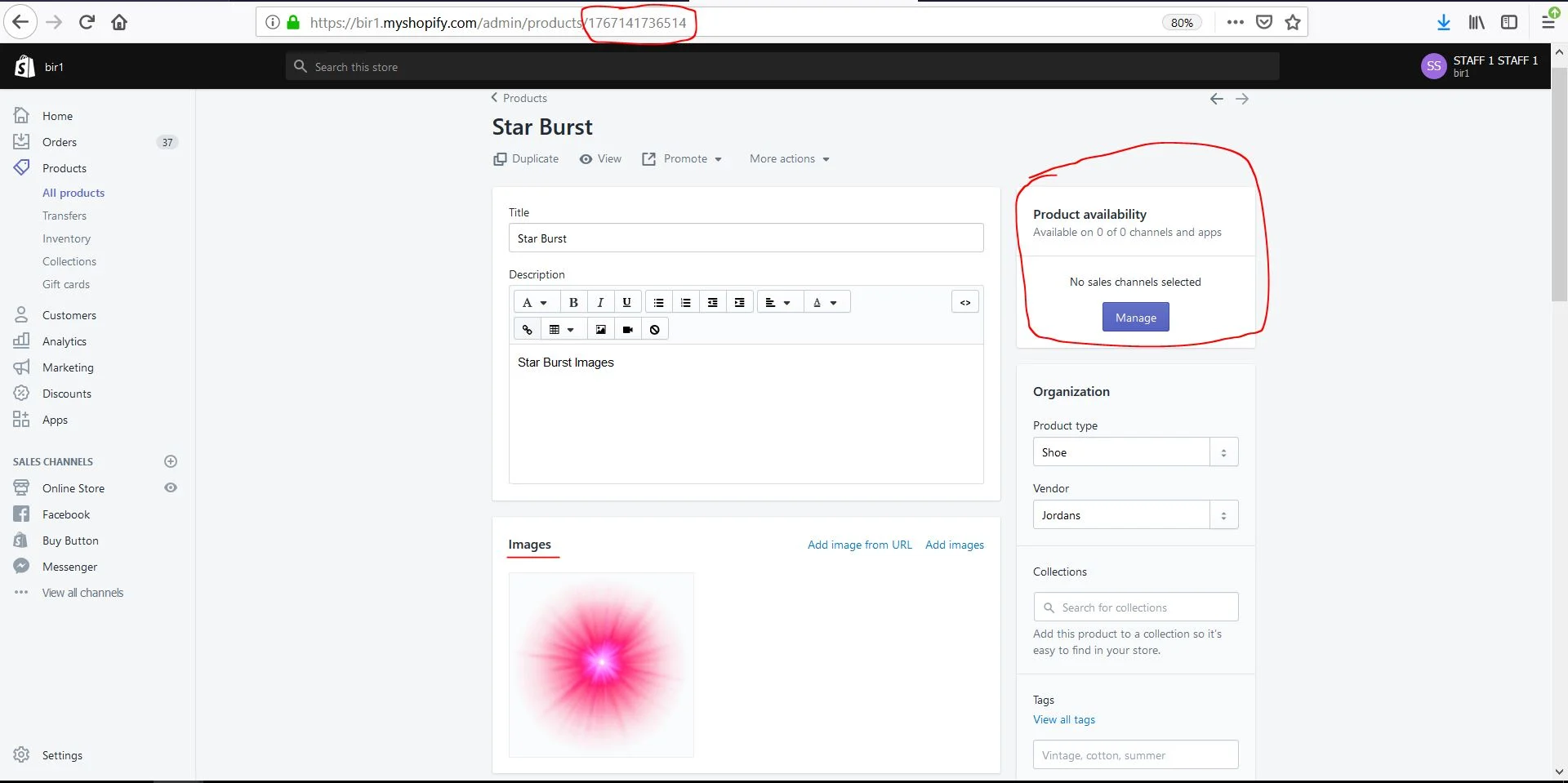
3.Navigate to Online store front and check if any product is being shown/listed.
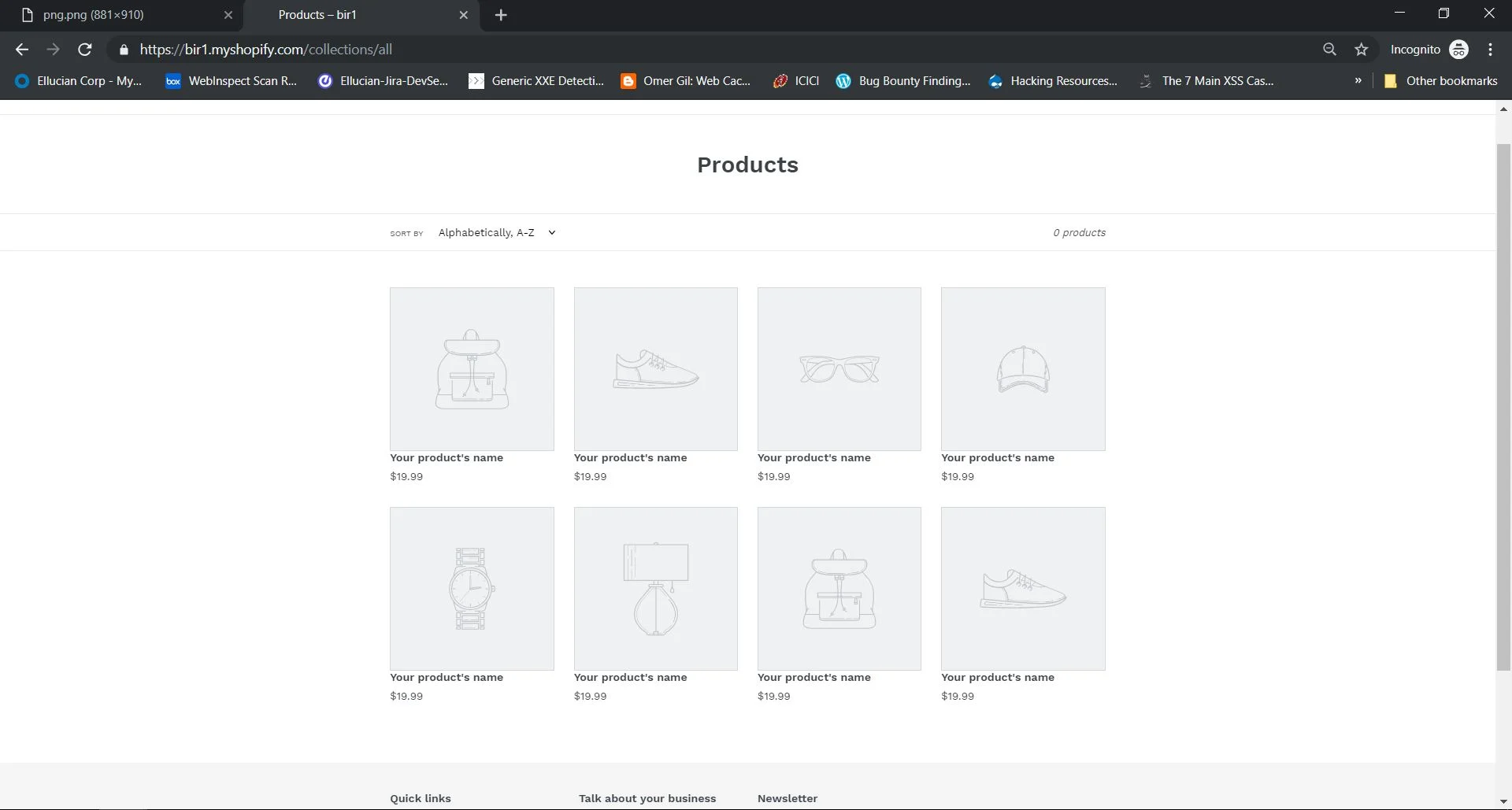
As you can see from above, no products or its images are visible.
4.Now navigate to the below endpoint
https://{shop_name}.myshopify.com/services/img?product={Product_ID}
Ex - https://bir1.myshopify.com/services/img?product=1767141736514
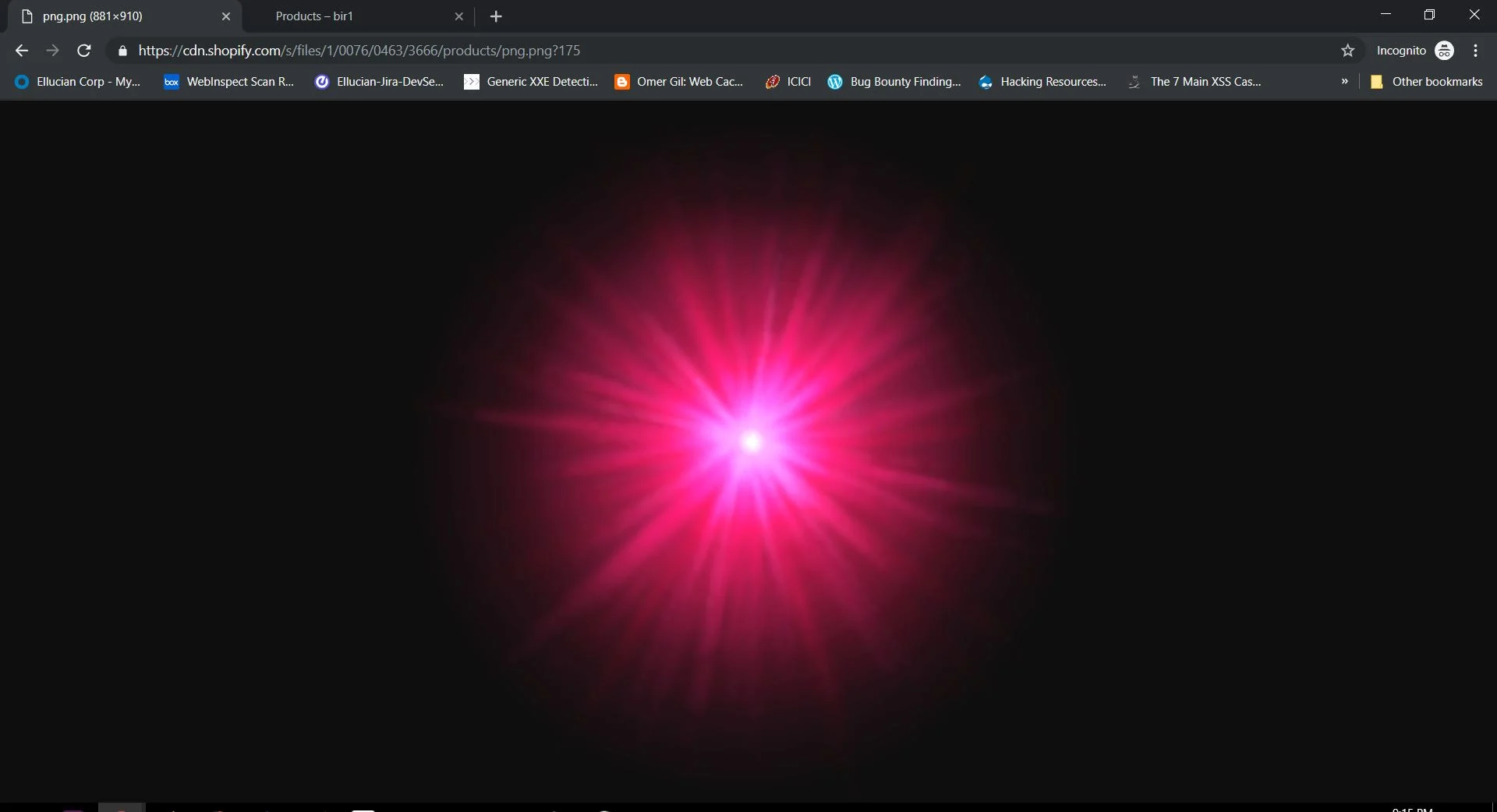
The product image of an unpublished item can be seen in the above screen shot
Impact
Through the above vulnerable endpoint, it was possible for an unauthenticated user to query product images of unpublished products in Shopify store by specifying their Product_ID.
Thanks, @h13-
Context
Shopify lets a merchant create products in the admin and decide, per sales channel, whether each product is published. A product that is not published on any sales channel should be invisible to the public: neither the product nor its images should be reachable from the storefront. The report examines whether that invisibility holds for the image-serving path, using a store on the your-store.myshopify.com domain.
The researcher describes the issue as minor but worth reporting: the expectation is that an unpublished product leaks no information to the public, including its pictures.
Setup
No special tooling, account role or version is described. The preconditions that matter are:
- A Shopify store with admin access, so a product can be created and an image uploaded.
- The product must be left unpublished on every sales channel and app.
- The storefront must be checked to confirm the product is not listed.
- The numeric
Product_IDof the unpublished product, which is used as the query value against the image endpoint.
Finding it
The researcher started from the intended behaviour: a product can be published or remain unpublished on any sales channel, and if it remains unpublished, no information about it should be visible to the public, product pictures included. Against that expectation, an endpoint was found that returns a product image when it is queried with the Product_ID of an unpublished product. The endpoint is:
https://{shop_name}.myshopify.com/services/img?product={Product_ID}
The shop_name placeholder is the store's myshopify subdomain and product takes the numeric product identifier. The researcher's own example is:
https://bir1.myshopify.com/services/img?product=1767141736514
What looked wrong is the mismatch between the storefront, which shows nothing, and this endpoint, which serves the image anyway to anyone who knows the identifier.
Exploitation
Step 1: create an unpublished product with an image
Create a product in the Shopify Admin and upload a product image to it. Then make sure the product is not published in any sales channels or apps.
Step 2: confirm the storefront shows nothing
Navigate to the Online store front and check whether any product is being shown or listed.
As the researcher notes, no products or images are visible on the storefront, which is the expected behaviour for an unpublished product.
Step 3: query the image endpoint with the product ID
Navigate to the endpoint with the unpublished product's identifier:
https://{shop_name}.myshopify.com/services/img?product={Product_ID}
For the researcher's store this was:
https://bir1.myshopify.com/services/img?product=1767141736514
The response serves the product image of the unpublished item, which can be seen in the screenshot. The only input needed is the Product_ID.
Root cause
The report does not describe the server-side implementation, so the exact mistake is not stated. What the behaviour implies is that the image-serving path at /services/img resolves a product by its identifier and returns the associated image without checking whether that product is published on any sales channel. The storefront listing applies the publication rule; this endpoint, reached directly, does not. Whether the check is missing entirely or applied only on some paths is not something the report says.
Impact
Through the endpoint, an unauthenticated user could query product images of unpublished products in a Shopify store by specifying their Product_ID. The exposure is limited to what the endpoint returns, which in the report is the product image, and it requires knowledge of the numeric product identifier. The researcher frames the issue as minor.
Fix
The report does not state what was changed. The behaviour it describes points to the fix: the image endpoint should apply the same publication check as the storefront and refuse to serve images for products that are not published on any sales channel.
Variants to test
- Other media endpoints: try paths that serve product media by identifier on stores you are authorised to test, and compare the response for a published and an unpublished product. A positive result is an image returned for the unpublished product.
- Identifier enumeration: check whether sequential or otherwise guessable product identifiers let you reach images without prior knowledge of the ID. A positive result is a valid image for an identifier you did not obtain from the storefront.
- Related objects: apply the same idea to other objects that have a published or visible state, such as collections, and see whether a direct lookup path ignores that state. A positive result is content returned for an object the storefront does not list.
Hunting notes
This kind of bug tends to sit on secondary serving paths, such as image and media endpoints, that resolve an object by identifier rather than going through the storefront's listing logic. During recon, the signal is a storefront that shows nothing while a direct request with a known identifier still returns content. The researcher demonstrated impact by creating the product, confirming the storefront showed nothing, and then showing the image served by the endpoint.
What happened, in plain words
Shopify is a service that lets people run an online shop. A shop owner logs into an admin area, adds products, uploads pictures of them, and decides where each product should appear. One of those decisions is whether a product is published: published means it is live and visible to shoppers, unpublished means it is still hidden, perhaps because it is not ready yet.
The sensible expectation is simple. If a product is unpublished on every sales channel, then nobody outside the shop should be able to see anything about it, including its pictures.
The researcher found that this expectation does not fully hold. There is a web address (an endpoint) that hands back the picture of a product when you give it that product's numeric identifier, even if the product is unpublished. No login is needed. The only thing you must know is the product's ID number.
The researcher describes this as a minor issue, but one worth reporting, because a hidden product should not leak its images to the public.
Background ideas you need first
A few concepts come up repeatedly, so here they are from zero.
- Storefront: the public, shopper-facing part of an online shop. It is what a customer sees in their browser when they visit the shop. It is separate from the admin area, which only the shop owner uses.
- Admin: the private control panel where the shop owner creates products, uploads images and changes settings.
- Sales channel: a place where a product can be offered for sale, such as the shop's own website or a connected app. A product can be published on some channels and not others.
- Published / unpublished: published means the product is live and allowed to be shown on a given sales channel. Unpublished means it is deliberately kept out of view there.
- Endpoint: a specific web address on a server that does one job. Think of a building with many service windows: each window has a number, and you go to the right window for the service you want. An endpoint is that window, and the address is its number.
- API: a way for one piece of software to talk to another, usually by requesting a specific address and getting data back rather than a full web page. The endpoint in this report behaves like a small API: you ask for an image by ID and it returns the image.
- Query parameter: the part of a web address after a question mark, made of a name, an equals sign and a value, for example
?product=123. It is how you pass a piece of information to the endpoint, like writing a reference number on a form. - Product_ID: the unique number a shop's system gives to each product. It is not secret in the sense of a password, but it is not shown on the storefront for a hidden product either.
- Unauthenticated: not logged in. An unauthenticated request is one made by an anonymous visitor with no account and no session.
- Access control: the rules that decide who is allowed to see or do what. When those rules are missing or too loose, the problem is called improper access control. The everyday comparison: a staff-only door that has no lock, so anyone who finds it can walk through.
The setup
The report does not describe any special tools, account roles or software versions. What matters are these preconditions:
- A Shopify store with admin access, so a product can be created and an image uploaded to it.
- The product must be left unpublished on every sales channel and app.
- The storefront must be checked to confirm the product is not listed there.
- The numeric
Product_IDof the unpublished product, which is used as the value sent to the image endpoint.
Finding it
The researcher started from the intended behaviour: a product can be published or left unpublished on any sales channel, and if it stays unpublished, no information about it should be visible to the public, pictures included.
Against that expectation, an endpoint was found that returns a product image when it is queried with the Product_ID of an unpublished product. The endpoint is:
https://{shop_name}.myshopify.com/services/img?product={Product_ID}
Line by line:
https://is the normal secure web protocol, the same one your browser uses for online banking.{shop_name}.myshopify.comis the address of the shop. The curly-braced part is a placeholder: each shop has its own name in that position, so the real address differs per shop./services/imgis the path, the part that points at the specific service window. Here it is the image-serving endpoint.?product={Product_ID}is the query parameter. The name isproductand the value is the product's numeric identifier, again shown as a placeholder.
So the address says: "image service, please give me the picture belonging to this product number."
The researcher's own example was:
https://bir1.myshopify.com/services/img?product=1767141736514
Here bir1 is the shop name and 1767141736514 is the product identifier.
What looked wrong is the mismatch. The storefront shows nothing at all, yet this endpoint serves the image anyway to anyone who knows the identifier. The public face of the shop says "there is no such product", while a direct request says "here is its picture".
Exploitation
Step 1: create an unpublished product with an image
Create a product in the Shopify Admin and upload a product image to it. Then make sure the product is not published in any sales channels or apps.
This step exists to set up a controlled test: you need a product that is definitely hidden, so that anything later revealing it is clearly a leak.
Step 2: confirm the storefront shows nothing
Navigate to the Online store front and check whether any product is being shown or listed.
As the researcher notes, no products or images are visible on the storefront. This is the expected behaviour for an unpublished product, and it is the baseline. Without this check you could not be sure the product was really hidden; with it, you know the shop is behaving correctly on its public side.
Step 3: query the image endpoint with the product ID
Navigate to the endpoint with the unpublished product's identifier:
https://{shop_name}.myshopify.com/services/img?product={Product_ID}
For the researcher's store this was:
https://bir1.myshopify.com/services/img?product=1767141736514
The response serves the product image of the unpublished item, which can be seen in the screenshot. The only input needed is the Product_ID. In other words, you do not log in, you do not use any special tool, and you do not need to be the shop owner.
Why it happens
The report does not describe the server-side implementation, so the exact mistake is not stated. What the behaviour implies is that the image-serving path at /services/img looks up a product by its identifier and returns the associated image without checking whether that product is published on any sales channel.
The storefront listing applies the publication rule: it only shows products that are meant to be shown. This endpoint, reached directly, does not apply that rule. A useful comparison is a shop with a front door that only lets in customers when the shop is open, and a side door that is never checked. The front door follows the opening hours; the side door does not.
Whether the check is missing entirely or applied only on some paths is not something the report says.
Impact
Through the endpoint, an unauthenticated user could query product images of unpublished products in a Shopify store by specifying their Product_ID. The exposure is limited to what the endpoint returns, which in the report is the product image, and it requires knowledge of the numeric product identifier. The researcher frames the issue as minor.
Fix
The behaviour it describes points to the fix: the image endpoint should apply the same publication check as the storefront and refuse to serve images for products that are not published on any sales channel.
Variants to test
If you want to look for similar problems on shops you are authorised to test, these are directions to try:
- Other media endpoints: try paths that serve product media by identifier, and compare the response for a published product and an unpublished one. A positive result is an image returned for the unpublished product.
- Identifier enumeration: check whether sequential or otherwise guessable product identifiers let you reach images without first learning the ID from the storefront. A positive result is a valid image for an identifier you did not obtain from the storefront.
- Related objects: apply the same idea to other objects that have a published or visible state, such as collections, and see whether a direct lookup path ignores that state. A positive result is content returned for an object the storefront does not list.
Hunting notes
This kind of bug tends to sit on secondary serving paths, such as image and media endpoints, that resolve an object by identifier rather than going through the storefront's listing logic. During recon, the signal is a storefront that shows nothing while a direct request with a known identifier still returns content.
The researcher demonstrated impact by creating the product, confirming the storefront showed nothing, and then showing the image served by the endpoint.
Glossary
- Admin: the private control panel where a shop owner manages products, images and settings.
- API: a way for software to request data from another system by calling a specific address, usually getting data back rather than a full web page.
- Access control: the rules that decide who may see or do what; when they are missing or too loose, the problem is called improper access control.
- Endpoint: a specific web address that performs one job on a server.
- Identifier (ID): a unique number or string that a system uses to refer to a particular object, such as a product.
- Product_ID: the numeric identifier Shopify assigns to a product.
- Published: a product state meaning the product is live and allowed to be shown on a given sales channel.
- Query parameter: the
name=valuepart of a web address after the question mark, used to pass information to the endpoint. - Unauthenticated: not logged in; a request made by an anonymous visitor with no account or session.
- Unpublished: a product state meaning the product is deliberately kept out of view on a given sales channel.




