Stored xss
A stored XSS flaw existed in Shopify admin store settings; a WAF filtered HTML tags but was bypassed with an HTML comment, and injected script executed in the admin dashboard.

- Triaged in 2 hours
- Fixed in 24 hours
- Paid in 18 days
- Disclosed after 41 days
Description :
WAF cut html tages but when put <!--> before tages we can bypass it :) .
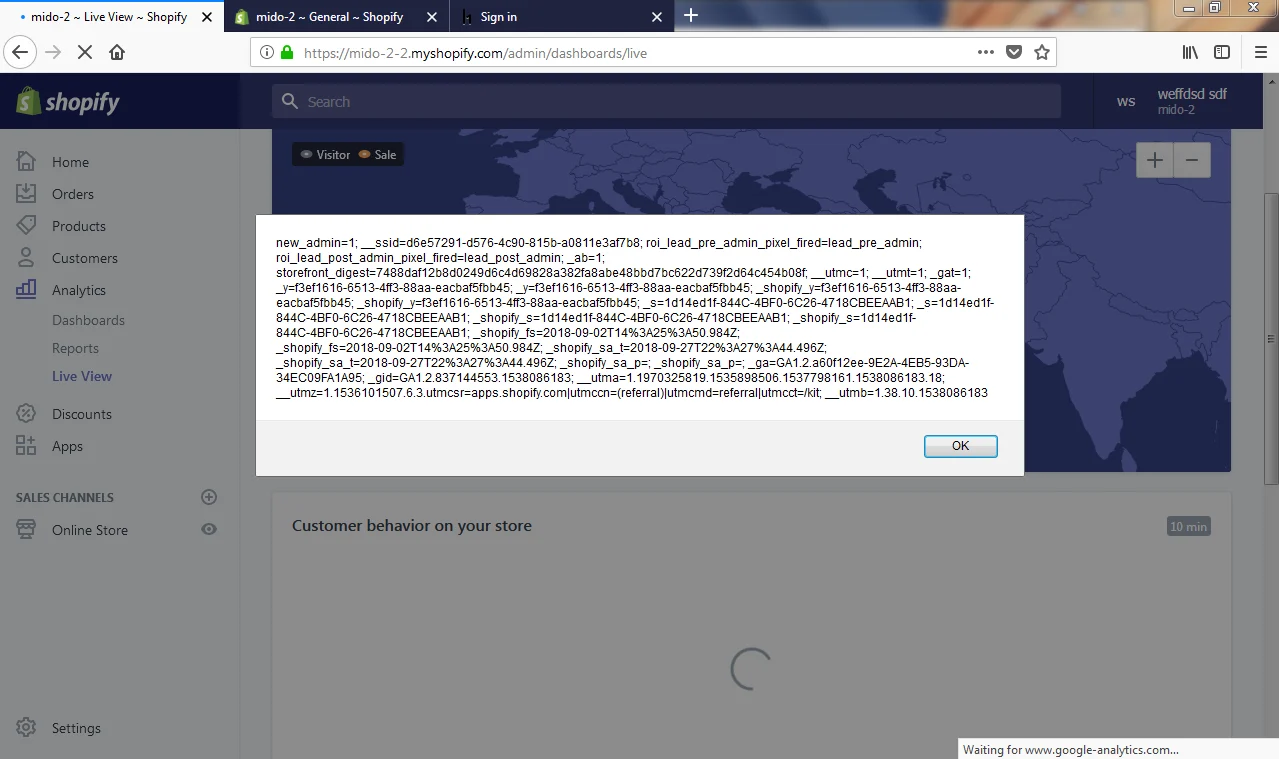
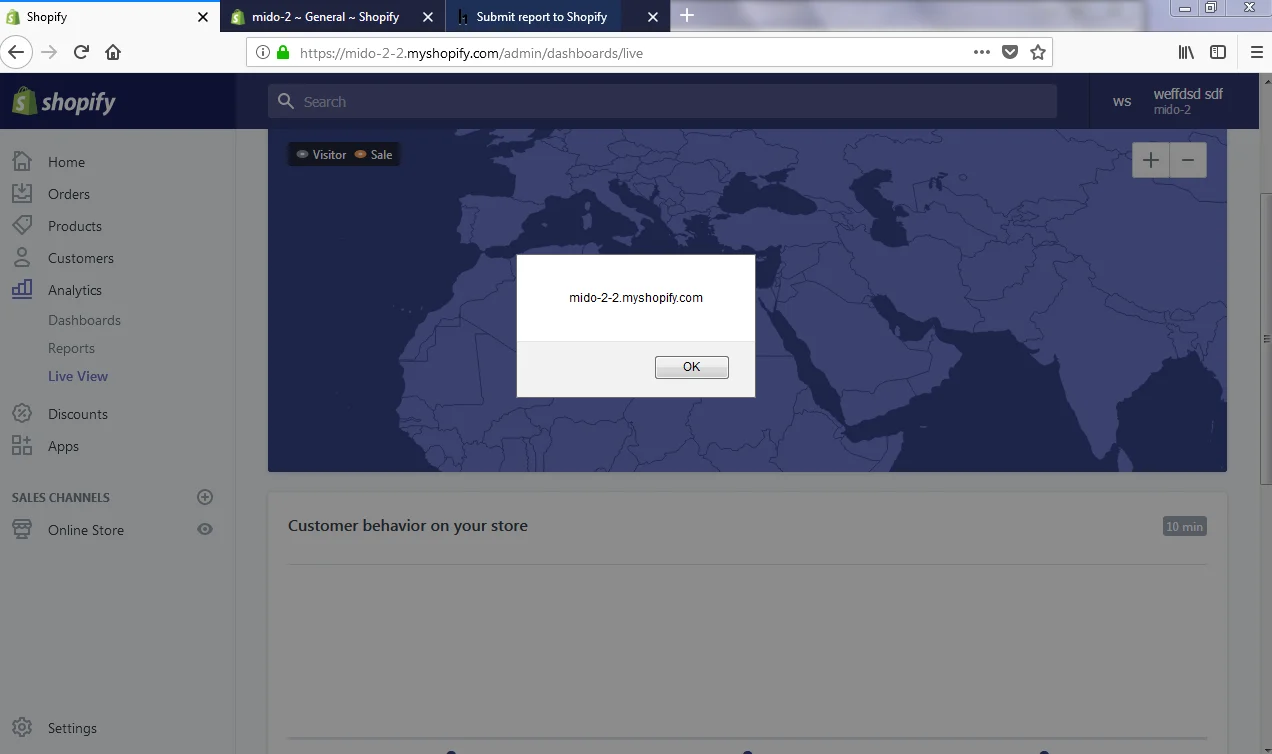
#Step to reproduce : 1-Open your store account 2-Navigate to https://xxx.myshopify.com/admin/settings/general 3-Put your street address xss payload (xss"><!--><svg/onload=alert(document.domain)>) 4-Go to https://xxx.myshopify.com/admin/dashboards/live 5-XSS alert message
Impact
XSS attack
Attachments
What the report shows
The target is the general settings page of a Shopify store admin, on the your-store.myshopify.com asset. The researcher found a stored cross-site scripting issue in the street address field, and the report describes a WAF bypass that made the payload survive.
The report opens with the core observation: the WAF strips HTML tags, but placing <!--> before the tags gets around it. The payload used in the reproduction steps is:
xss"><!--><svg/onload=alert(document.domain)>
The steps are short and direct:
- Open the store account.
- Navigate to
https://xxx.myshopify.com/admin/settings/general. - Put the payload above into the street address field.
- Go to
https://xxx.myshopify.com/admin/dashboards/live. - The XSS alert fires.
The outcome is that the script executes on the live dashboard page, which is a different page from the one where the value was entered. That is what makes it stored rather than reflected: the address value is saved and later rendered into another admin view. The report does not describe the fix.
Two screenshots are attached. Two screenshots are attached.
Root cause
The report does not state the root cause; the value is saved in the street address field and the script runs on the live dashboard. The WAF in front of the input is a filter, not an encoder: it removes tags it recognises, but the <!--> sequence confuses its parsing so the following <svg/onload=...> passes through. Filtering input by pattern is fragile in exactly this way, because the filter and the browser can disagree about where a tag begins and ends. The durable fix belongs at output time, where the value is placed into the page.
Impact
The report states the impact simply as an XSS attack. In practice, script running in the admin context of the store can act with the privileges of whoever views the affected page. The value is stored in a settings field and rendered on the live dashboard page. The report does not enumerate specific actions an attacker could take, so the concrete consequences beyond script execution are not documented here.
How this kind of bug works
Stored XSS happens when user-controlled data is persisted by the application and later written into an HTML response without context-appropriate encoding. The browser cannot tell injected markup from the application's own markup, so any script or event handler in the data executes in the origin of the page that renders it. The bug class appears wherever data crosses a trust boundary: profile fields, addresses, comments, names, support tickets, and any value that is echoed back into an administrative or public view.
Input filters and WAFs reduce the surface but do not remove the bug, because they must guess how a browser will tokenise the input. Comment syntax, unusual tag names, attribute contexts, encoding tricks and parser quirks all create gaps between what the filter sees and what the browser does. The reliable defence is output encoding: HTML-encode text nodes, attribute-encode attribute values, and avoid inserting untrusted data into JavaScript, CSS or URL contexts without the matching encoder. A restrictive Content Security Policy and correct use of framework auto-escaping reduce the chance that a missed encoding step becomes executable script.
How to test for it
Look for fields whose values are saved and later displayed somewhere else: account and store settings, profile data, addresses, display names, ticket subjects, and anything shown on a dashboard or summary page. The interesting case is a value entered on one page and rendered on another, because that is where encoding is most often forgotten.
A practical method:
- Enter a unique marker string in the field and save it.
- Find every page that displays the value, including admin dashboards, exports and emails.
- Replace the marker with a harmless probe that would only execute if the context is unencoded, such as an element with an event handler that calls
alerton a domain you control or writes to the DOM. - If a filter blocks the probe, vary the context: try breaking out of an attribute with a quote, try comment sequences, try different element and handler combinations, and observe whether the filter's response differs from the browser's parsing.
- Confirm execution in a real browser, not just by reading the response body.
A positive result is script executing in the origin of the page that renders the stored value, ideally on a page other than the one where it was entered. Common false positives are payloads that appear in the HTML source but are neutralised by encoding, values reflected only into a JSON response that is never inserted into the DOM, and alerts that fire from a page you control rather than the target origin. Also check whether the value is only visible to the user who entered it; that still matters, but it changes the impact story.
How it is fixed
Apply context-aware output encoding wherever the stored value is rendered, so the browser treats it as text rather than markup. Keep server-side validation as a secondary layer, but do not rely on blocklists or WAF rules as the primary control. Where rich text is genuinely needed, sanitise with a well-maintained HTML sanitiser on output or on storage, using an allowlist of elements and attributes. Add a Content Security Policy that restricts inline script, and review other fields that share the same rendering path, since a filter bypass found in one field usually applies to its siblings.
Hunting notes
Stored XSS tends to hide in secondary views: dashboards, activity feeds, admin tables, notification emails and export files, rather than the form where the data was entered. Settings pages that feed into multiple surfaces are good candidates, as are fields that accept free text but are validated only loosely. Recon signals include applications with a WAF in front of input fields, frameworks that mix server-rendered templates with client-side rendering, and any feature that aggregates user data into a summary page.
To get a report accepted, show execution in the target origin with a minimal, non-destructive payload, name the exact page where the value is stored and the page where it executes, and state who can trigger it and who is affected. If the payload only fires for the user who entered it, say so plainly rather than overstating the impact. Include the request and response evidence for both the save and the render, and note any filter behaviour you had to work around, since that is often the part triagers need to reproduce the finding.
What happened, in plain words
Shopify is a platform that lets people run an online shop. Each shop has an admin area, a private set of pages where the owner manages settings, products and orders. The researcher was looking at the general settings page of a store admin, at the address your-store.myshopify.com.
One of the fields on that page is the street address. The researcher found that a value typed into this field could contain a small piece of code, and that this code later ran in the browser on a different admin page, the live dashboard. This is called stored cross-site scripting, or stored XSS: stored because the value is saved by the shop, cross-site because the code ends up running in a page it was never meant to be part of.
A web application firewall, or WAF, sits in front of the input and tries to block dangerous HTML. The report opens with the key observation: the WAF strips HTML tags, but putting <!--> before the tags gets around it. The payload used in the reproduction steps is:
xss"><!--><svg/onload=alert(document.domain)>
Read it piece by piece:
xssis just text, a marker so the researcher can see where the value lands."is a double quote. It is there to close an HTML attribute early, so that whatever follows is no longer treated as part of an attribute value.>closes the HTML tag that the quote broke out of.<!-->is an HTML comment opener followed immediately by a closer. The report says putting it before the tags bypasses the WAF.<svg/onload=alert(document.domain)>is an SVG element with anonloadevent handler. When the browser loads that element, it runs the JavaScriptalert(document.domain), which pops up a box showing the domain of the page. That box is the proof that code ran on the target site.
The steps are short and direct:
- Open the store account.
- Navigate to
https://xxx.myshopify.com/admin/settings/general. - Put the payload above into the street address field.
- Go to
https://xxx.myshopify.com/admin/dashboards/live. - The XSS alert fires.
Each step matters. Step 2 is the page where the value is entered and saved. Step 3 is where the payload is entered into the street address field. Step 4 is a different page, the live dashboard, and that is the important part. The script runs there, not on the settings page. That is what makes the bug stored rather than reflected: the value is saved once and later rendered into another admin view. The report does not describe the fix.
Two screenshots are attached. Two screenshots are attached.
In general, how this kind of bug works
A web page is text that your browser reads and turns into what you see. Some of that text is markup, HTML, which tells the browser what is a heading, what is a form field, what is a button. When a site takes something a person typed and puts it into a page, it has to decide whether to treat that text as plain text or as markup. If it treats it as markup, the browser will obey any tags inside it, including tags that run code.
Stored XSS happens when a site saves user-supplied data and later writes it into a page without proper encoding. Encoding means converting characters that have special meaning in HTML, such as < and >, into harmless representations so the browser shows them as text instead of acting on them. Without encoding, the browser cannot tell the site's own markup from the injected markup, so any script or event handler in the saved data runs with the page's origin. Origin is the combination of scheme, host and port, the identity of the site; code running in that origin can do what the site itself can do.
The bug class appears wherever data crosses a trust boundary: profile fields, addresses, comments, names, support tickets, and any value echoed back into an administrative or public view. A useful everyday comparison is a noticeboard. If the rule is that anyone may pin a note, and nobody checks what is written on it, someone can pin a note that says "ignore the other notes and do this instead". Filtering the note as it comes in helps, but the safe approach is to treat every note as plain text when it is read.
Input filters and WAFs reduce the surface but do not remove the bug, because they must guess how a browser will read the input. Comment syntax, unusual tag names, attribute contexts, encoding tricks and parser quirks all create gaps between what the filter sees and what the browser does. The reliable defence is output encoding: HTML-encode text, attribute-encode attribute values, and avoid inserting untrusted data into JavaScript, CSS or URL contexts without the matching encoder. A restrictive Content Security Policy, a browser rule that limits which scripts may run, and correct use of framework auto-escaping reduce the chance that a missed encoding step becomes executable script.
Glossary
- Shopify: a platform for running an online shop, including an admin area for the shop owner.
- Admin area: the private pages where a shop owner manages settings, products and orders.
- Stored XSS: cross-site scripting where the malicious value is saved by the site and later shown to other users.
- Reflected XSS: cross-site scripting where the value is echoed back immediately in the same response, without being saved.
- WAF: web application firewall, a filter in front of a site that tries to block malicious requests.
- HTML: the markup language that describes the structure of a web page.
- Tag: a piece of HTML markup such as
<svg>, which tells the browser what to render. - Attribute: a setting inside a tag, such as
onloadin<svg onload=...>. - Event handler: code attached to an event, such as
onload, which runs when that event happens. - SVG: a format for drawing images in HTML; an
<svg>element can carry event handlers. - JavaScript: the programming language browsers run to make pages interactive.
alert: a browser function that shows a pop-up box; used here as harmless proof that code ran.document.domain: a JavaScript value holding the domain of the current page.- Payload: the piece of input crafted to trigger a bug.
- Encoding: converting special characters into harmless representations so they are shown as text, not acted on.
- Origin: the scheme, host and port of a page, which defines its security identity.
- Content Security Policy: a browser rule that restricts which scripts a page may run.
- Bounty: a payment made by a company for a valid security report.