Stored XSS in /admin/product and /admin/collections
A stored cross-site scripting vulnerability existed in the rich text HTML editor for product and collection descriptions in the Shopify admin. An attacker could save a malicious payload that would execute in the browser of anyone viewing the affected admin pages, potentially stealing cookies or performing actions on their behalf.
 Originally disclosed on HackerOne
- Triaged in 2 days
- Fixed in 24 days
- Paid in 10 days
- Disclosed after 20 months
Summary by the program
@ashketchum noticed that we changed our program policy to accept rich text editor-based XSS vulnerabilities and immediately got to testing. What they found was that an attacker could achieve stored XSS by putting a payload directly into the HTML editor and saving the contents, storing malicious code to be executed on subsequent page loads.
The report
Hello Security Team,
I was going through previous reports of XSS and I have found this, https://hackerone.com/reports/978125
As stated by team on this page even on https://hackerone.com/shopify?type=team under Known issues that we can now report XSS under Rich Text Editor on Product description and Collection description. I have found XSS on this endpoints /admin/product and /admin/collections
Steps to Reproduce:
/admin/product
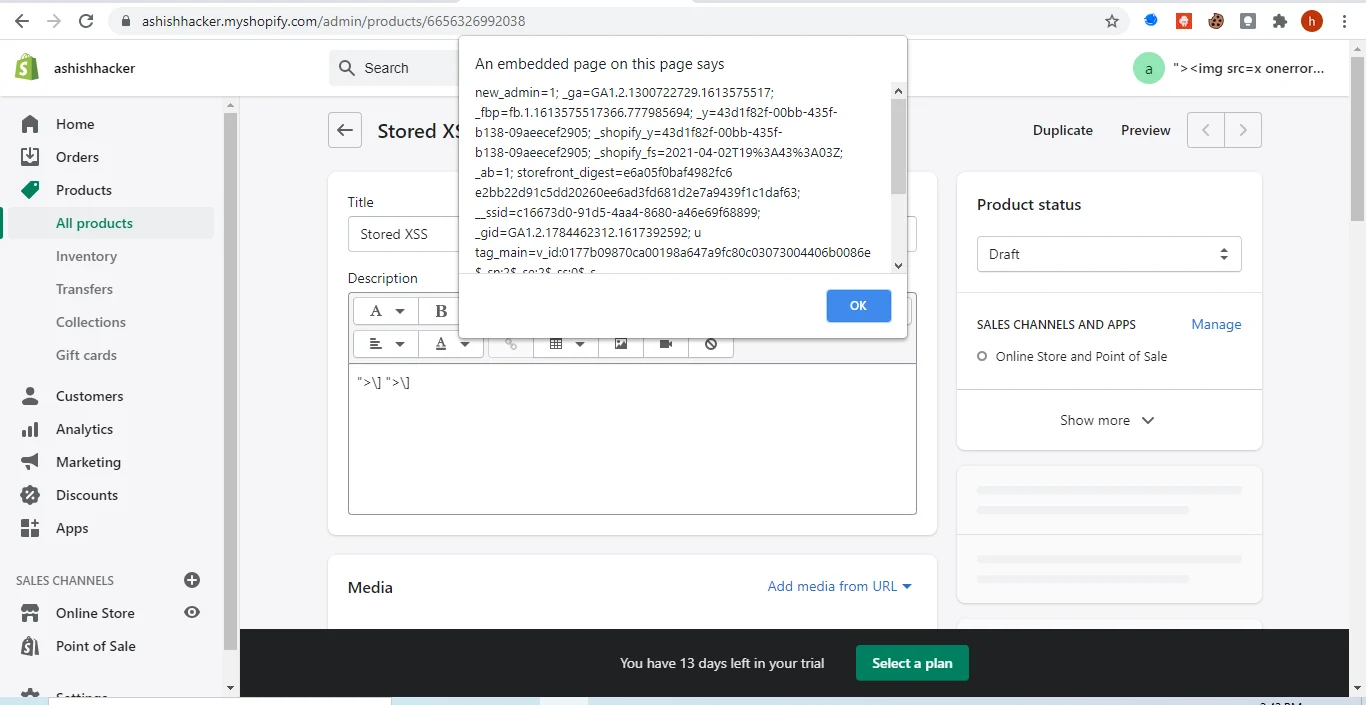
Step1: Go to https://your-store.myshopify.com/admin/products?selectedView=all Step2: Click on Add product Step3: Add anything in Title Step4: Right side corner in description click on Show HTML Step5: Add below Payloads and Click on Save
Payload:
">]<img src=x onerror=alert(document.domain)> ">]<img src=x onerror=alert(document.cookie)>
XSS will get triggered.
/admin/collections
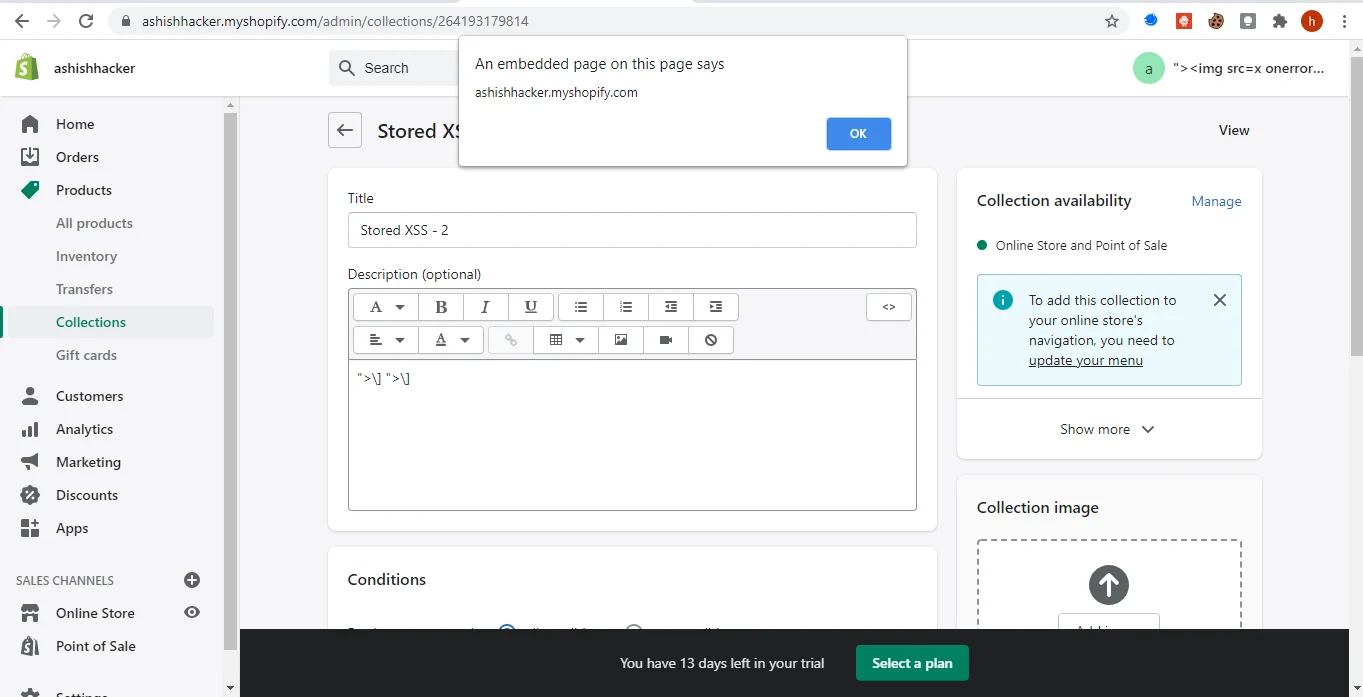
Step1: Go to https://your-store.myshopify.com/admin/collections Step2: Click on Create collection Step3: Add anything in Title Step4: Right side corner in description click on Show HTML Step5: Add below Payloads and Click on Save
Payload:
">]<img src=x onerror=alert(document.domain)> ">]<img src=x onerror=alert(document.cookie)>
XSS will get triggered.
I have attached POC Video, Please take a look.
Thank You
Ashish Dhone
Impact
A malicious user can steal cookies and use them to gain further access even an attacker can use XSS to send requests that appear to be from the victim to the web server.
Context
Shopify's admin interface lets a merchant build a store through the hosted admin at your-store.myshopify.com. Two of the objects a merchant creates there are products and collections, and both carry a description field. That description field is a rich text editor, and the editor exposes a Show HTML control that lets the merchant edit the underlying markup directly rather than through the WYSIWYG toolbar.
The report concerns stored cross-site scripting in that HTML editor, on the product and collection description fields. The program's own summary frames the finding as a direct consequence of a policy change: the team had recently widened the program to accept rich text editor-based XSS vulnerabilities, and the researcher tested that newly in-scope surface straight away. The weakness is recorded as stored XSS, severity medium, CVSS 5.4, with a bounty of 5300.00 USD, disclosed on 2022-12-01.
Setup
The report describes no special tooling, no proxy interception and no version numbers. The precondition is simply an authenticated session in a Shopify store's admin, since both affected screens live under /admin. The researcher's entry point was the program's own documentation: a previous XSS report, https://hackerone.com/reports/978125, and the Known issues section of https://hackerone.com/shopify?type=team, which stated that XSS under the Rich Text Editor on Product description and Collection description was now reportable.
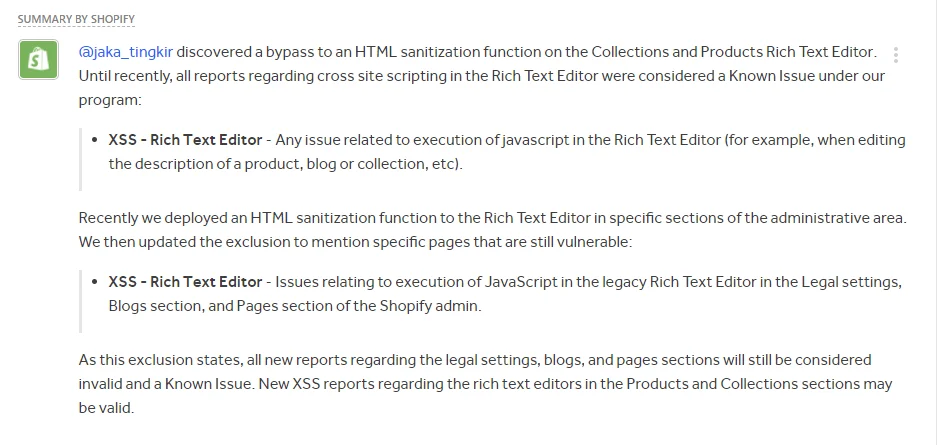
The screenshot above is the policy text the researcher relied on, showing the rich text editor scope as it was published at the time.
Finding it
The reasoning is short and entirely policy-driven. The researcher had been reading earlier XSS reports, found the note that rich text editor XSS on product and collection descriptions was now accepted, and went to test exactly those two fields. The endpoints named in the report are /admin/product and /admin/collections.
The thing that looked wrong is that the HTML editor accepted markup that the renderer later executed. The payload is an <img> tag whose src deliberately fails and whose onerror handler runs script, preceded by a ">] fragment.
Exploitation
Step 1: open the product list
https://your-store.myshopify.com/admin/products?selectedView=all
This is the standard admin product listing, reached with an authenticated merchant session.
Step 2: start a new product
Click Add product. This opens the product editor, which contains the title field and the description rich text editor.
Step 3: give it a title
Add anything in the Title field. The title is irrelevant to the payload; it only makes the product saveable and identifiable.
Step 4: switch the description editor to HTML
In the right side corner of the description editor, click Show HTML. This swaps the WYSIWYG view for the raw markup view, which is the surface the program had just declared in scope.
Step 5: insert the payload and save
Paste the following into the HTML view and click Save:
">]</img src=x onerror=alert(document.domain)> ">]</img src=x onerror=alert(document.cookie)>
The payload appears twice, once per proof: the first copy calls alert(document.domain) and the second calls alert(document.cookie). Each copy begins with ">] and then supplies an <img> element with src=x. Because x is not a valid image, the load fails and the onerror handler fires, executing the JavaScript. The report states that XSS is triggered once the payload is saved.
The screenshot is attached to the product reproduction steps.
Step 6: repeat on collections
The same sequence works on the collection editor:
https://your-store.myshopify.com/admin/collections
Click Create collection, add anything in the Title, click Show HTML in the right side corner of the description, paste the same payload and click Save:
">]</img src=x onerror=alert(document.domain)> ">]</img src=x onerror=alert(document.cookie)>
Again the report states that XSS is triggered.
The screenshot is attached to the collection reproduction steps.
Proof of concept video
The researcher attached a video walking through the reproduction.
Root cause
The description field is a rich text editor that intentionally accepts HTML, and the Show HTML mode hands the merchant raw markup. The program summary states that the saved contents store malicious code that executes on subsequent page loads. In other words, the HTML that the editor accepts is not sanitised down to a safe subset before it is stored or before it is rendered, so an event handler attribute on an element such as <img> survives the round trip and runs in the context of the admin page.
The ">] prefix in the payload suggests the description is placed inside an attribute or a bracketed structure in the rendered template, and that the prefix is what lets the injected element escape that context. The report does not show the template or the stored value as returned by the server, so the exact escaping failure is not documented; the mechanism above is the likely explanation rather than a confirmed one.
Impact
In the researcher's words, a malicious user can steal cookies and use them to gain further access, and an attacker can use XSS to send requests that appear to be from the victim to the web server. The report does not state the execution context of the payload.
Fix
The fix implied by the finding is to sanitise the HTML accepted by the rich text editor on product and collection descriptions, allowing formatting markup while stripping event handler attributes and other executable constructs, and to apply that sanitisation consistently on save and on render.
Variants to test
- Other rich text fields. Anywhere the same editor component is reused (other object descriptions, theme content, metafields), paste the same payload through Show HTML and save. A positive result is the
onerrorhandler firing on the next page load. - Alternative breakout prefixes. If
">]is tuned to one template context, try other closers for attribute, tag and script contexts. A positive result is execution with a different prefix, which shows the sanitisation is missing rather than the context being special. - Handler and element variations. Swap
<img src=x onerror=...>for other failing-load elements and handlers. A positive result is any execution after save, which indicates the filter is blocklist-based rather than structural. - Round-trip persistence. Save the payload, reload the editor in WYSIWYG mode and save again. A positive result is the payload surviving the editor's own re-serialisation, which widens the set of users who can plant it.
Hunting notes
This bug hid in plain sight behind a policy boundary. The signal during recon was not a scanner alert but the program's own Known issues text: once a program explicitly declares rich text editor XSS in scope, every field backed by that editor becomes a candidate, and the Show HTML toggle is the obvious place to start. The researcher demonstrated the payload on both named endpoints, product and collection, and attached a proof of concept video. That combination, a policy-backed target, two affected fields and a clear execution proof, is what carried the report.
What happened, in plain words
Shopify is a service that lets anyone run an online shop. When you sign up, you get a private control panel, called the admin, at an address like your-store.myshopify.com. That panel is where a shop owner adds products, organises them into collections (think of a collection as a shelf or a category, such as "Summer shoes"), writes descriptions and manages orders. Only the logged-in owner should be able to do those things.
Products and collections both have a description field. That field is not a plain text box: it is a rich text editor, the same kind of tool you may have used in a word processor or a webmail compose window. It gives you buttons for bold, italics and links, and it quietly stores the result as HTML, the language web pages are written in. The editor also has a small control called Show HTML that lets you look at, and edit, that raw HTML directly instead of using the buttons.
A security researcher noticed that Shopify had recently changed the rules of its bug bounty programme (a scheme where companies pay people for reporting security flaws) to say that cross-site scripting in this rich text editor was now fair game to report. He went straight to those fields and found that the editor would store HTML containing a small piece of JavaScript, and that the XSS triggered once the payload was saved. That is stored cross-site scripting: malicious code is saved on the server and served back to later visitors, like leaving a rigged letter in a filing cabinet for the next person who opens the drawer.
The finding was rated medium severity, CVSS 5.4, and paid a bounty of 5300.00 USD. It was disclosed on 2022-12-01.
The background you need first
A few ideas come up again and again below, so here they are from zero.
HTML is the language that describes what a web page contains: headings, paragraphs, images, links. An image on a page is written as a tag like <img src="...">, where src says where the picture lives.
JavaScript is the programming language that runs inside your browser and makes pages interactive. It can read things the page can see, change the page, and send requests to the server on your behalf.
Cross-site scripting (XSS) means getting someone else's JavaScript to run inside a page you trust. If an attacker can make the shop admin page run their code, that code runs with all the power the logged-in owner has, because the browser cannot tell the difference between the site's own code and the injected code.
Stored XSS is the variety where the malicious code is saved on the server first. The attacker does not need to trick the victim into clicking a special link; the victim just opens the ordinary page later and the saved code runs.
A cookie is a small piece of text a website asks your browser to keep and send back with every request to that site. It is how a site remembers that you are logged in. If someone steals your session cookie, they can often act as you without knowing your password. That is why the researcher's proof pops up document.cookie, the browser's way of reading the current site's cookies.
document.domain is simply the address of the site the code is running on, for example the shop's own admin address. Popping it up is a standard, harmless way to prove that code is really executing in the context of that site.
An event handler is an attribute on an HTML tag that tells the browser "when this happens, run this JavaScript". onerror is the handler for "this thing failed to load". So <img src=x onerror=...> asks the browser to load an image from a place called x, which does not exist, the load fails, and the onerror code runs. It is a reliable trick for getting script to execute without needing a visible image.
Sanitisation means cleaning user-supplied HTML before storing or displaying it, keeping harmless formatting like bold and links while removing anything executable such as event handlers. Think of a mail room that opens parcels and removes anything dangerous before passing them on.
An endpoint is just a particular address on a website that does a particular job, such as the page that lists products.
Setting up
The report describes no special tools, no interception software and no version numbers. The only precondition is that you are logged in to a Shopify store's admin, because both affected screens live under /admin, the part of the site reserved for the shop owner.
The researcher's starting point was the programme's own documentation rather than any scanning tool. He had been reading earlier XSS reports and found a previous one, https://hackerone.com/reports/978125, and then the Known issues section of https://hackerone.com/shopify?type=team, which stated that XSS under the Rich Text Editor on Product description and Collection description was now reportable.
The screenshot shows that policy text, the published statement of what the programme would now accept. Reading the rules first is what pointed him at exactly two fields to test.
Finding it
The reasoning is short and comes entirely from the policy. Earlier XSS reports led him to the note that rich text editor XSS on product and collection descriptions was now accepted, so he went to test precisely those two fields. The endpoints named in the report are /admin/product and /admin/collections.
What looked wrong was that the HTML editor accepted markup that the page later executed. The payload is an <img> tag whose src deliberately fails and whose onerror handler runs script, preceded by a ">] fragment. In everyday terms: the description is dropped into a slot in the page, the ">] at the front is a crowbar that pries the slot open, and the image tag is what gets shoved through the gap.
Exploitation
Step 1: open the product list
https://your-store.myshopify.com/admin/products?selectedView=all
This is the ordinary admin product listing, opened with a logged-in shop owner's session. The selectedView=all part simply asks for the view that shows every product. You start here because it is the normal way into the product editor.
Step 2: start a new product
Click Add product. This opens the product editor, which contains the title field and the description rich text editor. You need a product to attach a description to, so this is the natural next click.
Step 3: give it a title
Add anything in the Title field. The title has nothing to do with the payload; it only makes the product saveable and easy to recognise in the list afterwards.
Step 4: switch the description editor to HTML
In the right side corner of the description editor, click Show HTML. This swaps the friendly buttons view for the raw markup view, which is exactly the surface the programme had just declared in scope. The researcher went for this toggle because it is the place where the editor stops protecting you from HTML and lets you type it yourself.
Step 5: insert the payload and save
Paste the following into the HTML view and click Save:
">]</img src=x onerror=alert(document.domain)> ">]</img src=x onerror=alert(document.cookie)>
Line by line, in plain words:
">]at the start of each copy is a breakout fragment. The">]fragment precedes the image tag in each copy of the payload.<img src=x ...>asks the browser to display an image from the addressx. There is no such image, so the load fails.onerror=alert(document.domain)is the handler that runs when the load fails. It pops up a box showing the site's own address, which proves the code is running in the shop's admin page.- The second copy is identical except for
alert(document.cookie), which pops up the browser's cookies for the site. That is the more serious proof: cookies are what keep a user logged in. - The two copies sit side by side, separated by spaces, so one save demonstrates both proofs at once.
The report states that XSS is triggered once the payload is saved.
The screenshot is attached to the product reproduction steps.
Step 6: repeat on collections
The same sequence works on the collection editor:
https://your-store.myshopify.com/admin/collections
This is the admin page that lists collections. Click Create collection, add anything in the Title, click Show HTML in the right side corner of the description, paste the same payload and click Save:
">]</img src=x onerror=alert(document.domain)> ">]</img src=x onerror=alert(document.cookie)>
Again the report states that XSS is triggered. Repeating it on a second field shows the same payload works on collections as well as products.
The screenshot is attached to the collection reproduction steps.
Proof of concept video
The researcher attached a video walking through the reproduction from start to finish.
Why it worked
The description field is a rich text editor that is supposed to accept HTML, and the Show HTML mode hands the merchant raw markup. The program summary states that the saved contents store malicious code that executes on subsequent page loads. In other words, the HTML the editor accepts is not cleaned down to a safe subset before it is stored or before it is displayed, so an event handler attribute on an element such as <img> survives the round trip and runs in the context of the admin page.
The ">] prefix suggests the description is placed inside an attribute or a bracketed structure in the rendered template, and that the prefix is what lets the injected element escape that context. The report does not show the template or the stored value as returned by the server, so the exact escaping failure is not documented; the explanation above is the likely mechanism rather than a confirmed one.
Impact
In the researcher's words, a malicious user can steal cookies and use them to gain further access, and an attacker can use XSS to send requests that appear to be from the victim to the web server. The report does not state the execution context of the payload.
Fix
The fix implied by the finding is to sanitise the HTML accepted by the rich text editor on product and collection descriptions, allowing formatting markup while stripping event handler attributes and other executable constructs, and to apply that sanitisation consistently both when saving and when displaying.
Variants to test
- Other rich text fields. Anywhere the same editor component is reused (other object descriptions, theme content, metafields), paste the same payload through Show HTML and save. A positive result is the
onerrorhandler firing on the next page load. - Alternative breakout prefixes. If
">]is tuned to one template context, try other closers for attribute, tag and script contexts. A positive result is execution with a different prefix, which shows the sanitisation is missing rather than the context being special. - Handler and element variations. Swap
<img src=x onerror=...>for other failing-load elements and handlers. A positive result is any execution after save, which indicates the filter is blocklist-based rather than structural. - Round-trip persistence. Save the payload, reload the editor in the buttons view and save again. A positive result is the payload surviving the editor's own re-serialisation, which widens the set of users who can plant it.
Hunting notes
This bug hid in plain sight behind a policy boundary. The signal during recon was not a scanner alert but the programme's own Known issues text: once a programme explicitly declares rich text editor XSS in scope, every field backed by that editor becomes a candidate, and the Show HTML toggle is the obvious place to start. The researcher demonstrated the payload on both named endpoints, product and collection, and attached a proof of concept video. That combination, a policy-backed target, two affected fields and a clear execution proof, is what carried the report.
Glossary
- Admin: the private control panel where a shop owner manages their store.
- Bounty: money a company pays for a valid security report.
- Bug bounty programme: a scheme where companies invite people to report security flaws in exchange for rewards.
- Collection: a grouping of products in a shop, like a category or shelf.
- Cookie: a small piece of text a site asks your browser to store and send back, often used to remember that you are logged in.
- Cross-site scripting (XSS): getting someone else's JavaScript to run inside a page you trust.
- CVSS: a standard scoring system for the severity of a security flaw.
document.cookie: the browser's way of reading the current site's cookies from JavaScript.document.domain: the address of the site the running code belongs to.- Endpoint: a particular address on a website that performs a particular job.
- Event handler: an HTML attribute that runs JavaScript when something happens, such as
onerrorwhen a load fails. - HTML: the language that describes the content of a web page.
- JavaScript: the programming language that runs in the browser and makes pages interactive.
- Payload: the piece of code an attacker tries to get a system to accept and run.
- Rich text editor: a text box with formatting buttons that stores its content as HTML.
- Sanitisation: cleaning user-supplied HTML so harmless formatting survives and anything executable is removed.
- Session: the period during which a site remembers you as logged in, usually via a cookie.
- Severity: how serious a flaw is judged to be.
- Show HTML: the editor control that reveals and lets you edit the raw HTML behind the formatted view.
- Stored XSS: XSS where the malicious code is saved on the server and runs for later visitors.
- WYSIWYG: "what you see is what you get", the formatted view of an editor where you see the result rather than the markup.




