stored xss in invited team member via email parameter
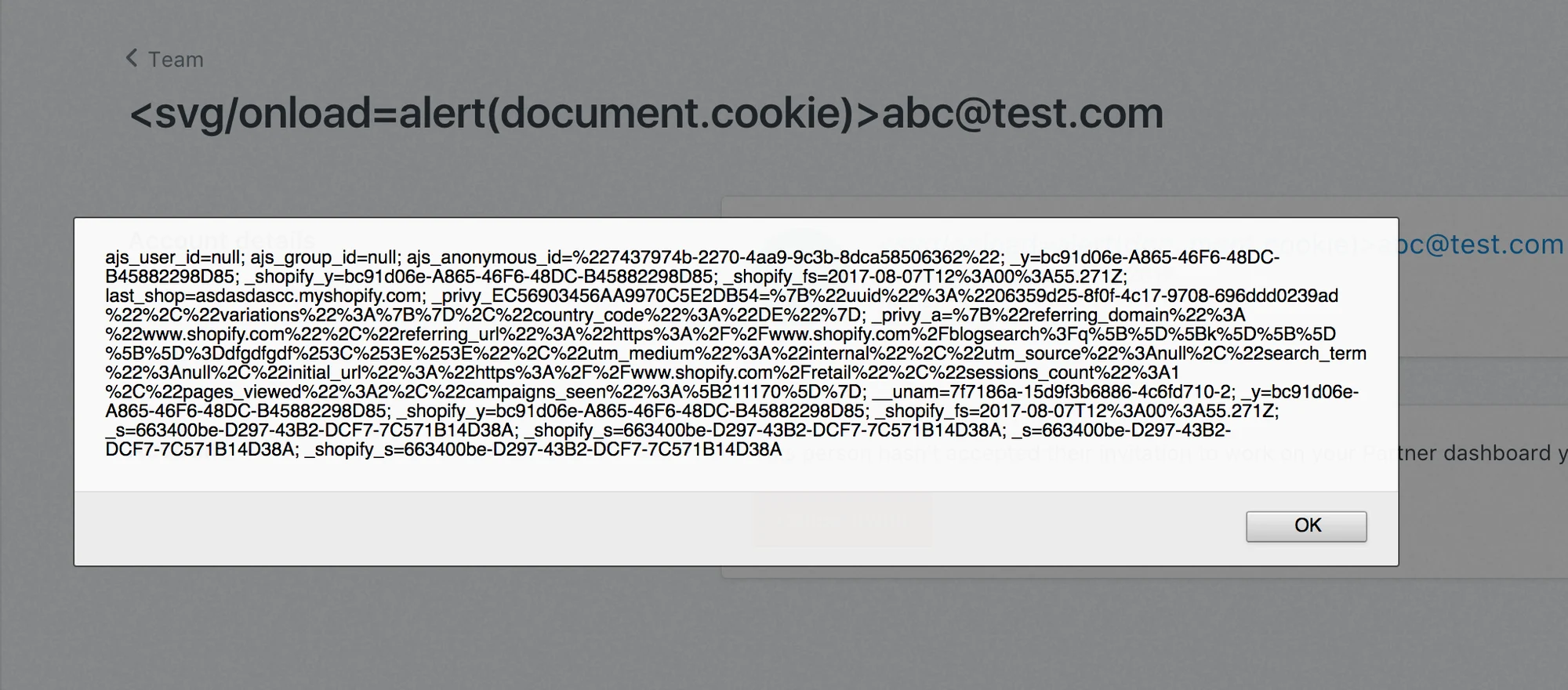
An email address field on the team invitation page accepted an SVG payload with an onload handler, which was stored and executed when the invitation page was opened. A staff member with member-management rights could run script in the context of anyone who viewed the invitation, including owners.

- Triaged in 2 days
- Fixed in 2 days
- Paid in 10 days
- Disclosed after 55 days
Hey there, while testing your program I found a stored XSS vulnerability which can placed by owners or other staff members who have ability to manage members and it will triggered by visiting invited team member page (e.g. https://partners.shopify.com/642416/invitations/15406).
Reproduction Steps
- login to partners.shopify.com.
- navigate to Team (e.g. https://partners.shopify.com/642416/memberships).
- click on Invite owner.
- use
<svg/onload=alert(document.cookie)>[email protected]as email address. - click on Send invite.
- you'll see a warning: There was a problem connecting to Shopify.
- navigate to Team section again (e.g. https://partners.shopify.com/642416/memberships).
- open invited user page (e.g. https://partners.shopify.com/642416/invitations/15411).
note: it does not matter who send the invitation, attack can be triggered by other team members (including owners) by opening invitation page.
also attached two file to show you that this vulnerability can placed by both owners and staff members with manage members access.
Attachments
Context
Shopify Partners is the programme portal where agencies and developers manage their relationship with Shopify. Each partner account has a team, and team members hold roles. Owners, and staff members granted the manage members permission, can invite new people into the team by email. The invitation is sent from the Team section of partners.shopify.com, and each pending invitation has its own page under a path like https://partners.shopify.com/642416/invitations/15406.
The report describes a stored cross-site scripting issue in that invitation flow: the email address supplied when inviting a team member is stored and later rendered unescaped on the invitation page, so script in the address executes when someone opens the invitation.
Setup
The only precondition is an authenticated account on partners.shopify.com with the ability to invite team members. The researcher notes that this means either an owner or a staff member holding the manage members permission. No special tools, browser versions or other configuration are described. The report gives example account and invitation identifiers in its URLs (642416 for the account, 15406 and 15411 for invitations), which are placeholders for whatever account and invitation are in play.
Finding it
The researcher was testing the team management features of the partner portal. The invitation flow takes an email address from the inviter and stores it, and the resulting invitation page displays that address back to whoever visits it. Because the value is attacker-controlled and is shown to other users, it is a natural candidate for stored XSS, and the researcher confirmed that the address is rendered without neutralising HTML.
Exploitation
Step 1: log in and open the Team section
Log in to partners.shopify.com and navigate to Team, for example:
https://partners.shopify.com/642416/memberships
Step 2: start an invitation
Click Invite owner. This opens the invitation form, which takes an email address.
Step 3: submit the payload as the email address
Use the following string in the email field:
<svg/onload=alert(document.cookie)>[redacted]
The payload is an SVG element with an onload handler, followed by a syntactically plausible address so the form accepts the value. When the stored string is later inserted into the invitation page as HTML, the browser parses the <svg> element and fires onload, running alert(document.cookie) in the origin of partners.shopify.com.
Step 4: send the invite
Click Send invite. The application responds with the warning There was a problem connecting to Shopify. Despite this error, the invitation is created: the researcher's next steps rely on the invitation existing and being reachable.
Step 5: return to the Team section
Navigate to Team again, for example:
https://partners.shopify.com/642416/memberships
Navigate to Team again, for example:
Step 6: open the invitation page
Open the invited user's page, for example:
https://partners.shopify.com/642416/invitations/15411
Loading this page renders the stored email address, and the payload executes. The researcher stresses that it does not matter who sent the invitation: the script runs when any team member, including an owner, opens the invitation page.
Demonstrating both roles
The report includes two recordings to show that the payload can be planted by an owner and by a staff member with manage members access.
The third attachment is a screenshot of the invitation flow.
Root cause
The email address supplied at invitation time is stored and later written into the invitation page without HTML encoding, so markup in the address is interpreted by the browser rather than displayed as text. The report does not describe the server-side or template code, so the exact location of the missing encoding is not stated. The report does not explain why the warning appears or whether the record was saved.
Impact
The payload executes in the context of partners.shopify.com for any team member who opens the affected invitation page, including owners. That gives an attacker who can invite members the ability to run script in another user's session on the partner portal, with whatever that session is authorised to do. The report frames the requirement as owner or manage members permission, so the attacker needs an account with invitation rights; the victim is any team member who views the invitation. The report does not enumerate specific actions taken with the stolen session.
Fix
The change needed is to HTML-encode the stored email address wherever it is rendered on the invitation page, so that characters such as < and > are displayed as text and never parsed as markup.
Variants to test
- Other fields captured at invitation time, such as a display name or message, rendered on the invitation page. A positive result is the payload executing when the invitation is opened.
- The same invitation page viewed by a different role, for example an owner opening an invitation created by a staff member. A positive result confirms the stored value is rendered for every viewer, not just the creator.
- Invitation emails or notification messages that echo the address. A positive result is execution in the mail client or webmail context, which depends on how the value is encoded there.
- Re-submitting the invitation after the There was a problem connecting to Shopify warning to see whether duplicate records are created and whether each renders the payload. A positive result is multiple invitation pages that all execute the script.
Hunting notes
Invitation and member management screens are a good place to look because they accept free-text values from one user and display them to another, which is exactly the stored XSS pattern. During recon, map the team and invitation endpoints, note which fields are echoed back on list and detail pages, and check whether the application reports errors while still saving the record. The researcher showed the payload can be planted by both an owner and a staff member with manage members access.
What happened, in plain words
Shopify Partners is a website where agencies and developers who work with Shopify manage their business relationship with Shopify. Think of it as a private clubhouse on the web: each partner company has an account, and inside that account there is a team of people. Each person on the team has a role, which is simply a label saying what they are allowed to do. Two kinds of people can add new members to the team: owners (the people in charge of the account) and staff members who have been given a permission called manage members.
Adding someone works by invitation. You type the new person's email address into a form, press a button, and Shopify sends them an email. Until they accept, the invitation sits in a list, and each pending invitation has its own web page. A page is just an address (a URL) you can open in a browser, like https://partners.shopify.com/642416/invitations/15406.
The researcher found that the email address you type when inviting someone is stored by Shopify and then shown back, as-is, on that invitation page. If the address contains special characters that a browser treats as instructions rather than as text, the browser will follow those instructions. That is the whole bug: a value one person types ends up being treated as code when another person opens the page. This class of bug is called stored cross-site scripting, usually shortened to stored XSS. "Stored" means the malicious value is saved on the server first and runs later, whenever someone views the page, rather than running immediately in the browser of the person who typed it.
The consequence is serious because the code runs inside the victim's session on partners.shopify.com. A session is the state of being logged in: the browser holds a small piece of data, a cookie, that proves who you are. If someone else's code runs on the page while you are logged in, it can read that proof and act as you, within whatever your account is allowed to do.
The pieces you need to understand first
Before walking through the steps, here are the ideas the report relies on, explained from zero.
- Browser: the program you use to visit websites (Chrome, Firefox, Safari, Edge). It reads HTML, the language web pages are written in, and turns it into the page you see.
- HTML tag: a piece of markup in angle brackets, like
<b>for bold. The browser does not show the tag; it obeys it. Text between tags is displayed; tags themselves are instructions. - JavaScript: the programming language browsers run. A short JavaScript program can read things on the page, including cookies.
- Event handler: an attribute on an HTML tag that says "when this happens, run this code". For example,
onloadmeans "when this element has finished loading, run the code attached to me". - SVG: a format for drawing pictures using HTML-like tags. Browsers understand
<svg>as an element, and elements can carry event handlers such asonload. - Cookie: a small piece of text a website asks your browser to keep and send back on every request, so the site can recognise you. Session cookies are the usual proof that you are logged in. Because they identify you, they are sensitive.
document.cookie: the way JavaScript reads the cookies for the current page. If script can run on a page, it can readdocument.cookiethere.alert(...): a JavaScript function that pops up a small dialog box with whatever text you give it. Researchers use it as a harmless, visible proof that their code ran.- URL: the address of a page, such as
https://partners.shopify.com/642416/memberships. The numbers in the path (642416,15406,15411) are identifiers:642416stands for the partner account, and the longer numbers stand for individual invitations. They are placeholders for whatever account and invitation are in play. - Escaping / encoding: when a website shows text that a user typed, it should convert characters like
<and>into harmless codes so the browser displays them as literal characters instead of treating them as tags. When a site forgets this, user text becomes browser instructions. That is the root of XSS. - Stored XSS: an XSS bug where the malicious value is saved on the server and later shown to other people. Compare it to writing graffiti on a sign in a shop: you paint it once, and every customer who walks in sees it.
What you need to reproduce it
The only precondition is a logged-in account on partners.shopify.com that is allowed to invite team members. According to the report, that means either an owner or a staff member holding the manage members permission. No special tools, browser versions or other configuration are described. The example URLs use 642416 for the account and 15406 and 15411 for invitations; those are just the identifiers that happened to be in play.
Finding it
The researcher was testing the team management features of the partner portal. The invitation flow takes an email address from the inviter and stores it, and the resulting invitation page displays that address back to whoever visits it. Because the value is controlled by the person inviting and is shown to other users, it is a natural candidate for stored XSS. The researcher confirmed that the address is rendered without neutralising HTML, meaning the browser is allowed to interpret it as markup.
Exploitation, step by step
Step 1: log in and open the Team section
Log in to partners.shopify.com and navigate to Team, for example:
https://partners.shopify.com/642416/memberships
This is the page that lists the people on the team. You go here first because the invitation form lives inside the team management area; you need to be logged in and on the team screen before you can invite anyone.
Step 2: start an invitation
Click Invite owner. This opens the invitation form, which takes an email address. You are starting an invitation because the email field is the input that will later be stored and shown back on the invitation page.
Step 3: submit the payload as the email address
Use the following string in the email field:
<svg/onload=alert(document.cookie)>[redacted]
Line by line, in plain words:
<svgopens an SVG element, a picture element the browser understands./onload=alert(document.cookie)attaches an event handler to that element. The/is a shorthand way of writing the tag so the handler sits on the same tag.onloadmeans "when this element has loaded, run the following code".alert(document.cookie)is the code that will run: it reads the cookies for the current page and shows them in a pop-up box.>closes the tag.[redacted]is a syntactically plausible email address, added so the form accepts the value. Without something that looks like an address, the form might reject the input.
When the stored string is later inserted into the invitation page as HTML, the browser parses the <svg> element and fires onload, running alert(document.cookie) in the origin of partners.shopify.com. "Origin" here means the site's own identity: the code runs as if it belonged to Shopify Partners, with access to that site's cookies.
Step 4: send the invite
Click Send invite. The application responds with the warning There was a problem connecting to Shopify. The researcher then continues to the invitation page.
Step 5: return to the Team section
Navigate to Team again, for example:
https://partners.shopify.com/642416/memberships
Navigate to Team again, for example:
Step 6: open the invitation page
Open the invited user's page, for example:
https://partners.shopify.com/642416/invitations/15411
Loading this page renders the stored email address, and the payload executes. The researcher stresses that it does not matter who sent the invitation: the script runs when any team member, including an owner, opens the invitation page. That is what makes it stored XSS rather than a problem only for the person who typed the value.
Demonstrating both roles
The report includes two recordings to show that the payload can be planted by an owner and by a staff member with manage members access.
The third attachment is a screenshot of the invitation flow.
Why it works (root cause)
The email address supplied at invitation time is stored and later written into the invitation page without HTML encoding, so markup in the address is interpreted by the browser rather than displayed as text. The report does not describe the server-side or template code, so the exact location of the missing encoding is not stated. The report does not explain why the warning appears or whether the record was saved.
What an attacker could do with it
The payload executes in the context of partners.shopify.com for any team member who opens the affected invitation page, including owners. That gives an attacker who can invite members the ability to run script in another user's session on the partner portal, with whatever that session is authorised to do. The report frames the requirement as owner or manage members permission, so the attacker needs an account with invitation rights; the victim is any team member who views the invitation. The report does not enumerate specific actions taken with the stolen session.
How to fix it
The change needed is to HTML-encode the stored email address wherever it is rendered on the invitation page, so that characters such as < and > are displayed as text and never parsed as markup.
Other places to test
- Other fields captured at invitation time, such as a display name or message, rendered on the invitation page. A positive result is the payload executing when the invitation is opened.
- The same invitation page viewed by a different role, for example an owner opening an invitation created by a staff member. A positive result confirms the stored value is rendered for every viewer, not just the creator.
- Invitation emails or notification messages that echo the address. A positive result is execution in the mail client or webmail context, which depends on how the value is encoded there.
- Re-submitting the invitation after the There was a problem connecting to Shopify warning to see whether duplicate records are created and whether each renders the payload. A positive result is multiple invitation pages that all execute the script.
Where to look next time
Invitation and member management screens are a good place to look because they accept free-text values from one user and display them to another, which is exactly the stored XSS pattern. During recon, map the team and invitation endpoints, note which fields are echoed back on list and detail pages, and check whether the application reports errors while still saving the record. The researcher showed the payload can be planted by both an owner and a staff member with manage members access.
Glossary
- Browser: the program used to visit websites, which reads HTML and turns it into a visible page.
- Cookie: a small piece of text a website asks the browser to keep and send back, often used to prove you are logged in.
- Stored XSS: an XSS bug where the malicious value is saved on the server and runs later for anyone who views the affected page.
document.cookie: the JavaScript way to read the cookies for the current page.alert(...): a JavaScript function that shows a pop-up box, used here as visible proof that code ran.- Email address field: the input on the invitation form where the inviter types the new member's address.
- Encoding / escaping: converting characters like
<and>into harmless codes so the browser shows them as text instead of obeying them. - Event handler: an attribute on an HTML tag that runs code when something happens, such as
onloadwhen an element has loaded. - HTML: the language web pages are written in, made of tags in angle brackets.
- Invitation page: the page for a pending invitation, at a URL like
https://partners.shopify.com/642416/invitations/15406. - Manage members: a permission that lets a staff member invite and manage team members.
- Origin: the site's own identity; code running in an origin can access that site's cookies and act as the logged-in user.
- Owner: a person in charge of a partner account, able to invite team members.
- Payload: the malicious string an attacker submits, here the SVG with an
onloadhandler. - Role: a label on a team member saying what they are allowed to do.
- Session: the state of being logged in, backed by a cookie that identifies you to the site.
- SVG: a picture format written with HTML-like tags, which browsers understand as an element.
- Team: the group of people belonging to a partner account on
partners.shopify.com. - URL: the address of a page on the web.





