Stored XSS in the Shopify Discussion Forums
A stored cross-site scripting flaw existed in the Shopify Discussion Forums because a topic title was not properly sanitised. An attacker could inject script that executed when a user clicked to enlarge an uploaded image.
 Originally disclosed on HackerOne
- Fixed in 43 hours
- Paid in 43 hours
- Disclosed after 32 days
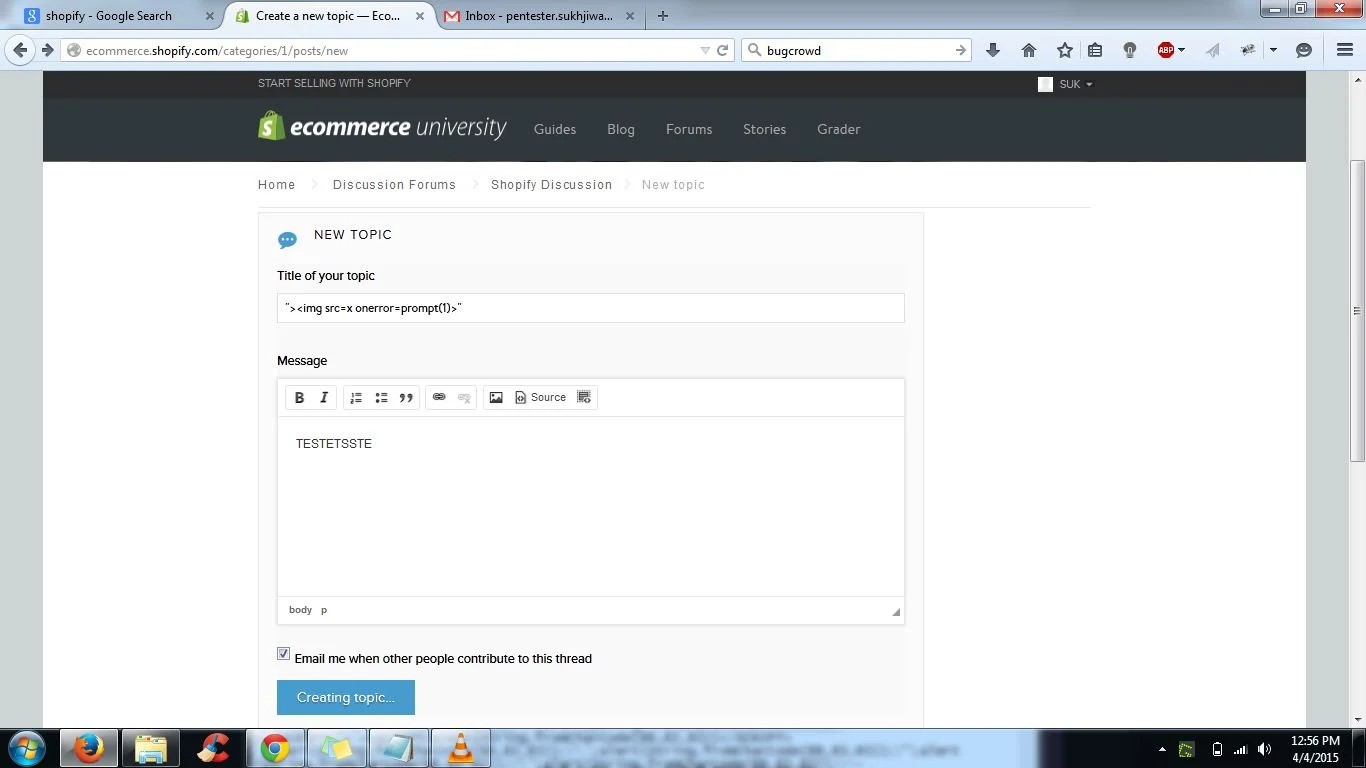
Hi Shopify Security Team, There is Stored XSS in the Shopify Discussion Forums.Under ecommerce.shopify.com, in shopify-discussion The STORED XSS is present. The Stored XSS can easily be produced Every time. To Produce the XSS Vulnerability, I created a New Topic Under the shopify-discussions in the Forums.I entered this XSS PAYLOAD in TITLE "><img src=x onerror=prompt(1)>
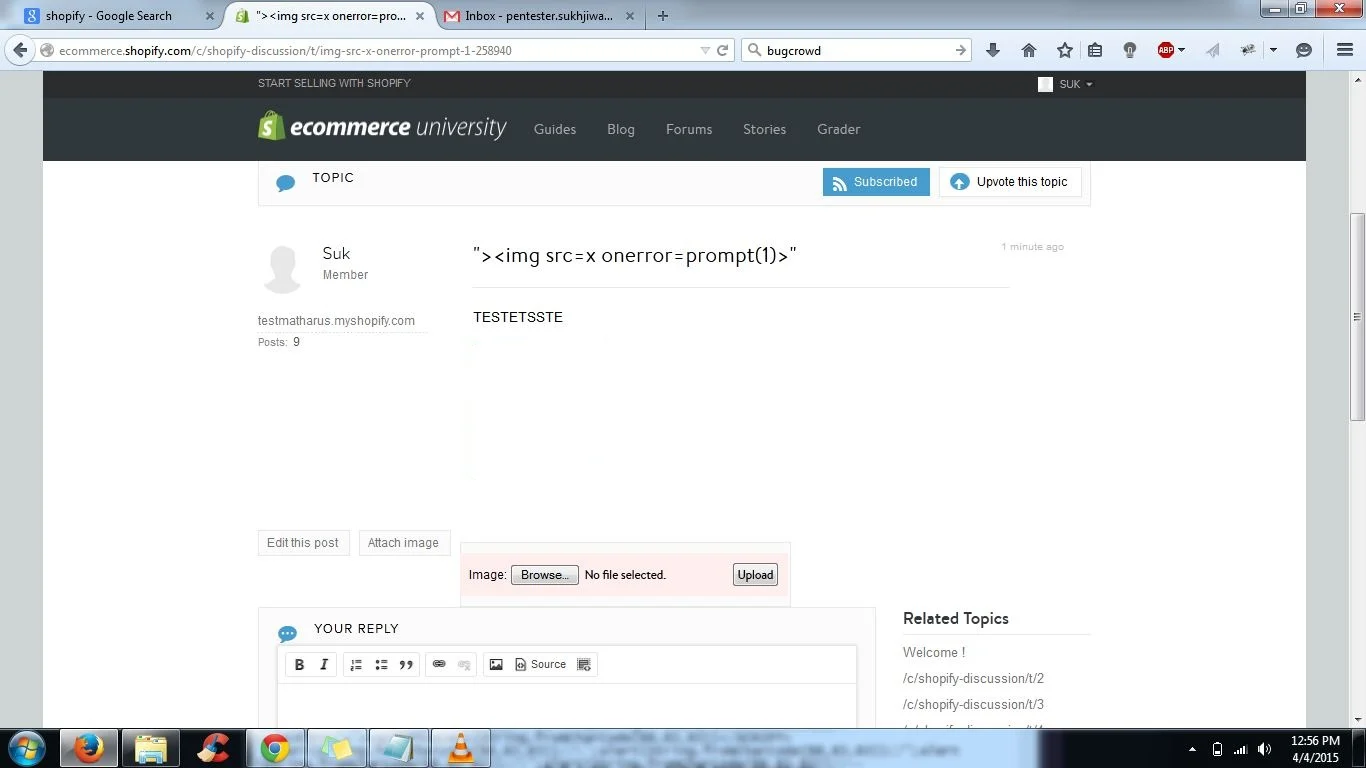
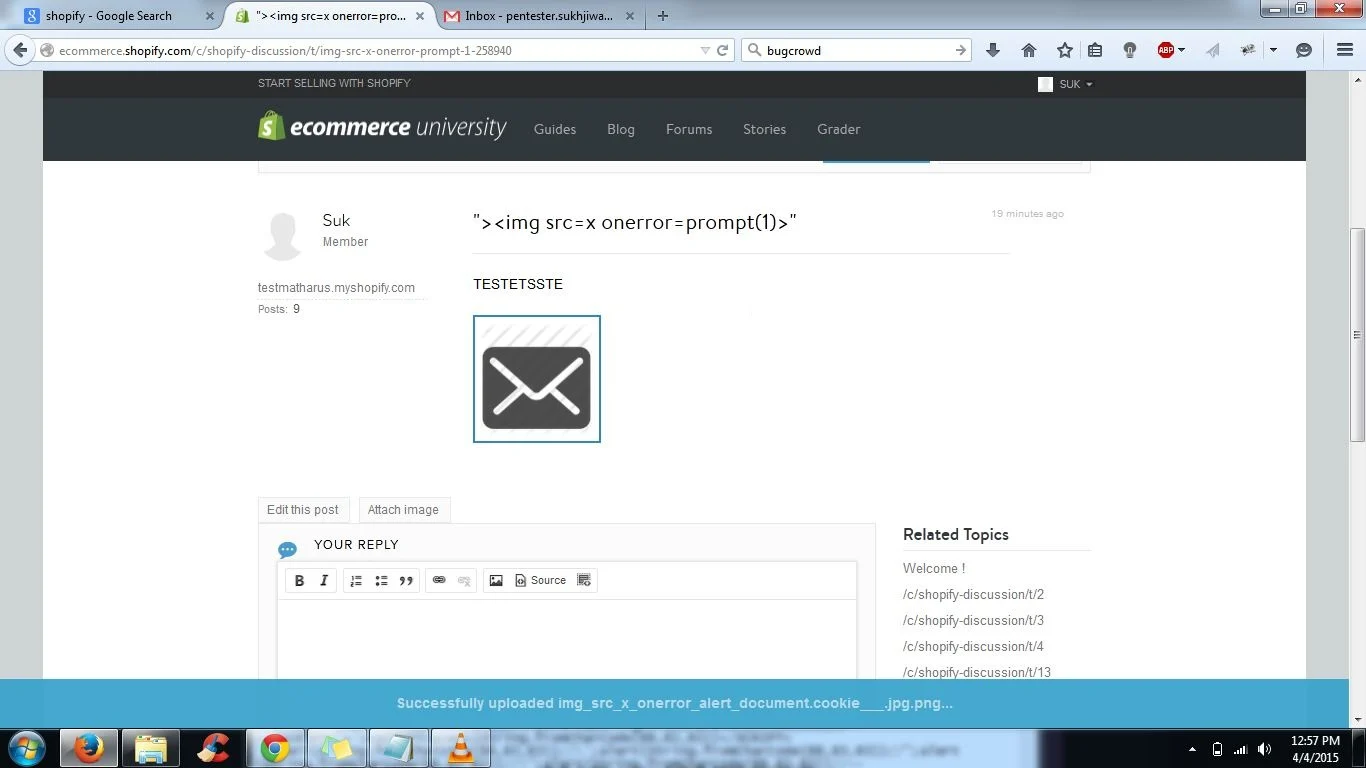
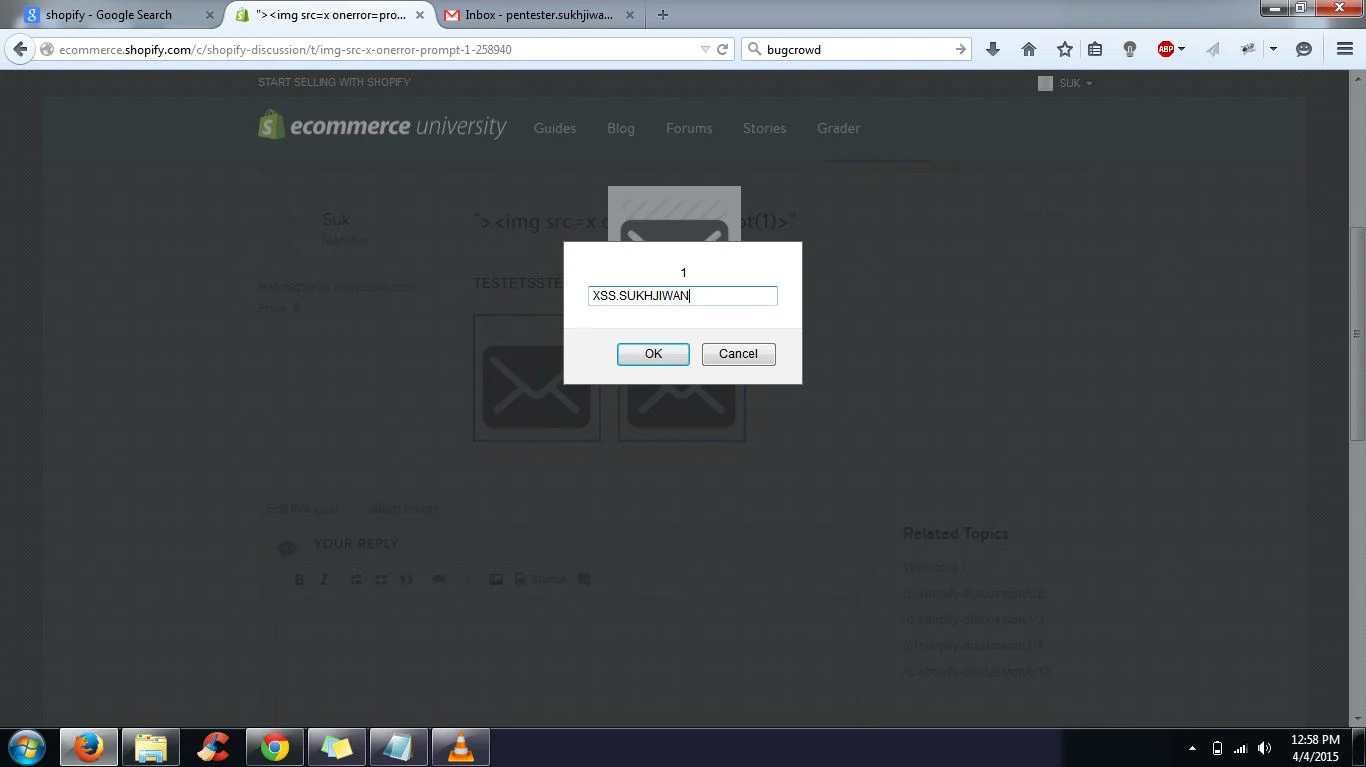
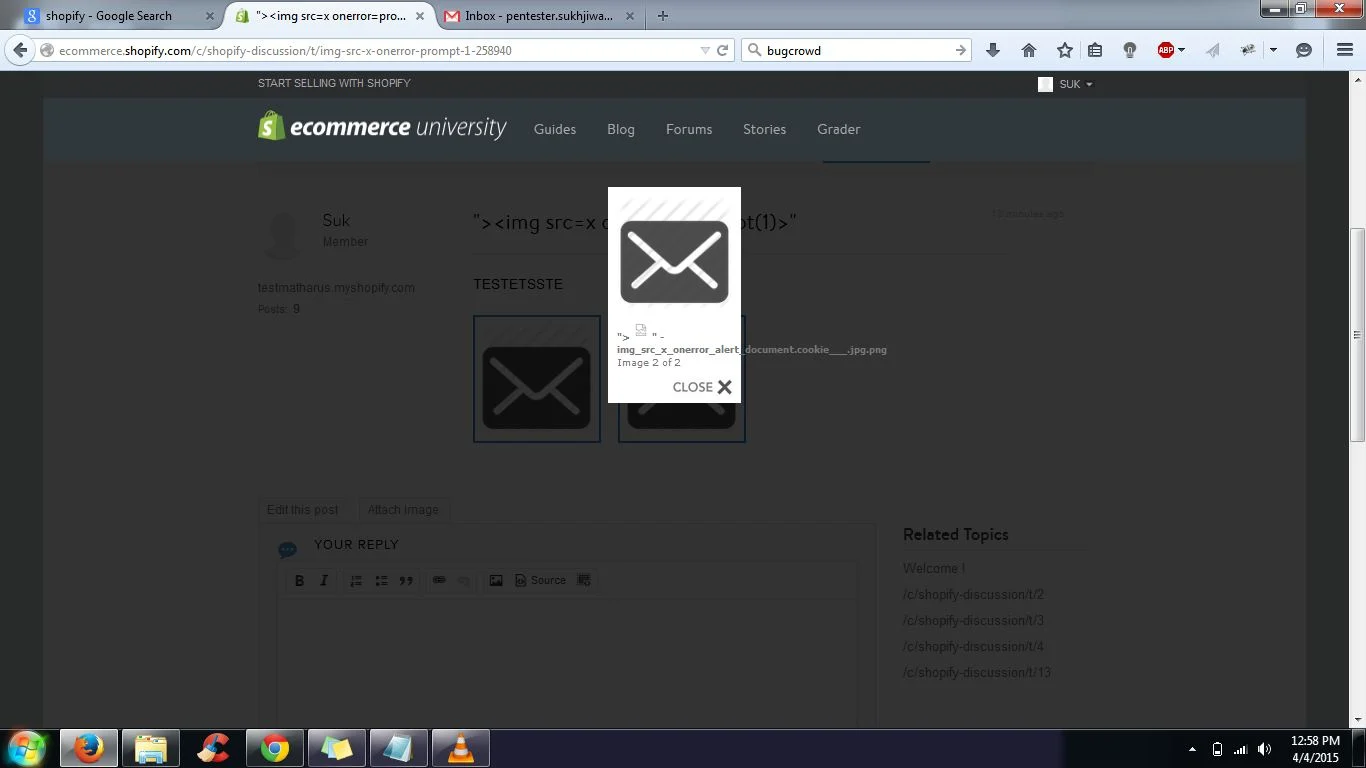
Now I entered demo content in the Message box,and clicked on create the topic, then topic has been created. It shows Our topic and below that shows two options EDIT POST and ATTACH IMAGE. From this attach image option i attached the image and uploaded to the topic. When i clicked the Image to enlarge it the STORED XSS executed itself and pop up was generated.
Here are steps to Reproduce the Stored XSS Bug: Enter the shopify-discussion under the Shopify Discussion Forums and create a new topic. In title add xss payload: "><img src=x onerror=prompt(1)> and in the message box and any demo content, and create the topic. After the topic has been created it shows the two options EDIT POST and Attach image, upload any from the this options. Now after the upload click the image to enlarge image,the XSS payload in the title will be executed.
Please find attached the Proof of Concept, i am attaching the screenshots.
Thank u Regards, Sukhjiwan Singh
Attachments

Context
The target is the Shopify Discussion Forums, specifically the shopify-discussion section under ecommerce.shopify.com. The forum lets users create new topics, each with a title and a message body, and then edit or attach images to their own posts. The report describes a stored cross-site scripting (XSS) issue in that topic workflow: a payload placed in the topic title is stored and later executed when an attached image is clicked to enlarge it.
The researcher is singh_sukhjiwan, the report was made through HackerOne, and the disclosed bounty was 500.00 USD. The weakness is classified as Cross-site Scripting (XSS) - Generic, and the report was disclosed on 2015-05-31.
Setup
The report does not describe any special account, role or tooling. The only precondition it makes explicit is access to the forums so that a new topic can be created under shopify-discussion, and the ability to attach and upload an image to that topic. The researcher states the stored XSS can be produced every time, so no unusual timing or race is involved.
Finding it
The researcher reports that a stored XSS is present in the Shopify Discussion Forums under ecommerce.shopify.com, in shopify-discussion. The payload is placed in the topic title, and the execution happens later, when the uploaded image is clicked to enlarge it. That is the notable part of the finding: the title is stored once, but the sink that renders it is reached through the image enlargement view rather than through the topic page itself.
Exploitation
Step 1: Create a topic with a payload in the title
A new topic is created under shopify-discussion. The title contains the following payload:
"><img src=x onerror=prompt(1)>
The leading "> closes an attribute value and the tag it sits in, so the following <img> element is parsed as markup rather than text. The src=x points at a resource that does not exist, which makes the image fail to load, and the onerror handler then runs prompt(1). The message box is filled with demo content only.
Step 2: Create the topic and use the post options
After the topic is created, the page shows the new topic and, below it, two options: EDIT POST and ATTACH IMAGE. The researcher uses the attach image option to attach an image and upload it to the topic.
Step 3: Click the image to enlarge it
When the uploaded image is clicked to enlarge it, the stored XSS executes and a pop-up is generated. The payload stored in the title is rendered in a context where the "> breaks out and the onerror handler fires.
Reproduction steps as given
- Enter the
shopify-discussionunder the Shopify Discussion Forums and create a new topic. - In the title add the XSS payload
"><img src=x onerror=prompt(1)>and put any demo content in the message box, then create the topic. - After the topic has been created it shows the two options EDIT POST and Attach image; upload any image from these options.
- After the upload, click the image to enlarge it; the XSS payload in the title will be executed.
Proof of concept
The researcher attached screenshots as the proof of concept.
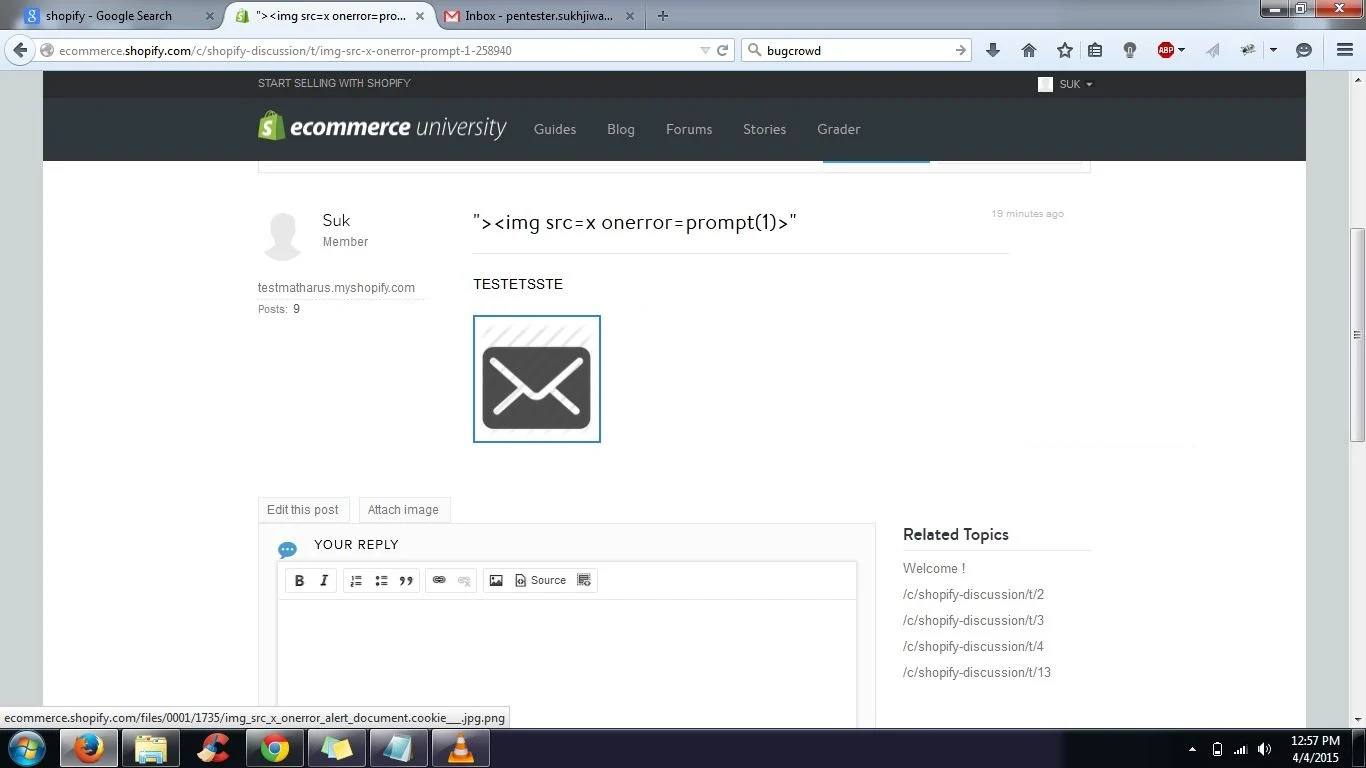
The final attachment is named for the payload itself, img_src_x_onerror_alert(document.cookie), which points at the same img/onerror construction being used to read document.cookie.
Root cause
The report does not include any code or server response, so the exact mistake is not shown. What the behaviour implies is that the topic title is stored and later written into an HTML attribute in the image enlargement view without being correctly encoded for that context. The "> in the payload is enough to close the attribute and the tag, after which the injected <img> element is parsed and its onerror handler runs. The enlargement view renders the stored title in a context where the payload breaks out. This is likely a context-specific output encoding failure rather than a missing filter on input.
Impact
The payload is stored, so it persists in the topic and executes whenever the affected view is reached, in this case when the image is clicked to enlarge it. The report demonstrates execution with prompt(1), and the attachment name indicates document.cookie can be read the same way. The report does not state which users are affected, whether the topic is visible to other forum members or staff, or what session protections were in place, so the practical reach of the issue is not established in the text.
Fix
The appropriate change is to encode the topic title for the exact context in which it is rendered in the image enlargement view, so that characters such as ", < and > are output as text and cannot close the attribute or open a new element. The same encoding should be applied wherever the stored title is reused, not only on the main topic page.
Variants to test
- Put the same
"><img src=x onerror=prompt(1)>payload in other user-controlled fields of a forum post, such as the message body, and check whether any view that re-renders the post executes it. - Try payloads that break out of single-quoted attributes and unquoted attributes, since the report only shows the double-quoted case.
- Test other secondary views that reuse stored content, such as edit previews, image galleries and attachment listings, and watch for execution when those views are opened.
- Replace
prompt(1)with a handler that readsdocument.cookie, as the attachment name suggests, to confirm whether session data is reachable.
Hunting notes
This kind of bug tends to hide in secondary rendering paths: the main page for a piece of content is often escaped correctly, while an enlargement view, preview, modal or attachment listing reuses the stored value in a different HTML context. During recon, look for forum and community features where a title or similar short field is displayed in more than one place, and where images or attachments open in an overlay. A positive result is a stored value that breaks out of its attribute and executes a handler when the secondary view is opened. The researcher gave a repeatable four-step reproduction and a screenshot set.
What happened, in plain words
A security researcher found a bug in the Shopify Discussion Forums, a public place where people talk about Shopify. The bug let someone type a small piece of code into the title of a forum post, and that code ran in the browser when the attached image was clicked to enlarge it.
This kind of bug is called stored cross-site scripting, or stored XSS. "Stored" means the dangerous text is saved on the website's server and comes back later, every time the page is viewed. "Cross-site scripting" means an attacker gets their own code to run inside someone else's browser session on that website, as if the website itself had written the code.
A simple comparison: imagine a noticeboard where visitors can pin notes. If the board copies whatever is written on a note straight onto a big display without checking it, someone could write "ignore the real notice, read this instead" and the display would present it as if the shop had written it. Stored XSS is the web version of that: the site saves the attacker's text and later shows it to other people as part of its own page.
The researcher reported it through HackerOne, a platform where companies pay people for finding bugs in their systems. The report was disclosed on 2015-05-31, the weakness was classified as Cross-site Scripting (XSS) - Generic, and the bounty was 500.00 USD.
The target: the Shopify Discussion Forums
The forums live under ecommerce.shopify.com, and the specific area involved is called shopify-discussion. A forum is a website where members start conversations. Each conversation is a topic, and a topic has a title (a short heading) and a message body (the longer text). Members can also edit their own posts and attach images to them.
Two features matter here:
- Creating a topic. You type a title and a message, then submit. The forum saves both and shows the topic to readers.
- Attaching an image. After a topic exists, the author sees options such as EDIT POST and ATTACH IMAGE. Uploading an image adds it to the post, and readers can click the image to enlarge it.
The bug lives in the second feature: the title is saved once, but it is displayed again in the image enlargement view, and that second display is where the attacker's code runs.
Setting up
The report does not describe any special account, role or tooling. The only things needed are access to the forums so that a new topic can be created under shopify-discussion, and the ability to attach and upload an image to that topic. The researcher says the stored XSS can be produced every time, so there is no unusual timing or luck involved: repeat the steps and it happens again.
Finding it
The researcher reports that a stored XSS is present in the Shopify Discussion Forums under ecommerce.shopify.com, in shopify-discussion. The payload is placed in the topic title, and the execution happens later, when the uploaded image is clicked to enlarge it. That is the notable part of the finding: the title is stored once, but the place that displays it unsafely is reached through the image enlargement view rather than through the topic page itself.
Exploitation
Step 1: Create a topic with a payload in the title
A new topic is created under shopify-discussion. The title contains the following payload:
"><img src=x onerror=prompt(1)>
Line by line, in plain words:
">is two characters: a double quote and a greater-than sign. Web pages are built from HTML, a language of tags such as<img>and<div>. Tags can carry attributes, which are settings written inside the tag, usually asname="value"with the value in double quotes. If a website puts your text inside such a quoted value without cleaning it, the"closes the quote early and the>closes the tag early. Everything after that is treated as new HTML written by the page itself, not as harmless text. This is called breaking out of the attribute.<img src=x onerror=prompt(1)>is an image tag.srcis the attribute that says where the image file lives; here it is set tox, which is not a real address. Because the image cannot load, the browser fires an error event, andonerroris the attribute that says what to do when that happens. The instruction there isprompt(1), which opens a small pop-up box in the browser showing the number 1. Seeing that pop-up proves code ran.
The message box is filled with demo content only, so the title is the only place the payload is placed.
Step 2: Create the topic and use the post options
After the topic is created, the page shows the new topic and, below it, two options: EDIT POST and ATTACH IMAGE. The researcher uses the attach image option to attach an image and upload it to the topic. This step matters because the image is the trigger: without an image to click, the unsafe view is never opened.
Step 3: Click the image to enlarge it
When the uploaded image is clicked to enlarge it, the stored XSS executes and a pop-up is generated. The payload stored in the title is rendered in a context where the "> breaks out and the onerror handler fires. In other words, the enlargement view takes the saved title and drops it into the page in a way that lets the quote and angle bracket do their work.
Reproduction steps as given
- Enter the
shopify-discussionunder the Shopify Discussion Forums and create a new topic. - In the title add the XSS payload
"><img src=x onerror=prompt(1)>and put any demo content in the message box, then create the topic. - After the topic has been created it shows the two options EDIT POST and Attach image; upload any image from these options.
- After the upload, click the image to enlarge it; the XSS payload in the title will be executed.
Proof of concept
The researcher attached screenshots as the proof of concept.
The final attachment is named for the payload itself, img_src_x_onerror_alert(document.cookie), which points at the same img/onerror construction being used to read document.cookie. A cookie is a small piece of data a website asks your browser to keep and send back with later requests, and it is often used to remember who is logged in. document.cookie is the browser's built-in way for page code to read those cookies. If an attacker can run code on a page, reading document.cookie is a common next step towards taking over a session.
Root cause
The report does not include any code or server response, so the exact mistake is not shown. What the behaviour implies is that the topic title is stored and later written into an HTML attribute in the image enlargement view without being correctly encoded for that context. Encoding here means converting characters that have special meaning in HTML, such as ", < and >, into safe stand-ins so the browser shows them as text instead of treating them as structure. The "> in the payload is enough to close the attribute and the tag, after which the injected <img> element is parsed and its onerror handler runs. The enlargement view renders the stored title in a context where the payload breaks out. This is likely a context-specific output encoding failure rather than a missing filter on input: the same text is safe in one place and unsafe in another.
Impact
The payload is stored, so it persists in the topic and executes whenever the affected view is reached, in this case when the image is clicked to enlarge it. The report demonstrates execution with prompt(1), and the attachment name indicates document.cookie can be read the same way. The report does not state which users are affected, whether the topic is visible to other forum members or staff, or what session protections were in place, so the practical reach of the issue is not established in the text.
Fix
The appropriate change is to encode the topic title for the exact context in which it is rendered in the image enlargement view, so that characters such as ", < and > are output as text and cannot close the attribute or open a new element. The same encoding should be applied wherever the stored title is reused, not only on the main topic page.
Variants to test
- Put the same
"><img src=x onerror=prompt(1)>payload in other user-controlled fields of a forum post, such as the message body, and check whether any view that re-renders the post executes it. - Try payloads that break out of single-quoted attributes and unquoted attributes, since the report only shows the double-quoted case.
- Test other secondary views that reuse stored content, such as edit previews, image galleries and attachment listings, and watch for execution when those views are opened.
- Replace
prompt(1)with a handler that readsdocument.cookie, as the attachment name suggests, to confirm whether session data is reachable.
Hunting notes
This kind of bug tends to hide in secondary rendering paths: the main page for a piece of content is often escaped correctly, while an enlargement view, preview, modal or attachment listing reuses the stored value in a different HTML context. During recon, look for forum and community features where a title or similar short field is displayed in more than one place, and where images or attachments open in an overlay. A positive result is a stored value that breaks out of its attribute and executes a handler when the secondary view is opened. The researcher gave a repeatable four-step reproduction and a screenshot set.
Glossary
- Stored XSS: a bug where dangerous text is saved by the website and later shown to visitors, causing the attacker's code to run in their browsers.
- Payload: the specific piece of text or code an attacker submits to trigger a bug.
- HTML: the language web pages are written in, made of tags such as
<img>and attributes such assrc. - Tag: a building block of HTML, written between angle brackets, for example
<img>. - Attribute: a setting inside an HTML tag, usually written as
name="value". - Breaking out: getting past the quotes or brackets that were meant to contain your text, so the rest is treated as page structure.
- Event handler: an attribute such as
onerrorthat tells the browser what to do when something happens. onerror: the handler that runs when an image or other resource fails to load.prompt(1): a browser function that opens a pop-up box showing a value; used here to prove code ran.- Cookie: a small piece of data a site stores in your browser and gets back on later requests, often used to keep you logged in.
document.cookie: the browser feature that lets page code read the site's cookies.- Encoding (output encoding): converting special characters into safe stand-ins so the browser displays them as text rather than treating them as HTML.
- Context: the exact place in the page where a value is inserted, such as inside a quoted attribute or between tags; safety depends on it.
- Filter: a check that blocks or cleans certain input before it is accepted.
- HackerOne: a platform where security researchers report bugs to companies and may receive a bounty.
- Bounty: a payment a company gives for a valid security report.
- Recon: the exploratory phase of looking around a target to find features worth testing.



