Stored XSS on activity
A store member could set their display name to a value containing an SVG element with an onload handler, and when an admin later made changes that generated an activity entry, the stored script ran in the admin's browser. This allowed the attacker to steal the admin's session cookies and take over the admin account.
 Originally disclosed on HackerOne
- Triaged in 3 hours
- Fixed in 3 days
- Paid in 7 days
- Disclosed after 7 days
Hi security team members,
#Description I found a store xss on the activity which allows an attacker to steal admin account cookies.
#Step to reproduce 1-Create store 2- Add a member in a store 3- Member can choose any name 4- So change the any member name with hunter"><svg/onload=alert(2)> 5- Now on admain account make changes 6- That will create activity with attacker malicious payload
#POC Please see the below image
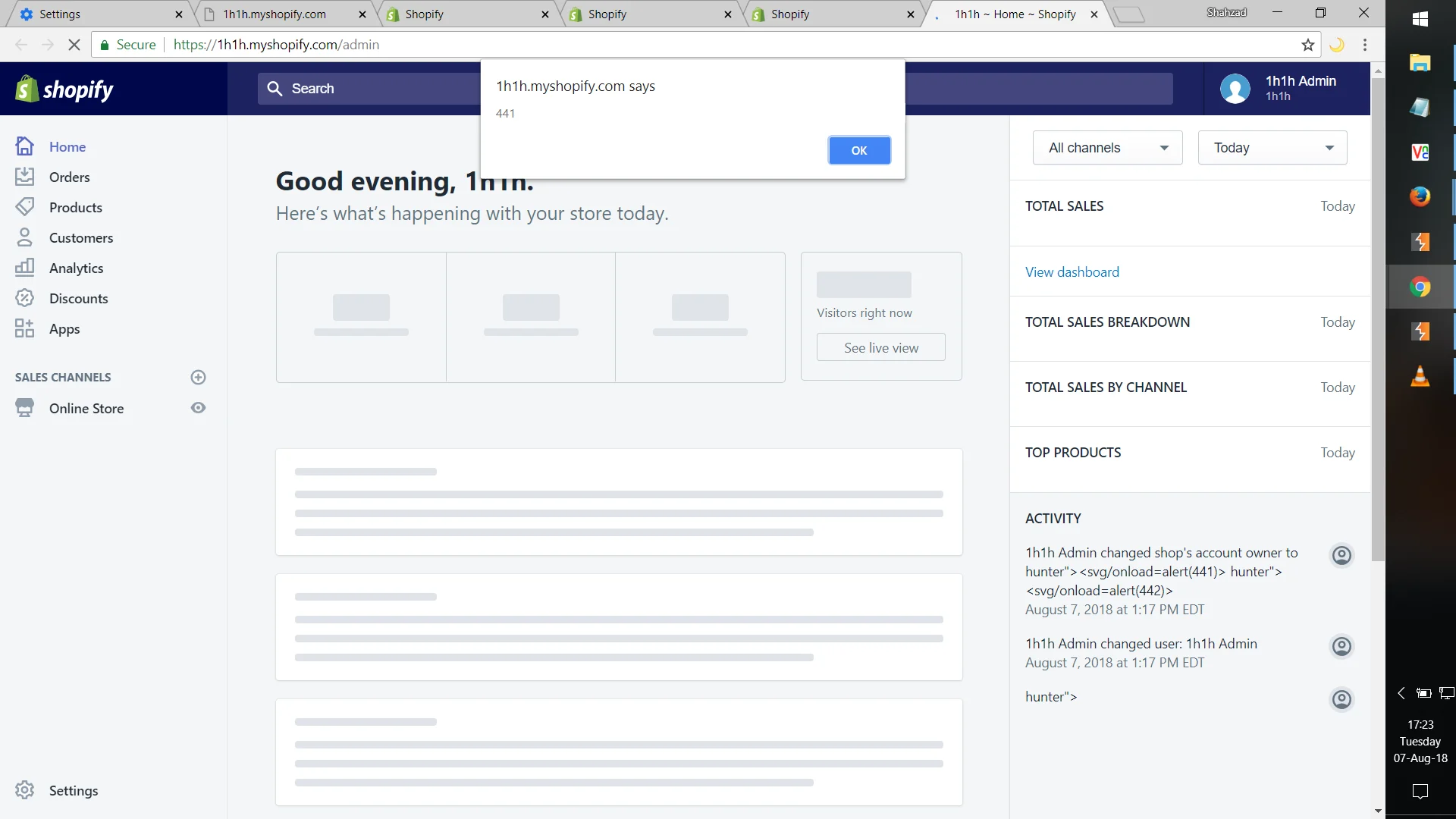
Let me know if more information is needed to my end. Best Regards, Shahzad
Impact
An attacker(staff member) can takeover admin account.
What the report shows
The report concerns a Shopify store and a stored XSS in the activity generated when a member name is rendered. The researcher reports a stored XSS on the activity that allows an attacker to steal admin account cookies.
The reproduction steps are short and are reproduced here as the report gives them:
- Create store
- Add a member in a store
- Member can choose any name
- So change the any member name with
hunter"><svg/onload=alert(2)> - Now on admain account make changes
- That will create activity with attacker malicious payload
The payload used for the member name is:
hunter"><svg/onload=alert(2)>
The researcher then makes changes on the admin account, which creates an activity containing the malicious payload.
The proof of concept is a single screenshot:
The report does not include the raw HTTP request or response for the member name change, the exact activity page, or the browser and version used. It also does not describe a fix or a timeline. The platform record lists the severity as high, the weakness as stored cross-site scripting, and a bounty of 2,000 USD, disclosed on 14 August 2018.
Root cause
The likely root cause is that the member name is stored and later rendered into the activity without adequate sanitisation or output encoding. The application treats the name as trusted text at render time, so the stored value executes in the browser of whoever views the activity entry, including an administrator.
Impact
The report's own claim is that an attacker who is a staff member can take over an admin account, and that the injected script can steal admin account cookies. The report describes the attacker as a staff member, so this is not an unauthenticated attack. The report does not demonstrate the cookie theft itself, only script execution in the activity feed.
How this kind of bug works
Stored cross-site scripting happens when input that is saved by the application is later included in a page without encoding appropriate to the context where it lands. The dangerous part is the context. A value that is safe inside an HTML text node is not safe inside an attribute, inside a URL, inside a script block or inside a CSS block, and each of those needs different handling.
Two properties make stored XSS more serious than reflected XSS. First, the payload persists, so it fires for every user who views the affected page, not just the person who submitted it. Second, the victim is often someone with more privileges than the attacker, which is exactly the escalation pattern described in this report. Activity feeds, audit logs, comment threads and notification lists are classic sinks because they aggregate data from many sources and are frequently viewed by administrators.
The defences are output encoding matched to context, sanitisation of HTML with an allowlist when rich text is genuinely required, and a Content Security Policy that restricts inline script. Server-side validation of names and other free-text fields helps, but encoding at render time is the control that actually stops the bug, because the same stored value may be rendered in several different contexts.
How to test for it
- Identify every place where user-controlled data is stored and later displayed to another user, especially to administrators: profile fields, member names, team invitations, comments, file names, ticket subjects and activity or audit logs.
- For each field, submit a benign marker first, such as a unique string, and confirm where and how it is rendered. View source rather than trusting the visual page.
- Determine the rendering context. If the marker appears between quotes inside a tag, an attribute breakout is the relevant test; if it appears in a text node, a tag injection is relevant; if it appears inside a script or URL, different syntax applies.
- Submit context-appropriate probes that are harmless if they execute, for example a quote followed by a tag with an event handler that calls
alertor writes to the DOM. Avoid destructive payloads. - Trigger the second-user view: log in as the higher-privileged account, or use a second browser session, and load the page that displays the stored value.
- A positive result is your probe executing in the victim session's origin, confirmed by the dialog or DOM change appearing under the second account. Capture the request that stored the value, the page that rendered it, and the execution evidence.
Common false positives: the payload appearing HTML-encoded in the source (safe), the payload executing only in your own session because you are viewing your own unsanitised preview, self-XSS that requires the victim to paste code into a console, and payloads that are stripped by a sanitizer but whose text still appears in the page. Also check whether the value is rendered inside a sandboxed iframe or a different origin, which changes the impact.
How it is fixed
Apply context-aware output encoding at every sink, so that quotes, angle brackets and ampersands are escaped when the value is written into an attribute and tags are escaped in text nodes. Where HTML input is a product requirement, run it through a well-maintained allowlist sanitizer on the server. Validate and length-limit names and similar fields on input as defence in depth. Add a Content Security Policy that disallows inline event handlers and inline script, which neutralises many payloads even when encoding is missed. Finally, review all other sinks that render the same stored field, since fixing one page does not fix the others.
Hunting notes
This class of bug hides wherever low-privileged users can set text that high-privileged users will later see. Multi-tenant SaaS is fertile ground: team management, invitations, activity feeds, audit logs, export filenames and notification emails. Recon signals include features that let one role create content for another, admin dashboards that aggregate events, and any page that echoes a name or title back into markup. When you find a candidate, establish the privilege boundary clearly: show that a low-privileged account stores the payload and an administrator session executes it. Keep payloads non-destructive and stop at proof of execution.
What happened, in plain words
This report is about a Shopify store. A Shopify store is an online shop hosted by Shopify; the address is the shop's own web address. The issue involves the activity generated in the store when changes are made.
The researcher found that a member's name, once saved, ends up in the activity without being made safe, so a crafted name can make the browser run code. This is called stored cross-site scripting: "stored" because the dangerous value is saved on the server first, and "cross-site scripting" because the code then runs in someone else's browser session.
The researcher says this lets an attacker steal an administrator's cookies. A cookie is a small piece of data a website asks your browser to keep and send back with every request, so the site can recognise you; a session cookie is effectively the key to your logged-in session. If someone else gets that key, they can act as you.
The reproduction steps are short, and here they are as the report gives them:
- Create store
- Add a member in a store
- Member can choose any name
- So change the any member name with
hunter"><svg/onload=alert(2)> - Now on admain account make changes
- That will create activity with attacker malicious payload
Step by step, and why each one matters:
- Create store. You need a shop to work in. This is the researcher's own test shop.
- Add a member in a store. A member is another person with access to the shop, for example a staff account. This matters because the attack needs a lower-privileged person to be able to put text into the shop.
- Member can choose any name. The name field accepts free text. That is the door: whatever the member types is saved.
- Change the member name to the payload. A payload is the piece of text or code that carries out the attack. Here it is:
hunter"><svg/onload=alert(2)>
alert(2) is a tiny built-in browser pop-up that shows the number 2. It is deliberately harmless: it proves code ran without doing damage.
5. Make changes on the admin account. The administrator is the person with the most power in the shop. Doing something in the shop creates an activity containing the malicious payload.
6. The activity carries the payload. The activity is created with the attacker's malicious payload.
The proof of concept is a single screenshot:
The report does not include the raw request that saved the name, the exact page involved, or the browser used. The platform record lists the severity as high, the weakness as stored cross-site scripting, and a bounty of 2,000 USD, disclosed on 14 August 2018.
Why it works
The likely cause is that the member name is saved without proper cleaning and later rendered into the activity without encoding. The application treats the name as trusted at display time, so the saved value runs in the browser of whoever opens the activity entry, including an administrator.
Impact
The report's own claim is that an attacker who is a staff member can take over an admin account, and that the script can steal admin cookies. The report describes the attacker as a staff member, so this is not an attack by a complete stranger. The report does not demonstrate the cookie theft itself, only that script runs in the activity feed.
In general, how this kind of bug works
Stored cross-site scripting happens when something a user saves is later put into a page without encoding that fits the spot where it lands. The spot is what counts. A value that is safe as ordinary page text is not safe inside an attribute, a link, a script block or a style block, and each needs different handling.
Two things make stored XSS worse than the reflected kind, where the payload comes back only in the response to the person who sent it. First, the payload persists, so it fires for everyone who views the page, not just the sender. Second, the viewer is often more privileged than the attacker, which is exactly the pattern in this report. Activity feeds, audit logs, comment threads and notification lists are classic places for this, because they gather data from many sources and administrators look at them often.
The defences are output encoding matched to context, sanitising HTML with an allowlist when rich text is genuinely needed, and a Content Security Policy (a set of browser rules about which scripts may run) that blocks inline script. Checking names on the server helps, but encoding at display time is the control that actually stops the bug, because the same saved value may be shown in several different places.
In general, how to test for it
- Find every place where user-supplied data is saved and later shown to another user, especially an administrator: profile fields, member names, invitations, comments, file names, ticket subjects, activity and audit logs.
- For each field, save a harmless unique marker first and confirm where and how it appears. Look at the page source, not just the visible page.
- Work out the context. If the marker sits between quotes inside a tag, test an attribute breakout; if it sits in plain text, test tag injection; inside a script or link, different syntax applies.
- Send probes that are harmless if they run, such as a quote followed by a tag with an event handler that calls
alertor changes the page. Avoid anything destructive. - Trigger the second view: log in as the higher-privileged account, or use a second browser session, and open the page that shows the saved value.
- A positive result is your probe running in the victim session, shown by the pop-up or page change under the second account. Record the request that saved the value, the page that displayed it, and the evidence of execution.
Common false positives: the payload appearing encoded in the source (safe), the payload running only in your own session because you are viewing your own unsanitised preview, self-XSS that needs the victim to paste code into a console, and payloads stripped by a sanitiser whose text still shows on the page. Also check whether the value is shown inside a sandboxed frame or a different origin, which changes the impact.
In general, how it is fixed
Apply context-aware output encoding at every display point, so quotes, angle brackets and ampersands are escaped inside attributes and tags are escaped in text. Where HTML input is a real requirement, run it through a well-maintained allowlist sanitiser on the server. Validate and length-limit names and similar fields on input as extra defence. Add a Content Security Policy that disallows inline event handlers and inline script, which neutralises many payloads even when encoding is missed. Finally, review every other place that shows the same saved field, since fixing one page does not fix the others.
In general, where to look
This class of bug hides wherever low-privileged users can set text that high-privileged users will later see. Multi-tenant software, where one service hosts many separate customers, is fertile ground: team management, invitations, activity feeds, audit logs, export file names and notification emails. Signals to watch for include features that let one role create content for another, admin dashboards that gather events, and any page that echoes a name or title back into markup. When you find a candidate, make the privilege boundary clear: show that a low-privileged account saves the payload and an administrator session runs it. Keep payloads non-destructive and stop at proof of execution.
Glossary
- Store: a shop hosted on Shopify.
- Activity feed: a page listing recent events in the shop, such as changes made by members.
- Member: a person with access to the shop, for example a staff account.
- Administrator (admin): the person with the most power in the shop.
- Cookie: a small piece of data a site asks the browser to keep and send back, used to recognise you.
- Session cookie: the cookie that identifies your logged-in session; whoever holds it can act as you.
- Payload: the piece of text or code that carries out an attack.
- HTML: the language that describes the structure of a web page.
- Tag: a building block of HTML, written between angle brackets, such as
<svg>. - Attribute: a setting written inside a tag, usually in quotes, such as
name="...". - SVG: a format for drawing images in HTML; it can carry event handlers.
- Event handler: code attached to an element that runs when something happens, such as
onloadwhen the element loads. alert(): a built-in browser pop-up, often used as harmless proof that code ran.- Cross-site scripting (XSS): a bug where attacker-supplied content is treated as code by a victim's browser.
- Stored XSS: XSS where the dangerous value is saved on the server and runs for everyone who views the page.
- Reflected XSS: XSS where the payload comes back only in the response to the person who sent it.
- Encoding (escaping): turning characters with special meaning into harmless stand-ins so they display as text.
- Sanitisation: cleaning input by removing or neutralising dangerous parts, often with an allowlist of permitted markup.
- Allowlist: a list of things that are permitted, with everything else rejected.
- Content Security Policy (CSP): browser rules stating which scripts a page may run.
- Sink: a place in the code where data is written into a page.
- Context: the spot where a value lands (text, attribute, link, script), which decides what encoding is needed.
- Self-XSS: a bug that only works if the victim pastes code in themselves.
- False positive: a result that looks like a bug but is not exploitable.
- Sandboxed frame: an embedded page restricted by the browser so it cannot do everything a normal page can.
- Origin: the combination of scheme, host and port that a browser uses to separate sites from each other.
- Multi-tenant: one service hosting many separate customers, each with their own space.
- Privilege escalation: gaining more access than your role should allow.
- Proof of concept (POC): a minimal demonstration that a bug is real.



