Stored XSS on buy button
The Buy Button sales channel did not properly render currency formatting, allowing an attacker to inject HTML into the currency format setting. A staff member could then execute JavaScript in the context of the channel and potentially take over another account.

- Triaged in 26 hours
- Fixed in 40 days
- Paid in 3 days
- Disclosed after 41 days
Summary by the program
@tony_tsep discovered a cross-site scripting vulnerability in the Buy Button sales channel. Currency amounts were not properly rendered, which could allow an attacker to execute Javascript in the context of the channel.
The report
I found an XSS vulnerability on buy button.
Steps to reproduce
Go to Settings > General > Store currency > Change formatting and add on "HTML with currency" the payload €{{amount}} "><img src=x onerror=prompt(document.domain)>
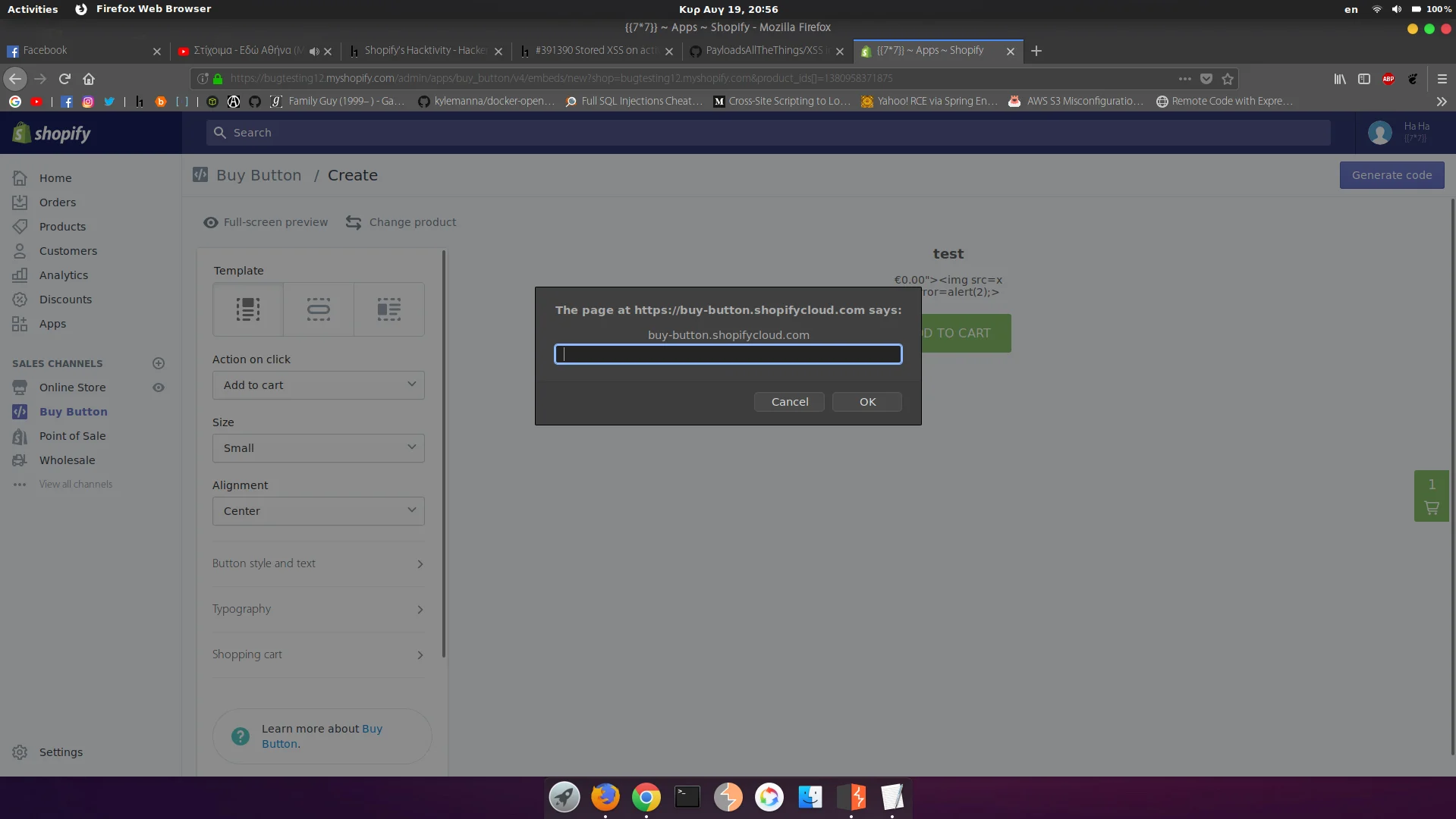
After that go to buy button and you will see that the payload triggers there.
Impact
A staff member can takeover another account.
Attachments
What the report shows
The target is the Buy Button sales channel on Shopify. The researcher, tony_tsep, found a stored cross-site scripting issue in how currency amounts were rendered. The program's own summary states that currency amounts were not properly rendered, which could allow an attacker to execute JavaScript in the context of the channel.
The reproduction is short and entirely inside the store settings:
- Go to Settings > General > Store currency > Change formatting.
- Choose the "HTML with currency" format and add the payload:
€{{amount}} "><img src=x onerror=prompt(document.domain)>
- Go to the Buy Button and observe that the payload triggers there.
The payload closes the attribute or tag that wraps the amount and injects an img element whose onerror handler runs prompt(document.domain). Because the value is saved in the store's currency formatting, it is stored rather than reflected: it persists and fires where the formatted amount is rendered, in this case the Buy Button.
The report rates impact as a staff member being able to take over another account. The report does not describe the fix.
The report includes a single attachment:
Root cause
A plausible explanation is that the currency formatting string, which is allowed to contain HTML, was stored and later inserted into the Buy Button output without context-aware escaping. Any user who can edit the format can therefore place arbitrary markup and event handlers into a page rendered for other users.
Impact
The report's own framing is that a staff member can take over another account. The payload runs in the context of the Buy Button channel for whoever views it, and the report states a staff member can take over another account. The program's summary keeps the hedge that it "could allow" JavaScript execution. The report does not describe session theft, credential capture or any specific takeover chain, so the account takeover claim should be read as the researcher's assessment of the worst case rather than a demonstrated step.
How this kind of bug works
Stored XSS happens when user-controlled data is saved by the application and later written into an HTML response without the escaping appropriate to the place it lands. The browser cannot tell developer markup from injected markup, so any <script>, event handler attribute or javascript: URL that survives into the page executes with the origin of the site. Because the value is stored, one write affects every later reader, which is what separates it from reflected XSS.
The interesting variant here is second-order rendering: the input is a formatting template, not a comment or profile field. Templates that legitimately contain markup are a classic blind spot, because developers assume the value is trusted configuration and skip escaping. The correct defence is to escape at output according to context, and where markup must be allowed, to sanitise it against a strict allowlist of tags and attributes. A Content Security Policy that forbids inline handlers adds defence in depth but does not fix the underlying injection.
How to test for it
Look for settings that accept formatting, templates or markup and are rendered elsewhere: currency and number formats, date formats, email templates, invoice headers, shipping labels, receipt footers, storefront widgets. The signal is a field whose help text mentions HTML or shows a preview.
A practical method:
- Identify every place a stored value is echoed into a page other than the settings screen itself, ideally one viewed by a different user or by customers.
- Save a benign marker first, such as a distinctive string, and confirm it appears in the second location. This proves the value is stored and re-rendered.
- Replace the marker with a minimal probe that would only execute if the context is unescaped, for example a tag with an event handler that calls
promptor writes to the DOM. Keep it harmless. - Check the raw response, not just the rendered page, to see whether your characters were encoded or stripped.
- If it fires, capture the exact request that saved the value and the exact page where it rendered, and note which user role sees it.
Common false positives: the payload appears in the page source but is HTML-encoded, so it renders as text; the value only reflects back to the same user in the same request; the field is sanitised server-side but the preview in the settings UI is not, which may still matter but needs a victim path; or the execution happens in a sandboxed iframe with an opaque origin, which limits what can be reached.
How it is fixed
Escape the stored value at output for the context it lands in, and if markup must be supported, run it through an allowlist-based sanitiser that strips event handlers and dangerous URLs. Validate the format string on save so only the expected placeholder and a safe tag set are accepted. Apply the same treatment to every consumer of the setting, since one escaped sink does not protect another. Add a restrictive Content Security Policy as a second layer.
Hunting notes
Formatting and template fields are where this bug class hides, especially in commerce and SaaS platforms where merchants customise receipts, invoices and storefront widgets. Recon signals include settings pages with live previews, documentation mentioning HTML in a format field, and any value that is written once and rendered in a different application surface, such as a checkout widget or an embedded button. Programs accept these reports more readily when the proof shows a cross-user path and a concrete consequence rather than a self-XSS prompt.
What happened, in plain words
Shopify is a platform that lets people run an online shop. One of its features is the Buy Button. A merchant can also change how prices look in their shop, for example the currency symbol and the order of the number.
The researcher, tony_tsep, found that this price formatting setting could be abused. The setting accepts a template that is allowed to contain HTML, the language used to build web pages. If you put a piece of HTML that contains a small script into that template, it is saved with the shop's settings and later shown on the Buy Button. The browser runs the script as if Shopify itself had written it. This kind of bug is called stored cross-site scripting, or stored XSS.
The program's own summary says currency amounts were not properly rendered, which could allow an attacker to execute JavaScript in the context of the channel.
The reproduction, step by step
The whole reproduction happens inside the shop's settings:
- Go to Settings > General > Store currency > Change formatting.
- Choose the "HTML with currency" format and add the payload:
€{{amount}} "><img src=x onerror=prompt(document.domain)>
- Go to the Buy Button and observe that the payload triggers there.
Why each step matters:
- The formatting setting is where a merchant decides how a price is displayed. The
{{amount}}part is a placeholder: the shop replaces it with the actual number when it shows a price. - The payload starts with
€{{amount}}, so it still looks like a normal price format. Then">closes whatever HTML attribute or tag was wrapping the amount. What follows,<img src=x onerror=prompt(document.domain)>, adds an image element. Thesrc=xpoints at an address that does not exist, so the image fails to load, and theonerrorpart is a handler that runs when that failure happens. The handler callsprompt(document.domain), which opens a browser dialog showing the domain of the page. That dialog is the visible proof that code ran. - Saving the setting is what makes this stored rather than reflected. The value lives in the shop's configuration, so it is not a one-off trick against the person who typed it. It fires where the formatted amount is rendered, in this case the Buy Button.
The report includes a single attachment:
Impact
The report's impact statement is that a staff member can take over another account. In plain terms, a staff member who can edit the currency format could plant this value and have it run in the browser of someone who views the Buy Button. The report does not describe how an account would actually be taken over, so treat that sentence as the researcher's view of the worst case rather than a demonstrated chain.
In general, how this kind of bug works
A web page is a document the browser reads and turns into what you see. HTML is the markup that describes that document: headings, images, links and so on. JavaScript is code the browser can run inside the page. When a site puts text from a user into a page, it has to make sure that text is treated as text and not as markup or code. If it does not, the browser cannot tell the difference between what the developer wrote and what an attacker injected, and anything that looks like a tag or a handler runs with the site's own authority.
A useful comparison is a noticeboard where visitors can leave notes. If the person pinning notes copies whatever a visitor writes, including instructions like "ignore the previous note and unlock the door", the next reader may follow them. Escaping is the practice of writing the visitor's words so they can only be read as words, never as instructions.
Stored XSS is the version where the dangerous text is saved by the site and shown later to other people. Reflected XSS is the version where the text comes back only in the same response, for example in a search result page, and usually only affects the person who sent it. Stored is more serious because one write can reach many readers.
The twist here is that the field is a template, and templates are supposed to contain markup. Developers often assume such configuration is trusted and skip the escaping. The fix is to escape the value when it is output, according to where it lands, and if markup really must be allowed, to clean it against a strict list of permitted tags and attributes. A Content Security Policy, a browser rule that limits what a page may run, adds a second layer but does not repair the injection itself.
In general, how to test for it
Look for settings that accept formatting, templates or markup and are shown somewhere else: currency and number formats, date formats, email templates, invoice headers, shipping labels, receipt footers, storefront widgets. The signal is a field whose help text mentions HTML or shows a preview.
A practical method:
- Find every place a saved value appears on a page other than the settings screen, ideally one seen by a different user or by customers.
- Save a harmless marker first, such as a distinctive word, and confirm it appears in the second location. This proves the value is stored and shown again.
- Replace the marker with a minimal probe that only runs if the context is not escaped, for example a tag with an event handler that calls
prompt. Keep it harmless. - Check the raw response, not just the rendered page, to see whether your characters were encoded or removed.
- If it fires, record the exact request that saved the value and the exact page where it appeared, and note which user role sees it.
Common false positives: the payload appears in the page source but is encoded, so it shows as text; the value only comes back to the same user in the same request; the field is cleaned on the server but the preview in the settings screen is not, which may still matter but needs a victim path; or the code runs in a sandboxed frame with an opaque origin, which limits what it can reach.
Glossary
- Shopify: a platform for running an online shop.
- Buy Button: a Shopify feature that lets a merchant embed a purchase button on another website.
- HTML: the markup language that describes the structure of a web page.
- JavaScript: code that a browser can run inside a web page.
- Payload: the piece of input an attacker supplies to trigger a bug.
- Stored XSS: cross-site scripting where the dangerous input is saved by the site and shown later to other users.
- Reflected XSS: cross-site scripting where the input comes back only in the same response, usually affecting only the sender.
- Cross-site scripting (XSS): a bug where user input is treated as markup or code in a page instead of as text.
- Template: a string with placeholders that the site fills in, here
{{amount}}for the price. - Placeholder: the part of a template that gets replaced with a real value.
- Attribute: a setting written inside an HTML tag, such as
srcon an image. - Event handler: an attribute such as
onerrorthat tells the browser to run code when something happens. onerror: the handler that runs when an image fails to load.prompt: a browser function that opens a dialog and returns what the user types.document.domain: the domain of the current page, as read by code running in it.- Escaping: writing user input so the browser reads it as text, not as markup or code.
- Sanitising: cleaning input against a list of allowed tags and attributes.
- Allowlist: a list of things that are permitted, with everything else rejected.
- Content Security Policy: a browser rule set by the site that limits what scripts and resources a page may use.
- Origin: the combination of scheme, host and port that identifies a site to the browser.
- Sandboxed iframe: an embedded frame with restricted permissions, often with an opaque origin.
- False positive: a finding that looks like a bug but is not exploitable in practice.
- Severity: a rating of how serious a bug is.
- Bounty: a payment made by a program for a valid report.



