Stored XSS through Facebook Page Connection
 Originally disclosed on HackerOne
- Triaged in 24 hours
- Fixed in 45 hours
- Paid in 8 days
- Disclosed after 2.6 years
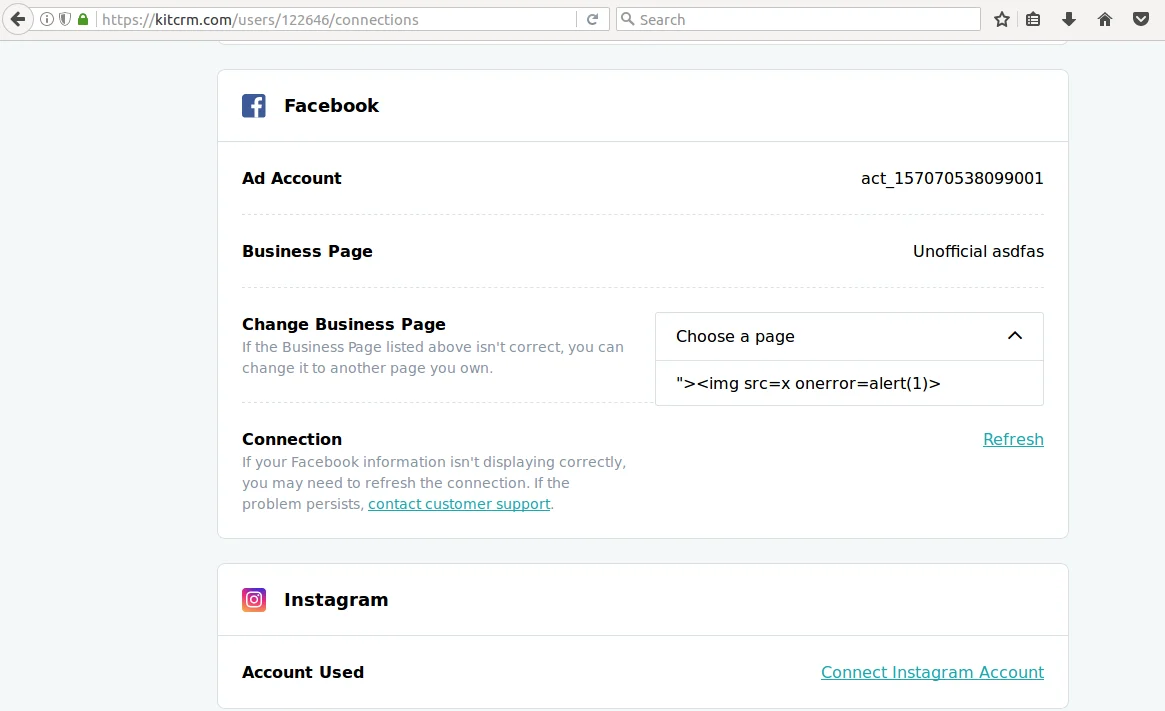
The following URL https://kitcrm.com/users/122686/connections displays us options to connect our several social networking accounts to kitcrm. Once i connect my facebook account, the facebook section in above link will list out all my facebook page and will give me an option to select a business page. One of my facebook page name is "><img src=x onerror=alert(9)> F220032: Screenshot from 2017-09-11 22-23-23.png 54.6KB
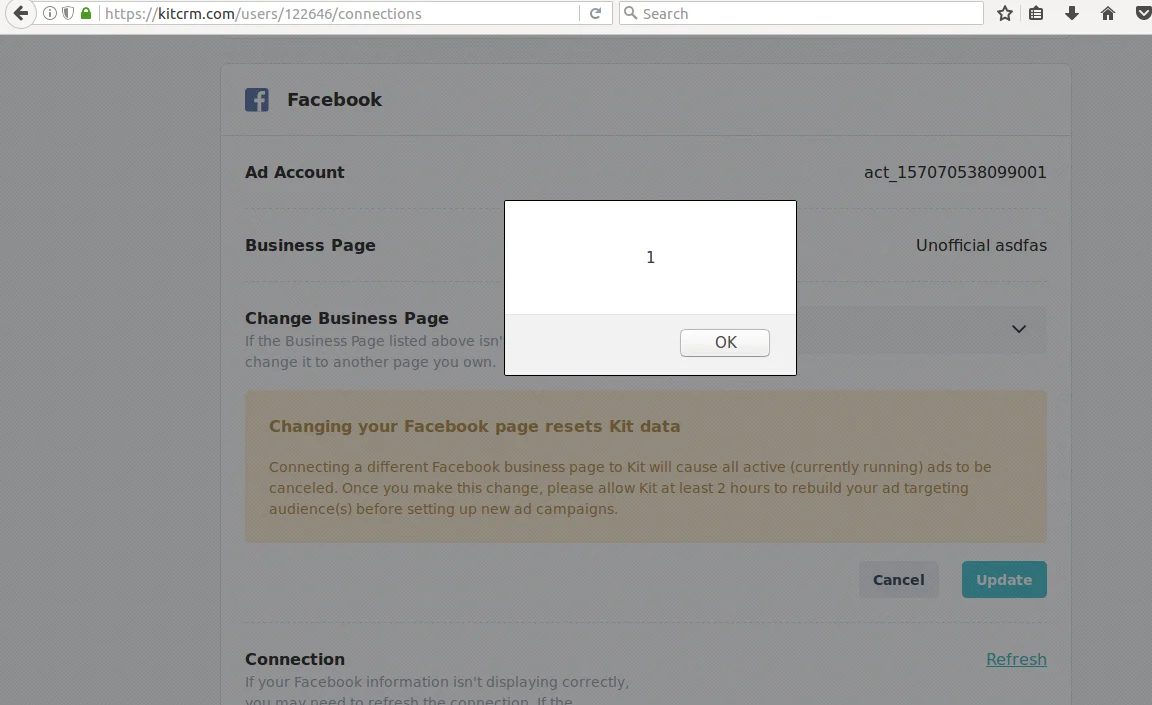
Now when i click on that drop-down option an alert will pop-up. F220033: Screenshot from 2017-09-11 22-25-20.png
Attachments
What the report shows
The target is the connections page of kitcrm.com, where a user links external social networking accounts to the CRM. The researcher opened the following URL, which lists the available connection options:
https://kitcrm.com/users/122686/connections
After connecting a Facebook account, the Facebook section of that page listed all of the researcher's Facebook pages and offered a dropdown to select a business page. One of those Facebook pages had the following name:
"><img src=x onerror=alert(9)>
When the researcher opened the dropdown, the page rendered the page name as markup rather than text, and the injected handler fired: an alert box appeared. The report includes two screenshots.
The report stops there. It records no fix, no bounty and no further exploitation beyond the alert. The platform lists it as a low severity stored cross-site scripting issue with a CVSS score of 2.8, disclosed on 4 April 2020.
Root cause
The report does not state a cause; the page name appears to be rendered as markup. The name is attacker-influenced data: a Facebook page owner controls it, and the CRM treats it as trusted once the account is linked. Because the value is written into the page as raw HTML, the closing quote and img tag in the name break out of whatever attribute or element was meant to hold it, and the onerror handler runs when the image fails to load.
Impact
The report demonstrates script execution in the context of the connections page, triggered when the dropdown is opened. The report shows execution when the researcher opened the dropdown for their own connected account. What an attacker could do with that execution, such as reading data or acting as the victim, is not explored in the report; the proof stops at the alert.
How this kind of bug works
Stored XSS happens when input that is saved by the application is later rendered into a page without context-appropriate output encoding. The dangerous part is persistence: the payload is written once and executes for every user who views the affected view, with no need to trick each victim into clicking a crafted link.
Third-party data is a common source. Names, display names, titles and descriptions pulled from connected services (social accounts, OAuth providers, address books, importers) are often assumed to be safe because they come from a trusted API. They are not: the API faithfully returns whatever the account owner set. If the front end builds HTML by string concatenation, or assigns to innerHTML, the value is parsed as markup.
The defence is contextual output encoding: HTML-encode text inserted into element content and attribute values, and use the framework's escaping rather than manual string building. A restrictive Content Security Policy that blocks inline handlers and inline script reduces the damage when encoding is missed. Server-side validation of the incoming value helps but is not a substitute for encoding at render time.
How to test for it
- Map every place where data from an external or user-controlled source is displayed: profile fields, connected-account lists, imported records, notification text, admin panels.
- Set a distinctive but harmless marker in the source system, for example a name containing angle brackets and a quote, and observe how it appears in the target application.
- If the marker appears encoded, the output is probably safe. If it appears as literal markup, or if the page structure changes around it, you have a candidate.
- Confirm execution with a benign payload that produces an observable effect, such as an alert or a DOM change, and record the exact steps and the request that stored the value.
- Check every rendering context: the same value may be safe in one view and unsafe in another, such as a dropdown, a tooltip, a PDF export or an email notification.
Common false positives: the value is reflected but encoded; the payload fires only in your own browser because of an extension; the input is sanitised on save but the sanitised version is what you see; or the alert comes from a different, already-known issue on the page. Verify in a clean browser profile and confirm the stored value is what the server returns.
How it is fixed
Encode all output according to context: HTML entities in element text and attributes, JavaScript escaping inside script blocks, URL encoding in links. Prefer templating engines and frameworks that escape by default, and avoid assigning untrusted strings to innerHTML. Add a Content Security Policy that disallows inline script and inline event handlers. Where possible, validate or normalise third-party values on ingestion, but keep encoding as the primary control.
Hunting notes
This class of bug tends to hide wherever data crosses a trust boundary: OAuth and social integrations, CRM imports, ticketing systems that display customer-supplied names, chat and comment widgets, and admin dashboards that render data from lower-privileged users. Recon signals include features that list external accounts, any page that shows a name or title you set elsewhere, and endpoints that accept bulk imports.
To get a report accepted, show the full path from storing the value to execution, name the exact view and the user who would trigger it, and demonstrate a realistic impact beyond an alert where the program allows it. Keep the payload minimal and avoid touching other users' data. If the value only renders in your own session, say so; a stored issue that requires the victim to connect their own account is weaker than one that fires for anyone viewing a shared page.
What happened, in plain words
kitcrm.com is a customer relationship management (CRM) tool: software a business uses to keep track of customers, contacts and the other services it talks to. One of its features is a connections page, where you link outside accounts, such as your social networking accounts, to the CRM. The researcher opened this page:
https://kitcrm.com/users/122686/connections
A URL is the address of a page, the thing you type in the browser bar. The URL contains the number 122686. The page shows the list of services you can connect.
After the researcher connected a Facebook account, the Facebook part of the page listed all of the researcher's Facebook pages and offered a dropdown menu to pick a business page. A dropdown is the small menu that opens when you click it and shows a list of choices. One of the researcher's Facebook pages had this name:
"><img src=x onerror=alert(9)>
That is not a normal name. It is a piece of HTML, the language web pages are written in. Broken down:
">closes whatever quote and tag the page had opened around the name, so the text stops being treated as a name and starts being treated as page code.<img src=x ...>asks the browser to show an image.src=xpoints at an image calledx, which does not exist.onerror=alert(9)is an instruction attached to the image: if the image fails to load, run the JavaScriptalert(9). JavaScript is the programming language browsers run to make pages interactive.alert(9)makes a small pop-up box appear with the number 9 in it.
Because the image x does not exist, it always fails to load, so the pop-up always appears.
When the researcher clicked the dropdown, the page showed the page name as if it were code rather than as plain text, and the pop-up appeared. The report includes two screenshots.
This is called stored cross-site scripting, or stored XSS. "Stored" means the harmful text was saved somewhere first (here, as the name of a Facebook page) and is shown later to whoever views the page. "Cross-site scripting" means a page runs code that the site's owners did not write, because it treated someone else's text as code.
The report stops at the pop-up. It does not describe a fix, a bounty payment or any attempt to do more than show the alert. The platform records it as a low severity stored XSS issue with a CVSS score of 2.8, disclosed on 4 April 2020. CVSS is a standard scoring system for how serious a security flaw is; 2.8 is on the low end.
Why it happens
The likely cause is that the CRM takes the Facebook page name from the connected account and puts it into the connections page without encoding it. Encoding means converting characters that have a special meaning in HTML, such as <, > and ", into harmless stand-ins so the browser shows them as text. Without encoding, the browser reads them as instructions.
The name is data the page owner controls: anyone who owns a Facebook page can set its name. The report does not explain why the name was rendered as code. But Facebook simply returns whatever the owner typed. If the CRM builds its page by gluing strings of text together, the name is treated as part of the page's code.
What an attacker could do
The report shows code running on the connections page when the dropdown is opened. The report shows the code running when the researcher opened the dropdown for their own connected account. What an attacker could actually do with that, such as reading data or acting as the victim, is not explored in the report. The proof stops at the pop-up.
In general, how this kind of bug works
Stored XSS happens when something a user or an outside service supplies is saved by the application and later placed into a page without the right encoding for that spot. The dangerous part is that it persists: the harmful text is saved once and runs for every visitor who sees the affected view, with no need to trick each person into clicking a special link.
Data from third parties is a common source. Names, display names, titles and descriptions pulled from connected services (social accounts, login providers, address books, importers) are often assumed safe because they come from a trusted interface. They are not: the service faithfully returns whatever the account owner set. If the front end builds HTML by joining strings, or assigns text to innerHTML (a browser property that treats a string as HTML), the value is read as markup.
The defence is contextual output encoding: encode text according to where it lands, HTML-encoding values placed in element content and in attributes, and using the framework's escaping instead of building strings by hand. A restrictive Content Security Policy, a set of browser rules that limits what code a page may run, blocks inline handlers and inline script and reduces the damage when encoding is missed. Checking the value on the server helps but does not replace encoding when the page is drawn.
In general, how to test for it
- List every place where data from an outside or user-controlled source is displayed: profile fields, connected-account lists, imported records, notification text, admin panels.
- Put a distinctive but harmless marker in the source system, for example a name containing angle brackets and a quote, and watch how it appears in the target application.
- If the marker appears encoded, the output is probably safe. If it appears as literal markup, or the page structure changes around it, you have a candidate.
- Confirm it runs with a harmless payload that produces a visible effect, such as an alert or a change on the page, and record the exact steps and the request that saved the value.
- Check every place the value is shown: the same value may be safe in one view and unsafe in another, such as a dropdown, a tooltip, a PDF export or an email notification.
Common false alarms: the value is shown but encoded; the payload fires only in your own browser because of an extension; the input is cleaned when saved and you are seeing the cleaned version; or the alert comes from a different, already-known issue on the page. Check in a clean browser profile and confirm the saved value is what the server returns.
In general, how it is fixed
Encode all output according to context: HTML entities in element text and attributes, JavaScript escaping inside script blocks, URL encoding in links. Prefer templating engines and frameworks that escape by default, and avoid assigning untrusted strings to innerHTML. Add a Content Security Policy that disallows inline script and inline event handlers. Where possible, check or normalise third-party values when they arrive, but keep encoding as the main control.
In general, where to look
This class of bug tends to hide wherever data crosses a trust boundary: social and login integrations, CRM imports, ticketing systems that show customer-supplied names, chat and comment widgets, and admin dashboards that show data from lower-privileged users. Signs to watch for include features that list outside accounts, any page that shows a name or title you set elsewhere, and endpoints that accept bulk imports.
To get a report accepted, show the full path from saving the value to it running, name the exact view and the user who would trigger it, and demonstrate a realistic impact beyond an alert where the program allows it. Keep the payload minimal and avoid touching other users' data. If the value only shows in your own session, say so; a stored issue that needs the victim to connect their own account is weaker than one that fires for anyone viewing a shared page.
Glossary
- CRM: customer relationship management software, used to track customers, contacts and connected services.
- URL: the address of a page or resource, typed in the browser bar.
- Dropdown: a menu that opens when clicked and shows a list of choices.
- HTML: the language web pages are written in, made of tags such as
<img>. - Tag: a piece of HTML markup, such as
<img>, that tells the browser what to show. - Attribute: a setting inside a tag, such as
srcoronerror. - JavaScript: the programming language browsers run to make pages interactive.
alert(): a JavaScript function that shows a pop-up box.- Event handler: code attached to an element that runs when something happens, such as an image failing to load (
onerror). - Stored XSS: cross-site scripting where the harmful text is saved by the site and shown later to visitors.
- Cross-site scripting (XSS): a flaw where a page runs code supplied by someone other than the site's owners because their text was treated as code.
- Encoding: converting special characters into harmless stand-ins so they are shown as text, not read as code.
innerHTML: a browser property that treats a string as HTML when placed into a page.- Content Security Policy (CSP): browser rules that limit what code a page may run.
- CVSS: a standard scoring system for the severity of a security flaw.
- Payload: the piece of text or code used to demonstrate a flaw.
- False positive: a suspected flaw that turns out not to be real.




