Unauthenticated Stored XSS on <any>.myshopify.com via checkout page
The first name field on the Shopify checkout page accepted an HTML tag with an event handler, which was then inserted unsanitised into the title tag of the thank-you page. An attacker could execute arbitrary JavaScript in the context of any Shopify store's myshopify.com domain, affecting admins and other users.
 Originally disclosed on HackerOne
- Triaged in 20 hours
- Fixed in 4 days
- Paid in 9 days
- Disclosed after 9 days
Hi,
I have found a stored cross site scripting vulnerability on <any>.myshopify.com through customer's first name in the checkout page after the order is completed.
#Details:
While processing an order on checkout.shopif.com customers are asked to enter their first name , last name , address details ..etc.
It's been found that the mentioned fields does not accept any HTML tags , so if you entered something like <script>alert(2);</script> , it will be rejected and you'll see a message saying cannot contain HTML tags .
However, for some reason the only tag that you can include and it won't be rejected is <html> tag itself :D
So , something like <html onmouseover=alert(1)> will be accepted.
After completing the order you'll land at a thank page saying that the order was confirmed , the XSS vulnerability lies in that page due to not sanitizing the first name of the customer inside the <title> tag.
#Steps to reproduce:
- As an admin create a product with $0 price and $0 taxes on shipping so that you don't have to to enter any credit card details (the price doesn't matter , it's just to make testing easier).
- As a user go to the product you created and buy it.
- You'll be redirected to a page in
checkout.shopify.comasking you to enter your details. - In the first name field enter
</title></head><html onmouseover=alert(2)>. - Fill the other fields then click Continue to shipping method --> Continue to payment method --> Complete order
- XSS will trigger on
checkout.shopify.com, to get the payload executed on<your_store>.myshopify.com, just go to<your_store>.myshopify.com/0/checkouts/<checkout_id>/thank_you
Here is a live PoC: https://zh5402.myshopify.com/14372648/checkouts/5e566284338e71d6adc542b6567b4cf0/thank_you
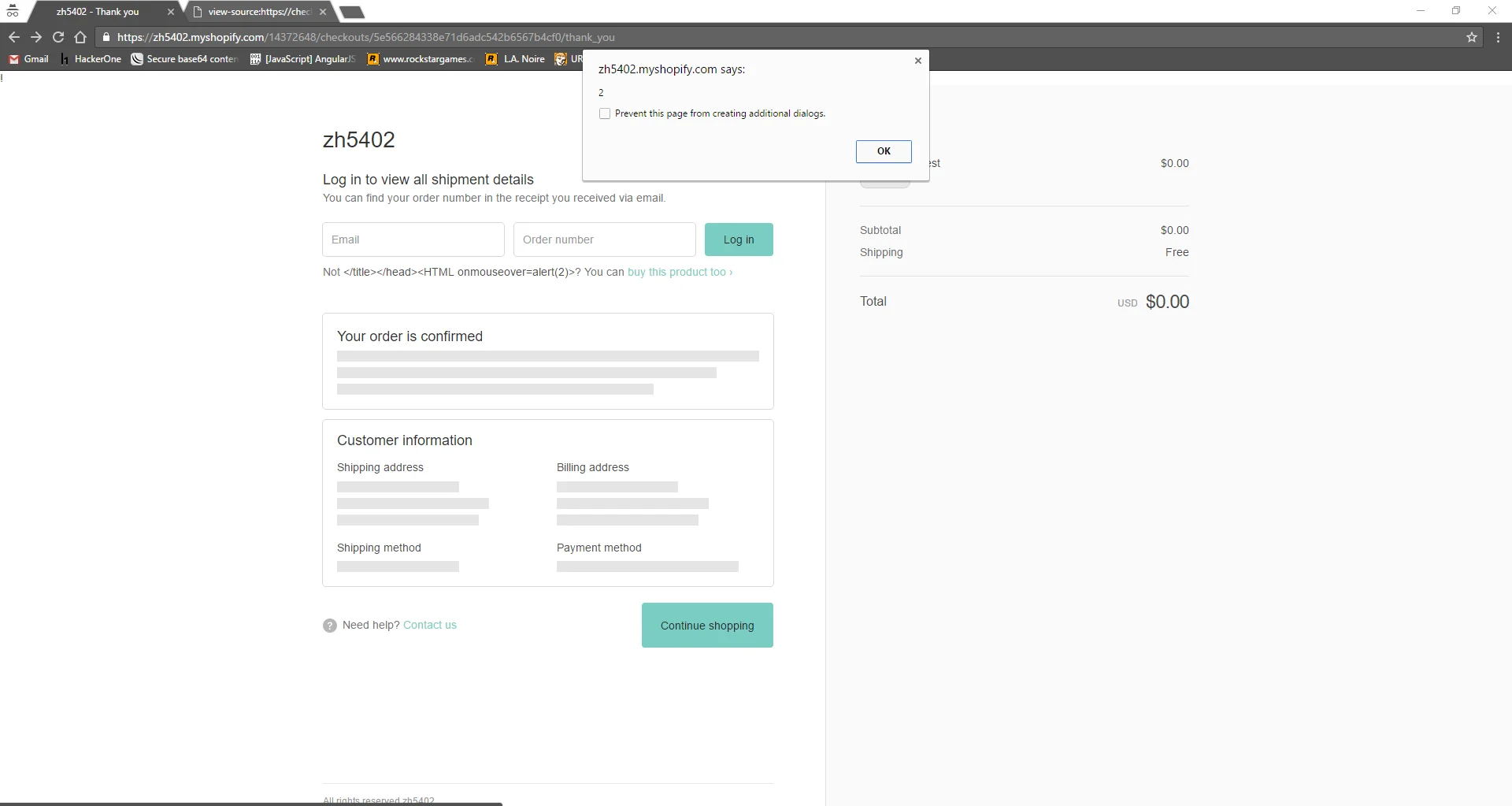
#Impact:
Through this vulnerability an attacker is able to execute arbitrary JavaScript at <any>.myshopify.com on admins and any other users to perform malicious actions such as fetching the CSRF token and using it to perform malicious requests , stealing sensitive information ..etc.
Not written yet. The AI write-up for this report has not been written yet. The Original tab links to the source.
How it worked
Root cause
Likely the checkout form's input filter only blocked most HTML tags but allowed the <html> tag, and the thank-you page inserted the first name into the <title> element without proper output encoding.
Impact
An attacker could execute arbitrary JavaScript on any myshopify.com store, potentially affecting admins and other users, and could fetch CSRF tokens to perform malicious requests or steal sensitive information.
What the attacker needed
Attacker can place an order with a crafted first name; victim visits the thank-you page; victim moves mouse over the page
How it was found
- As an admin, create a product with zero price and zero shipping tax to avoid entering credit card details.
- As a user, go to the product and buy it.
- You are redirected to a checkout page asking for your details.
- In the first name field, enter a closing title tag, closing head tag, and an html tag with an onmouseover handler.
- Fill the other fields and proceed through shipping, payment, and complete the order.
- The XSS triggers on checkout.shopify.com; to execute on the store's myshopify.com domain, visit the thank_you URL for the checkout.
Explained by bugbounty.wiki with AI from the original and checked against quotes from it; it can still be wrong. Read the original before relying on a detail.
Not written yet. The AI write-up for this report has not been written yet. The Original tab links to the source.
A website let a customer type a special HTML tag into their first name, and later showed that name on a confirmation page without cleaning it. Because the tag could contain a mouse-over action, an attacker could make the page run their own code when someone moved the mouse over it. This could let the attacker act as the victim on the store's website.
What is XSS?
Script an attacker supplies runs in another user's browser, on the target's origin, with that user's session.




