XSS in my.shopify.com in widget
A product description containing an image tag with an error handler was not sanitised when displayed in the Buy Button channel, allowing script execution. An attacker could run JavaScript in the context of the shop's Buy Button page and read cookies.

- Triaged in 30 hours
- Fixed in 7 months
- Paid in 7 months
- Disclosed after 8 months
Summary by the program
The researcher observed that product descriptions were not properly sanitized when displayed inside the Buy Button channel.
The report
Hi security team I found XSS in the Buy Button in my.shopify.com
Step to reproduce
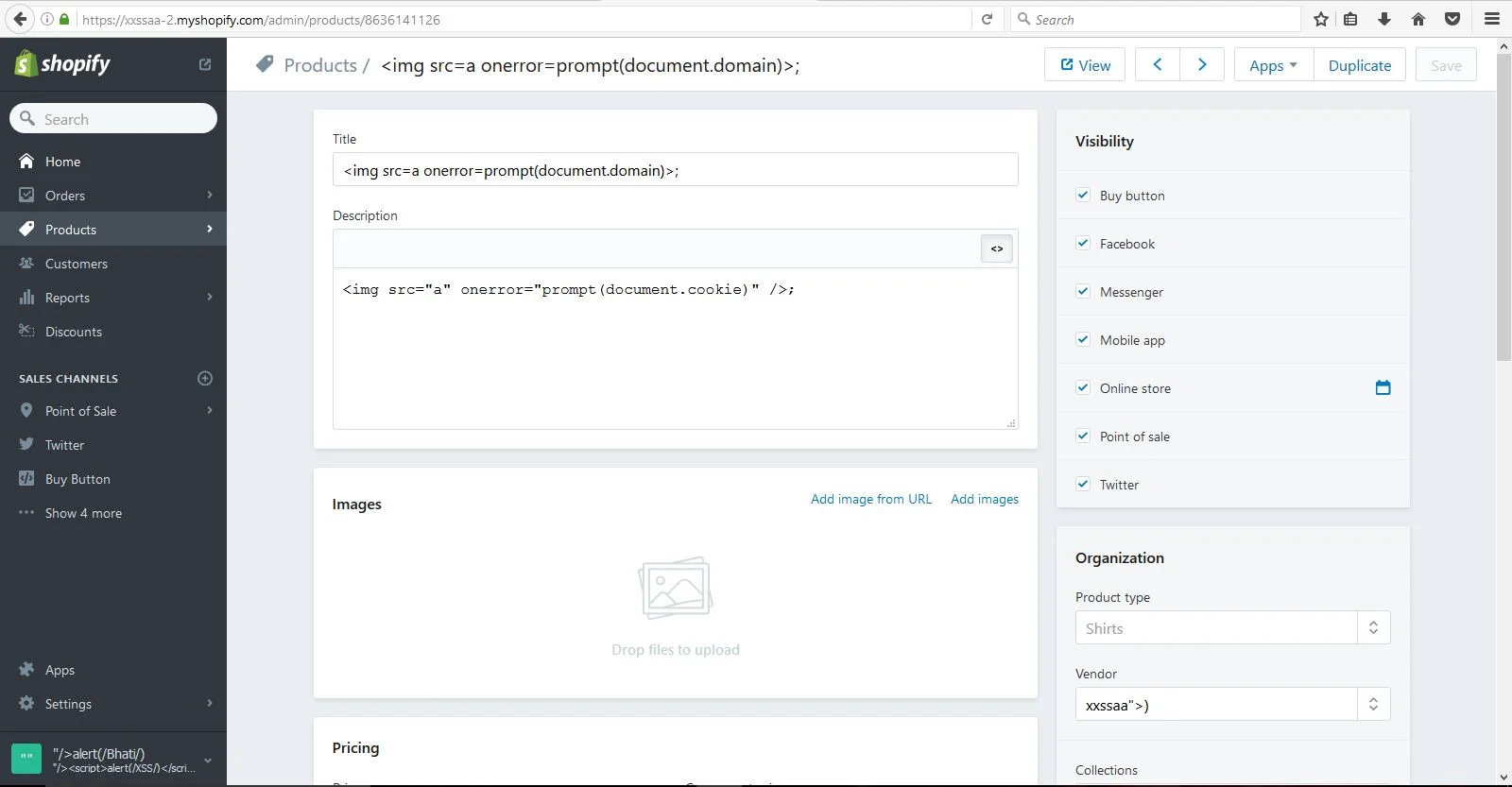
1-Go to Product and create Product with these payload ; See (Step1)
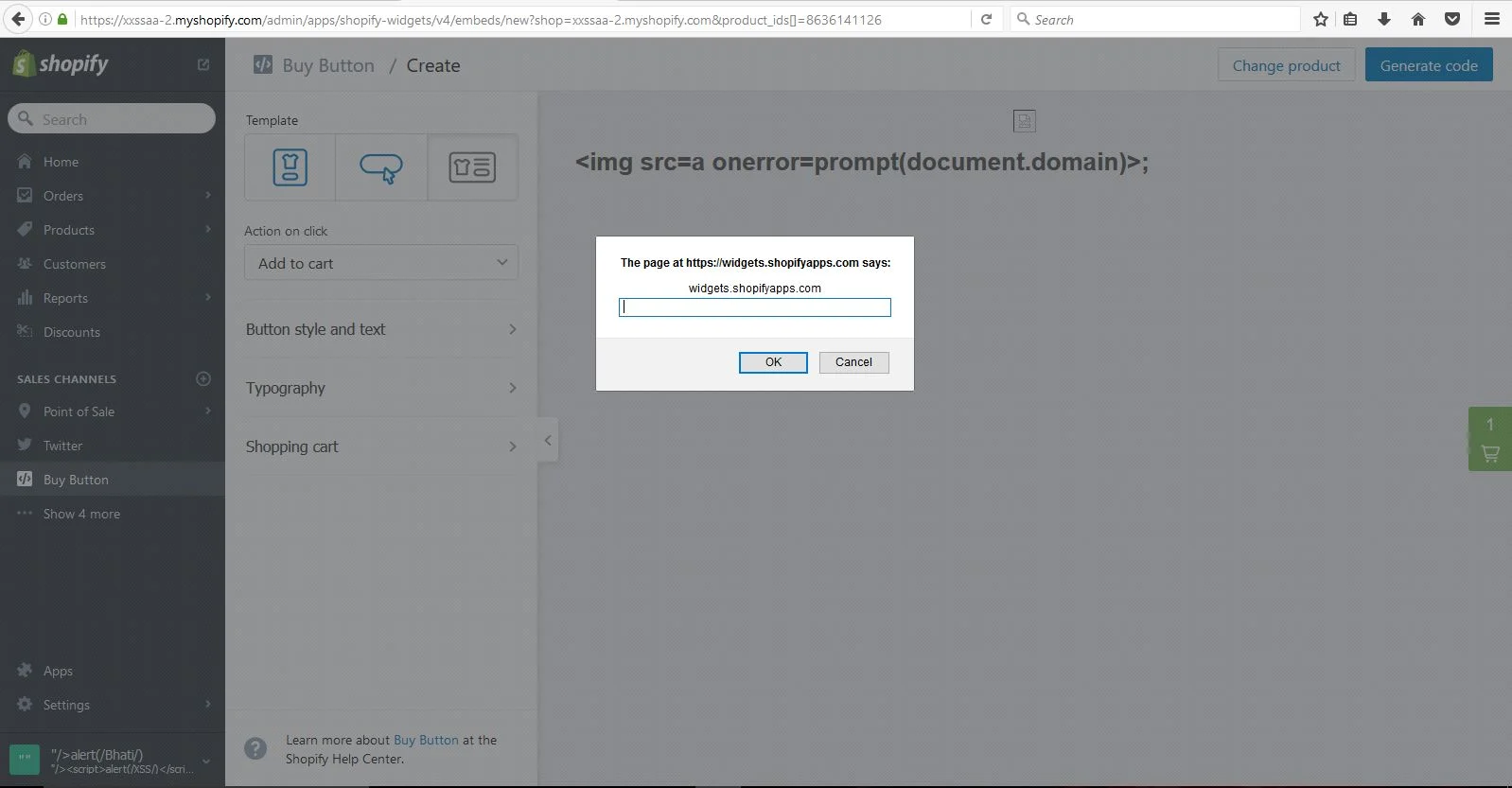
2- Now Go to Embed on a website and in the buy bouton page chose the third template and XSS will pop up
Patch it
Attachments
What the report shows
The target is the Buy Button channel on my.shopify.com. The researcher reported a cross-site scripting issue in the way product descriptions are rendered inside that channel. The program's own summary states the finding plainly: product descriptions were not properly sanitised when displayed inside the Buy Button channel.
The reproduction is short and consists of two steps.
- Go to Product and create a product whose description contains the payload. The report refers to a payload in the first image, which is not reproduced as text in the report itself.
- Go to Embed on a website, open the Buy Button page, and choose the third template. The report says the XSS pops up at that point.
The first attachment is labelled Step1.
The second attachment is labelled xss222.
The report closes with a one-line request to patch the issue. It gives no HTTP request, no parameter name beyond the product description field, no browser or server version, and no response body. The report does not describe the fix that was applied.
Root cause
The report points to missing sanitisation of product description content at the point where the Buy Button channel renders it. The report does not state where the sanitisation failed.
Impact
The report says the XSS pops up when the third template is chosen. The practical impact therefore depends on who can create or edit products and who views the resulting embed, and the report does not analyse either.
How this kind of bug works
Stored cross-site scripting arises when untrusted input is persisted and later written into an HTML document without context-appropriate encoding. In an embed or widget scenario there are usually two layers: the data layer, where the description is stored, and the rendering layer, where a template or client-side script builds the DOM. Encoding applied at input time is fragile because the same value may be rendered into several contexts (HTML text, attribute values, JavaScript strings, URLs), each needing different escaping. The robust approach is to encode at output, per context, and to avoid assigning untrusted strings to properties such as innerHTML.
Defences that stop this class include contextual output encoding, a strict Content Security Policy that blocks inline script, sanitising rich text with an allow-list parser before storage or before rendering, and templating engines that escape by default. For embeddable widgets, isolating the rendered content in a sandboxed iframe also limits what injected script can reach.
How to test for it
- Identify every field whose content is later rendered somewhere else: product descriptions, titles, metadata, custom fields, store names. Note which surfaces consume them, including embeds, widgets and third-party channel pages.
- Submit a benign marker first, such as a distinctive string, and confirm where it appears in the rendered output. View source and the live DOM, since client-side rendering can differ from the server response.
- Replace the marker with context probes: plain text tags, attribute-breaking characters, and quote characters, one context at a time. Observe whether the characters are encoded in the response or passed through raw.
- Where a value lands inside a script block or an attribute, craft a payload for that specific context rather than a generic one.
- Check each template or theme variant offered by the feature, because rendering paths often differ between them.
A positive result is your markup being interpreted by the browser rather than displayed as text, confirmed in the DOM and, ideally, with a harmless proof such as an alert or a DOM change. Common false positives are characters that appear unencoded in the raw response but are neutralised by a client-side sanitiser before insertion, payloads that only execute in your own session because you are the one who stored them, and reflected echoes that never reach a persistent rendering path. Confirm execution in a fresh session and, where relevant, from a second account.
How it is fixed
Apply contextual output encoding wherever the description is rendered, including every template variant. Sanitise rich text with an allow-list based HTML sanitiser so that only expected tags and attributes survive. Avoid inserting untrusted strings through DOM APIs that parse HTML. Add a Content Security Policy that disallows inline script as a defence in depth, and consider rendering embed content inside a sandboxed iframe.
Hunting notes
Stored XSS tends to hide in features where user-supplied content is reused across surfaces: product and listing descriptions, profile fields, custom themes, email templates, and channel or widget integrations that render the same data with a different template. Recon signals worth following are any "embed", "widget" or "share" endpoint that takes an identifier and returns rendered HTML, and any feature offering multiple display templates, since each is a separate rendering path. When you report, show the storage step and the rendering step separately, name the exact template or surface, and demonstrate execution with a minimal payload in a clean session. Programs accept these reports more readily when the impact is clear: state who can inject and who would be affected, and include the rendered DOM as evidence.
What happened, in plain words
This report is about a shop-building service, Shopify. Sellers use it to create an online shop, add products, and then place a "Buy Button" on other websites so customers can buy from them there. The Buy Button is a small piece of code you paste into a page, and it shows a product and a purchase option. The researcher found that a product description could carry hidden code that runs in the visitor's browser when the Buy Button is displayed. That kind of bug is called cross-site scripting, or XSS.
The program's own summary says it directly: product descriptions were not properly sanitised when displayed inside the Buy Button channel. "Sanitised" means cleaned so that anything that looks like code is treated as harmless text. When that cleaning is missing, text a seller typed can be read by the browser as instructions instead of as words.
The report
The researcher opens by saying they found XSS in the Buy Button on my.shopify.com, then gives two reproduction steps.
- Go to Product and create a product whose description contains a payload. The report points to the first image for the payload; the payload itself is not written out as text in the report.
- Go to Embed on a website, open the Buy Button page, and choose the third template. The report says the XSS pops up at that point.
The first attachment is labelled Step1.
The second attachment is labelled xss222.
The report ends with a short request to patch the issue. It contains no HTTP request, no parameter name beyond the product description field, no browser or server version and no response body. It also does not describe the fix that was applied.
Why each step matters
Step 1 is the storage half of the bug. A product description is ordinary content that a seller is allowed to write, and it is saved by the platform. Putting the payload there means the malicious text is now sitting in the shop's data, waiting to be shown somewhere. This is what makes the bug "stored": the bad input is kept, not just passed along once.
Step 2 is the rendering half. The Buy Button feature offers several display templates, and the report singles out the third one. Choosing a template is how you tell the feature which layout to build. The report does not say how the template handles the description. The report does not say which template was affected beyond "the third template", and it does not say whether the fault was in storage, in the template or in the embed script.
What the report does not establish
The report says the XSS pops up on the Buy Button page. Because the payload lives in a product description, the person who can trigger it is the person who controls that description. The report does not analyse the impact.
In general, how this kind of bug works
A browser reads a web page as a mixture of text and instructions. Most of the page is text you see, but some parts are markup and script that tell the browser what to do. If a website takes something a user typed and drops it into the page without cleaning it, the browser cannot tell the difference between "this is a description" and "this is an instruction". That is the whole idea behind XSS: user input becomes code.
A useful comparison is a noticeboard. If the rule is that people pin up plain notes, everything is fine. But if someone writes "ignore all notes and unlock the door" and the person reading the board follows written instructions literally, the note has become a command. Sanitising is the person at the board who crosses out anything that looks like an instruction and leaves only the words.
Stored XSS is the version where the note stays pinned. The input is saved first and rendered later, possibly on a different page or in a different feature. In an embed or widget there are usually two layers: the data layer, where the description is stored, and the rendering layer, where a template or a script in the browser builds what you see. Cleaning the input when it is saved is fragile, because the same value may later be placed in several different spots, such as visible text, an attribute inside a tag, a script string or a link. Each spot needs its own kind of escaping. The sturdier approach is to encode at the moment of output, for the exact spot, and to avoid handing untrusted strings to browser functions that parse HTML.
Defences that stop this class include encoding output for its context, a strict Content Security Policy that blocks inline script, cleaning rich text with an allow-list parser before it is stored or shown, and templating engines that escape by default. For embeddable widgets, putting the rendered content inside a sandboxed iframe also limits what injected script can reach.
In general, how to test for it
- List every field whose content is shown somewhere else: product descriptions, titles, metadata, custom fields, shop names. Note which surfaces use them, including embeds, widgets and third-party channel pages.
- Submit a harmless marker first, such as a distinctive word, and confirm where it appears in the rendered output. Look at both the page source and the live page, because browser-side rendering can differ from what the server sent.
- Replace the marker with probes for each context: plain text tags, characters that break out of an attribute, and quote characters, one context at a time. Watch whether the characters are encoded in the response or passed through raw.
- Where a value lands inside a script block or an attribute, build a payload for that specific spot rather than a generic one.
- Check every template or theme variant the feature offers, because rendering paths often differ between them.
A positive result is your markup being interpreted by the browser instead of shown as text, confirmed in the page and ideally with a harmless proof such as an alert or a visible change. Common false positives are characters that look unencoded in the raw response but are neutralised by a cleaner in the browser before insertion, payloads that only run in your own session because you are the one who stored them, and echoes that never reach a saved rendering path. Confirm execution in a fresh session and, where relevant, from a second account.
In general, how it is fixed
Apply output encoding wherever the description is rendered, including every template variant. Clean rich text with an allow-list based HTML cleaner so only expected tags and attributes survive. Avoid inserting untrusted strings through browser functions that parse HTML. Add a Content Security Policy that disallows inline script as an extra layer, and consider rendering embed content inside a sandboxed iframe.
In general, where to look
Stored XSS tends to hide in features where user-supplied content is reused across surfaces: product and listing descriptions, profile fields, custom themes, email templates, and channel or widget integrations that render the same data with a different template. Signals worth following are any embed, widget or share endpoint that takes an identifier and returns rendered HTML, and any feature offering multiple display templates, since each is a separate rendering path. When you report, show the storage step and the rendering step separately, name the exact template or surface, and demonstrate execution with a minimal payload in a clean session. State who can inject and who would be affected, and include the rendered page as evidence.
Glossary
- XSS (cross-site scripting): a bug where input from a user is treated by the browser as code instead of text.
- Stored XSS: XSS where the malicious input is saved first and rendered later.
- Payload: the piece of input crafted to trigger the bug.
- Sanitise: clean input so anything resembling code is neutralised.
- Encode / escape: convert characters so the browser shows them as text rather than interpreting them.
- Context: the place a value lands in a page, such as visible text, an attribute or a script string; each needs its own encoding.
- Rendering: the process of turning stored data into the page the browser displays.
- Template: a layout the feature uses to build its output; different templates are different rendering paths.
- Embed / widget: a small piece of code placed on another website to show content from the main service.
- Buy Button: Shopify's feature for placing a product and purchase option on another website.
- DOM: the browser's live model of the page, which can differ from the raw HTML the server sent.
- Content Security Policy (CSP): a header that tells the browser which sources of script are allowed, used to block inline script.
- Allow-list: a rule that permits only known-good tags and attributes and removes everything else.
- Sandboxed iframe: an embedded frame with restricted permissions, limiting what script inside it can do.
- Bounty: a payment made by a program for a valid security report.
- Severity: the program's rating of how serious a bug is.



