XSS on product comments in transfers
Pasting HTML with an image error handler into a product comment in the transfers tab produced an XSS pop-up; the report claims cookie theft is possible.

- Triaged in 16 hours
- Fixed in 22 days
- Paid in 16 hours
- Disclosed after 25 days
summery:
You are able to copy and paste stored XSS code into the comment section of a product in the transfers tab and receive the error.
Reproduce:
- Create a product with the name '"'><img src=x onerror=alert(domain.domain)>'
- add a transfer with that product
- now go back to the product use the code button and type the same code for the title . '"'><img src=x onerror=alert(domain.domain)>'
- you will get a XSS pop-up however ignore it. as soon as you get here you need to get out of the code setting and into the normal text and copy the the little piece of code with the image.
- delete the code that we put in the html for the XSS.
- go back to transfers and paste the code that we copied there
- error
Impact
steal cookie
Attachments
What the report shows
The asset is a Shopify store admin, your-store.myshopify.com, and the issue involves the comment area of a product in the transfers tab. The researcher reported a stored cross-site scripting issue, rated low severity, with a 500.00 USD bounty, disclosed on 2019-12-09.
The summary is short: stored XSS code can be copied and pasted into the comment section of a product in the transfers tab, and the error fires. The reproduction steps are:
- Create a product with the name
'"'><img src=x onerror=alert(domain.domain)>' - Add a transfer with that product.
- Go back to the product, use the code button and type the same code for the title:
'"'><img src=x onerror=alert(domain.domain)>' - An XSS pop-up appears; ignore it. Leave the code setting and return to normal text, then copy the small piece of code containing the image.
- Delete the code that was put into the HTML for the XSS.
- Go back to transfers and paste the copied code there.
- The error fires.
The payload used throughout is:
'"'><img src=x onerror=alert(domain.domain)>
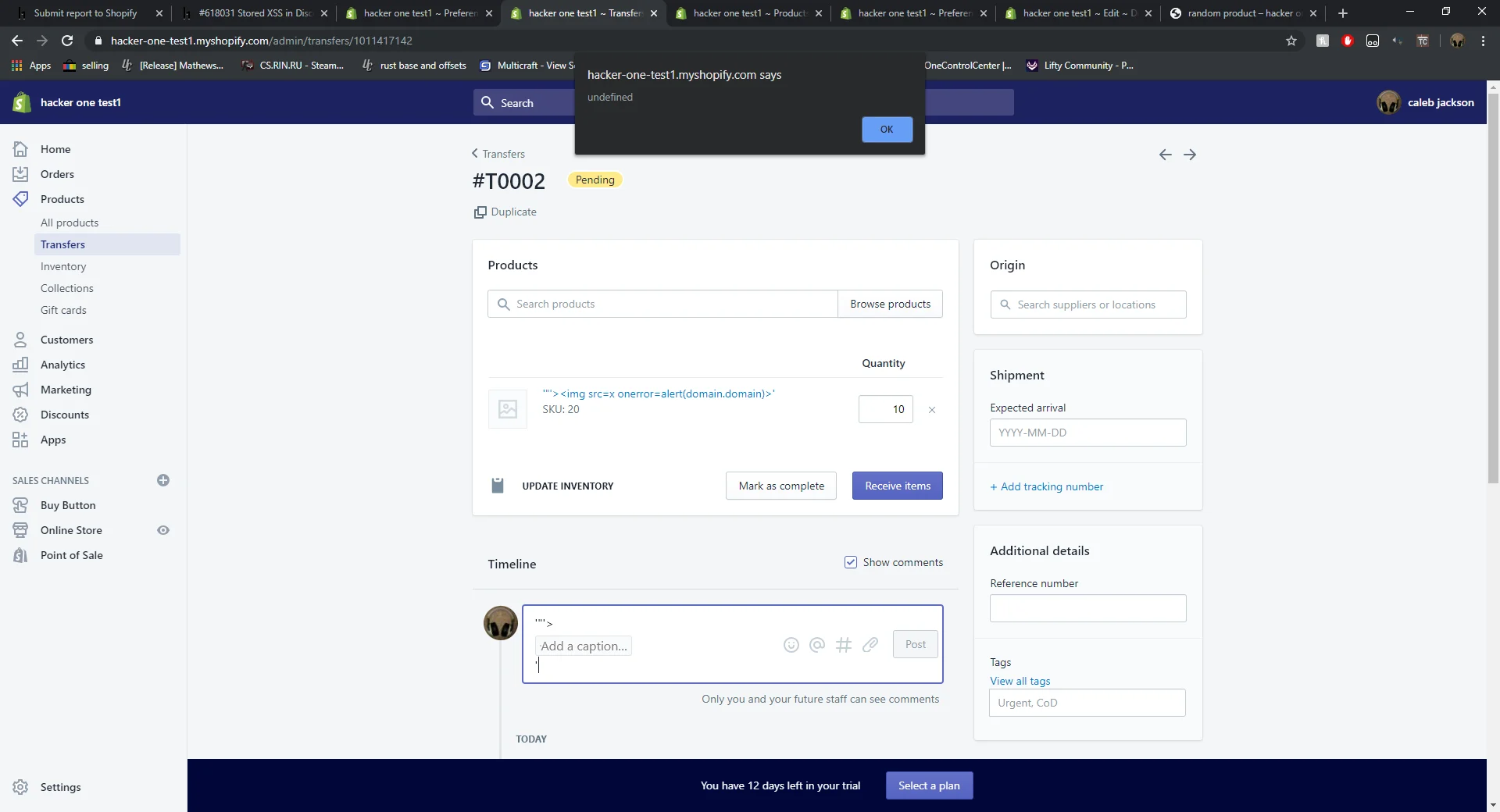
The stated impact is "steal cookie". The report gives no fix details and no CVSS score. The single attachment is a screenshot of the transfers view in Chrome:
Root cause
The report does not analyse the cause. The report does not analyse the cause; the steps suggest a value passes through the product editor's code view and is pasted into the transfers comment area, where the pop-up fires. The exact rendering path is not described.
Impact
The report's own claim is cookie theft. The report's own claim is cookie theft; it does not demonstrate this beyond the pop-up firing. The report does not demonstrate this beyond the alert firing, so the practical impact should be read as the researcher stated it: a stored script execution in the admin interface with cookie theft as the goal.
How this kind of bug works
Stored XSS happens when input is saved by the application and later written into a page without context-appropriate encoding. The browser cannot tell data from markup, so any <, > or attribute-breaking quote that survives into the HTML becomes part of the document. Event handlers such as onerror then run as soon as the element fails to load its resource, which is why a broken image is a common payload.
Admin panels are a frequent home for this class because they often render user-supplied names, titles and comments in tables, tooltips and rich-text editors, and because the same value can pass through several representations (plain text, HTML source view, clipboard) before it is stored again. Each hop is a chance for one layer to decode or re-encode the value differently from the layer that finally outputs it.
The defences are output encoding matched to context (HTML entity encoding for text and attributes, JavaScript encoding inside scripts), a strict Content Security Policy that blocks inline handlers, and treating every stored value as untrusted at render time regardless of which form field produced it.
How to test for it
- Map every place a value you control is stored and later displayed: product names, titles, comments, notes, transfer descriptions, and any field that appears in more than one screen.
- Submit a benign marker first, such as a unique string, to confirm the value is stored and where it reappears.
- Replace the marker with a payload that breaks out of the expected context. Start with plain text, then attribute contexts, then quoted contexts, using a harmless handler that only calls an alert or writes to the DOM.
- Exercise the round trips the application offers: rich-text or code views, copy and paste between fields, edit and re-save, and any import or duplicate action. A value that is safe on first save may be re-rendered unsafely after a second pass.
- A positive result is your handler executing in the browser of a different session or user who views the stored value, not merely the payload appearing in the page source.
Common false positives: the payload reflected only in the immediate response rather than stored; the value appearing HTML-encoded in the source; execution only in your own browser because of a client-side preview that never reaches the server; and self-XSS, where the script only runs because you pasted it into your own developer console or a field that only you can see.
How it is fixed
Encode stored values on output according to the context they land in, rather than relying on filtering at input time. Sanitise any field that legitimately accepts HTML with an allow-list based sanitiser, and strip event handler attributes and dangerous URL schemes. Add a Content Security Policy that disallows inline script and inline event handlers. Review every render path for a field, including secondary screens such as transfers, so a value escaped in one view is escaped in all of them.
Hunting notes
This class tends to hide in secondary and administrative views: list tables, detail pages, comment threads, activity logs and anything that aggregates data from other objects. Fields that cross boundaries between features, as a product title does when it appears in a transfer, are worth extra attention because the second view may have been written by a different team or at a different time.
Recon signals include rich-text editors with a source or code toggle, copy and paste workflows between fields, and any interface that shows a preview alongside stored data. When you find execution, show impact concretely: demonstrate the action an attacker could take with the victim's session, keep the payload non-destructive, and describe the exact view and user role required to trigger it.
What happened, in plain words
A Shopify store admin is the web page where a shop owner manages products, orders and stock. Every shop gets its own address, and this report concerns one such admin page, your-store.myshopify.com. Inside it there is a transfers tab, and a product can be added to a transfer. A product can be added to a transfer, and the report refers to the comment section of a product in the transfers tab.
The researcher found that code copied from the product editor into the comment area of a product in the transfers tab was run as code, not shown as text. This is called stored cross-site scripting: stored because the value is saved by the shop and shown again later, and cross-site scripting (XSS) because the browser is tricked into treating data as a small program. The report was rated low severity, paid a 500.00 USD bounty and was disclosed on 2019-12-09.
The summary in the report is one sentence: stored XSS code can be copied and pasted into the comment section of a product in the transfers tab, and the error fires. The reproduction steps are:
- Create a product with the name
'"'><img src=x onerror=alert(domain.domain)>' - Add a transfer with that product.
- Go back to the product, use the code button and type the same code for the title:
'"'><img src=x onerror=alert(domain.domain)>' - An XSS pop-up appears; ignore it. Leave the code setting and return to normal text, then copy the small piece of code containing the image.
- Delete the code that was put into the HTML for the XSS.
- Go back to transfers and paste the copied code there.
- The error fires.
The payload used throughout is:
'"'><img src=x onerror=alert(domain.domain)>
Read it piece by piece. The leading '"'> is a set of quote characters and a closing angle bracket. Their job is to break out of whatever HTML the page has already written around the value: if the page puts the title inside an attribute wrapped in quotes, the quote characters end that attribute early, and the > closes the surrounding tag. What follows is a normal image tag, <img src=x onerror=...>. The browser tries to load an image from the address x, which does not exist, so the load fails. The onerror part is an event handler: a snippet the browser runs when the image fails. Here it runs alert(domain.domain), which opens a pop-up box. A pop-up is harmless, but it proves that the browser executed the text as code rather than displaying it as characters.
Why each step matters. Step 1 plants the payload in a product name, a field that is saved by the shop. Step 2 puts that product into a transfer, so the same value now appears in a second feature. Step 3 uses the product editor's code button and types the payload there; the report does not explain what changes. Step 4 is the first proof: the pop-up shows the code ran. The researcher then copies the small image fragment out of the editor and, in step 5, removes the original payload from the HTML, so the product itself is clean again. Step 6 pastes the copied fragment into the transfers comment area, and step 7 shows the pop-up firing there. Steps 4 to 6 copy the image fragment into the transfers comment area, where the pop-up then fires.
The stated impact is "steal cookie". A cookie is a small piece of data a website asks the browser to keep and send back with every request; for a logged-in admin it is often what proves who you are. The report names cookie theft as the goal but does not show it happening. The report does not show that theft happening; it shows the pop-up and names cookie theft as the goal.
The report gives no fix details and no CVSS score. Its single attachment is a screenshot of the transfers view in Chrome:
In general, how this kind of bug works
Stored XSS happens when a site saves something a user typed and later writes it into a page without encoding it for the place it lands. Encoding means turning characters that have a special meaning in HTML, such as < and >, into harmless text so the browser shows them instead of acting on them. Without that step the browser cannot tell data from markup: any angle bracket or quote that survives becomes part of the page. Event handlers such as onerror then run as soon as their event happens, which is why a broken image is such a common payload.
Admin panels are a frequent home for this class of bug. They show names, titles and comments in tables, tooltips and rich-text editors, and the same value can pass through several forms, plain text, HTML source view, clipboard, before it is saved again. Each hop is a chance for one layer to decode or re-encode the value differently from the layer that finally prints it.
The defences are output encoding matched to context, a strict Content Security Policy (a browser rule that blocks inline scripts and inline event handlers), and treating every stored value as untrusted when it is displayed, no matter which form field produced it.
In general, how to test for it
- Map every place a value you control is saved and later shown: product names, titles, comments, notes, transfer descriptions, and any field that appears on more than one screen.
- Submit a harmless marker first, such as a unique string, to confirm the value is saved and where it reappears.
- Replace the marker with a payload that breaks out of the expected context, starting with plain text, then attribute contexts, then quoted contexts, using a handler that only calls an alert.
- Exercise the round trips the application offers: rich-text or code views, copy and paste between fields, edit and re-save, and any import or duplicate action. A value that is safe on first save may be shown unsafely after a second pass.
- A positive result is your handler running in the browser of a different session or user who views the stored value, not merely the payload appearing in the page source.
Common false positives: the payload reflected only in the immediate response rather than stored; the value appearing encoded in the source; execution only in your own browser because of a client-side preview that never reaches the server; and self-XSS, where the script only runs because you pasted it into your own developer console or a field only you can see.
In general, how it is fixed
Encode stored values on output according to the context they land in, rather than relying on filtering at input time. Sanitise any field that legitimately accepts HTML with an allow-list based sanitiser, and strip event handler attributes and dangerous URL schemes. Add a Content Security Policy that disallows inline script and inline event handlers. Review every render path for a field, including secondary screens such as transfers, so a value escaped in one view is escaped in all of them.
Glossary
- Stored XSS: a bug where a site saves malicious input and later shows it as code in someone's browser.
- Payload: the piece of text an attacker submits to trigger a bug.
- HTML: the language that describes the structure of a web page, using tags such as
<img>. - Tag: a piece of HTML such as
<img ...>that tells the browser to create an element. - Attribute: a setting inside a tag, such as
srcoronerror. - Event handler: code attached to an element that runs when something happens, such as an image failing to load.
- Encoding: converting special characters into harmless text so the browser displays them instead of acting on them.
- Cookie: a small value the browser stores for a site and sends back with requests, often used to keep you logged in.
- Session: the period during which a site treats your browser as a logged-in user.
- Admin panel: the private part of a site where an owner manages content and settings.
- Content Security Policy: a browser rule set by a site that restricts what scripts may run.
- Sanitiser: a tool that removes dangerous parts from HTML while keeping safe formatting.
- Self-XSS: a bug that only runs because you pasted the code into your own browser yourself.
- CVSS: a standard score for how severe a vulnerability is.
- Bounty: a payment a company makes to someone who reports a valid security bug.



