XSS on services.shopify.com
A stored cross-site scripting vulnerability was found in the Shopify services marketplace, allowing an attacker to upload an HTML file containing a script that executes when the file is clicked. This could let an attacker steal cookies.
 Originally disclosed on HackerOne
- Disclosed after 17 days
Hy security, i Got a stored xss in one of your sub-domain "services.shopify.com"
steps: 1- Go to https://(your_store).myshopify.com/admin/apps/experts_marketplace/services_marketplace 2- Then Go to All services>Marketing and sales>email marketing> Design custom email templates >click select 3- fill al the data, there will be an option for "attach file" 4: selcet a html file where the xss payloads are got stored. 5. write click on the attached file and go to that location, you will see the pop-up
Impact
can steal cookies
Attachments
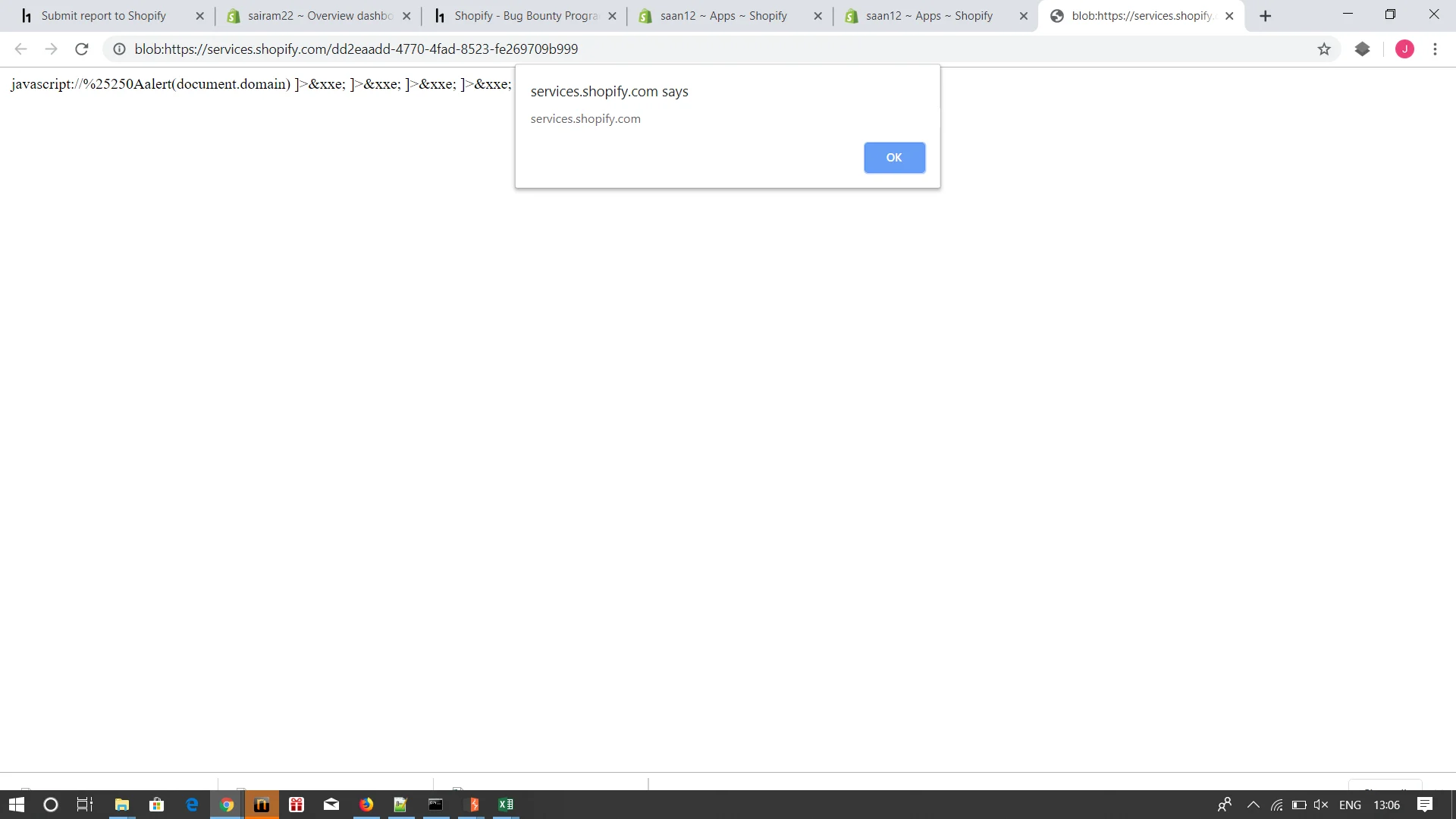
What the report shows
The target is the Shopify subdomain services.shopify.com, reached through a store's admin area. The researcher reported a stored cross-site scripting issue in the Experts Marketplace services flow, specifically in the email marketing section where a merchant can design custom email templates.
The reproduction steps are short and given as follows:
- Go to
https://(your_store).myshopify.com/admin/apps/experts_marketplace/services_marketplace. - Navigate to All services > Marketing and sales > email marketing > Design custom email templates, then click select.
- Fill in all the data. There is an option to attach a file.
- Select an HTML file containing the XSS payloads, which are then stored.
- Right-click the attached file and open it at that location; the pop-up appears.
The report does not include the actual payload used, the HTTP request that uploaded the file, or the response. The only artefact is a screenshot attached to the report.
The screenshot is the sole attachment and is referenced under an "Attachments" heading at the end of the report; the text does not describe what it depicts beyond the pop-up mentioned in step 5.
The report states the impact as the ability to steal cookies. The platform records the issue as a stored cross-site scripting weakness on the *.shopify.com asset, rated low severity, with a bounty of 500.00 USD, disclosed on 2019-06-14. The report itself does not describe a fix.
Root cause
The report shows that an uploaded HTML file containing the payload was stored and that opening it produced a pop-up, which suggests the browser executed its script. The report does not identify the exact cause; it only shows that opening the stored HTML file produced a pop-up. The report does not identify the exact component or header responsible.
Impact
As the report puts it, an attacker could steal cookies. The report states only that cookies could be stolen; it does not show which cookies or in what context. The report does not demonstrate a specific victim, a delivery path to another user, or which cookies were reachable, so the practical reach should be treated as unproven beyond the pop-up shown.
How this kind of bug works
Stored XSS happens when input that one user supplies is persisted and later returned to another user's browser inside an HTML or script context without adequate encoding or isolation. The dangerous ingredient is not the upload itself but the way the stored content is served: if the response carries an HTML content type and is treated as same-origin, the browser parses and runs any script in it.
File-upload features are a classic source because developers focus on storing the bytes and forget the serving step. An HTML file that is echoed back with text/html and no Content-Disposition: attachment becomes a script execution primitive on the application's origin. Even when the file is served from a separate host, a permissive content type or a missing sandbox can still allow execution.
The defences are layered: encode output for the context it lands in, force untrusted uploads to download rather than render, serve user content from a distinct origin with a restrictive Content-Security-Policy and X-Content-Type-Options: nosniff, and set HttpOnly on session cookies so script cannot read them even if execution occurs.
How to test for it
A general method for this class:
- Map every feature that accepts a file or rich content and then displays it back: attachments, avatars, templates, imports, previews.
- Upload a benign HTML file containing a distinctive marker, for example a script that sets a unique value or triggers an alert, and note where the file can be opened or previewed.
- Inspect the response that serves the file: its
Content-Type, anyContent-Disposition, the origin it comes from, and whether a CSP is present. - Open the file through the application's own link and observe whether the marker executes. A positive result is script running in the application's origin, not a download prompt and not a rendered-but-inert page.
- Confirm persistence by reloading or opening the file from a fresh session, which distinguishes stored from reflected behaviour.
Common false positives: the file downloads instead of rendering; the content is served from a sandboxed or separate origin with no access to application cookies; a CSP blocks inline script; or the pop-up only appears because the tester opened a local file directly rather than through the application. Check the actual response headers before claiming execution.
How it is fixed
Standard fixes for stored XSS in uploaded content:
- Serve user-supplied files with
Content-Disposition: attachmentand a non-rendering content type such asapplication/octet-stream. - Host user content on a separate origin so any script cannot reach the main application's cookies or DOM.
- Apply
X-Content-Type-Options: nosniffand a restrictiveContent-Security-Policy. - Encode or sanitise any user content that must be rendered as HTML, using an allow-list approach.
- Mark session cookies
HttpOnlyandSecureto limit the damage if execution still occurs.
Hunting notes
This class tends to hide in features that combine upload with display: template designers, attachment previews, document viewers, import/export tools and anything that lets a user define markup. Recon signals worth watching are endpoints that accept multipart uploads, parameters that reference stored file identifiers, and preview or download routes that echo stored content. When you find one, check how the stored file is served before assuming impact: the headers and origin decide whether it is a real finding. A pop-up alone is weak evidence; a demonstrated data read or a clear same-origin execution path is what programs accept.
What happened, in plain words
Shopify is a platform that lets people run online shops. Each shop has its own admin area, and inside that admin area there is a marketplace of apps and services. One of those services lets a shop owner design custom email templates, and that designer includes an option to attach a file.
The researcher found that an HTML file uploaded through that attachment option was stored, and opening it produced a pop-up, showing the script ran. That is called stored cross-site scripting: a script that one person plants is saved on the server and later executed in someone else's browser.
The report gives five reproduction steps. They are short, so here they are with an explanation of why each one matters.
-
Go to
https://(your_store).myshopify.com/admin/apps/experts_marketplace/services_marketplace.This is the admin area of a shop, in the Experts Marketplace services section. The
(your_store)part is a placeholder for the shop's own name. -
Then go to All services > Marketing and sales > email marketing > Design custom email templates, then click select.
This is the feature under test: a template designer for marketing emails. The feature is where the attachment option used in the report is found.
-
Fill in all the data. There will be an option for "attach file".
Filling in the form is just to get to a state where the attachment option is available.
-
Select an HTML file where the XSS payloads are got stored.
An HTML file is an ordinary text file that a browser reads as a web page. If it contains a
<script>block, the browser runs that script when it displays the page. Uploading such a file is the moment the malicious content enters Shopify's storage. The report does not include the actual payload that was inside the file. -
Right-click on the attached file and go to that location; you will see the pop-up.
Opening the stored file through the application's own link is the moment of execution. A pop-up (an alert box) is the simplest visible proof that script ran.
The screenshot is the only attachment in the report. It sits under an "Attachments" heading at the end, and the text does not describe it beyond the pop-up mentioned in step 5.
The report states the impact as "can steal cookies". A cookie is a small piece of data a website asks your browser to keep and send back with every request. Login sessions are usually kept in a cookie, so if a script can read that cookie, it can potentially act as the logged-in user. The report does not show a specific victim, does not explain how another user would be made to open the file, and does not say which cookies were reachable, so the practical reach beyond the pop-up is not demonstrated.
The platform records this as a stored cross-site scripting weakness on the *.shopify.com asset, rated low severity, with a bounty of 500.00 USD, disclosed on 2019-06-14. The report does not describe a fix.
In general, how this kind of bug works
Stored XSS happens when something one user supplies is saved by the server and later sent back to a browser as part of a web page, without being neutralised. The browser cannot tell that the script came from a user rather than from Shopify, so it runs it with the same trust it gives the site itself.
A useful comparison is a noticeboard in an office. If anyone can pin a note and everyone else reads it as official, then one person can write instructions that others will follow. The board is not broken; the problem is that nobody checks what is pinned to it.
File uploads are a classic source of this bug because developers concentrate on storing the bytes and think less about how those bytes are handed back. If an uploaded HTML file is returned with an HTML content type and from the same origin (the same scheme, host and port as the application), the browser treats it as a page of the application and runs any script in it. If instead the file is forced to download, or served from a separate host, the script has no access to the application's cookies or page.
Defences are layered:
- Encode output for the place it lands, so characters that could start a script are shown as text.
- Force untrusted uploads to download rather than render.
- Serve user content from a separate origin with a restrictive Content-Security-Policy (a header that tells the browser which scripts are allowed) and
X-Content-Type-Options: nosniff(a header that stops the browser guessing a different type). - Mark session cookies
HttpOnly, so script cannot read them even if it does run.
In general, how to test for it
- List every feature that accepts a file or rich content and then shows it back: attachments, avatars, templates, imports, previews.
- Upload a harmless HTML file with a distinctive marker, such as a script that shows an alert or sets a unique value, and note where the file can be opened or previewed.
- Look at the response that serves the file: its
Content-Type, anyContent-Disposition, the origin it comes from, and whether a Content-Security-Policy is present. - Open the file through the application's own link and see whether the marker runs. A real result is script running on the application's origin, not a download prompt and not a page that displays the text without running it.
- Reload, or open the file in a fresh session, to confirm the content was stored rather than reflected back once.
Common false positives: the file downloads instead of rendering; it is served from a sandboxed or separate origin with no access to the application's cookies; a Content-Security-Policy blocks the script; or the pop-up only appeared because the tester opened a local file directly rather than through the application. Check the actual response headers before claiming execution.
In general, how it is fixed
- Serve user-supplied files with
Content-Disposition: attachmentand a non-rendering content type such asapplication/octet-stream. - Host user content on a separate origin so any script cannot reach the main application's cookies or page.
- Apply
X-Content-Type-Options: nosniffand a restrictive Content-Security-Policy. - Encode or sanitise any user content that must be rendered as HTML, using an allow-list approach.
- Mark session cookies
HttpOnlyandSecureto limit the damage if execution still occurs.
In general, where to look
This class of bug tends to hide in features that combine upload with display: template designers, attachment previews, document viewers, import and export tools, and anything that lets a user define markup. Signals worth watching are endpoints that accept file uploads, parameters that point at stored files, and preview or download routes that return stored content. When you find one, check how the stored file is served before assuming impact: the headers and origin decide whether it is a real finding. A pop-up alone is weak evidence; a demonstrated data read or a clear same-origin execution path is what programmes accept.
Glossary
- Cross-site scripting (XSS): a bug where an attacker's script ends up running in another user's browser as if it came from the trusted site.
- Stored XSS: XSS where the malicious content is saved on the server and served to later visitors, rather than being reflected back once.
- Payload: the piece of content, here a script inside an HTML file, that is meant to trigger the bug.
- HTML file: a text file a browser reads as a web page; it can contain script that the browser runs.
- Script: a small program that a browser executes when it loads a page.
- Pop-up / alert: a small dialog box a script can display; here used as visible proof that script ran.
- Cookie: a small piece of data a site asks the browser to store and send back with each request, often used to keep you logged in.
- Session cookie: the cookie that identifies your logged-in session; stealing it can let someone act as you.
- HttpOnly: a cookie flag that hides the cookie from scripts, so XSS cannot read it.
- Secure: a cookie flag that sends the cookie only over encrypted HTTPS connections.
- Origin: the combination of scheme, host and port that defines which site a page belongs to; scripts from one origin normally cannot read another's data.
- Same-origin: served from the same scheme, host and port as the application, so the browser treats it as part of the application.
- Content-Type: a header that tells the browser what kind of file it is receiving, for example HTML or a binary download.
- Content-Disposition: a header that tells the browser whether to display a file inline or download it as an attachment.
- Content-Security-Policy (CSP): a header that restricts which scripts and resources a page may load.
- X-Content-Type-Options: nosniff: a header that stops the browser guessing a file's type and forces it to use the declared one.
- Sanitise: clean user-supplied content so that dangerous parts, such as scripts, are removed.
- Allow-list: a rule that permits only known-safe items and rejects everything else.
- False positive: a result that looks like a bug but is not, for example a pop-up caused by opening a local file.
- Bounty: a reward a company pays for a valid security report.
- Severity: a rating of how serious a bug is, here low.




