your-store.myshopify.com preview link is leak on third party website lead to preview all action from store owner Without store Password.
The Shopify store preview link was leaked in the Referer header to third-party social media sites, allowing the owner of those sites to access the store preview without a password. An attacker could use the leaked link to view and interact with the store owner's preview actions.
 Originally disclosed on HackerOne
- Triaged in 5 days
- Fixed in 17 days
- Paid in 6 days
- Disclosed after 9 months
Hi Security Team,
#Description
It has been identified that the application is leaking Link to third party sites. In this case it was found that the Linkis being leaked to third party sites which is a issue knowing the fact that it can allow any malicious users to use the Link to catch/preview all action in your-store.myshopify.com from store owner without store password.
The owner of that website can perform a security compromise by grabbing those links.
#Solution: The solution is very very SIMPLE. Just include the following HTML code in the following in code between <head> tags of the html of the page: <meta name="referrer" content="never" /> This will not send referrer headers to third party websites.
#Reproduction Instructions /
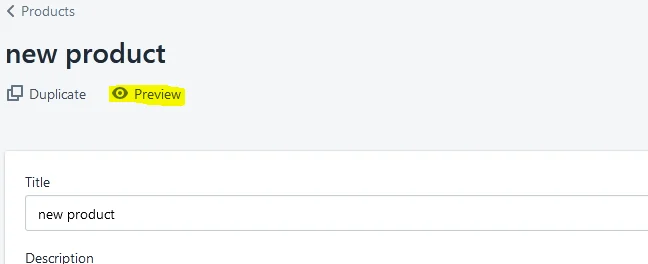
1.Create new products & click Preview .F1013353
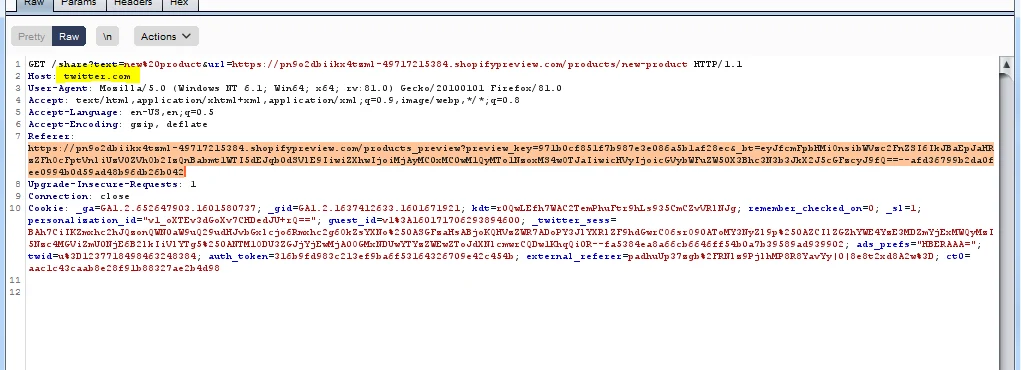
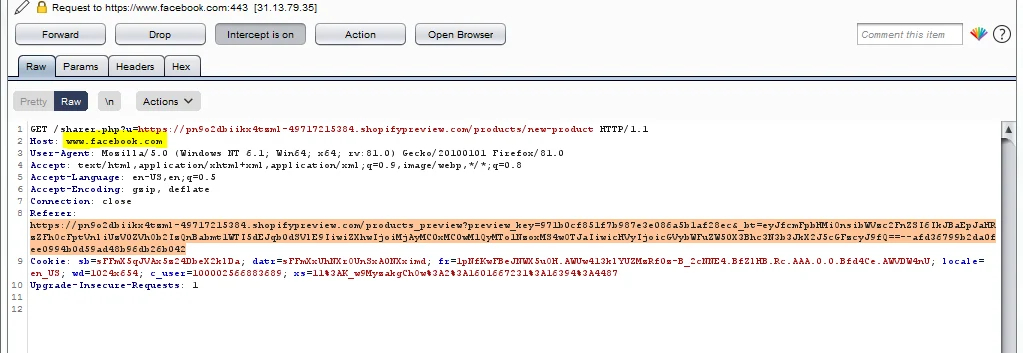
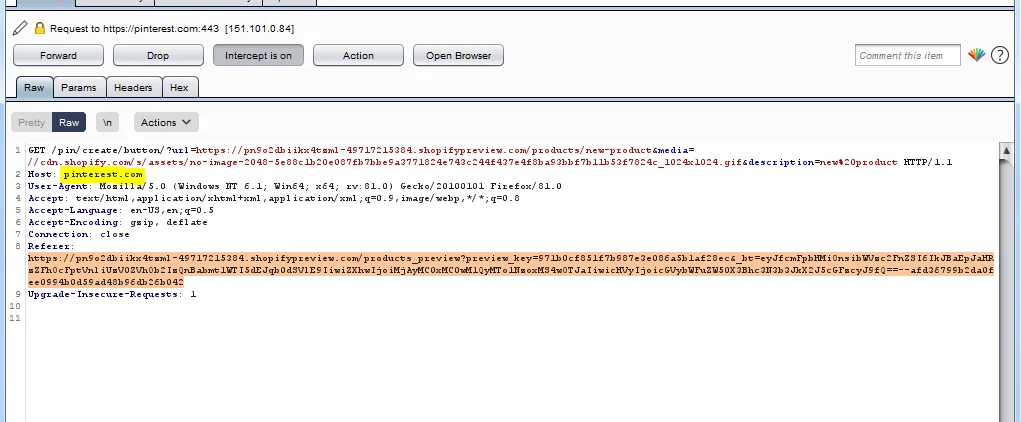
2)Now turn burp suite intercept on and click on Click on any social media link(on follow us section). Check for the requests having the Link in Referrer as third party website. And copy the Link.
3)Now turn intercept off and Open Link.(with that token) in other tab,browser or PC.
4)Now you you sucesfully catch/preview all action in your-store.myshopify.com from store owner without store password.
Preview all action/
Store
Products
Collections
Available
#Proof of Concept F1013350 F1013351 F1013352 F1013356
#Additional Information: Note also that if users can author content within the application then an attacker may be able to inject links referring to a domain they control in order to capture data from URLs used within the application.
Impact
As you can see in the Referrer preview Link is getting leaked to third party sites. So, the person who has the complete control over that particular third party site can Use the Link to preview all action in your-store.myshopify.com from store owner without store password.
Attachments
Context
Shopify storefronts live at your-store.myshopify.com, and the admin includes a preview feature that lets a store owner look at products, collections and other content before publishing. A preview link carries a token that grants access to that preview without the store password. The report is about that preview link leaking to third party websites through the Referrer header, which, in the researcher's account, lets anyone who controls the receiving site use the link to preview all actions in your-store.myshopify.com from the store owner without the store password.
The weakness was classified as Improper Authentication (generic), rated medium, and paid a 500 USD bounty. It was disclosed on 12 July 2021.
Setup
The researcher used Burp Suite with interception enabled to observe requests made when clicking a social media link in the "follow us" section of a store page. The precondition is a store with at least one product that can be previewed, and a page that contains outbound links to third party sites (the social media links in the follow us section). No special role beyond the store owner creating the preview is described.
Finding it
The researcher noticed that the application leaks a link to third party sites. The link in question is the preview link, and the concern is that any malicious user who obtains it can use it to catch or preview all actions in your-store.myshopify.com from the store owner without the store password. The owner of the receiving third party website can perform a security compromise by grabbing those links.
The reasoning is that when the store owner clicks an outbound social media link while a preview link is present in the page context, the browser sends the preview URL in the Referrer header to the third party site. Whoever controls that site can read the referrer and reuse the tokenised preview link.
Exploitation
Step 1: create a product and start a preview
Create new products and click Preview. This produces the preview link that carries the token.
Step 2: capture the referrer with Burp
Turn Burp Suite interception on and click any social media link in the follow us section. Check the requests for the link appearing in the Referrer header sent to the third party website, and copy the link.
Step 3: open the copied link elsewhere
Turn interception off and open the link (with that token) in another tab, browser or PC.
Step 4: use the preview
The researcher states that this successfully catches or previews all actions in your-store.myshopify.com from the store owner without the store password. The actions listed are:
Store
Products
Collections
Available
Proof of concept
The report references four proof of concept items by identifier: F1013350, F1013351, F1013352 and F1013356. The reproduction section also references F1013353 next to the preview step. The report includes four screenshots as attachments.
Root cause
The preview link is placed in a context where the browser includes it as the Referrer when the user follows an outbound link to a third party site. The application does not suppress the referrer for those outbound navigations, so the tokenised preview URL is disclosed to whoever operates the destination site. Because the preview link itself authenticates access to the preview, possession of the URL is enough to reach the preview without the store password. The report frames this as an authentication weakness: the token in the URL acts as the credential, and the referrer policy fails to protect it.
The researcher also notes that if users can author content within the application, an attacker may be able to inject links referring to a domain they control in order to capture data from URLs used within the application. That is stated as an additional consideration rather than a demonstrated step.
Impact
As shown in the Referrer, the preview link leaks to third party sites. The person who has complete control over that particular third party site can use the link to preview all actions in your-store.myshopify.com from the store owner without the store password. The impact depends on the store owner following an outbound link to a site controlled by the attacker while the preview link is in play, and on the attacker being able to read the referrer at that destination.
Fix
The report proposes a simple fix: include the following HTML between the <head> tags of the page's HTML:
<meta name="referrer" content="never" />
This stops referrer headers being sent to third party websites. The report does not state what the program actually changed.
Variants to test
- Outbound links in footers, social icons and "follow us" sections on preview pages: a positive result is the preview URL appearing in the
Referrerheader of the request to the third party domain. - User authored content containing links to an attacker controlled domain: a positive result is the preview URL arriving at that domain in the referrer.
- Other tokenised URLs rendered on pages with outbound links: a positive result is the token appearing in the referrer of a cross origin navigation.
Hunting notes
This kind of bug tends to hide wherever a credential is carried in a URL and the page also links out to third parties. During recon, look for preview, draft and share links with tokens, then check the referrer policy of the pages that render them. The signal is an outbound navigation whose Referrer header contains the tokenised URL. The researcher demonstrated impact by copying the leaked link and opening it in a separate browser context, showing that the preview actions were reachable without the store password.
What happened, in plain words
Shopify is a service that lets people run an online shop. Every shop gets an address like your-store.myshopify.com. The shop owner logs into an admin area to add products, organise them into collections, and so on. Before publishing something, the owner can use a preview feature to look at it as a visitor would. That preview is reached through a special link, and the link contains a token: a long random string that acts like a temporary key. Anyone holding that link can open the preview, no store password needed.
The problem in this report is that the preview link was leaking to other websites. When you click a link that takes you from one site to another, your browser normally tells the destination site where you came from. It does this with something called the Referrer header, a small piece of information attached to the request. Here, the page being previewed contained links to social media sites in a "follow us" section. If the shop owner clicked one of those links while previewing, the browser sent the preview link, token and all, to the social media site in that Referrer header. Whoever runs that destination site can read it, copy the preview link, and open the preview themselves, without the store password.
The researcher classified this as an authentication weakness (the token in the URL is effectively the credential, and it was not protected), rated it medium, and the program paid a 500 USD bounty. It was disclosed on 12 July 2021.
The pieces you need to know
Before the steps make sense, a few everyday ideas:
- A store admin and a preview. Think of a shop owner writing a new product page but not publishing it yet. Preview is a private window into the unfinished page. The preview link is like a backstage pass: show the pass at the door and you get in, no need to prove who you are with a password.
- A token in a URL. A token is a long random string that stands in for a password. If it is in the address of a page, then anyone who sees that address can use it. It is like a hotel key card left on a table: whoever picks it up can open the door.
- The
Referrerheader. When your browser asks a website for a page, it sends a short note saying which page you came from. That note is theReferrerheader. It exists so sites can see where their visitors arrive from. The catch is that the note can contain private information if the address you came from contains private information. - Burp Suite and interception. Burp Suite is a tool that sits between your browser and the internet and lets you pause and read the requests your browser sends. "Interception on" means every request waits for you before it goes out, so you can inspect it. It is like a mail room that holds each letter so you can read the envelope before it is delivered.
- Third party website. Any website that is not the shop itself. The social media sites in the "follow us" section are third parties.
Setting up
The researcher used Burp Suite with interception enabled to watch the requests made when clicking a social media link in the "follow us" section of a store page. Two things are needed for this to work: a store with at least one product that can be previewed, and a page that contains outbound links to third party sites, which is what the social media links in the follow us section are. Nothing beyond the store owner creating the preview is described.
Finding it
The researcher noticed that the application leaks a link to third party sites. The link in question is the preview link, and the concern is that any malicious user who obtains it can use it to catch or preview all actions in your-store.myshopify.com from the store owner without the store password. The owner of the receiving third party website can perform a security compromise by grabbing those links.
The reasoning is that when the store owner clicks an outbound social media link while a preview link is present in the page context, the browser sends the preview URL in the Referrer header to the third party site. Whoever controls that site can read the referrer and reuse the tokenised preview link.
Exploitation
Step 1: create a product and start a preview
Create new products and click Preview. This produces the preview link that carries the token. You do this first because the whole bug depends on that tokenised link existing and being present on the page you are about to click away from.
Step 2: capture the referrer with Burp
Turn Burp Suite interception on and click any social media link in the follow us section. Check the requests for the link appearing in the Referrer header sent to the third party website, and copy the link. Interception is on so the request pauses and you can read the header before it leaves your machine. Copying the link is the point of the exercise: you now hold the same backstage pass the third party site would receive.
Step 3: open the copied link elsewhere
Turn interception off and open the link (with that token) in another tab, browser or PC.
Step 4: use the preview
The researcher states that this successfully catches or previews all actions in your-store.myshopify.com from the store owner without the store password. The actions listed are:
Store
Products
Collections
Available
The actions listed are:
Proof of concept
The report references four proof of concept items by identifier: F1013350, F1013351, F1013352 and F1013356. The reproduction section also references F1013353 next to the preview step. The report includes four screenshots as attachments.
Root cause
The preview link is placed in a context where the browser includes it as the Referrer when the user follows an outbound link to a third party site. The application does not suppress the referrer for those outbound navigations, so the tokenised preview URL is disclosed to whoever operates the destination site. Because the preview link itself authenticates access to the preview, possession of the URL is enough to reach the preview without the store password. The report frames this as an authentication weakness: the token in the URL acts as the credential, and the referrer policy fails to protect it.
The researcher also notes that if users can author content within the application, an attacker may be able to inject links referring to a domain they control in order to capture data from URLs used within the application. That is stated as an additional consideration rather than a demonstrated step. In plain terms: if an attacker can put their own link on a page, they can make sure the private address is sent to a site they own.
Impact
As shown in the Referrer, the preview link leaks to third party sites. The person who has complete control over that particular third party site can use the link to preview all actions in your-store.myshopify.com from the store owner without the store password. The impact depends on the store owner following an outbound link to a site controlled by the attacker while the preview link is in play, and on the attacker being able to read the referrer at that destination.
Fix
The report proposes a simple fix: include the following HTML between the <head> tags of the page's HTML:
<meta name="referrer" content="never" />
Line by line: <meta starts a metadata tag, information for the browser rather than something visible on the page. name="referrer" says the setting is about the referrer. content="never" says never send a referrer at all. The closing /> ends the tag. Put between the <head> tags, it applies to the whole page, so outbound clicks no longer carry the private address along. The report does not state what the program actually changed.
Variants to test
- Outbound links in footers, social icons and "follow us" sections on preview pages: a positive result is the preview URL appearing in the
Referrerheader of the request to the third party domain. - User authored content containing links to an attacker controlled domain: a positive result is the preview URL arriving at that domain in the referrer.
- Other tokenised URLs rendered on pages with outbound links: a positive result is the token appearing in the referrer of a cross origin navigation.
Hunting notes
This kind of bug tends to hide wherever a credential is carried in a URL and the page also links out to third parties. During recon, look for preview, draft and share links with tokens, then check the referrer policy of the pages that render them. The signal is an outbound navigation whose Referrer header contains the tokenised URL. The researcher demonstrated impact by copying the leaked link and opening it in a separate browser context, showing that the preview actions were reachable without the store password.
Glossary
- Shopify: a service for running an online shop, with an admin area for the owner and a public storefront for visitors.
- Storefront: the public, visitor-facing part of an online shop.
- Admin: the private area where a shop owner manages products, collections and settings.
- Preview: a way to look at unpublished content before it goes live.
- Preview link: the special address that opens a preview.
- Token: a long random string that acts like a temporary key, granting access to something without a password.
- Credential: anything that proves you are allowed in, such as a password or a token.
- Authentication: the process of proving who you are or that you are allowed access.
- Improper Authentication: a weakness where access control is done badly, for example letting a URL alone stand in for a password.
- URL: the address of a page or resource on the web.
- Header: a small piece of information sent alongside a web request or response, separate from the page content.
Referrerheader: the header in which a browser tells a website which page the visitor came from.- Referrer policy: the rule a page sets for how much of its address may be shared as a referrer.
- Third party website: any website other than the one you are currently on.
- Outbound link: a link that takes you from the current site to a different site.
- Cross origin navigation: moving from a page on one site to a page on another site.
- Burp Suite: a tool that sits between your browser and the internet so you can pause, read and change requests.
- Interception: pausing a request before it is sent so you can inspect it.
- Request: the message your browser sends to a website asking for a page or data.
- HTML: the language used to describe the structure of a web page.
<head>: the part of an HTML page that holds information for the browser rather than visible content.<meta>tag: an HTML tag that gives the browser a setting or piece of information about the page.- Proof of concept: a demonstration that a weakness can actually be used.
- Bounty: a reward paid by a company for a valid security report.
- Disclosure: the point at which a security report is made public.
- Recon: the exploratory phase of looking for weaknesses before testing them in detail.




