Xss triggered in Your-store.myshopify.com/admin/apps/shopify-email/editor/****
A stored cross-site scripting flaw existed in the Shopify Email app's template branding editor, where a store name field could be saved with an image tag carrying an error handler. An attacker could then trigger script execution in the store admin context when another template was selected.
 Originally disclosed on HackerOne
- Fixed in 6 days
- Paid in 17 days
- Disclosed after 3 months
Hi team,
I have found Store Xss in shopify-email
#Reproduction Instructions /
1.Configure shopify-email for Shopify stores at https://apps.shopify.com/shopify-email
2.Goto Your-store.myshopify.com/admin/apps/shopify-email/template-branding
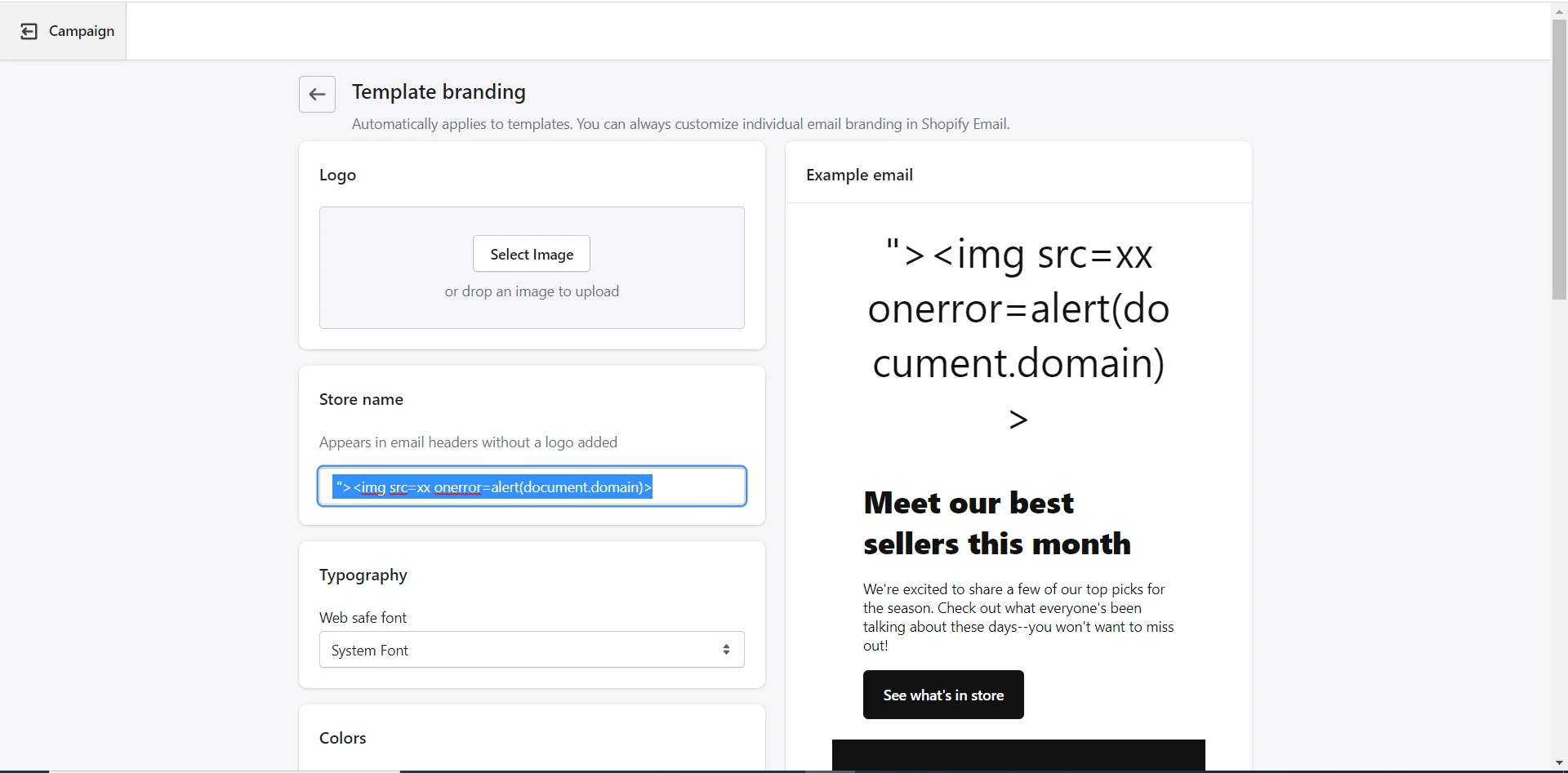
3.Change F1607675 with "><img src=xx onerror=alert(document.domain)> click Save.
4.Now Select any F1607682.
#██████████
#Proof of Concept ███ ████
Impact
Stored XSS triggered.
Attachments
What the report shows
The target is the Shopify Email app, one of the Shopify developed apps, reached through a store's admin panel. The researcher reports a stored cross-site scripting issue in the app's template branding editor.
The reproduction steps are short and direct:
- Configure
shopify-emailfor a Shopify store at https://apps.shopify.com/shopify-email - Go to
Your-store.myshopify.com/admin/apps/shopify-email/template-branding - Change
F1607675to the following payload and clickSave:
"><img src=xx onerror=alert(document.domain)>
- Select any
F1607682.
The report then shows a proof of concept section, but the body of it is redacted in the disclosed text, so the exact response or trigger point is not visible. The impact statement is a single line: stored XSS triggered.
The two attachments are screenshots of the setup. The first shows the store name used during testing.
The second shows the pre-built template that the branding editor works with.
The report was rated medium severity with a CVSS score of 4.6, classified as stored cross-site scripting, and paid a bounty of 2,900 USD. It was disclosed on 25 April 2022. The report does not describe the fix that was applied.
Root cause
The report does not describe the underlying cause; the payload suggests a value from the branding form is placed into page markup without encoding. The payload closes an existing attribute with "> and injects an img element whose onerror handler runs script. The report classifies the issue as stored XSS but does not describe when or how often the script executes.
Impact
The report's own claim is limited to stored XSS being triggered. In general terms, script running in the context of a store's admin origin can act with the privileges of whoever views the affected page: reading page content, making requests as that user, and interacting with the admin interface.
How this kind of bug works
Stored XSS happens when an application accepts input from one request, saves it, and later places it into an HTML document without context-appropriate encoding. The browser cannot tell developer markup from attacker markup, so any injected element or attribute handler is treated as part of the page and its script runs under the page's origin.
The classic failure is string concatenation into HTML: a template engine or front-end component builds markup by joining stored values into an attribute or element body. Escaping that is correct for one context (for example, HTML text) is wrong for another (an attribute value, a URL, a JavaScript string), so a single generic escape is often not enough. The robust defences are contextual output encoding at the point of rendering, a strict Content Security Policy that blocks inline handlers, and, where rich content is genuinely needed, server-side sanitisation with an allowlist of elements and attributes. Input validation alone is a weak control because the same value may be rendered in several places.
How to test for it
- Map where each stored value is rendered. A value saved in one form may appear in a preview pane, an exported template, an email body or an admin listing, and each is a separate context.
- Send a benign marker first, such as a unique string, to confirm the value is stored and reflected back unchanged. This separates storage from rendering.
- Then send context-breaking characters: a double quote followed by a tag, a single quote inside an attribute, a closing tag, or a
javascript:URL where a link is expected. Use a harmless handler such as an alert of the document domain so the proof is unambiguous. - Reload the page and view the value from a second session or a different account to confirm persistence rather than a one-off reflection.
- A positive result is script executing on page load or on a normal user interaction, in the target origin, after the value was saved earlier. Capture the request that saved it, the request that rendered it, and the browser console or screenshot showing execution.
Common false positives: the payload appears in the response but is HTML-encoded, so it renders as text; the value is reflected only in the same request that submitted it (reflected, not stored); the script runs inside a sandboxed iframe or a different origin; a browser or extension blocks the handler; or the input is sanitised on save but the tester only checked the save response, not the render. Also check whether the affected page is reachable by a low-privileged user, since that changes the severity considerably.
How it is fixed
Apply contextual output encoding wherever the stored value is rendered, so that quotes, angle brackets and ampersands become entities in attribute and text contexts. Where the feature must accept markup, sanitise it server-side against an allowlist of tags and attributes and strip event handlers and dangerous URL schemes. Add a Content Security Policy that disallows inline script and inline event handlers, which limits the damage of any encoding mistake that slips through. Validate and normalise input on save as a secondary layer, and review every render site for the same field, not just the one where the bug was found.
Hunting notes
Stored XSS tends to hide in features built for customisation: template and theme editors, signature and footer fields, saved views, custom fields on records, and anything with a preview. Admin panels of SaaS platforms are productive because a stored payload there runs with staff or merchant privileges. Recon signals include parameters named after display fields, endpoints that return HTML fragments for previews, and editors that round-trip values between a form and a rendered template.
To get a report accepted, show persistence across sessions, name the exact field and endpoint, and demonstrate execution in the target origin with a minimal payload. Explain who views the affected page and what their privileges are, because a stored XSS reachable only by the attacker is far less interesting than one triggered when an administrator opens a template. Keep the proof reproducible with numbered steps and include the save request and the render request.
What happened, in plain words
Shopify is a platform that lets people run online shops. Besides the shop itself, Shopify offers extra apps that add features, and one of them is Shopify Email, used to design and send marketing emails to customers. Each shop has an admin panel, a private area where the shop owner manages everything, reached at an address like Your-store.myshopify.com/admin/....
Shopify Email includes a template branding editor: a screen where the shop owner customises how their email templates look. The researcher reported a stored XSS issue in this editor, submitting a payload into a field there. That is a stored cross-site scripting (XSS) bug. "Stored" means the dangerous value is kept on the server and shown again later, so it can affect anyone who opens the page, not just the person who typed it.
The reproduction steps are short:
- Configure
shopify-emailfor a Shopify store at https://apps.shopify.com/shopify-email - Go to
Your-store.myshopify.com/admin/apps/shopify-email/template-branding - Change
F1607675to the following payload and clickSave:
"><img src=xx onerror=alert(document.domain)>
- Select any
F1607682.
Step 1 just installs and sets up the app on a test shop, so there is something to attack. Step 2 opens the branding editor, the screen that holds the vulnerable field. Step 3 is the heart of the bug: F1607675 is the name of a field in that editor, and the text placed in it is the payload, a small piece of HTML that the browser will treat as code. Step 4 selects another element, F1607682; the report does not explain what this step triggers.
Why does that payload work? A web page is built from HTML, a language of tags such as <img> for an image. Tags can carry attributes, extra settings written inside the tag, and attribute values are usually wrapped in double quotes. The payload starts with ">, a double quote followed by a closing angle bracket. If the app places the saved value inside an existing attribute, that "> would end the attribute and the tag early, and everything after it would be read as fresh HTML. The rest, <img src=xx onerror=alert(document.domain)>, is a new image tag pointing at a file xx that does not exist. When an image fails to load, the browser fires an onerror event, and here that event is set to run JavaScript: alert(document.domain) opens a pop-up showing the domain of the current page. That pop-up would be the proof that script supplied by the researcher ran inside the shop's admin page.
The report includes a proof of concept section, but its body is redacted in the disclosed text, so the exact response or trigger point is not visible. The impact statement is one line: stored XSS triggered.
The two attachments show the setup. The first shows the store name used during testing.
The second shows the pre-built template that the branding editor works with.
The report was rated medium severity with a CVSS score of 4.6, classified as stored cross-site scripting, and paid a bounty of 2,900 USD. It was disclosed on 25 April 2022. The report does not describe the fix that was applied.
In general, how this kind of bug works
Stored XSS happens when an application accepts input from one request, saves it, and later places it into an HTML page without encoding it for the place where it lands. Encoding means turning characters that have a special meaning in HTML, such as <, > and ", into harmless stand-ins (entities) so the browser shows them as text instead of acting on them. The browser cannot tell markup written by the developers from markup injected by an attacker, so any injected tag or event handler is treated as part of the page and its script runs with the page's origin, meaning it inherits the page's permissions and logged-in session.
The classic failure is building HTML by gluing stored values into it, for example joining a saved value into an attribute or between tags. Escaping that is correct for one context, such as plain page text, is wrong for another, such as an attribute value or a link, so one generic escape is often not enough. The robust defences are contextual output encoding at the moment of rendering, a strict Content Security Policy (a browser rule that blocks inline scripts and inline event handlers), and, where rich content is genuinely needed, server-side sanitisation against an allowlist of elements and attributes. Checking input only on save is weak, because the same value may be shown in several places.
In general, how to test for it
- Find features that save text you type and show it again: branding and theme editors, template builders, profile fields, saved filters, notification settings, custom labels.
- Map where each saved value appears. A value saved in one form may show up in a preview pane, an exported template, an email body or an admin listing, and each is a separate context.
- Send a harmless marker first, such as a unique string, to confirm the value is stored and comes back unchanged. This separates storage from display.
- Then send characters that break out of context: a double quote followed by a tag, a single quote inside an attribute, a closing tag, or a
javascript:link where a URL is expected. Use a harmless handler such as an alert of the document domain so the proof is unambiguous. - Reload the page and view the value from a second session or a different account to confirm it persists rather than appearing only once.
- A positive result is script running on page load or on a normal user action, in the target origin, after the value was saved earlier. Capture the request that saved it, the request that displayed it, and the browser console or a screenshot showing execution.
Common false positives: the payload appears in the response but is encoded, so it shows as text; the value appears only in the same request that submitted it (reflected, not stored); the script runs inside a sandboxed frame or a different origin; a browser or extension blocks the handler; or the input is cleaned on save but the tester only checked the save response, not the display. Also check whether a low-privileged user can reach the affected page, since that changes the severity considerably.
In general, how it is fixed
Apply contextual output encoding wherever the saved value is displayed, so quotes, angle brackets and ampersands become entities in attribute and text contexts. Where the feature must accept markup, sanitise it on the server against an allowlist of tags and attributes and strip event handlers and dangerous URL schemes. Add a Content Security Policy that disallows inline script and inline event handlers, which limits the damage of any encoding mistake that slips through. Validate and normalise input on save as a secondary layer, and review every place the same field is displayed, not just the one where the bug was found.
In general, where these bugs hide
Stored XSS tends to hide in features built for customisation: template and theme editors, signature and footer fields, saved views, custom fields on records, and anything with a preview. Admin panels of online services are productive because a stored payload there runs with staff or merchant permissions. Signals worth watching include parameters named after display fields, endpoints that return HTML fragments for previews, and editors that move values back and forth between a form and a rendered template.
To get a report accepted, show persistence across sessions, name the exact field and endpoint, and demonstrate execution in the target origin with a minimal payload. Explain who views the affected page and what their permissions are, because a stored XSS reachable only by the attacker is far less interesting than one triggered when an administrator opens a template. Keep the proof reproducible with numbered steps and include the save request and the display request.
Glossary
- Shopify: a platform for running online shops, with an admin panel and an app store.
- Shopify Email: a Shopify app for designing and sending marketing emails.
- Admin panel: the private management area of a shop, reached at
Your-store.myshopify.com/admin/.... - Template branding editor: the screen in Shopify Email where the look of email templates is customised.
- Field: a named input in a form, here
F1607675andF1607682. - Payload: the small piece of text an attacker submits to try to make the application misbehave.
- HTML: the language web pages are written in, made of tags such as
<img>. - Tag: an HTML building block, for example
<img>for an image. - Attribute: an extra setting inside a tag, such as
srcoronerror. - Event handler: code attached to an event, such as
onerror, that runs when the event happens. - JavaScript: the programming language browsers run inside web pages.
alert(document.domain): JavaScript that opens a pop-up showing the current page's domain, used here as harmless proof.- Cross-site scripting (XSS): a bug where an attacker's code ends up running inside someone else's web page.
- Stored XSS: XSS where the dangerous value is saved on the server and shown to later visitors.
- Reflected XSS: XSS where the value appears only in the response to the request that sent it.
- Encoding / escaping: converting special characters into harmless stand-ins so the browser shows them as text.
- Context: the place a value lands in a page (text, attribute, link), each needing its own encoding.
- Sanitisation: cleaning input by removing anything not on an allowlist of safe elements and attributes.
- Allowlist: a list of things explicitly permitted, with everything else rejected.
- Content Security Policy (CSP): a browser rule set by the site that can block inline scripts and handlers.
- Origin: the combination of scheme, host and port that defines a page's security boundary.
- Session: the logged-in state a browser keeps for a user, often held in a cookie.
- Cookie: a small piece of data a site stores in the browser, often used to keep you logged in.
- Request: a message a browser sends to a server asking for a page or action.
- Response: the server's reply to a request.
- CVSS: a scoring system that rates the severity of a vulnerability, here 4.6.
- Bounty: money paid by a company for a valid security report.
- Proof of concept (PoC): a demonstration that the bug really works.
- Redacted: removed or blacked out before public release.
- False positive: a finding that looks like a bug but is not.




