Port 587 SMPT Open: Can send any mail remotely from the internal mail users to company mail id's.
The SMTP service on port 587 was exposed and allowed unauthenticated users to send email to internal company addresses. An attacker could send phishing messages from a legitimate company address to employees.
 Originally disclosed on HackerOne
- Triaged in 4 days
- Fixed in 4 days
- Paid in 4 days
- Disclosed after 2 months
Summary:
While, testing I thought to do nmap scan on the main domain. I found that SMTP port to be open. I tried connecting with telnet and to the surprise it allowed me to connect. Initially i tried HELO and EHLO commands and the server responded to it. Then i tried if i can mail to outsider but nope, it was relay denied from the server. Then I found out to mail id's of company and tried sending the data and boom server queued the mail.
Steps To Reproduce:
- Run this command in your terminal, " nmap -p 587 206.223.178.168"(IP of the company sidefx.com), you'll see SMTP port open.
- now to connect to the port smtp remotely using "telnet 206.223.178.168 587" and the server gets connected.
- Try different commands for smtp to respond for example HELO *, EHLO *, VRFY * and other which don't harm the server, the server will respond 250 1.0.0 ok
- Now I tried
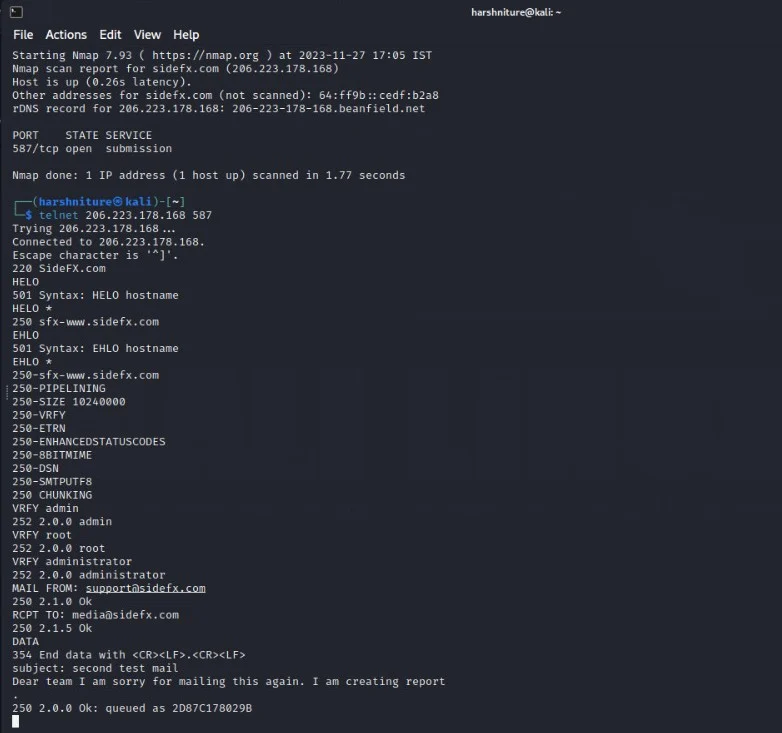
MAIL FROM: [email protected] server replied 250 2.1.0 ok RCPT TO: [email protected] server replied 250 2.1.0 ok DATA(enter) subject: test mail (next line by pressing enter) this is test mail (next line by pressing enter) . ( this '.' is for ending the mail body) And here the server queued my mail
Supporting Material/References:
https://exploit-notes.hdks.org/exploit/email/smtp-pentesting/ (for testing purposes)
Impact
Attacker can remotely send the data he wants to send to the mail users of company remotely, including the user admin, root and administrator as they are verified using the VRFY to the smtp. The attacker can also maliciously perform RCE through LFI as the server is allowing many actions to perform ( https://www.hackingarticles.in/smtp-log-poisioning-through-lfi-to-remote-code-exceution/). Attacker can send phishing links to the other mail id's as they are from the legitimate source( company's mail user).
Context
The target is SideFX's *.sidefx.com estate, and the finding is not a web application bug at all: it is an exposed SMTP submission service. Port 587 is the mail submission port, the one mail clients use to hand outgoing messages to a mail server for delivery. Normally that port should require authentication before it accepts a sender, a recipient and a message body, and it should only relay mail for users who have proved who they are. The report describes a server that accepted a full mail transaction from an unauthenticated remote client, as long as the recipient was a company address.
Setup
The researcher needed no account, no credentials and no special tooling. The only tools used were nmap for the port check and telnet for the interactive SMTP conversation. The precondition is simply network reachability to the mail host on port 587. The report does not name a software version or mail server product.
Finding it
The starting point was a port scan of the main domain. The scan showed the SMTP port open, and a manual connection with telnet succeeded, which is the first sign that the service is exposed to the internet rather than restricted to internal clients or a trusted network.
The researcher then probed the service with harmless SMTP verbs. HELO and EHLO were answered by the server, confirming it was speaking SMTP normally. The next test was an attempt to send mail to an outside address, which failed with a relay denied response: the server would not act as an open relay for arbitrary destinations. That is the expected defence, and it is what makes the next observation interesting. When the researcher switched the recipient to company mail addresses, the server accepted the transaction and queued the message. The restriction was on the destination domain, not on the identity of the sender.
Exploitation
Step 1: confirm the port is open
nmap -p 587 [redacted]
The scan targets port 587 on the company's mail host. The result the researcher reports is that the SMTP port is open.
Step 2: connect remotely
telnet [redacted] 587
This opens an interactive session against the submission port from outside the company network. The server accepts the connection, which is the precondition for everything that follows.
Step 3: probe the SMTP verbs
The researcher tried several commands that do not change server state, including HELO, EHLO and VRFY, to see how the server would respond. The server answered with 250 1.0.0 ok, showing that it processes these verbs for an unauthenticated client. VRFY asks the server to verify whether a mailbox exists. The report lists accounts such as admin, root and administrator as reachable mail users.
Step 4: send a message to a company address
The transaction was performed manually, one SMTP command at a time:
MAIL FROM: [redacted]
The server replied 250 2.1.0 ok. The envelope sender is a company address, but nothing in the exchange proves the client is entitled to use it.
RCPT TO: [redacted]
The server replied 250 2.1.0 ok. The recipient is a company mailbox, which is the condition under which the server accepts the message.
DATA
subject: test mail
this is test mail
.
After DATA, the researcher entered a subject line, a one-line body, and a single . on its own line to terminate the message body. The server queued the mail. The screenshot below shows the session and the queued message.
The key contrast is with the earlier attempt to mail an outsider, which was relay denied. The server refuses to relay to external domains, but it happily accepts mail addressed to its own users from an unauthenticated sender.
Root cause
The submission service on port 587 is reachable from the internet and does not require authentication before accepting MAIL FROM, RCPT TO and DATA. The only restriction in place is a relay control that limits accepted recipients to company domains. That control prevents the host from being used as an open relay to the wider internet, but it does not prevent an outsider from injecting mail into the company's own mailboxes. In other words, the defence that was configured addresses outbound abuse, not inbound forgery.
Because the envelope sender can be set to any company address, the resulting message appears to come from a legitimate internal user. The report does not describe SPF, DKIM or DMARC behaviour, so whether such a message would pass sender authentication downstream is not established here.
Impact
An unauthenticated remote attacker can send messages to company mail users. The researcher states that this includes accounts such as admin, root and administrator, which were confirmed with VRFY. Because the sender address can be a legitimate company mailbox, the messages can carry phishing links that appear to originate from inside the organisation.
The report also claims that the server's permissiveness could enable remote code execution through LFI via SMTP log poisoning, citing an external article on that technique. That claim is a general technique reference rather than a demonstrated result in this report; no LFI was shown.
Fix
The measure implied by the finding is to require authentication on the submission port before accepting a mail transaction, so that only authorised users can set a sender and submit a message, and to restrict who can reach the port at all.
Variants to test
- Scan other mail-related ports on the same host, such as 25, 465 and 587, and check whether each accepts a transaction without authentication. A positive result is a
250onMAIL FROMandRCPT TOfollowed by a queued message. - Test whether
VRFYenumerates valid mailboxes. A positive result is a distinct response for existing versus non-existent users. - Try recipients in sibling or subsidiary domains of the target. A positive result is acceptance for a domain the tester did not expect to be treated as internal.
- Check whether the server accepts a sender address from a domain it does not own. A positive result is a
250onMAIL FROMfor an arbitrary external sender.
Hunting notes
This kind of exposure hides in plain sight during recon: a port scan of the primary domain is enough to surface it, and a manual telnet session confirms it in minutes. The signal to watch for is a submission port that answers HELO and EHLO without first demanding authentication, combined with relay denial for external recipients but acceptance for internal ones. That combination means the server is not an open relay, but it is an open injection point into the company's own mailboxes. The researcher showed impact by completing a full transaction to a company mailbox and capturing the server's queued response.
What happened, in plain words
A security researcher was looking at the main website of a company called SideFX. Instead of testing the website itself, they checked which network doors (called ports) were open on the company's mail server. One of those doors, port 587, was open to anyone on the internet, and it let the researcher start sending email without logging in first. The researcher could not send mail to random outside addresses, but they could send mail to the company's own email addresses, and the server accepted and queued the message. That means an outsider could send email that looks like it came from inside the company.
This is not a bug in a web page. It is a misconfiguration of an email service. To understand it, you only need to know a few basic ideas, which I explain as they come up.
Background: what SMTP and port 587 are
Email is delivered by a protocol called SMTP (Simple Mail Transfer Protocol). Think of it as the language a mail program speaks to a mail server: "I have a message from this sender, for this recipient, here is the body." A port is a numbered door on a computer that a particular service listens on. Web pages normally use port 443, and the port used for handing outgoing mail to a server is 587, called the submission port.
Normally, port 587 should ask you to log in (prove who you are) before it accepts a message. It should also only forward mail for users who have logged in. The report describes a server that skipped the login step entirely, as long as the recipient was a company address.
The target here is SideFX's *.sidefx.com estate, meaning the company's domains and subdomains. The researcher needed no account, no password and no special software: just two common command-line tools, nmap (which checks which ports are open) and telnet (which lets you type directly to a service and read its replies). The report does not name the mail server software or its version.
Finding it
The researcher started by scanning the main domain to see which ports were open. The scan showed the SMTP port open, and a manual connection with telnet worked. That is the first warning sign: the service is reachable from the internet, not limited to internal computers or a trusted network.
Next, the researcher sent harmless SMTP commands to see how the server would answer. HELO and EHLO are the standard "hello" commands a mail program uses to introduce itself. The server answered them, which confirmed it was speaking SMTP normally. Then the researcher tried to send mail to an outside address. The server refused with a relay denied response. "Relaying" means using a mail server to forward a message to somewhere it does not own; refusing that is the correct, expected defence, because otherwise anyone could use the server to send spam anywhere.
That refusal makes the next observation important. When the researcher changed the recipient to a company email address, the server accepted the whole transaction and queued the message. The restriction was on where the mail was going, not on who was sending it.
Exploitation
Step 1: confirm the port is open
nmap -p 587 [redacted]
nmap is a program that probes a computer's ports. -p 587 tells it to check only port 587, the mail submission port. The number after it is the address of the company's mail server. The result the researcher reports is that the SMTP port is open, meaning the door is unlocked and listening for connections from the internet.
Step 2: connect remotely
telnet [redacted] 587
telnet opens a direct, typed conversation with a service. Here it connects to the mail server on port 587 from outside the company network. The server accepts the connection, which is the precondition for everything that follows: if the door had been closed, there would be nothing to test.
Step 3: probe the SMTP commands
The researcher tried several commands that do not change anything on the server, including HELO, EHLO and VRFY, to see how it would respond. The server answered 250 1.0.0 ok. In SMTP, a reply starting with 250 means "OK, done". The fact that an unauthenticated client gets this reply shows the server processes these commands without asking who you are.
VRFY is the interesting one. It asks the server to verify whether a mailbox exists. The report lists accounts such as admin, root and administrator as mail users on the system. In everyday terms, it is like asking a receptionist "does this person work here?" and getting a clear yes.
Step 4: send a message to a company address
The researcher then performed a full mail transaction by hand, one command at a time:
MAIL FROM: [redacted]
The server replied 250 2.1.0 ok. MAIL FROM sets the envelope sender, the address the server will treat as the origin of the message. Here it is a company address, but nothing in the exchange proves the client is allowed to use it. It is like writing someone else's return address on an envelope: the postal service does not check.
RCPT TO: [redacted]
The server replied 250 2.1.0 ok. RCPT TO sets the recipient, the mailbox the message is for. This one is a company mailbox, which is the condition under which the server accepts the message.
DATA
subject: test mail
this is test mail
.
DATA tells the server that the message body is coming next. The researcher then typed a subject line, a one-line body, and a single . on its own line. That lone dot is the standard signal that the message is finished. The server queued the mail, meaning it accepted it and put it in line for delivery. The screenshot below shows the session and the queued message.
The key contrast is with the earlier attempt to mail an outsider, which was relay denied. The server refuses to forward mail to external domains, but it happily accepts mail addressed to its own users from a sender who never logged in.
Root cause
The submission service on port 587 is reachable from the internet and does not require authentication before accepting MAIL FROM, RCPT TO and DATA. The only restriction in place is a relay control that limits accepted recipients to company domains. That control stops the server being used as an open relay to the wider internet, but it does not stop an outsider from injecting mail into the company's own mailboxes. In other words, the defence that was configured addresses outbound abuse, not inbound forgery.
Because the envelope sender can be set to any company address, the resulting message appears to come from a legitimate internal user. The report does not describe SPF, DKIM or DMARC behaviour. Those are three common checks that receiving mail servers use to decide whether a sender is genuine; whether such a message would pass them downstream is not established here.
Impact
An unauthenticated remote attacker can send messages to company mail users. The researcher states that this includes accounts such as admin, root and administrator, which were confirmed with VRFY. Because the sender address can be a legitimate company mailbox, the messages can carry phishing links (fake links designed to trick people into giving away passwords or other information) that appear to come from inside the organisation.
The report also claims that the server's permissiveness could enable remote code execution through LFI via SMTP log poisoning, citing an external article on that technique. That claim is a general technique reference rather than a demonstrated result in this report; no LFI was shown. In plain terms, the idea is that if the server writes mail contents into a log file, and some other part of the site can be tricked into reading that file, an attacker might get code to run. That chain was not proven here.
Fix
The measure implied by the finding is to require authentication on the submission port before accepting a mail transaction, so that only authorised users can set a sender and submit a message, and to restrict who can reach the port at all.
Variants to test
- Scan other mail-related ports on the same host, such as 25, 465 and 587, and check whether each accepts a transaction without authentication. A positive result is a
250onMAIL FROMandRCPT TOfollowed by a queued message. - Test whether
VRFYenumerates valid mailboxes. A positive result is a distinct response for existing versus non-existent users. - Try recipients in sibling or subsidiary domains of the target. A positive result is acceptance for a domain the tester did not expect to be treated as internal.
- Check whether the server accepts a sender address from a domain it does not own. A positive result is a
250onMAIL FROMfor an arbitrary external sender.
Hunting notes
This kind of exposure hides in plain sight during recon (the early stage of testing, where you map out what a target exposes). A port scan of the primary domain is enough to surface it, and a manual telnet session confirms it in minutes. The signal to watch for is a submission port that answers HELO and EHLO without first demanding authentication, combined with relay denial for external recipients but acceptance for internal ones. That combination means the server is not an open relay, but it is an open injection point into the company's own mailboxes. The researcher showed impact by completing a full transaction to a company mailbox and capturing the server's queued response.
Glossary
- SMTP: Simple Mail Transfer Protocol, the language mail programs use to hand messages to a mail server.
- Port: a numbered door on a computer that a particular service listens on; port 587 is the mail submission port.
- Submission port: the port mail clients use to hand outgoing messages to a server for delivery.
nmap: a program that scans a computer to see which ports are open.telnet: a program that opens a direct, typed conversation with a service on a port.HELO/EHLO: the standard SMTP "hello" commands a mail program uses to introduce itself.VRFY: an SMTP command that asks the server whether a mailbox exists.250reply: an SMTP response code meaning "OK, done".MAIL FROM: the SMTP command that sets the envelope sender of a message.RCPT TO: the SMTP command that sets the recipient of a message.DATA: the SMTP command that says the message body follows; a lone.on its own line ends it.- Envelope sender: the address the server treats as the origin of a message, which does not prove who actually sent it.
- Relay: using a mail server to forward a message to a destination it does not own; refusing this is a normal defence.
- Relay denied: the server's refusal to forward mail to an outside destination.
- Open relay: a mail server that will forward mail for anyone to anywhere, a common spam enabler.
- Authentication: proving who you are, usually with a username and password, before a service accepts your commands.
- Queued: accepted by the server and placed in line for delivery.
- Phishing: fake messages or links designed to trick people into giving away information.
- SPF, DKIM, DMARC: three common checks receiving mail servers use to judge whether a sender is genuine.
- LFI: local file inclusion, a flaw where a site can be tricked into reading files on its own server.
- Log poisoning: writing attacker-controlled content into a log file so that a separate file-reading flaw can execute it.
- Remote code execution: getting a server to run code the attacker chose.
- Recon: the early stage of testing, mapping out what a target exposes.



