500$ bounty: Man in the Middle on Slack
Slack rendered uploaded HTML files and allowed iframes, so an attacker could host a fake login page inside an iframe and make the URL end in 'login' by using an email-to-Slack address. A victim who entered credentials on that page would send them to the attacker.
 Published on sysrant.com
Jul 15, 2019 · 11 min read · bug bountyMiTMSlack ·
The full write-up lives on its author's site
It belongs to its author, so we link to it rather than copy it. The other two tabs are our own rewrites, checked against it.
Context
Slack is a chat application used by a large number of companies, and the researcher had been using it for years before deciding to look at how it handles uploaded data. The feature that mattered here is file upload: users can upload whatever they want to share in a channel or a private message, and Slack serves the uploaded file back in several ways, either as a preview inside the channel or on an actual URL on the Slack files domain.
The researcher's interest was in the processing and serving side rather than the upload itself. As he puts it, you cannot trust an extension such as .png or .jpg: the file can be altered, have content injected, or be used to trick the system. He quotes OWASP at length on the risks of file upload modules, including server-side attacks through web shells, client-side attacks such as XSS or cross-site content hijacking, abuse of uploaded files to reach other vulnerable parts of an application, and the possibility of hosting phishing pages or malware on the storage server.
His own framing is that uploading a malicious file is only half the problem. To turn an upload into an exploit you also need to be able to access the file so it executes, and the server has to be willing to execute it. The upload can succeed with no consequences at all; what matters is how the file is served and processed afterwards. On the defensive side he lists identifying the file properly (extension, headers, metadata, raw data), renaming it to a random name with a fixed extension so that a badfile.wtf still ends up listed as something like 10293812903.png, storing it where the server cannot execute it, and delivering it in a way that tampering does not produce odd behaviour, for example escaping it properly when it is included in an HTML tag.
Setup
The researcher was already a member of HackerOne and checked the scope of the Slack program before doing anything, and he stresses that this kind of work sits in a grey area and needs proper consent. No specific tooling, versions or accounts beyond that are described. The proof of concept relies on a server he controlled, which hosted the pages referenced below, and on a Slack workspace where he could upload files and use the email-to-Slack feature.
Finding it
Looking at how Slack serves uploaded content, he noticed that the behaviour depends on the type of data. A movie gets a player, an image is displayed as an image, and HTML is rendered to some extent, not necessarily inside the client itself but when you open the original file.
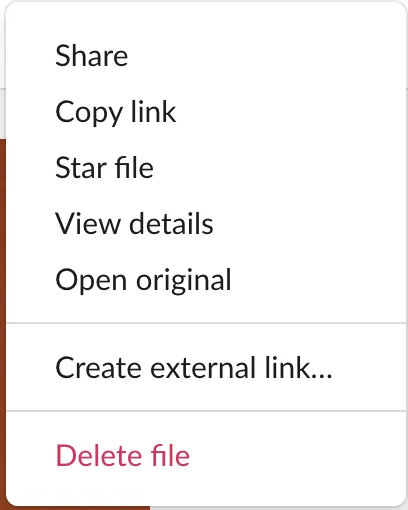
Opening the original gives back the uploaded data as an actual webpage with the information displayed. An image simply gets a .jpg, but an HTML file gets included and rendered. That made it worth investigating what could be done with a rendered HTML page.
His first attempts were blocked. Loading remote resources was impossible because of the content security policy, and the same applied to inline JavaScript. He calls this good on Slack's part, but it limited his options. After trying various approaches he found that he was allowed to include a remote page through an iframe. The iframe does not live inside the page; it is a containerised element with no access to its parent page. The problem with iframes, as he puts it, is that with the right styling you can mask one so that it looks like an ordinary webpage while actually showing content from the iframe source.
Exploitation
Step 1: An HTML file that covers the page with an iframe
He crafted an HTML page that loads his own server in a full-page iframe:
1<html>
2<body>
3
4<iframe src="https://wiard.nl/test.php" style="position:fixed; top:0px; left:0px; bottom:0px; right:0px; width:100%; height:100%; border:none; margin:0; padding:0; overflow:hidden; z-index:999999;">
5</iframe>
6</body>
7</html>
The inline style removes the scrollbars, stretches the iframe over the whole viewport and places it on top with a high z-index. Whatever is served from test.php on his own server is then rendered inside the Slack preview page.
Step 2: Controlling the URL
A man-in-the-middle attack needs the victim to trust the page, so he looked at how the URL of the uploaded data is formed. Uploaded files mostly get a URL of this shape:
files.slack.com/files-pri/T2RJU2CNR-F8YSYRH1A/something-random-title
He wanted to control the something-random-title part. Changing the file title only sometimes added a few letters from the title to the URL, and the result still looked odd.
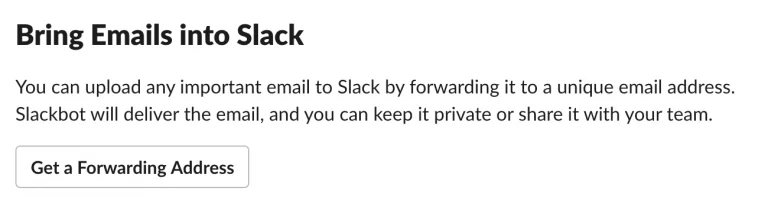
He then found a feature that gives you a random Slack email address: any mail sent to that address is posted in a private DM on Slack. The title of the email became the title used for the file on Slack. That gave him control over the last part of the URL.
Step 3: Sending the HTML by email
He wrote a small PHP script to send the email to his Slack address, with a text/html content type so the HTML would render, containing the same iframe:
  1    <?php
 2
 3    $to = '[email protected]';
 4    $subject = 'Login';
 5    $headers .= "Content-Type: text/html; charset=UTF-8\r\n";
 6    $message = '
 7
 8    <html>
 9    <body>
10
11    <iframe src="https://wiard.nl/test.php" style="position:fixed; top:0px; left:0px; bottom:0px; right:0px; width:100%; height:100%; border:none; margin:0; padding:0; overflow:hidden; z-index:999999;">
12    </iframe>
13    </body>
14    </html>
15
16    ';
17
18    mail($to, $subject, $message, $headers);
19
The recipient address is the Slack email address, the subject is Login, and the Content-Type: text/html; charset=UTF-8 header makes the message body render as HTML rather than plain text. The body is the iframe page from step 1.
Step 4: A fake login page behind the iframe
On his own server he copied the HTML of the official Slack login page and placed it in his PHP script. The result was a page on the Slack files domain whose URL ended in login, showing an actual login page, but any data entered there was sent to him rather than to Slack.
He notes that the server, webpage and email address no longer exist.
His own summary of the chain: an HTML page containing an iframe to his own website, which hosted a fake login page, was sent to his Slack email address, which uploaded the data to Slack. The email title let him craft a URL ending in /login to make it more believable. Anyone who logged in through that page would have handed over their credentials.
Root cause
Two design decisions combine. First, Slack renders uploaded HTML on the files domain instead of serving it as inert content. The content security policy blocked remote resources and inline JavaScript, but he found that including a remote page through an iframe was allowed. Second, the file title, which is derived from the email subject through the email-to-Slack feature, becomes part of the public URL path. That lets an attacker choose a convincing path segment such as login on a genuine Slack domain. The CSP blocked remote resources and inline JavaScript, but it did not stop the visual substitution that the iframe made possible.
Impact
An attacker who can get a victim to open the crafted file URL sees a login page on the Slack files domain, at a URL ending in login, and any credentials entered are sent to the attacker. The researcher describes it as a man-in-the-middle in the sense of tricking the user into using his page so that he can read or steal something; if someone logged in via that page, he would have gained their credentials. The report does not describe any other impact, and the iframe has no access to its parent page.
Fix
Slack fixed the issue, and the researcher was then able to disclose it. The report does not describe the change that was made. The general measures he outlines for upload handling are to identify files properly, rename them to random names with a fixed extension, store them where the server cannot execute them, and deliver them so that tampering does not change behaviour, including proper escaping when embedding in HTML.
Reporting it
He built the proof of concept and Slack eventually confirmed it. When they first tried to reproduce it they forgot the text/html header, and he later received the message that the issue had been triaged. He received the 500 USD bounty much earlier, although he had made the report nearly 12 months before writing, and he believes Slack changed some internal processes to improve that. He thanks Max from Slack for his help with communication and timeline after he asked for more information.
Variants to test
- Upload HTML to any file-sharing or attachment feature and open the file directly. A positive result is your markup rendering on the provider's domain rather than being served as
text/plainor downloaded. - Probe the content security policy with an iframe pointing at a page you control. A positive result is the external page loading inside the rendered file, even when inline script and remote script are blocked.
- Look for features that derive a file name or URL path from user-controlled metadata, such as an email subject, a display name or a title field. A positive result is a URL on the provider's domain whose final path segment is a string you chose, for example
login. - Combine 1 and 3 with a pixel-covering iframe and a cloned login form. A positive result is a page on the provider's domain that looks like its login page and posts credentials to your server.
- Check whether other rendered formats, such as SVG, are served inline with the same framing freedom. A positive result is an SVG or similar file that loads an external frame or resource when opened.
What happened, in plain words
A security researcher spent some time looking at Slack, the chat application many companies use, and found a way to make a fake login page appear on a real Slack web address. He put his fake page inside an HTML file, sent it to his Slack email address so Slack stored it, and used the email title to make the web address end in login. Anyone who typed their Slack username and password into that page would have sent them straight to the researcher instead of to Slack.
Slack confirmed the problem and later fixed it, and he received a 500 US dollar bounty. This article walks through the whole thing slowly, assuming you have never done any security work before. Every technical word is explained the first time it appears, and there is a glossary at the end.
Slack?
Slack is a chat application. Teams use it to talk in channels (group conversations) and in private messages, and to share files. It is very common in IT companies. It also lets you post animated pictures with a bot, which the researcher mentions as one of its finer qualities.
The part of Slack that matters for this story is file upload. Any member of a workspace can attach a file to a message: a picture, a video, a document, anything. Slack stores that file on its own servers and shows it back to people in two ways. You get a small preview inside the conversation, and you also get a real web address on Slack's file servers where the file can be opened on its own.
Discovery phase
The researcher had used Slack for years and wanted to understand how it handled data. Chat text is simple; uploads are where things get complicated. So he started uploading different kinds of files and watching what Slack did with them.
1: Processing data is hard
When a website accepts files from anyone, it has a hard job. The name of a file, such as holiday.png, tells you nothing reliable about what is inside it. Someone can rename any file to end in .png, or hide extra content inside a real image, or craft a file specifically to confuse the software that opens it.
The researcher quotes a long list from OWASP, an organisation that publishes guidance on web security, about what can go wrong with file uploads. In short, the list says that a badly handled upload can let an attacker run commands on the server, attack other visitors through the browser (for example with XSS, which is explained below), use the site to host phishing pages or malware, or reach other weak parts of the same application.
His own way of putting it is that the upload itself is only half the story. To turn a malicious file into a real attack you need two more things:
- You need to be able to reach the file, so that opening it actually does something.
- The server has to be willing to run it, for example by treating a
.phpfile as a program rather than as text.
A file can sit on a server completely harmlessly if neither of those is true. That is why he says the way a site serves and processes files matters as much as the way it accepts them.
On the defensive side he lists a few sensible habits for anyone building an upload feature:
- Identify the file properly: look at the extension, the headers, the metadata and the raw bytes, not just the name.
- Rename the file to a random name with a fixed extension, so that even a file called
badfile.wtfends up stored and listed as something like10293812903.png. - Store files somewhere the server will not execute them.
- Deliver them in a way where tampering does not change behaviour, for example by escaping the name properly when it is placed inside an HTML tag.
2: Serving the data
This is the part he was really interested in: once a file is stored, how does Slack hand it back to a browser? He noticed the answer depends on the type of file. Upload a video and you get a player. Upload an image and you see the image. Upload an HTML file, and Slack renders it as a web page.
HTML is the language web pages are written in. A browser reading an HTML file turns tags like <b> or <img> into visible content. Rendering means the browser does that: it displays the page rather than showing you the raw text of the file. So when the researcher opened the original of an uploaded HTML file, he got an actual web page with his own content on it, served from Slack's file domain. An image simply gets a .jpg address; an HTML file gets rendered.
That is interesting because HTML can contain more than text. It can contain instructions that make the browser load other things, and that is where an attacker starts to have options.
Attack vector
His first idea was to use JavaScript, the programming language that runs inside web pages and can read and change what is on screen. He tried to load remote resources (files from another server) and to run JavaScript written directly inside the page. Both were blocked.
The thing blocking him is called the Content Security Policy, or CSP. It is a rule that a website sends to your browser saying which sources of content are allowed. If the policy says scripts may only come from Slack's own servers, the browser refuses to run a script from anywhere else. The researcher calls this good on Slack's part, because it shuts down a whole family of attacks. But it also limited what he could do.
After trying various things, he found one thing that was still allowed: an iframe. An iframe is an HTML element that puts another web page inside the current one, like a small window cut into the page. The embedded page is separate: it cannot read or change the page around it. The researcher describes it as a containerised element with no access to its parent page.
The problem with iframes, as he puts it, is that you can style them. Styling means the instructions that decide how big an element is and where it sits. With the right styling, an iframe can be stretched over the entire visible page, hiding whatever is underneath and showing only the embedded page. To a visitor it looks like an ordinary web page, but the content actually comes from somewhere else.
So he wrote this HTML file:
1<html>
2<body>
3
4<iframe src="https://wiard.nl/test.php" style="position:fixed; top:0px; left:0px; bottom:0px; right:0px; width:100%; height:100%; border:none; margin:0; padding:0; overflow:hidden; z-index:999999;">
5</iframe>
6</body>
7</html>
Line by line:
- Line 1,
<html>, opens the document. Every web page starts with this. - Line 2,
<body>, opens the visible part of the page. - Line 4 is the iframe.
src="https://wiard.nl/test.php"tells the browser which page to load inside the frame: a page on the researcher's own server. Thestyleattribute holds the styling rules, separated by semicolons:position:fixedpins the frame to the browser window instead of letting it scroll with the page.top:0px; left:0px; bottom:0px; right:0pxsets all four edges to zero distance from the window edges, so the frame covers the whole window.width:100%; height:100%makes it full width and full height.border:noneremoves the thin border browsers normally draw around a frame.margin:0; padding:0removes any spacing around and inside it.overflow:hiddenhides scrollbars.z-index:999999puts the frame on top of everything else. Think of z-index as the order of sheets of paper in a stack: a higher number sits closer to you.
- Line 5 closes the iframe, line 6 closes the body and line 7 closes the document.
The effect is that whatever page sits at test.php on his server fills the whole screen, inside a page served from Slack's domain.
Man in the Middle
A man-in-the-middle attack, in the broad sense used here, means putting yourself between a user and the service they think they are talking to, so that you can read or steal what passes between them. The researcher's goal was to trick a user into using his page, so that whatever the user typed went to him.
For that to work, the victim has to trust the link. So he looked at how the web address of an uploaded file is built. Uploaded files mostly get an address of this shape:
files.slack.com/files-pri/T2RJU2CNR-F8YSYRH1A/something-random-title
Reading it from left to right: files.slack.com is Slack's file server, files-pri is a path segment, then two identifiers (one for the workspace, one for the file), and finally a last part derived from the file's title. He wanted to control that last part, because a link ending in login looks far more convincing than one ending in a random string.
Changing the file title by hand only sometimes added a few letters of the title to the address, and the result still looked odd. Then he found a Slack feature that gives you a random email address. Any mail sent to that address is posted into a private message on Slack. And the subject line of the email became the title used for the file on Slack. That gave him control over the end of the address.
The "payload"
A payload is the part of an attack that actually does the work, as opposed to the delivery mechanism around it. Here the payload is the HTML page with the iframe, and the delivery mechanism is an email. He wrote a small PHP script to send it. PHP is a programming language commonly used on web servers; this script runs on his own server and sends one email.
  1    <?php
 2
 3    $to = '[email protected]';
 4    $subject = 'Login';
 5    $headers .= "Content-Type: text/html; charset=UTF-8\r\n";
 6    $message = '
 7
 8    <html>
 9    <body>
10
11    <iframe src="https://wiard.nl/test.php" style="position:fixed; top:0px; left:0px; bottom:0px; right:0px; width:100%; height:100%; border:none; margin:0; padding:0; overflow:hidden; z-index:999999;">
12    </iframe>
13    </body>
14    </html>
15
16    ';
17
18    mail($to, $subject, $message, $headers);
19
Line by line:
- Line 1,
<?php, tells the server that what follows is PHP code rather than plain output. - Line 3 sets
$to, the recipient, to the Slack email address. A variable in PHP starts with$; think of it as a labelled box holding a value. - Line 4 sets
$subjecttoLogin. This is the email subject, and because of the feature described above it becomes the file title on Slack, and therefore the end of the web address. - Line 5 builds the email headers. Headers are the hidden lines at the top of an email that describe it, such as who it is from and what format the body is in.
Content-Type: text/html; charset=UTF-8tells the mail software that the body is HTML in the UTF-8 character encoding, so it should be rendered as a web page rather than shown as plain text. The\r\nat the end is the line break that ends a header line. - Lines 6 to 16 put the HTML page into
$message. It is the same iframe page as before, wrapped in quotes. - Line 18 calls
mail(), the PHP function that sends an email, passing the recipient, subject, body and headers.
He sent this email to his Slack address. The mail was posted in a private DM on Slack, and the email title became the title used for the file on Slack.
What was left was the page behind the iframe. On his own server, in test.php, he copied the HTML of the official Slack login page. So the frame now contained a copy of Slack's real login page HTML.
The result
Put together, the chain was: a page on Slack's file domain, at an address ending in login, showing a real-looking Slack login page, where anything typed was sent to the researcher instead of to Slack.
He notes that the server, the web page and the email address no longer exist.
His own summary: he created an HTML page containing an iframe to his own website, which hosted a fake login page. He sent that HTML page to his Slack email address, which uploaded the data to Slack. The email title let him craft an address ending in /login, making it more believable. If someone logged in through that page, he would have gained their credentials.
Credentials means the username and password pair. Once an attacker has them, they can log in as the victim.
Reporting it
Before doing any of this, he was already a member of HackerOne, a platform where companies publish bug bounty programmes: lists of their systems, the rules for testing them, and the rewards for finding problems. He checked the scope of the Slack programme, meaning the list of what is and is not allowed. He stresses that this kind of work sits in a grey area and that without proper consent you can end up with real legal problems. If you ever want to try it, read the scope first.
He built the proof of concept and Slack eventually confirmed it. When they first tried to reproduce it, they forgot the text/html header. Later he received the message that the issue had been triaged, meaning it had been reviewed and accepted as a real problem. That mattered because Slack pays bounties for accepted reports.
A few days before he published, Slack fixed the issue, which allowed him to disclose it publicly. He praises Slack for running such a programme, since it makes their product more secure while letting researchers work safely. The one downside was timing: he had made the report nearly 12 months earlier. He did receive his 500 dollar bounty much earlier, and he believes Slack changed some internal processes to improve that. He also thanks Max from Slack for stepping in with communication and timeline information after he asked for more detail.
Contributing yourself
He ends by encouraging others to get involved. If you have influence at a company, consider a bug bounty programme such as HackerOne (he notes he is not affiliated with them). It gives you access to a large community of people who know how to break into applications, which adds a lot on top of periodic penetration tests, where a company hires someone to attack its own systems on a schedule. If that is too big a step, at least publish a disclosure policy: a page saying how people can report a security problem to you. That is passive, you do not run a programme, but it lets people tell you about issues safely and on your terms.
For people with some interest in IT, he recommends joining programmes as a researcher. He sees it as a technical puzzle with the occasional payout, and says it taught him a lot for his own work: as a former developer, moving to the attacking side helped him build more secure applications. Sign up, read the scope of each programme, and if you want help, contact him.
Variants to test
If you want to look for similar problems, these are the checks the story suggests. Only do them inside a programme's scope or on systems you own.
- Upload HTML to any file-sharing or attachment feature and open the file directly. A positive result is your markup rendering on the provider's domain rather than being served as
text/plainor downloaded. - Probe the content security policy with an iframe pointing at a page you control. A positive result is the external page loading inside the rendered file, even when inline script and remote script are blocked.
- Look for features that derive a file name or URL path from user-controlled metadata, such as an email subject, a display name or a title field. A positive result is a URL on the provider's domain whose final path segment is a string you chose, for example
login. - Combine 1 and 3 with a pixel-covering iframe and a cloned login form. A positive result is a page on the provider's domain that looks like its login page and posts credentials to your server.
- Check whether other rendered formats, such as SVG, are served inline with the same framing freedom. A positive result is an SVG or similar file that loads an external frame or resource when opened.
Glossary
- Bug bounty programme: a scheme where a company publishes rules and rewards for people who find and report security problems in its systems.
- Channel: a group conversation inside Slack.
- Content Security Policy (CSP): rules a website sends to your browser saying which sources of content, such as scripts, are allowed to load.
- Credentials: the username and password (or similar) used to log in to an account.
- Cross-site scripting (XSS): an attack where an attacker gets their own code to run inside another website as seen by a victim.
- Disclosure policy: a public page explaining how to report a security problem to a company.
- Domain: the part of a web address that names the site, such as
slack.com. - Email-to-Slack: a Slack feature that gives you an email address; mail sent to it is posted into a private message.
- Escaping: converting characters in data so they are treated as text rather than as instructions by the software that reads them.
- File upload: a feature that lets a user send a file to a website, which stores it.
- Headers: hidden lines at the top of an email or a web response that describe it, such as its format.
- HTML: the language web pages are written in.
- Iframe: an HTML element that displays another web page inside the current one, isolated from the page around it.
- JavaScript: the programming language that runs inside web pages in the browser.
- Man-in-the-middle: an attack where the attacker positions themselves between a user and a service so they can read or steal what passes between them.
- Metadata: data about a file, such as its size or the camera that took a photo, stored alongside its contents.
- OWASP: an organisation that publishes guidance on web application security.
- Parent page: the page that contains an iframe, as opposed to the page loaded inside it.
- Payload: the part of an attack that does the actual work.
- Penetration test: a hired, authorised attack on a company's own systems to find weaknesses.
- PHP: a programming language commonly used on web servers.
- Phishing: tricking someone into entering their details on a fake page that looks genuine.
- Private message (DM): a conversation visible only to the people in it.
- Proof of concept (PoC): a working demonstration that a security problem is real.
- Rendering: a browser turning HTML into a visible page rather than showing the raw text.
- Scope: the list of systems and actions a bug bounty programme allows you to test.
- Server: a computer that stores and serves websites and their data.
- Styling: instructions that decide how an element looks and where it sits on the page.
- SVG: a picture format written in a text language similar to HTML.
- Triaged: reviewed and accepted as a valid issue by the company running the programme.
- URL: a web address.
- Web shell: a malicious file uploaded to a server that lets an attacker run commands on it.
- z-index: a styling value that decides which element sits on top when elements overlap.


