Rate-limit bypass
The iOS app's sign-in API endpoint lacked the rate limiting the web app enforced on failed 2FA attempts, allowing brute force of the 2FA code to access a victim's account.
 Originally disclosed on HackerOne
- Fixed in 15 days
- Paid in 15 days
- Disclosed after 3 months
Hello Slack,
This vulnerability is about a 2FA Bypass, On Slack Web Application there is rate limit implemented. After performing 4-6 failed 2FA Attempt, Rate limit logic will ge Triaged and ask user to wait for next attempt(preventing automated 2FA Attempts)
I tested the same using iOS App(iOS 9.3.3 iPad Air 2) and found that API Endpoint "/api/auth.signin" have no rate limit implemented.
Due to this an attacker can brute force the 2FA Valid Code to get into user(Victim`s account) Vulnerable Endpoint - /api/auth.signin Vulnerable Parameter = pin
Re-Production I created the POC Video in 2 parts, Because creating this POC in singe Video will make a large size of video file.
POC Video Part 1 - https://www.youtube.com/watch?v=ZCOii-HIr4A POC Video Part 2 - https://www.youtube.com/watch?v=d1dknJXCPy4
- Screen shot is also attached.
- Using Slack iOS App, Sign into an account in which 2FA is enabled.
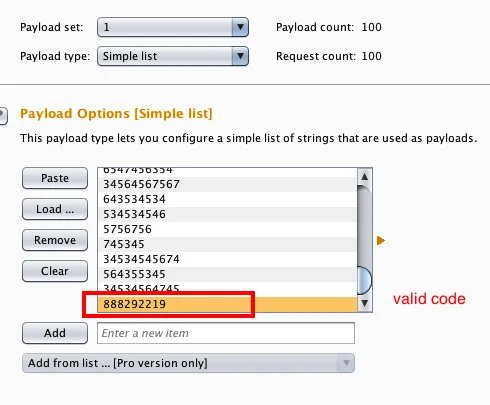
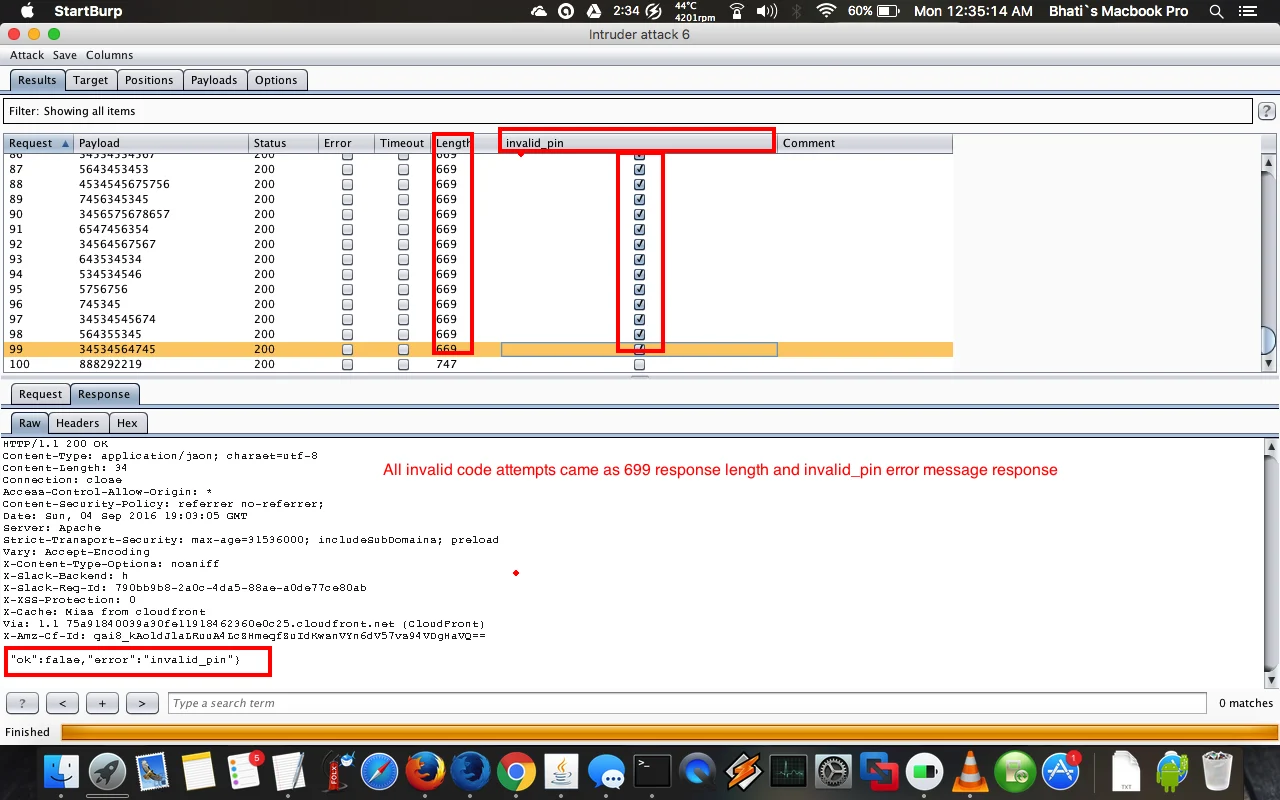
- Intercept the 2FA enter code request and perform many numbers of attempts( In my POC i had performed 100 attempts, Due to size of POC Video) But you can perform as more as you can.
- In attack windows you will see that all invalid code attempt came as same response code response message of "invalid_pin" but our valid code will came as different response length code response message like "{"ok":true,"token":"xoxs-62548102116-65394751110-76166043750-0a50252718","user":"U1XBLN338","team":"T1UG4303E"}"
If there was a rate limit implemented than i should get block after 4-6 failed just like Slack Web Application.
Thanks Narendra
Attachments
Context
Slack's web application protects accounts with two-factor authentication (2FA) and enforces a rate limit on the 2FA code entry step. After roughly 4 to 6 failed 2FA attempts, the web application trips its rate-limit logic and asks the user to wait before the next attempt, which prevents automated guessing of the 2FA code.
The report describes the same 2FA flow as exposed through the Slack iOS app, which talks to the API endpoint /api/auth.signin. That endpoint accepts a pin parameter carrying the 2FA code. The researcher found that this API path does not apply the rate limit that the web application does.
Setup
- Target: Slack, web application and iOS app.
- Feature: 2FA code entry during sign-in.
- Client used for testing: Slack iOS app on iOS 9.3.3, iPad Air 2.
- Tooling implied by the reproduction steps: an intercepting proxy to capture and replay the 2FA code submission request.
- Precondition: an account with 2FA enabled, and the ability to intercept the sign-in traffic of the iOS app.
Finding it
The researcher first confirmed the expected behaviour on the Slack web application: after 4 to 6 failed 2FA attempts, the rate-limit logic is triggered and the user is asked to wait for the next attempt. That is the defence that stops automated 2FA guessing on the web.
Testing the same flow through the iOS app showed a different picture. The API endpoint /api/auth.signin had no rate limit implemented. The vulnerable parameter is pin.
Because the endpoint accepts an unlimited number of code submissions, an attacker who already has valid credentials for an account (and therefore reaches the 2FA step) can brute force the 2FA code and get into the victim's account.
Exploitation
Step 1: sign in with 2FA enabled
Using the Slack iOS app, sign into an account that has 2FA enabled. This puts the client at the point where it submits the 2FA code to the API.
Step 2: intercept and replay the code submission
Intercept the 2FA enter-code request and perform a large number of attempts. In the proof of concept the researcher performed 100 attempts, limited by the size of the video, and notes that an attacker can perform as many as they like.
The request targets the endpoint and parameter identified above:
/api/auth.signin
Step 3: distinguish invalid attempts from the valid one
In the attack window, every invalid code attempt returns the same response code and the same response message, invalid_pin. The valid code returns a different response length and a different message body:
{"ok":true,"token":"[redacted]","user":"U1XBLN338","team":"T1UG4303E"}
The ok field turning true and the presence of a session token mark a successful guess. Because invalid attempts are uniform and cheap to send, an attacker can keep submitting codes until that success response appears.
If a rate limit were implemented, the researcher argues, the endpoint should block after 4 to 6 failures, just as the Slack web application does.
The proof of concept was split into two videos because a single recording would have produced a large file.
Screenshots of the attempt list and the error response were also attached.
Root cause
The rate limiting that protects 2FA code entry on the Slack web application is not applied to the /api/auth.signin endpoint used by the iOS app. The pin parameter is accepted on every request without the rate limit the web flow enforces. The report does not explain why the limit is missing on this endpoint.
Impact
An attacker who already holds valid credentials for an account with 2FA enabled can brute force the 2FA code through /api/auth.signin and take over the victim's account. The attack requires reaching the 2FA step, so it is a second-factor bypass rather than a standalone account takeover. The report does not state the length or entropy of the 2FA code, so the practical number of attempts needed is not quantified here; the researcher's point is that the endpoint imposes no limit at all.
Fix
The implied remediation is to apply the same rate limiting to /api/auth.signin that the web application applies to 2FA code entry, so that repeated failed pin submissions trigger the wait or lockout after 4 to 6 attempts.
Variants to test
- Compare every client against the web flow. Submit 2FA codes through the mobile app API, the desktop client API and any other client, and check whether each one blocks after the same number of failures as the web application. A positive result is an endpoint that keeps returning
invalid_pinindefinitely. - Test other authentication parameters on the same endpoint. If
pinis unlimited, check whether password, backup code or recovery parameters on the same sign-in API share the gap. A positive result is any credential check that never locks out. - Replay the exact captured request many times. If the response stays uniform and no wait or lockout appears, the limit is missing on that path.
- Look for response differences that reveal success. A positive result is a distinct response length or body (for example an
okfield or a token) that separates the valid code from invalid ones.
Hunting notes
This kind of bug tends to hide where a security control is implemented in one client or layer rather than in the shared API. The web application had a working rate limit, which makes the gap easy to miss if testing stops at the browser. Signals during recon include separate API endpoints used by mobile clients, authentication parameters such as pin that are submitted directly to the API, and any flow where the web UI shows a lockout that the API does not.
The researcher showed impact by demonstrating the contrast directly: the web application blocks after 4 to 6 failures, while the API accepted 100 attempts and returned a different response for the valid code. That side-by-side comparison, plus the captured success response, is what makes the missing limit concrete.
What happened, in plain words
Slack is a messaging product that people use in a browser and through apps on phones and tablets. When you sign in, Slack can ask for a second proof of identity beyond your password: a short numeric code, called a PIN, that you type in after the password. This second step is called two-factor authentication, or 2FA. The idea is that a stolen password alone is not enough to get into the account, because the attacker also needs the code.
A code is only a few digits, so an attacker who already has your password could try to guess it by submitting many codes quickly. To stop that, Slack's web application (the version you open in a browser) counts failed attempts. After roughly 4 to 6 wrong codes, it stops accepting more for a while and asks the user to wait. That pause is called a rate limit: a cap on how often something can be tried in a period of time. It turns a fast guessing attack into an impractical one.
The researcher found that the same sign-in step, when reached through the Slack iOS app (the app for Apple's iPhone and iPad), did not have that cap. The app does not talk to the website directly; it talks to a separate service on Slack's servers, called an API. An API is the machine-facing part of a product: instead of drawing a page for a human, it accepts a request and returns data, usually in a compact format such as JSON. The endpoint (the specific address of one API function) involved here is /api/auth.signin, and the field carrying the code is pin.
Because that endpoint accepted an unlimited number of code submissions, someone who already had valid credentials for an account could keep guessing the PIN until the right one came back, and then be let in. The researcher demonstrated this by sending 100 attempts and showing that a valid code produced a different, successful response containing a session token. A token is a short string that the server hands out after a successful login; the client sends it back on later requests to prove who it is, a bit like a cloakroom ticket that matches you to your coat.
Context
Slack's web application protects accounts with 2FA and enforces a rate limit on the step where you type the code. After roughly 4 to 6 failed attempts, the web application trips its rate-limit logic and asks the user to wait before the next attempt. That is what prevents automated guessing of the code on the web.
The report describes the same 2FA flow as exposed through the Slack iOS app, which talks to the API endpoint /api/auth.signin. That endpoint accepts a pin parameter carrying the 2FA code. The researcher found that this API path does not apply the rate limit that the web application does.
A parameter is simply a named field in a request: the name goes in, a value goes with it. Here the name is pin and the value is whatever code was typed.
Setup
- Target: Slack, web application and iOS app.
- Feature: 2FA code entry during sign-in.
- Client used for testing: Slack iOS app on iOS 9.3.3, iPad Air 2.
- Tooling implied by the reproduction steps: an intercepting proxy to capture and replay the 2FA code submission request.
- Precondition: an account with 2FA enabled, and the ability to intercept the sign-in traffic of the iOS app.
An intercepting proxy is a tool that sits between an app and the internet and lets you look at, and change, the messages going back and forth. Think of it as standing at the postbox, reading each letter before it is delivered, and being able to post the same letter again as many times as you like. That replay ability is the whole basis of this test: the researcher captures the one request that submits a code, then sends it over and over with different code values.
Finding it
The researcher first confirmed the expected behaviour on the Slack web application: after 4 to 6 failed 2FA attempts, the rate-limit logic is triggered and the user is asked to wait for the next attempt. That is the defence that stops automated 2FA guessing on the web. Checking the normal, protected path first matters, because it gives you a baseline: you now know what "working" looks like, so a difference elsewhere stands out.
Testing the same flow through the iOS app showed a different picture. The API endpoint /api/auth.signin had no rate limit implemented. The vulnerable parameter is pin.
Because the endpoint accepts an unlimited number of code submissions, an attacker who already has valid credentials for an account (and therefore reaches the 2FA step) can brute force the 2FA code and get into the victim's account. Brute force means trying every possibility, or enough of them, until one works, rather than being clever about it. It only pays off when the target lets you try without limit.
Exploitation
Step 1: sign in with 2FA enabled
Using the Slack iOS app, sign into an account that has 2FA enabled. This puts the client at the point where it submits the 2FA code to the API. The reason for this step is practical: you cannot capture the code-submission request until the app actually makes one, and it only makes one after the password has been accepted and the app is asking for the second factor.
Step 2: intercept and replay the code submission
Intercept the 2FA enter-code request and perform a large number of attempts. In the proof of concept the researcher performed 100 attempts, limited by the size of the video, and notes that an attacker can perform as many as they like.
The request targets the endpoint and parameter identified above:
/api/auth.signin
This is the address of the API function that handles sign-in. The leading /api/ marks it as a machine-facing service rather than a web page, and auth.signin names the action: authenticate, sign in. The researcher lists it on its own because it is the thing being tested: every replayed attempt goes to this same address.
This is the name of the field inside the request that carries the 2FA code. It is listed separately because it is the value being changed between attempts. Everything else in the captured request stays the same; only the number in pin differs. That is what makes it a guessing attack rather than a series of fresh logins.
Step 3: distinguish invalid attempts from the valid one
In the attack window, every invalid code attempt returns the same response code and the same response message, invalid_pin. The valid code returns a different response length and a different message body:
{"ok":true,"token":"[redacted]","user":"U1XBLN338","team":"T1UG4303E"}
JSON is a text format for structured data: curly braces hold a set of named fields, each name followed by a colon and its value. Reading the block field by field:
"ok":truesays the request succeeded. On a wrong code this would not be true."token":"[redacted]"is the session token, the credential the client uses from then on. Its presence is the real proof of a successful login."user":"U1XBLN338"identifies the account that was signed into."team":"T1UG4303E"identifies the workspace the account belongs to.
The ok field turning true and the presence of a session token mark a successful guess. Because invalid attempts are uniform and cheap to send, an attacker can keep submitting codes until that success response appears. Uniform responses are what make the attack easy to automate: there is no ambiguity to slow the attacker down, just one repeated "no" until a "yes".
If a rate limit were implemented, the researcher argues, the endpoint should block after 4 to 6 failures, just as the Slack web application does.
The proof of concept was split into two videos because a single recording would have produced a large file.
Screenshots of the attempt list and the error response were also attached.
Root cause
The rate limiting that protects 2FA code entry on the Slack web application is not applied to the /api/auth.signin endpoint used by the iOS app. The pin parameter is accepted on every request without the rate limit the web flow enforces. The report does not explain why the limit is missing on this endpoint.
An attempt counter is just a tally of how many times something has been tried; a lockout is the refusal that follows once the tally passes a threshold. If that tally lives in the web layer, the part of the system that serves browser pages, then a request that arrives at the API without going through the web layer is never counted. The protection exists, but not on the road the mobile app uses.
Impact
An attacker who already holds valid credentials for an account with 2FA enabled can brute force the 2FA code through /api/auth.signin and take over the victim's account. The attack requires reaching the 2FA step, so it is a second-factor bypass rather than a standalone account takeover. The report does not state the length or entropy of the 2FA code, so the practical number of attempts needed is not quantified here; the researcher's point is that the endpoint imposes no limit at all.
Entropy, in this context, means how unpredictable the code is: a longer code drawn from more possible values is harder to guess. The distinction between a second-factor bypass and a standalone takeover is worth holding on to. The attacker still needs the password to get as far as the code prompt; what the missing limit removes is the second lock, the one that was supposed to survive a stolen password.
Fix
The implied remediation is to apply the same rate limiting to /api/auth.signin that the web application applies to 2FA code entry, so that repeated failed pin submissions trigger the wait or lockout after 4 to 6 attempts.
Variants to test
- Compare every client against the web flow. Submit 2FA codes through the mobile app API, the desktop client API and any other client, and check whether each one blocks after the same number of failures as the web application. A positive result is an endpoint that keeps returning
invalid_pinindefinitely. - Test other authentication parameters on the same endpoint. If
pinis unlimited, check whether password, backup code or recovery parameters on the same sign-in API share the gap. A positive result is any credential check that never locks out. - Replay the exact captured request many times. If the response stays uniform and no wait or lockout appears, the limit is missing on that path.
- Look for response differences that reveal success. A positive result is a distinct response length or body (for example an
okfield or a token) that separates the valid code from invalid ones.
Hunting notes
This kind of bug tends to hide where a security control is implemented in one client or layer rather than in the shared API. The web application had a working rate limit, which makes the gap easy to miss if testing stops at the browser. Signals during recon include separate API endpoints used by mobile clients, authentication parameters such as pin that are submitted directly to the API, and any flow where the web UI shows a lockout that the API does not.
Recon, short for reconnaissance, is the early stage of looking around a target to see how it is built before trying anything. The researcher showed impact by demonstrating the contrast directly: the web application blocks after 4 to 6 failures, while the API accepted 100 attempts and returned a different response for the valid code. That side-by-side comparison, plus the captured success response, is what makes the missing limit concrete.
Glossary
- 2FA (two-factor authentication): a sign-in step that asks for a second proof of identity, such as a short code, in addition to the password.
- API: the machine-facing part of a service that accepts requests and returns data, rather than drawing pages for a person to read.
- Endpoint: the specific address of one API function, here
/api/auth.signin. - Parameter: a named field in a request, such as
pin, whose value the server reads. - PIN: the short numeric code typed in during the 2FA step.
- Rate limit: a cap on how many times an action can be attempted in a period, used to make guessing impractical.
- Lockout: a refusal to accept further attempts once a failure threshold is passed.
- Attempt counter: a tally of how many times something has been tried, used to decide when to lock out.
- Brute force: trying many possibilities until one works, rather than exploiting a flaw in logic.
- Intercepting proxy: a tool placed between an app and the internet that can read, change and resend the messages passing through.
- Replay: sending a captured request again, unchanged or with one value altered.
- JSON: a text format for structured data made of named fields and values.
- Token (session token): a string handed out after a successful login that the client sends back to prove who it is.
- Response code: the status value a server returns with a reply, indicating broadly what happened.
- Response length: the size of the reply body, which can differ between a failure and a success.
- Entropy: how unpredictable a value is; higher entropy means harder to guess.
- Second-factor bypass: getting past the second proof of identity without legitimately satisfying it.
- Account takeover: gaining control of someone else's account.
- Web layer: the part of a system that serves browser pages, as opposed to the shared API behind it.
- Recon: the early stage of examining a target to understand how it is built.
- HackerOne: a platform where researchers report security bugs to companies.
- Bounty: a payment made to a researcher for a valid report.



