Stored XSS(Cross Site Scripting) In Slack App Name
An app's name field on the Slack app management page did not properly sanitise user input, so a crafted name containing a script tag was stored and later rendered as executable HTML. An attacker could set such a name and send the resulting app page link to another user, causing script to run in that victim's browser.
 Originally disclosed on HackerOne
- Triaged in 11 hours
- Fixed in 36 hours
- Paid in 36 hours
- Disclosed after 3 months
Hello Slack,
This vulnerability is about a Stored Cross Site Scripting
Slack Stored XSS In App(App Name)
Vulnerable URL(Edit App Page) https://api.slack.com/apps/[appid]/general
https://api.slack.com/apps/A21B3V9GA/general
Vulnerable Parameter = name
Note -Its also work on other user as well.
Send this link to victim
===================
Reproduction Steps POC Video - https://youtu.be/3jAbPjfPW1o Screen shot is also attached.
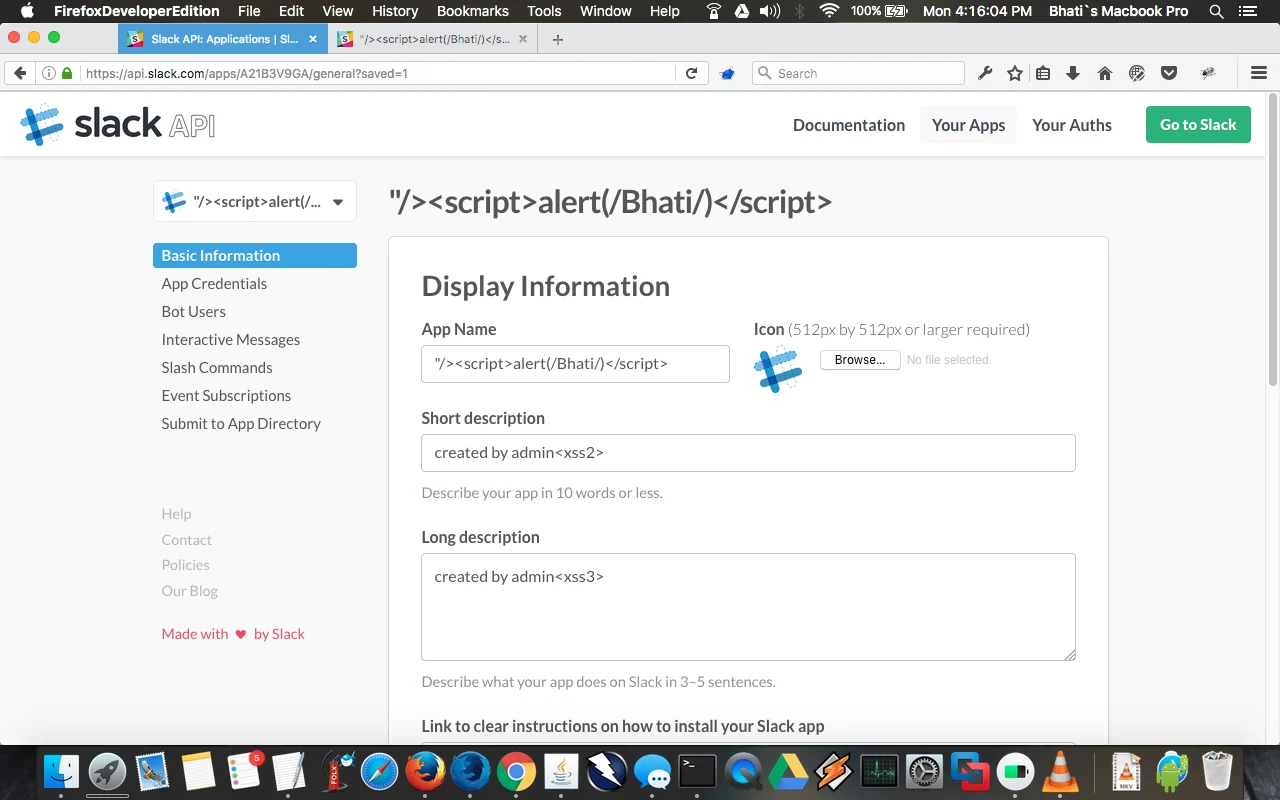
- Go to app edit page
https://api.slack.com/apps/[appid]/general https://api.slack.com/apps/A21B3V9GA/general 2) In app name parameter enter the following payload
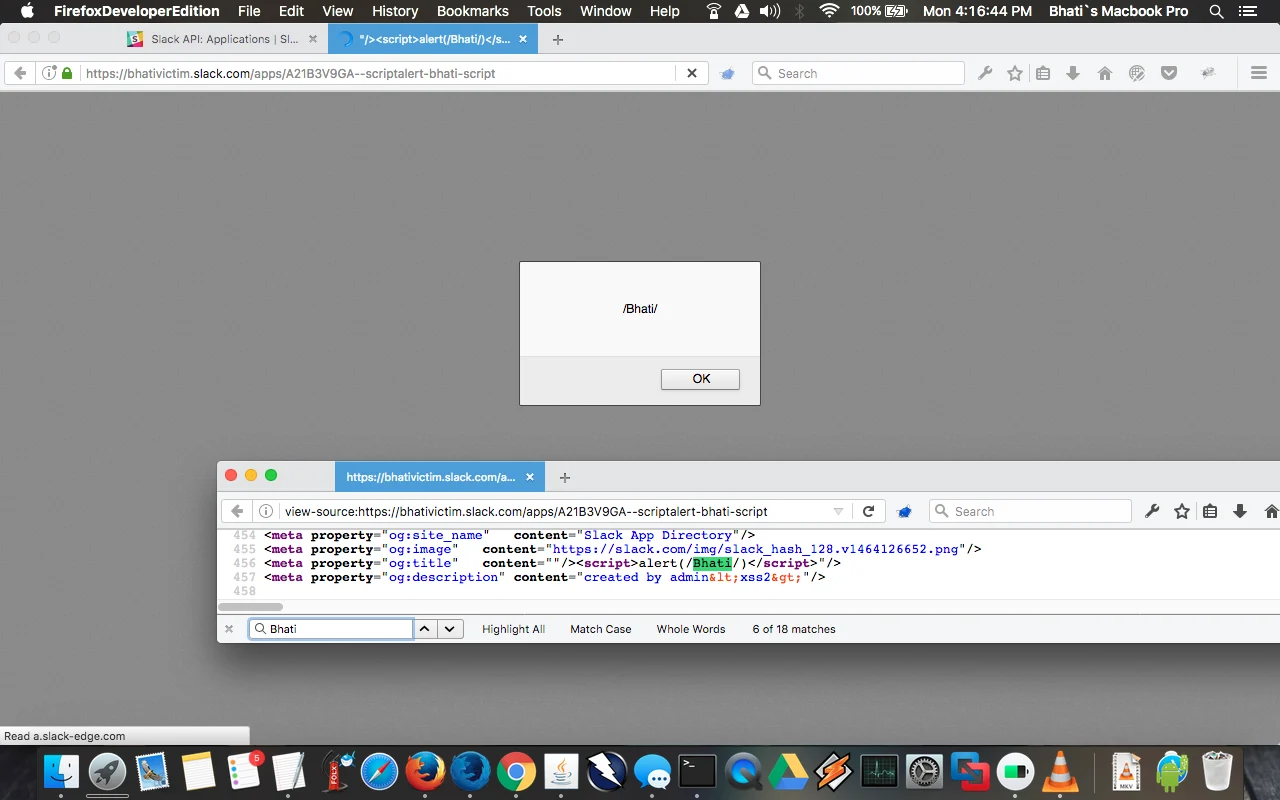
"/><script>alert(/Bhati/)</script> 3) Now open the app page in any other tab
https://bhativictim.slack.com/apps/A21B3V9GA--scriptalert-bhati-script 4) You will get a Alert Box 5) We can also send this same link to other user(victim).
Thanks, Narendra
Attachments
What the report shows
The target is Slack's app management interface, specifically the app edit page at api.slack.com. The researcher reported a stored cross-site scripting issue in the app name field.
The vulnerable URL is the general settings page of an app:
https://api.slack.com/apps/[appid]/general
https://api.slack.com/apps/A21B3V9GA/general
The vulnerable parameter is name. The researcher notes that the payload also fires for other users, which is what makes it stored rather than reflected.
The reproduction steps are short:
- Go to the app edit page at
https://api.slack.com/apps/[appid]/general. - In the app name parameter, enter the following payload:
"/><script>alert(/Bhati/)</script>
- Open the app page in another tab at the URL below:
https://bhativictim.slack.com/apps/A21B3V9GA--scriptalert-bhati-script
- An alert box appears.
- The same link can be sent to another user (the victim).
The researcher also recorded a proof-of-concept video and attached screenshots.
The report was disclosed on 22 November 2016 with a bounty of 1,000 USD. The platform records the weakness as generic cross-site scripting. The report does not describe a fix.
Root cause
The payload begins with "/>, which closes an HTML attribute and a tag before injecting a script element. This strongly suggests that the app name was written into an HTML attribute in the page markup without proper encoding, so the double quote ended the attribute early and the rest of the value was parsed as markup. The stored value was then rendered back to other users viewing the app, which is why the script executed for them as well. The report does not show the server-side or template code, so the exact sink is not confirmed.
Impact
The report demonstrates script execution in the context of the Slack app pages when a victim opens the crafted link. Because the payload is stored in the app name, a victim who opens the crafted app page link runs it. The researcher frames the impact as sending the link to another user.
How this kind of bug works
Stored cross-site scripting happens when user-controlled data is saved by the application and later rendered into a page without context-appropriate encoding. The browser cannot tell application data from application markup, so any characters that have meaning in HTML, such as <, >, " and ', can break out of the surrounding context and introduce new elements or attributes.
The context matters. Data placed between tags needs < and > encoded. Data placed inside an attribute needs the quote character that delimits the attribute encoded, plus angle brackets. Data inside a script block, a style block, or a URL attribute such as href or src has its own rules, and a generic HTML encoder is not always enough there. The classic defences are output encoding matched to the sink, a strict Content Security Policy that blocks inline script, and, where rich text is genuinely needed, server-side sanitisation with a well-maintained HTML sanitiser. Input validation alone is a weak control because the same value may be rendered in several different contexts.
How to test for it
- Identify every field whose value is saved and later displayed to other users: profile names, team or workspace names, app names, project titles, labels, filenames, comments.
- Save a harmless marker first, such as a unique string, and find every page and API response where it appears. Note whether it lands in HTML text, an attribute, a JavaScript string, a JSON response consumed by the front end, or an email.
- For each location, submit a context-appropriate probe. For attribute contexts, a value that closes the attribute and the tag is the standard test. For text contexts, a simple tag with an event handler or a script tag works. Keep probes non-destructive.
- View the page as a second user, not just as the account that saved the value, to confirm the payload is stored and rendered for others.
- A positive result is your probe executing in the victim's browser session, or appearing unencoded in the raw HTML response in a position where it will be parsed as markup. Check the raw response, not only the rendered page, because client-side frameworks may re-encode or sanitise on render.
- Common false positives: the value appears encoded in the HTML but decoded by JavaScript and inserted with a safe API; the payload fires only in your own session because of a client-side preview; the application escapes the value on one page but not another, so test every sink; and browser XSS filters or a Content Security Policy blocking execution while the underlying encoding flaw remains.
How it is fixed
Encode output for the exact context in which it is rendered, using the framework's escaping helpers rather than hand-written replacements. Where the field must accept markup, sanitise it server-side on input and again on output with an allowlist-based sanitiser. Add a Content Security Policy that disallows inline script and restricts script sources, as defence in depth. Validate length and character set on the server, and re-test every place the stored value is displayed, including admin panels, exports and notification emails.
Hunting notes
Stored XSS tends to hide in fields that are set once and displayed in many places: names and titles, descriptions, custom labels, integration and app metadata, and anything shown in an administrative view. Look for features where one user's input is shown to another, such as shared workspaces, team directories and public profiles. Recon signals include reflected values in HTML attributes, JSON blobs rendered by client-side templates, and older pages that mix server-rendered markup with user data. Keep the proof minimal and reproducible.
What happened, in plain words
Slack lets teams build small add-on programs called apps. Each app has a settings page where its owner can change things like the app's name. That page lives on Slack's developer site, api.slack.com. The researcher found that a crafted app name could break out of its context and run script. If you typed special characters that mean something to a web browser, the browser obeyed them instead of showing them.
This is called stored cross-site scripting. "Stored" means the dangerous text is saved on Slack's servers and shown again later to anyone who opens the app page. "Cross-site scripting" means an attacker gets their own instructions to run inside someone else's browser session on the real site.
A simple comparison: imagine a noticeboard where you write your name on a card. Normally the card just shows your name. Here the "wall" is the web page and the "instruction" is a small program.
The vulnerable page is the app's general settings page:
https://api.slack.com/apps/[appid]/general
https://api.slack.com/apps/A21B3V9GA/general
[appid] is a placeholder for an app's identifier; the second line shows a real-looking one. The vulnerable field is the parameter called name, meaning the app name. The researcher notes the payload also works for other users, which is what makes it stored rather than reflected. A reflected bug only bounces back to the person who sent it; a stored one waits on the server for its next visitor.
The reproduction steps are short:
- Go to the app edit page at
https://api.slack.com/apps/[appid]/general. - In the app name field, enter this payload:
"/><script>alert(/Bhati/)</script>
- Open the app page in another tab at the URL below:
https://bhativictim.slack.com/apps/A21B3V9GA--scriptalert-bhati-script
- An alert box appears.
- The same link can be sent to another user, the victim.
Let us take the payload apart, because each piece has a job. A web page is written in HTML, a language of tags such as <div> and <input>. Tags can carry settings called attributes, written like name="value", where the double quotes mark where the value starts and ends. The payload starts with "/>. The " closes the attribute early, and the > closes the tag. Everything after that is no longer treated as a value but as new page markup. The <script> tag then tells the browser to run a program, and alert(/Bhati/) is that program: it pops up a box showing the text Bhati. The closing </script> ends it.
Step 3 matters because it shows the saved name being displayed back on the app's own page. The URL contains a slug built from the app name, A21B3V9GA--scriptalert-bhati-script, which is the name with the special characters turned into words. Opening that page makes the browser read the stored name and run the script. Step 5 is the real danger: the attacker does not need to be the victim. They save the name once, then send the link to another user, and the script runs for that person.
The researcher recorded a proof-of-concept video and attached screenshots.
The report was disclosed on 22 November 2016 with a bounty of 1,000 USD. The platform records the weakness as generic cross-site scripting. The report does not describe a fix.
Why it worked
The payload begins with "/>, which closes an HTML attribute and a tag before injecting a script element. This strongly suggests the app name was written into an HTML attribute in the page markup without proper encoding, so the double quote ended the attribute early and the rest of the value was parsed as markup. The stored value was then rendered back to other users viewing the app, which is why the script executed for them as well. The report does not show the server-side or template code, so the exact sink is not confirmed.
What it could do
The report demonstrates script execution in the context of the Slack app pages when a victim opens the crafted link. Because the payload is stored in the app name, a victim who opens the crafted app page link runs it. The researcher frames the impact as sending the link to another user.
In general, how this kind of bug works
Stored cross-site scripting happens when user-controlled data is saved by the application and later rendered into a page without context-appropriate encoding. Encoding means turning characters that have a special meaning into harmless stand-ins, so a browser shows them as text instead of acting on them. The browser cannot tell application data from application markup, so any characters that have meaning in HTML, such as <, >, " and ', can break out of the surrounding context and introduce new elements or attributes.
The context matters. Data placed between tags needs < and > encoded. Data placed inside an attribute needs the quote character that delimits the attribute encoded, plus angle brackets. Data inside a script block, a style block, or a URL attribute such as href or src has its own rules, and a generic HTML encoder is not always enough there. The classic defences are output encoding matched to the sink, a strict Content Security Policy that blocks inline script, and, where rich text is genuinely needed, server-side sanitisation with a well-maintained HTML sanitiser. Input validation alone is a weak control because the same value may be rendered in several different contexts.
How to test for it
- Identify every field whose value is saved and later displayed to other users: profile names, team or workspace names, app names, project titles, labels, filenames, comments.
- Save a harmless marker first, such as a unique string, and find every page and API response where it appears. Note whether it lands in HTML text, an attribute, a JavaScript string, a JSON response consumed by the front end, or an email.
- For each location, submit a context-appropriate probe. For attribute contexts, a value that closes the attribute and the tag is the standard test. For text contexts, a simple tag with an event handler or a script tag works. Keep probes non-destructive.
- View the page as a second user, not just as the account that saved the value, to confirm the payload is stored and rendered for others.
- A positive result is your probe executing in the victim's browser session, or appearing unencoded in the raw HTML response in a position where it will be parsed as markup. Check the raw response, not only the rendered page, because client-side frameworks may re-encode or sanitise on render.
- Common false positives: the value appears encoded in the HTML but decoded by JavaScript and inserted with a safe API; the payload fires only in your own session because of a client-side preview; the application escapes the value on one page but not another, so test every sink; and browser XSS filters or a Content Security Policy blocking execution while the underlying encoding flaw remains.
How it is fixed
Encode output for the exact context in which it is rendered, using the framework's escaping helpers rather than hand-written replacements. Where the field must accept markup, sanitise it server-side on input and again on output with an allowlist-based sanitiser. Add a Content Security Policy that disallows inline script and restricts script sources, as defence in depth. Validate length and character set on the server, and re-test every place the stored value is displayed, including admin panels, exports and notification emails.
Where to look
Stored XSS tends to hide in fields that are set once and displayed in many places: names and titles, descriptions, custom labels, integration and app metadata, and anything shown in an administrative view. Look for features where one user's input is shown to another, such as shared workspaces, team directories and public profiles. Recon signals include reflected values in HTML attributes, JSON blobs rendered by client-side templates, and older pages that mix server-rendered markup with user data. Keep the proof minimal and reproducible.
Glossary
- App: a small add-on program that a team connects to Slack; it has settings pages and a name.
- Attribute: a setting written inside an HTML tag, such as
name="value", where quotes mark the value's boundaries. - Bounty: money paid by a company to a researcher who reports a valid security bug.
- Content Security Policy: a rule set a website sends to the browser saying which scripts it may run, used to block injected ones.
- Cross-site scripting (XSS): a bug where an attacker's text is treated as code by a victim's browser on a real site.
- CVSS: a standard scoring system for rating how severe a vulnerability is.
- Encoding / escaping: converting special characters into harmless stand-ins so they display as text rather than being acted on.
- HTML: the language web pages are written in, made of tags and attributes.
- Parameter: a named piece of data sent to or stored by a web application, here the app name field.
- Payload: the exact text an attacker submits to trigger a bug.
- Proof of concept (POC): a minimal demonstration that a bug is real.
- Reflected XSS: a bug where the dangerous text bounces straight back to the person who sent it and is not saved.
- Sanitisation: cleaning user-supplied markup so only an approved set of tags and attributes survives.
- Script: a small program a browser can run, written inside
<script>tags. - Session: the logged-in state a site keeps for you after you sign in, so it knows who you are on each request.
- Sink: the place in the page or code where stored data finally gets written out.
- Slug: a URL-friendly version of a name, with special characters replaced by words or dashes.
- Stored XSS: a bug where the dangerous text is saved on the server and shown to later visitors.
- Tag: an HTML marker such as
<div>or<script>that tells the browser what an element is. - URL: the address of a page or resource on the web.




