Possible XSS vulnerability without a content security bypass
 Originally disclosed on HackerOne
- Triaged in 9 days
- Fixed in 21 days
- Paid in 23 days
- Disclosed after 5 months
Summary:
Hi security team members,
Hope you are well and doing great :)
I found a Possible XSS vulnerability in https://dashboard.stripe.com but I was not able to bypass a content security policy.
Although, I don't have much knowledge about CSP and its bypasses. But, I read that you accept the XSS without a content security bypass. So, I'm reporting this to you.
Please note that we do accept and reward submissions for valid cross-site scripting vulnerabilities even if they are not accompanied by a bypass of our content security policy. Cross-site scripting vulnerabilities without a content security bypass will be assessed at a lower severity level than those with a bypass.
Description:
This occurs when you create a custom link with the javascript://%0aalert(1) through a stripe app. And, It gives a CSP refused executing error on clicking the custom link.
Steps To Reproduce:
- Install this
Custom Linkapp:- https://marketplace.stripe.com/apps/custom-links - Now, Go to your products and then create a
Custom Linkwith thisjavascript://%0aalert(1)as a link
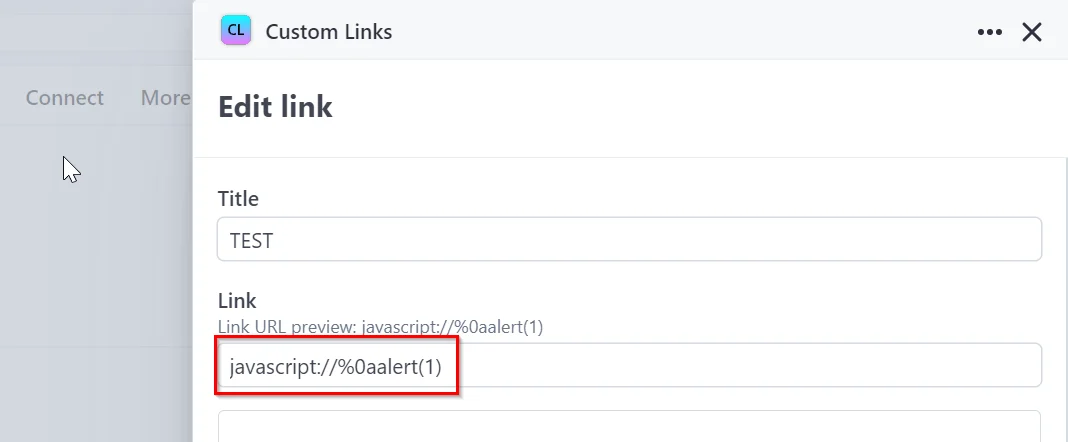
- Then, Once you click on the custom link that you just created. It will doesn't execute because of CSP.
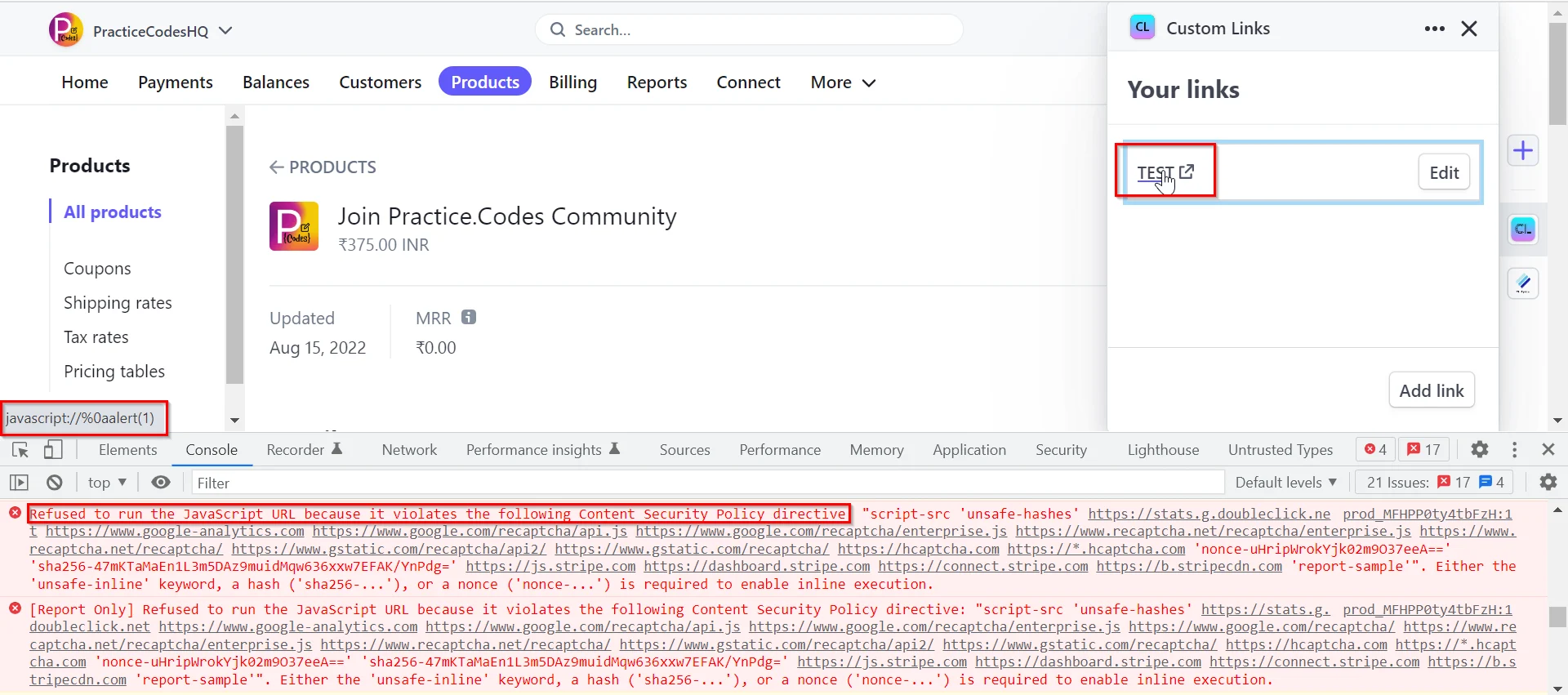
- You can verify this by opening your
Console.
Video POC:
Impact
If an attacker is able to bypass CSP then there is a possible XSS vulnerability in https://dashboard.stripe.com,.
Context
Stripe's merchant dashboard at https://dashboard.stripe.com lets merchants create custom links through the Custom Link app, with a destination of the merchant's choosing. The destination is supplied by the merchant through the Custom Link app, available in the Stripe marketplace at https://marketplace.stripe.com/apps/custom-links. Because the destination is user-controlled, the dashboard has to treat it as untrusted input, and Stripe protects the dashboard with a Content Security Policy (CSP).
The researcher, saajanbhujel, reported a possible cross-site scripting issue in the dashboard that could not be turned into script execution because the CSP blocked it. Stripe's programme explicitly accepts such reports, and the report was assessed as medium severity with a 2,000 USD bounty and disclosed on 1 May 2023.
Setup
No special tooling is described. The preconditions are:
- A Stripe account with access to the dashboard at
https://dashboard.stripe.com. - The Custom Link app installed from the marketplace.
- A browser with developer tools, since the researcher verifies the behaviour through the console.
The researcher states up front that they do not have much knowledge of CSP and its bypasses, and that they are reporting because Stripe's policy accepts XSS without a CSP bypass. The relevant policy text quoted in the report is:
Please note that we do accept and reward submissions for valid cross-site scripting vulnerabilities even if they are not accompanied by a bypass of our content security policy. Cross-site scripting vulnerabilities without a content security bypass will be assessed at a lower severity level than those with a bypass.
Finding it
The researcher found that a custom link could be created with a javascript: destination. By supplying a javascript: URL, the link's destination becomes script rather than a normal web address. The payload used is:
javascript://%0aalert(1)
The javascript: scheme tells the browser to evaluate the rest of the URL as script when the link is followed. The // after the scheme starts what looks like a comment, and %0a is a URL-encoded newline, which ends that comment line so that alert(1) is parsed as code. The result is a link that, when clicked, would run alert(1).
Exploitation
Step 1: Install the app
Install the Custom Link app from the marketplace:
https://marketplace.stripe.com/apps/custom-links
This adds the custom link feature to the merchant's dashboard.
Step 2: Create a custom link with a javascript: destination
Go to the products section of the dashboard and create a custom link, using the payload as the link destination:
javascript://%0aalert(1)
The dashboard accepts the value when the custom link is created. The screenshot below shows the custom link being created with this value in the link field.
Step 3: Click the link
Once the custom link is created, clicking it does not run the script. The browser refuses to execute it because of the dashboard's Content Security Policy, and the researcher observes a CSP refusal error. The screenshot shows that error.
Step 4: Confirm in the console
Open the browser console to verify the refusal. The console records the CSP violation rather than an executed alert(1).
The video walkthrough shows the whole sequence: installing the app, creating the link with the payload, clicking it, and the resulting CSP error.
Root cause
The custom link destination is accepted with a javascript: scheme, and the resulting link can be clicked by the merchant. When followed, the browser would evaluate the script in the context of the dashboard origin.
The only thing standing between this stored value and script execution is the dashboard's Content Security Policy, which blocks the inline script that the javascript: URL would run. The report does not describe the specific CSP directives involved, only that a CSP refusal error appears.
Impact
If an attacker can bypass the CSP, the stored javascript: destination becomes a cross-site scripting vulnerability in https://dashboard.stripe.com. As reported, the payload does not execute because the CSP blocks it, so the practical impact in the report is limited to that. The researcher frames the impact conditionally: the XSS is possible only if a CSP bypass is found. Stripe's policy assesses such reports at a lower severity than XSS with a working bypass.
Fix
The report does not describe any fix or remediation.
Variants to test
- Try other script-bearing schemes and encodings in the same destination field, for example mixed case (
JaVaScRiPt:) or HTML-entity or percent-encoded variants of the colon and newline. A positive result is the stored value being rendered as a clickable link whose target still resolves to script. - Try the payload in other user-controlled URL fields in the same product, such as redirect or return URLs. A positive result is the same CSP refusal on click, which confirms the field is unvalidated.
- Look for places where the stored destination is rendered outside the CSP-protected dashboard, for example in emails or on a separate host. A positive result is the payload executing where no CSP applies.
- Test whether the CSP can be weakened through the same feature, for example by pointing a link at a resource the policy allows. A positive result is script execution despite the policy.
Hunting notes
This kind of bug hides in features that accept a URL from the user and later render it as a link: custom links, redirects, webhook endpoints, profile fields and anything shown back to the merchant. During recon, look for marketplace apps and settings pages that take a destination URL, then check whether the scheme is validated. The signal is a field that accepts javascript: without complaint.
The researcher demonstrated the payload, the click and the CSP error, and cited Stripe's stated policy that XSS without a CSP bypass is accepted at a lower severity. The report is honest about the limit, which is that the script does not run, and the programme rewarded it accordingly.
What happened, in plain words
Stripe runs a website called the dashboard at https://dashboard.stripe.com. It is the place where a business that uses Stripe logs in to manage its payments, its products and its settings. One of the things you can do there is create a custom link through the Custom Link app, pointing to a destination you choose. You type in the destination, and the dashboard turns it into a link you can click or send to someone.
Because the destination is typed in by a person, the dashboard has to be careful with it. A web address can start with different schemes, the part before the ://. The usual one is https, which means "go to this page". But there is another scheme, javascript:, which tells the browser "run what follows as a small program" instead of going anywhere. If a website lets you save a javascript: address and then shows it back to you as a clickable link, clicking it can run code inside that website. That is the family of bugs called cross-site scripting, or XSS: tricking a site into running code that the site's owners never intended.
Stripe defends the dashboard with a Content Security Policy, or CSP. Think of the CSP as a list of house rules that the browser is handed along with the page: which sources of code are allowed to run, and which are not. When something tries to run code that the rules do not permit, the browser refuses and writes a complaint in a hidden log called the console.
The researcher, saajanbhujel, found that the custom link feature accepted a javascript: destination. When the link was clicked, the browser refused to run the code because of the CSP. So the dangerous value was stored, but it did not actually execute. The researcher says plainly that they do not know much about CSP and how to get around it, and that they are reporting because Stripe's bug bounty programme says it accepts XSS reports even when the CSP is not bypassed. The quoted policy is:
Please note that we do accept and reward submissions for valid cross-site scripting vulnerabilities even if they are not accompanied by a bypass of our content security policy. Cross-site scripting vulnerabilities without a content security bypass will be assessed at a lower severity level than those with a bypass.
A bug bounty programme is a scheme where a company invites outside people to look for security problems and pays for good reports. Stripe assessed this one as medium severity, paid a 2,000 USD bounty, and disclosed the report on 1 May 2023.
Setting the scene
The report describes no special tools. To follow along you need:
- A Stripe account that can open the dashboard at
https://dashboard.stripe.com. - The Custom Link app installed from the Stripe marketplace.
- A normal browser, because the researcher checks the result in the browser's developer tools, specifically the console.
A marketplace app here is an add-on that plugs extra features into Stripe. The Custom Link app is the one that adds the custom link feature. The console is a panel built into every modern browser, usually opened with the developer tools, where the browser prints warnings and errors, including CSP refusals.
Finding it
The researcher found that a custom link could be created with a javascript: destination. You could type a javascript: address instead of a normal https one. The value used in the report is:
javascript://%0aalert(1)
Reading it piece by piece:
javascript:is the scheme. It tells the browser that what comes next is code to run, not a page to visit.//looks like the start of a comment in many programming languages. Here it is there to make the beginning of the rest look harmless to a parser.%0ais a newline character written in URL encoding, a way of writing characters that are awkward to type by replacing them with a percent sign and a code. A newline ends the comment-like part, so the browser carries on reading the next line as real code.alert(1)is the simplest possible program: it makes a small pop-up box appear with the number 1 in it. Researchers use it because it is harmless and easy to spot.
Put together, the address is designed so that clicking the link would run alert(1).
Walking through it
Step 1: Install the app
The first step is to install the Custom Link app from the marketplace:
https://marketplace.stripe.com/apps/custom-links
This is the app's page in the Stripe marketplace. Installing it adds the custom link feature to the merchant's dashboard, which is why it comes first: without the feature there is no destination field to test.
Step 2: Create a custom link with a javascript: destination
Next, go to the products section of the dashboard and create a custom link, putting the payload in as the link destination:
javascript://%0aalert(1)
The dashboard accepts the value when the custom link is created. The screenshot shows the custom link being created, with this value sitting in the link field.
This is the important moment. A well-behaved form would look at the address, notice that it does not start with https or another safe scheme, and refuse it. Here it is accepted without complaint.
Step 3: Click the link
Once the custom link exists, clicking it does not run the script. The browser refuses because of the dashboard's Content Security Policy, and the researcher sees a CSP refusal error. The screenshot shows that error.
So the stored value is dangerous in principle, but the house rules stop it at the door. The browser has read the CSP that came with the dashboard page, compared it with the code the link wanted to run, and decided the code is not allowed.
Step 4: Confirm in the console
Open the browser console to check. Instead of an alert(1) pop-up, the console records the CSP violation. That is the evidence: the browser itself is saying it blocked something.
The video shows the whole sequence: installing the app, creating the link with the payload, clicking it, and the resulting CSP error.
Why it happens
A custom link can be created with a javascript: destination, and the resulting link can be clicked by the merchant. If it were followed, the browser would run the script in the context of the dashboard, meaning with the dashboard's own identity and access.
The only thing between that stored value and running code is the CSP, which blocks the inline script the javascript: address would run. The report does not say which CSP rules are involved, only that a refusal error appears.
What the impact is
If an attacker can get around the CSP, the stored javascript: destination becomes a real cross-site scripting bug in https://dashboard.stripe.com. As reported, the payload does not run, so the practical impact in this report stops there. The researcher states the impact conditionally: the XSS is possible only if a CSP bypass is found. Stripe's policy rates such reports lower than XSS with a working bypass.
What the fix would be
The report does not describe any fix.
Other things worth trying
- Try other script-bearing schemes and encodings in the same destination field, for example mixed case (
JaVaScRiPt:) or variants of the colon and newline written as HTML entities or percent-encoded. A positive result is the stored value being shown as a clickable link whose target still resolves to script. - Try the payload in other URL fields the user controls in the same product, such as redirect or return URLs. A positive result is the same CSP refusal on click, which confirms the field is not validated.
- Look for places where the stored destination is shown outside the CSP-protected dashboard, for example in emails or on a separate host. A positive result is the payload running where no CSP applies.
- Test whether the CSP can be weakened through the same feature, for example by pointing a link at a resource the policy allows. A positive result is script running despite the policy.
Notes for anyone hunting similar bugs
This kind of bug hides in features that take a URL from the user and later show it as a link: custom links, redirects, webhook endpoints, profile fields, and anything echoed back to the merchant. While exploring a target, look for marketplace apps and settings pages that accept a destination URL, then check whether the scheme is validated. The signal is a field that accepts javascript: without complaint.
The researcher demonstrated the payload, the click and the CSP error, and cited Stripe's stated policy that XSS without a CSP bypass is accepted at a lower severity. The report is honest about the limit, which is that the script does not run, and the programme rewarded it accordingly.
Glossary
- Dashboard: the logged-in website where a Stripe merchant manages payments, products and settings.
- Custom link: a short, shareable web address created in the dashboard that points to a destination the merchant chooses.
- URL scheme: the part of a web address before
://, such ashttpsorjavascript, which tells the browser what kind of address it is. - Cross-site scripting (XSS): a bug where a website can be made to run code that its owners never intended, usually because it trusts input from a user.
- Content Security Policy (CSP): a set of rules sent with a web page that tells the browser which code it may run and which it must block.
- CSP bypass: a way of getting code to run despite the CSP rules.
- Console: a panel in the browser's developer tools where warnings and errors, including CSP refusals, are printed.
- Payload: the specific value an attacker or researcher types in to test for a bug.
- URL encoding: writing awkward characters as a percent sign plus a code, for example
%0afor a newline. - Newline: the invisible character that marks the end of a line of text.
alert(1): the simplest possible program in a browser, which shows a small pop-up containing the number 1; researchers use it as a harmless marker.- Origin: the combination of scheme, host and port that identifies a website to the browser; code running in an origin can act with that site's identity.
- Bug bounty programme: a scheme where a company invites outside researchers to report security problems and pays for valid reports.
- Severity: a rating of how serious a bug is, here medium.
- Bounty: the money paid for a valid report, here 2,000 USD.
- Disclosure: making a bug report public, here on 1 May 2023.
- Marketplace app: an add-on installed into Stripe that adds extra features, such as the Custom Link app.
- Input validation: checking what a user types before accepting it, for example refusing addresses that do not start with a safe scheme.
- Webhook endpoint: a URL that one system calls to deliver automatic notifications to another; mentioned here only as another place where user-supplied URLs appear.