XSS vulnerability without a content security bypass in a `CUSTOM` App through Button tag
A custom Stripe app using the Button component with a javascript: href containing a newline character could execute script, but the dashboard's Content Security Policy blocked it. An attacker who could bypass CSP might achieve stored XSS in the Stripe dashboard.
 Originally disclosed on HackerOne
- Triaged in 35 hours
- Fixed in 2 months
- Paid in 35 hours
- Disclosed after 4 months
Summary:
Hi security team members,
Hope you are well and doing great :)
I found a Possible XSS vulnerability in CUSTOM App through the Button tag but I was not able to bypass a content security policy.
This report is similar to my previous report(#1804177). The only difference is that the previous issue I found on a live Stripe App(which uses a Link tag maybe). But, here in this report "I found it possible to create an XSS vulnerability with the help of the Button tag".
Description:
This occurs when you create a CUSTOM app with the Button tag. Like:- <Button href="javascript://%0aalert(document.domain)">XSS</Button>
Steps To Reproduce:
- Create a demo Custom app through stripe-cli
- Replace your viewport with
"viewport": "stripe.dashboard.drawer.default"instripe-app.json, So the app works on every page in the dashboard - Copy and paste the below code into your
App.tsxfile
import { Box, ContextView, Inline, Link } from "@stripe/ui-extension-sdk/ui";
import type { ExtensionContextValue } from "@stripe/ui-extension-sdk/context";
import {Button} from '@stripe/ui-extension-sdk/ui';
import {Img} from '@stripe/ui-extension-sdk/ui'
import {Chip, ChipList} from '@stripe/ui-extension-sdk/ui';

import BrandIcon from "./brand_icon.svg";

/**
 * This is a view that is rendered in the Stripe dashboard's customer detail page.
 * In stripe-app.json, this view is configured with stripe.dashboard.customer.detail viewport.
 * You can add a new view by running "stripe apps add view" from the CLI.
 */

const App = ({ userContext, environment }: ExtensionContextValue) => {
  return (
    <ContextView
      title="XSS POC"
      brandColor="#F6F8FA" // replace this with your brand color
      brandIcon={BrandIcon} // replace this with your brand icon
    >

	  <Button href="javascript://%0aalert(123)">
		XSS with %0a
	  </Button>
	  <Button href="javascript://%0dalert(document.domain)">
		XSS with %0d
	  </Button>

    </ContextView>
  );
};

export default App;
- Then, Run and Open your app
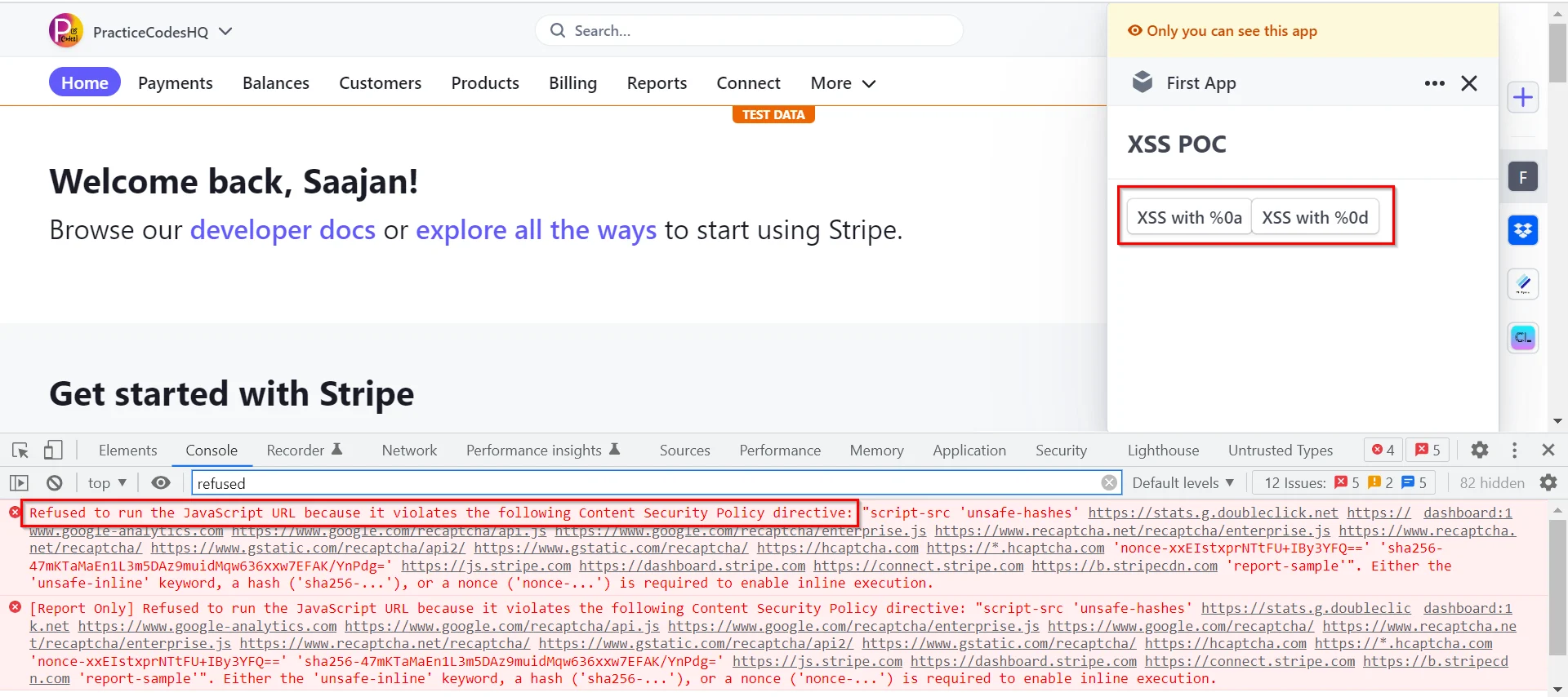
- Once you open your app then after click on the button link. It will doesn't execute because of CSP.
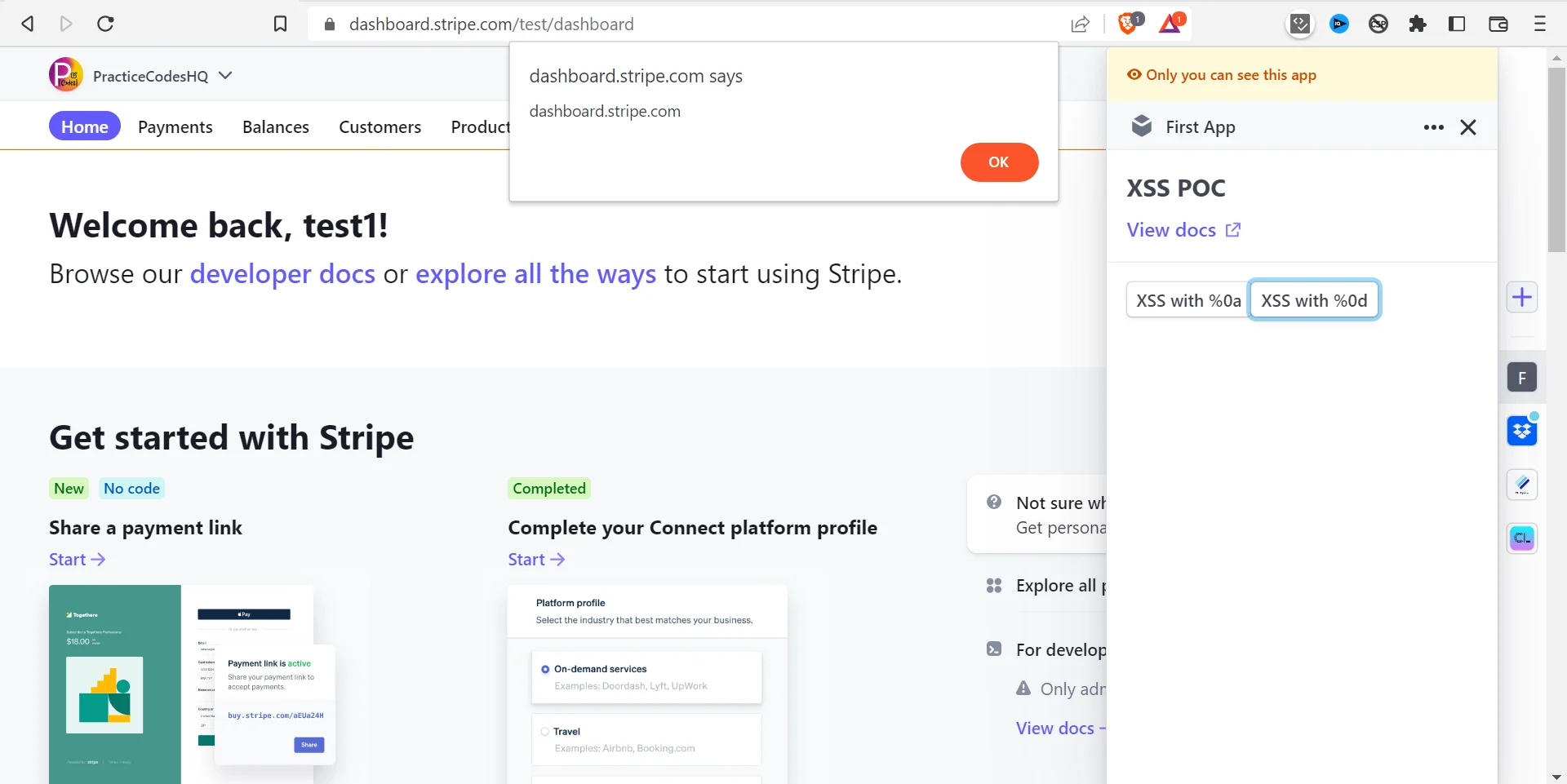
- But, If you turn off your CSP protection with the help of an extension then XSS will execute.
Video POC:
Impact
If an attacker is able to bypass CSP then there is a possible stored XSS vulnerability in https://dashboard.stripe.com.
Not written yet. The AI write-up for this report has not been written yet. The Original tab links to the source.
How it worked
Root cause
Likely the Button component did not sanitise or block javascript: URLs in its href attribute, allowing script execution when clicked.
Impact
If an attacker is able to bypass CSP then there is a possible stored XSS vulnerability in the Stripe dashboard; however, the report notes CSP blocked the exploit as tested.
What the attacker needed
Ability to create a custom Stripe app; victim clicks the button; CSP must be bypassed or disabled
How it was found
- Create a demo Custom app through stripe-cli
- Set the viewport to stripe.dashboard.drawer.default in stripe-app.json
- Put the provided code with Button href using javascript: into App.tsx
- Run and open the app
- Click the button link; it does not execute because of CSP
- Disable CSP with a browser extension and click again; the XSS executes
Explained by bugbounty.wiki with AI from the original and checked against quotes from it; it can still be wrong. Read the original before relying on a detail.
Not written yet. The AI write-up for this report has not been written yet. The Original tab links to the source.
A cross-site scripting (XSS) bug lets an attacker run their own JavaScript in another user's browser session. Here, a button's link could be set to a javascript: address, which runs code when clicked, but the site's Content Security Policy (a browser rule that blocks inline scripts) stopped it. Without that protection, the code would have run.
What is XSS?
Script an attacker supplies runs in another user's browser, on the target's origin, with that user's session.