Incorrect Authorization leads to see other users Documents Uploaded
A document uploaded by one user could be viewed and downloaded by any other logged-in user who had the file's link. The link contained an encoded identifier that was not checked against the requesting user, so documents were not kept private.

- Disclosed after 43 days
Summary:
Hi team, when user upload document, other user can see this docs only with link
Steps To Reproduce:
- loign to portal with user A : https://qcn.mytva.com
- go to admin section and upload a document.
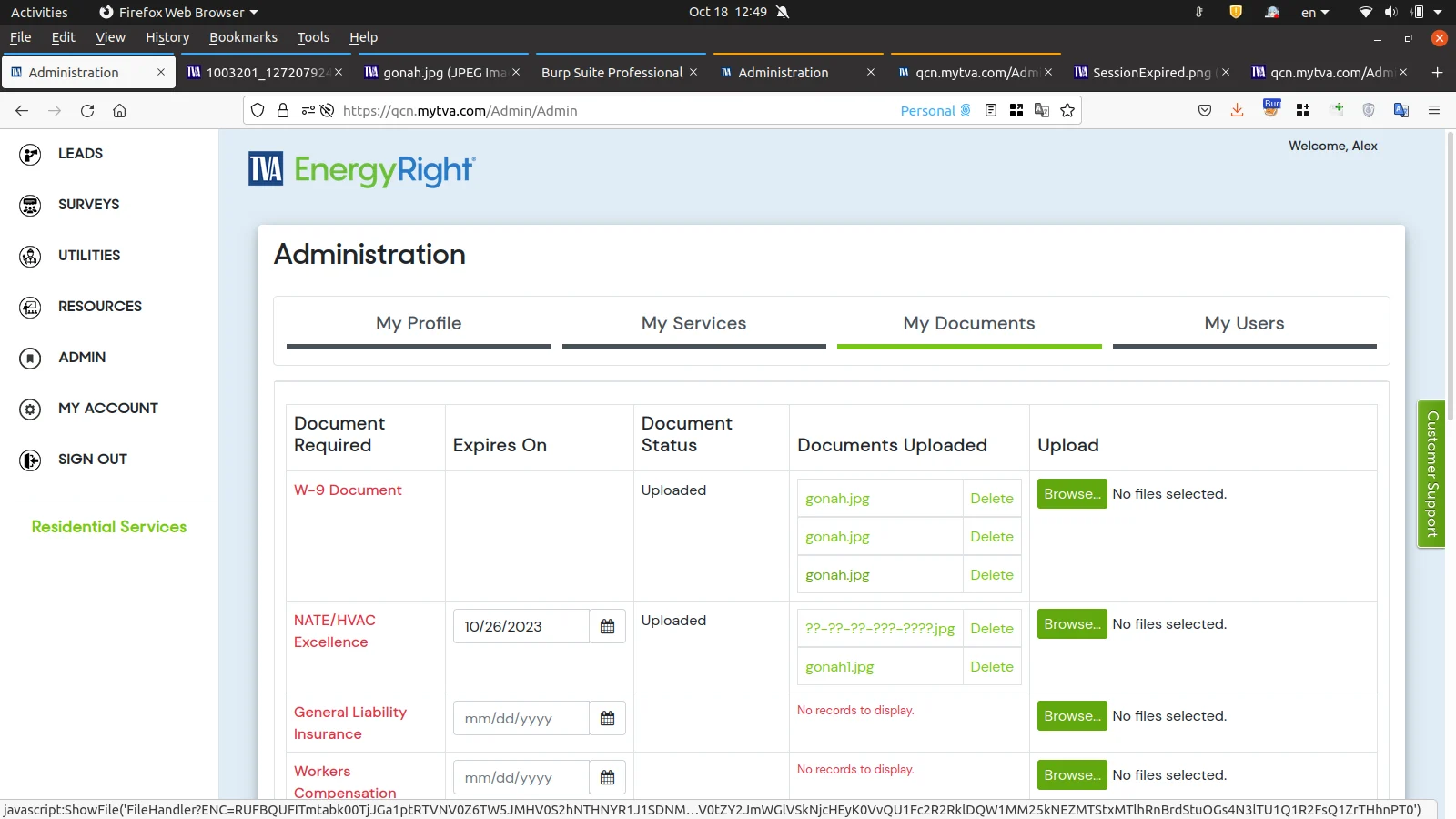
- click on link to see uploaded image. like
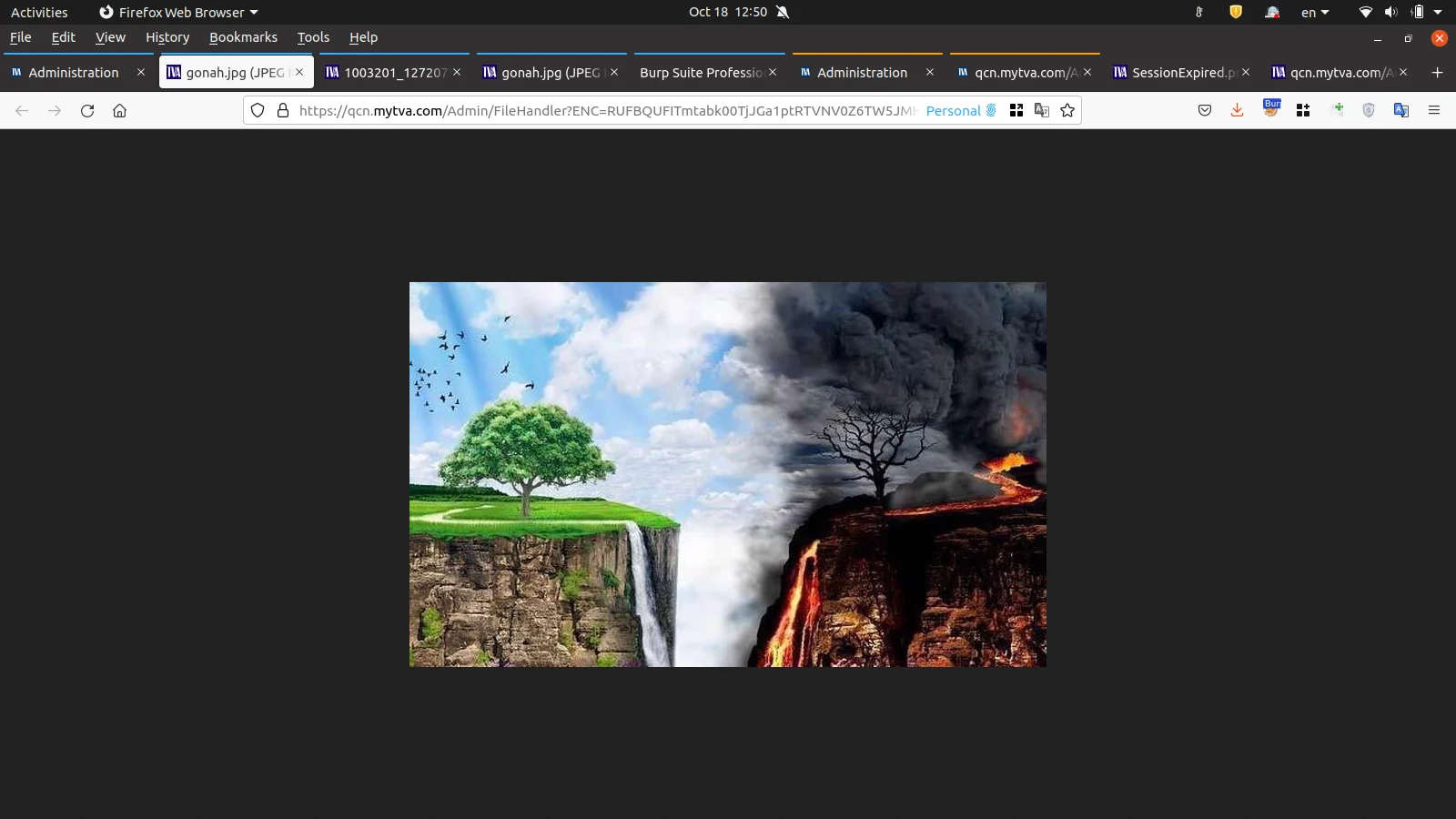
- login to portal with user B
- go to above url, we can see and download user A document.
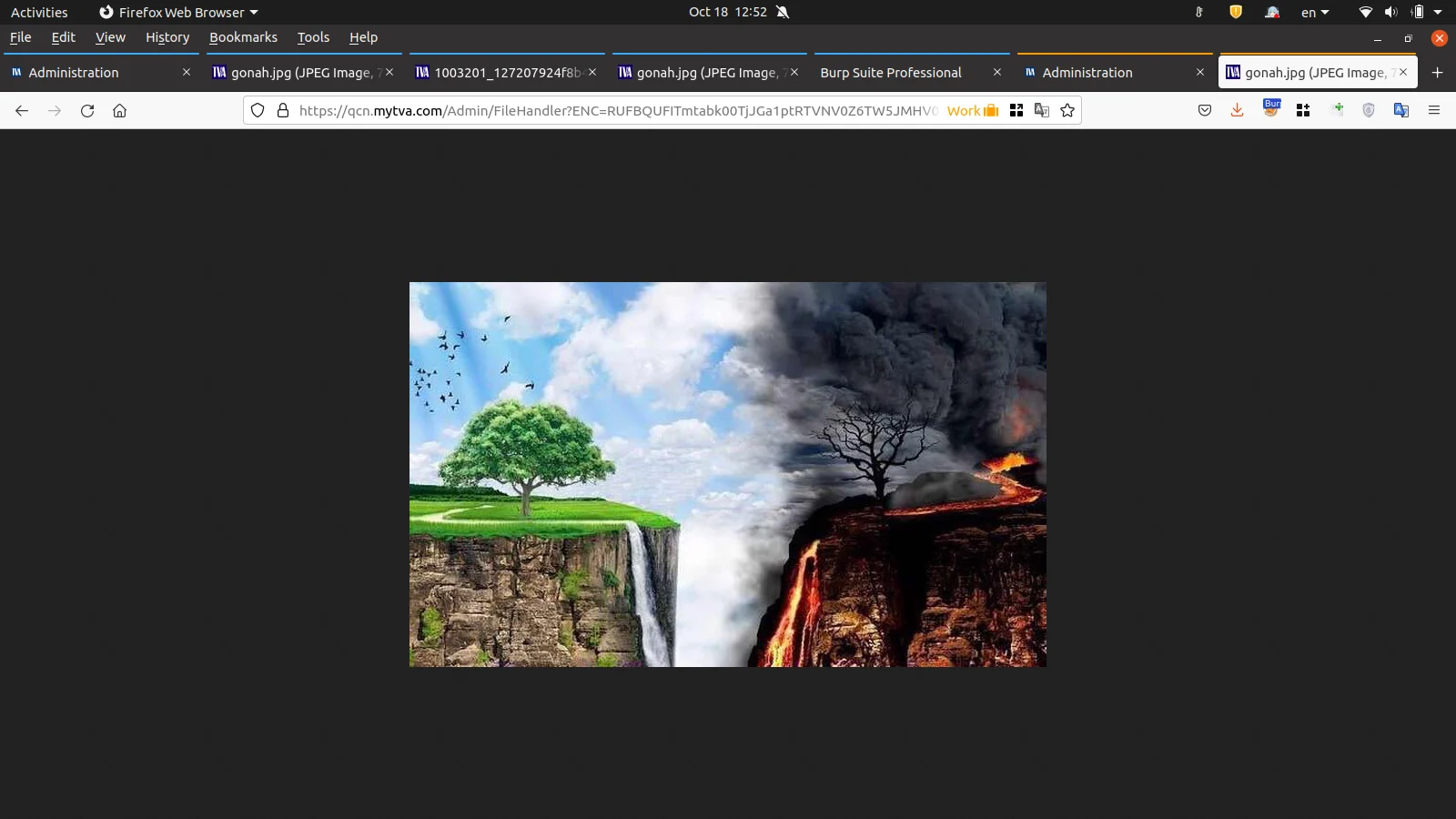
Impact
any login user can see other user documents
What the report shows
The target is the TVA portal at qcn.mytva.com, part of the *.mytva.com scope. The researcher reported an authorisation flaw in the document upload feature of the admin section: a document uploaded by one logged-in user could be viewed and downloaded by a different logged-in user who had the link.
The reproduction is short and uses two accounts, user A and user B.
- Log in to the portal as user A at
https://qcn.mytva.com. - Go to the admin section and upload a document.
- Click the link to view the uploaded file. The report gives the link in this form:
https://qcn.mytva.com/Admin/FileHandler?ENC=[redacted]
- Log in to the portal as user B.
- Open the same URL. User B can see and download user A's document.
The report records the outcome as: any logged-in user can see other users' documents. It was filed under Incorrect Authorization, rated medium severity, and disclosed on 30 November 2023. The report does not describe a fix, and no bounty figure is given.
Root cause
The file is served by an endpoint, Admin/FileHandler, that takes a single opaque parameter, ENC, and returns the document. The report shows that any logged-in account presenting the same ENC value receives the file, but it does not explain why. The value is long and sits in the URL, where it can leak through history, logs, referrers and sharing.
Impact
As the report puts it, any logged-in user can see other users' documents. In practice this means any logged-in account can read files uploaded by other accounts, provided it obtains the link. The documents themselves are not described, so their sensitivity is unknown.
How this kind of bug works
This is a broken object-level authorisation problem, often called IDOR. The application authenticates the request (the caller is logged in) but does not authorise it (the caller is not checked against the object being requested). Access control is enforced only by the difficulty of guessing the identifier, which is not access control at all: identifiers end up in browser history, proxy logs, chat messages, support tickets and referrer headers.
Opaque, encoded or encrypted identifiers give a false sense of safety. If the server can decode the value, so can anyone who holds it, and holding it is exactly what the attacker does. The only reliable defence is a server-side check that the current principal is allowed to read this specific object, performed on every request, independent of how the identifier was produced.
How to test for it
- Map the features that return user-owned objects: uploads, downloads, invoices, exports, attachments, profile images, reports. Look for endpoints with a single identifier parameter, whether numeric, UUID, base64 or encrypted-looking.
- Create two accounts of the same role, and where possible a third with a different role. Upload or create an object with account A and record every URL and parameter used to retrieve it.
- Replay the retrieval request with account B's session, keeping the identifier unchanged. Use a proxy so you can compare the full request and response.
- Try variations: remove the session cookie entirely, swap in a session for a lower-privileged account, change only the identifier to another value you own, and check whether the response differs between owners.
- A positive result is a full or partial object returned to an account that does not own it: the document body, metadata, a thumbnail, or even a distinguishable error versus success. A negative result is a consistent authorisation error or an empty response for the non-owner.
Common false positives: the endpoint may return a generic page or a cached public asset regardless of the identifier; the object may genuinely be public; the second account may share a team or tenant with the first, which is legitimate access. Confirm by checking that the content really belongs to the other account and that no sharing relationship exists. Also test whether the identifier can be guessed or enumerated, since a random-looking value that is actually sequential underneath changes the severity.
How it is fixed
The standard fix is an authorisation check on the server for every object access: resolve the object from the identifier, then verify that the authenticated principal owns it or has an explicit grant. Do not rely on unguessable identifiers. Where links must be shareable, use short-lived, single-purpose tokens bound to the object and, ideally, to the recipient, and revoke them on logout or expiry. Serve files through a handler that checks the session before streaming bytes, avoid putting long-lived secrets in URLs, and log access so misuse can be detected.
Hunting notes
Object-level authorisation bugs cluster in admin panels, file handlers, export and report endpoints, and anything with a file, id, doc or encoded parameter. Recon signals include endpoints that return binary content, parameters whose values look base64 or encrypted, and features that generate a link after upload. When you find one, demonstrate impact with two accounts you control, show the exact request and response for the non-owner, and state clearly what data was exposed. Programs accept these reports when the proof is reproducible and the data is genuinely another user's; a screenshot of the file opened in the second account, as in this report, documents the result.
What happened, in plain words
This report is about a website run by the Tennessee Valley Authority, reachable at qcn.mytva.com. The site has a login, and once you are logged in you can go to an admin section and upload documents. A document here is just a file, for example a PDF or an image, that a user puts on the site so it can be stored and later opened again.
The researcher found that the uploaded file could be opened by a completely different logged-in user, as long as that second person had the link to it. A different logged-in user could open the file, so being logged in was enough to reach it. The report was filed as an "Incorrect Authorization" issue, rated medium severity, and disclosed on 30 November 2023. No fix and no bounty amount are described.
To understand the problem, it helps to know what a link like this actually is. When you open a web page, your browser sends a request to a server, and the server sends back a response, usually the page or a file. A request is simply a message asking for something, like asking a librarian for a specific book. The address in the request is the URL, and anything after a ? in a URL is a parameter: extra information the server uses to decide what to send back.
Here the parameter is called ENC, and its value is a long string of letters and numbers. It looks scrambled, probably encoded or encrypted, which means turned into a form that hides the original content. The server uses it to work out which file to return.
What the report shows
The researcher used two accounts, called user A and user B, to prove the point. The steps are short.
- Log in to the portal as user A at
https://qcn.mytva.com. - Go to the admin section and upload a document.
- Click the link to view the uploaded file. The report gives the link in this form:
https://qcn.mytva.com/Admin/FileHandler?ENC=[redacted]
Reading this line by line: https:// means the connection is encrypted in transit, so other people on the network cannot read it. qcn.mytva.com is the site. /Admin/FileHandler is the part of the site that hands out files, a bit like a specific counter in an office that deals only with documents. ?ENC= starts the parameter, and everything after the equals sign is the scrambled value that tells the server which file to send. Nothing in the URL says who is asking.
- Log in to the portal as user B.
- Open the same URL. User B can see and download user A's document.
Why does each step matter? Step 2 creates an object that belongs to one person. Step 3 shows the normal way to reach it and captures the exact address used. Step 4 puts a second, unrelated person in front of the site. Step 5 repeats the same request with that second person's login. If the site were doing its job, step 5 would be refused. Instead it returned the file.
As the report puts it, any logged-in user can see other users' documents. The report does not explain how someone would find another user's link without being given it. The documents themselves are not described, so their sensitivity is unknown.
In general, how this kind of bug works
This is a broken access control problem, often called IDOR, short for Insecure Direct Object Reference. The name sounds technical, but the idea is simple. Imagine a hotel where the receptionist checks that you are a guest, then hands you a key to any room number you ask for. You are allowed in the building, so nobody stops you, but nobody checks that the room is yours. Here the site confirmed the caller was logged in, but never confirmed the caller was allowed to read that particular file.
A useful distinction is authentication versus authorisation. Authentication answers "who are you?" and is usually done with a login and a session cookie, a small piece of data your browser stores and sends with each request so the server remembers you. Authorisation answers "are you allowed to do this?" and must be checked for every object, every time.
Long, scrambled identifiers give a false sense of safety. If the server can decode the value, so can anyone holding it, and holding it is exactly the attacker's position. Such values also travel in URLs, where they end up in browser history, server logs, chat messages and support tickets. The only reliable defence is a server-side check that the current user is allowed to read this specific file, done on every request regardless of how the identifier was produced.
If you want to look for this kind of issue yourself, a simple routine works:
- Find features that return things belonging to a user: uploads, downloads, invoices, attachments, profile pictures.
- Create two accounts of the same kind and, if possible, a third with a different role. With account A, create or upload something and note every URL used to retrieve it.
- Repeat the retrieval with account B's login, keeping the identifier unchanged. A proxy, a tool that sits between browser and server and lets you inspect and replay requests, makes this easier.
- Try variations: remove the session cookie, use a lower-privileged account, and compare what each account receives.
- A positive result is the file, or part of it, arriving for an account that does not own it. A negative result is a consistent refusal or an empty response.
Watch for false positives. The endpoint may return a generic page or a public asset whatever the identifier, the object may genuinely be public, or the two accounts may legitimately share a team. Confirm the content really belongs to the other account and that no sharing exists. Also check whether the identifier can be guessed, since a value that looks random but is actually sequential changes the severity.
The usual fix is an authorisation check on the server for every object access: look up the object from the identifier, then verify that the logged-in user owns it or has been explicitly granted access. Where links must be shareable, use short-lived tokens tied to the object and, ideally, to the recipient, and revoke them on logout or expiry. Serve files through a handler that checks the session before sending anything, avoid long-lived secrets in URLs, and keep access logs so misuse can be spotted.
Glossary
- Request: a message a browser sends to a server asking for a page, file or action.
- Response: what the server sends back, such as a web page or a document.
- URL: the address of something on the web, including the site name and any parameters.
- Parameter: extra information added to a URL after a
?, used by the server to decide what to return. - Endpoint: a specific address on a server that performs a particular job, such as handing out files.
- Encoded / encrypted: turned into a scrambled form so the original content is hidden; the server can reverse it.
- Authentication: proving who you are, usually by logging in.
- Authorisation: deciding whether you are allowed to do or see something.
- Session cookie: a small piece of data your browser keeps and sends with requests so the server remembers you are logged in.
- IDOR (Insecure Direct Object Reference): a flaw where a user can reach another user's object by changing or reusing its identifier, because the server does not check ownership.
- Access control: the rules that decide who may read or change what.
- Proxy: a tool between browser and server that lets you inspect, edit and replay requests.
- Token: a value used to prove permission or identity, often in a link or a cookie.
- Severity: a rating of how serious a security issue is, here medium.