access to profile & reset password page without authentication
The portal treated unauthenticated visitors as logged-in users, showing a greeting with a null username and returning HTTP 200 from user profile and favourites API endpoints. An attacker could reach internal pages and API responses that should require a session, though the returned data was empty or null.

- Disclosed after 44 days
Summary:
Hi team, when i checking https://valleyconnect.tva.gov i see we are login! and in top of page see : Hello, null. and we can access to some internal page like Reset Password.
Steps To Reproduce:
- go to https://valleyconnect.tva.gov
- click on reset passwod menu
Tips
by default we are login in portal and we can get status code 200 from below Api :
GET /customapi/v1/user/getbasicprofileinfo HTTP/2
Host: valleyconnect.tva.gov
response is :
HTTP/2 200 OK
Content-Type: application/json; charset=utf-8

"{\"username\":null,\"email\":null,\"orgId\":null,\"hasRemoteAssistanceGrant\":false}"
we can access to favorites too:
GET /customapi/v1/user/getuserfavorites
response is :
HTTP/2 200 OK
Date: Tue, 17 Oct 2023 14:45:02 GMT

""
Supporting Material/References:
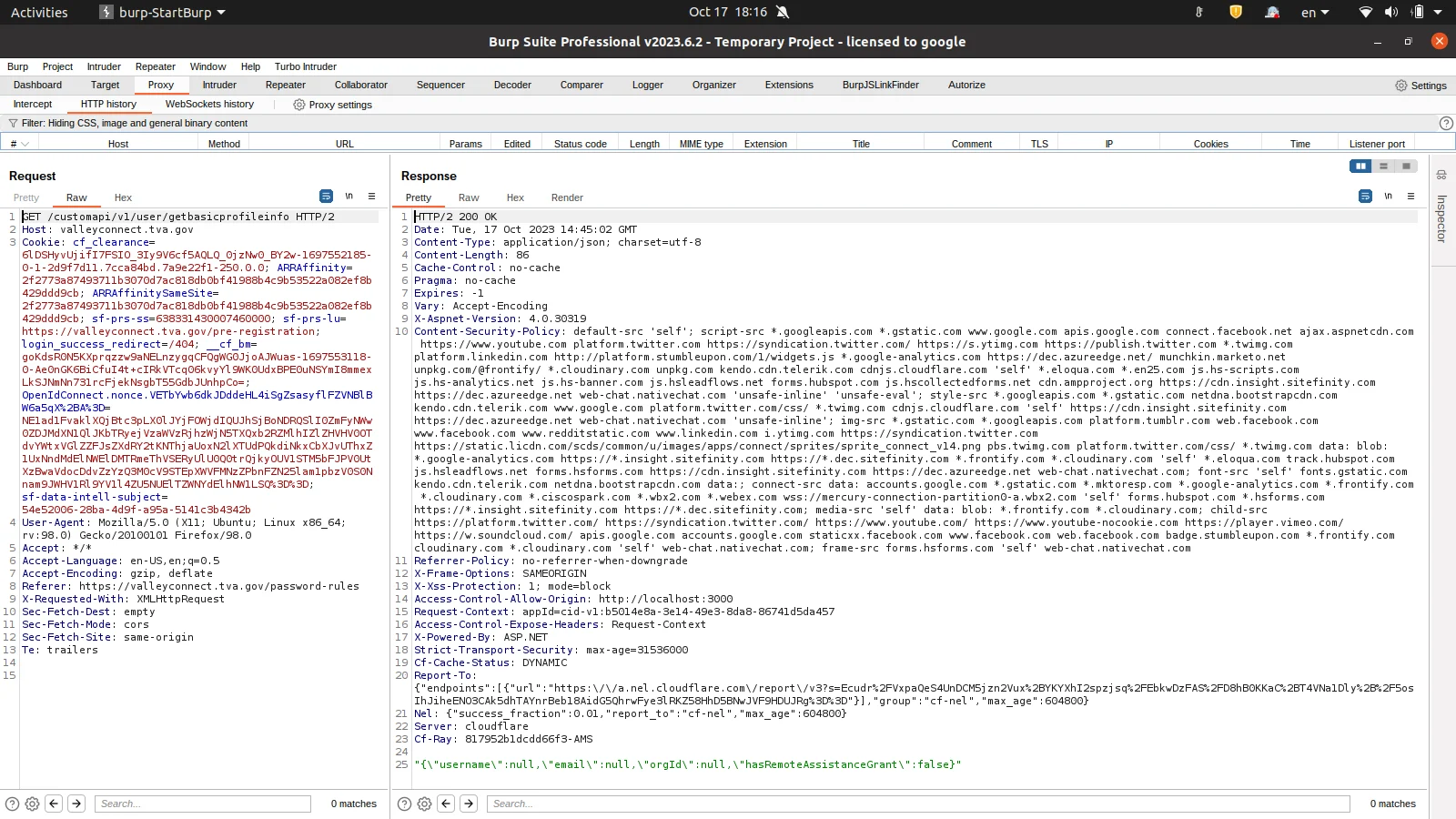
Screenshot_from_2023-10-17_18-16-26.png From the original on HackerOne 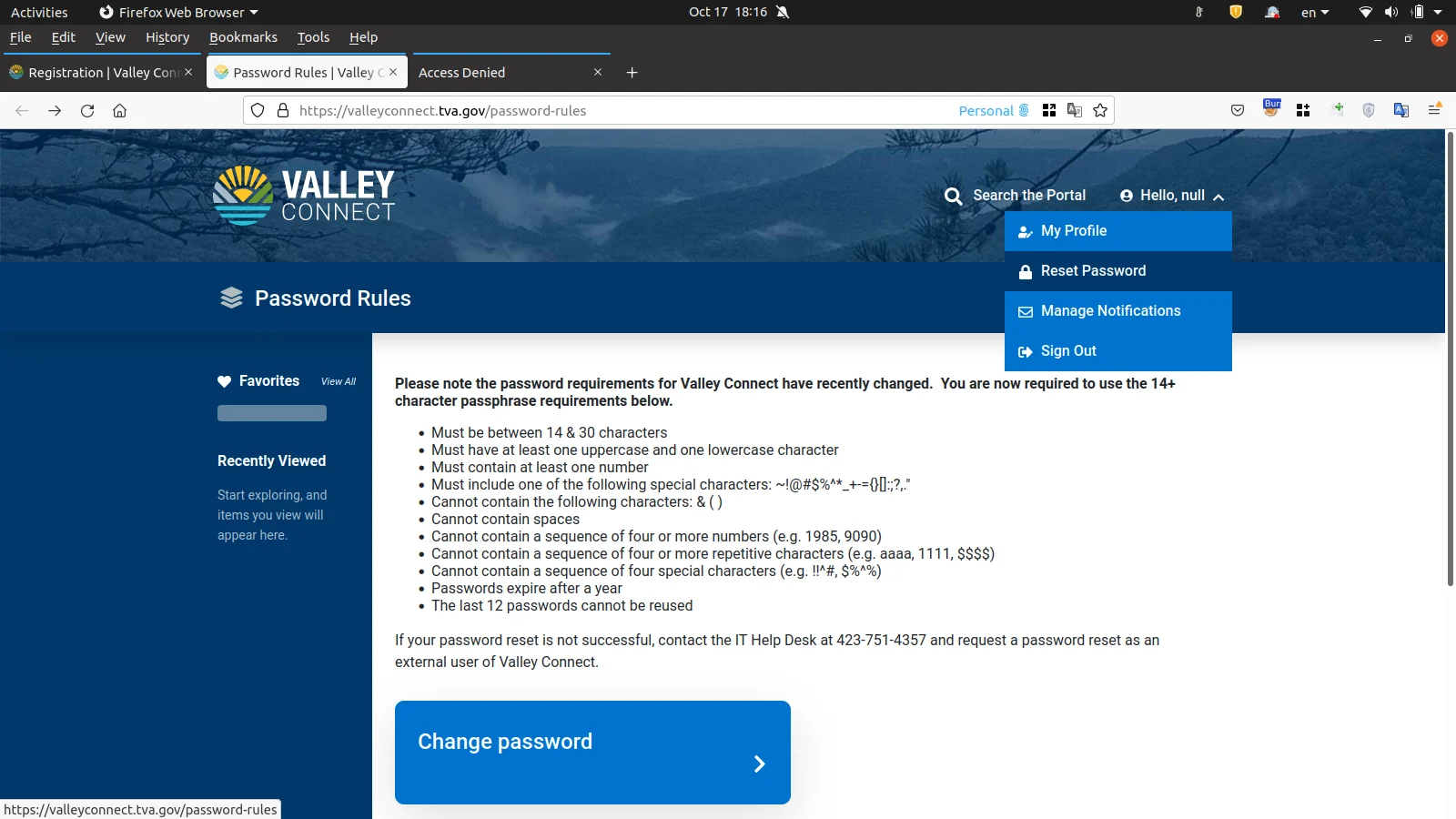
Screenshot_from_2023-10-17_18-16-41.png
Impact
Improper Authentication leads to access to internal page like reset password and profile page.
What the report shows
The target is the Valley Connect portal at https://valleyconnect.tva.gov, part of the Tennessee Valley Authority's *.tva.gov estate. The researcher, mohs3n, was looking at the portal and noticed that it behaved as though a session already existed: the top of the page greeted the visitor with Hello, null., and some internal pages, including Reset Password, could be opened without signing in.
The reproduction is short:
- Go to
https://valleyconnect.tva.gov. - Click on the reset password menu, which points at
https://valleyconnect.tva.gov/password-rules.
To confirm that the portal really was treating the visitor as logged in, the researcher queried the profile API that the front end uses. The request was:
GET /customapi/v1/user/getbasicprofileinfo HTTP/2
Host: valleyconnect.tva.gov
The server answered with a success status and a JSON body in which every user field is null:
HTTP/2 200 OK
Content-Type: application/json; charset=utf-8

"{\"username\":null,\"email\":null,\"orgId\":null,\"hasRemoteAssistanceGrant\":false}"
The favourites endpoint behaved the same way:
GET /customapi/v1/user/getuserfavorites
HTTP/2 200 OK
Date: Tue, 17 Oct 2023 14:45:02 GMT

""
The report was rated medium severity under the weakness category Improper Authentication. The disclosed record does not include a CVSS score or a bounty amount, and it does not describe a fix.
Root cause
Impact
The report's own summary is that improper authentication leads to access to internal pages such as the reset password and profile page. The API responses returned no real user data: the profile fields were null and the favourites response was an empty string. So the demonstrated impact is unauthorised reachability of authenticated areas and their endpoints, not disclosure of another user's information. Whether those pages could be pushed further, for example by supplying an identity the server would accept, is not shown in the report.
How this kind of bug works
Many web applications split the job of authentication in two: a front end that decides what to render, and an API that decides what to return. When the API trusts the caller to be authenticated, or derives the user from a token or cookie without verifying it, an anonymous request can still produce a normal response. The application has no concept of "not logged in" at that layer, so it fills the user object with empty values and returns 200.
This is distinct from broken access control between users (horizontal privilege escalation). Here the failure is vertical in the simplest sense: the boundary between anonymous visitors and signed-in users is not enforced. It commonly appears when:
- API routes are added for a single-page front end and rely on the client to hide them.
- A session middleware is applied to page routes but not to
/apior/customapiprefixes. - The back end treats a missing identity as a valid, empty identity instead of an error.
The defences are straightforward: authenticate at the API layer, reject requests with no valid session using a 401 or a redirect, and never construct a user context from absent credentials.
How to test for it
- Map the authenticated surface. Sign in with a test account, browse the portal, and record every page and every XHR or fetch call the front end makes, including profile, favourites, settings and password routes.
- Replay those requests with no session at all: a fresh browser profile, or a proxy with cookies and authorization headers stripped. Do not just log out in the UI, because client-side state can hide the real behaviour.
- Compare status codes and bodies. A positive result is a 200 with real data, or a page that renders as though signed in. A 200 with all-null fields and an empty body, as in this report, is a weaker signal: it shows the route is not protected, but not that data leaks.
- Try the page routes directly by URL, not only through the menu, since menus can be hidden client-side while the route stays open.
- Check whether the empty context can be influenced: a token, header or parameter that the server accepts as an identity is where the finding becomes serious.
Common false positives: a 200 returned by a generic error handler or a CDN, a page shell that loads but whose data calls all fail with 401, and cached responses. Confirm by looking at the body, not the status line alone, and repeat with cache-busting.
How it is fixed
- Enforce authentication server-side on every user-specific route, returning 401 or a redirect when no valid session exists.
- Fail closed: treat a missing identity as an error, never as an empty user object.
- Apply the same middleware to page routes and API prefixes so new endpoints inherit the check.
- Add regression tests that call each protected endpoint without credentials and assert rejection.
Hunting notes
This class hides wherever a front end and an API are developed separately. Recon signals worth following: JavaScript bundles that reference /api, /customapi or similar prefixes; portals that render a user menu or greeting before any login; and single-page apps whose HTML shell is served identically to anonymous and signed-in users. Compare the anonymous and authenticated responses to the same endpoint: identical structure with null values is a strong hint that the check is missing. To make the report land, show the request, the response and the page, and be explicit about what data was and was not exposed; a clear demonstration of reachability with honest limits is more convincing than an overstated impact claim.
What happened, in plain words
This report is about the Valley Connect portal at https://valleyconnect.tva.gov, a website belonging to the Tennessee Valley Authority. A portal is simply a website that gathers several services in one place, usually behind a login. The researcher, mohs3n, opened the portal and noticed something odd: the site behaved as if a person were already signed in, even though nobody had signed in.
At the top of the page the site showed the greeting Hello, null.. In computing, null means "no value at all". So the page was trying to greet a user, found no user, and printed the word null in place of a name. That is the first clue that something is wrong: a properly built site would send an anonymous visitor to a sign-in page instead of greeting them.
The researcher could also open internal pages, such as the Reset Password page, without logging in. "Internal" here means pages meant for people who have an account, not for the general public.
The reproduction is short:
- Go to
https://valleyconnect.tva.gov. - Click on the reset password menu, which points at
https://valleyconnect.tva.gov/password-rules.
To check whether the site really was treating the visitor as logged in, the researcher asked the site's own data service for the user's profile. Websites like this one are usually split in two: the pages you see in the browser, and a back-end service (an API) that supplies the data those pages display. The browser sends a request, which is just a message asking for something, and the server sends back a response. Here is the request:
GET /customapi/v1/user/getbasicprofileinfo HTTP/2
Host: valleyconnect.tva.gov
Line by line: GET is the method, meaning "give me this". /customapi/v1/user/getbasicprofileinfo is the address of the profile data on the server. HTTP/2 is the version of the web protocol used. Host: valleyconnect.tva.gov tells the server which website the request is for, because one server can host many sites.
The server answered with a success status and a body in which every user field is empty:
HTTP/2 200 OK
Content-Type: application/json; charset=utf-8

"{\"username\":null,\"email\":null,\"orgId\":null,\"hasRemoteAssistanceGrant\":false}"
200 OK is the standard code for "here is your answer, everything went fine". Content-Type: application/json says the body is JSON, a common text format for structured data. The body lists a username, an email, an organisation id and a remote assistance flag, and the first three are null. The important part is not the empty values but the success code: the server did not refuse the request, it answered it as though the caller were a legitimate user.
The favourites endpoint behaved the same way:
GET /customapi/v1/user/getuserfavorites
HTTP/2 200 OK
Date: Tue, 17 Oct 2023 14:45:02 GMT

""
Again a 200 OK, this time with an empty body. Favourites are the items a signed-in user has saved, so this route should also require a login.
The report was rated medium severity under the weakness category Improper Authentication. The disclosed record does not include a CVSS score or a bounty amount, and it does not describe a fix.
In general, how this kind of bug works
Authentication is the process of proving who you are, usually with a username and password. Once you are signed in, the site gives your browser a small piece of data, often a cookie or a token, which it sends with every later request so the server can recognise you. A cookie is a short note the site stores in your browser; a token is a similar proof of identity, often a long string of characters.
Many sites divide the work in two: the front end, which decides what to draw on screen, and the API, which decides what data to hand out.
A useful comparison is a hotel reception desk. A properly run desk asks for your key card before letting you into a room. Here the desk simply handed over a room key with no name on it and let you walk in. You did not get someone else's room, but you got past the desk.
This is different from a bug where one signed-in user can see another user's data. Here the broken boundary is between anonymous visitors and signed-in users. It tends to appear when:
- API routes are added for a modern single-page front end and the developers rely on the browser to hide them.
- A login check is applied to page addresses but not to API prefixes such as
/customapi. - The back end treats a missing identity as a valid, empty identity rather than an error.
The fix is to check the session on the server for every user-specific route, refuse requests with no valid session using a 401 (the standard code for "not authorised") or a redirect to the login page, and never build a user profile from absent credentials.
Glossary
- Portal: a website that brings several services together in one place, usually behind a login.
- Authentication: the process of proving who you are, for example with a username and password.
- Improper Authentication: a weakness where a system does not correctly check who the caller is before serving protected content.
- API: a back-end service that supplies data to a website or app, separate from the pages you see.
- Request: a message a browser sends to a server asking for something.
- Response: the message a server sends back.
- Status code: a number in the response saying how it went, such as
200 OKfor success or401for not authorised. null: a computing value meaning "no value at all".- JSON: a common text format for structured data, made of names and values.
- Endpoint: a specific address on a server that accepts requests, such as
/customapi/v1/user/getbasicprofileinfo. - Cookie: a short piece of data a site stores in your browser and receives back on later requests, often used to remember a login.
- Token: a piece of data, often a long string, used as proof of identity.
- Session: the period during which a site remembers that you are signed in.
- Front end: the part of a website that runs in your browser and draws what you see.
- Severity: a rating of how serious a security issue is, here medium.
- CVSS: a standard scoring system for the severity of security issues.