How I got access to 25+ Tesla’s around the world. By accident. And curiosity.
TeslaMate, a self-hosted data logger for Teslas, shipped with insecure default Docker configuration that exposed Grafana dashboards and allowed unauthenticated access to API tokens. An attacker could use these tokens to send commands to Tesla vehicles, such as unlocking doors or starting keyless driving.
 Published on medium.com
How the heck did a 19 year old from Germany manage to be able to take over more than 25 Tesla’s around the world?
The full write-up lives on its author's site
It belongs to its author, so we link to it rather than copy it. The other two tabs are our own rewrites, checked against it.
Context
TeslaMate is an open source, self-hosted data logger for Tesla vehicles. It pulls data from the Tesla API, stores it, and displays it. The project ships a Docker configuration that also brings a Grafana installation with it, which is what serves the dashboards. TeslaMate itself is only intended for pulling, storing and displaying data; the dashboard cannot run vehicle commands such as unlocking doors.
The vehicles themselves are reached through the Tesla API. A TeslaMate instance holds the owner's Tesla API token, because that token is what lets it pull the vehicle data in the first place. The token is stored where all the other data is stored, neither separately nor encrypted.
The author is David Colombo, 19 years old, from Bavaria in Germany, running Colombo Technology. The finding is not a vulnerability in Tesla's infrastructure directly, but Tesla is still responsible for many security shortcomings, as the writeup states up front.
Setup
The preconditions are all on the victim side:
- A TeslaMate instance deployed with its default Docker configuration, or the Docker image with default configuration, reachable from the internet.
- The Grafana installation that comes with that Docker setup, listening on port 3000, still using its default credentials.
- A Tesla owner who has signed in to that instance, so that a valid API token sits in the database.
Tools used across the story: subdomain enumeration, a light nmap scan, a browser, Grafana Explore for custom queries, and later a small Python script for token revocation. The researcher also read the TeslaMate source code and its Dockerfile on GitHub.
Finding it
The story starts on a client engagement, a SaaS company from Paris, before any full audit had begun. Basic subdomain enumeration turned up a backup.redacted.com domain. Nothing was running there except a plain "this works" page.
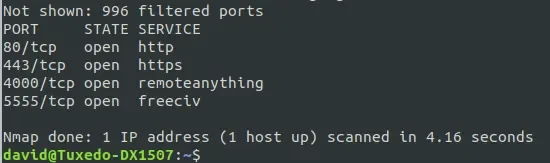
A very light nmap scan found only remoteanything and some "game server" ports.
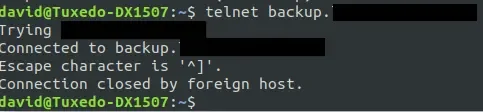
Connecting via telnet did not work.
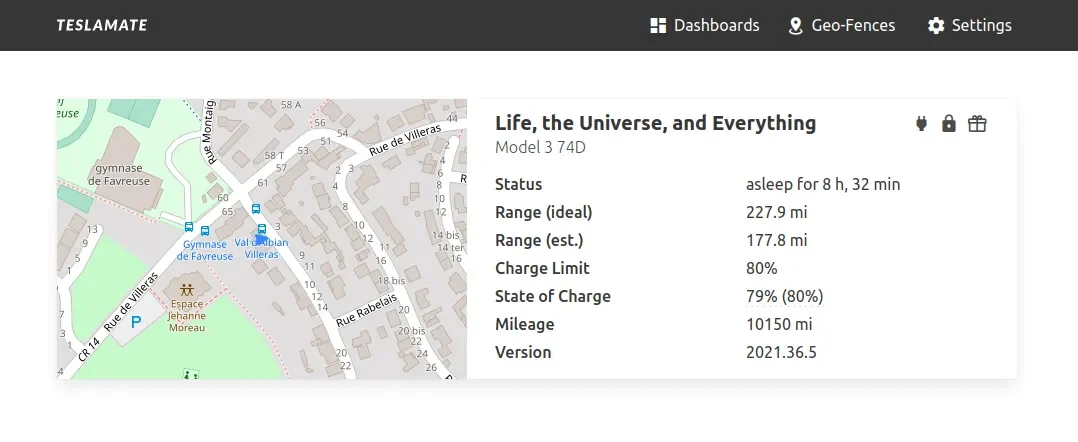
Accessing those ports in the browser, however, brought up TeslaMate.
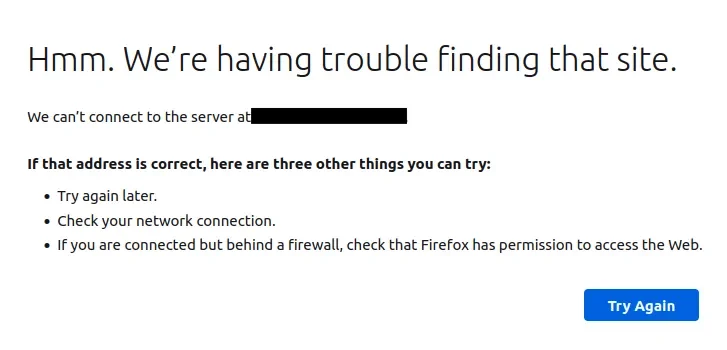
Trying to access the Dashboards gave an error.
Reading the Dockerfile showed that TeslaMate also installs Grafana, which explained the inaccessible Dashboards. Port 5555 was the one that answered.
What came back was a large amount of vehicle data: where the Tesla had been, where it charged, its current location, where it usually parks, when it was driving, trip speeds, navigation requests, software update history, even weather history around the car. Unauthorised guest access to these Grafana dashboards was later disabled in TeslaMate v1.25.1.
That alone was enough to report, but the researcher wanted to know how TeslaMate works, and specifically whether something that pulls vehicle data might also be able to send commands. Reading the source showed the API key is saved where all the other data is stored, unencrypted and not separated. So if Grafana can read the vehicle data, it can likely read the API key too. Grafana Explore runs custom queries, but it needs authentication.
That is where default credentials came in. The TeslaMate Docker Grafana installation ships with them. Logging in with admin:admin worked, and building a query in Grafana Explore to pull the API tokens was straightforward after that. At that point the researcher stopped and contacted the organisation. The instance was taken down on 1 November 2021.
Exploitation
The second round began in January 2022, from the thought that TeslaMate is insecure by default: any deployment using the default Docker configuration is exposed. CWE-1188 describes it: the software initialises a resource with a default intended to be changed by the administrator, but the default is not secure. Another prompt to look again was that, as of 1 December 2021, the user's password apparently was no longer needed to issue a Keyless Driving API call.

The method, as the writeup lists it:
- Run an internet-wide search for TeslaMate instances, for example by searching for the MQTT brokers.
- Make sure they run with the insecure default Docker configuration.
- Go to port 3000 to access the Grafana dashboard.
- Log in using default credentials (only with explicit authorisation).
- Go to the Explorer tab.
- Use the Query Builder to extract the API and refresh tokens.
- Use them against the Tesla API, only on vehicles you own.
Step 1: find instances
The initial scan resulted in 300+ found instances. Whether all of them were vulnerable was never confirmed, because the Tesla Security Team asked the researcher not to access any more instances until further notice. Within hours, 25+ Teslas from 13 countries were confirmed: Germany, Belgium, Finland, Denmark, the UK, the US, Canada, Italy, Ireland, France, Austria and Switzerland. There were at least an additional 30+ from China, which were left completely untouched because of China's cyber security laws.
Step 2: log in to Grafana
With the default Docker configuration, Grafana on port 3000 accepts the default credentials. The login used was:
admin:admin
This is the default Grafana credential pair. It worked, which gave access to Grafana Explore.
Step 3: query the tokens
In the Explorer tab, the Query Builder was used to extract the API and refresh tokens from the TeslaMate data source. Because the token is stored alongside the vehicle data in the same place, a query that can read the data can read the token.
Alternative: no login at all
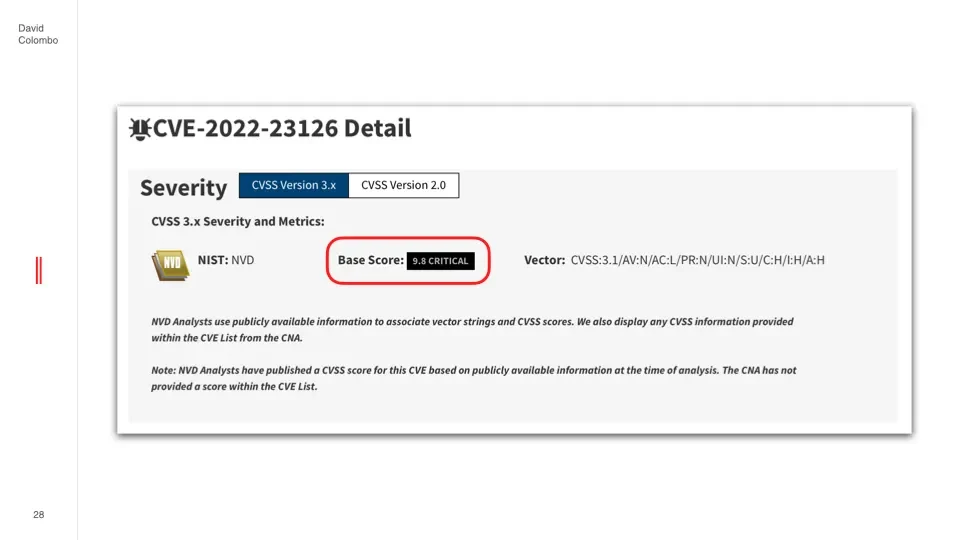
If the owner changed the admin password, as they should have, there was still a path: arbitrary requests to the TeslaMate data source as an unauthorised anonymous Grafana user through a Grafana API endpoint. This is CVE-2022-23126, it only affects the TeslaMate Docker, and it is patched now.
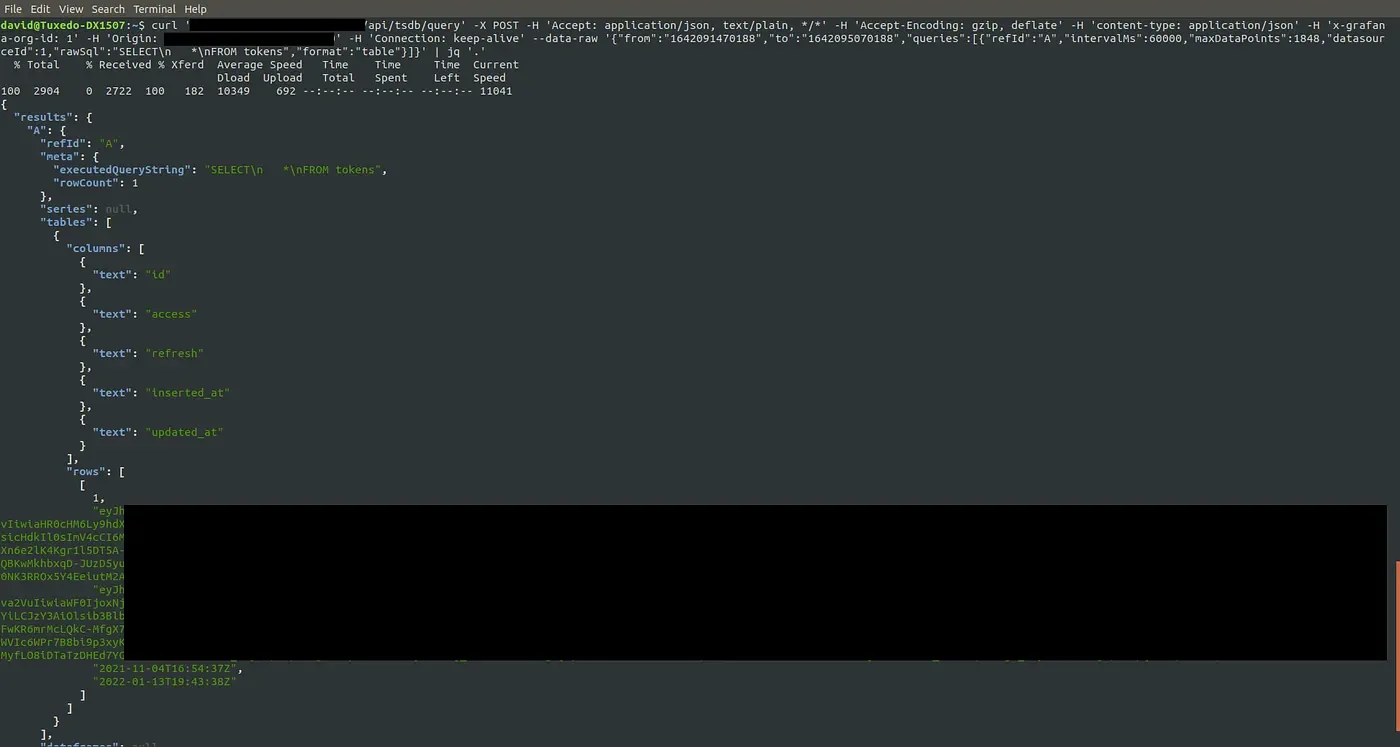
Querying the Tesla API token from Grafana without submitting credentials or login cookies.
Step 4: use the token against the Tesla API
With the token, the following were possible, among others:
- Unlocking the doors.
- Opening the windows.
- Starting Keyless Driving.
- Sharing videos to the Tesla.
- Changing heater/cooler settings.
- Honking the horn and flashing the lights.
A fun fact from the writeup: it even is or would have been possible to open and close some garage doors, if the garage doors are connected to the exposed Teslas. A full command list is at https://tesla-api.timdorr.com/. In one of the later screenshots the access_type is owner, since it is the Owner API.
What the researcher could not do: there was no access to steering, accelerator or brakes, or any other driving safety critical feature. The summon feature might have been usable to get the car moving, but that could not be confirmed.
What the exposed cars looked like
Before going further, the writeup shows a set of exposed vehicles around the world.
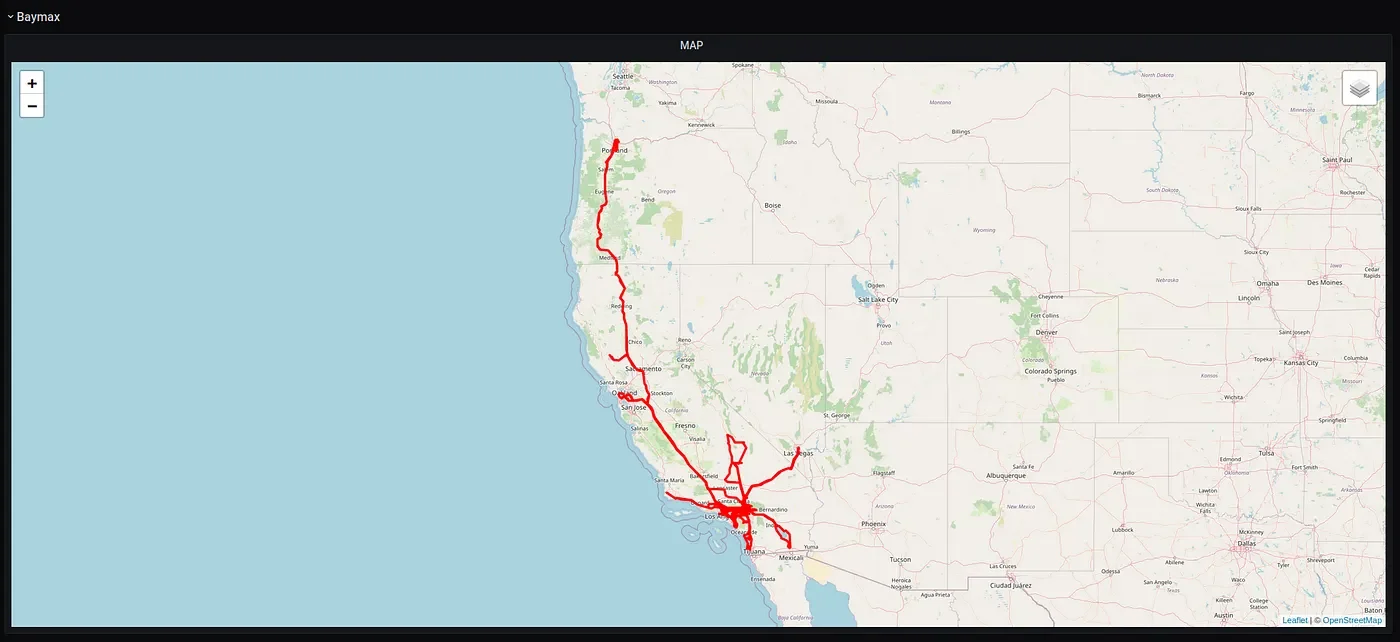
Tesla Model Y driving in California.
Tesla driving in Europe.
Tesla Model 3 driving in (mainly) Belgium.
Tesla Model 3 driving in the UK.
Tesla Model Y driving in Florida.
Tesla Model 3 driving in Denmark.
Model Y driving in and around Kitchener (Canada).
Finding the owners
Reporting to the responsible owner was the first instinct. For one owner it was an OSINT exercise: WHOIS records, SSL certificates, aliases and online profiles, until the owner was found on Twitter. For most of the others there was no way to identify them. After a full day, only two owners out of more than two dozen had been found, so the researcher tweeted about it out of frustration. The tweet drew attention, and thanks to it the researcher found another affected owner from Ireland, whose car is named "Blue Giant" in the writeup.
Verifying it is his Tesla using the VIN.
Having Blue Giant honking.
A scary detail from this part: the API tokens that gave access to Blue Giant stayed active and were not revoked even after the owner explicitly reset his Tesla Account password multiple times. Four hours later, a way was found to make the Tesla API revoke the keys through an undocumented API endpoint.
Continuous token revocation
Some access tokens were still exposed after the second revocation by the Tesla Security Team, probably because users signed in to the vulnerable TeslaMate instances again. The researcher built a quick Python script to automatically revoke exposed access tokens from vulnerable instances. There did not seem to be a way to revoke version 3 tokens. Had one been found, the internet-wide scans could have been piped into the script to revoke exposed tokens continuously.
Additional finding in the Tesla API
After a Twitter exchange with Tyler Corsair, founder of Teslascope, who mentioned there should be an endpoint to query owner-identifying information using version 3 tokens, the researcher went looking for it. It was easy to find in retrospect: there is no official Tesla OAuth documentation, but Tesla had added the endpoint somewhere else.
Version 3 access tokens, unlike version 2 tokens, are JWTs. Decoding one shows this:
Besides https://owner-api.teslamotors.com/ for vehicle commands, the token also shows https://auth.tesla.com/oauth2/v3/userinfo for user information, which finally gave a way to get owners' email addresses. Tesla asked the researcher not to use those addresses to notify owners of exposed Teslas.
More surprising: the email addresses could be queried using tokens that had already been revoked by the Tesla Security Team.
Querying the emails of Tesla owners using tokens that are revoked by Tesla.
This was reported to the Tesla Security Team immediately. They confirmed the vulnerability and rolled out a fix into production shortly after.
Pin-to-Drive
On 26 January the writeup adds a correction. The researcher had suggested that owners enable Pin-to-Drive to prevent anyone from stealing the car even with valid API tokens or account credentials. But Pin-to-Drive is bypassed by the Keyless Driving API call.
Root cause
The chain has several links, and the writeup frames it as a concatenation of issues where owners, the third-party maintainer and Tesla itself could each have prevented it.
- Insecure defaults in the TeslaMate Docker setup. The Grafana installation that ships with the Docker configuration comes with default credentials, and the dashboards are reachable without proper authentication. CWE-1188 covers this: a default intended to be changed, but not secure out of the box. Only Docker installations are primarily affected; users following the Advanced Setup Guides should not be.
- Sensitive token stored next to the data it protects. TeslaMate saves the Tesla API key where it stores all other data, neither separate nor encrypted. Any read access to the data, through Grafana or through the anonymous API endpoint of CVE-2022-23126, therefore yields the token.
- No scoping on the Tesla API. A token that only needs to read data carries the same power as one that unlocks doors and starts Keyless Driving.
- Password reset does not revoke tokens. Tokens stayed valid after the owner reset his Tesla account password multiple times, and version 3 tokens could not be revoked at all at the time.
- Keyless Driving without the account password. As of 1 December 2021 the password was apparently no longer required for that API call, and Pin-to-Drive is bypassed by it.
- Revoked tokens still worked for the userinfo endpoint. A revoked version 3 token could still be used to query owner email addresses.
Impact
An attacker who finds an exposed instance can read the full driving history and location data of the vehicle, and, with the token, run commands: unlock doors, open windows, start Keyless Driving, share videos to the car, change heater and cooler settings, honk the horn and flash the lights. The writeup notes that someone with malicious intent could even steal the car, and that the commands could create dangerous situations on the road, for example blasting music at maximum volume on the highway or flashing the lights at night. The researcher had no access to steering, accelerator or brakes; whether summon could move the car was not confirmed.
Beyond the vehicle, the data exposed includes where the owner went on vacation, where the car usually parks, and when it was driving. The additional API finding allowed querying owners' email addresses, even with revoked tokens. The initial scan found 300+ instances, of which 25+ in 13 countries were confirmed, plus at least 30+ in China left untouched. Since Tesla revoked thousands of keys, the writeup suggests the issue may have been even more widespread.
Fix
What was actually changed:
- TeslaMate v1.25.1, released on 12 January 2022 after private disclosure, brought a partial fix. Encrypting the critical access tokens was under consideration (pull request 2360).
- Tesla revoked thousands of potentially affected API tokens on 12 January 2022 at 6:30 UTC / 7:30 CET, forced some affected users to reset their passwords, and revoked another batch on 19 January 2022. On 13 January the Tesla Security Team confirmed all affected tokens were revoked and all affected owners notified by email and push notification, though some previously affected owners still seemed to be affected. Some previously affected owners still seemed to be affected on 13 January.
- The additional API vulnerability was confirmed by Tesla and a fix was rolled out into production.
- CVE-2022-23126 was requested from MITRE on 11 January, granted the same day, and published on 24 January 2022. The description the researcher suggested: "TeslaMate's default Docker configuration prior version 1.25.1 allows for an attacker to obtain a victim's generated token, giving them the ability to perform unauthorized actions via Tesla's API such as controlling certain critical features of the vehicle or disclosing sensitive information."
What the writeup recommends:
- For owners: be careful who you give credentials to; update TeslaMate and any other third-party Tesla software and watch for security updates; do not put random stuff on the internet. Revoking compromised tokens only works for version 2 tokens, which are deprecated, and there did not seem to be a way to revoke version 3 tokens.
- For third-party maintainers: build with security in mind; dashboards and databases containing sensitive data should only be accessible with authentication; do not store critical access tokens where they are externally accessible, and encrypt them at best.
- For Tesla: add multiple scopes to the API (read-only, non-critical such as seat heater, critical such as unlocking doors and keyless driving); require the password for the Keyless Driving endpoint again; revoke API tokens when the Tesla account password is reset, or provide an easy manual revocation; give owners an inventory of and tracking for API tokens, since they are effectively car keys that can be copied and used in multiple places; and add the "press in case of hacked to cut cloud connectivity" button Elon Musk mentioned in 2017.
Variants to test
- Other self-hosted dashboards shipped with default credentials. Look for Docker-compose stacks that bundle Grafana or similar with a shipped
admin:admin. A positive result is a login to the dashboard on the exposed port with the default credentials. - Anonymous access to the data source through the Grafana API. Even when the admin password has been changed, try requests to the data source as an unauthenticated user, as in CVE-2022-23126. A positive result is a query result containing stored secrets without any credentials or cookies.
- Secrets stored alongside the data they protect. For any logger or integration that holds a third-party API token, check whether a query against its data store returns the token. A positive result is the token appearing in a normal data query.
- Token power after password reset. Take a token issued before a password reset and use it after the reset. A positive result is the token still working.
- Revoked tokens against auxiliary endpoints. Take a token that has been revoked and query user information endpoints such as
https://auth.tesla.com/oauth2/v3/userinfo. A positive result is owner-identifying data returned for a revoked token. - JWT contents. Decode version 3 tokens and look at the audiences and endpoints they name. A positive result is an endpoint in the token that is not documented and returns more than the vehicle commands.
- Default-configuration exposure at scale. Search for instances of the product by a distinctive component such as its MQTT broker, then check whether they answer on the dashboard port. A positive result is a reachable dashboard from an instance you are authorised to test.
What happened, in plain words
A 19 year old security researcher from Bavaria, David Colombo, found that a piece of free software called TeslaMate, which Tesla owners install to keep a diary of their car's data, was being put on the internet by many owners with its front door left open. Because of how TeslaMate was built, anyone who walked through that open door could read the car's whole history and, worse, pick up the digital key the software uses to talk to Tesla. With that key, a stranger could unlock the car, open its windows, honk the horn, flash the lights and start it without a key, and the writeup notes someone with malicious intent could even steal the car.
He found this by accident while looking at a client's website, then went looking on purpose months later and found more than 25 cars in 13 countries within hours. He reported it to the owners he could identify, to the software's maintainer and to Tesla. Tesla revoked the affected keys, the maintainer shipped a fix, and a public identifier for the flaw, CVE-2022-23126, was published. Along the way he also found a second, separate flaw in Tesla's own API, which Tesla fixed.
The writeup says up front that this is not a vulnerability in Tesla's infrastructure directly, but that Tesla is still responsible for many security shortcomings.
The pieces you need to know before the story
A few everyday ideas come up again and again, so here they are first.
A server on the internet. Think of a computer somewhere in a data centre that answers requests from browsers. Every service it offers sits on a numbered door called a port. A web page is normally on port 80 or 443; other services use other numbers. If a door is reachable from the whole internet, anyone can knock.
A subdomain. Websites have a main name, like example.com, and can have many names in front of it, like shop.example.com or backup.example.com. Finding those extra names is called subdomain enumeration: you try a list of common words and see which ones answer. It is a normal first step when you are allowed to look at a company's systems, because forgotten names often host forgotten services.
An API. API stands for Application Programming Interface. It is the counter where one piece of software asks another to do something. Think of a restaurant: you do not walk into the kitchen, you tell the waiter what you want and the waiter brings it. The Tesla API is Tesla's waiter: a program asks it "where is this car?" or "unlock the doors" and it does it, provided the program shows the right proof of permission.
A token. A token is that proof of permission. It is a long string of characters that the server hands out after you log in, and that you show on every later request instead of typing your password again. Think of a cloakroom ticket: whoever holds the ticket gets the coat, no questions asked. That is why a stolen token is as bad as a stolen password, sometimes worse, because it is easy to copy and does not change when you change your password.
A cookie. A cookie is a small piece of data a website stores in your browser so it can recognise you on the next page. Login sessions usually ride on cookies. When someone says they queried something "without submitting credentials or login cookies", they mean they did it with no login at all.
TeslaMate. This is a free, open source program that a Tesla owner can run on their own computer or server. It logs into the Tesla API with the owner's permission, pulls data about the car, stores it, and draws charts. It is a diary and a dashboard, not a remote control: the writeup is explicit that the TeslaMate dashboard cannot run commands like unlocking doors. It is open source, so anyone, including the researcher, can read its code on GitHub.
Docker. Docker is a way of packaging software with everything it needs so it runs the same everywhere. A Dockerfile is the recipe, and a Docker image is the ready-made box. TeslaMate ships a Docker setup, and that setup also installs a second program, Grafana, which is what actually draws the dashboards. The catch with ready-made boxes is that they come with whatever settings the packager chose, and those settings are meant to be changed by whoever installs them.
Grafana and Grafana Explore. Grafana is a popular tool for making charts out of data. Grafana Explore is a part of it where you can type your own query, meaning your own question to the database, instead of using a ready-made chart. If the database holds secrets, a custom query can ask for the secrets.
Default credentials. Many programs ship with a built-in administrator account and a factory password, so that the first login works out of the box. The most famous pair is admin as the username and admin as the password. It is meant to be changed immediately. When it is not, anyone who knows the factory password can log in.
CWE-1188. CWE is a catalogue of weakness types. CWE-1188 is "insecure default initialisation of a resource": the software sets something up with a default that the administrator is supposed to change, but the default itself is not safe. The writeup quotes the catalogue's own description, which says developers often pick defaults that leave the software as open and easy to use as possible, assuming the administrator will change them, and that this ease of use costs security when the administrator does not.
CVE. CVE is a public numbering system for known vulnerabilities, so that everyone can refer to the same flaw by the same name. CVE-2022-23126 is the number assigned to the TeslaMate issue.
nmap, telnet, MQTT. nmap is a program that knocks on a range of ports to see which ones answer. telnet is an old way of opening a raw text connection to a port. MQTT is a lightweight messaging protocol often used by small devices and by home automation; TeslaMate can use it, which makes it a useful search term for finding TeslaMate installations.
OSINT. Open source intelligence: finding information about someone from public sources such as domain registration records (WHOIS), website certificates (SSL certificates), and social media profiles.
JWT. A JSON Web Token is a token with a readable middle part. It is not encrypted, only signed, so anyone holding it can decode it and read what is inside, such as which service it is meant for.
Scopes. A scope is a limit written on a token saying what it may do. A token with a read-only scope can fetch data but not unlock a door. Without scopes, one token can do everything the account can do.
Keyless Driving, Sentry Mode, summon, Pin-to-Drive. These are Tesla features. Keyless Driving starts the car without the physical key present. Sentry Mode is the car's security camera mode. Summon moves the car slowly without anyone inside. Pin-to-Drive asks for a PIN before the car will drive.
The setup: what had to be true for this to work
Everything that made the attack possible was on the victim's side:
- A TeslaMate installation using its default Docker configuration, reachable from the internet.
- The Grafana that comes with that setup, listening on port 3000, still using its factory credentials.
- A Tesla owner who had signed in to that installation, so that a working Tesla API token was sitting in its database.
Tools used across the story: subdomain enumeration, a light nmap scan, a browser, Grafana Explore for custom queries, and later a small Python script for revoking tokens. The researcher also read the TeslaMate source code and its Dockerfile on GitHub.
Finding it, the first time
The story starts on a client engagement, a SaaS company from Paris, before any full audit had begun. A SaaS company is one that sells software as a subscription over the internet. Basic subdomain enumeration turned up a backup.redacted.com domain. The name is redacted in the writeup to protect the client. Nothing was running there except a plain "this works" page.
A very light nmap scan found only remoteanything and some "game server" ports. "Light" means he did not hammer the server, just knocked on a few doors.
The image shows the nmap output, which the writeup calls a weird scan for a backup server.
Connecting via telnet did not work.
The image shows the failed telnet attempt.
Accessing those ports in the browser, however, brought up TeslaMate.
The image shows the TeslaMate page that appeared when the port was opened in a browser.
Trying to access the Dashboards gave an error.
The image shows that error when opening the Dashboards.
Reading the Dockerfile showed that TeslaMate also installs Grafana, which explained the inaccessible Dashboards. Port 5555 was the one that answered.
The image shows what port 5555 returned: a map and history of the car's trips, which the writeup captions with the joke that it knows where the owner went on vacation, and that it is definitely not the game freeciv that nmap had guessed.
What came back was a large amount of vehicle data: where the Tesla had been, where it charged, its current location, where it usually parks, when it was driving, trip speeds, navigation requests, software update history, even weather history around the car. Unauthorised guest access to these Grafana dashboards was later disabled in TeslaMate v1.25.1.
That alone was enough to report, but the researcher wanted to know how TeslaMate works, and specifically whether something that pulls vehicle data might also be able to send commands. Reading the source showed the API key is saved where all the other data is stored, unencrypted and not separated. So if Grafana can read the vehicle data, it can likely read the API key too. Grafana Explore runs custom queries, but it needs authentication.
That is where default credentials came in. The TeslaMate Docker Grafana installation ships with them. Logging in with admin:admin worked, and building a query in Grafana Explore to pull the API tokens was straightforward after that. At that point the researcher stopped and contacted the organisation. The instance was taken down on 1 November 2021.
Doing it on purpose, months later
The second round began in January 2022, from the thought that TeslaMate is insecure by default: any deployment using the default Docker configuration is exposed. CWE-1188 describes it: the software initialises a resource with a default intended to be changed by the administrator, but the default is not secure. Another prompt to look again was that, as of 1 December 2021, the user's password apparently was no longer needed to issue a Keyless Driving API call.
The image shows the note that as of 1 December 2021 the password is apparently no longer needed to start Keyless Driving.
The method, as the writeup lists it:
- Run an internet-wide search for TeslaMate instances, for example by searching for the MQTT brokers.
- Make sure they run with the insecure default Docker configuration.
- Go to port 3000 to access the Grafana dashboard.
- Log in using default credentials (only with explicit authorisation).
- Go to the Explorer tab.
- Use the Query Builder to extract the API and refresh tokens.
- Use them against the Tesla API, only on vehicles you own.
Step 1: find instances
The initial scan resulted in 300+ found instances. Whether all of them were vulnerable was never confirmed, because the Tesla Security Team asked the researcher not to access any more instances until further notice. Within hours, 25+ Teslas from 13 countries were confirmed: Germany, Belgium, Finland, Denmark, the UK, the US, Canada, Italy, Ireland, France, Austria and Switzerland. There were at least an additional 30+ from China, which were left completely untouched because of China's cyber security laws.
Step 2: log in to Grafana
With the default Docker configuration, Grafana on port 3000 accepts the default credentials. The login used was:
admin:admin
This is one line: the username admin, a colon, and the password admin. It is the default Grafana credential pair. It worked, which gave access to Grafana Explore. The reason this step matters is that Grafana is the window into the database, and the database is where the Tesla token is kept.
Step 3: query the tokens
In the Explorer tab, the Query Builder was used to extract the API and refresh tokens from the TeslaMate data source. A refresh token is a second, longer-lived token used to get a new access token when the first one expires. Because the token is stored alongside the vehicle data in the same place, a query that can read the data can read the token. That is the whole trick: no exploit code, just a normal database question asked by someone who should not have been able to ask it.
The alternative: no login at all
If the owner changed the admin password, as they should have, there was still a path: arbitrary requests to the TeslaMate data source as an unauthorised anonymous Grafana user through a Grafana API endpoint. In plain words, Grafana has a back entrance meant for programs, and that entrance did not check who was calling. This is CVE-2022-23126, it only affects the TeslaMate Docker, and it is patched now.
The second image shows the result: the Tesla API token coming back from Grafana without submitting credentials or login cookies.
Step 4: use the token against the Tesla API
With the token, the following were possible, among others:
- Unlocking the doors.
- Opening the windows.
- Starting Keyless Driving.
- Sharing videos to the Tesla.
- Changing heater/cooler settings.
- Honking the horn and flashing the lights.
A fun fact from the writeup: it even is or would have been possible to open and close some garage doors, if the garage doors are connected to the exposed Teslas. A full command list is at https://tesla-api.timdorr.com/. In one of the later screenshots the access_type is owner, since it is the Owner API. access_type is a field in the token saying what kind of permission it carries; owner means the full owner-level permission, not a limited guest one.
What the researcher could not do: there was no access to steering, accelerator or brakes, or any other driving safety critical feature. The summon feature might have been usable to get the car moving, but that could not be confirmed.
What the exposed cars looked like
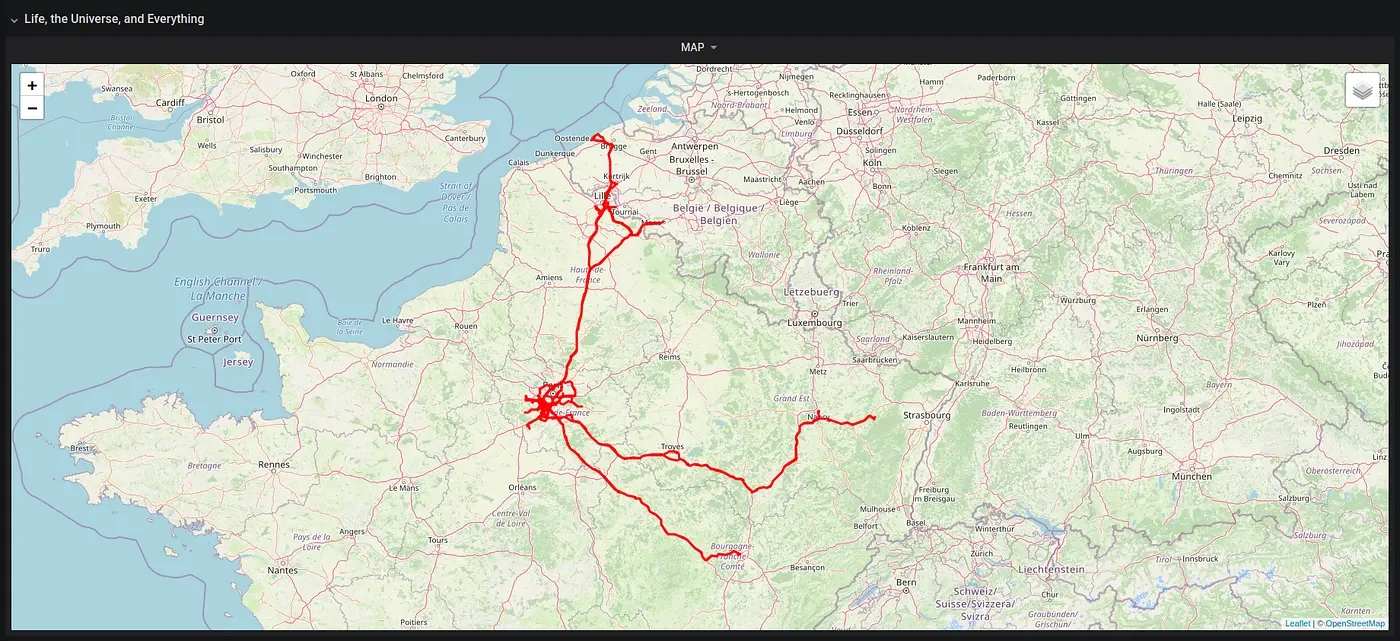
Before going further, the writeup shows a set of exposed vehicles around the world. These are the trip maps drawn from the data of cars whose owners had no idea a stranger could see them.
Tesla Model Y driving in California.
Tesla driving in Europe.
Tesla Model 3 driving in (mainly) Belgium.
Tesla Model 3 driving in the UK.
Tesla Model Y driving in Florida.
Tesla Model 3 driving in Denmark.
Model Y driving in and around Kitchener (Canada).
Finding the owners
Reporting to the responsible owner was the first instinct. For one owner it was an OSINT exercise: WHOIS records, SSL certificates, aliases and online profiles, until the owner was found on Twitter. For most of the others there was no way to identify them. After a full day, only two owners out of more than two dozen had been found, so the researcher tweeted about it out of frustration. The tweet drew attention, and thanks to it the researcher found another affected owner from Ireland, whose car is named "Blue Giant" in the writeup.
The second image shows the owner verifying that it really is his car by comparing the VIN, the vehicle identification number, the car's unique chassis number.
The second image shows Blue Giant honking, triggered remotely.
A scary detail from this part: the API tokens that gave access to Blue Giant stayed active and were not revoked even after the owner explicitly reset his Tesla Account password multiple times. Four hours later, a way was found to make the Tesla API revoke the keys through an undocumented API endpoint. Undocumented means Tesla never published it; it exists, but nobody outside is told about it.
Continuous token revocation
Some access tokens were still exposed after the second revocation by the Tesla Security Team, probably because users signed in to the vulnerable TeslaMate instances again. The researcher built a quick Python script to automatically revoke exposed access tokens from vulnerable instances. There did not seem to be a way to revoke version 3 tokens. Had one been found, the internet-wide scans could have been piped into the script to revoke exposed tokens continuously.
A second finding, this time in Tesla's own API
After a Twitter exchange with Tyler Corsair, founder of Teslascope, who mentioned there should be an endpoint to query owner-identifying information using version 3 tokens, the researcher went looking for it. An endpoint is one specific address inside an API, like one particular counter in a large office. It was easy to find in retrospect: there is no official Tesla OAuth documentation, but Tesla had added the endpoint somewhere else.
Version 3 access tokens, unlike version 2 tokens, are JWTs. Decoding one shows this:
The image shows a decoded version 3 access token.
Besides https://owner-api.teslamotors.com/ for vehicle commands, the token also shows https://auth.tesla.com/oauth2/v3/userinfo for user information, which finally gave a way to get owners' email addresses. Tesla asked the researcher not to use those addresses to notify owners of exposed Teslas.
More surprising: the email addresses could be queried using tokens that had already been revoked by the Tesla Security Team.
The image shows the emails of Tesla owners coming back from a query made with tokens that Tesla had already revoked.
This was reported to the Tesla Security Team immediately. They confirmed the vulnerability and rolled out a fix into production shortly after.
Pin-to-Drive
On 26 January the writeup adds a correction. The researcher had suggested that owners enable Pin-to-Drive to prevent anyone from stealing the car even with valid API tokens or account credentials. But Pin-to-Drive is bypassed by the Keyless Driving API call. In other words, the extra PIN you type before driving does not stop a program that starts the car through the API.
Why it worked: the chain of causes
The chain has several links, and the writeup frames it as a concatenation of issues where owners, the third-party maintainer and Tesla itself could each have prevented it.
- Insecure defaults in the TeslaMate Docker setup. The Grafana installation that ships with the Docker configuration comes with default credentials, and the dashboards are reachable without proper authentication. CWE-1188 covers this: a default intended to be changed, but not secure out of the box. Only Docker installations are primarily affected; users following the Advanced Setup Guides should not be.
- A sensitive token stored next to the data it protects. TeslaMate saves the Tesla API key where it stores all other data, neither separate nor encrypted. Any read access to the data, through Grafana or through the anonymous API endpoint of CVE-2022-23126, therefore yields the token.
- No scoping on the Tesla API. A token that only needs to read data carries the same power as one that unlocks doors and starts Keyless Driving.
- A password reset does not revoke tokens. Tokens stayed valid after the owner reset his Tesla account password multiple times, and version 3 tokens could not be revoked at all at the time.
- Keyless Driving without the account password. As of 1 December 2021 the password was apparently no longer required for that API call, and Pin-to-Drive is bypassed by it.
- Revoked tokens still worked for the userinfo endpoint. A revoked version 3 token could still be used to query owner email addresses.
What the impact was
An attacker who finds an exposed instance can read the full driving history and location data of the vehicle, and, with the token, run commands: unlock doors, open windows, start Keyless Driving, share videos to the car, change heater and cooler settings, honk the horn and flash the lights. The writeup notes that someone with malicious intent could even steal the car, and that the commands could create dangerous situations on the road, for example blasting music at maximum volume on the highway or flashing the lights at night. The researcher had no access to steering, accelerator or brakes; whether summon could move the car was not confirmed.
Beyond the vehicle, the data exposed includes where the owner went on vacation, where the car usually parks, and when it was driving. The additional API finding allowed querying owners' email addresses, even with revoked tokens. The initial scan found 300+ instances, of which 25+ in 13 countries were confirmed, plus at least 30+ in China left untouched. Since Tesla revoked thousands of keys, the writeup suggests the issue may have been even more widespread.
What was fixed, and what the writeup recommends
What was actually changed:
- TeslaMate v1.25.1, released on 12 January 2022 after private disclosure, brought a partial fix. Encrypting the critical access tokens was under consideration (pull request 2360).
- Tesla revoked thousands of potentially affected API tokens on 12 January 2022 at 6:30 UTC / 7:30 CET, forced some affected users to reset their passwords, and revoked another batch on 19 January 2022. On 13 January the Tesla Security Team confirmed all affected tokens were revoked and all affected owners notified by email and push notification, though some previously affected owners still seemed to be affected. Some previously affected owners still seemed to be affected on 13 January.
- The additional API vulnerability was confirmed by Tesla and a fix was rolled out into production.
- CVE-2022-23126 was requested from MITRE on 11 January, granted the same day, and published on 24 January 2022. MITRE is the organisation that hands out CVE numbers. The description the researcher suggested: "TeslaMate's default Docker configuration prior version 1.25.1 allows for an attacker to obtain a victim's generated token, giving them the ability to perform unauthorized actions via Tesla's API such as controlling certain critical features of the vehicle or disclosing sensitive information."
What the writeup recommends:
- For owners: be careful who you give credentials to; update TeslaMate and any other third-party Tesla software and watch for security updates; do not put random stuff on the internet. Revoking compromised tokens only works for version 2 tokens, which are deprecated, and there did not seem to be a way to revoke version 3 tokens.
- For third-party maintainers: build with security in mind; dashboards and databases containing sensitive data should only be accessible with authentication; do not store critical access tokens where they are externally accessible, and encrypt them at best.
- For Tesla: add multiple scopes to the API (read-only, non-critical such as seat heater, critical such as unlocking doors and keyless driving); require the password for the Keyless Driving endpoint again; revoke API tokens when the Tesla account password is reset, or provide an easy manual revocation; give owners an inventory of and tracking for API tokens, since they are effectively car keys that can be copied and used in multiple places; and add the "press in case of hacked to cut cloud connectivity" button Elon Musk mentioned in 2017.
The same patterns, in other places
These are the general lessons, written as things to check on systems you are allowed to test:
- Other self-hosted dashboards shipped with default credentials. Look for Docker-compose stacks that bundle Grafana or similar with a shipped
admin:admin. A positive result is a login to the dashboard on the exposed port with the default credentials. - Anonymous access to the data source through the Grafana API. Even when the admin password has been changed, try requests to the data source as an unauthenticated user, as in CVE-2022-23126. A positive result is a query result containing stored secrets without any credentials or cookies.
- Secrets stored alongside the data they protect. For any logger or integration that holds a third-party API token, check whether a query against its data store returns the token. A positive result is the token appearing in a normal data query.
- Token power after password reset. Take a token issued before a password reset and use it after the reset. A positive result is the token still working.
- Revoked tokens against auxiliary endpoints. Take a token that has been revoked and query user information endpoints such as
https://auth.tesla.com/oauth2/v3/userinfo. A positive result is owner-identifying data returned for a revoked token. - JWT contents. Decode version 3 tokens and look at the audiences and endpoints they name. A positive result is an endpoint in the token that is not documented and returns more than the vehicle commands.
- Default-configuration exposure at scale. Search for instances of the product by a distinctive component such as its MQTT broker, then check whether they answer on the dashboard port. A positive result is a reachable dashboard from an instance you are authorised to test.
Glossary
- API: the counter where one program asks another program to do something, and gets an answer back.
- API endpoint: one specific address inside an API, like one particular counter in a large office.
- Bug bounty: a programme where a company pays researchers for reporting security flaws to it.
- Cookie: a small piece of data a website stores in your browser so it can recognise you on later requests.
- Credentials: the proof of who you are, usually a username and password, or a token.
- CVE: a public numbering system for known vulnerabilities, so everyone can refer to the same flaw by the same name.
- CWE-1188: a catalogue entry for software that sets something up with a default that is meant to be changed but is not safe as shipped.
- Default credentials: the factory username and password a program ships with, such as
admin:admin, meant to be changed on first use. - Docker: a way of packaging software with everything it needs so it runs the same everywhere.
- Dockerfile: the recipe that describes how a Docker image is built.
- Docker image: the ready-made box produced from a Dockerfile.
- Endpoint: see API endpoint.
- Grafana: a program that draws charts and dashboards from data.
- Grafana Explore: the part of Grafana where you type your own query instead of using a ready-made chart.
- Insecure by default: a product that is unsafe as shipped, until someone changes its settings.
- JWT (JSON Web Token): a token whose middle part is readable by anyone who holds it, because it is signed but not encrypted.
- Keyless Driving: a Tesla feature that starts the car without the physical key present.
- MITRE: the organisation that assigns CVE numbers.
- MQTT: a lightweight messaging protocol often used by small devices and home automation.
- nmap: a program that knocks on a range of ports to see which ones answer.
- OSINT: finding information about someone from public sources such as domain records, certificates and social media.
- Pin-to-Drive: a Tesla feature that asks for a PIN before the car will drive.
- Port: a numbered door on a computer through which one service is reachable.
- Query: a question asked of a database.
- Refresh token: a second, longer-lived token used to obtain a new access token when the first one expires.
- Scope: a limit written on a token saying what it is allowed to do.
- Sentry Mode: a Tesla security camera mode.
- Subdomain enumeration: trying a list of common names in front of a domain to find services that answer.
- Summon: a Tesla feature that moves the car slowly without anyone inside.
- telnet: an old way of opening a raw text connection to a port.
- Token: a long string handed out after login that proves permission on later requests, like a cloakroom ticket.
- VIN: vehicle identification number, the car's unique chassis number.
- WHOIS: a public record of who registered a domain name.
- SSL certificate: the file a website presents to prove its identity and enable encrypted connections; it can also reveal names and details about the site.



