How I got my first big bounty payout with Tesla
A developer accidentally committed Base64-encoded ServiceNow credentials to a public GitHub repository. The attacker decoded them and found that the ServiceNow API did not enforce MFA, allowing access to internal data such as server details and tickets.
 Published on medium.com
Today I’m finally doing my write-up on how I got my first bug bounty, what I learned from the experience and some tips on how, (with a little luck and perseverance) you may find one too.
The full write-up lives on its author's site
It belongs to its author, so we link to it rather than copy it. The other two tabs are our own rewrites, checked against it.
Context
This is the story of a first bug bounty payout, found through manual GitHub reconnaissance against Tesla. The target was not a web application in the usual sense: it was a public code repository that happened to contain credentials for an internal ServiceNow instance. ServiceNow is an IT Service Management platform, and in Tesla's deployment it was used for incidents, helpdesk tickets, change requests and a Configuration Item database of production systems. The report does not name the repository, the ServiceNow hostname or the account involved.
The weakness class is information disclosure: secrets committed to a public repository, which then gave access to a system that should have required multi-factor authentication.
Setup
The researcher came from an IT background (service desk and sysadmin roles) and had little security experience at the time. The tooling involved GitHub code search, CyberChef for decoding, Postman for API requests, and a script the researcher wrote to demonstrate impact. No accounts, roles or special access were needed to start: everything began from public search results.
The trigger was a GitHub recon video by @Th3G3nt3lman, which used Tesla as its example target and demonstrated manual search terms likely to surface secrets. The researcher followed along with the same target.
Finding it
The first searches used the obvious variable name:
"tesla.com" password=
Nothing of real interest came back. The researcher then reasoned that developers do not always name variables well, and tried a shorter form:
"tesla.com" pass=
Again nothing stood out. A third attempt used an even terser abbreviation:
"tesla.com" pwd=
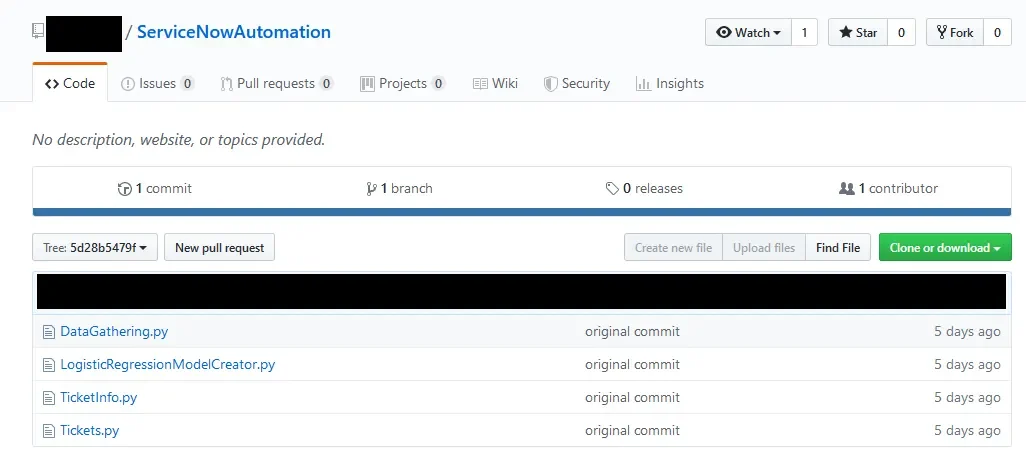
This returned a repository that was only 3 days old, containing code that embedded what looked like credentials.
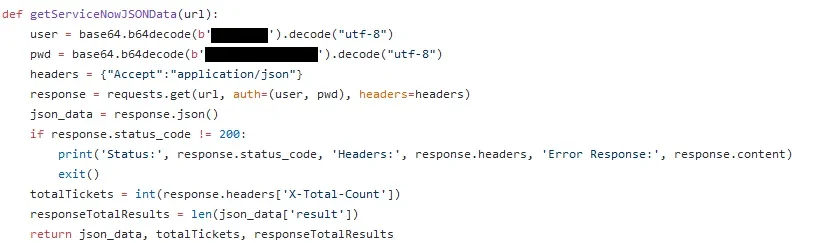
The code was Base64 encoded, which the researcher notes is not the same as secure. Two things followed from reading it: the code was likely interacting with ServiceNow, a product the researcher already knew from work, and the encoded values might be usable credentials.
Exploitation
Step 1: Decode the values
The encoded strings were decoded from Base64 to plaintext with CyberChef. The report does not reproduce the encoded strings or the decoded values. The result was a username and a password.
Step 2: Try the login
With what appeared to be a username and password, the researcher attempted to log in. The login was redirected to a Tesla ADFS portal, and any attempt to go further was redirected to an MFA prompt.

So the credentials were valid, but the interactive path was blocked: completing the login would have required access to the user's mobile phone. At this point the researcher considered it a lost cause.
Step 3: Use the ServiceNow API instead
Having used the ServiceNow API for reporting tasks at work, the researcher sent the same credentials to the API from Postman. A request for a few rows from a table returned HTTP 200. The API did not enforce the MFA prompt that the web login did, so the credentials were enough on their own.
The report does not include the request itself. It does note a mistake worth repeating: a poorly crafted request crashed Postman because the tool attempted to retrieve all the contents of a particular table. That was an error on the researcher's part and is explicitly not necessary for a proof of concept.
Step 4: Demonstrate impact
To show what the access meant, the researcher wrote a PowerShell script and then converted it into a Python script, published on GitHub, that can dump the contents of an entire ServiceNow instance given appropriate access. The report links the tool as snowdump.
The reasoning behind the impact rests on how ServiceNow installations work. Although ServiceNow is a cloud service, it commonly uses a MID Server to push information into the cloud instance, including Active Directory data such as users and computers. That is how ServiceNow can link an incident or helpdesk ticket to a particular user, and how engineers plan maintenance on production systems, since those systems are imported and managed in ServiceNow's Configuration Item database.
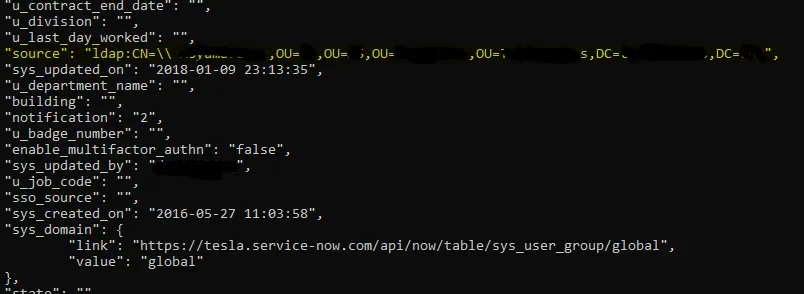
In this instance, querying the right table with the right access could effectively build a map of all internal servers, their internal IP addresses, specifications and descriptions. It could also expose outstanding change requests, incidents and service requests.
This proof of concept was enough to raise the severity of the disclosure from P4 to P1. The report is explicit that impact drove the rating.
Step 5: Disclosure and remediation
The repository was removed within about 3 hours. The researcher credits the triage team and Tesla for the speed of the response. The underlying issue was then patched: MFA is now prompted in both the production and development instances of ServiceNow for Tesla Motors.

Root cause
Two mistakes combined. First, credentials for an internal system were committed to a public repository, and Base64 encoding was evidently treated as protection when it is only an encoding. Second, the ServiceNow API accepted those credentials without the MFA challenge that the ADFS web login enforced, so a stolen password alone was sufficient. The report does not describe the API authentication configuration, so the exact reason the API path skipped MFA is not stated;
Impact
With a valid account and API access, an attacker could read ServiceNow tables. Depending on the account's permissions, that could include a map of internal servers with internal IP addresses, specifications and descriptions, plus change requests, incidents and service requests, which often contain sensitive operational detail. The report hedges this on access: the dump is possible "if you have the appropriate access", and the impact depends on which tables the account could query. The account's role and the exact data returned are not described.
Fix
The repository was taken down within about 3 hours of the report. The ServiceNow configuration was changed so that MFA is prompted in both the production and development instances.
Variants to test
- Search for abbreviated secret variable names against other targets:
"example.com" pwd=,"example.com" pass=,"example.com" password=, and similar. A positive result is a public repository containing an assignment of a literal value to one of those names. - Look for Base64-looking strings next to hostnames or product names in search results, then decode them. A positive result is a decoded value that looks like a username, password, token or connection string.
- Sort or filter search results by recency and check young repositories. A positive result is a recently created repository that has not yet been cleaned up.
- Take any credentials found and try the product's API rather than its web login, since API authentication may not enforce the same MFA policy. A positive result is an HTTP 200 from an API call that the web login would have blocked behind MFA.
- For ServiceNow specifically, request a small number of rows from a table rather than the whole table. A positive result is a 200 with a bounded set of records, which is enough for a proof of concept without crashing your client.
What happened, in plain words
A person who worked in IT support and system administration, but who had almost no security experience, found a company's internal login details sitting in a public place on the internet. The company was Tesla. The public place was GitHub, a website where programmers store and share the code they write. Someone at Tesla had put a username and a password into a piece of code and published it openly, scrambled in a way that looks secret but is not.
The researcher found it by typing search phrases into GitHub's own search box. Once the details were unscrambled, they worked. The normal web login page asked for a second proof of identity, a code from the user's phone, which the researcher did not have. But the same login details, sent to a different door into the same system (the API, a way for programs to talk to a service directly), were accepted without that second check. That let the researcher read data from an internal Tesla system called ServiceNow, which holds helpdesk tickets, maintenance plans and a list of the company's servers.
The researcher wrote a small program to show how much could be read, reported it, and the code was taken down within about 3 hours. The underlying weakness was fixed so that the phone check is now required on both the production and development copies of ServiceNow.
This is the beginner's version of that story. Every technical idea is explained from zero as it appears, in the same order as the original write-up.
The setting
The researcher had spent a few years in IT roles: working a service desk (answering staff requests for help with computers) and as a system administrator (looking after servers). Security was an interest but not yet a job, and confidence was low. That matters for the lesson: you do not need to be a security professional to start.
One night the researcher watched a video about "GitHub recon". Recon is short for reconnaissance, the first phase of any security test: looking around, gathering information, before touching anything. In this video, a researcher called @Th3G3nt3lman showed how to search GitHub by hand for clues that programmers had accidentally left in public code. The video used Tesla as its example target, so the researcher followed along with the same target.
Why search GitHub at all? Because GitHub is public by default in the sense that anyone can read a public repository (a project folder of code). Programmers sometimes paste real passwords, keys or server addresses into their code while testing, then forget to remove them before publishing. This class of mistake is called information disclosure: information that should have stayed private becomes readable by outsiders. It is not a clever hack. It is finding something that was left out in the open.
Finding it
The first search used the most obvious word a programmer would use for a password:
"tesla.com" password=
Line by line: the quotes tell GitHub to look for that exact text, tesla.com is the company's domain name (the part of a web address after the @ in an email, or after www.), and password= is the pattern you would see in code where a password is being set. The idea is to find any file containing both the company name and a password assignment. Nothing of real interest came back.
So the researcher thought about how people actually write code. Programmers are often lazy about naming things, and a variable (a named box that holds a value in a program) might be called pass rather than password. The second search:
"tesla.com" pass=
Again, nothing stood out. Then an even shorter abbreviation, the kind you use when you cannot be bothered to type:
"tesla.com" pwd=
This one hit. The result was a repository that was only 3 days old, containing code like this:
The code contained strings of characters that looked like random noise. That noise is Base64: a way of turning any text into a standard set of letters, digits and a couple of symbols, so it can travel safely through systems that only handle plain text. It is used everywhere, for example to attach images to emails. Crucially, Base64 is an encoding, not encryption. Encoding just changes the format, like writing a message in a different alphabet. Anyone can reverse it in seconds. Encryption, by contrast, is meant to be unreadable without a key. Treating Base64 as protection is like writing your PIN on the back of your bank card in mirror writing: it looks scrambled, but it is not hidden.
Reading the code told the researcher two things. First, the code was probably talking to ServiceNow. ServiceNow is a large piece of software that companies use to manage their IT work: staff raise a ticket when something breaks, engineers plan maintenance, and a database records every server and piece of equipment the company owns. The researcher already knew ServiceNow from work, which is why the code was recognisable. Second, the scrambled values might be a real username and password.
The adrenalin rush
The next step was to check whether the details were real. Because they were only Base64, decoding them was easy. The researcher used CyberChef, a free website that performs these transformations in the browser: you paste text in, choose "From Base64", and get the plain text out. The report does not show the scrambled strings or the decoded values. The result was a username and a password.
The dilemma
With a username and password in hand, the natural next step is to try logging in. The researcher did, and was sent to a Tesla ADFS login portal. ADFS stands for Active Directory Federation Services: Microsoft software that lets a company's staff use one set of login details across many internal systems, and that can add extra checks. Here the extra check appeared immediately: after the password, the portal asked for MFA.
MFA means multi-factor authentication: proving who you are with more than one kind of evidence. The usual three kinds are something you know (a password), something you have (a phone that receives a code, or an app that generates one), and something you are (a fingerprint). A password alone is one factor. A password plus a code from your phone is two. The point is that stealing a password is not enough; the thief also needs your phone.
So the credentials were valid, but the normal login route was blocked. To pass the check, the researcher would have needed the owner's mobile phone. At that point it looked like a dead end.
API saves the day
Here the researcher's work experience helped. ServiceNow has an API, which stands for Application Programming Interface. An API is a way for one program to talk to another directly, without a human clicking through web pages. A useful comparison: the web login page is like a reception desk where a person checks your name and asks for a second piece of ID. The API is like a service entrance where programs deliver and collect parcels. If the reception desk has a new security rule but the service entrance was never updated, the parcels still go through.
The researcher had used the ServiceNow API at work for reporting, so knew it existed. Using Postman, a free program for sending API requests and seeing the replies, the researcher sent the same username and password to the API and asked for a few rows from a table. A table here means a structured list of records, like a spreadsheet: one table for tickets, one for servers, and so on.
The reply was HTTP 200. HTTP is the language browsers and servers use to talk; every reply carries a status code, a three-digit number summarising what happened. 200 means "OK, here is your data". 401 or 403 would mean "not allowed". So the API accepted the credentials without asking for the phone code. The second factor was simply not enforced on that route.
The report does not include the exact request. It does record a mistake worth learning from: a badly built request crashed Postman, because the tool tried to fetch the entire contents of a table at once. That was an error, and the researcher stresses it is absolutely not necessary for a proof of concept (PoC). A PoC is the smallest demonstration that proves a problem is real, without causing harm or disruption. Asking for a handful of rows proves the same point as asking for everything, and is safer.
The technical bits
To explain why this mattered, the researcher steps back to describe how ServiceNow is usually set up. ServiceNow runs in the cloud, meaning on someone else's servers reached over the internet, but it often uses a component called a MID Server. A MID Server is a small program that runs inside the company's own network and pushes information out to the cloud instance. It carries things like Active Directory data: Active Directory is Microsoft's directory of users, computers and other objects inside a company. That flow is what lets ServiceNow link a helpdesk ticket to the right person, and what lets engineers plan maintenance on production systems (the machines that run the real service), because those machines are imported and recorded in ServiceNow's Configuration Item database, a catalogue of every asset the company manages.
The consequence is that ServiceNow is not just a ticket system; it is a map of the company's insides. If someone can query the right table with the right permissions, they can see all internal servers, their internal IP addresses (the numeric addresses machines use to find each other on a private network), their specifications and descriptions. They can also read outstanding change requests (formal proposals to alter a system), incidents (things that have broken) and service requests (things staff have asked for).
To show this concretely, the researcher wrote a rough PowerShell script (PowerShell is a scripting tool built into Windows) and then converted it into a Python script (Python is a popular programming language) published on GitHub. The script can dump the contents of an entire ServiceNow instance if the account has the right access. The report links it as snowdump.
This demonstration was enough to raise the severity rating from P4 to P1. Bug bounty programmes rank findings, often from P5 (lowest) to P1 (highest), and the ranking drives the payout. The researcher's point is that the rating followed the impact: not "a password was exposed" but "a password exposed a map of the internal network and its tickets".
The repository was removed within about 3 hours. The researcher praises the speed of the triage team (the people who receive and sort reports) and Tesla. The underlying issue was then patched: MFA is now required in both the production and development instances of ServiceNow for Tesla Motors. Production means the live system staff use; development means the copy used for testing changes.
Key takeaways
The researcher draws three lessons.
- Search everywhere, search often. The repository was only 3 days old. A few days earlier or later and it might never have been seen. Fresh mistakes are the easiest to find.
- Automatic tools are not everything. The researcher loves automation and calls themselves a lazy IT person, but this find came from a hand-written search query plus noticing something odd in a repository. Tools help; judgement found this.
- Anyone can pursue bug bounties. The find was not deeply technical. The researcher says they made it more technical than it needed to be. If you can use a browser and a search box, you can start.
Variants to test
These are the same ideas applied to other targets, in the order the original presents them.
- Try abbreviated secret names against other companies:
"example.com" pwd=,"example.com" pass=,"example.com" password=, and similar. A hit is a public repository where one of those names is set to a literal value. - Look for Base64-looking strings near hostnames or product names in search results, then decode them. A hit is a decoded value that looks like a username, password, token or connection string.
- Sort or filter results by recency and check young repositories. A hit is a recently created repository that has not been cleaned up yet.
- Take any credentials found and try the product's API rather than its web login, since API authentication may not enforce the same MFA policy. A hit is an HTTP 200 from an API call that the web login would have blocked behind MFA.
- For ServiceNow specifically, request a small number of rows from a table rather than the whole table. A hit is a 200 with a bounded set of records, enough for a proof of concept without crashing your client.
Glossary
- Active Directory: Microsoft's directory service that stores users, computers and other objects inside a company network.
- ADFS (Active Directory Federation Services): Microsoft software that lets staff use one set of login details across many internal systems and can add extra checks such as MFA.
- API (Application Programming Interface): a way for one program to talk to another directly, without a human clicking through web pages.
- Base64: an encoding that turns any text into a standard set of letters, digits and symbols so it can travel safely; easily reversed, so not a form of protection.
- Bug bounty: a programme that pays researchers for reporting security problems responsibly.
- Change request: a formal proposal to alter a system, tracked so the change can be reviewed and planned.
- Configuration Item database: a catalogue in ServiceNow of every asset the company manages, such as servers and their details.
- Credentials: a username and password (or similar) used to prove identity.
- CyberChef: a free browser-based tool for encoding, decoding and transforming data.
- Development instance: a copy of a system used for testing changes, separate from the live one.
- Encoding: changing the format of data, like writing in a different alphabet; reversible by anyone.
- Encryption: scrambling data so it cannot be read without a key; different from encoding.
- GitHub: a website where programmers store and share code in public or private repositories.
- HTTP: the language browsers and servers use to communicate; replies carry a numeric status code.
- HTTP 200: the status code meaning "OK, here is your data".
- Impact: the real-world harm a security problem could cause; it drives severity ratings and payouts.
- Incident: a record of something that has broken and needs fixing.
- Information disclosure: a weakness where information that should be private becomes readable by outsiders.
- Internal IP address: the numeric address a machine uses to find other machines on a private network.
- MID Server: a small program inside a company network that pushes data, such as Active Directory information, into a cloud ServiceNow instance.
- MFA (multi-factor authentication): proving identity with more than one kind of evidence, such as a password plus a code from a phone.
- P1 / P4: severity ratings used by bug bounty programmes, where P1 is the highest and P4 is low.
- Postman: a free program for sending API requests and viewing the replies.
- PowerShell: a scripting tool built into Windows.
- Production: the live system that real users and staff rely on.
- Proof of concept (PoC): the smallest demonstration that proves a problem is real, without causing harm.
- Python: a popular programming language.
- Recon (reconnaissance): the first phase of a security test, gathering information before touching anything.
- Repository: a project folder of code, on GitHub or elsewhere.
- ServiceNow: an IT Service Management platform used for tickets, incidents, change requests and asset records.
- Service request: a request from staff for something they need, tracked in ServiceNow.
- Table: a structured list of records, like a spreadsheet, inside a system such as ServiceNow.
- Triage team: the people who receive and sort incoming security reports.
- Variable: a named box in a program that holds a value.



