Detecting Tor Browser UI Language
A web page could infer the Tor Browser interface language by measuring the rendered width of a submit button that has no explicit value, because the browser fills in a localised default label. This let a site learn the user's UI language even when the user chose not to send language headers.
 Originally disclosed on HackerOne
- Fixed in 5 days
- Paid in 5 days
- Disclosed after 19 months
Suppose that a user downloads a non-English version of Tor Browser from https://www.torproject.org/projects/torbrowser.html.en, there is a way to detect which UI language the user is using. I don't think you want websites to detect this info, because at the first time I launched non-English Tor Browser, there's a warning dialog asking if I want to send my UI language to websites in the "Accept-Language" header, which may violate my privacy. This trick works even if I choose "Don't send my language" in that warning dialog.
Steps to reproduce:
- Download and install 简体字 (zh-CN) version (i.e. Simplified Chinese) of Tor Browser from https://www.torproject.org/projects/torbrowser.html.en.
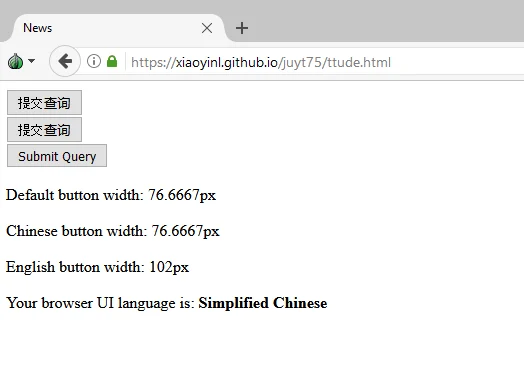
- In the Chinese Tor Browser, navigate to https://xiaoyinl.github.io/juyt75/ttude.html. The page should be able to tell you "Your browser UI language is: Simplified Chinese".
- Launch an English Tor Browser, and navigate to https://xiaoyinl.github.io/juyt75/ttude.html. The page should be able to tell you "Your browser UI language is: English".
The trick is that when I specify a button <input type="submit"> without a "value" property, the default text of the button depends on the UI language. If the UI language is Chinese, its text is 提交查询; if the UI language is English, its text is "Submit Query". Thus, these two buttons will have different width. If its width equals the width of <input type="submit" value="Submit Query">, the UI language is English. If its width equals the width of <input type="submit" value="提交查询">, the UI language is Simplified Chinese.
To fix this, always use the button with default text in English.
Attachments
Context
Tor Browser ships localised builds, and the project's download page at https://www.torproject.org/projects/torbrowser.html.en lets a user pick a language. On first launch of a non-English build, the browser shows a warning dialog asking whether the user wants to send their UI language to websites in the Accept-Language header. The report is about a way to learn that UI language anyway, even when the user chooses "Don't send my language" in that dialog. The weakness is classified as a privacy violation and rated low severity.
Setup
No accounts or special tooling are needed. The preconditions are:
- A localised build of Tor Browser, in this case the Simplified Chinese (zh-CN) build, downloaded from https://www.torproject.org/projects/torbrowser.html.en.
- An English build for comparison.
- A test page that measures button widths, hosted at https://xiaoyinl.github.io/juyt75/ttude.html.
The researcher notes that the trick works even after choosing "Don't send my language" in the first-launch warning dialog.
Finding it
The starting observation is that the default text of a submit button depends on the browser UI language. When an <input type="submit"> element is written without a value attribute, the browser fills in a localised default label: 提交查询 in a Chinese UI, Submit Query in an English one. Because the two strings have different rendered widths, the width of the button leaks which label the browser chose, and therefore which UI language is active. This bypasses the Accept-Language control the user was offered, since the leak does not travel through that header.
Exploitation
Step 1: install a localised build
Download and install the Simplified Chinese (zh-CN) build of Tor Browser from https://www.torproject.org/projects/torbrowser.html.en.
Step 2: load the test page in the Chinese build
In the Chinese Tor Browser, navigate to:
https://xiaoyinl.github.io/juyt75/ttude.html
The page reports "Your browser UI language is: Simplified Chinese".
Step 3: load the test page in the English build
Launch an English Tor Browser and navigate to the same URL:
https://xiaoyinl.github.io/juyt75/ttude.html
The page reports "Your browser UI language is: English".
How the page decides
The page compares the width of a submit button that has no value attribute against the widths of two reference buttons whose labels are fixed:
<input type="submit" value="Submit Query">
<input type="submit" value="提交查询">
If the default button's width matches the Submit Query reference, the UI language is English. If it matches the 提交查询 reference, the UI language is Simplified Chinese. The screenshot attached to the report shows the test page and its result.
Root cause
The browser renders a localised default label for a submit button that has no value attribute. That label is part of the rendered page, so any script on the page can measure the button's dimensions and infer the UI language from them. The Accept-Language warning only governs the header; it does not stop the UI language from influencing other observable output such as the default button text. The report does not describe any further mechanism.
Impact
A website can determine the UI language of a visitor using Tor Browser, including visitors who explicitly chose "Don't send my language". The report frames this as information the user does not want websites to detect. The report frames this as information the user does not want websites to detect, and the platform rated it low severity.
Fix
The report's recommendation is to always use the button with default text in English, so the rendered label no longer varies with the UI language. The report does not state whether or which change was made.
Variants to test
- Other elements with localised default text: check whether any other control renders a language-dependent default that can be measured. A positive result is a measurable difference between localised and English builds.
- Other localised strings that reach the DOM: look for any built-in text the page can read or measure. A positive result is a value that changes with the UI language while
Accept-Languagestays fixed. - Width-based comparison against reference elements: reproduce the reference-button technique on a test page and confirm the reported language matches the installed build.
Hunting notes
This kind of leak hides in browser and application chrome that renders localised defaults into the page, and in any UI string that scripts can measure. During recon, the signal is a control whose label changes with the UI language without any network request carrying that language. The researcher demonstrated impact by showing the same page reporting the correct language for two different builds, which is what makes the case for a privacy violation rather than a theoretical quirk.
What happened, in plain words
Tor Browser is a web browser built to make it hard for websites to learn who you are. It is made by the Tor Project and can be downloaded in many languages. When you install a version in a language other than English, the browser shows a warning the first time you open it: it asks whether you want to tell websites which language you use, by sending that information in something called the Accept-Language header. A header is a small piece of extra information your browser attaches to every request it sends to a website, a bit like the label on a parcel that tells the post office how to handle it. If you answer "Don't send my language", you would reasonably expect websites not to find out.
The researcher, newfunction, found that a website can still work out the language of the browser's interface (the menus, buttons and messages you see, called the UI language) even after you choose "Don't send my language". The trick does not use the header at all. It uses the fact that a certain kind of button on a web page gets its label filled in automatically by the browser, and that label is written in the UI language. A Chinese browser writes one label, an English browser writes another, and the two labels are different widths on screen. A page can measure that width and guess the language from it.
The report was filed on HackerOne against the Tor program, classified as a privacy violation and rated low severity. It was disclosed on 21 May 2019.
The setup
Nothing special is needed to try this: no account, no hacking tools. You need three things.
- A copy of Tor Browser in a non-English language, here the Simplified Chinese (zh-CN) build, downloaded from https://www.torproject.org/projects/torbrowser.html.en.
- A copy of the English build, to compare against.
- A test web page, hosted at https://xiaoyinl.github.io/juyt75/ttude.html, that measures button widths and prints a result.
The researcher stresses that the trick works even if you pick "Don't send my language" in the first-launch warning dialog. That dialog is the browser's attempt to protect your privacy; the finding is that the protection does not cover this route.
Finding it
Start with a simple observation about how browsers draw forms. A web page can contain a submit button, written in HTML (the language web pages are written in) as <input type="submit">. A submit button is the button you click to send a form, for example a search box. Normally the page author decides what the button says by adding a value attribute, which is just the text label. If the author leaves value out, the browser supplies a default label itself, and it supplies it in the language of its own interface: 提交查询 in a Chinese UI, Submit Query in an English one.
Those two strings are not the same length when drawn on screen, so the button ends up a different width. Width is something any page can measure with a tiny bit of JavaScript, the programming language that runs inside web pages. So the width of the button quietly reveals which label the browser chose, and therefore which UI language is active. This gets around the Accept-Language setting entirely, because the information never travels in that header.
Trying it, step by step
Step 1: install a localised build
Download and install the Simplified Chinese (zh-CN) build of Tor Browser from https://www.torproject.org/projects/torbrowser.html.en. This gives you a browser whose interface is in Chinese, which is the condition being tested.
Step 2: load the test page in the Chinese build
In the Chinese Tor Browser, open this address:
https://xiaoyinl.github.io/juyt75/ttude.html
This is simply a web address, typed into the address bar like any other. The page is built to run the width comparison and print the answer. In the Chinese build it reports "Your browser UI language is: Simplified Chinese".
Step 3: load the test page in the English build
Now launch an English Tor Browser and open the same address:
https://xiaoyinl.github.io/juyt75/ttude.html
This time the page reports "Your browser UI language is: English". Two different builds, same page, two different answers: that is the proof that the page can tell them apart.
How the page decides
The page does not guess from the header. It compares the width of a submit button that has no value attribute against the widths of two reference buttons whose labels are fixed:
<input type="submit" value="Submit Query">
<input type="submit" value="提交查询">
Line by line:
<input type="submit" value="Submit Query">is a button whose label is hard-coded to the English text. Its width is a known quantity: whatever "Submit Query" measures in the current font.<input type="submit" value="提交查询">is the same kind of button with the Chinese label hard-coded. Its width is the other known quantity.
These two are rulers. The page then looks at a third button, one written without value, whose label the browser filled in by itself. If that button's width matches the Submit Query ruler, the UI language is English. If it matches the 提交查询 ruler, the UI language is Simplified Chinese. The screenshot attached to the report shows the test page and its result.
Why it happens
The browser draws a translated default label for a submit button that has no value attribute. That label is part of the page as drawn on screen, so any script on the page can measure the button and work out the language from its size. The Accept-Language warning only controls that one header. It does not stop the UI language from showing up in other visible output, such as the default button text. The report does not describe any further mechanism.
What it means for privacy
A website can determine the UI language of a visitor using Tor Browser, including visitors who explicitly chose "Don't send my language". The report frames this as information the user does not want websites to detect. The report frames this as information the user does not want websites to detect, and the platform rated it low severity.
The suggested fix
The report's recommendation is to always use the button with default text in English, so the drawn label no longer changes with the UI language. The report does not state whether or which change was made.
Other things worth testing
- Other elements with translated default text: check whether any other control draws a language-dependent default that can be measured. A positive result is a measurable difference between localised and English builds.
- Other translated strings that reach the page: look for any built-in text the page can read or measure. A positive result is a value that changes with the UI language while
Accept-Languagestays fixed. - Width-based comparison against reference elements: reproduce the reference-button technique on a test page and confirm the reported language matches the installed build.
Notes for anyone hunting this kind of bug
This kind of leak hides in the parts of a browser or application that draw translated defaults into the page, and in any interface text that scripts can measure. When looking for it, the signal is a control whose label changes with the UI language without any network request carrying that language. The researcher showed real impact by having the same page report the correct language for two different builds, which is what makes this a privacy violation rather than a theoretical quirk.
Glossary
- Tor Browser: a web browser built by the Tor Project to make it hard for websites to identify and track you.
- UI language: the language of the browser's own interface, such as its menus, buttons and messages.
- Localised build: a version of a program packaged with its interface translated into a particular language.
- Header: a small piece of extra information a browser attaches to each request it sends to a website, such as which language it prefers.
Accept-Language: the header in which a browser can tell a website which languages the user prefers.- HTML: the language web pages are written in, made of tags such as
<input>. - Attribute: an extra setting written inside an HTML tag, such as
typeorvalue. <input type="submit">: an HTML element that draws a submit button, the button used to send a form.valueattribute: the setting that gives a form control its text label.- Default label: the text a browser fills in by itself when the page author does not supply one.
- JavaScript: the programming language that runs inside web pages and can read and measure what is on screen.
- Width: how wide an element is drawn on screen, measured in pixels.
- Privacy violation: a weakness in which information the user did not intend to share is exposed.
- Severity: a rating of how serious a bug is; here, low.
- HackerOne: a platform where security researchers report bugs to the organisations that run bug bounty programs.
- Disclosure: the point at which a reported bug is made public.