Brave Browser Tor Window leaks user's real IP to the external DNS server
The Brave browser's Tor window sent DNS requests directly to the user's configured DNS server instead of routing them through the Tor network. This leaked the user's real IP address and the domain names they visited to their ISP and DNS server, undermining anonymity.
 Originally disclosed on HackerOne
- Disclosed after 5 months
Summary:
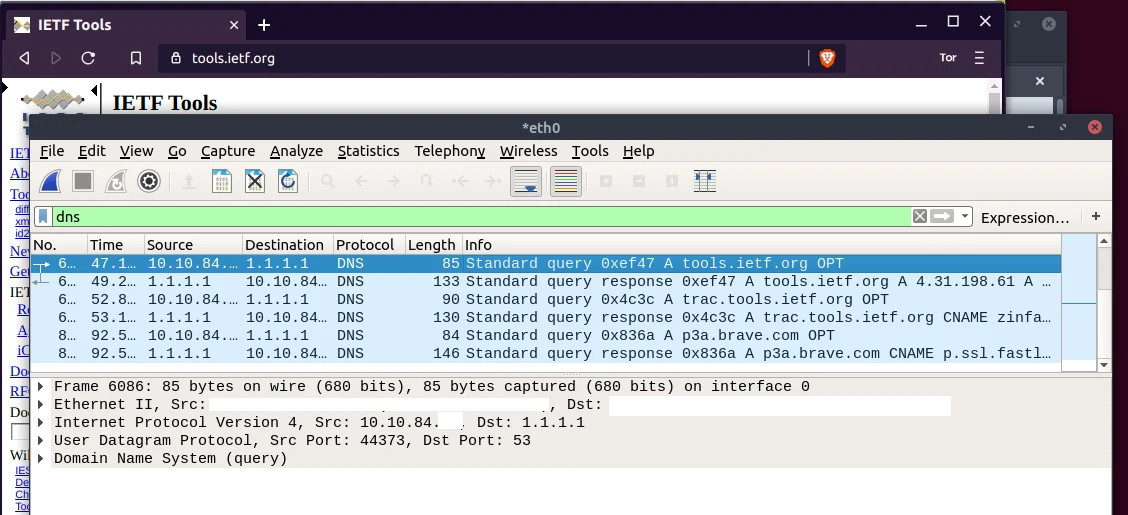
When a user navigates to a URL in Tor Window, the DNS requests are sent directly without using the Tor proxy, which leaks the user's real IP address and the requested domain name to the user's ISP and the DNS server.
Products affected:
- OS: Ubuntu 18.04.5 LTS x86_64
- Brave: Version 1.18.78 Chromium: 87.0.4280.141 (Official Build) (64-bit)
Steps To Reproduce:
- Open WireShark, and start capturing traffic on the Internet interface. Set WireShark's display filter to
dns. - Open Brave Browser. Then open new private window with Tor.
- On the Tor window, navigate to https://tools.ietf.org/ (or any other URLs)
- In WireShark, you can see a DNS request for tools.ietf.org sent to your DNS server.
Supporting Material/References:
- a screenshot attached
Impact
Brave's Tor window passively leaks users' IP addresses and requests to DNS servers. This undermines the user's anonymity.
Attachments
Not written yet. The AI write-up for this report has not been written yet. The Original tab links to the source.
How it worked
Root cause
Likely the Tor window did not route DNS queries through the Tor proxy, so they were sent directly to the system's DNS resolver.
Impact
The Tor window passively leaked users' IP addresses and the domains they requested to DNS servers, which could undermine their anonymity.
What the attacker needed
Use Brave's Tor window; visit any website
How it was found
- Start capturing traffic on the internet interface with a network analyser and filter for DNS.
- Open Brave Browser and then open a new private window with Tor.
- In the Tor window, navigate to a website such as tools.ietf.org.
- Observe in the network analyser that a DNS request for the visited domain is sent to the local DNS server.
Explained by bugbounty.wiki with AI from the original and checked against quotes from it; it can still be wrong. Read the original before relying on a detail.
Not written yet. The AI write-up for this report has not been written yet. The Original tab links to the source.
When you use a privacy tool like Tor, you expect all your internet traffic to be hidden. In this case, the browser was still asking a normal DNS server to look up website addresses, which revealed both your real location and the sites you wanted to visit. This means someone watching your internet connection could see what you were doing, even though you thought you were anonymous.
What is Info disclosure?
Data the application should keep private (personal data, internal details, other users' records) reaches someone it should not.