22.6k+ GitHub Stars Note-Taking App Hit by XSS Vulnerability
A stored cross-site scripting vulnerability was found in Trilium Notes where a note title containing HTML was rendered unsafely in the Note Map view. An attacker could inject script that executes when the Note Map is opened or a red dot is clicked.
 Published on infosecwriteups.com
CVE-2023–3067: Stored Cross Site Scripting Vulnerability on renowned note-taking thick client app Trillium
The full write-up lives on its author's site
It belongs to its author, so we link to it rather than copy it. The other two tabs are our own rewrites, checked against it.
Context
Trilium Notes is an open-source hierarchical note-taking application for building knowledge bases. The write-up covers CVE-2023-3067, a stored cross-site scripting issue found in the thick client application while adding new notes. The feature at the centre of the finding is the "Note Map", which renders note titles as nodes in a visual map. According to the report, a note title entered by the user was immediately shown in the Note Map, and that rendering path allowed HTML injection and cross-site scripting on both saved and reflected data.
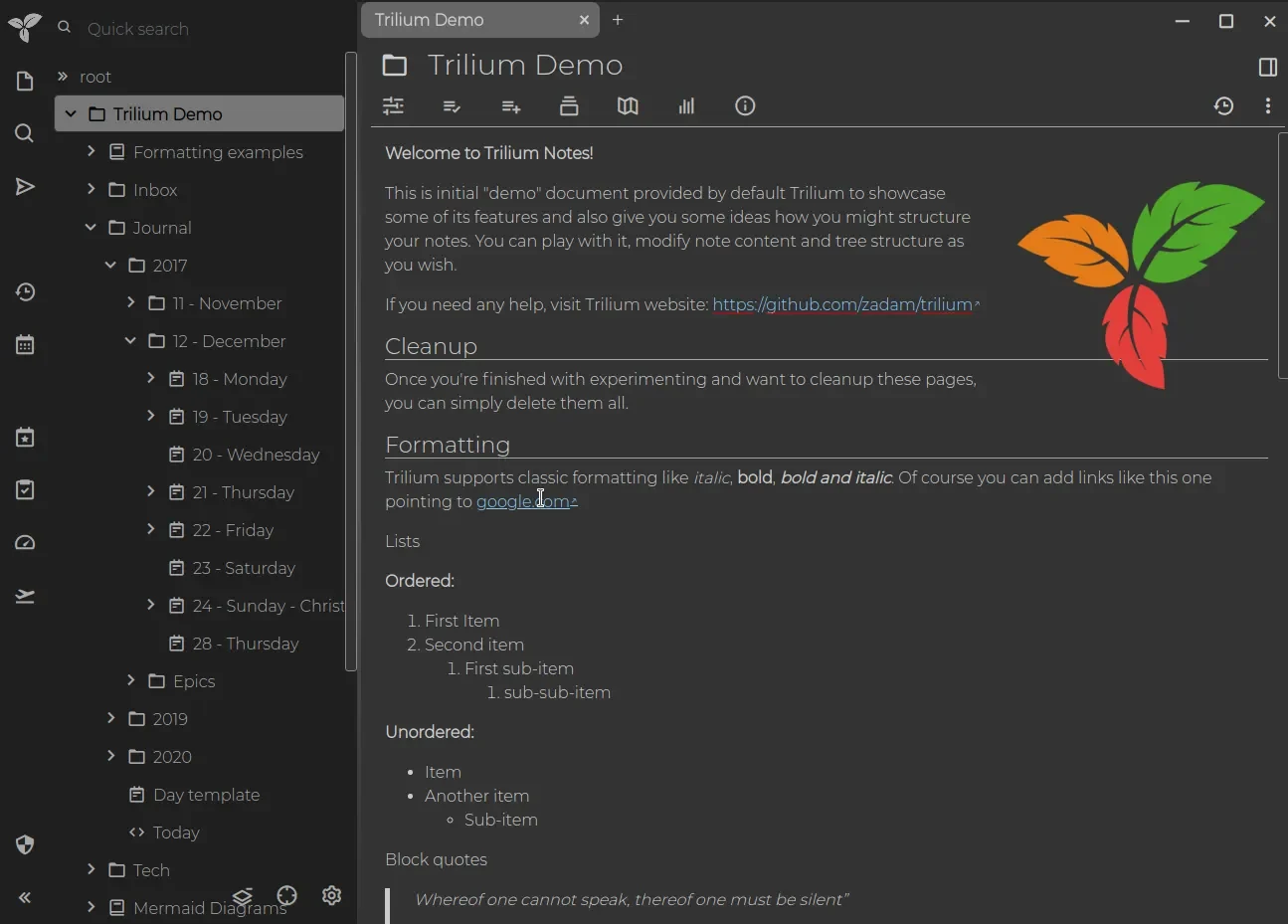
Trilium Notes is a Hierarchical Note-Taking App for Knowledge Bases
Setup
The testing was carried out against the desktop (thick client) build of Trilium Notes on Windows. The researcher states that the vulnerable version used was 0.58.0-beta for Windows, and that the issue is present in versions of the zadam/trilium repository prior to 0.59.4. No accounts, roles or additional tooling are described beyond running the application itself.
Finding it
While adding new notes, the researcher noticed that note titles were immediately displayed in the Note Map function. Because the title is user-controlled text that is rendered back into a UI component, it looked like a candidate for HTML injection: if the title were inserted into the map's markup without proper encoding, any HTML in the title would be parsed by the renderer. The researcher tested this by putting an image tag with an onerror handler into the title, which is a standard way to confirm script execution without relying on a visible element loading successfully.
Exploitation
Step 1: Obtain the vulnerable build
Download the vulnerable version, 0.58.0-beta for Windows, from the release archive:
https://github.com/zadam/trilium/releases/download/v0.58.0-beta/trilium-windows-x64-0.58.0-beta.zip
Step 2: Start the application
Execute the trilium.exe binary from the extracted archive. This launches the thick client locally.
Step 3: Create a new note
Create a new note within Trilium. This is the ordinary note creation flow; nothing special is required at this stage.
Step 4: Inject the payload into the note title
Name the new note with the following value:
"><img src="x" onerror=alert(1337) />
The leading "> closes an attribute value and the surrounding tag in the place where the title is interpolated, so the following <img> element is parsed as markup rather than text. The src="x" points at a resource that will not load, which forces the onerror handler to fire, and the handler calls alert(1337) as proof of execution.
Step 5: Open the Note Map
Access the Note Map functionality within Trilium. The new note appears there as a node, and its title is rendered into the map.
Step 6: Trigger the payload
Click the red dot representing the note in the Note Map, or simply wait for the alert to appear. The XSS is both stored and reflected: the payload persists with the note title and fires each time the title is rendered in the map.
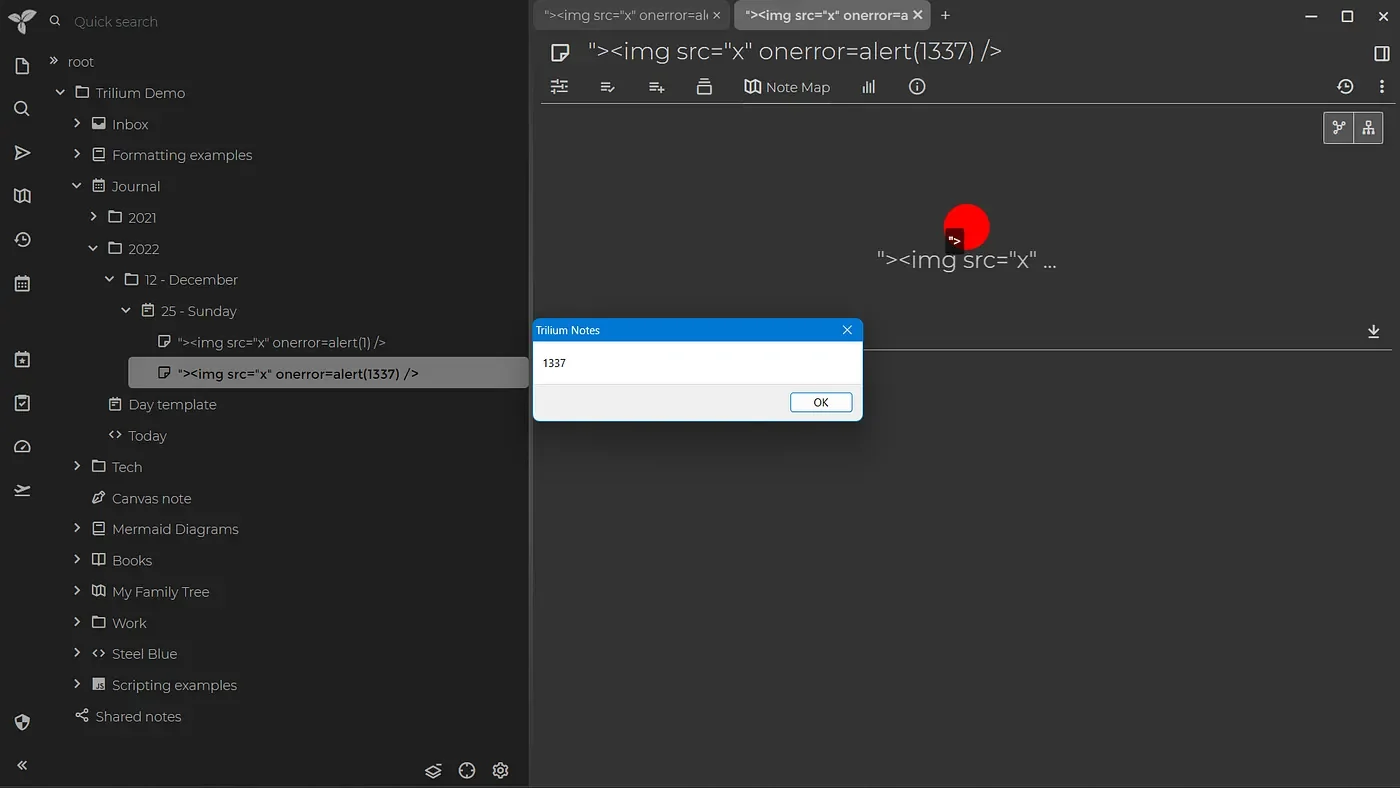
When the Red Dot in the Note Map was clicked, the stored XSS was executed, and an alert box appeared.
A video proof of concept is linked in the report:
https://drive.google.com/drive/folders/[redacted]
Root cause
The report describes the flaw as HTML injection in the Title section that surfaces in the Note Map: the note title is placed into the map's rendering without being treated purely as text, so markup in the title is interpreted. The report does not include the specific source code responsible, so the exact escaping or sanitisation gap is not shown. The reason existing defences did not stop it is likewise not detailed in the report.
Impact
The report describes the issue as stored and reflected XSS arising from note titles displayed in the Note Map. In the demonstrated case the payload executes in the thick client when the map renders the note. The report does not analyse multi-user scenarios, privilege boundaries or what data an attacker could reach beyond the alert box shown in the proof of concept, so the practical impact beyond script execution in the application's rendering context is not established there.
Fix
The vulnerability was addressed through a new software release; the report states that versions prior to 0.59.4 are affected. The report does not describe the code change itself. The general remedy for this class of issue is to encode note titles for the context in which they are rendered (HTML text, attribute or script) and to avoid constructing markup from user-controlled strings in the Note Map component.
Variants to test
- Other views that render note titles, such as lists, search results, breadcrumbs and link previews. A positive result is the same
onerroralert firing when the title is displayed in that view. - Attribute contexts rather than element text: try breaking out of an attribute with
">as in this report, and also try single-quote breakouts. A positive result is a new element or handler being parsed where only a title string should appear. - Titles containing other HTML that does not need script, such as
<b>or<a href=...>. A positive result is the markup rendering as markup, which confirms injection even where script is blocked. - Import and sync paths that bring in notes from other sources, since titles arriving that way may bypass any client-side validation on the title field. A positive result is the payload firing after import or sync without being retyped.
- Renaming an existing note rather than creating a new one, to check whether the update path applies the same rendering as creation. A positive result is the alert firing from the renamed title in the map.
What happened, in plain words
Trilium Notes is a free, open-source application for taking notes and organising them into a knowledge base. You install it on your own computer (that is what "thick client" or "desktop app" means: a program that runs on your machine, not a website you visit in a browser). It lets you arrange notes in a tree, like folders inside folders, and it also has a visual feature called the "Note Map" that draws your notes as dots (nodes) on a canvas so you can see how they connect.
A security researcher was testing this desktop application. While creating new notes, he noticed that whatever you type as a note's title is shown again, almost immediately, inside the Note Map. That is a normal, helpful behaviour: you name a note, and the map shows it. But it also means the title is text that you control, and that text gets displayed back to you by the program. Whenever a program takes text from a user and later displays it, there is a question worth asking: does the program treat that text purely as text, or does it accidentally treat parts of it as instructions?
In this case it was the second. By putting a small piece of HTML (the language web pages are written in) into the note title, the researcher made the Note Map run a tiny piece of JavaScript (the programming language browsers use to make pages interactive). The proof was a pop-up alert box showing the number 1337. This class of bug is called stored cross-site scripting, or stored XSS. "Stored" because the malicious text is saved with the note and fires again every time the note is displayed; "cross-site scripting" because it lets an attacker's code run inside the application's own display, as if the application itself had written it.
The issue was given the identifier CVE-2023-3067. A CVE is a public catalogue number for a known security flaw, so people can look it up and track the fix. The researcher reported it through huntr.dev, a platform for reporting bugs in open-source software, the report was validated, a new release addressed it, and the researcher was assigned a CVE.
Trilium Notes is a Hierarchical Note-Taking App for Knowledge Bases
The background you need
Before walking through the steps, here are the few ideas the rest of the article relies on.
- HTML: the language that describes what a page or screen contains. It is written with tags in angle brackets, like
<img>for an image. Tags can carry extra settings called attributes, written asname="value"inside the tag. For example,<img src="cat.png">means "an image whose source file is cat.png". - JavaScript: the language that makes pages do things, such as react to a click. It is often attached to HTML through attributes like
onerror, which means "run this code if something goes wrong". - XSS (cross-site scripting): a bug where text that should be shown as plain text is instead interpreted as HTML or JavaScript. The classic proof that XSS works is making an alert box appear, because if you can make an alert appear, you could in principle run other code too.
- Stored vs reflected XSS: reflected XSS fires once, from something you just sent. Stored XSS is saved somewhere (here, in the note title) and fires again every time that saved value is displayed. This report describes both happening at once: the title is saved, and it is also rendered back immediately.
- Thick client: a program installed on your computer, as opposed to a website. Trilium's desktop build is a thick client, but internally it still uses web technology to draw its screens, which is why an HTML/JavaScript bug is possible inside a desktop app.
- Version: software is released in numbered versions. Bugs are fixed in a particular version, and everything older than that is affected. Here, versions before 0.59.4 are affected.
Setting up the test
The testing was done against the desktop build of Trilium Notes on Windows. The researcher used version 0.58.0-beta for Windows, and states that the flaw exists in versions of the zadam/trilium repository (the project's public code repository on GitHub) prior to 0.59.4. No special accounts, permissions or extra tools are mentioned: running the application itself was enough.
Finding it
While adding new notes, the researcher saw that note titles were shown straight away in the Note Map. A title is text the user types, and it is displayed back inside a part of the interface. That combination is exactly where HTML injection bugs live: if the program pastes the title into its screen markup without treating it as plain text, any HTML in the title gets interpreted.
To test this, the researcher put an image tag into the title, with an onerror handler attached. The trick works like this: the image points at a source that will never load, so the "error" event fires, and the handler runs. This is a standard way to confirm that code executes without depending on a real image being displayed.
Reproducing it, step by step
Step 1: Get the vulnerable build
Download the affected version, 0.58.0-beta for Windows, from the release archive:
https://github.com/zadam/trilium/releases/download/v0.58.0-beta/trilium-windows-x64-0.58.0-beta.zip
This is a direct link to a zip file on GitHub's release download service. The v0.58.0-beta part of the address is the version number, and trilium-windows-x64 says it is the 64-bit Windows build. You download it because the bug was fixed later, so you need a version from before the fix to see it.
Step 2: Start the application
Run the trilium.exe file from the extracted zip. This launches the desktop program on your own machine. Nothing is sent to a remote server at this point; the app runs locally.
Step 3: Create a new note
Create a new note inside Trilium, using the ordinary note creation flow. Nothing special is needed here: the point is simply to have a note whose title you control.
Step 4: Put the payload in the title
Name the new note with this exact value:
"><img src="x" onerror=alert(1337) />
Line by line, in plain words:
">: this closes whatever attribute value and tag the program has already opened around the title. Imagine the program writes<div title="and then your text; the">finishes that attribute and that tag early, so everything after it is no longer inside the attribute.<img ... />: now that we are outside the attribute, this is read as a real image tag rather than as text.src="x": the image's source is set tox, which is not a real file, so the image will fail to load.onerror=alert(1337): because the image fails, the error handler runs, and it callsalert(1337), which shows a pop-up box containing the number 1337. That pop-up is the proof that our code ran.
Step 5: Open the Note Map
Open the Note Map feature. The new note appears there as a node (a dot), and its title is drawn into the map. This is the moment the saved title is displayed again, which is why the payload gets a chance to run.
Step 6: Trigger it
Click the red dot that represents the note in the Note Map, or simply wait for the alert to appear. The XSS is both stored and reflected: the payload is saved with the note title, and it fires every time the title is rendered in the map.
When the Red Dot in the Note Map was clicked, the stored XSS was executed, and an alert box appeared.
The report also links a video proof of concept:
https://drive.google.com/drive/folders/[redacted]
Why it worked
The report describes the flaw as HTML injection in the Title section that shows up in the Note Map: the note title is placed into the map's rendering without being treated purely as text, so markup inside the title is interpreted. The report does not include the specific source code responsible, so the exact escaping or sanitisation gap is not shown. The reason existing defences did not stop it is likewise not detailed.
What the impact is
The report describes the issue as stored and reflected XSS arising from note titles displayed in the Note Map. In the demonstrated case the payload runs in the desktop client when the map renders the note. The report does not analyse multi-user scenarios, privilege boundaries or what data an attacker could reach beyond the alert box shown in the proof of concept, so the practical impact beyond script execution in the application's rendering context is not established there.
The fix
The vulnerability was addressed through a new software release; the report states that versions prior to 0.59.4 are affected. The report does not describe the code change itself. The general remedy for this class of issue is to encode note titles for the context in which they are rendered (HTML text, attribute or script) and to avoid constructing markup from user-controlled strings in the Note Map component.
Other places worth testing
- Other views that render note titles, such as lists, search results, breadcrumbs and link previews. A positive result is the same
onerroralert firing when the title is displayed in that view. - Attribute contexts rather than element text: try breaking out of an attribute with
">as in this report, and also try single-quote breakouts. A positive result is a new element or handler being parsed where only a title string should appear. - Titles containing other HTML that does not need script, such as
<b>or<a href=...>. A positive result is the markup rendering as markup, which confirms injection even where script is blocked. - Import and sync paths that bring in notes from other sources, since titles arriving that way may bypass any client-side validation on the title field. A positive result is the payload firing after import or sync without being retyped.
- Renaming an existing note rather than creating a new one, to check whether the update path applies the same rendering as creation. A positive result is the alert firing from the renamed title in the map.
Glossary
- HTML: the language used to describe what a page or screen contains, written with tags such as
<img>. - Attribute: an extra setting inside an HTML tag, written as
name="value". - JavaScript: the programming language that makes pages and screens interactive.
- Stored XSS: XSS where the malicious text is saved and fires again every time it is displayed.
- Reflected XSS: XSS that fires once, from input that is immediately echoed back.
- HTML injection: getting HTML markup into a place where only plain text should appear.
- Payload: the piece of text or code used to prove a vulnerability.
onerror: an HTML attribute that runs code when something fails to load, such as a broken image.alert(): a JavaScript function that shows a pop-up box; commonly used as proof that code ran.- Thick client / desktop app: a program installed and run on your own computer rather than a website.
- Note Map: Trilium's visual feature that draws notes as dots (nodes) on a canvas.
- Node: a single dot in the Note Map representing one note.
- Version: a numbered release of software; fixes land in a particular version.
- CVE: a public catalogue number for a known security vulnerability.
- huntr.dev: a platform for reporting and handling security bugs in open-source software.
- Repository: the public store of a project's source code, here on GitHub.
- Encoding / escaping: converting characters so they are treated as plain text rather than as markup.
- Sanitisation: cleaning input so that dangerous parts are removed or neutralised.
- Context-aware encoder: a tool that escapes text correctly for the exact place it will appear (text, attribute, script).
- Proof of concept (PoC): a demonstration that a vulnerability really works.



