My findings on Hack U.S Program
Several endpoints on a government programme's hosts lacked authentication, letting anyone create or delete frameworks and change configuration details. A public GitHub repository also stored plaintext passwords and URLs, which gave access to a protected system.

Greetings, everyone! I’m Charan, also known as 0xcharan, in the bug bounty community.
The full write-up lives on its author's site
It belongs to its author, so we link to it rather than copy it. The other two tabs are our own rewrites, checked against it.
Context
The target was the U.S. Department of Defence's Hack U.S program, a bug bounty programme with a very large scope. The author, Charansai (0xcharan in the bug bounty community), hunted on it while studying agriculture, and this write-up covers three findings from that programme: a publicly accessible .git directory, unauthenticated access to a frameworks management interface, and credentials leaked in a public GitHub repository.
The report does not describe the product behind the frameworks endpoint beyond the fragment URLs, so what follows sticks to what was observed: an endpoint at https://redacted/#/frameworks that let an unauthenticated visitor create and delete frameworks, and a second endpoint at https://redacted/#/configuration where configuration details could be changed.
Setup
The author found the programme on Twitter and worked alone, with limited time because of university commitments and health issues. No specific tool versions are given. The workflow relied on Shodan to enumerate hosts and on fuzzing to look for endpoints and sensitive files. No accounts or roles were needed for the accepted findings: the frameworks endpoint required no authentication at all, and the GitHub finding used credentials found in a public repository.
Finding it
The starting point was the scope page, which the author describes as vast and initially overwhelming. Rather than working through it host by host, the approach was to pull the IPs behind the programme's subdomains out of Shodan and then fuzz those IPs for endpoints and sensitive files. Two of the three findings came out of that fuzzing pass; the third came from GitHub reconnaissance.
Exploitation
Step 1: enumerate hosts with Shodan
The author used the following Shodan query to collect candidate hosts:
ssl:"target.com" 200
The author used this Shodan query to collect candidate hosts. The IPs returned by this search became the fuzzing targets for the rest of the session.
Step 2: fuzz for a .git directory (duplicate)
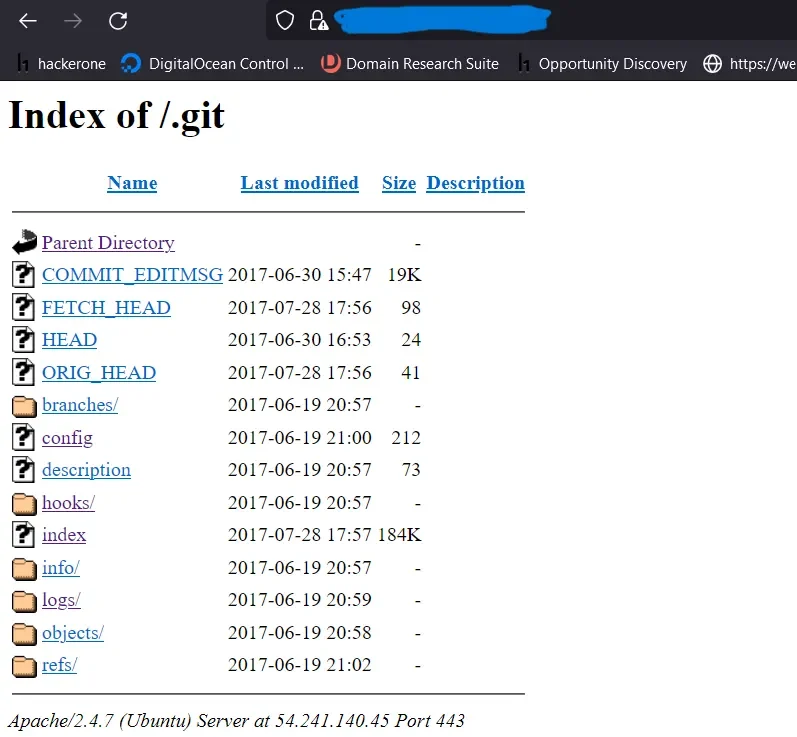
While fuzzing the IPs, the author found a /.git/ directory exposed on a host. The report's heading links it as https://redacted/.git/, with the underlying address shown as https://[redacted]/.git/. An exposed .git directory can let anyone download the repository metadata and reconstruct source code, so it was reported promptly. The submission was a duplicate.
Step 3: unauthenticated frameworks endpoint (accepted, high)
Continuing the fuzzing over the Shodan-derived IPs, the author came across this endpoint:
The endpoint was reachable without authentication. The endpoint had no authentication in front of it, so an unauthenticated visitor could create frameworks and delete them. The author reported it, the security team rated it high risk, and it paid 500 USD.
A second endpoint allowed configuration details to be changed:
The report shows the underlying address for this one as https://[redacted]/#/configuration. No request or response bodies are included for either endpoint, so the exact parameters and the server's replies are not documented here.
Step 4: credentials in a public GitHub repository (accepted, medium)
For the third finding the author moved from Shodan to GitHub, looking for leaks tied to the scope. Early reconnaissance did not produce much, and many of the subdomains encountered sat behind login portals. The search used this dork:
"target.com" password
After about 30 minutes of searching, the author found a public repository that stored passwords in clear text together with the URLs where they were used. Testing the credentials against those URLs gave access. The issue was rated medium severity on reporting.

Root cause
Each finding has its own cause:
- The
.gitdirectory was left inside the web root, so the version control metadata was served like any other static file. Nothing in front of the server blocked requests to/.git/. - The frameworks and configuration routes were reachable without any authentication check. The report does not say whether the check was missing on the client, the server, or both;
- Credentials were committed to a public repository in clear text, alongside the URLs they belonged to. Once the repository was public, anyone running a dork could find them, and the credentials worked when tested.
Impact
- The
.gitexposure was a duplicate and the report gives no further detail on what the repository contained. - The unauthenticated frameworks endpoint let anyone create or delete frameworks, and the configuration endpoint let anyone change configuration details. The team rated this high risk and paid 500 USD.
- The leaked credentials gave access when tested against the URLs in the repository. The team rated this medium severity. The author notes that payment was received for the unauthenticated access to frameworks.
Fix
Based on the findings, the changes needed are: remove .git from the web root or block access to it at the server, enforce authentication and authorisation on the frameworks and configuration endpoints at the API level rather than only in the front end, and revoke the leaked credentials and purge them from the repository history.
Variants to test
- Run the same Shodan query against other programmes with large scopes and fuzz the returned IPs for
/.git/,/.svn/, backup archives and similar metadata paths. A positive result is a directory listing or a downloadableHEADorconfigfile. - Fuzz single-page application fragment routes such as
#/frameworksand#/configurationand call the underlying API endpoints directly without a session. A positive result is a successful create, delete or update response from an unauthenticated request. - Run GitHub dorks combining the target domain with terms like
password,secretandtoken, then test any credentials found against the URLs stored next to them. A positive result is a successful login or API call with the leaked credentials.
What happened, in plain words
This is the story of three separate discoveries made by a bug bounty hunter called Charansai, who goes by the name 0xcharan in the bug bounty community. He hunts for bugs in his spare time while studying agriculture at university. The programme he was working on was the U.S. Department of Defence's Hack U.S programme, which is a bug bounty programme: an arrangement where an organisation invites outside people to look for security weaknesses in its systems and pays them for reporting what they find.
A bug bounty programme publishes a scope, which is a list of the systems that are fair game to test. The Hack U.S scope was enormous, and the author found it overwhelming at first. He found the programme on Twitter and decided to take part despite having limited time because of university work and health problems.
He made three findings:
- A
.gitdirectory that anyone on the internet could open. This was a duplicate, so it earned nothing. - A web page for managing "frameworks" that let anyone create or delete them without logging in. This was accepted, rated high risk, and paid 500 USD.
- Passwords stored in plain text in a public GitHub repository, which gave access to the systems those passwords belonged to. This was accepted and rated medium severity.
The rest of this article walks through each one in the order he did them, explains every idea from scratch, and shows the exact commands and addresses he used.
Before we start: the ideas you need
A few concepts come up again and again, so here they are up front, in everyday terms.
A server and a web page. When you type an address into your browser, your computer asks a server (a computer somewhere else that holds the website) for a page, and the server sends it back. Most of what you see on the internet works this way.
An IP address. Every computer on the internet has a numeric address, like a phone number, so other computers can reach it. A domain name such as target.com is just a friendlier label that gets translated into one of these numbers. One domain can point at many different servers, each with its own number.
A subdomain. A domain can have smaller names in front of it, such as shop.target.com or mail.target.com. Each subdomain may live on a completely different server. Large organisations have hundreds or thousands of them, and each one is a possible way in.
Shodan. Shodan is a search engine, but instead of indexing web pages it indexes devices and services connected to the internet. You give it a search query, and it returns machines that match. Security researchers use it to find servers belonging to an organisation without having to guess every address by hand.
Fuzzing. Fuzzing means trying lots of variations automatically to see what comes back. In web terms, it usually means asking a server for many different paths or names in quick succession and watching for ones that respond differently. It is like jiggling every door handle in a long corridor to see which ones are unlocked, rather than guessing which door matters.
Authentication. Authentication is simply proving who you are, usually by logging in with a username and password. If a page or feature works without you logging in, it has no authentication in front of it, and anyone who finds the address can use it.
An API. An API is the part of a website that actually does the work behind the scenes. When you click a button on a modern web page, the page often does not reload; instead it quietly sends a request to the API, which carries out the action and sends back the result. Think of the web page as the counter of a shop and the API as the storeroom behind it: the counter is what customers see, but the storeroom is where things are actually fetched and changed.
A single-page application and the # in a URL. Some websites load once and then swap content in and out as you click, without ever reloading. These are called single-page applications. The part of the address after a # symbol is called the fragment, and in these sites it tells the page which section to show. So https://example.com/#/frameworks means "load the site, then show the frameworks section". That matters later, because the real work is done by the API the page talks to, not by the address you see.
A .git directory. Git is a tool that programmers use to keep track of changes to their code. It stores its entire history in a hidden folder called .git that sits inside the project folder. If a website is published by copying the whole project folder onto a web server, that .git folder can end up publicly downloadable. Anyone who downloads it can reconstruct the source code of the site, which may reveal how it works and what secrets it holds. It is like leaving the architect's full blueprints, including the notes about the alarm code, in an unlocked drawer next to the front door.
A GitHub dork. GitHub is a website where programmers store and share code, often publicly. A dork is a clever search query that finds things people did not mean to make public, such as passwords typed into a file. Running a dork is just using GitHub's search box with the right words.
Severity and bounty. When you report a finding, the organisation's security team decides how serious it is, usually on a scale from low to critical, and pays a reward called a bounty according to that rating. A duplicate is a report of something already reported, and normally pays nothing.
Finding it: where he started
He began on the scope page, the list of everything he was allowed to test. It was so large that he did not know where to begin. Instead of going through it host by host, he decided to work from the outside in: first collect the numeric addresses (IPs) behind the programme's subdomains using Shodan, then fuzz those addresses for interesting paths and files. Two of the three findings came out of that fuzzing. The third came from searching GitHub.
Step 1: collecting addresses with Shodan
He ran this query in Shodan:
ssl:"target.com" 200
Line by line, in plain words:
ssl:"target.com"asks Shodan for machines whose security certificate (the digital ID a website presents so browsers can encrypt traffic with it) mentionstarget.com. Certificates often name the domain they belong to, so this is a way to find servers that serve that organisation even if their addresses are not obvious.200asks for machines that answered a normal web request successfully. In web terms, 200 is the status code for "here is the page you asked for". Adding it filters out machines that are offline or refusing requests, so the results are live web services.
The addresses Shodan returned became the targets for the rest of the session. The reasoning is simple: rather than guessing subdomain names, ask a search engine that has already scanned the internet which machines are associated with the target and are currently up.
Step 2: an open .git directory (duplicate)
While fuzzing those addresses, he found a /.git/ directory that anyone could open. The report's heading links it as https://redacted/.git/, with the underlying address shown as https://[redacted]/.git/.
Why this matters: as explained above, the .git folder holds the full history of a project's code. If a web server hands it out like any other file, a visitor can download it and rebuild the source code. That can expose how the site is built, internal notes, and sometimes credentials. It is one of the classic accidental exposures, and it is easy to check for: you simply ask the server for the folder and see whether it answers.
He reported it straight away. The submission was a duplicate, so it earned nothing. He took it as a lesson and carried on.
Step 3: a management page with no login (accepted, high risk, 500 USD)
Still fuzzing the addresses from Shodan, he came across this address:
In plain words: this is a single-page application, and the #/frameworks part tells the page to show its frameworks section. "Frameworks" here is the name of a feature in the product; the report does not describe what a framework is in this product beyond the fact that it can be created and deleted. The important point is what happened when he opened it: there was no login in front of it. Anyone who reached the address could create frameworks and delete them, with no account and no password.
Why this matters: a management feature is meant to be used only by authorised staff. If it works without authentication, then the whole internet is staff. Creating and deleting records is a change to the organisation's data, not just a view of it, which is why the security team rated it high risk. He reported it, the team accepted it, and it paid 500 USD.
There was a second address where configuration details could be changed without logging in:
Again, the #/configuration fragment tells the single-page application to show its settings section. The report shows the underlying address for this one as https://[redacted]/#/configuration. Being able to change configuration without authentication is serious for the same reason: settings control how a system behaves, so an outsider changing them can affect everyone who uses it.
The report does not include the actual requests sent to either address, nor the server's replies, so the exact fields and values involved are not documented here. What is documented is the outcome: no login was required, and the actions worked.
Step 4: passwords in a public GitHub repository (accepted, medium)
For the third finding he switched from Shodan to GitHub, looking for information the organisation had accidentally published. Early attempts did not turn up much, and many of the subdomains he came across were behind login pages, which stop casual inspection.
He searched GitHub with this dork:
"target.com" password
In plain words:
"target.com"in quotes asks GitHub to find files containing that exact text. Programmers often paste the domain of the system they are working on into configuration files and notes, so this narrows the search to code connected to the target.passwordasks for files that also contain that word. Together, the two terms look for files that mention both the target's domain and the word password, which is exactly the shape of a configuration file with a login in it.
After about 30 minutes of searching, he found a public repository that stored passwords in clear text, meaning not scrambled or hashed in any way, together with the web addresses where those passwords were used. Clear text is the worst case: anyone reading the file can read the password directly, with no work required.
He tested the credentials against the addresses stored next to them, and they worked. In other words, the passwords were not only exposed but still valid, so the repository effectively handed out working keys to the systems behind those addresses. He reported it, and the team rated it medium severity. He notes that in the end he was paid for the unauthenticated access to frameworks.
Why each finding happened
Each of the three has its own cause, and understanding the cause is what lets you spot the same pattern elsewhere.
- The
.gitfolder was left inside the folder that the web server publishes. The server then treated it like any other file and handed it out. Nothing blocked requests to/.git/. - The frameworks and configuration sections were reachable without any login check. The report does not say whether the check was missing in the page itself, on the server, or both.
- Passwords were written into a public repository in clear text, next to the addresses they belonged to. Once the repository was public, anyone running a search could find them, and the passwords worked when tested.
What the impact was
- The open
.gitfolder was a duplicate and the report gives no further detail on what the repository contained. - The frameworks section let anyone create or delete frameworks, and the configuration section let anyone change settings. The team rated this high risk and paid 500 USD.
- The leaked passwords gave access when tested against the addresses in the repository. The team rated this medium severity.
How it should be fixed
Based on the findings, the changes needed are: remove the .git folder from the published folder or block access to it at the server; enforce login and permission checks on the frameworks and configuration features in the API itself, not only in the page; and change the leaked passwords and remove them from the repository's history.
Things to try yourself
These are the same techniques applied to other targets, described so a beginner can follow the reasoning.
- Run the same Shodan query against other programmes with large scopes, then fuzz the returned addresses for
/.git/,/.svn/(the equivalent folder for another version control tool) and backup archives. You know you have a hit when the server shows you a list of files or lets you download a file such asHEADorconfigfrom inside the folder. - Fuzz single-page application sections such as
#/frameworksand#/configuration, then call the API behind them directly without logging in. You know you have a hit when a request you sent without a session successfully creates, deletes or updates something. - Run GitHub dorks that combine the target's domain with words like
password,secretandtoken, then test any passwords you find against the addresses stored next to them. You know you have a hit when a login or API call succeeds with the leaked password.
Glossary
- API: the part of a website that does the actual work behind the scenes, receiving requests and returning results, separate from what you see on the page.
- Authentication: proving who you are, usually by logging in, so a system can decide whether to let you in.
- Authorisation: deciding what a logged-in person is allowed to do, as opposed to whether they are who they say they are.
- Bug bounty programme: an arrangement where an organisation invites outside researchers to find security weaknesses and pays them for reporting them.
- Bounty: the reward paid for an accepted report.
- Clear text: stored or sent without any scrambling, so anyone who can read it can read it directly.
- Configuration: the settings that control how a system behaves.
- Credentials: the username and password (or similar) used to log in.
- Domain name: the friendly name of a website, such as
target.com, which gets translated into a numeric address. - Dork: a carefully chosen search query that finds information people did not mean to make public.
- Duplicate: a report of a problem that someone else already reported, which normally earns nothing.
- Fragment: the part of a web address after the
#symbol, used by single-page applications to decide which section to show; the server never sees it. - Fuzzing: automatically trying many variations of a request to see which ones get a different, interesting response.
- Git: a tool programmers use to track changes to code, storing its history in a hidden
.gitfolder. - GitHub: a website where programmers store and share code, often publicly.
- High risk / medium severity: ratings a security team gives a finding to say how serious it is; higher ratings usually mean bigger rewards.
- IP address: the numeric address of a computer on the internet, like a phone number.
- Scope: the list of systems a bug bounty programme allows you to test.
- Server: a computer somewhere else that holds a website and answers requests for it.
- Severity: how serious a finding is judged to be.
- Shodan: a search engine that indexes devices and services connected to the internet, rather than web pages.
- Single-page application: a website that loads once and swaps content in and out as you click, without reloading.
- SSL / TLS certificate: the digital ID a website presents so browsers can encrypt traffic with it; it often names the domain it belongs to.
- Status code 200: the standard web answer meaning "here is the page you asked for", as opposed to an error or a refusal.
- Subdomain: a smaller name in front of a domain, such as
shop.target.com, which may live on a different server. - Version control: the practice of keeping a history of changes to code, usually with Git.

