Hacking into Admin Panel of U.S Federal government system C.A.R.S — without credentials.
The admin login page had a client-side JavaScript check that only verified a hidden form field was set to 'admin', and the server did not enforce authentication. An attacker could set that field in the browser console and log in to the admin panel without credentials.
 Published on medium.com
Hello guys, I hope you’re doing great! This is my first time writing an article about security bugs and I hope you will learn something new in this journey.
The full write-up lives on its author's site
It belongs to its author, so we link to it rather than copy it. The other two tabs are our own rewrites, checked against it.
Context
C.A.R.S (Comprehensive Accident Reporting System) is a U.S Federal government system, described in the report as designed for personnel to report car accidents in the US. The target was the host https://cars.fas.gsa.gov/, found under the U.S. General Services Administration program. The feature at the centre of the write-up is the site's login: a home page that leads to an admin panel login form, with a C.A.R.S button that submits the form.
The researcher's stated goal was ordinary reconnaissance: map the site, identify technologies, enumerate endpoints and look for JavaScript files. The bug turned up in the login form's JavaScript check.
Setup
The only tools used, as stated in the report, were BurpSuite and Wappalyzer. No account, credential or special role was needed: the whole point of the finding is that the researcher had no credentials for the admin panel. The precondition is simply that the login page is reachable and that its source can be read.
Finding it
Starting from the home page, the researcher found a simple page with little to enumerate.
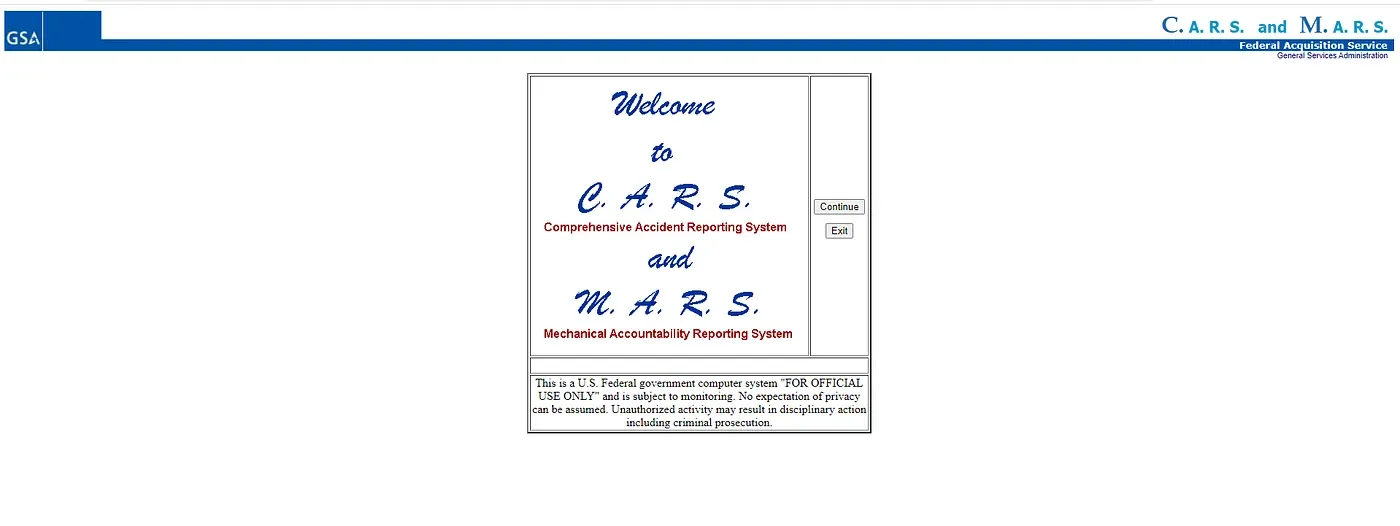
Home Page
Navigation and inspection of the available functionality did not reveal much beyond an admin panel login.
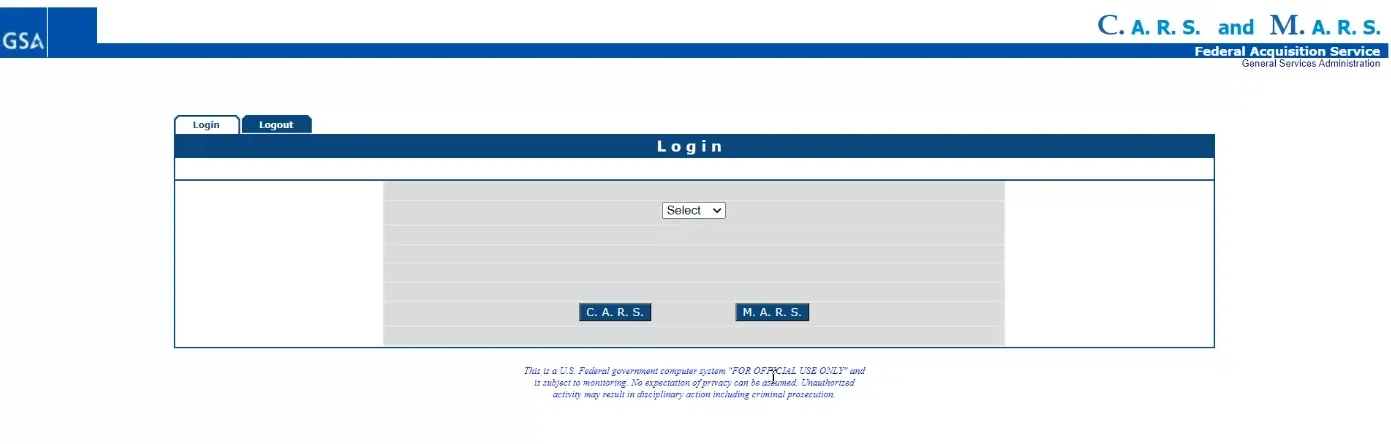
Admin Login Panel
Clicking the CARS & MARS button produced nothing, and the select field on the form was empty, so there was nothing usable in the rendered page. The next step was to read the page source (CTRL+U, or right-click and View Page Source). While looking through the source for interesting functions, the researcher came across a function called loginchk():
function loginChk() { if (document.forms[0].scSelCen.value =="admin") { return true; }
As the report explains, the function checks whether the scSelCen value is "admin" and returns true. The function checks whether the scSelCen value is "admin" and returns true. The field scSelCen was not displayed on the form, so a normal user could not set it through the interface, but nothing stopped it being set from the console.
Exploitation
Step 1: open the developer console and set the hidden field
With the login page loaded, the researcher opened the developer console with F12 and set the property directly:
document.forms[0].scSelCen.value = "admin"
This targets the first form on the page (document.forms[0]), takes its scSelCen control and assigns the string admin to its value. Because the check in loginChk() reads exactly this property, the client-side condition is now satisfied.
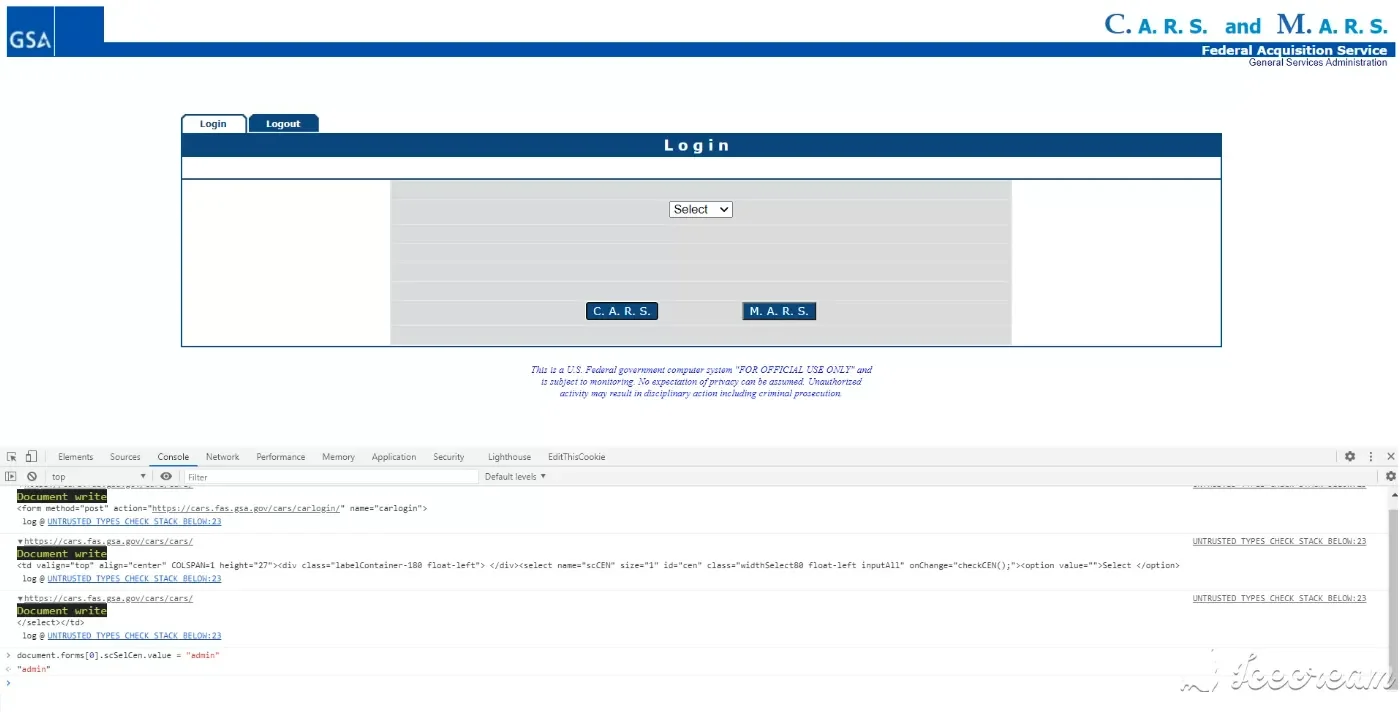
Developer Console, Adding the value "admin"
Step 2: submit the form
With the value in place, the researcher clicked on C.A.R.S and got this response:
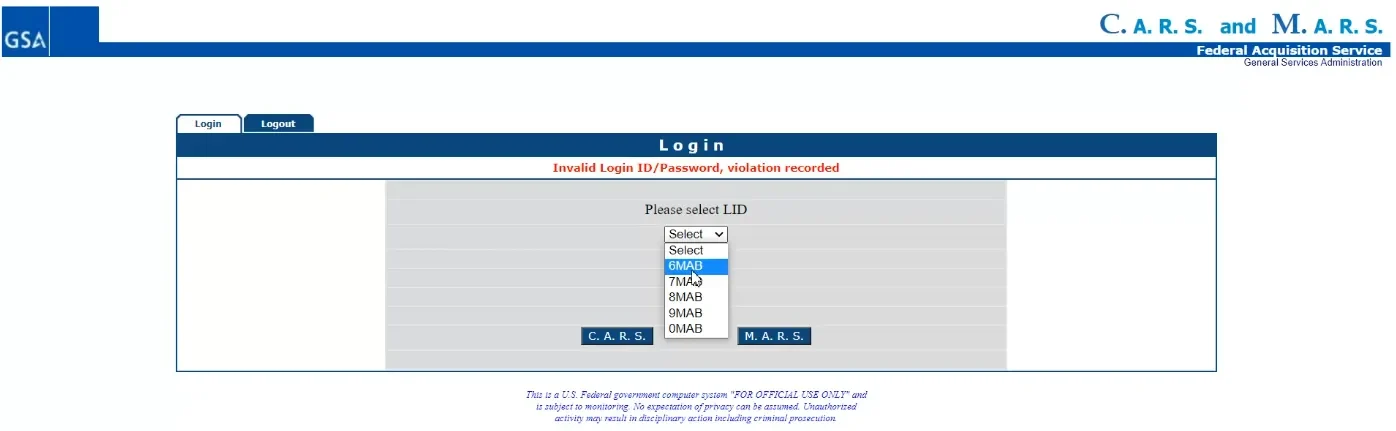
Login Response
The response said Invalid login ID/Password, but the page now offered options to choose from, which had not been shown before. In other words, the client-side gate had opened and the form had progressed to a stage that was previously unreachable, even though the credentials themselves were rejected.
Step 3: pick an option and submit again
The researcher chose a value at random, 6MAB, and clicked again on C.A.R.S. The result was a successful login into the system.
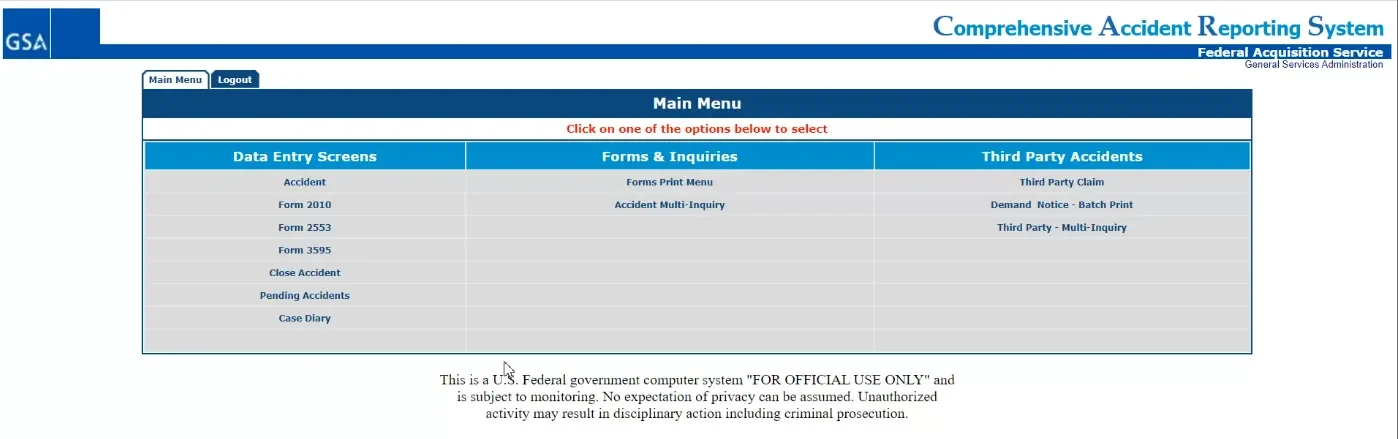
Successful Login.
The report does not describe what the server did with 6MAB or why that particular value was accepted; it only records that a randomly chosen option from the newly revealed list led to a logged-in session.
Root cause
The access decision was enforced on the client. loginChk() compares a form field to the literal "admin" and returns true, and the browser is free to run, skip or feed that function whatever the user wants. Hiding the scSelCen field from the rendered form is presentation, not access control: the control still exists in the DOM and can be written to from the console.
The check lives in JavaScript, so the browser decides whether the form proceeds. The report does not include the server-side code, so the exact server behaviour is not shown; the observable result is that satisfying the client check exposed options that were not previously available and allowed a login without valid credentials. The access decision was made in client-side JavaScript.
Impact
The researcher reached the admin login panel, read one line of JavaScript, set a hidden field from the console and obtained a logged-in session without credentials. The report does not enumerate what the session could then do, so the blast radius beyond the successful login is not documented here. The researcher reported the issue immediately and it was fixed within one week.
Fix
The report states only that the issue was fixed within one week and does not describe the change. The fix that addresses the root cause is to move the authorisation decision to the server: the server should not rely on a client-supplied field such as scSelCen to decide whether a caller is an admin, and every request that depends on that decision should be authorised server-side against the authenticated session. The client-side check can remain as a usability aid, but it must not be the control.
Variants to test
- Hidden form fields that gate a submit. Look for inputs of
type="hidden"or controls absent from the rendered form but referenced in submit handlers. A positive result is that setting the field from the console changes the response, for example revealing new options or a different error. - JavaScript functions that return true on a magic value. Grep the page source for comparisons against strings such as
admin,trueor role names inside submit or validation functions. A positive result is a function whose return value alone decides whether the request is sent or which branch the UI takes. - Client-side role or centre selectors. Where a form posts a role, centre or tenant identifier, try changing it before submission. A positive result is that the server accepts the altered value and returns data or options belonging to the other role.
- Multi-stage logins. Where a first response says invalid credentials but reveals a second-stage selector, try submitting a value from that selector. A positive result is a session being issued despite the failed credential check.
- Disabled or read-only controls. Remove
disabledorreadonlyfrom a control in the console and submit. A positive result is the server acting on the value that the UI intended to prevent.
In each case, confirm the behaviour with an intercepting proxy so that you can see whether the server, not the browser, made the decision.
What happened, in plain words
A security researcher was browsing a U.S. government website, the Comprehensive Accident Reporting System (C.A.R.S), which is used by personnel to report car accidents in the US. The site had an admin login page. The researcher did not have a username or password for it. By reading one line of the page's JavaScript, the small programs that run inside your browser, they found that the site decided whether you were an admin by checking a value in the login form. That value was hidden from normal visitors, but it could still be changed from the browser's built-in developer tools. Setting it to admin changed the login response, and choosing a revealed option then logged the researcher in without credentials. The issue was reported and fixed within one week.
This article walks through the same steps slowly, explaining each idea from scratch, so that someone who has only ever used a browser can follow along.
Context
What the target is
C.A.R.S stands for Comprehensive Accident Reporting System. The report describes it as a U.S Federal government system designed for personnel to report car accidents in the US. The specific address (URL) the researcher looked at was:
https://cars.fas.gsa.gov/
A URL is the address you type into your browser to reach a page, like a street address for a website. The part cars.fas.gsa.gov is the name of the server (the computer that hosts the site), and https:// means the connection is encrypted so that other people on the network cannot read it.
The site was found through a bug bounty program run by the U.S. General Services Administration. A bug bounty program is an arrangement where an organisation invites outside people to look for security problems in its systems and report them, often in exchange for a reward. The researcher's job here was to find a weakness and tell the organisation about it responsibly.
What feature was involved
The feature at the centre of the story is the site's login. The home page leads to an admin panel login form, and there is a button labelled C.A.R.S that submits the form. An admin panel is a special page meant only for staff with extra permissions, for example people who manage other users or see sensitive records. A login form is the set of boxes where you type your username and password.
What the researcher set out to do
The stated goal was ordinary reconnaissance. Reconnaissance means exploring a target before attacking it, the way a burglar might walk around a building first to note the doors, windows and cameras. In web terms it means mapping the site, identifying which technologies it uses, listing the possible endpoints (the specific addresses the site responds to) and looking for JavaScript files. None of this is an attack; it is just looking.
The bug turned up not in a server endpoint but in the client-side login check. "Client-side" means the part of the work done by your browser on your own computer. "Server-side" means the part done by the remote computer that holds the data. The distinction matters throughout this article.
Setup
Tools
The only tools used, as stated in the report, were BurpSuite and Wappalyzer.
- BurpSuite is a program that sits between your browser and a website and lets you watch and edit the requests and responses. A request is the message your browser sends to ask for a page or submit a form; a response is the message the server sends back. Think of BurpSuite as a transparent envelope you can open and reseal before it reaches the recipient.
- Wappalyzer is a browser extension that tries to guess which technologies a site is built with, such as the web server software, the programming framework or the analytics tools. It is like reading the labels on the ingredients of a packaged meal.
What was needed to start
No account, credential or special role was needed. The whole point of the finding is that the researcher had no credentials for the admin panel. The only precondition is that the login page can be reached and that its source can be read. Reading the source means viewing the underlying text of the page, the HTML and JavaScript that the browser turns into what you see. Every browser lets you do this.
Finding it
Step 1: start at the home page
Starting from the home page, the researcher found a simple page with little to enumerate.
Home Page
Enumerating means listing things: which pages exist, which links work, which files are loaded. A simple page with few features gives you little to list. That is not a failure; it just means the interesting part is elsewhere.
Step 2: reach the admin login
Navigation and inspection of the available functionality did not reveal much beyond an admin panel login.
Admin Login Panel
Clicking the CARS & MARS button produced nothing, and the select field on the form was empty, so there was nothing usable in the rendered page. A select field is a dropdown menu. "Rendered" means the version you actually see on screen after the browser has drawn the page. An empty dropdown gives you nothing to pick, so the normal way of using the page was a dead end.
Step 3: read the page source
The next step was to read the page source. You can do this with CTRL+U, or by right-clicking and choosing View Page Source. The source is the raw text the browser received, before it turned it into the visible page. It is like lifting the bonnet of a car: the paint and seats are what you normally see, but the engine and wiring are underneath.
While looking through the source for interesting functions, the researcher came across a function called loginchk():
function loginChk() { if (document.forms[0].scSelCen.value =="admin") { return true; }
Line by line, in plain words:
function loginChk() {starts the definition of a function namedloginChk. A function is a named block of instructions that can be run later, like a recipe card you can pull out when needed. The name suggests it is meant to check the login.if (document.forms[0].scSelCen.value =="admin")is the condition.documentis the browser's model of the current page.forms[0]means the first form on the page (counting starts at zero).scSelCenis the name of a control inside that form..valueis the current contents of that control.==compares the two sides. So the whole condition asks: is the value of thescSelCencontrol in the first form equal to the textadmin?{ return true; }says that if the condition is true, the function hands back the answertrue. In JavaScript,trueandfalseare the two boolean values, the yes and no of programming.
As the report explains, the function checks whether the scSelCen value is "admin" and returns true. The function checks whether the scSelCen value is "admin" and returns true. Authorisation means deciding whether someone is allowed to do something. Here the decision was made entirely by code running on the visitor's own machine, which is a bit like a nightclub letting you in because you ticked a box on your own application form.
The field scSelCen was not displayed on the form, so a normal user could not set it through the interface. But nothing stopped it being set from the console. The console is a panel built into every browser where you can type JavaScript and run it against the current page. It is the browser's own workbench.
Exploitation
Step 1: open the developer console and set the hidden field
With the login page loaded, the researcher opened the developer console with F12 and set the property directly:
document.forms[0].scSelCen.value = "admin"
Line by line:
documentis the browser's live model of the page you are looking at.forms[0]picks the first form on that page.scSelCenpicks the control with that name inside the form, even though it is not visible on screen..value = "admin"assigns the textadminto that control, replacing whatever was there.
This targets the first form on the page, takes its scSelCen control and assigns the string admin to its value. Because the check in loginChk() reads exactly this property, the client-side condition is now satisfied. In everyday terms, the form had a hidden box that the site used to decide whether you were an admin; the console let the researcher reach into that box and write admin in it.
Developer Console, Adding the value "admin"
Step 2: submit the form
With the value in place, the researcher clicked on C.A.R.S and got this response:
Login Response
The response said Invalid login ID/Password, but the page now offered options to choose from, which had not been shown before. In other words, the client-side gate had opened and the form had progressed to a stage that was previously unreachable, even though the credentials themselves were rejected. A credential is a username, password or similar proof of identity. The site was still saying the identity was wrong, yet it had moved on to a new screen. The response rejected the credentials yet revealed new options.
Step 3: pick an option and submit again
The researcher chose a value at random, 6MAB, and clicked again on C.A.R.S. The result was a successful login into the system.
Successful Login.
The report does not describe what the server did with 6MAB or why that particular value was accepted; it only records that a randomly chosen option from the newly revealed list led to a logged-in session. A session is the period during which the site remembers who you are, usually by giving your browser a small piece of data to hold on to. Getting a session without valid credentials is the core of the problem.
Root cause
The access decision was enforced on the client. loginChk() compares a form field to the literal "admin" and returns true, and the browser is free to run, skip or feed that function whatever the user wants. Hiding the scSelCen field from the rendered form is presentation, not access control. The control still exists in the page's structure (the DOM, the browser's live tree of the page) and can be written to from the console. Hiding something on screen is like putting a sign over a door; it does not lock the door.
The check lives in JavaScript, so the browser decides whether the form proceeds. The report does not include the server-side code, so the exact server behaviour is not shown. The observable result is that satisfying the client check exposed options that were not previously available and allowed a login without valid credentials. The access decision was made in client-side JavaScript.
Impact
The researcher reached the admin login panel, read one line of JavaScript, set a hidden field from the console and obtained a logged-in session without credentials. "Unauthenticated" simply means not logged in. The report does not enumerate what the session could then do, so the blast radius beyond the successful login is not documented here. The researcher reported the issue immediately and it was fixed within one week.
Fix
The report states only that the issue was fixed within one week and does not describe the change. The fix that addresses the root cause is to move the authorisation decision to the server. The server should not rely on a client-supplied field such as scSelCen to decide whether a caller is an admin, and every request that depends on that decision should be authorised server-side against the authenticated session. The client-side check can remain as a usability aid, but it must not be the control. A useful comparison: a bouncer at a door should check your ID themselves, not accept a badge you printed at home.
Variants to test
These are patterns worth looking for on other sites, once you understand the one above.
- Hidden form fields that gate a submit. Look for inputs of
type="hidden"or controls absent from the rendered form but referenced in submit handlers. A positive result is that setting the field from the console changes the response, for example revealing new options or a different error. - JavaScript functions that return true on a magic value. Search the page source for comparisons against strings such as
admin,trueor role names inside submit or validation functions. A positive result is a function whose return value alone decides whether the request is sent or which branch the interface takes. - Client-side role or centre selectors. Where a form posts a role, centre or tenant identifier, try changing it before submission. A positive result is that the server accepts the altered value and returns data or options belonging to the other role.
- Multi-stage logins. Where a first response says invalid credentials but reveals a second-stage selector, try submitting a value from that selector. A positive result is a session being issued despite the failed credential check.
- Disabled or read-only controls. Remove
disabledorreadonlyfrom a control in the console and submit. A positive result is the server acting on the value that the interface intended to prevent.
In each case, confirm the behaviour with an intercepting proxy so that you can see whether the server, not the browser, made the decision. An intercepting proxy is a tool that sits between browser and server and lets you read and edit the traffic, which is exactly what BurpSuite does.
Glossary
- Admin panel: a restricted area of a website meant only for staff with extra permissions.
- Authorisation: the process of deciding whether someone is allowed to perform an action.
- Boolean: a value that is either true or false.
- Bug bounty program: an arrangement where an organisation invites outsiders to find and report security problems, often for a reward.
- BurpSuite: a tool that sits between your browser and a website so you can inspect and edit requests and responses.
- Client-side: work done by your own browser on your computer, as opposed to the server.
- Console: a panel in the browser where you can type and run JavaScript against the current page.
- Credential: a username, password or similar proof of identity.
- DOM: the browser's live tree-like model of the page, which scripts can read and change.
- Endpoint: a specific address on a server that responds to requests.
- Enumerate: to list or map out the things that exist, such as pages, files or parameters.
- Function: a named block of instructions that can be run when needed.
- HTML: the language that describes the structure of a web page.
- Intercepting proxy: a tool placed between browser and server that lets you read and modify the traffic.
- JavaScript: the programming language that runs in the browser and makes pages interactive.
- Privilege escalation: gaining a higher level of access than you were meant to have.
- Reconnaissance: exploring a target to learn about it before attempting anything.
- Rendered page: the version of a page you see after the browser has drawn it from the source.
- Request: the message your browser sends to a server to ask for something or submit data.
- Response: the message a server sends back to your browser.
- Select field: a dropdown menu on a form.
- Server-side: work done by the remote computer that holds the data, as opposed to your browser.
- Session: the period during which a site remembers who you are, usually via a small piece of data held by your browser.
- Source code: the raw text of a page or program before it is turned into what you see.
- URL: the address of a page or resource on the web.
- Wappalyzer: a browser extension that guesses which technologies a site uses.
- XSS: not used in this report, but a related idea: injecting script into a page so it runs in someone else's browser.

