How I XSSed UBER and bypassed CSP
A reflected XSS existed in the 'v' parameter of an Uber partners referral page, where the value was inserted unfiltered into an HTML attribute. Because a strict CSP blocked inline scripts, the attacker bypassed it by loading a JSONP endpoint on a whitelisted Uber subdomain that reflected a callback parameter, allowing script execution.

First of all,I’m not a security researcher/security engineer or anything similar,I’m just a guy who learns new things and who tries to improve himself every day.Due to some school related reasons I couldn’t write any of my findings,but since I’m in some kind of resting period and since I believe “Sharing is caring”…
The full write-up lives on its author's site
It belongs to its author, so we link to it rather than copy it. The other two tabs are our own rewrites, checked against it.
Context
The target is Uber's partner platform, specifically the referral and anniversary pages under partners.uber.com. These pages exist to celebrate a driver's milestone: the v parameter on the referral URL represents how many years the person has worked as an Uber driver, and the page renders a milestone image for that anniversary. The researcher's original goal was not XSS at all: he was hunting open redirects on Uber subdomains, hoping to chain one with another bug. Uber's published policy, quoted in the write-up, states that open redirects are generally out of scope:
"Open redirects. 99% of open redirects have low security impact. For the rare cases where the impact is higher, e.g. stealing oauth tokens, we do still want to hear about them."
That policy shaped the whole story: a bare redirect was not worth reporting, so the researcher went looking for a second vulnerability to combine with it.
Setup
No accounts, special tooling or versions are described. The work was done with a browser, Google dorks, and reading other people's write-ups. The researcher describes himself as a newcomer rather than a professional security engineer, and the report gives no information about the browser or any extension used.
Finding it
The open redirect that went nowhere
While enumerating endpoints on partners.uber.com, the researcher found this URL on a forum:
https://partners.uber.com/carrier-discounts/att/redirect?href=http://www.wireless.att.com/
He then found a similar URL with Google dorks. The href parameter was indeed an open redirect. He spent hours looking for a second vulnerability in the login section to chain it with, found nothing, and did not report it. A week later the redirect no longer worked: whatever was placed in the href parameter, the response redirected to https://www.wireless.att.com. Whether Uber fixed it on its own or someone else reported it is not known from the report.
Pivoting to invitation links
The researcher then turned to Uber's most widely shared URLs: invitation links. He lists two forms:
https://www.uber.com/a/join?exp_hvp=1&invite_code=bq6ew1w9ue
https://partners.uber.com/p3/referrals/ms?i=bq6ew1w9ue
The first showed nothing when tested for XSS. The second uses the same invite code and redirects to another URL when clicked. Rather than stop there, he asked why other parameters on it should not be tested, and enumerated the subdomain with a basic dork:
site:partners.uber.com
That dork produced a large list of invitation links. His aim was to find an additional parameter, and he found one:
https://partners.uber.com/p3/referrals/ms?i=bq6ew1w9ue&m=ANNIVERSARY&v=1
The v parameter is the number of years worked, used to render the anniversary milestone image.
Injection without execution
Injecting XSS payloads into v produced no pop-up, so he inspected the source. The original markup was:
content="static/images/milestones/anniversary/anniversary_1.png" />
After his payload it became:
content="static/images/milestones/anniversary/anniversary_1 "><img src=x onerror=alert(document.cookie)>.png" />
The parameter was not filtered, the quote broke out of the attribute and an img tag with an onerror handler was injected, yet nothing executed. That pointed at Content Security Policy. The report quotes Netsparker's definition: CSP is a way to selectively specify which content should be loaded in web applications, by whitelisting specific origins or using nonces or hashes.
Reading the CSP
The CSP header for partners.uber.com is described as very long; the report reproduces only the part after script-src:
The researcher first examined rules.quantcount.com for JSON endpoints but found nothing useful. The interesting entry was https://*.uber.com: any Uber subdomain that serves a JSON endpoint with a callback-style parameter could be used to execute script under the policy. He also credits a write-up by stamone on DOM XSS at auth.uber.com, linked as http://stamone-bug-bounty.blogspot.com/2017/10/dom-xss-auth14.html, where the CSP allowed *.marketo.com and the author found a callback parameter with dorks. The screenshot in that part of the article shows the callback parameter working:

Finding an allowed host
Following that lead, the researcher searched Uber's subdomains on VirusTotal and found one named mkto. He guessed that mkto was short for Marketo, and confirmed it: visiting mkto.uber.com redirects to https://app-ab19.marketo.com/index.php, so the host is a Marketo instance. The screenshot shows the subdomain listing that led him there:
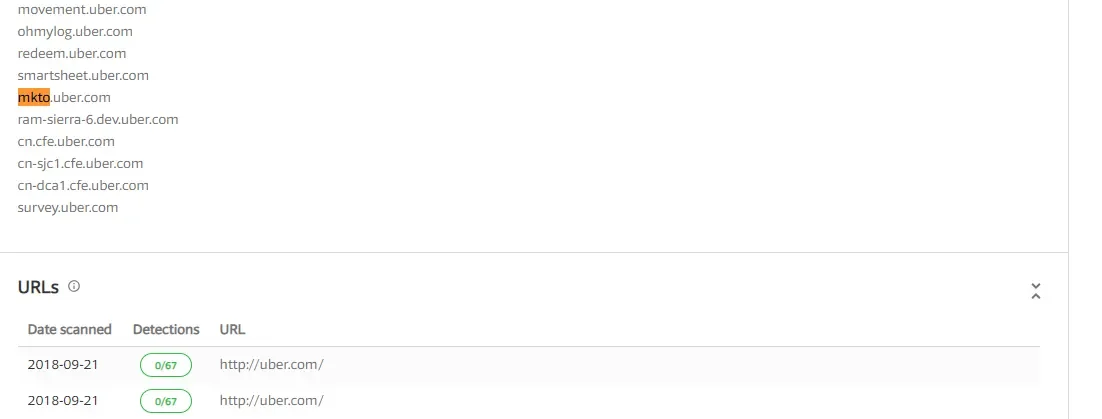
Because *.uber.com was whitelisted in script-src, this host could be used to satisfy the policy.
Exploitation
Step 1: build the injection
The v parameter is reflected into a content attribute without filtering. Supplying a value that closes the attribute and the tag lets the attacker add a new element after it.
Step 2: load script from the whitelisted host
He used a basic payload on the referral URL, pointing a script element at the Marketo host with a callback parameter:
The v value closes the content attribute and the meta tag, then opens a script element whose src is on mkto.uber.com, a host permitted by script-src through the *.uber.com wildcard. The callback parameter of the Marketo getKnownLead endpoint carries the JavaScript to run, so the response is valid script from an allowed origin. The researcher states that he created the link and checked it, and that it worked. The screenshot shows the payload in place:
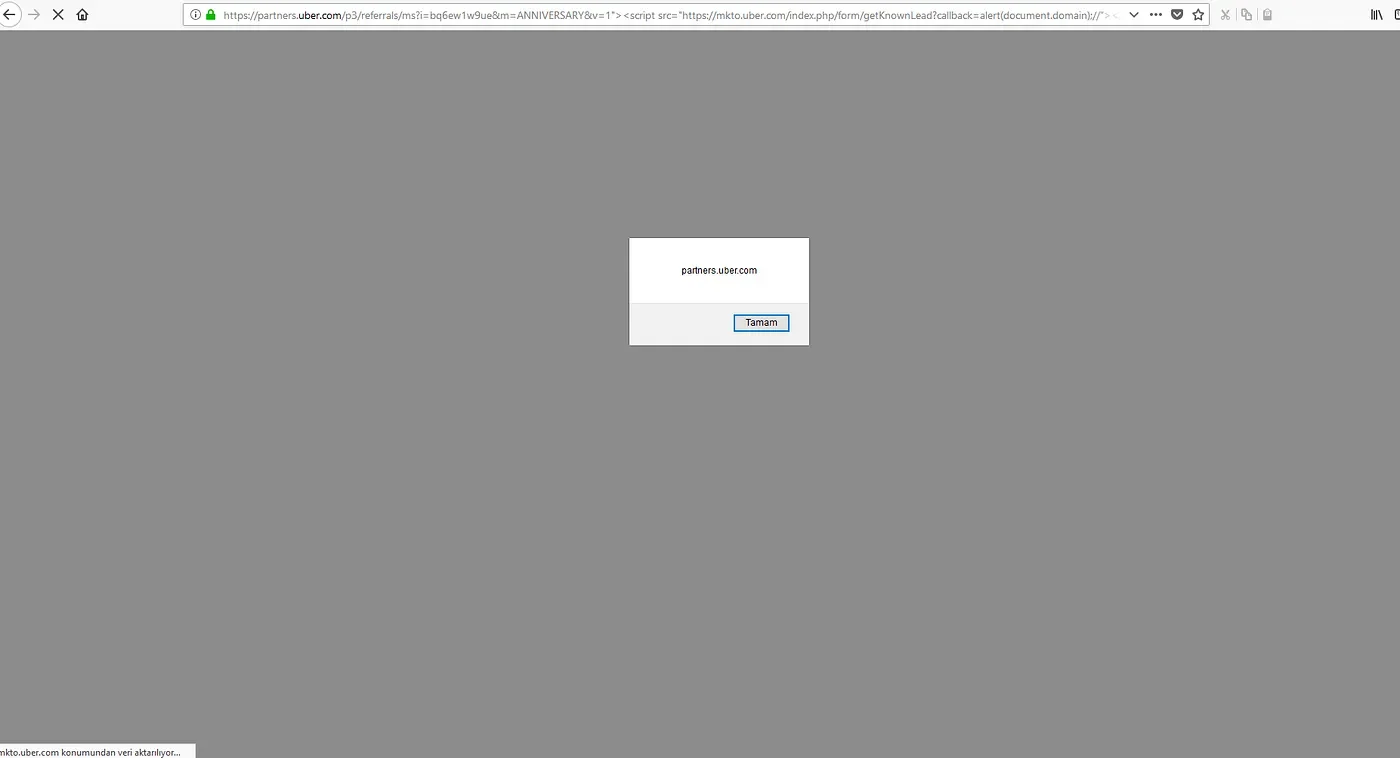
Step 3: execution
With the script loading from an allowed origin, the CSP no longer blocked it and the callback executed, confirming reflected XSS on partners.uber.com.
Root cause
The v parameter is reflected into an HTML attribute without filtering, so a double quote and a closing bracket break out of the content attribute and allow arbitrary markup. CSP was the only thing standing between the injection and execution, and it was weakened by whitelisting the whole *.uber.com wildcard: any Uber-controlled host that reflects a callback parameter into a JavaScript response becomes a gadget for bypassing the policy. The Marketo instance at mkto.uber.com provided exactly that. The report does not describe the server-side code, so the exact reason the value was not escaped is not stated.
Impact
An attacker who can get a victim to open a crafted referral link can run JavaScript in the origin of partners.uber.com. The report demonstrates execution with alert(document.domain) and, in the earlier blocked attempt, alert(document.cookie). It does not describe what data or actions were reachable from that origin, so the practical consequences beyond script execution in the partner origin are not established in the text. Exploitation requires the victim to click the crafted link.
Fix
Uber fixed the vulnerability on 27 August 2018, according to the timeline.
Timeline
| Date | Event |
|---|---|
| 03-08-2018 | Reported to Uber |
| 07-08-2018 | Status changed to "Triaged" |
| 22-08-2018 | Additional information sent and process queried |
| 23-08-2018 | Uber replied that the information was passed to the internal team |
| 27-08-2018 | Vulnerability fixed |
| 30-08-2018 | Bounty of $2,000 awarded |
| 03-04-2018 | Limited disclosure on HackerOne (date as written in the report) |
Variants to test
- Other reflected parameters on the same page. Fuzz every parameter of the referral URL, not just
v, with a quote and a tag. A positive result is the value appearing unencoded inside an attribute or script block in the response. - Other wildcard entries in CSP. For each
*.domainin ascript-srcdirective, enumerate subdomains and look for JSONP or callback endpoints. A positive result is a subdomain that returns attacker-controlled JavaScript in the response body. - Callback parameters on third-party SaaS hosts. Marketo, and similar marketing or analytics platforms, often expose endpoints such as
getKnownLeadwith acallbackparameter. A positive result is a response whose body begins with the callback value followed by a parenthesis. - Subdomain enumeration via passive sources. Query VirusTotal or similar sources for subdomains of the target and look for short names that map to third-party services. A positive result is a host that redirects to a known SaaS tenant, as
mkto.uber.comdid. - Attribute context breakouts. Where a value lands inside a
contentattribute, try closing the attribute and the tag, as in the payload above. A positive result is a new element appearing in the DOM next to the original meta tag. - Dork-based discovery of parameter-rich URLs. Use
site:dorks to collect shared links and compare their parameters. A positive result is a parameter that is not present in the canonical link and that is reflected in the page.
What happened, in plain words
A security researcher who describes himself as a beginner, not a professional, spent time looking at Uber's websites. Uber runs a bug bounty programme: a scheme where companies pay people who find security problems in their systems and report them privately instead of exploiting them. This report is about one such finding, on a page used to celebrate how long a driver has worked for Uber.
His first idea was not the bug he ended up finding. He was hunting for something called an open redirect, a flaw where a website link sends you to a different site chosen by whoever made the link. He hoped to combine it with another flaw to make something more serious. Uber's own published rules say plain open redirects are usually not worth reporting, so he needed a second bug to pair with it. He never found one, and the redirect was fixed anyway.
He then changed direction and looked at Uber's invitation links, the kind people share on social media to invite new drivers. On one of those links he found an extra parameter that showed an anniversary image. He tried to inject code into it. The page did not block his input, but his code still did not run, because of a browser security feature called Content Security Policy (CSP). CSP is a rule the website sends to your browser saying which sources of code are allowed to run. He then studied that rule, found a loophole in it, and used an Uber-owned subdomain to get his code to run. Uber paid him $2,000 and fixed the problem.
This article walks through the whole story step by step, explaining every term as it comes up. You only need to know how to use a browser.
Background: what the pages are and what he was looking for
The target was Uber's partner platform, the website used by drivers and delivery partners, at partners.uber.com. Two kinds of page matter here:
- Referral pages: pages that carry an invitation code so a new driver can sign up through an existing one.
- Anniversary pages: pages that celebrate a milestone, for example one year of driving. The URL has a parameter called
vthat holds the number of years worked, and the page shows a matching anniversary image.
A parameter (also called a query parameter) is the part of a web address after the question mark. In ?name=value, name is the parameter and value is what it is set to. Multiple parameters are joined with &. Websites read these values to decide what to show you.
Before going further, the researcher quoted Uber's bug bounty policy on open redirects:
"Open redirects. 99% of open redirects have low security impact. For the rare cases where the impact is higher, e.g. stealing oauth tokens, we do still want to hear about them."
In plain words: Uber says most open redirects are low impact, so they generally do not want them reported, unless the redirect can be used for something bigger such as stealing login tokens. A token here means a short piece of secret text that proves who you are, a bit like a wristband at an event that lets you back in without showing your ticket again. That policy is why the researcher did not simply report the redirect he found: he wanted to chain it with something else.
Setup: what tools he used
No accounts, special software or version numbers are described. The work was done with a browser, Google search tricks called dorks, and reading other people's write-ups. A dork is just a search query with special operators, for example site: to restrict results to one website. The researcher says he is a newcomer rather than a professional security engineer. The report does not say which browser or extensions he used.
Finding it
The open redirect that went nowhere
While looking through pages on partners.uber.com, he found this URL posted on a forum:
https://partners.uber.com/carrier-discounts/att/redirect?href=http://www.wireless.att.com/
Line by line:
https://partners.uber.comis Uber's partner website./carrier-discounts/att/redirectis a page whose job is to send you onward to another address.?href=http://www.wireless.att.com/is the parameter telling it where to send you.hrefis short for hyperlink reference, the same word used in HTML for a link target.
If a page takes the destination from the URL like this and does not check it, anyone can craft a link that looks like it belongs to Uber but sends the visitor somewhere else. That is an open redirect.
He then found a similar URL using Google dorks. The href parameter was indeed an open redirect. He spent hours looking for a second vulnerability in the login section to combine with it, found nothing, and did not report it. A week later the redirect no longer worked: whatever was put in the href parameter, the response redirected to https://www.wireless.att.com. Whether Uber fixed it on its own or someone else reported it is not known from the report.
Pivoting to invitation links
He then turned to Uber's most widely shared URLs: invitation links. He lists two forms:
https://www.uber.com/a/join?exp_hvp=1&invite_code=bq6ew1w9ue
Line by line:
https://www.uber.com/a/joinis the public sign-up page.exp_hvp=1is a parameter whose meaning the report does not explain.invite_code=bq6ew1w9ueis the invitation code identifying who invited the new driver.
https://partners.uber.com/p3/referrals/ms?i=bq6ew1w9ue
Line by line:
https://partners.uber.com/p3/referrals/msis the partner-side referral page.i=bq6ew1w9ueis the same invitation code, here under the shorter namei.
The first showed nothing when tested for XSS. XSS, short for Cross-Site Scripting, is a flaw where a website takes input from a visitor and puts it into the page without neutralising it, so the input is treated as code by the browser instead of as text. Think of a comment box that lets you write a note, but the site pastes your note into the page as if it were part of the site's own instructions. If you write instructions instead of a note, the browser obeys them.
The second link uses the same invite code and redirects to another URL when clicked. Rather than stop there, he asked why other parameters on it should not be tested, and listed the subdomain with a basic dork:
site:partners.uber.com
Line by line:
site:is a search operator that limits results to one website.partners.uber.comis the site being searched.
So this asks a search engine: show me every page you have indexed from partners.uber.com. That produced a large list of invitation links. His aim was to find an additional parameter, and he found one:
https://partners.uber.com/p3/referrals/ms?i=bq6ew1w9ue&m=ANNIVERSARY&v=1
Line by line:
i=bq6ew1w9ueis the invitation code, as before.m=ANNIVERSARYtells the page which kind of milestone to show.v=1is the number of years worked, used to pick the anniversary image.
Injection without execution
Injecting XSS payloads into v produced no pop-up. A payload is the specific piece of input an attacker sends to try to trigger a flaw. A pop-up here means a JavaScript alert box appearing in the browser, the usual sign that injected code ran. So he inspected the page source. The original markup was:
content="static/images/milestones/anniversary/anniversary_1.png" />
Line by line:
- This is a fragment of an HTML tag, showing an attribute that carries a value rather than visible content.
content="..."is an attribute: a named setting on the tag, with its value in double quotes.static/images/milestones/anniversary/anniversary_1.pngis the path of the anniversary image./>closes the tag.
After his payload it became:
content="static/images/milestones/anniversary/anniversary_1 "><img src=x onerror=alert(document.cookie)>.png" />
Line by line:
content="static/images/milestones/anniversary/anniversary_1is the start of the original attribute, now cut short by the injected double quote.">closes the attribute and themetatag, so the browser thinks the tag has ended.<img src=x onerror=alert(document.cookie)>is a new tag the attacker added.imgnormally shows a picture;src=xpoints at a picture that does not exist;onerror=is an event handler, code the browser runs when loading the picture fails. Becausexnever loads, the handler runs immediately.alert(document.cookie)is the code being run.document.cookiereads the site's cookies, andalertshows them in a pop-up. A cookie is a small piece of data a website stores in your browser, often used to remember that you are logged in, a bit like a cloakroom ticket that lets you collect your coat without proving who you are again..png" />is the leftover tail of the original value, now just text after the injected tag.
The parameter was not filtered, the quote broke out of the attribute and an img tag with an onerror handler was injected, yet nothing executed. That pointed at Content Security Policy. The report quotes Netsparker's definition: CSP is a way to selectively specify which content should be loaded in web applications, by whitelisting specific origins or using nonces or hashes.
In plain words: CSP is a list the website sends with each page telling the browser which places code may come from. An origin is the combination of protocol, host and port, roughly "which website". A nonce is a one-time random value attached to a legitimate script tag so the browser can recognise it as approved. A hash is a fingerprint of a script's contents, used the same way. If injected code does not match any of these, the browser refuses to run it, even though the code is sitting in the page.
Reading the CSP
The CSP header for partners.uber.com is described as very long; the report reproduces only the part after script-src:
Line by line:
script-srcis the part of the policy that governs where JavaScript may be loaded from.'self'means the same origin as the page itself.'unsafe-inline'would normally allow code written directly inside the page.'nonce-...'is the one-time value that marks Uber's own scripts as trusted.- The
https://...entries are whitelisted origins: Google services, CloudFront (a content delivery network, a service that serves files from servers close to the visitor), an internal Uber host, and so on. https://*.uber.comis a wildcard: it allows any subdomain ofuber.com. A wildcard is a stand-in for "anything here", like writing*.example.comto mean every subdomain.- The final
;ends the directive.
The researcher first examined rules.quantcount.com for JSON endpoints but found nothing useful. A JSON endpoint is a URL that returns data in JSON, a plain text format for structured data that programs can read easily. The interesting entry was https://*.uber.com: any Uber subdomain that serves a JSON endpoint with a callback-style parameter could be used to execute script under the policy. A callback parameter is a parameter whose value the server wraps around its data in the response, so the response becomes a function call. If the server does not check the value, you can put your own code there and the server will hand it back to the browser as if it were legitimate script from that server.
He also credits a write-up by stamone on DOM XSS at auth.uber.com, linked as http://stamone-bug-bounty.blogspot.com/2017/10/dom-xss-auth14.html, where the CSP allowed *.marketo.com and the author found a callback parameter with dorks. DOM XSS is XSS where the flaw happens in the browser's own handling of the page (the DOM, the browser's model of the page) rather than on the server. The screenshot in that part of the article shows the callback parameter working:
Finding an allowed host
Following that lead, the researcher searched Uber's subdomains on VirusTotal and found one named mkto. VirusTotal is a website that aggregates information about domains and files, and it can be used to list subdomains of a domain. He guessed that mkto was short for Marketo, a marketing platform companies use to manage leads and forms, and confirmed it: visiting mkto.uber.com redirects to https://app-ab19.marketo.com/index.php, so the host is a Marketo instance. The screenshot shows the subdomain listing that led him there:
Because *.uber.com was whitelisted in script-src, this host could be used to satisfy the policy. In other words, the browser would happily load code from mkto.uber.com because it matches the wildcard, even though the code actually comes from a third-party marketing service.
Exploitation
Step 1: build the injection
The v parameter is reflected into a content attribute without filtering. Reflected means the value you send in the URL is echoed back into the page you receive. Supplying a value that closes the attribute and the tag lets the attacker add a new element after it. This is the same breakout shown earlier: a double quote ends the attribute, and > ends the tag.
Step 2: load script from the whitelisted host
He used a basic payload on the referral URL, pointing a script element at the Marketo host with a callback parameter:
Line by line:
https://partners.uber.com/p3/referrals/msis the referral page, as before.?i=bq6ew1w9ue&m=ANNIVERSARY&v=1are the normal parameters, withv=1starting the value.">closes thecontentattribute and themetatag, ending the original markup early.<script src="https://mkto.uber.com/index.php/form/getKnownLead?callback=alert(document.domain);">adds a new script element.srcis the address the browser should fetch code from. That address is onmkto.uber.com, which the CSP allows through*.uber.com.callback=alert(document.domain)is the value the Marketo endpoint will wrap around its response.alert(document.domain)shows a pop-up with the current domain, which proves the code ran in the context of the page.</script>closes the script element.
The v value closes the content attribute and the meta tag, then opens a script element whose src is on mkto.uber.com, a host permitted by script-src through the *.uber.com wildcard. The callback parameter of the Marketo getKnownLead endpoint carries the JavaScript to run, so the response is valid script from an allowed origin. The researcher states that he created the link and checked it, and that it worked. The screenshot shows the payload in place:
Step 3: execution
With the script loading from an allowed origin, the CSP no longer blocked it and the callback executed, confirming reflected XSS on partners.uber.com. In everyday terms: the page still had the flaw, but the browser's rulebook had a hole, and the attacker found a website inside the allowed list that would happily hand back whatever code was asked for.
Root cause
The v parameter is reflected into an HTML attribute without filtering, so a double quote and a closing bracket break out of the content attribute and allow arbitrary markup. Encoding here means converting special characters such as " and > into harmless text so the browser treats them as data, not as structure. CSP was the only thing standing between the injection and execution, and it was weakened by whitelisting the whole *.uber.com wildcard: any Uber-controlled host that reflects a callback parameter into a JavaScript response becomes a gadget for bypassing the policy. A gadget in this context is a legitimate feature that an attacker can repurpose to do something it was not meant to do. The Marketo instance at mkto.uber.com provided exactly that.
Impact
An attacker who can get a victim to open a crafted referral link can run JavaScript in the origin of partners.uber.com. The report demonstrates execution with alert(document.domain) and, in the earlier blocked attempt, alert(document.cookie). Exploitation requires the victim to click the crafted link. In plain words: the attacker cannot do this on their own; they need to trick someone into opening a link, for example by sharing it as if it were a normal invitation.
Fix
Uber fixed the vulnerability on 27 August 2018, according to the timeline.
Timeline
| Date | Event |
|---|---|
| 03-08-2018 | Reported to Uber |
| 07-08-2018 | Status changed to "Triaged" |
| 22-08-2018 | Additional information sent and process queried |
| 23-08-2018 | Uber replied that the information was passed to the internal team |
| 27-08-2018 | Vulnerability fixed |
| 30-08-2018 | Bounty of $2,000 awarded |
| 03-04-2018 | Limited disclosure on HackerOne (date as written in the report) |
A triaged status means the company has looked at the report and accepted it as a real issue worth investigating. A bounty is the money paid for a valid report. Limited disclosure means some details of the report were made public, usually after the fix.
Variants to test
If you want to practise the same thinking on a site you are allowed to test, here are the directions the researcher's approach suggests. Each one names what to try and what a positive result looks like.
- Other reflected parameters on the same page. Try every parameter of the referral URL, not just
v, with a quote and a tag. A positive result is the value appearing unencoded inside an attribute or script block in the response. - Other wildcard entries in CSP. For each
*.domainin ascript-srcdirective, list subdomains and look for JSONP or callback endpoints. A positive result is a subdomain that returns attacker-controlled JavaScript in the response body. - Callback parameters on third-party SaaS hosts. Marketing and analytics platforms often expose endpoints such as
getKnownLeadwith acallbackparameter. A positive result is a response whose body begins with the callback value followed by a parenthesis. - Subdomain enumeration via passive sources. Query VirusTotal or similar sources for subdomains of the target and look for short names that map to third-party services. A positive result is a host that redirects to a known SaaS tenant, as
mkto.uber.comdid. SaaS means software as a service: a product run by another company and used through the browser. - Attribute context breakouts. Where a value lands inside a
contentattribute, try closing the attribute and the tag, as in the payload above. A positive result is a new element appearing in the page next to the original meta tag. - Dork-based discovery of parameter-rich URLs. Use
site:dorks to collect shared links and compare their parameters. A positive result is a parameter that is not present in the canonical link and that is reflected in the page.
Glossary
- Attribute: a named setting on an HTML tag, written as
name="value". - Bounty: money paid by a company for a valid security report.
- Bug bounty programme: a scheme where companies invite people to report security flaws privately, often for a reward.
- Callback parameter: a URL parameter whose value a server wraps around its response, turning the response into a function call.
- Content Security Policy (CSP): a rule sent by a website telling the browser which sources of code are allowed to run.
- Cookie: a small piece of data a website stores in your browser, often used to remember that you are logged in.
- Dork: a search query using special operators, such as
site:, to narrow results. - DOM XSS: XSS caused by the browser's own handling of the page rather than by the server.
- Encoding: converting special characters into harmless text so the browser treats them as data, not structure.
- Gadget: a legitimate feature repurposed by an attacker to do something it was not meant to do.
- Hash (in CSP): a fingerprint of a script's contents used to approve it.
- HTML: the language that describes the structure of a web page.
- JSON: a plain text format for structured data that programs can read easily.
- JSON endpoint: a URL that returns data in JSON.
- JSONP: a technique where a server returns data wrapped in a function call so it can be loaded as a script.
- Marketo: a marketing platform used to manage leads and forms.
- Nonce: a one-time random value attached to a legitimate script so the browser can recognise it as approved.
- Open redirect: a flaw where a website link sends you to a different site chosen by whoever made the link.
- Origin: the combination of protocol, host and port, roughly "which website".
- Parameter (query parameter): the part of a web address after the question mark, in
name=valueform. - Payload: the specific input an attacker sends to try to trigger a flaw.
- Reflected: a value sent in the URL that is echoed back into the page you receive.
- SaaS: software as a service, a product run by another company and used through the browser.
- Token: a short piece of secret text that proves who you are.
- Triaged: a status meaning the company has accepted a report as a real issue worth investigating.
- Wildcard: a stand-in for "anything here", such as
*.example.comfor every subdomain. - XSS (Cross-Site Scripting): a flaw where a website puts visitor input into the page without neutralising it, so the browser treats it as code.




