[affiliates.udemy.com] Wordpress user admin information discloure
The WordPress REST API user endpoint was left enabled on an affiliate subdomain, exposing administrator usernames. An attacker could use the disclosed usernames to target password brute-force attempts against the login system.

- Fixed in 16 hours
- Paid in 7 months
- Disclosed after 10 months
Summary
This website using Wordpress CMS, so developer forget to disable the link that can view information of admin user. By access to this link, attacker can get all username and other information of user admin:
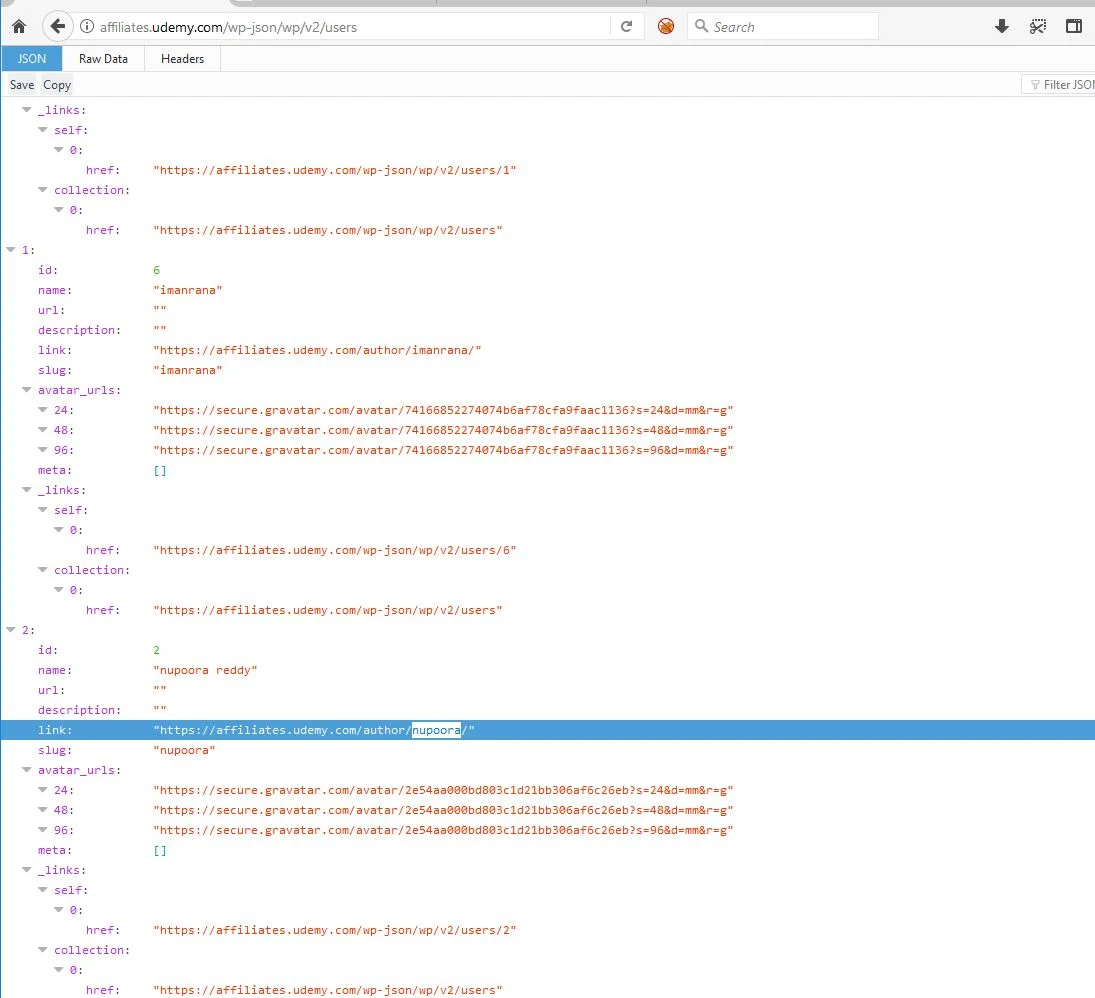
Admin user list:
- hamza
- imanrana
- nupoora
Impact
With this vulnerability, attacker can get username of user admin and only brute-force the password for logging in the system.
What the report shows
The target is affiliates.udemy.com, a site the researcher identifies as running WordPress. The researcher reports that the developer left enabled a link that exposes information about administrative users. The endpoint named in the report is:
http://affiliates.udemy.com/wp-json/wp/v2/users
Requesting that URL returned a listing of users, which the researcher presents as the admin user list:
- hamza
- imanrana
- nupoora
The screenshot is captioned as the admin user list.
The report was disclosed on 28 April 2019 and is rated low severity, with the weakness classified as information disclosure. The report does not record a bounty amount or a fix.
Root cause
The report points to a configuration mistake: the WordPress REST API users route was reachable without authentication, so the site returned user records to anyone who asked. The researcher frames this as the developer forgetting to disable the link.
Impact
The researcher states the impact narrowly: an attacker obtains the usernames of administrative users and can then brute-force passwords against the login system, targeting known accounts instead of guessing names. The report does not claim that any password was cracked or that any account was accessed. The value here is enumeration: valid admin usernames reduce the guessing work in a later credential attack.
How this kind of bug works
Modern WordPress exposes a REST API under /wp-json/. The users collection route returns a paginated list of user objects, and each object normally includes fields such as the user ID, display name, slug and, depending on configuration, more. Because the route is part of the core API, it exists on most installations whether or not the site owner uses it, and it is readable by unauthenticated visitors by default. Plugins and themes that add their own REST routes can widen this further.
The same class of exposure appears in other frameworks: JSON endpoints that back a front-end application and return full user objects, author archives that reveal login names, and API routes that were meant for internal use but were never given an authorisation check. The common thread is a read endpoint that returns more than the caller needs, with no check on who is calling.
Defences are straightforward: restrict the users route to authenticated or privileged callers, remove fields that are not needed from the response, and avoid exposing login names where a display name would do. Rate limiting and monitoring on authentication endpoints reduce the value of enumeration, and multi-factor authentication makes a stolen or guessed password far less useful.
How to test for it
- Identify the stack. Response headers, cookie names, generator meta tags,
/wp-json/availability and predictable paths such as/wp-login.phpare quick signals that a site runs WordPress. - Request the users collection route on the target host and observe the status and body. A positive result is a JSON array of user objects returned to an unauthenticated client.
- Walk the pagination parameters to see how many records are reachable, and note which fields come back: identifiers, slugs, display names, and anything richer.
- Check related routes and parameters that filter or expand user data, and compare what an anonymous caller sees with what a low-privileged account sees.
- Confirm the exposure is real by checking that the returned names are valid accounts, for example by comparing them with author pages or the login flow, without attempting any authentication attack.
Common false positives: a route that returns only public display names already shown on author archive pages, a response that is cached HTML rather than live data, a generic 404 or error page that merely mentions the route, or a listing that requires a valid session and only appeared to work because of a stale cookie. Confirm with a clean, unauthenticated client before reporting.
How it is fixed
- Restrict the users REST route so it requires authentication or an appropriate capability, using a filter on the REST API or a plugin that hardens the endpoint.
- Remove unnecessary fields from user responses so that only what the front end needs is returned.
- Replace login-name exposure with display names on public pages and author archives.
- Add rate limiting and alerting on authentication endpoints, and enable multi-factor authentication for administrative accounts.
- Review custom REST routes for the same missing authorisation checks.
Hunting notes
This bug class hides wherever an application programming interface serves a front end: REST routes, GraphQL schemas, mobile API back ends, and older JSON endpoints left behind after a redesign. On WordPress, the users route is the obvious starting point, but also look at plugin routes, oEmbed responses, sitemaps and feed endpoints, all of which can leak account names.
Recon signals include a /wp-json/ root that responds, a front end that fetches user data from an API, and author archive URLs that contain a slug different from the display name. Compare responses across hosts in the same organisation, since hardening is often applied unevenly.
To make the report land, show the exact request and the response with the sensitive fields visible, state clearly that no authentication was used, and explain the concrete next step an attacker gains, such as a shortlist of valid administrative usernames for credential attacks. Avoid overstating impact: if only display names are exposed, say so, and if the names are already public elsewhere, the report is weak. Programs accept enumeration reports most readily when the data is not otherwise available and when the path to real harm is short and specific.
What happened, in plain words
A security researcher looked at affiliates.udemy.com, a website that he says runs on WordPress. WordPress is a popular program for building websites; you install it, pick a theme and plugins, and it gives you pages, posts and a login system without writing code yourself.
WordPress also has a built-in feature called the REST API. Think of it as a service counter at the back of the site: other software, such as a mobile app or a piece of JavaScript running in a visitor's browser, can walk up to the counter and ask for data in a machine-friendly format instead of a web page. The researcher found that one of these counters, the one that lists the site's users, was open to anyone. He describes it as the developer forgetting to switch off the link that shows information about administrator accounts.
The address he names is:
http://affiliates.udemy.com/wp-json/wp/v2/users
Reading it from left to right: http:// is the protocol, the way the browser and the server agree to talk. affiliates.udemy.com is the server. /wp-json/ is the entrance to the WordPress REST API, and /wp/v2/users is the specific counter that deals with user records. Typing that address into a browser is a request: the browser asks the server for that resource, and the server answers with data.
When the researcher made that request, the server answered with a list of users. He presents these as the admin user list:
- hamza
- imanrana
- nupoora
The screenshot is captioned as the admin user list. JSON is just a text format for structured data, a bit like a very strict shopping list where every item has a label; browsers and programs can read it easily, and so can a person.
The report was disclosed on 28 April 2019 and is rated low severity, with the weakness classified as information disclosure. It does not record a bounty amount or a fix.
Why this matters
The researcher keeps the impact narrow. With these usernames, an attacker knows which accounts exist and which of them are administrators. That makes a later password-guessing attack, called brute force, much cheaper: instead of trying common names and hoping one is real, the attacker can aim at confirmed accounts. Brute force means trying passwords one after another, automatically, until one works, like trying every key on a large key ring on a single door.
The report does not claim that any password was cracked or that any account was accessed. The value is enumeration: learning which names are valid. The report does not say how the issue was resolved.
In general, how this kind of bug works
Modern WordPress exposes a REST API under /wp-json/. The users collection route returns a paginated list of user objects, meaning the answer comes in pages rather than all at once, and each object normally includes fields such as the user ID, display name and slug, a short name used in web addresses. Because the route is part of the core API, it exists on most installations whether or not the site owner uses it, and it is readable by visitors who have not logged in by default.
The same class of exposure appears in other frameworks: JSON endpoints that back a front-end application and return full user objects, author archives that reveal login names, and API routes meant for internal use that never got an authorisation check. The common thread is a read endpoint that returns more than the caller needs, with no check on who is calling.
Defences are straightforward: restrict the users route to logged-in or privileged callers, remove fields that are not needed from the response, and avoid exposing login names where a display name would do. Rate limiting, which caps how many requests a client may make in a period, and monitoring on login pages reduce the value of enumeration, and multi-factor authentication, a second proof of identity beyond the password, makes a guessed password far less useful.
In general, how to test for it
- Identify the stack. Response headers, cookie names, generator meta tags,
/wp-json/availability and predictable paths such as/wp-login.phpare quick signals that a site runs WordPress. A cookie is a small piece of data a site stores in your browser to remember you between requests. - Request the users collection route on the target host and observe the status and body. A positive result is a JSON array of user objects returned to a client that is not logged in.
- Walk the pagination parameters to see how many records are reachable, and note which fields come back: identifiers, slugs, display names, and anything richer.
- Check related routes and parameters that filter or expand user data, and compare what an anonymous caller sees with what a low-privileged account sees.
- Confirm the exposure is real by checking that the returned names are valid accounts, for example by comparing them with author pages or the login flow, without attempting any authentication attack.
Common false positives: a route that returns only public display names already shown on author archive pages, a response that is cached HTML rather than live data, a generic 404 or error page that merely mentions the route, or a listing that requires a valid session and only appeared to work because of a stale cookie. Confirm with a clean, unauthenticated client before reporting.
In general, how it is fixed
- Restrict the users REST route so it requires authentication or an appropriate capability, using a filter on the REST API or a plugin that hardens the endpoint.
- Remove unnecessary fields from user responses so that only what the front end needs is returned.
- Replace login-name exposure with display names on public pages and author archives.
- Add rate limiting and alerting on authentication endpoints, and enable multi-factor authentication for administrative accounts.
- Review custom REST routes for the same missing authorisation checks.
In general, where to look
This bug class hides wherever an application programming interface serves a front end: REST routes, GraphQL schemas, mobile API back ends, and older JSON endpoints left behind after a redesign. On WordPress, the users route is the obvious starting point, but also look at plugin routes, oEmbed responses, sitemaps and feed endpoints, all of which can leak account names.
Recon signals include a /wp-json/ root that responds, a front end that fetches user data from an API, and author archive URLs that contain a slug different from the display name. Compare responses across hosts in the same organisation, since hardening is often applied unevenly.
To make the report land, show the exact request and the response with the sensitive fields visible, state clearly that no authentication was used, and explain the concrete next step an attacker gains, such as a shortlist of valid administrative usernames for credential attacks. Avoid overstating impact: if only display names are exposed, say so, and if the names are already public elsewhere, the report is weak. Programs accept enumeration reports most readily when the data is not otherwise available and when the path to real harm is short and specific.
Glossary
- WordPress: a popular program for building and running websites, with pages, posts and a login system.
- CMS: content management system, software such as WordPress that lets people publish and manage site content without coding.
- REST API: a set of addresses on a server that return data in a machine-friendly format rather than web pages.
- Endpoint: one specific address in an API, such as the users route.
- Request: a message a browser or program sends to a server asking for something.
- Response: the server's answer to a request, such as a page or a block of data.
- JSON: a text format for structured data, made of labelled values, easy for programs to read.
- Information disclosure: a weakness where a system reveals data to someone who should not have it.
- Enumeration: collecting a list of valid items, here valid usernames, by asking the system.
- Brute force: automatically trying many passwords or names until one works.
- Authentication: proving who you are, usually with a username and password.
- Authorisation: deciding what an identified user is allowed to do or see.
- Unauthenticated: not logged in, so with no proven identity.
- Cookie: a small piece of data a site stores in your browser to remember you between requests.
- Session: the period during which a site remembers that you are logged in.
- Slug: a short name used in web addresses, often derived from a title or username.
- Pagination: splitting a long list of results into pages.
- Rate limiting: capping how many requests a client may make in a given period.
- Multi-factor authentication: requiring a second proof of identity beyond the password.
- False positive: a finding that looks like a problem but is not one.
- GraphQL: a query language for APIs, an alternative to REST.
- oEmbed: a standard that lets a site embed content from another site, such as a video.
- Sitemap: a file listing a site's pages to help search engines.
- Recon: short for reconnaissance, the early information-gathering stage of testing.