S3 bucket unnecessarily discloses permissions
The 'udemy-images' S3 bucket allowed the AllUsers group to list ACLs, exposing which users have READ, WRITE, READ_ACP, and WRITE_ACP rights. An attacker could gather information about authorised users to target them, for example by looking for breached passwords.

- Triaged in 4 days
- Fixed in 12 months
- Paid in 8 days
- Disclosed after 13 months
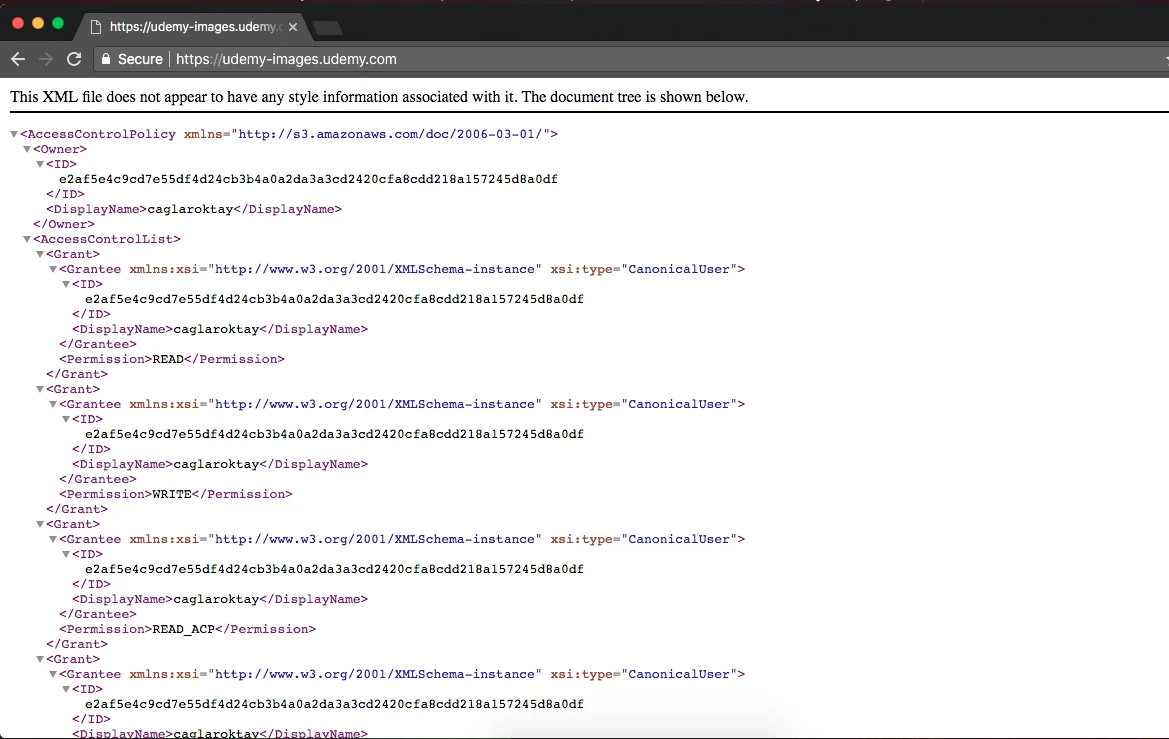
The 'udemy-images' bucket allows the 'AllUsers' group to list ACLs that are applied to the bucket. By navigating to: https://udemy-images.udemy.com or by using the aws-cli tool an attacker can see which users have READ, WRITE, READ_ACP, and WRITE_ACP rights. Doing this now we can see one user who has these rights (see attached screenshot). We can see their ID and DisplayName (hi @caglaroktay!)
Impact
While this doesn't give public users write access to the bucket, a motivated attacker can gather a lot of information from this. If one were targeting the Udemy AWS infrastructure, this information would give them all they need to know to start gathering intel on an authorized user (like @caglaroktay). An easy way to do this would be to look for breached passwords belonging to the authorized user to try logging into their AWS console with.
This public permission is unnecessary as it is not needed for the site to run properly and should be removed immediately.
Attachments
Context
Udemy serves its site assets from an Amazon S3 bucket named udemy-images, exposed through the custom domain udemy-images.udemy.com. S3 buckets can carry access control lists (ACLs) that grant individual AWS accounts or predefined groups rights over the bucket itself. The AllUsers group is the S3 group that represents anonymous, unauthenticated users. When a bucket grants AllUsers a permission, that permission applies to anyone on the internet, with no AWS credentials required.
The permission in question here is not read or write access to the objects. It is the ability to read the bucket's ACL, which is the list of who has been granted which rights on the bucket.
Setup
No account, role or special tooling was needed. The bucket is public-facing, and the researcher used two equivalent routes to reach the ACL: a browser pointed at the bucket's domain, and the aws-cli tool. The report does not give a CLI version or any credential configuration, which is consistent with the request being unauthenticated.
Finding it
The udemy-images bucket allows the AllUsers group to list the ACLs applied to the bucket. That means an anonymous visitor can retrieve the ACL document and see which users hold READ, WRITE, READ_ACP and WRITE_ACP rights on the bucket. The researcher's judgement was that this public permission is unnecessary and should be removed.
Exploitation
Step 1: Reach the bucket
The bucket is reachable at its custom domain:
https://udemy-images.udemy.com
Step 2: Retrieve the ACL
The same result can be obtained with the aws-cli tool, which lets an attacker pull the ACL listing directly rather than through the browser. The report does not include the exact command used.
Step 3: Read the grants
Doing this, the researcher could see one user who holds READ, WRITE, READ_ACP and WRITE_ACP rights on the bucket. The ACL exposes that user's ID and DisplayName. The attached screenshot shows the result.
The screenshot is the evidence for the finding: the bucket's ACL as returned to an anonymous requester, including the identity of the authorised user and the rights granted to them.
Root cause
The bucket's ACL grants the AllUsers group the ACL-reading permission. In S3 terms this is the READ_ACP permission granted to AllUsers, which makes the ACL document itself world-readable even though the objects and the write operations are not. The report does not describe how the bucket policy or ACL came to be configured this way; The report does not describe how the bucket policy or ACL came to be configured this way..
The important distinction is that this is not public write access to the bucket. The exposure is metadata: the identities and permission grants of the accounts that do have rights.
Impact
A public visitor cannot write to the bucket through this. What a motivated attacker gains is intelligence. If someone were targeting Udemy's AWS infrastructure, the ACL tells them exactly which user to focus on, and the report names the exposed account as an example of that. From there, an easy next step would be to look for breached passwords belonging to that authorised user and try them against the AWS console. The report frames this as a starting point for gathering intelligence on an authorised user, not as a compromise in itself.
Fix
The public permission should be removed. The researcher's position is that it is not needed for the site to run properly, so it should be removed. The report does not record a confirmation that the change was made.
Variants to test
- Check other buckets belonging to the same organisation for
AllUsersACL-read grants, using the same browser and CLI routes. A positive result is an ACL document returned to an unauthenticated request that names accounts and their grants. - Look for buckets whose custom domains appear in page source, CDN URLs or JavaScript bundles, since those hostnames are already public and easy to test.
- Test whether the same anonymous access extends beyond the ACL to object listing. A positive result there is a listing of keys rather than a permission document, which is a different and generally more serious finding.
- Check whether the exposed identities can be correlated with other public data, such as usernames reused elsewhere, to judge how much the disclosure really gives away.
Hunting notes
This class of bug hides in storage that is already public by design: image, static asset and media buckets behind custom domains. The signal during recon is a hostname that resolves to object storage and answers unauthenticated requests. From there, the question is which permissions the anonymous group actually holds, and ACL read is easy to overlook because it does not expose content.
The impact argument that carries the report is not the permission itself but the identity behind it: the ACL names a real authorised user, and the researcher explains the follow-on path of breached-password reuse against the AWS console. That framing, plus the point that the permission is unnecessary for the site to run, is what turns a metadata disclosure into something worth fixing.
What happened, in plain words
Udemy is a website that hosts online courses. Like most large sites, it does not keep every image and file on its own web servers. Instead it stores those files in Amazon S3, a cloud storage service run by Amazon Web Services (AWS). Think of an S3 bucket as a large shared filing cabinet in the cloud: you put files in it, and anyone with the right address can fetch them.
Udemy's image bucket is called udemy-images, and it is reachable through a friendly web address, udemy-images.udemy.com, rather than through Amazon's own long default address. That address is public because the site uses it to show images to every visitor.
S3 buckets can carry an access control list, usually shortened to ACL. An ACL is simply a list of who is allowed to do what with the bucket. One of the entries on that list can be a special group called AllUsers, which means literally everyone on the internet, including people who are not logged in and have no AWS account at all.
The problem in this report is that the udemy-images bucket let AllUsers read the ACL itself. In other words, any anonymous visitor could ask the bucket, "who has rights over you, and what are those rights?", and the bucket would answer. The answer named a real user and showed the permissions that user holds.
This is not the same as letting strangers upload or delete files. Nothing in the bucket could be changed by an outsider through this. What leaked was information: the identity of an authorised user and the shape of the permissions around the bucket. The researcher's point is that this information is a useful starting point for someone planning an attack on Udemy's AWS setup, and that the permission is unnecessary, so it should be removed.
The pieces involved
Before walking through the steps, here are the concepts that come up, explained from scratch.
Cloud storage and buckets. AWS S3 stores files as objects inside containers called buckets. Each bucket has a name, and each object inside it has a key, which is like a file path. A bucket can be reached either through Amazon's own address or through a custom domain that the owner points at it.
ACLs and grants. An ACL is a list of grants. A grant says that a particular person or group may perform a particular action. S3 uses four standard permissions on a bucket:
| Permission | What it allows |
|---|---|
READ |
List the objects in the bucket |
WRITE |
Create, overwrite and delete objects |
READ_ACP |
Read the ACL, that is, see who has which rights |
WRITE_ACP |
Change the ACL, that is, grant or revoke rights |
The AllUsers group. This is a predefined S3 group that stands for anonymous, unauthenticated users. If a bucket grants something to AllUsers, it grants it to anyone on the internet, with no login and no AWS credentials.
AWS accounts and identities. Every AWS user has an identifier, and S3 ACLs can show a DisplayName alongside it. That is a human-readable label attached to the account.
The AWS console. This is Amazon's web dashboard for managing cloud resources. It is protected by a username and password, so anyone who learns a valid username can try to log in if they also have the password.
The aws-cli tool. This is Amazon's command-line program for talking to AWS from a terminal. It can perform the same operations as the web console, including asking a bucket for its ACL.
Context
Udemy serves its site assets from an S3 bucket named udemy-images, exposed through the custom domain udemy-images.udemy.com. Because the bucket carries ACLs, it can grant individual AWS accounts or predefined groups rights over the bucket itself. The AllUsers group represents anonymous, unauthenticated users, so any permission given to it applies to anyone on the internet, with no AWS credentials required.
The permission at issue is not read or write access to the objects. It is the ability to read the bucket's ACL, the list of who has been granted which rights on the bucket.
Setup
No account, role or special tooling was needed. The bucket is public-facing, and the researcher used two equivalent routes to reach the ACL: a browser pointed at the bucket's domain, and the aws-cli tool. The report does not give a CLI version or any credential configuration, which fits with the request being unauthenticated.
Finding it
The udemy-images bucket allows the AllUsers group to list the ACLs applied to the bucket. That means an anonymous visitor can retrieve the ACL document and see which users hold READ, WRITE, READ_ACP and WRITE_ACP rights on the bucket. The researcher judged this public permission unnecessary and said it should be removed.
Exploitation
Step 1: Reach the bucket
The bucket is reachable at its custom domain:
https://udemy-images.udemy.com
Line by line: https is the encrypted web protocol a browser uses; udemy-images.udemy.com is the hostname, a subdomain of udemy.com that Udemy has pointed at the S3 bucket. This is the same bucket the site uses for images, so the hostname is already public and appears in normal browsing traffic.
Step 2: Retrieve the ACL
The same result can be obtained with the aws-cli tool, which lets an attacker pull the ACL listing directly rather than through the browser. The report does not include the exact command used.
Why two routes? A browser is the simplest way to confirm that an anonymous visitor gets an answer, because a browser sends no AWS credentials. The command-line tool is the more convenient way to pull structured data and read it carefully. Getting the same result both ways shows the exposure is a property of the bucket, not an accident of one particular client.
Step 3: Read the grants
Doing this, the researcher could see one user who holds READ, WRITE, READ_ACP and WRITE_ACP rights on the bucket. The ACL exposes that user's ID and DisplayName. The attached screenshot shows the result.
The screenshot is the evidence for the finding: the bucket's ACL as returned to an anonymous requester, including the identity of the authorised user and the rights granted to them. In plain terms, a stranger who never logged in was handed a list naming a real person and spelling out what that person is allowed to do with the bucket.
Root cause
The bucket's ACL grants the AllUsers group the ACL-reading permission. In S3 terms this is the READ_ACP permission granted to AllUsers, which makes the ACL document itself world-readable even though the objects and the write operations are not. The report does not describe how the bucket policy or ACL came to be configured this way; The report does not describe how the bucket policy or ACL came to be configured this way..
The important distinction is that this is not public write access to the bucket. The exposure is metadata: the identities and permission grants of the accounts that do have rights.
Impact
A public visitor cannot write to the bucket through this. What a motivated attacker gains is intelligence. If someone were targeting Udemy's AWS infrastructure, the ACL tells them exactly which user to focus on, and the report names the exposed account as an example of that. From there, an easy next step would be to look for breached passwords belonging to that authorised user and try them against the AWS console. The report frames this as a starting point for gathering intelligence on an authorised user, not as a compromise in itself.
Put simply: knowing a username is half of a login. If that person's password has already appeared in some unrelated data breach elsewhere on the internet, an attacker can pair the two and try the AWS console. The bucket did not leak a password, but it did hand over the name to aim at.
Fix
The public permission should be removed. The researcher's position is that it is not needed for the site to run properly, so it should be removed. The report does not record a confirmation that the change was made.
Variants to test
- Check other buckets belonging to the same organisation for
AllUsersACL-read grants, using the same browser and CLI routes. A positive result is an ACL document returned to an unauthenticated request that names accounts and their grants. - Look for buckets whose custom domains appear in page source, CDN URLs or JavaScript bundles, since those hostnames are already public and easy to test.
- Test whether the same anonymous access extends beyond the ACL to object listing. A positive result there is a listing of keys rather than a permission document, which is a different and generally more serious finding.
- Check whether the exposed identities can be correlated with other public data, such as usernames reused elsewhere, to judge how much the disclosure really gives away.
Hunting notes
This class of bug hides in storage that is already public by design: image, static asset and media buckets behind custom domains. The signal during recon is a hostname that resolves to object storage and answers unauthenticated requests. From there, the question is which permissions the anonymous group actually holds, and ACL read is easy to overlook because it does not expose content.
The impact argument that carries the report is not the permission itself but the identity behind it: the ACL names a real authorised user, and the researcher explains the follow-on path of breached-password reuse against the AWS console. That framing, plus the point that the permission is unnecessary for the site to run, is what turns a metadata disclosure into something worth fixing.
Glossary
- ACL (access control list): a list attached to a resource saying who may do what with it.
- Anonymous / unauthenticated: not logged in, with no account or credentials presented.
- AWS (Amazon Web Services): Amazon's cloud platform, offering storage, computing and many other services.
- AWS console: Amazon's web dashboard for managing AWS resources, protected by a login.
aws-cli: Amazon's command-line tool for performing AWS operations from a terminal.- Bucket: a container in S3 that holds files (objects).
- CDN (content delivery network): a network of servers that serves static files such as images close to visitors.
- Custom domain: a friendly web address owned by an organisation that points at a service such as a storage bucket.
- DisplayName: a human-readable label shown next to an AWS account identifier in an ACL.
- Grant: a single entry in an ACL stating that a person or group has a particular permission.
- Hostname: the part of a web address that names the server, for example
udemy-images.udemy.com. - Key: the name or path of an individual object inside a bucket.
- Metadata: data about data; here, information about the bucket and its permissions rather than the files themselves.
- Object: a single stored file in S3.
READ: the S3 permission to list the objects in a bucket.READ_ACP: the S3 permission to read a bucket's ACL, that is, to see who has which rights.- Recon (reconnaissance): the information-gathering phase of an attack, before any attempt to break in.
- S3 (Simple Storage Service): Amazon's cloud storage service for files and objects.
AllUsers: the predefined S3 group meaning everyone on the internet, logged in or not.WRITE: the S3 permission to create, overwrite and delete objects in a bucket.WRITE_ACP: the S3 permission to change a bucket's ACL, granting or revoking rights.



