Completed Compromise & Source Code Disclosure via Exposed Jenkins Dashboard at https://jenkins101.udemy.com
An exposed Jenkins dashboard allowed any GitHub user to authenticate and gain full read access to Udemy's source code and service credentials. The attacker could view sensitive keys and potentially take over third-party accounts, as demonstrated with Sendgrid.

- Triaged in 8 hours
- Fixed in 3 days
- Paid in 51 days
- Disclosed after 7 months
Summary by the researcher
I discovered a critical information disclosure bug via an exposed Jenkins dashboard located at https://jenkins101.udemy.com. Upon navigating to this address, I was presented with a Github authentication page. After authenticating, I was surprised to find that I had complete read access to the corresponding Jenkins Dashboard.
Contained within the dashboard was the complete Udemy source code, including the keys for various Udemy services.
The report
Howdy, @udemy!
Summary:
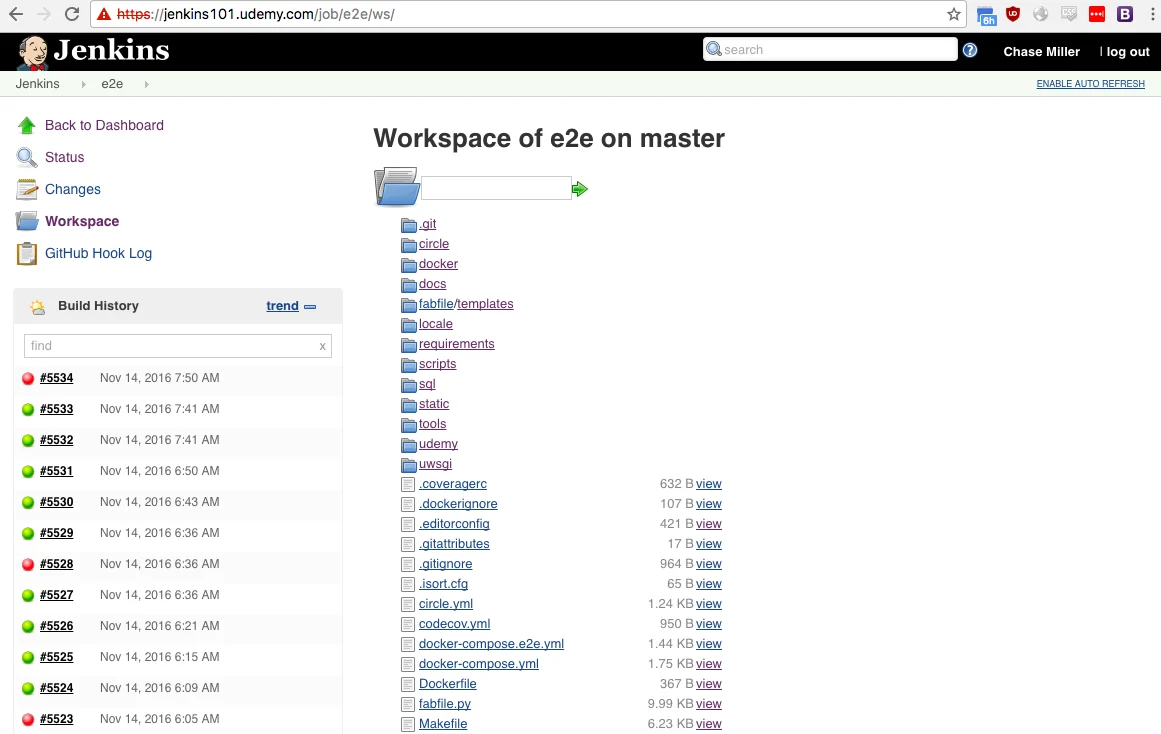
I am writing to inform you of a critical information disclosure bug via an exposed Jenkins dashboard located at https://jenkins101.udemy.com. Upon navigating to this address, I was asked to authenticate with my Github account. After authenticating, I was surprised to find that I had complete access to the corresponding Jenkins Dashboard as seen in the screenshot below:
Impact:
Contained within these files was the complete Udemy Django source code. This included complete database schemas and keys/ credentials for the following services:
- Crowdin
- Amazon Redshift
- Exchange
- Maxmind
- Sendgrid
- Sift
- Twilio
- Zencoder
- Level3
- Apple
- Salesforce
- Celery
- Paypal
- Stripe
- Freshdesk
- and more
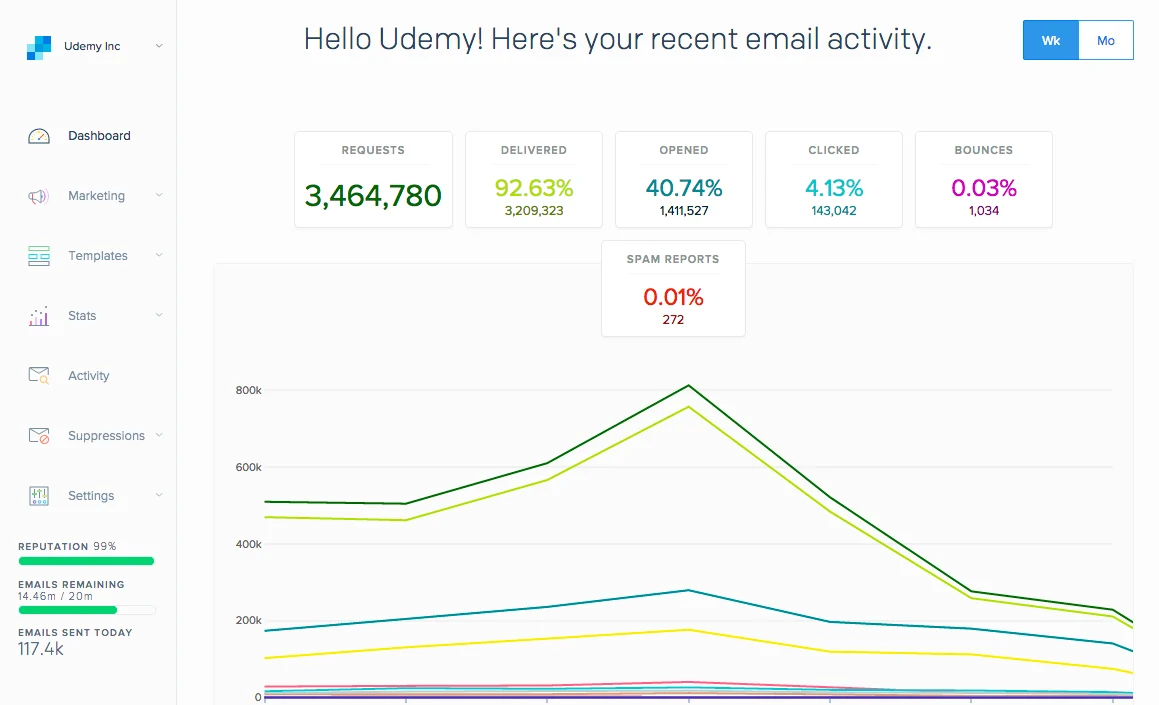
To verify that these credentials were active, I attempted to login into Sendgrid. I was able to take over the Udemy Sendgrid account as seen in the screenshot below. I did not make any change/ access any information.
Mitigation
Mitigation for this should be fairly straightforward, simply ensuring proper user authentication should prevent future unauthorized users from access the dashboard. I am not storing any of the informaiton that I came across, however, rekeying the compromised systems may not be a bad idea.
I hope this reports helps! Please let me know if you have any questions! 😁
Best, @n0rb3r7
Context
Udemy runs a Jenkins instance at https://jenkins101.udemy.com. Jenkins is a build and automation server: it holds job configurations, build history and, in many setups, the credentials and source code that the build jobs use. Access to a Jenkins dashboard is therefore access to whatever the builds touch.
The report describes an exposed Jenkins dashboard that was reachable by anyone who could authenticate with a GitHub account. The researcher characterises the issue as a critical information disclosure, and the platform classifies the weakness as code injection.
Setup
No special tooling, role or version is described. The only precondition the report states is a GitHub account: the dashboard asked the researcher to authenticate with GitHub, and after doing so it granted access. The report does not describe how the GitHub login was configured or who was meant to be allowed in.
Finding it
The researcher navigated to https://jenkins101.udemy.com and was presented with a GitHub authentication page. That in itself is unremarkable for a Jenkins instance configured with GitHub-based login. What looked wrong was what came after authentication: the researcher had complete read access to the corresponding Jenkins dashboard, rather than being rejected as an unauthorised user.
The screenshot shows the Jenkins dashboard as the researcher saw it after logging in with GitHub.
Exploitation
Step 1: Reach the dashboard and authenticate
The researcher opened the Jenkins host and completed the GitHub login prompt. The report gives no request or response for this step; it only states that authentication with a GitHub account was requested and that it succeeded.
Step 2: Read the dashboard contents
After authenticating, the researcher had complete read access to the dashboard. Inside it was the complete Udemy Django source code, including complete database schemas and keys and credentials for a long list of services:
- Crowdin
- Amazon Redshift
- Exchange
- Maxmind
- Sendgrid
- Sift
- Twilio
- Zencoder
- Level3
- Apple
- Salesforce
- Celery
- Paypal
- Stripe
- Freshdesk
- and more
Step 3: Confirm that a credential was live
To verify that the credentials were active rather than stale, the researcher attempted to log in to Sendgrid. The login succeeded and the researcher was able to take over the Udemy Sendgrid account. The report is explicit that no change was made and no information was accessed.
The screenshot shows the successful Sendgrid login that confirmed the credential was live.
Root cause
The report attributes the exposure to missing user authentication: the dashboard was reachable by users who should not have had access, and the GitHub login did not restrict entry to authorised Udemy users. The report does not describe the Jenkins configuration behind the GitHub login.
Impact
An outsider with a GitHub account could authenticate and then read the complete Udemy Django source code, the database schemas and credentials for the services listed above. The researcher demonstrated that at least one of those credentials, Sendgrid, was live by logging in with it. The researcher states that no changes were made and no information was accessed through the Sendgrid account.
Fix
The researcher's recommendation is straightforward: ensure proper user authentication so that unauthorised users cannot access the dashboard. The report also suggests that rekeying the compromised systems may not be a bad idea, given that credentials for many services were exposed.
Variants to test
- Jenkins instances that offer GitHub, Google or other OAuth logins: check whether any account can log in and see the dashboard, rather than only accounts from the owning organisation. A positive result is a dashboard listing jobs and builds after logging in with an unrelated account.
- Jenkins instances where the login succeeds but authorisation is the weak point: after authenticating, try to open job configuration, build logs and credential pages. A positive result is read access to source code, schemas or secrets that the account should not see.
- Credentials found in build configuration or logs: test one low-impact credential to confirm it is live, as the researcher did with Sendgrid, without changing anything. A positive result is a successful login to the third-party service.
Hunting notes
This kind of bug hides on build and CI hosts that are internet-facing and use a third-party identity provider for login. During recon, a Jenkins host that redirects to a GitHub or similar OAuth page is a signal worth following: the question is not whether login works, but who is allowed in once it does. The researcher read the source code and credentials and confirmed one credential was live by logging in without making changes.
What happened, in plain words
Udemy is an online learning site. Like most companies that build software, it runs a machine called a build server. That server, named Jenkins, is where the company's programmers put their code together, test it and ship it. Jenkins is not a website for customers: it is a workshop tool for staff.
This report is about that workshop being left open. The researcher found a Jenkins dashboard at https://jenkins101.udemy.com. A dashboard here means the web page where Jenkins shows its jobs, its build history and the files and passwords those jobs use. The page asked the researcher to log in with a GitHub account. GitHub is a website where programmers keep and share code, and many services let you use your GitHub account as a login, the same way some sites let you "sign in with Google".
The researcher logged in with GitHub, expecting to be turned away because they are not a Udemy employee. Instead they got full read access to the dashboard. Inside it was the complete Udemy source code (the actual text of the programs that run the site), the database schemas (the blueprints of how data is stored) and login details for many outside services Udemy uses. To prove the login details were real and not old leftovers, the researcher used one of them to log in to Sendgrid, an email-sending service, and got in. They then stopped, changed nothing and read nothing.
Context
Jenkins is a build and automation server. Think of it as a robot workshop: programmers write instructions (jobs), the robot follows them (builds), and to do its work the robot needs keys, passwords and copies of the code. So the workshop holds exactly the things you would not want a stranger to see: the code, the plans for the database, and the keys to other services.
Access to a Jenkins dashboard is therefore access to whatever the builds touch. If you can read the dashboard, you can read the code and the keys.
The report describes an exposed Jenkins dashboard that was reachable by anyone who could authenticate with a GitHub account. The researcher calls the issue a critical information disclosure. Information disclosure simply means private information was shown to someone who should not have seen it. The platform that published the report classifies the weakness as code injection; the report itself does not explain that label, and the steps it describes are about reading, not injecting anything.
Setup
No special tooling, role or version is described. The only precondition the report states is a GitHub account. The dashboard asked the researcher to authenticate with GitHub, and after doing so it granted access. The report does not describe how the GitHub login was configured or who was meant to be allowed in.
An allow-list is a guest list: a list of names that are allowed in. The report does not describe how the login was meant to restrict access.
Finding it
The researcher navigated to https://jenkins101.udemy.com and was presented with a GitHub authentication page. That in itself is unremarkable for a Jenkins instance configured with GitHub-based login. What looked wrong was what came after authentication: the researcher had complete read access to the corresponding Jenkins dashboard, rather than being rejected as an unauthorised user.
The screenshot shows the Jenkins dashboard as the researcher saw it after logging in with GitHub.
Exploitation
Step 1: Reach the dashboard and authenticate
The researcher opened the Jenkins host and completed the GitHub login prompt. The report gives no request or response for this step; it only states that authentication with a GitHub account was requested and that it succeeded.
Authentication means proving who you are, like showing a passport at a desk. It is not the same as authorisation, which means being allowed in.
Step 2: Read the dashboard contents
After authenticating, the researcher had complete read access to the dashboard. Inside it was the complete Udemy Django source code, including complete database schemas and keys and credentials for a long list of services:
- Crowdin
- Amazon Redshift
- Exchange
- Maxmind
- Sendgrid
- Sift
- Twilio
- Zencoder
- Level3
- Apple
- Salesforce
- Celery
- Paypal
- Stripe
- Freshdesk
- and more
Django is a toolkit programmers use to build websites in the Python language. A credential is a username and password, or a key, that lets a program log in to another service on the company's behalf. Each name in the list is an outside company whose service Udemy uses, for example Sendgrid for sending email or Stripe for taking payments. Holding their credentials means being able to act as Udemy towards those services.
Step 3: Confirm that a credential was live
To verify that the credentials were active rather than stale, the researcher attempted to log in to Sendgrid. The login succeeded and the researcher was able to take over the Udemy Sendgrid account. The report is explicit that no change was made and no information was accessed.
This step matters because a password found in an old file might no longer work. Logging in once, without touching anything, turns "there are passwords here" into "these passwords still open doors".
The screenshot shows the successful Sendgrid login that confirmed the credential was live.
Root cause
The report attributes the exposure to missing user authentication: the dashboard was reachable by users who should not have had access, and the GitHub login did not restrict entry to authorised Udemy users.
Impact
An outsider with a GitHub account could authenticate and then read the complete Udemy Django source code, the database schemas and credentials for the services listed above. The researcher demonstrated that at least one of those credentials, Sendgrid, was live by logging in with it. The researcher states that no changes were made and no information was accessed through the Sendgrid account.
Fix
The researcher's recommendation is straightforward: ensure proper user authentication so that unauthorised users cannot access the dashboard. The report also suggests that rekeying the compromised systems may not be a bad idea, given that credentials for many services were exposed. Rekeying means changing the locks: replacing the passwords and keys that were exposed, so the old copies stop working.
Variants to test
These are the same kinds of check, written for someone who has only a browser.
- Jenkins instances that offer GitHub, Google or other OAuth logins: check whether any account can log in and see the dashboard, rather than only accounts from the owning organisation. OAuth is the mechanism behind "sign in with GitHub": the site asks GitHub to confirm who you are. A positive result is a dashboard listing jobs and builds after logging in with an unrelated account.
- Jenkins instances where the login succeeds but authorisation is the weak point: after authenticating, try to open job configuration, build logs and credential pages. A positive result is read access to source code, schemas or secrets that the account should not see.
- Credentials found in build configuration or logs: test one low-impact credential to confirm it is live, as the researcher did with Sendgrid, without changing anything. A positive result is a successful login to the third-party service.
Hunting notes
This kind of bug hides on build and CI hosts that are internet-facing and use a third-party identity provider for login. CI means continuous integration, the practice of building and testing code automatically. During recon, a Jenkins host that redirects to a GitHub or similar OAuth page is a signal worth following: the question is not whether login works, but who is allowed in once it does. The researcher read the source code and credentials and confirmed one credential was live by logging in without making changes.
Glossary
- Authentication: proving who you are, for example by logging in with a username and password or a GitHub account.
- Authorisation: being allowed to do something after you have proved who you are, for example being on the guest list for a particular page.
- Allow-list: a list of people or accounts that are permitted access; anyone not on it is refused.
- Build: one run of a job on a build server, for example compiling code or running tests.
- Build server: a machine that automatically builds, tests and ships software for a company.
- CI (continuous integration): the practice of building and testing code automatically whenever it changes.
- Code injection: a weakness class where an attacker can get their own input treated as code; the platform uses this label for the report, which itself describes reading exposed information.
- Credential: a username and password, key or token that lets a program or person log in to a service.
- Dashboard: the web page where a tool such as Jenkins shows its jobs, builds and settings.
- Database schema: the blueprint describing how data is organised in a database, such as tables and their fields.
- Django: a toolkit for building websites in the Python programming language.
- GitHub: a website where programmers store and share code, also usable as a login identity for other services.
- Information disclosure: a weakness where private information is shown to someone who should not see it.
- Jenkins: a build and automation server used by programmers to build, test and ship software.
- Job: a set of instructions on a build server describing what to build or run.
- OAuth: the mechanism behind "sign in with GitHub" or "sign in with Google", where one site asks another to confirm your identity.
- Recon: the early stage of security testing where you look around and gather information about a target.
- Rekeying: replacing exposed passwords and keys so that old copies no longer work.
- Source code: the text of a program as written by programmers.
- Token: a short piece of text that acts like a temporary password, proving a program is allowed to talk to a service.