Widespread CSRF on authenticated POST endpoints
Most authenticated POST endpoints lack CSRF protection, allowing an attacker to perform actions on behalf of a logged-in user. The attacker can set availability, submit quizzes, send password reset emails, and submit background information without the user's consent.

- Triaged in 6 days
- Fixed in 6 months
- Disclosed after 6 months
Summary:
Cross-Site Request Forgery (CSRF) is possible on most, if not all, authenticated POST endpoints.
While CORS is configured such that the Access-Control-Allow-Origin header is set to Access-Control-Allow-Origin: hackers.upchieve.org, CORS does not prevent CSRF - it only prevents the attacker from reading the response. This does not stop the attacker from performing any arbitrary actions on behalf of the user.
This is possible through a simple HTML form with hidden inputs, submitted with JavaScript. While POST requests are made using JSON data by default, application/x-www-form-urlencoded is accepted as well. Because the user's session cookie does not have the SameSite attribute set, it is sent along with the request.
The following endpoints were found to be vulnerable:
POST /api/calendar/save(set availability for text messages)POST /api/training/score(submit quizzes and subject certifications)POST /auth/reset/send(send password reset email)POST /api/user/volunteer-approval/background-information(submit background information)POST /api/user/volunteer-approval/reference(request a reference)
The attacker can perform any of the above actions on behalf of the user, as long as the user has a valid session cookie. There are probably more endpoints to be discovered, but I do not have access to them yet due to the approval / onboarding process.
PUT requests, particularly PUT /api/user (to update a user's phone number and account status), are not possible through this method. However, older browsers might not comply to CORS pre-flight requests and still allow a PUT request initiated by JavaScript on the attacker's site to go through.
Steps To Reproduce:
- As a victim, log in to https://hackers.upchieve.org/
- Create a page like the one below.
This is an example for performing a CSRF on the /api/calendar/save endpoint (the full HTML file is attached). In this example, we set all the possible time slots to "true".
<html>
  <body>
    <form action="https://hackers.upchieve.org/api/calendar/save" method="POST">
        <input type="hidden" name="availability[Sunday][12a]" value="true" />
        <input type="hidden" name="availability[Sunday][1a]" value="true" />

		...

        <input type="hidden" name="availability[Saturday][11p]" value="true" />
        <input type="hidden" name="tz" value="Asia/Singapore" />
    </form>
    <script>
      	document.forms[0].submit();
    </script>
  </body>
</html>
- Serve the page on the attacker server.
- As the victim, visit http://ATTACKER_SERVER/calendar_csrf.html
Once the HTML page loads on the browser, the POST request is submitted and we would see the following response:
{"msg":"Schedule saved"}
- Verify that the victim's calendar has been modified.
I have also prepared other CSRF payloads for the other endpoints.
calendar_csrf.htmlperforms the above-described attack.reference_csrf.htmlsends out reference requests on behalf of the victim.quiz_csrf.htmlsubmits quizzes for grading on behalf of the victim.reset_csrfsends out password resets on behalf of the victim.
Supporting Material/References:
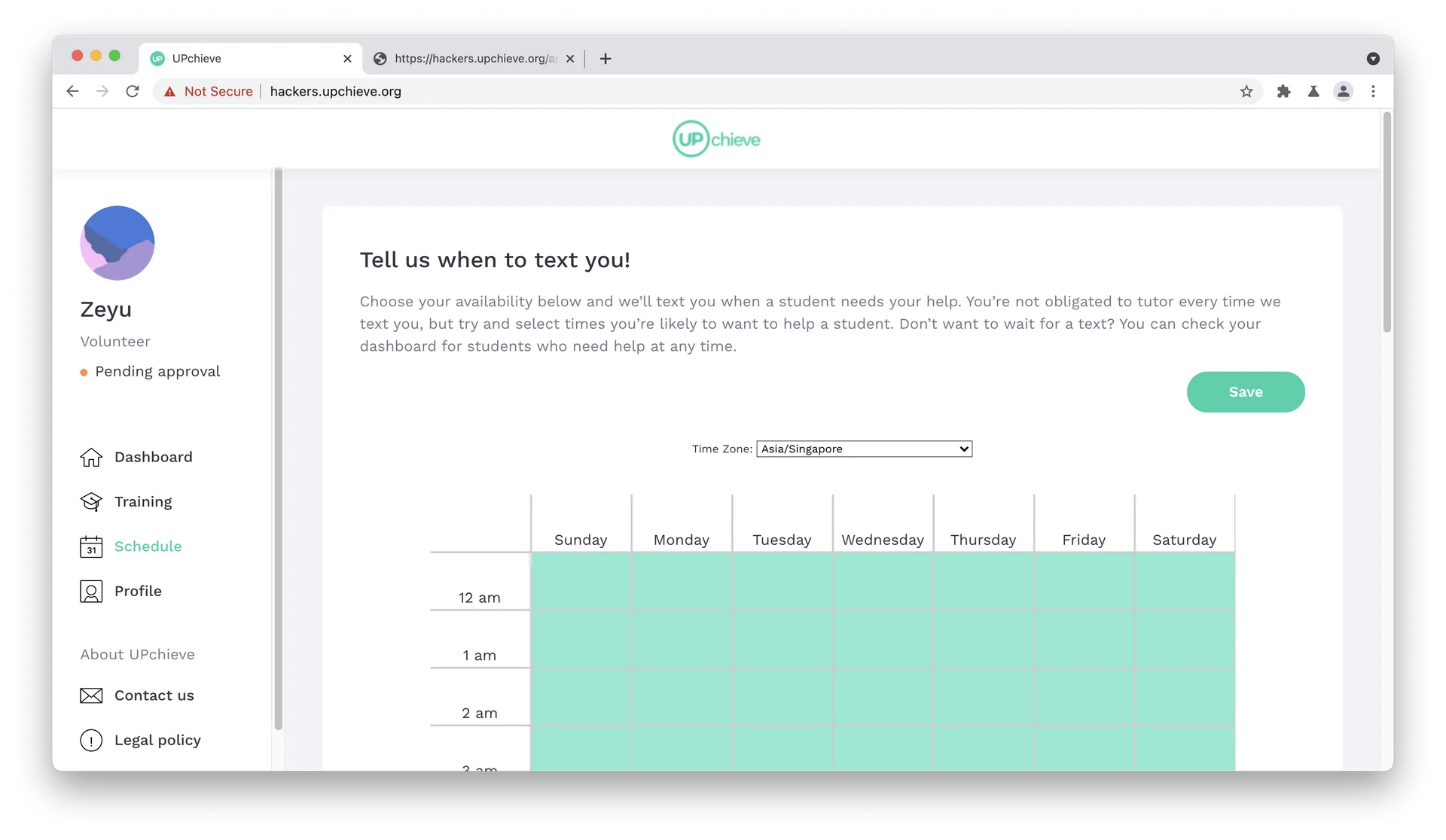
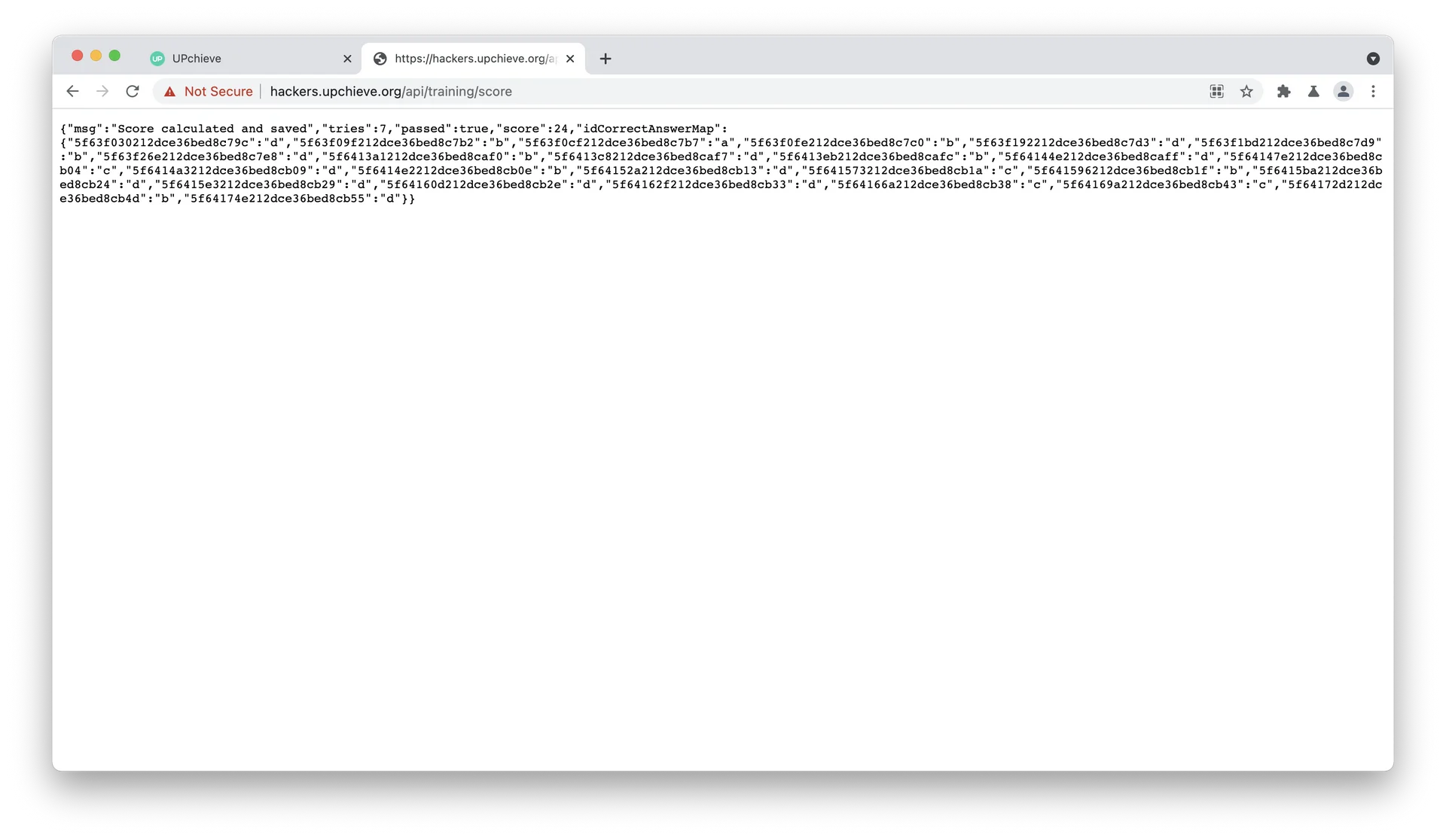
I have attached the CSRF payloads, a screenshot of the changed calendar, and a screenshot of the output from the quiz CSRF.
Recommendations for Fixing/Mitigation
- Use CSRF tokens
- Use the SameSite attribute for cookies
Impact
When an authenticated user visits any attacker-controlled site, the attacker is able to perform arbitrary authenticated actions on behalf of the user. While the attacker cannot obtain the request output from the CSRF, he is still able to perform sensitive actions blindly.
Attachments
Context
UPchieve is a platform that connects students with volunteer tutors, and the report concerns the authenticated web application served at hackers.upchieve.org. The application exposes a set of authenticated POST endpoints that back normal user features: saving a volunteer's weekly availability for text messages, submitting training quizzes and subject certifications, sending password reset emails, submitting background information for volunteer approval, and requesting a reference.
The researcher found that these endpoints accept cross-site form submissions, so an attacker-controlled page can trigger them in the browser of any logged-in user. The researcher reports that CSRF is possible on most, if not all, authenticated POST endpoints.
Setup
The only precondition is a victim with a valid session on https://hackers.upchieve.org/. The attacker needs a server to host a page, and the victim needs to visit that page while logged in. The researcher also notes a limitation on their own testing: they could not enumerate every endpoint because the approval and onboarding process restricted access to parts of the application, so they expect more vulnerable endpoints exist than the ones listed.
Finding it
The starting observation is that the application's CORS configuration sets the header to:
Access-Control-Allow-Origin: hackers.upchieve.org
The researcher points out that this does not prevent CSRF. CORS only stops the attacker's page from reading the response to a cross-origin request; it does not stop the browser from sending the request and the server from acting on it. The attacker can therefore perform arbitrary actions on behalf of the user without ever seeing the result.
Two further conditions make the attack work:
- The API expects JSON by default for POST requests, but
application/x-www-form-urlencodedis also accepted. A plain HTML form can produce that content type without any JavaScript fetch or preflight. - The user's session cookie does not have the
SameSiteattribute set, so the browser attaches it to the cross-site request.
The endpoints the researcher confirmed as vulnerable are:
| Endpoint | Action performed |
|---|---|
POST /api/calendar/save |
Set availability for text messages |
POST /api/training/score |
Submit quizzes and subject certifications |
POST /auth/reset/send |
Send password reset email |
POST /api/user/volunteer-approval/background-information |
Submit background information |
POST /api/user/volunteer-approval/reference |
Request a reference |
PUT requests are a different story. In particular, PUT /api/user, which updates a user's phone number and account status, cannot be issued through this form-based method. The researcher adds a caveat: older browsers might not enforce CORS preflight requests and could still allow a PUT request initiated by JavaScript on the attacker's site to go through.
Exploitation
Step 1: log in as the victim
Log in to https://hackers.upchieve.org/ so that a valid session cookie exists in the browser. This is the state the attacker relies on.
Step 2: build the attacker page
The example targets /api/calendar/save and sets every possible time slot to true. The form posts URL-encoded fields, with the availability expressed as nested parameter names and a timezone supplied alongside them.
<html>
  <body>
    <form action="https://hackers.upchieve.org/api/calendar/save" method="POST">
        <input type="hidden" name="availability[Sunday][12a]" value="true" />
        <input type="hidden" name="availability[Sunday][1a]" value="true" />

		...

        <input type="hidden" name="availability[Saturday][11p]" value="true" />
        <input type="hidden" name="tz" value="Asia/Singapore" />
    </form>
    <script>
      	document.forms[0].submit();
    </script>
  </body>
</html>
The form's action points at the target endpoint and its method is POST, so the browser sends a URL-encoded body to the application. Each hidden input maps to one availability slot, and the tz field sets the timezone used to interpret them. The inline script submits the form automatically as soon as the page loads, so the victim does not have to interact with anything.
Step 3: serve the page
Host the HTML on the attacker's server. The researcher names the file calendar_csrf.html.
Step 4: get the victim to visit it
The victim visits http://ATTACKER_SERVER/calendar_csrf.html. Because the session cookie lacks SameSite, the browser includes it with the cross-site POST, and the application treats the request as coming from the logged-in user.
Once the page loads, the POST is submitted and the server responds with:
{"msg":"Schedule saved"}
The attacker cannot read that response, but the action has already happened server-side.
Step 5: confirm the effect
Check the victim's calendar and verify that it has been modified. The screenshot of the changed calendar is attached to the report.
The researcher prepared equivalent payloads for the other endpoints:
calendar_csrf.htmlperforms the availability attack described above.reference_csrf.htmlsends out reference requests on behalf of the victim.quiz_csrf.htmlsubmits quizzes for grading on behalf of the victim.reset_csrfsends out password resets on behalf of the victim.
The report also includes a screenshot of the output from the quiz CSRF.
Root cause
The user's session cookie has no SameSite attribute, so it travels with cross-site requests. The API accepts application/x-www-form-urlencoded in addition to JSON, which means a simple HTML form is enough to produce a well-formed request; no preflight is triggered and no custom header is required. The report recommends adding CSRF tokens to the endpoints.
The CORS header Access-Control-Allow-Origin: hackers.upchieve.org gives a false sense of protection. It restricts which origins can read responses, not which origins can cause requests to be sent, so it does nothing against this class of attack.
Impact
When an authenticated user visits any attacker-controlled site, the attacker can perform arbitrary authenticated actions on the user's behalf. The actions demonstrated include changing the victim's availability, submitting quizzes and subject certifications, sending password reset emails, submitting background information and requesting references. The attacker cannot obtain the request output, so the actions are performed blindly, but they are still sensitive actions carried out under the victim's identity. The researcher expects additional vulnerable endpoints beyond the five listed, since parts of the application were not reachable during testing.
Fix
The report recommends two fixes:
- Use CSRF tokens on the authenticated POST endpoints.
- Set the
SameSiteattribute on session cookies.
Variants to test
- Other authenticated POST endpoints. Enumerate every state-changing POST route in the application and try the same hidden-form technique against each.
- Endpoints that expect JSON. A positive result is the endpoint processing the request despite the unexpected content type.
- PUT and other non-simple methods. Try issuing them from JavaScript on an attacker origin. On modern browsers the preflight should block this, but the researcher notes older browsers may not comply; a positive result is the request reaching the server and taking effect.
- Cookie attributes. Inspect the session cookie for
SameSite. - CORS as a control. Do not treat a restrictive
Access-Control-Allow-Originas CSRF protection.
What happened, in plain words
UPchieve is a website that connects students with volunteer tutors. Volunteers log in, set the times they are available to help by text message, take training quizzes, submit background information, and ask people to give references. All of that happens inside a logged-in account on hackers.upchieve.org.
A security researcher found that many of the actions a logged-in volunteer can take could also be triggered by a completely different website, without the volunteer knowing. If a volunteer was logged in to UPchieve and then visited a page the attacker controlled, that page could quietly make the volunteer's account do things: change their availability, submit quizzes, send a password reset email, submit background information, or request a reference. This kind of attack is called Cross-Site Request Forgery, or CSRF.
The issue affects most, if not all, of the logged-in actions that use the POST method (explained below).
The pieces you need to know first
Before the details make sense, here are the basic building blocks, explained from scratch.
A website and a server. When you visit a site, your browser (Chrome, Firefox, Safari) asks a computer somewhere else, called a server, for pages and data. The server sends back what you asked for. UPchieve's server is the one that holds volunteer accounts and calendars.
An API and an endpoint. An API is the part of a website that accepts instructions rather than showing pages. Each instruction has its own address, called an endpoint. Think of a restaurant: the menu is the website you see, and the kitchen window where waiters hand in orders is the API. Each order slip has a name, like "save calendar" or "submit quiz", and that name is the endpoint. In this report the endpoints look like /api/calendar/save or /auth/reset/send.
GET and POST. Browsers and servers talk using methods, which are labels on each request saying what kind of action it is. GET is for fetching something, like loading a page. POST is for sending data that changes something, like saving a form. The report also mentions PUT, which is used to update an existing record. The vulnerable actions here are all POST.
A cookie and a session. When you log in, the server gives your browser a small piece of text called a session cookie. Your browser stores it and sends it back with every later request to that site. The cookie is how the server recognises you: it is like a wristband at an event that proves you already showed your ticket. If someone else's page can make your browser send a request with your wristband attached, the server will treat that request as coming from you.
The SameSite attribute. Cookies can carry settings, and one of them is called SameSite. It tells the browser whether to attach the cookie when the request is started by a different website. If SameSite is not set, the browser is free to attach the cookie to requests coming from other sites, which is exactly what an attacker wants. If it is set to a strict value, the cookie stays home when another site starts the request.
CORS. CORS stands for Cross-Origin Resource Sharing. It is a set of rules, enforced by the browser, about which websites are allowed to read the responses that come back from a server. The key word is read. CORS does not stop a request from being sent, and it does not stop the server from acting on it. It only stops the attacker's page from seeing the answer. Think of a locked suggestion box: anyone can drop a note in, but only the office can open the box and read the notes.
CSRF. Cross-Site Request Forgery is when an attacker's website tricks your browser into sending a request to another site where you are logged in. Your browser attaches your cookie automatically, the other site believes the request is genuinely from you, and the action happens. The attacker never needs your password.
A CSRF token. A CSRF token is a secret, random value that the real website puts into its own forms. The server checks that the value is present and correct before acting. An attacker's page cannot guess it, so its forged requests are rejected. It is like a cloakroom ticket that must match the coat.
JSON and form encoding. When data is sent to a server, it is packaged in a particular format. JSON is a structured text format that looks like {"key": "value"}. application/x-www-form-urlencoded is the older format that a plain HTML form produces, where fields are joined together like name=value&name2=value2. The report notes that the API expects JSON by default but also accepts the form format, and that difference matters a great deal.
A preflight request. For some kinds of cross-site requests, the browser first sends a small check request, called a preflight, to ask the server whether the real request is allowed. A plain HTML form does not trigger a preflight. A JavaScript request with unusual settings does. This is why a simple form is such a useful attack tool.
The setup
Only two things are needed for the attack to work. First, a victim who is logged in to https://hackers.upchieve.org/, so their browser holds a valid session cookie. Second, a server the attacker controls, hosting a page, and a way to get the victim to visit that page while still logged in.
The researcher also mentions a limit on their own testing: parts of the application were behind an approval and onboarding process, so they could not reach every endpoint. They expect there are more vulnerable endpoints than the five they confirmed.
Finding it
The researcher started from the application's CORS configuration, which sets this header:
Access-Control-Allow-Origin: hackers.upchieve.org
A header is a line of extra information that travels with a web request or response. This one tells the browser which website is allowed to read responses from the server. Here it is set to hackers.upchieve.org, meaning only pages from that site may read the answers.
The researcher's point is that this does not prevent CSRF at all. It only stops the attacker's page from reading the response to a cross-site request. It does not stop the browser from sending the request, and it does not stop the server from carrying it out. The attacker can therefore perform actions on the user's behalf without ever seeing the result.
Two more conditions make the attack possible:
- The API expects JSON by default for POST requests, but it also accepts
application/x-www-form-urlencoded. A plain HTML form can produce that format on its own, with no JavaScript fetch and no preflight. - The user's session cookie does not have the
SameSiteattribute set, so the browser attaches it to the cross-site request.
The endpoints the researcher confirmed as vulnerable are:
| Endpoint | Action performed |
|---|---|
POST /api/calendar/save |
Set availability for text messages |
POST /api/training/score |
Submit quizzes and subject certifications |
POST /auth/reset/send |
Send password reset email |
POST /api/user/volunteer-approval/background-information |
Submit background information |
POST /api/user/volunteer-approval/reference |
Request a reference |
Each row is one instruction the server will carry out for a logged-in volunteer. The first changes when they say they are free to help. The second submits training work for grading. The third sends a password reset email. The fourth and fifth are part of the volunteer approval process.
PUT requests behave differently. In particular, PUT /api/user, which updates a user's phone number and account status, cannot be sent through this form-based method. The researcher adds a caveat: older browsers might not enforce CORS preflight requests, and could still allow a PUT request started by JavaScript on the attacker's site to go through.
Exploitation
Step 1: log in as the victim
Log in to https://hackers.upchieve.org/ so that a valid session cookie exists in the browser. This is the state the attacker relies on. Without a logged-in session, the server has no reason to believe the request comes from a real volunteer, and the whole attack falls apart.
Step 2: build the attacker page
The example targets /api/calendar/save and sets every possible time slot to true. The form posts URL-encoded fields, with the availability expressed as nested parameter names and a timezone supplied alongside them.
<html>
  <body>
    <form action="https://hackers.upchieve.org/api/calendar/save" method="POST">
        <input type="hidden" name="availability[Sunday][12a]" value="true" />
        <input type="hidden" name="availability[Sunday][1a]" value="true" />

		...

        <input type="hidden" name="availability[Saturday][11p]" value="true" />
        <input type="hidden" name="tz" value="Asia/Singapore" />
    </form>
    <script>
      	document.forms[0].submit();
    </script>
  </body>
</html>
Line by line, in plain words:
<html>and<body>are the ordinary opening tags of any web page. Nothing unusual happens yet.<form action="https://hackers.upchieve.org/api/calendar/save" method="POST">starts a form. Theactionis the address the form will be sent to, which is the calendar-saving endpoint on UPchieve's server. ThemethodisPOST, the method used for sending data that changes something. Because the form is on the attacker's page but points at UPchieve, this is a cross-site request.- Each
<input type="hidden" ... />is a field the visitor never sees.type="hidden"means it is not drawn on the page. Thenameis the label the server will look for, and thevalueis what gets sent. Here each field is one availability slot, such asavailability[Sunday][12a], set totrue. The square brackets are a naming convention that lets the server group these into a structured list of days and hours. The...in the middle stands for the rest of the week's slots, which the researcher left out of the report excerpt. <input type="hidden" name="tz" value="Asia/Singapore" />sends a timezone. The server needs to know which timezone the hours refer to, otherwise "12a" could mean midnight anywhere in the world.<script>and</script>wrap a small piece of JavaScript, the programming language browsers run.document.forms[0].submit();finds the first form on the page and submits it immediately. The victim does not have to click anything. The moment the page loads, the form is sent.
Step 3: serve the page
Host the HTML on the attacker's server. The researcher names the file calendar_csrf.html. Any web server will do; the point is simply that the page is reachable at a public address the victim can open.
Step 4: get the victim to visit it
The victim visits http://ATTACKER_SERVER/calendar_csrf.html. Because the session cookie lacks SameSite, the browser includes it with the cross-site POST, and the application treats the request as coming from the logged-in user. This is the heart of the attack: the browser does the work of proving identity, and the victim does nothing but open a link.
Once the page loads, the POST is submitted and the server responds with:
{"msg":"Schedule saved"}
This is a short JSON reply. msg is the field name and Schedule saved is the message. The attacker cannot read this response, because CORS blocks reading it, but that does not matter: the action has already happened on the server.
Step 5: confirm the effect
Check the victim's calendar and verify that it has been modified. The screenshot of the changed calendar is attached to the report.
The researcher prepared equivalent payloads for the other endpoints. A payload here simply means the page and data that carry out the attack.
calendar_csrf.htmlperforms the availability attack described above.reference_csrf.htmlsends out reference requests on behalf of the victim.quiz_csrf.htmlsubmits quizzes for grading on behalf of the victim.reset_csrfsends out password resets on behalf of the victim.
The report also includes a screenshot of the output from the quiz CSRF.
Why it worked
The user's session cookie has no SameSite attribute, so it travels with cross-site requests. The API accepts application/x-www-form-urlencoded in addition to JSON, which means a simple HTML form is enough to produce a well-formed request; no preflight is triggered and no custom header is required. The report recommends adding CSRF tokens to the endpoints.
The CORS header Access-Control-Allow-Origin: hackers.upchieve.org gives a false sense of protection. It restricts which origins can read responses, not which origins can cause requests to be sent, so it does nothing against this class of attack.
What an attacker could do
When an authenticated user visits any attacker-controlled site, the attacker can perform arbitrary authenticated actions on the user's behalf. The actions demonstrated include changing the victim's availability, submitting quizzes and subject certifications, sending password reset emails, submitting background information and requesting references. The attacker cannot obtain the request output, so the actions are performed blindly, but they are still sensitive actions carried out under the victim's identity. The researcher expects additional vulnerable endpoints beyond the five listed, since parts of the application were not reachable during testing.
The fix
The report recommends two fixes:
- Use CSRF tokens on the authenticated POST endpoints.
- Set the
SameSiteattribute on session cookies.
Other things to test
- Other authenticated POST endpoints. Enumerate every state-changing POST route in the application and try the same hidden-form technique against each.
- Endpoints that expect JSON. A positive result is the endpoint processing the request despite the unexpected content type.
- PUT and other non-simple methods. Try issuing them from JavaScript on an attacker origin. On modern browsers the preflight should block this, but the researcher notes older browsers may not comply; a positive result is the request reaching the server and taking effect.
- Cookie attributes. Inspect the session cookie for
SameSite. - CORS as a control. Do not treat a restrictive
Access-Control-Allow-Originas CSRF protection.
Glossary
- API: the part of a website that accepts instructions and data rather than showing pages.
- Endpoint: a specific address on a server that accepts one kind of instruction, such as saving a calendar.
- GET: the request method used to fetch something, like loading a page.
- POST: the request method used to send data that changes something on the server.
- PUT: the request method used to update an existing record.
- Cookie: a small piece of text a site stores in your browser and gets back on later requests, often used to remember that you are logged in.
- Session cookie: the cookie that proves you are logged in, like a wristband at an event.
- SameSite: a cookie setting that controls whether the cookie is attached to requests started by other websites.
- CORS: Cross-Origin Resource Sharing, browser rules about which websites may read responses from a server; it does not stop requests from being sent.
- CSRF: Cross-Site Request Forgery, an attack where another website tricks your browser into sending a request to a site where you are logged in.
- CSRF token: a secret random value placed in a site's own forms and checked by the server, which an attacker's page cannot guess.
- JSON: a structured text format for data, looking like
{"key": "value"}. application/x-www-form-urlencoded: the format a plain HTML form uses to send data, joining fields asname=value&name2=value2.- Preflight request: a small check request a browser sends before certain cross-site requests, to ask the server whether the real request is allowed.
- Header: a line of extra information sent with a web request or response.
- Payload: the page and data used to carry out an attack.
- Hidden input: a form field that is sent to the server but not shown on the page.
- Origin: the combination of scheme, host and port that identifies a website, such as
https://hackers.upchieve.org. - Onboarding: the process of setting up and approving a new volunteer account.



