Response Manipulation in the Admin panel lead to PII leakage
The login response contained a status field that the client trusted to grant access. By changing it from false to true, the attacker could view the admin panel and access customer reports containing PII.
 Published on 7odamo.medium.com
Hi there, 7odamois here. Today I will talk about How I was able to view all the customer reports on UPSAdmin Panel
The full write-up lives on its author's site
It belongs to its author, so we link to it rather than copy it. The other two tabs are our own rewrites, checked against it.
Context
UPS is an American multinational shipping, receiving and supply chain management company. The target of this hunt was a subdomain of ups.com, connectnb.ups.com, found through the UPS programme on HackerOne. The feature at the centre of the write-up is an administrative login page at connectnb.ups.com/layout/login, which fronts an admin panel that controls orders with delivery problems. Behind that panel sit customer reports containing personally identifiable information (PII).

Setup
The only precondition worth noting is environmental: the network connection was very poor at the time, so heavy automation was not an option. The tooling was deliberately light:
- SecurityTrails, to pick a subdomain.
- FFUF, for a single content-discovery run.
- Burp, to intercept the login request and, later, the response.
- A browser, to observe what the front end did with the manipulated response.
Finding it
The subdomain connectnb.ups.com was picked at random from SecurityTrails. Because the network was slow, the researcher limited automation to one FFUF run against the host:
ffuf -u http://connectnb.ups.com/FUZZ -w /home/Wordlist.txt -recursion -c -v -mc 200 -fs 0 -fw 0
The flags restrict results to responses with status 200 (-mc 200), hide responses with zero size (-fs 0) and zero words (-fw 0), enable recursion (-recursion), colourise output (-c) and use verbose mode (-v).
Among the results, one path stood out: connectnb.ups.com/layout/login. Opening it revealed an ordinary login page.
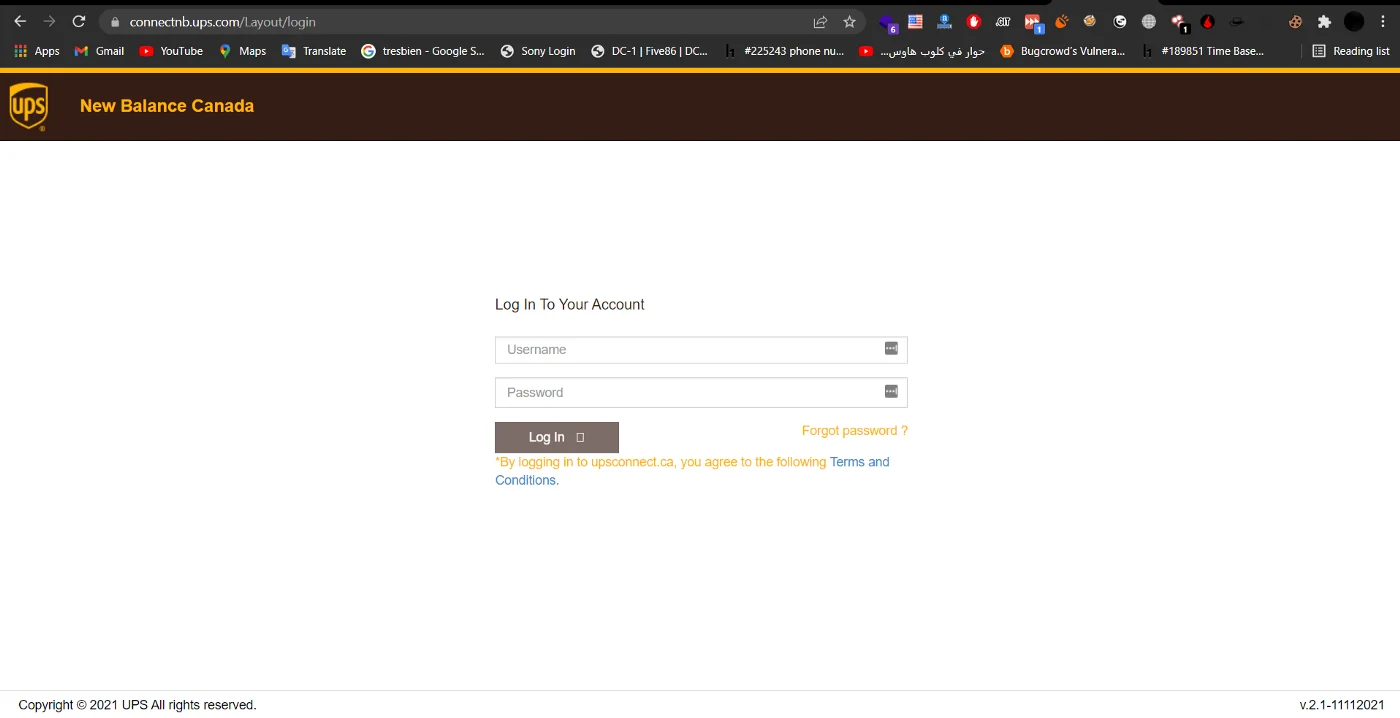
Two things drew attention. The first was the poor styling of the page. The second, and the more interesting one, was that there was no endpoint and no button to create an account: the login form was the only way in, with no self-service registration path.
Exploitation
Step 1: enumerate valid usernames through error messages
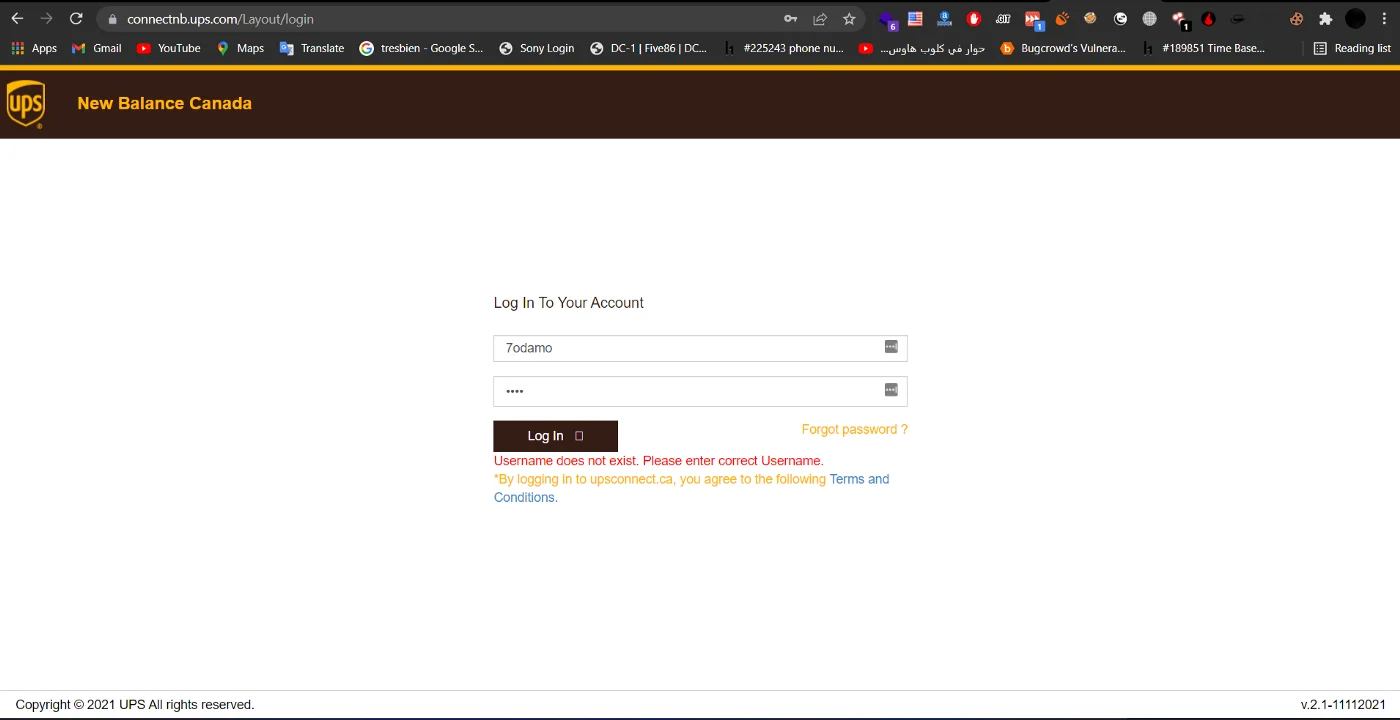
The researcher typed 7odamo as the username and 01010 as the password. The page returned the error "Username does not exist".
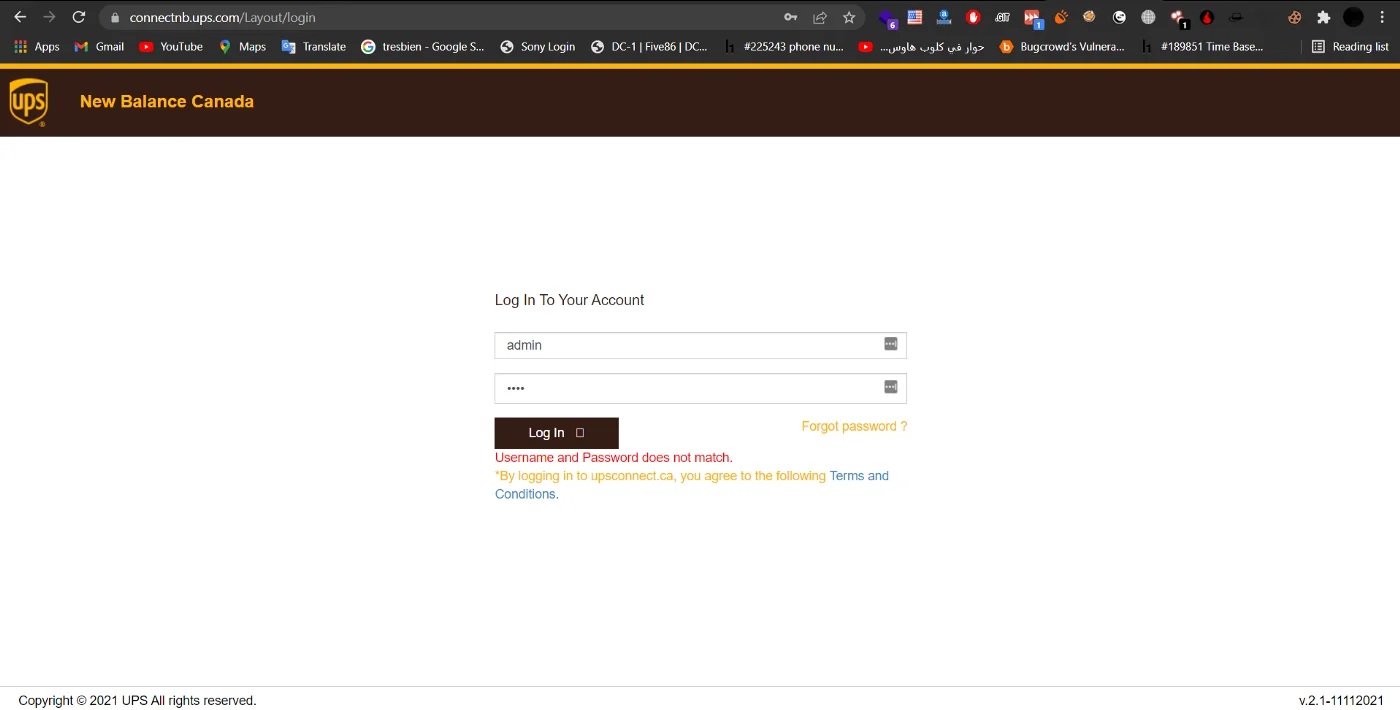
Next, admin was tried as the username with 01010 as the password. This time the error changed to "Username and Password doesn't match".
Further random passwords were tried against the admin username and the same "Username and Password doesn't match" message came back each time. The differing messages confirm that the application distinguishes between a non-existent user and an existing user with a wrong password, which makes the login form a username oracle. At that point the researcher was sure a username called admin existed.
Step 2: intercept the request and the response
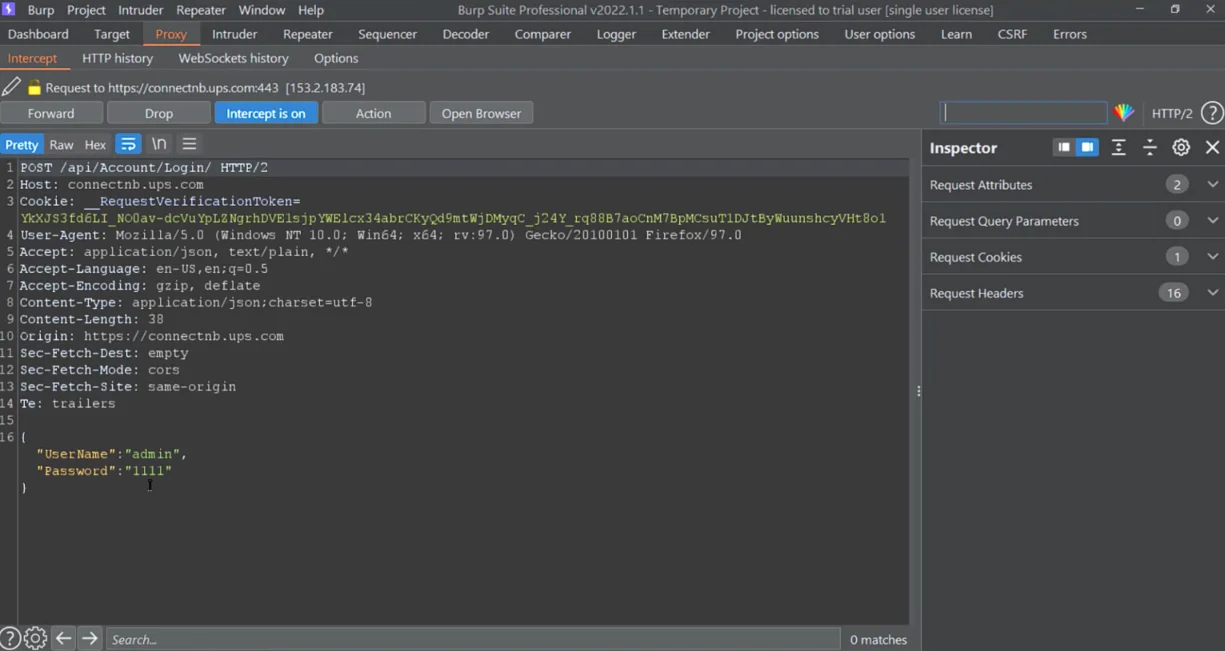
The login request was intercepted with Burp. Nothing interesting appeared in the request itself.
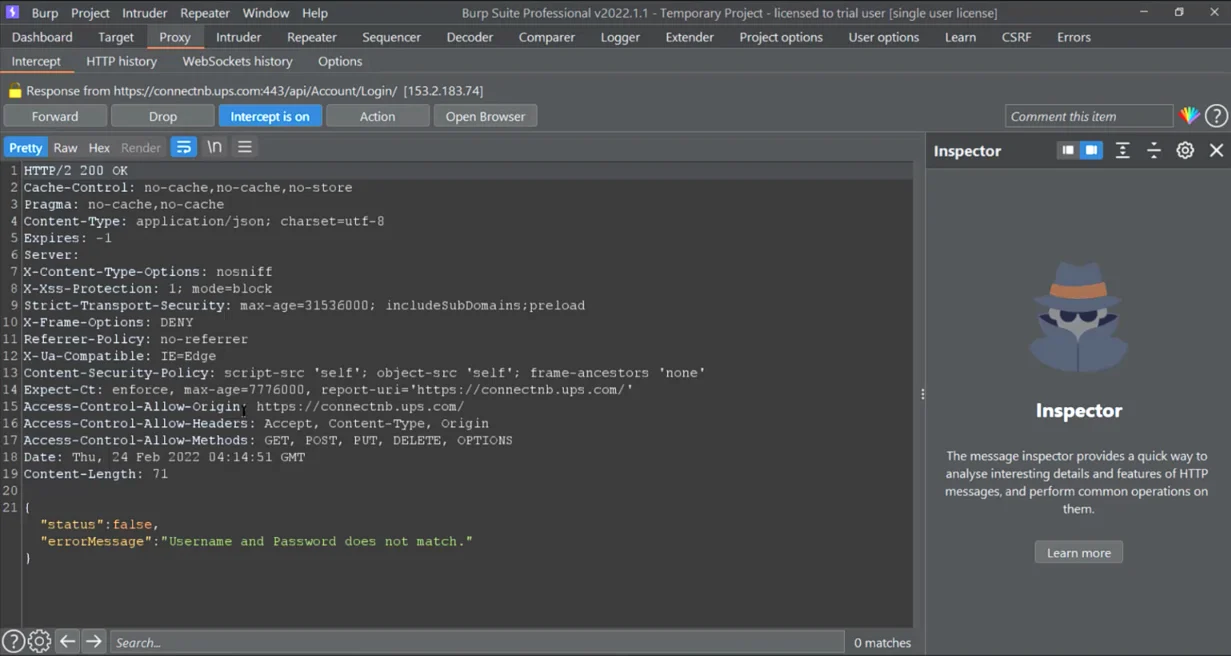
The same request was then sent again, this time intercepting the response. The response body contained status = false.
Step 3: flip the status flag
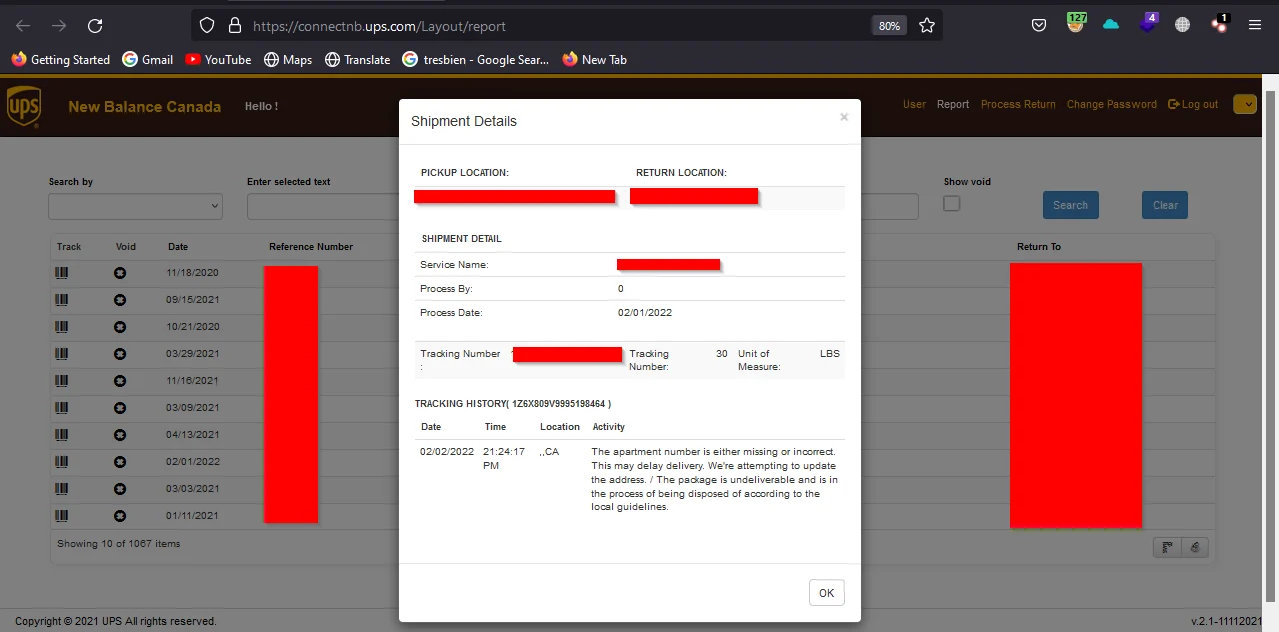
The researcher changed status = false to status = true in the intercepted response and let it reach the browser. The browser then rendered the admin panel, and reports were visible at connectnb.ups.com/layout/report.
Step 4: read the exposed data
The panel controls orders that have problems in delivery. Through it, the researcher could view PII leakage including:
- PICKUP LOCATION
- RETURN LOCATION
- SERVICE NAME
- PROCESS DATE
- TRACKING NUMBER
- ACTIVITY
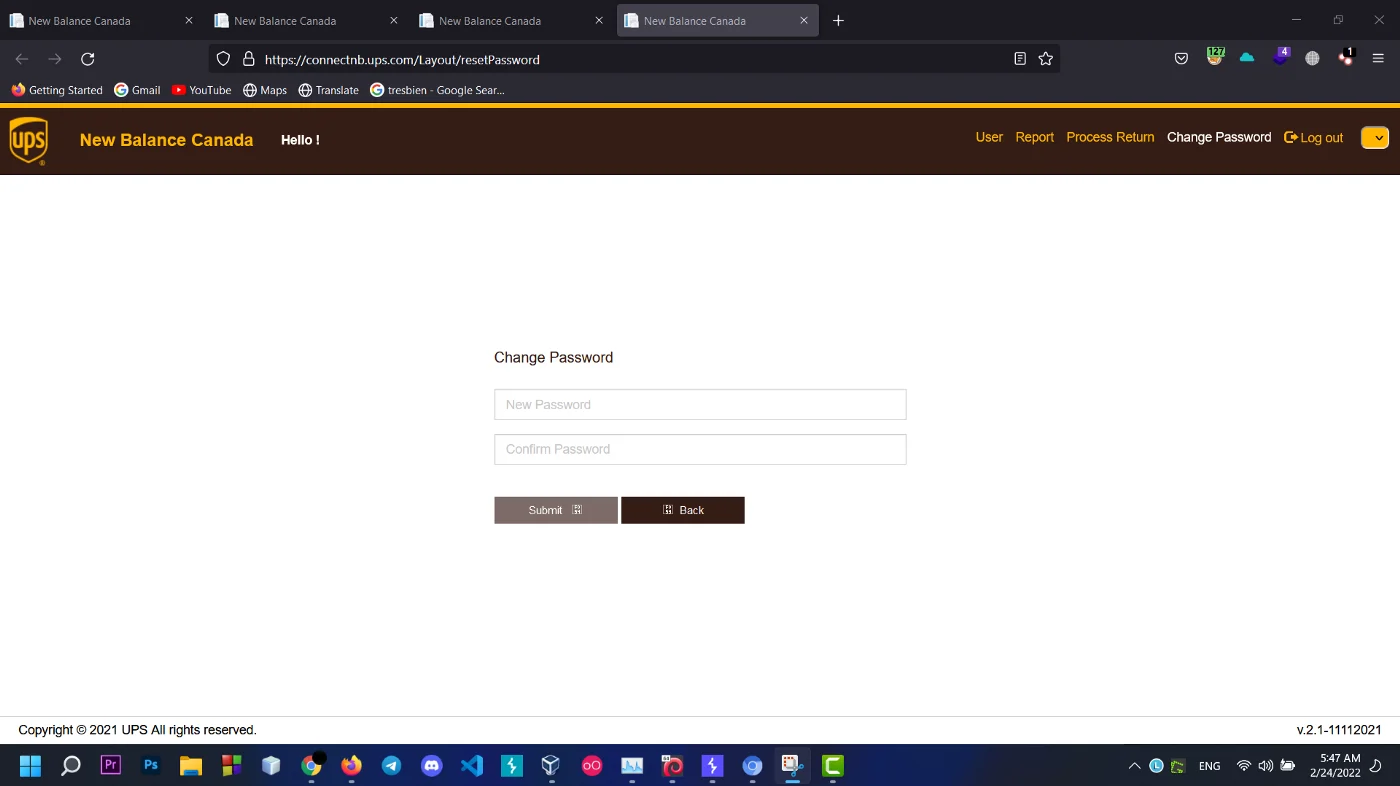
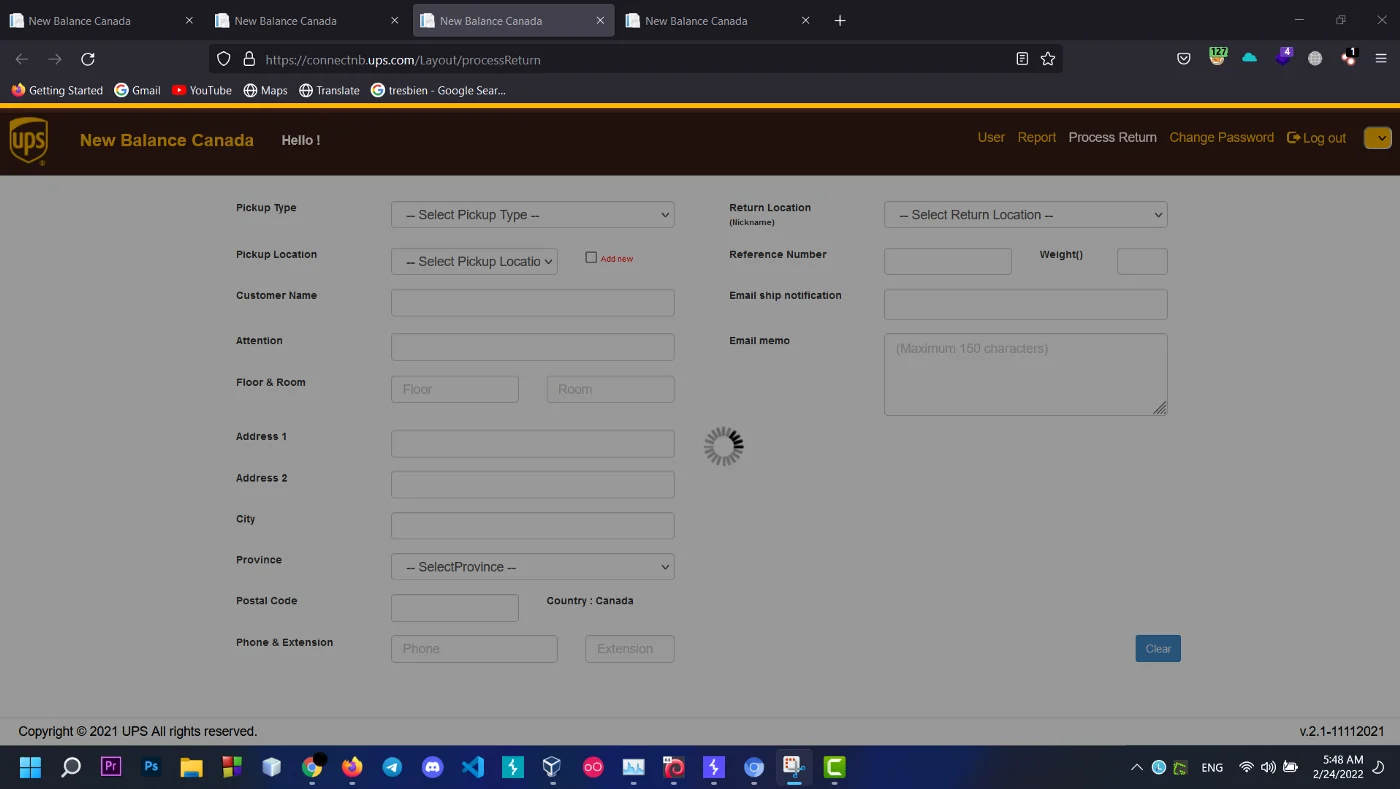
Beyond the report list, the panel also exposed actions such as Password Reset and View report details.
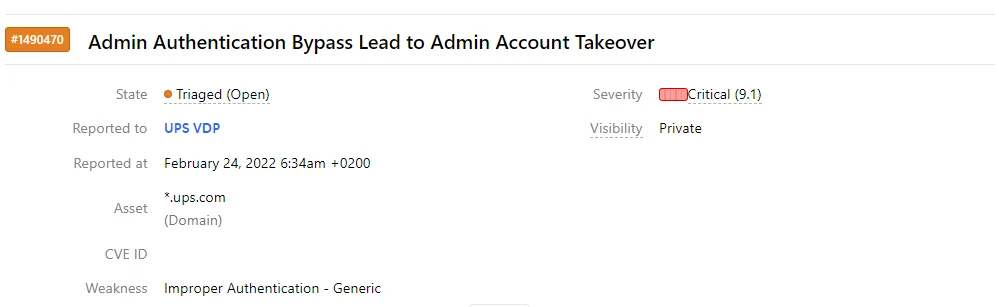
The researcher stopped at this point and reported the issue on HackerOne. The report was triaged as Critical, and the internal team later set it to Medium.

Root cause
The application appears to make its authorisation decision in client-side JavaScript based on a status field in the login response, rather than enforcing the authenticated state on the server. The server returned status = false for a failed login, but the front end trusted whatever value arrived and switched to the admin view when it saw status = true. Because the response is generated on the server but consumed by the browser, anyone who can intercept and modify their own traffic can set the flag themselves. The server-side checks behind the panel are not described in the report, so why real data was returned is not explained. The exact server-side checks are not described in the report, so this part is likely.
Impact
An unauthenticated attacker who knows or guesses the admin username can reach the administrative interface and read customer reports for orders with delivery problems, including pickup and return locations, service name, process date, tracking number and activity. The panel also exposes password reset and report detail functions. The researcher characterises the outcome as PII leakage. The report was triaged as Critical and later downgraded to Medium by the internal team.
Fix
The report does not describe what was changed. The fix that follows from the root cause is to stop treating a client-supplied flag as proof of authentication: the server should issue a session or token on successful login and every admin endpoint should verify it server-side before returning data or performing actions such as password reset. The login response should not carry an authorisation decision that the client is free to rewrite.
Variants to test
- Look for login responses containing boolean fields such as
status,success,isAdminorauthenticated, and flip them in Burp. A positive result is the browser rendering a privileged view that the server then populates with real data. - Compare error messages for a non-existent user against a wrong password on any login form. A positive result is two distinct messages, which gives you a username oracle as in this case.
- After flipping a flag, request the underlying API endpoints directly (for example the report listing path) without the manipulated page. A positive result is JSON or HTML containing records rather than a redirect or an authorisation error, which shows the server never checked the session.
- Try privileged actions such as password reset from the manipulated view. A positive result is the action completing against a real account.
- Run a small content-discovery pass on admin-looking hosts and inspect any login page that has no registration path. A positive result is a login form whose only gate is a client-side check.
What happened, in plain words
A security researcher found a login page for an administrative area of a UPS website. He could not log in because he did not know the password. But he discovered that the page decided whether he was logged in by reading a small value in the reply the server sent back, a value that said status = false. He changed that value to status = true in his own browser before the page saw it, and the page then showed him the admin panel. Inside that panel were real customer reports about parcels with delivery problems, including pickup and return locations, tracking numbers and other personal information. He reported it to HackerOne, where it was first rated Critical and later changed to Medium by the company's internal team.
This article walks through the same steps for someone who has never done security testing before. Every tool and term is explained as it appears.
The target and the tools
UPS is an American multinational company that handles shipping, receiving and supply chain management. The researcher chose UPS as a target through the HackerOne bug bounty platform. A bug bounty programme is a scheme where a company invites outside people to look for security problems in its systems and report them, sometimes for a reward.
A subdomain is a smaller name that sits under a main domain. If ups.com is the main address, then connectnb.ups.com is one particular server belonging to UPS. Companies often have many subdomains, and each one can run a different application with its own quirks.
The only precondition worth noting is environmental: his network connection was very poor at the time, so running large automated scans was not realistic. Instead he kept the tooling light:
- SecurityTrails, a website that lists subdomains belonging to a domain, used here to pick a subdomain to look at.
- FFUF, a command-line tool that tries many possible paths on a website and reports which ones exist.
- Burp, short for Burp Suite, a tool that sits between your browser and the server so you can read and change the traffic going in both directions.
- A normal browser, to see what the page did with the changed reply.
Finding the login page
The subdomain connectnb.ups.com was picked at random from SecurityTrails. Because the network was slow, the researcher limited automation to one FFUF run against the host:
ffuf -u http://connectnb.ups.com/FUZZ -w /home/Wordlist.txt -recursion -c -v -mc 200 -fs 0 -fw 0
Line by line, in plain words:
ffufis the name of the program being run.-u http://connectnb.ups.com/FUZZgives the address to test. The wordFUZZis a placeholder: FFUF replaces it with each word from a list, one at a time, and asks the server for that address.-w /home/Wordlist.txtpoints to the word list, a plain text file full of common path names such aslogin,adminorreport. FFUF tries each one in place ofFUZZ.-recursiontells FFUF to keep going deeper: if it finds a folder that exists, it will also try the word list inside that folder.-cadds colour to the output so it is easier to read on screen.-vmeans verbose, so FFUF prints more detail about each result.-mc 200means match only responses with HTTP status code 200. A status code is a three-digit number the server sends with every reply; 200 means "here is the page, all fine". Other codes mean other things, such as 404 for "not found".-fs 0hides responses whose body is zero bytes long, because an empty page is usually not interesting.-fw 0hides responses whose body contains zero words, for the same reason.
Among the results, one path stood out: connectnb.ups.com/layout/login. Opening it in a browser showed an ordinary login page.
Two things drew the researcher's attention. The first was the poor styling of the page. The second, and the more interesting one, was that there was no endpoint and no button to create an account. An endpoint is simply a specific address on a server that does something when you request it, for example a page or a piece of software that returns data. Here, the login form was the only way in, with no self-service registration path. That matters because a login page with no sign-up usually belongs to staff or administrators, not to ordinary customers.
Step 1: finding out which usernames exist
The researcher typed 7odamo as the username and 01010 as the password. The page returned the error "Username does not exist".
Next, admin was tried as the username with 01010 as the password. This time the error changed to "Username and Password doesn't match".
Further random passwords were tried against the admin username and the same "Username and Password doesn't match" message came back each time. This difference in wording is the important part. The application is telling the visitor two different things: "this username is not in our system" and "this username is in our system, but the password is wrong". That turns the login form into what security people call a username oracle: a place where you can ask the system a question ("does this user exist?") and get a reliable yes or no back, without ever logging in. At that point the researcher was sure a username called admin existed.
Step 2: intercepting the request and the response
A login form works by sending a request to the server, containing what you typed, and receiving a response back. Burp lets you pause both directions. The researcher intercepted the login request with Burp. Nothing interesting appeared in the request itself: it was just the username and password being sent, as you would expect.
He then sent the same request again, this time intercepting the response. The response body contained status = false.
status = false is a simple flag, a value that is either true or false. In this case the server was saying, in effect, "this login attempt did not succeed". The crucial question is who reads that flag and what they do with it. If the server itself checks the flag before handing over any data, then changing it in the browser achieves nothing. If the browser's own code reads the flag and decides what to show, then whoever controls the browser controls the decision.
Step 3: flipping the status flag
The researcher changed status = false to status = true in the intercepted response and let it reach the browser. The browser then rendered the admin panel, and reports were visible at connectnb.ups.com/layout/report.
This is the heart of the bug. The page trusted a value that arrived from the server but was consumed by the browser, and the browser is under the visitor's control. Anyone who can intercept and modify their own traffic, which is exactly what Burp does, can set the flag themselves. The server had already said "false", but the front end did not care: it saw "true" and switched to the admin view. This class of problem is called response manipulation: changing the reply from the server so that the client behaves as if something succeeded when it did not.
Step 4: reading the exposed data
The panel controls orders that have problems in delivery. Through it, the researcher could view PII leakage. PII stands for personally identifiable information: data that can identify a person or reveal private details about them, such as an address or a tracking number tied to a parcel. The exposed fields were:
- PICKUP LOCATION
- RETURN LOCATION
- SERVICE NAME
- PROCESS DATE
- TRACKING NUMBER
- ACTIVITY
Beyond the report list, the panel also exposed actions such as Password Reset and View report details. A password reset function is particularly sensitive: if an attacker can trigger it for another account, they may be able to take that account over.
The researcher stopped at this point and reported the issue on HackerOne. The report was triaged as Critical, and the internal team later set it to Medium. Triaged means the platform's security team reviewed the report, confirmed it was a real issue and assigned it a severity. Severity ratings run from low to critical and describe how much damage the bug could cause.
Why it worked
The application appears to make its authorisation decision in client-side JavaScript based on a status field in the login response, rather than enforcing the logged-in state on the server. Client-side means code that runs in your browser, on your computer, where you can see and change it. Server-side means code that runs on the company's machine, where you cannot. The server returned status = false for a failed login, but the front end trusted whatever value arrived and switched to the admin view when it saw status = true.
The server-side checks behind the panel are not described in the report, so why real data was returned is not explained. If they had, the manipulated response would have produced an empty or rejected view rather than real customer data. A session is how a website remembers that you logged in: after a successful login the server gives your browser a small piece of data, often called a cookie or a token, and your browser sends it back with every later request so the server can recognise you. If the server never checks that piece of data before returning customer records, then the login screen is only decoration. The exact server-side checks are not described in the report, so this part is likely rather than confirmed.
Impact
An unauthenticated attacker, meaning someone with no account and no password, who knows or guesses the admin username can reach the administrative interface and read customer reports for orders with delivery problems. That includes pickup and return locations, service name, process date, tracking number and activity. The panel also exposes password reset and report detail functions. The researcher characterises the outcome as PII leakage. The report was triaged as Critical and later downgraded to Medium by the internal team.
Fix
The report does not describe what was changed. The fix that follows from the root cause is to stop treating a client-supplied flag as proof of authentication. The server should issue a session or token on successful login, and every admin endpoint should verify it server-side before returning data or performing actions such as password reset. The login response should not carry an authorisation decision that the client is free to rewrite.
Variants to test
If you want to look for similar problems yourself, these are the directions the same idea points to:
- Look for login responses containing boolean fields such as
status,success,isAdminorauthenticated, and flip them in Burp. A positive result is the browser rendering a privileged view that the server then populates with real data. - Compare error messages for a non-existent user against a wrong password on any login form. A positive result is two distinct messages, which gives you a username oracle as in this case.
- After flipping a flag, request the underlying API endpoints directly, for example the report listing path, without the manipulated page. An API is the part of a server that returns raw data, often in a format called JSON, rather than a finished web page. A positive result is JSON or HTML containing records rather than a redirect or an authorisation error, which shows the server never checked the session.
- Try privileged actions such as password reset from the manipulated view. A positive result is the action completing against a real account.
- Run a small content-discovery pass on admin-looking hosts and inspect any login page that has no registration path. A positive result is a login form whose only gate is a client-side check.
Glossary
- API: the part of a server that returns raw data, often in JSON, rather than a finished web page; other software talks to it directly.
- Authorisation: the decision about whether a user is allowed to do or see something, as opposed to authentication, which is about proving who they are.
- Boolean: a value that is either true or false.
- Bug bounty programme: a scheme where a company invites outside people to find and report security problems, sometimes for a reward.
- Burp Suite: a tool that sits between your browser and a server so you can read and change the traffic in both directions.
- Client-side: code that runs in your browser, on your own computer, where you can see and change it.
- Cookie: a small piece of data a website stores in your browser and asks for back on later requests, often used to remember that you logged in.
- Endpoint: a specific address on a server that does something when you request it.
- Flag: a simple value, often true or false, that records a state such as whether a login succeeded.
- HackerOne: a platform where companies run bug bounty and vulnerability disclosure programmes and receive reports from researchers.
- HTTP status code: a three-digit number the server sends with every reply; 200 means the page was found and returned normally, 404 means not found.
- JSON: a text format for structured data, commonly used by APIs.
- PII: personally identifiable information, data that can identify a person or reveal private details about them.
- Request: the message your browser sends to a server asking for a page or an action.
- Response: the message the server sends back.
- Response manipulation: changing the server's reply so the client behaves as if something succeeded when it did not.
- SecurityTrails: a website that lists subdomains belonging to a domain.
- Server-side: code that runs on the company's machine, where you cannot see or change it.
- Session: how a website remembers that you logged in, usually by giving your browser a cookie or token that is sent back on later requests.
- Severity: a rating, from low to critical, of how much damage a security bug could cause.
- Subdomain: a smaller name under a main domain, such as
connectnb.ups.comunderups.com. - Token: a piece of data, similar to a cookie, used to prove who you are on later requests.
- Triaged: reviewed and confirmed as a real issue, with a severity assigned.
- Username oracle: a place where you can ask the system whether a username exists and get a reliable yes or no back without logging in.
- Vulnerability disclosure programme (VDP): like a bug bounty programme but usually without a cash reward.
- Word list: a plain text file of common names or paths that a tool tries one by one.



