Arbitrary file creation with semi-controlled content (leads to DoS, EoP and others) at Steam Windows Client
The Steam Windows client service writes a log file into a path taken from a registry value that ordinary users can modify, and the path is not sanitised. An attacker could redirect that file creation to almost any location on disk and inject semi-controlled text, which could break the operating system, alter name resolution, or plant startup scripts.

- Triaged in 28 hours
- Fixed in 9 days
- Paid in 9 days
- Disclosed after 30 days
The vulnerability allows to create arbitrary file with some crafted text (or append to existing file). Tested on actual version 5.31.28.21 (SteamService.exe filevesion info). At start of the report I describe how to trigger vulnerability, than describe how to cause any consequences.
How to trigger
- Environment
Close Steam application and stop "Steam Client Service", if it is necessary. Create folder at user-controlled space (e.g. "C:\test"). Copy files Steam.exe and steamservice.dll from origina Steam folder ("C:\Program Files (x86)\Steam"). Create empty folder "C:\test\logs" Now go to registry and change value of "InstallPath" (HKLM\Software\wow6432node\valve\steam) to "C:\test\1..". This registry branch has explicit permission "Full control" for "Users".
- Little test
Start "Steam Client service". After it has been stopped, check C:\test\logs. Here must be file "service_log.txt" with something like: "08/27/19 13:45:01 : ERROR: SteamService: Invalid file signature C:\test\1..\bin\SteamService.dll". Note, that "C:\test\1.." path equals to "C:\test" path, so Windows used second but message contain first one. Delete service_log.txt.
- Add some more text
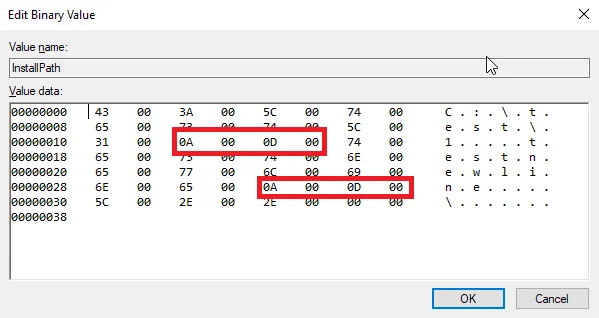
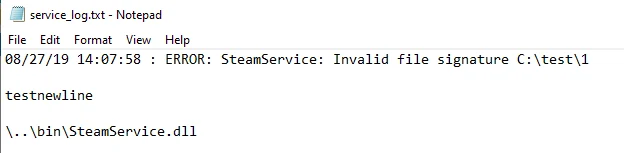
Interesting fact: when Windows used path with ".." it is autosimplified the one. Without any check. For example, path "C:\1<test>.." will be converted to "C:\1" in spite of impossible folder name. Lets add some CLRF. It is easy from code, but it is possible via regedit. Open "HKLM\Software\wow6432node\valve\steam" and select "Modify binary data..." from context menu on "InstallPath". Here screen (reg_clrf.png) of such changes. So Windows will use path "C:\test", but content of "service_log.txt" will be with custom lines (see service_log_content.png). Delete service_log.txt after test.
- Redirect file creation
Non-admin unable to create file symlink. But there is one trick - you could combine NTFS-reparse point and object-directory symlink (both could be created without admin rights). Create reparse point "C:\test\logs" <-> "\RPC Control", than create symlink "\RPC Control\service_log.txt" <-> any target path. This strick requre two things - folder of source file must be writeable and must be empty (this is reason of deleting service_log.txt ater every test). There is simple utility named CreateSymlink.exe from (https://github.com/googleprojectzero/symboliclink-testing-tools/ binaries could be finded on Release) that automate the trick. More details could be readed there - https://github.com/googleprojectzero/symboliclink-testing-tools/blob/master/CreateSymlink/CreateSymlink_readme.txt Using of utility: CreateSymlink.exe <from> <to> In our case CreateSymlink.exe C:\test\logs\service_log.txt <target>. Steam Client Service after start will create file <target> (or append to, if file exists) and add some lines which could be controlled (except the first and the last ones). Since Steam client service work as NT AUTHORITY\SYSTEM, almost any target could be choosed.
Impacts
Now I list some impact from low to high.
- DoS
If we choose target "C:\Winwos\System32\config\SAM" or "C:\Winwos\System32\config\SECURITY" it seems OS will be broken wont be booted after shutdown.
- Redirect of internet services
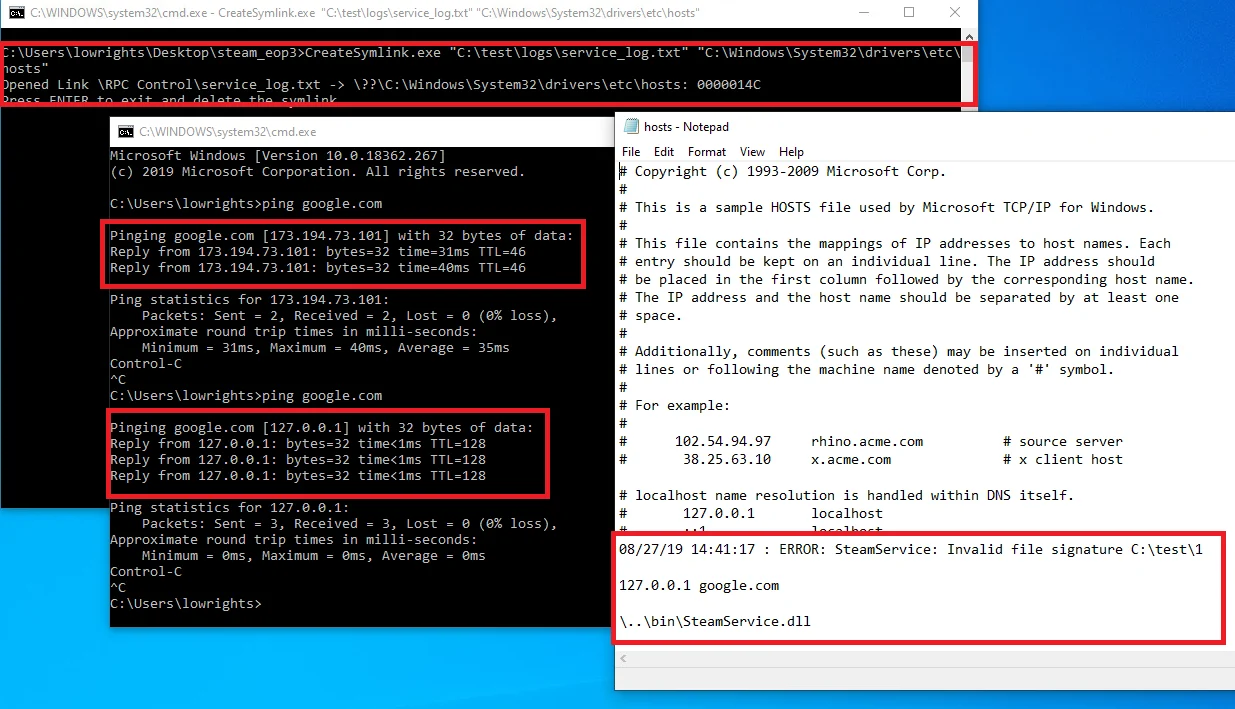
Target: C:\Windows\system32\drivers\etc\hosts Add line: "127.0.0.1 google.com" (for example) Result on ping.png
- Horizontal EoP
Target: C:\ProgramData\Microsoft\Windows\Start Menu\Programs\StartUp\run.bat Add line: "start C:\test\1.exe" Any files from "C:\ProgramData\Microsoft\Windows\Start Menu\Programs\StartUp" are executed during logon of any user (this folder not writable for non-admin users). The vulnerability create bat file and all lines of the file will be executed (the first one and the last one has no effect, but payload will be executed). This is allows any user of OS force to execute any payload as another user (even administrator) when the target user logined. Note: since line contains '', we need add some ".." at the end of "InstallPath" (we need "InstallPath" be equals to "C:\test")
- Vertical EoP
Many software uses bat files for its own purposes and some times this files runs with high privileges. For example, NVIDIA and VmWare uses this. Moreover, domain users ofteh have Startup and Shutdown scripts from GroupPolicy. All of that scripts could be appended with payload. Yes, I unable to found any script that out-of-box-Windows has, but this is not means that there are no such files.
- Not checked but need to be mentioned.
The vulnerability allows to create xml files and ini files (with extra lines, which breaks format). I was not check that kind of files for vaildity for TaskSheduler or .manifest (Windows dll side-by-side loading) or so on. This will take so much of my time if I do this checks. so I just mention it.
Impact
- DoS (force OS to be broken)
- Redirect of internet services (take control of name-ip resolution)
- Horizontal EoP (from one user to another)
- Vertical EoP (possible with additions, from user to NT AUTHORITY\SYSTEM)
Attachments
Not written yet. The AI write-up for this report has not been written yet. The Original tab links to the source.
How it worked
Root cause
Likely the service trusts a user-writable registry value for its install path and writes a log file there without validating or sanitising the path, so path traversal and reparse-point redirection let it write anywhere.
Impact
Because the service runs as SYSTEM, an attacker could overwrite or append to sensitive files, which may break the OS, redirect name resolution, or plant startup scripts that run as another user; the author notes vertical escalation to SYSTEM was not demonstrated.
What the attacker needed
Local access to the Windows machine; ability to edit the Steam registry key; ability to create reparse points and symlinks
How it was found
- Stop Steam and the Steam Client Service, then copy the client files into a user-writable folder and create an empty logs folder.
- Change the InstallPath registry value to a path containing a traversal segment pointing at that folder.
- Start the service and confirm the log file appears in the chosen folder.
- Add carriage-return and line-feed characters to the registry value so extra lines appear in the log.
- Create a reparse point and an object-directory symlink so the log file is created at an arbitrary target path.
- Start the service again to create or append to the target file with partly controlled content.
Explained by bugbounty.wiki with AI from the original and checked against quotes from it; it can still be wrong. Read the original before relying on a detail.
Not written yet. The AI write-up for this report has not been written yet. The Original tab links to the source.
A background Windows service runs with high privileges and writes a log file. It decides where to write by reading a setting that normal users are allowed to change. By pointing that setting somewhere else and using a Windows shortcut trick, a normal user can make the service write a file in a protected place, such as a startup folder, with text the user partly controls.
What is Path traversal?
Input that builds a file path escapes the intended folder, reading or writing files the application should never touch.



